 夜雨聆风
夜雨聆风uni-app 实战系列(一):全局容器的实现
系列总览
章节脉络
本系列围绕 全局容器 这一主题,从底层原理到上层应用,分为四个章节:
| 章节 | 主题 | 核心问题 |
|---|---|---|
| 全局容器的实现 | 如何让每个页面自动包裹布局组件? | |
| Vite 虚拟模块 | 如何在运行时读取 pages.json 配置? | |
| 组件设计 | 如何设计可配置的 NavBar 和 TabBar? | |
| 动态调用设计 | 页面如何与全局容器进行通信? |
整体架构
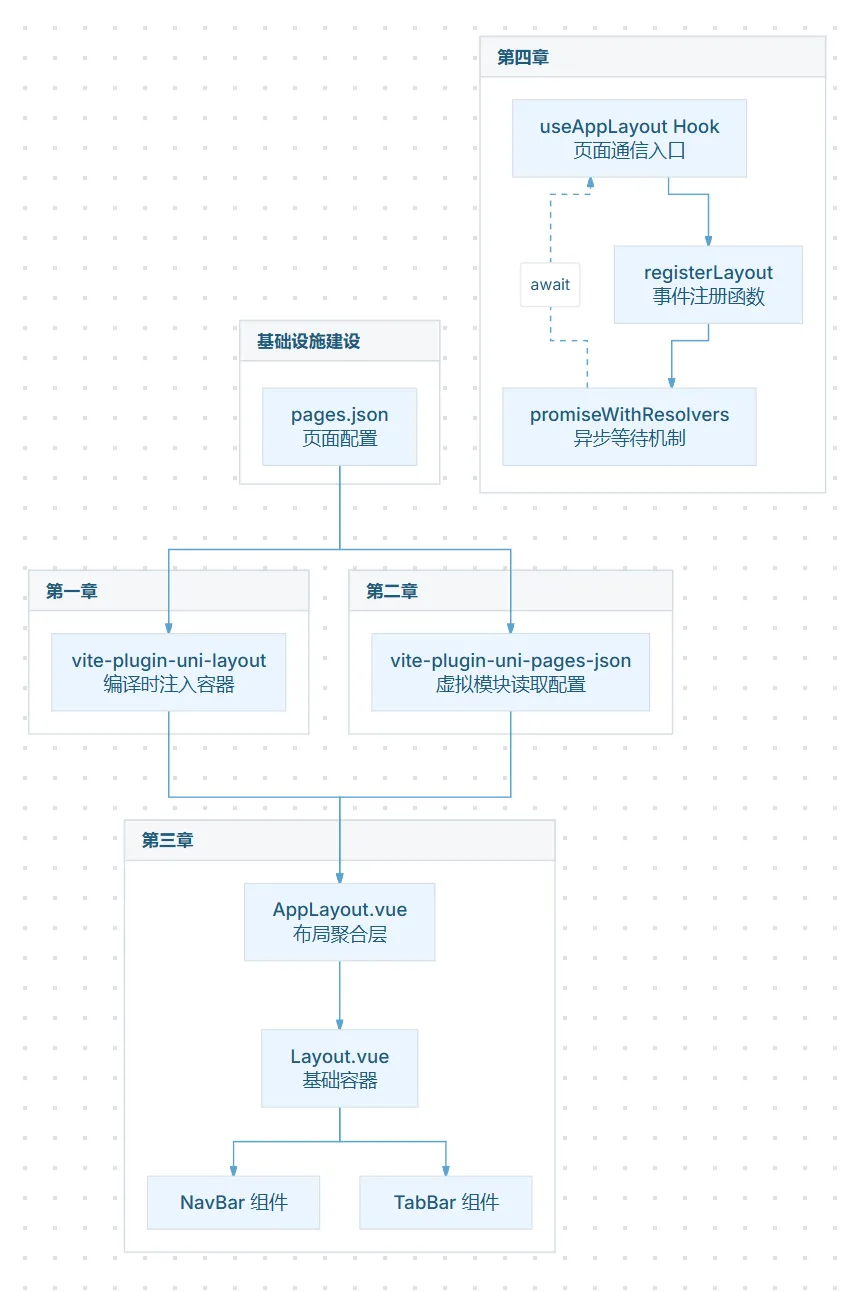
依赖关系:
- 第一章和第二章是基础设施,可独立理解
- 第三章依赖第一、二章
- 第四章依赖第三章
一、设计背景
1.1 问题场景
在 uni-app 跨平台应用开发中,每个页面通常需要共享相同的布局结构,如导航栏、标签栏、页面容器等。传统做法是在每个页面组件中手动引入这些公共组件,导致:
- 代码重复:每个页面都要写相同的容器结构
- 维护困难:修改容器样式需要遍历所有页面
- 一致性难以保证:各页面容器可能出现差异
1.2 uni-app 架构特点
uni-app 是一个基于 Vue.js 的跨平台开发框架,其架构从上到下分为四个层次:
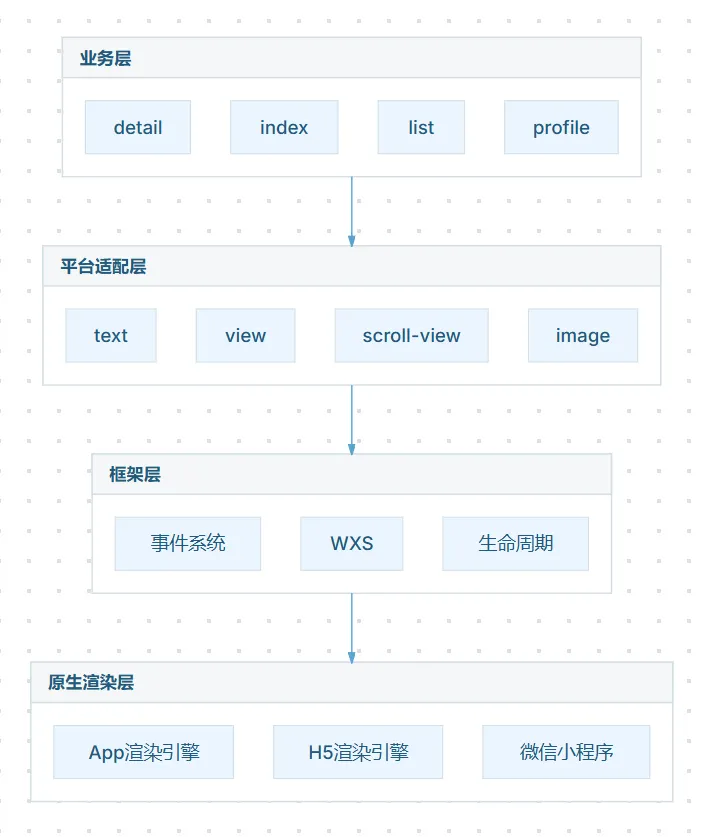
关键特点:uni-app 中,每个页面都是独立的 Vue 实例,页面之间没有天然的嵌套关系。
这意味着:
- 页面顶部区域(导航栏)需要每个页面自己处理
- 页面底部区域(标签栏)需要每个页面自己处理
- 页面容器包裹每个页面都需要手动添加
1.3 传统方案的问题
| 方案 | 问题 |
|---|---|
| 每个页面手动引入容器组件 | 代码重复、维护成本高 |
| 使用 Mixin 混入 | 侵入性强,隐式依赖 |
| 全局组件注册 | 无法精细控制哪些页面需要 |
核心矛盾:uni-app 框架层没有提供页面容器抽象,而业务层又需要统一的布局结构。
二、设计目标
设计一个编译时全局容器注入机制,实现:
| 目标 | 描述 |
|---|---|
| 自动包裹 | 编译时自动为所有页面包裹全局容器组件 |
| 零侵入 | 不修改业务代码,不影响开发体验 |
| 灵活配置 | 通过 pages.json 配置控制哪些页面需要容器 |
| 跨平台兼容 | 支持 uni-app 的所有平台(H5、App、小程序) |
三、核心设计
3.1 设计理念
| 设计点 | 方案 | 为什么选择这个方案 |
|---|---|---|
| 注入时机 | 编译时(Transform Hook) | uni-app 页面无父容器,运行时注入成本高 |
| 容器定位 | 编译时代码转换,非运行时逻辑 | 运行时注入需要修改 Vue 实例创建过程 |
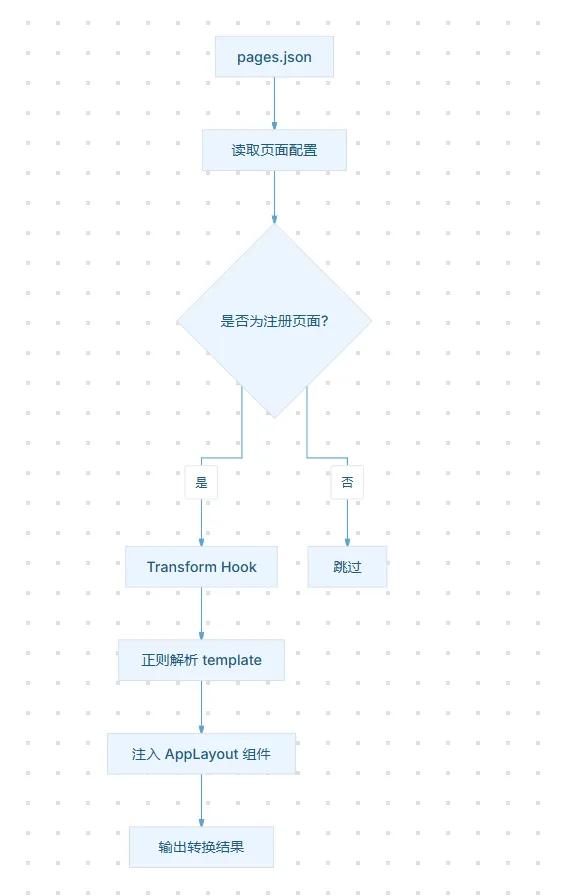
| 页面识别 | 读取 pages.json 动态获取页面列表 | 精准控制,只为注册页面注入容器 |
| 模板处理 | 正则解析 <template> 内容 | 轻量无 AST 依赖,实现简洁 |
| 包裹方式 | 替换 <template> 内容区域 | 保留原有模板结构,用户无感知 |
关键洞察:uni-app 的编译过程会处理每个 .vue 文件,我们在这个过程中拦截并注入容器,对业务代码完全透明。
3.2 注入流程
3.3 架构分层
注入容器后的架构层次:
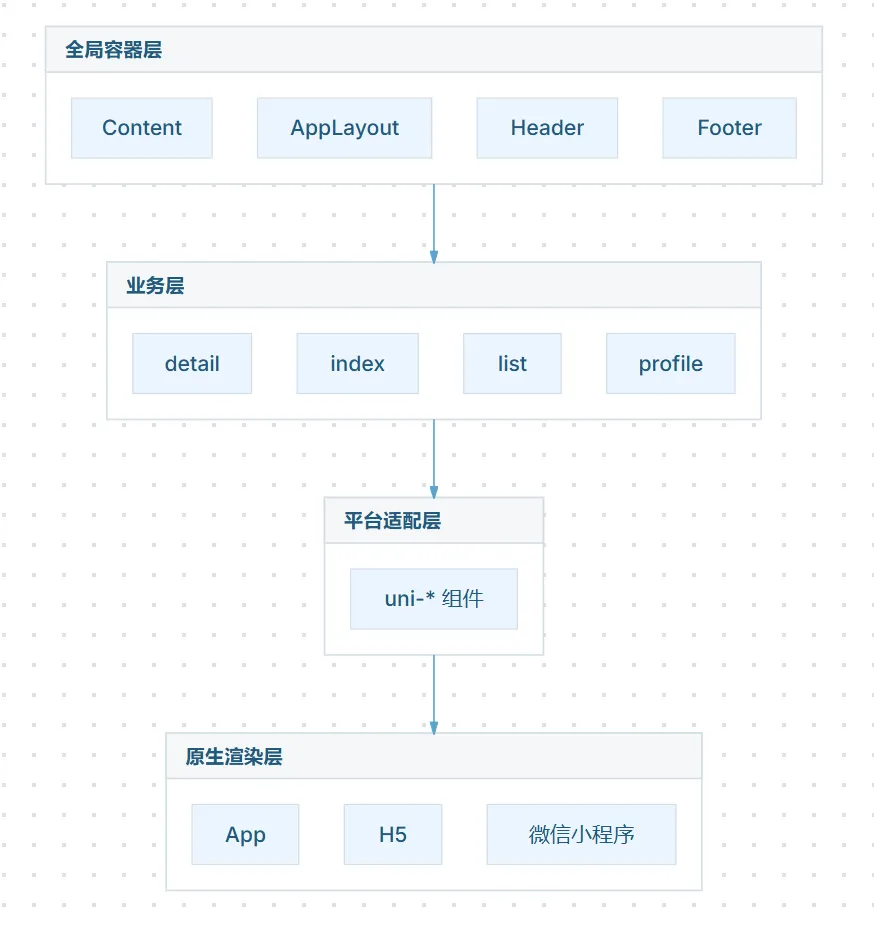
关键变化:通过编译时注入,在业务层和平台适配层之间新增了一层全局容器层,统一处理公共布局,而业务页面无需感知。
四、插件实现
4.1 核心代码
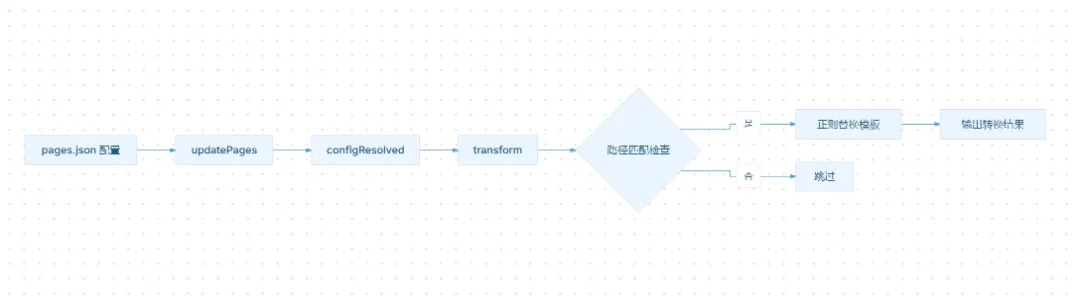
javascript // vite-plugin-uni-layout.jsimport fs from'fs';import path from'path';exportdefaultfunctionuniLayout() {let pagesPaths = newSet(); // 存储 pages.json 中的页面路径let pagesJsonPath = ''; // pages.json 文件路径// 从 pages.json 读取页面路径列表functionupdatePages() {const content = fs.readFileSync(pagesJsonPath, 'utf-8');const config = JSON.parse(content); pagesPaths.clear(); (config.pages || []).forEach(page => { pagesPaths.add(page.path); }); }return {name: 'vite-plugin-uni-layout',enforce: 'pre', // 🔍 pre 模式:确保在 @dcloudio/vite-plugin-uni 之前执行// 否则 uni-app 的编译插件会先处理 .vue 文件,// 我们的注入代码会被其内部流程覆盖或丢失// Vite 配置解析完成时调用,初始化 pages.json 路径configResolved(config) {// config.root 为项目根目录,pages.json 通常在 src/ 下 pagesJsonPath = path.resolve(config.root, 'src/pages.json');updatePages(); },// Transform 钩子:转换每个 .vue 文件// id 参数格式:'/path/to/src/pages/index/index.vue?xxx=xxx'// ^^^ Query Stringtransform(code, id) {// 1️⃣ 去除 Query String(如 ?ts=1700000000)// Vite 热更新时会在 id 追加时间戳,必须清除const cleanId = id.split('?')[0];// 2️⃣ 仅处理 .vue 文件if (!cleanId.endsWith('.vue')) return;// 3️⃣ 计算文件相对于 pages.json 目录的路径// 示例:// pagesJsonPath = '/project/src/pages.json'// cleanId = '/project/src/pages/index/index.vue'// dirname = '/project/src'// relative = 'pages/index/index' (Unix 风格路径)const relativePath = path.relative( path.dirname(pagesJsonPath), cleanId ).replace(/\\/g, '/'); // Windows 反斜杠转正斜杠// 4️⃣ 转为路由路径:去掉 .vue 后缀// 'pages/index/index' 匹配 pages.json 中的 pathconst routePath = relativePath.replace(/\.vue$/, '');// 5️⃣ 仅对 pages.json 中注册的页面注入容器if (!pagesPaths.has(routePath)) return;// 6️⃣ 核心:包裹 <template> 内容区域// 找到 <template> 标签的开始位置和结束位置const templateOpenRegex = /<template[^>]*>/;const templateOpenMatch = code.match(templateOpenRegex);if (templateOpenMatch) {const openTag = templateOpenMatch[0]; // '<template>'const openIndex = templateOpenMatch.index + openTag.length; // 内容起始位置const closeIndex = code.lastIndexOf('</template>'); // 内容结束位置if (closeIndex > openIndex) {const before = code.substring(0, openIndex); // '<template>' 之前const content = code.substring(openIndex, closeIndex); // 模板内容const after = code.substring(closeIndex); // '</template>' 之后// 注入 AppLayout 组件return`${before}\n<AppLayout>\n${content}\n</AppLayout>\n${after}`; } } } };}
4.2 转换效果
转换前(业务页面):
vue <template> <view class="content"> <text>Hello World</text> </view></template>
转换后(编译产物):
vue <template><AppLayout> <view class="content"> <text>Hello World</text> </view></AppLayout></template>
4.3 数据流
4.4 正则解析的局限性与注意事项
当前实现的局限性
本方案使用正则表达式解析 Vue 模板,具有轻量、无 AST 依赖的优点,但存在以下局限:
| 场景 | 问题 | 示例 |
|---|---|---|
| 多根节点模板 | v-if/v-else-if/v-else 会产生多个根节点 | vue\n<template v-if="ok"><view>A</view></template>\n<template v-else><view>B</view></template>\n |
| 动态组件 | <component :is="..."> 包裹的内容无法正确提取 | vue\n<template><component :is="componentName"/></template>\n |
| 深度嵌套 template | 多层 <template> 标签匹配混乱 | vue\n<template><template v-for="...">...</template></template>\n |
| 特殊属性值 | > 在字符串中出现导致标签匹配错误 | vue\n<template><text>{{ '<template>' }}</text></template>\n |
为什么选择正则而非 AST?
| 方案 | 优点 | 缺点 |
|---|---|---|
| 正则解析 | 轻量、无依赖、实现简单 | 边界 case 较多 |
| AST 解析(@vue/compiler-sfc) | 精确、可预测 | 体积增大、API 复杂 |
实际项目中,如果你的模板满足以下条件,正则方案足够稳定:
- 使用单根节点模板
- 不使用深度嵌套的
<template>标签 - 模板内容不包含
</template>字符串
生产环境建议
对于复杂模板场景,推荐升级方案:
javascript // 使用 @vue/compiler-sfc 精确解析import { parse } from'@vue/compiler-sfc'const { descriptor } = parse(code)const templateContent = descriptor.template.content// 然后精确操作 AST
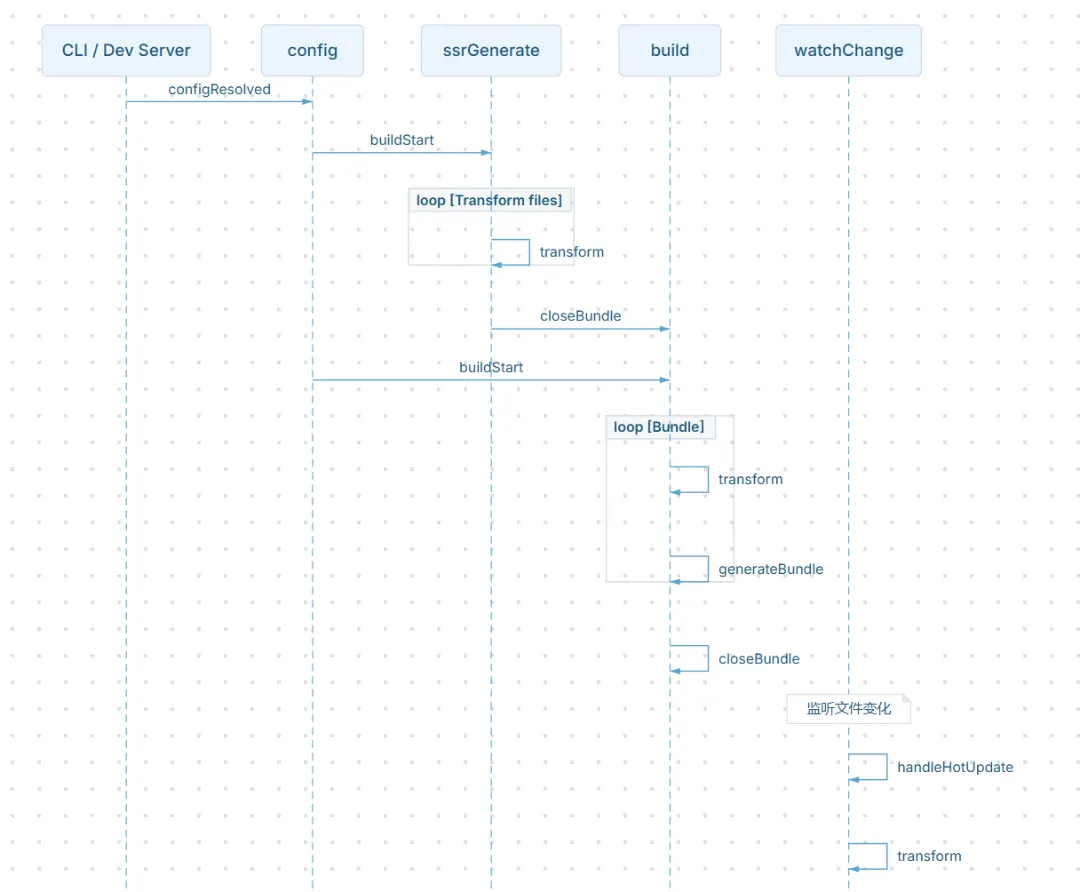
4.5 插件执行时机与 Vite 钩子顺序
Vite 插件钩子执行顺序
Vite 插件的钩子按以下顺序执行:
enforce: ‘pre’ vs ‘post’
javascript exportdefaultfunctionmyPlugin() {return {name: 'my-plugin',enforce: 'pre', // ✅ 在默认插件之前执行(如 @dcloudio/vite-plugin-uni)// enforce: 'post', // 后置执行 }}
| 模式 | 执行时机 | 适用场景 |
|---|---|---|
| 默认 | 介于 pre 和 post 之间 | 普通转换逻辑 |
pre | 最先执行 | 需要在其他插件之前处理,如本方案的容器注入 |
post | 最后执行 | 清理工作、最终修改 |
本插件使用 ‘pre’ 的原因
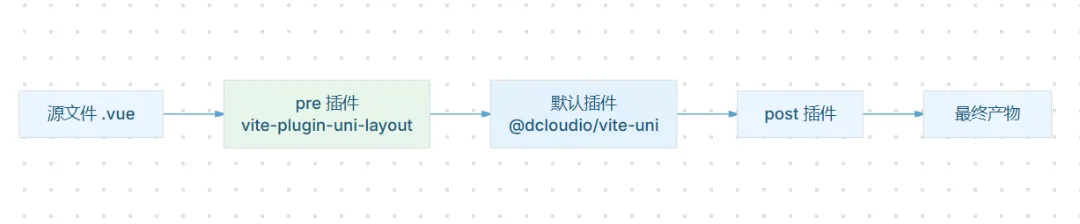
- uni-app 编译流程复杂:
@dcloudio/vite-plugin-uni内部会多次转换 .vue 文件 - 注入代码必须优先:如果在其之后执行,注入的
<AppLayout>会被其内部处理流程覆盖 - 单向保证:pre 可以看到"最原始"的代码,而 post 可以看到"处理后"的代码
configResolved 钩子详解
configResolved 在 Vite 解析完配置后调用,此时:
config.root已确定config.plugins已确定顺序- 可以读取最终的配置进行初始化
javascript configResolved(config) {// config.root: string - 项目根目录// config.srcDir?: string - src 目录(如果有)// config.plugins: Plugin[] - 按执行顺序排列的插件列表 pagesJsonPath = path.resolve(config.root, 'src/pages.json');}
transform 钩子详解
每个文件在被读取、转换时都会触发 transform:
javascript transform(code, id) {// code: string - 文件原始内容// id: string - 文件绝对路径 + query string//// 返回值类型:// - null/undefined: 不处理,交由后续插件// - string: 替换后的内容// - { code, map }: 替换内容 + Source Map}
id 参数的 Query String 示例:
| 触发场景 | id 示例 |
|---|---|
| 初始加载 | /src/pages/index/index.vue |
| 热更新 | /src/pages/index/index.vue?import&t=1700000000 |
| SSR 构建 | /src/pages/index/index.vue?ssr=true |
五、插件注册
5.1 vite.config.js 配置
javascript import { defineConfig } from'vite';import uniLayout from'./vite/plugins/vite-plugin-uni-layout';import uni from'@dcloudio/vite-plugin-uni';exportdefaultdefineConfig({plugins: [uniLayout(), // 全局容器插件uni(), ],});
5.2 AppLayout 基础组件
vue <template> <view class="app-layout"> <header class="layout-header"> <slot name="header"> <text class="header-title">{{ title }}</text> </slot> </header> <main class="layout-content"> <slot></slot> </main> <footer class="layout-footer" v-if="showTabBar"> <slot name="footer"></slot> </footer> </view></template><script>export default { name: 'AppLayout', props: { title: { type: String, default: 'App Name' }, showTabBar: { type: Boolean, default: true } }};</script><style scoped>.app-layout { display: flex; flex-direction: column; height: 100vh; background-color: #f5f5f5;}.layout-header { height: 88rpx; background: linear-gradient(135deg, #667eea 0%, #764ba2 100%); color: #fff; display: flex; align-items: center; padding: 0 30rpx;}.layout-content { flex: 1; overflow-y: auto;}.layout-footer { height: 100rpx; background: #fff; box-shadow: 0 -2rpx 10rpx rgba(0, 0, 0, 0.1);}</style>
5.3 pages.json 配置
json {"pages":[{"path":"pages/index/index","style":{"navigationBarTitleText":"首页"}},{"path":"pages/list/list","style":{"navigationBarTitleText":"列表"}}],"globalStyle":{"navigationBarTextStyle":"white","navigationBarTitleText":"应用名称","navigationBarBackgroundColor":"#667eea"}}
六、设计价值
| 维度 | 传统方式 | 本方案 |
|---|---|---|
| 开发效率 | 每个页面手动引入容器 | 一次配置,全局生效 |
| 可维护性 | 分散管理 | 集中管理 |
| 性能 | 运行时动态创建 | 编译时零开销 |
| 一致性 | 各页面可能存在差异 | 所有页面完全一致 |
| 侵入性 | 业务代码需要修改 | 零侵入,无感知 |
七、总结
本方案通过 Vite 编译时注入 机制,基于 uni-app 架构实现了全局容器的优雅设计:
| 核心要点 | 说明 |
|---|---|
| 架构契合 | 适配 uni-app 页面平级、无父容器的特点 |
| 编译时注入 | 利用 Transform Hook,在构建期完成容器包裹 |
| 配置驱动 | 依托 pages.json 天然管控,无需额外配置 |
| 零侵入 | 业务代码完全无感知,保持简洁 |
| 可扩展 | 容器内部支持 slot 插槽,可灵活定制各页面 |
这一设计模式可推广至以下场景:
- 全局错误边界注入
- 页面切换动画包装
- 状态管理自动初始化
- 性能监控埋点注入
下章预告
第一章解决了「如何让每个页面自动包裹布局组件」的问题。
下一章我们将探讨:如何让组件在运行时读取 pages.json 配置?

