 夜雨聆风
夜雨聆风写报告的宝子们应该都深有体会,报告附件中常常需要插入现场照片、附图以及各类表格。如果手动一张张插入图片,再逐一调整图片高度,操作十分繁琐。现在AI时代,写个工具不就是很简单的事情。
于是中午动手写了一个小工具。
当然小编也打包exe,分享给需要的宝子们,在文章结尾。
第一步:双击

第二步:选择Word文档,照片文件夹。设置参数(列数和图高)。标题文字。
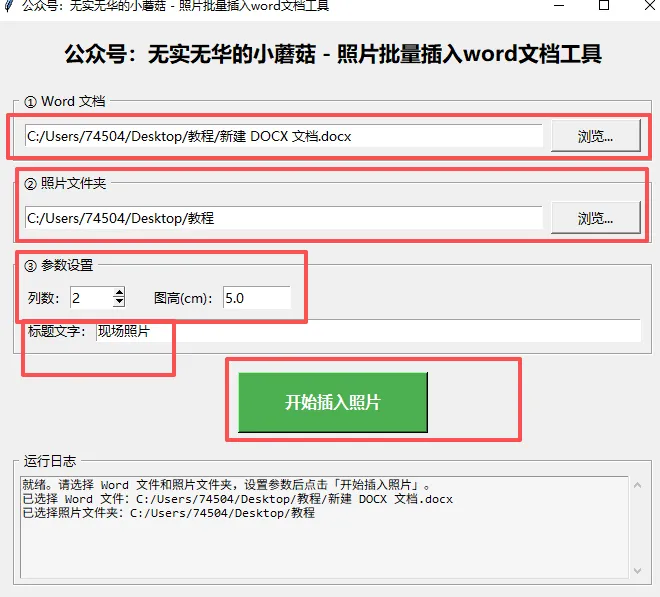
第三步:开始插入照片,完成。
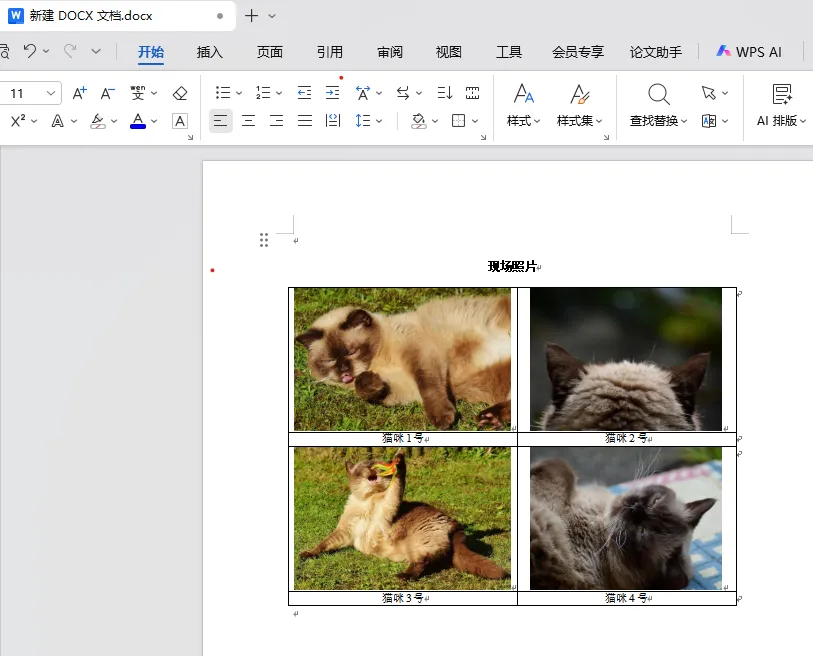
python代码分享:
import osimport reimport mathimport tempfileimport tkinter as tkfrom tkinter import filedialog, messagebox, scrolledtextfrom docx import Documentfrom docx.shared import Cm, Ptfrom docx.enum.table import WD_CELL_VERTICAL_ALIGNMENT, WD_TABLE_ALIGNMENTfrom docx.enum.text import WD_PARAGRAPH_ALIGNMENTfrom docx.oxml.ns import qnfrom docx.oxml import OxmlElementfrom PIL import ImageDEFAULT_COLS = 2DEFAULT_HEIGHT_CM = 5.0DEFAULT_TITLE = "现场照片"def set_run_font(run, cn_font='宋体', en_font='Times New Roman', size=None, bold=False):run.font.name = en_fontrun._element.rPr.rFonts.set(qn('w:eastAsia'), cn_font)if size is not None:run.font.size = Pt(size)run.bold = bolddef set_cell_center(cell):for para in cell.paragraphs:para.alignment = WD_PARAGRAPH_ALIGNMENT.CENTERpara.paragraph_format.space_before = Pt(0)para.paragraph_format.space_after = Pt(0)para.paragraph_format.line_spacing = 1.0pPr = para._p.get_or_add_pPr()spacing = pPr.find(qn('w:spacing'))if spacing is None:spacing = OxmlElement('w:spacing')pPr.append(spacing)spacing.set(qn('w:before'), '0')spacing.set(qn('w:after'), '0')spacing.set(qn('w:line'), '240')spacing.set(qn('w:lineRule'), 'auto')cell.vertical_alignment = WD_CELL_VERTICAL_ALIGNMENT.CENTERtcPr = cell._tc.get_or_add_tcPr()vAlign = tcPr.find(qn('w:vAlign'))if vAlign is None:vAlign = OxmlElement('w:vAlign')tcPr.append(vAlign)vAlign.set(qn('w:val'), 'center')def set_table_borders(table, color="000000", size="4"):tbl = table._tbltblPr = tbl.tblPr if tbl.tblPr is not None else OxmlElement('w:tblPr')if tbl.tblPr is None:tbl.insert(0, tblPr)borders = OxmlElement('w:tblBorders')for border_name in ['top', 'left', 'bottom', 'right', 'insideH', 'insideV']:border = OxmlElement(f'w:{border_name}')border.set(qn('w:val'), 'single')border.set(qn('w:sz'), size)border.set(qn('w:space'), '0')border.set(qn('w:color'), color)borders.append(border)existing = tblPr.find(qn('w:tblBorders'))if existing is not None:tblPr.remove(existing)tblPr.append(borders)def photo_sort_key(filename):name = os.path.splitext(filename)[0]m = re.match(r'^(.+?)-(\d+)$', name)if m:return (1, int(m.group(2)))return (0, 0)def safe_image_path(img_path):try:with Image.open(img_path) as im:if im.mode in ('RGBA', 'P', 'LA'):im = im.convert('RGB')tmp = tempfile.NamedTemporaryFile(suffix='.jpg', delete=False)tmp.close()im.save(tmp.name, 'JPEG', quality=95)return tmp.nameexcept Exception as e:print(f"⚠️ 图片预处理失败,使用原图:{os.path.basename(img_path)} ({e})")return img_pathdef insert_photo_table(doc_path, photo_folder, col_count=2,pic_height_cm=5.0, title_text="现场照片",log_func=None):def log(msg):print(msg)if log_func:log_func(msg)if not os.path.isdir(photo_folder):log(f"❌ 照片文件夹不存在:{photo_folder}")return Falseif os.path.exists(doc_path) and os.path.getsize(doc_path) > 0:try:doc = Document(doc_path)log(f"📄 打开已有文档:{doc_path}")except Exception as e:log(f"⚠️ 文档打开失败({e}),将创建新空白文档")doc = Document()else:if not os.path.exists(doc_path):log(f"📄 文件不存在,将创建新文档:{doc_path}")else:log(f"⚠️ 文件为空(0字节),将创建新文档:{doc_path}")doc = Document()exts = ('.jpg', '.jpeg', '.png', '.bmp', '.gif')photos = [f for f in os.listdir(photo_folder) if f.lower().endswith(exts)]photos.sort(key=photo_sort_key)if not photos:log(f"⚠️ 文件夹为空:{photo_folder}")return Falsetotal = len(photos)log(f"📷 共找到 {total} 张照片,{col_count} 列布局,图高 {pic_height_cm}cm")photo_rows = math.ceil(total / col_count)table_rows = photo_rows * 2title_para = doc.add_paragraph()title_para.alignment = WD_PARAGRAPH_ALIGNMENT.CENTERrun = title_para.add_run(title_text)set_run_font(run, size=12, bold=True)table = doc.add_table(rows=table_rows, cols=col_count)table.alignment = WD_TABLE_ALIGNMENT.CENTERset_table_borders(table)for row_idx in range(photo_rows):row_photo = row_idx * 2row_name = row_photo + 1for col_idx in range(col_count):pos = row_idx * col_count + col_idxif pos >= total:breakphoto_name = photos[pos]photo_path = os.path.join(photo_folder, photo_name)cell = table.cell(row_photo, col_idx)cell.paragraphs[0].clear()run = cell.paragraphs[0].add_run()run.add_picture(safe_image_path(photo_path), height=Cm(pic_height_cm))set_cell_center(cell)log(f"✅ 插入:{photo_name}")cell = table.cell(row_name, col_idx)cell.text = os.path.splitext(photo_name)[0]set_run_font(cell.paragraphs[0].runs[0], size=10.5)set_cell_center(cell)save_dir = os.path.dirname(doc_path)if save_dir and not os.path.exists(save_dir):os.makedirs(save_dir, exist_ok=True)doc.save(doc_path)log(f"🎉 全部完成!已保存:{doc_path}")return Trueclass PhotoApp:def __init__(self, root):self.root = rootself.root.title("公众号:无实无华的小蘑菇 - 照片批量插入word文档工具")self.root.geometry("680x580")self.root.resizable(True, True)self.root.update_idletasks()x = (self.root.winfo_screenwidth() - 680) // 2y = (self.root.winfo_screenheight() - 580) // 2self.root.geometry(f"680x580+{x}+{y}")self.root.attributes('-topmost', True)self.root.after(500, lambda: self.root.attributes('-topmost', False))self.word_path = tk.StringVar()self.photo_folder = tk.StringVar()self.col_count = tk.IntVar(value=DEFAULT_COLS)self.pic_height = tk.StringVar(value=str(DEFAULT_HEIGHT_CM))self.title_text = tk.StringVar(value=DEFAULT_TITLE)self._build_ui()def _build_ui(self):main = tk.Frame(self.root, padx=20, pady=15)main.pack(fill=tk.BOTH, expand=True)title = tk.Label(main, text="公众号:无实无华的小蘑菇 - 照片批量插入word文档工具",font=("微软雅黑", 16, "bold"))title.pack(pady=(0, 15))frame1 = tk.LabelFrame(main, text=" ① Word 文档(不存在则自动新建) ", padx=10, pady=8,font=("微软雅黑", 10))frame1.pack(fill=tk.X, pady=5)tk.Entry(frame1, textvariable=self.word_path, font=("微软雅黑", 10)).pack(side=tk.LEFT, fill=tk.X, expand=True, padx=(0, 8))tk.Button(frame1, text="浏览...", command=self._select_word,width=10, font=("微软雅黑", 10)).pack(side=tk.RIGHT)frame2 = tk.LabelFrame(main, text=" ② 照片文件夹 ", padx=10, pady=8,font=("微软雅黑", 10))frame2.pack(fill=tk.X, pady=5)tk.Entry(frame2, textvariable=self.photo_folder, font=("微软雅黑", 10)).pack(side=tk.LEFT, fill=tk.X, expand=True, padx=(0, 8))tk.Button(frame2, text="浏览...", command=self._select_folder,width=10, font=("微软雅黑", 10)).pack(side=tk.RIGHT)frame3 = tk.LabelFrame(main, text=" ③ 参数设置 ", padx=10, pady=8,font=("微软雅黑", 10))frame3.pack(fill=tk.X, pady=5)row1 = tk.Frame(frame3)row1.pack(fill=tk.X, pady=2)tk.Label(row1, text="列数:", font=("微软雅黑", 10)).pack(side=tk.LEFT)tk.Spinbox(row1, from_=1, to=6, textvariable=self.col_count,width=5, font=("微软雅黑", 10)).pack(side=tk.LEFT, padx=(0, 25))tk.Label(row1, text="图高(cm):", font=("微软雅黑", 10)).pack(side=tk.LEFT)tk.Entry(row1, textvariable=self.pic_height, width=8,font=("微软雅黑", 10)).pack(side=tk.LEFT)row2 = tk.Frame(frame3)row2.pack(fill=tk.X, pady=(6, 2))tk.Label(row2, text="标题文字:", font=("微软雅黑", 10)).pack(side=tk.LEFT)tk.Entry(row2, textvariable=self.title_text, font=("微软雅黑", 10)).pack(side=tk.LEFT, fill=tk.X, expand=True)btn_frame = tk.Frame(main)btn_frame.pack(pady=12)self.run_btn = tk.Button(btn_frame, text="开始插入照片",command=self._run,font=("微软雅黑", 12, "bold"),bg="#4CAF50", fg="white",activebackground="#45a049", activeforeground="white",width=18, height=2, cursor="hand2")self.run_btn.pack()log_frame = tk.LabelFrame(main, text=" 运行日志 ", padx=5, pady=5,font=("微软雅黑", 10))log_frame.pack(fill=tk.BOTH, expand=True, pady=(5, 0))self.log_text = scrolledtext.ScrolledText(log_frame, height=8,font=("Consolas", 9),state=tk.DISABLED,bg="#f5f5f5")self.log_text.pack(fill=tk.BOTH, expand=True)self._log("就绪。Word 文件不存在或为空时会自动新建,请选择照片文件夹后点击「开始插入照片」。")def _log(self, msg):self.log_text.config(state=tk.NORMAL)self.log_text.insert(tk.END, msg + "\n")self.log_text.see(tk.END)self.log_text.config(state=tk.DISABLED)self.root.update_idletasks()def _select_word(self):path = filedialog.askopenfilename(title="选择 Word 文档(不存在可手动输入路径)",initialdir=os.path.join(os.path.expanduser("~"), "Desktop"),filetypes=[("Word 文件", "*.docx"), ("所有文件", "*.*")])if path:self.word_path.set(path)self._log(f"已选择 Word 文件:{path}")def _select_folder(self):path = filedialog.askdirectory(title="选择照片文件夹",initialdir=os.path.join(os.path.expanduser("~"), "Desktop"))if path:self.photo_folder.set(path)self._log(f"已选择照片文件夹:{path}")def _run(self):word = self.word_path.get().strip()folder = self.photo_folder.get().strip()if not word:messagebox.showwarning("提示", "请先填写或选择 Word 文件路径!")returnif not word.lower().endswith('.docx'):word += '.docx'self.word_path.set(word)if not folder:messagebox.showwarning("提示", "请先选择照片文件夹!")returntry:cols = int(self.col_count.get())if cols < 1 or cols > 6:raise ValueErrorexcept (ValueError, tk.TclError):messagebox.showwarning("提示", "列数必须是 1~6 之间的整数!")returntry:height = float(self.pic_height.get())if height <= 0:raise ValueErrorexcept ValueError:messagebox.showwarning("提示", "图高必须是大于 0 的数字!")returntitle = self.title_text.get().strip()if not title:messagebox.showwarning("提示", "标题文字不能为空!")returnself.run_btn.config(state=tk.DISABLED, text="处理中...")self._log("-" * 50)self._log(f"开始处理({cols}列 / 图高{height}cm / 标题:{title})...")try:ok = insert_photo_table(word, folder,col_count=cols,pic_height_cm=height,title_text=title,log_func=self._log)if ok:messagebox.showinfo("完成", "照片插入完成!")else:messagebox.showerror("失败", "处理失败,请查看日志。")except Exception as e:self._log(f"❌ 发生错误:{e}")messagebox.showerror("错误", f"处理出错:\n{e}")finally:self.run_btn.config(state=tk.NORMAL, text="开始插入照片")if __name__ == "__main__":root = tk.Tk()app = PhotoApp(root)root.mainloop()
关注回复:0809。