ARTICLE · 980685
数据获取||excel中基于植物智网站自动提取和填充植物物种分类学信息
数据获取||excel中基于植物智网站自动提取和填充植物物种分类学信息给位小伙伴大家好,最近有朋友需要根据中文名查阅和补充植物物种的分类学信息,但是动辄几百个物种的信息填充的确有点费事费力,因此小编在AI模型的帮助下,开发了一套根据中文名自动填充物种分类学信息(门、纲、科、属、种的中文名和拉丁名)的脚本,在这里分享给大家。完整的脚本信息获取方式在文末,在这里先教大家怎么用。 step1:打开一个空白的excel,按快捷键“Alt+F11",打开如下界面 
step2:点击"插入-模块“ 
step3:将我提供的脚本粘贴 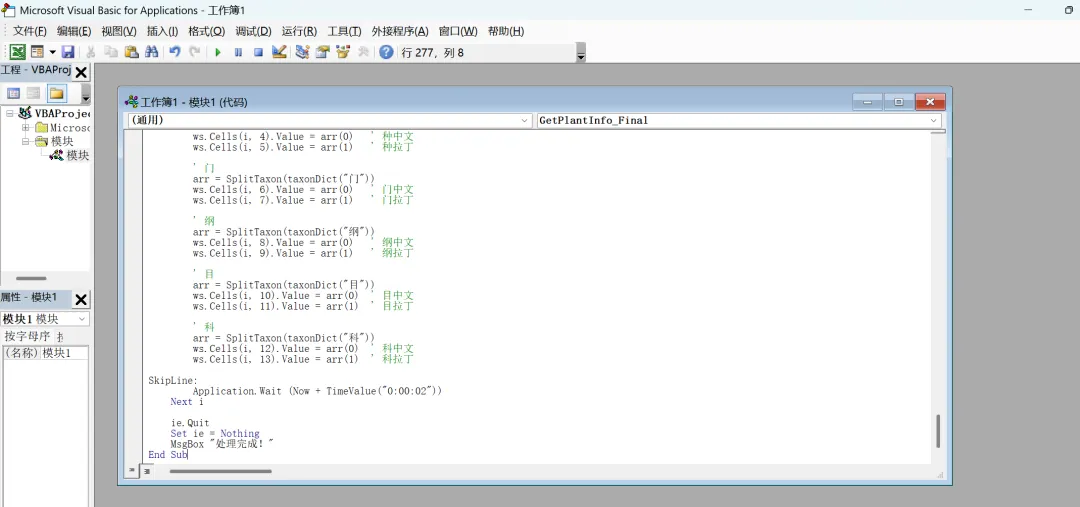
step4:点击左上角的保存按钮,并保存为宏格式的excel 
step1:将我们需要查询的物种中文名粘贴到刚才保存的excel的第一列 
step2:按住快捷键“Alt+F8"开始查询和填充所有物种的分类学信息。 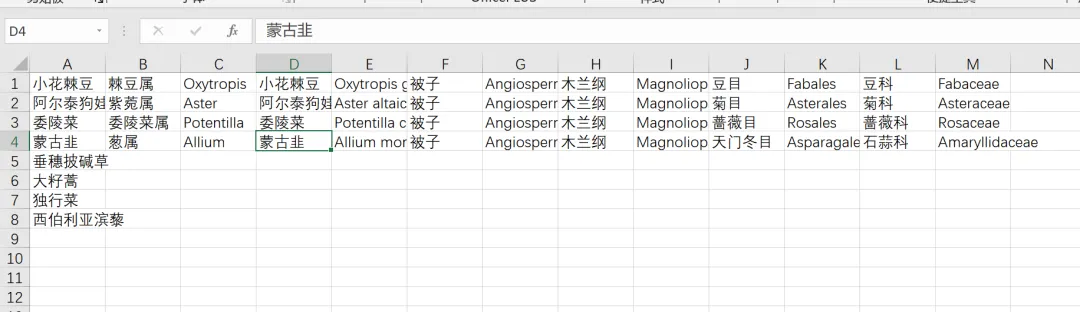
step3:获得所有物种的分类学信息。 
前言
1. 编辑excel的宏脚本
2. 调用宏访问植物志网站的植物百科栏,并依据中文名获取我们想要的分类学信息,这里以门、纲、科、属、种的中文名和拉丁名为例。
3. 脚本
' ============================================================' 辅助函数:将“中文 拉丁”格式拆分为中文和拉丁两部分' 如果字符串中没有空格,则中文=原字符串,拉丁=""' ============================================================Private Function SplitTaxon(str As String) As VariantDim result(1) As StringDim spacePos As IntegerspacePos = InStr(str, " ")If spacePos > 0 Thenresult(0) = Left(str, spacePos - 1)result(1) = Mid(str, spacePos + 1)Elseresult(0) = strresult(1) = ""End IfSplitTaxon = resultEnd Function' ============================================================' 主程序:获取植物分类信息,拆分为中英文,写入指定列' 列布局:A=植物名(输入),B=属中,C=属拉,D=种中,E=种拉,' F=门中,G=门拉,H=纲中,I=纲拉,J=目中,K=目拉,' L=科中,M=科拉' ============================================================Sub GetPlantInfo_Final()Dim ws As WorksheetDim lastRow As LongDim i As LongDim plantName As StringDim ie As ObjectDim htmlDoc As ObjectDim treeElement As ObjectDim treeText As StringDim taxonDict As ObjectDim timeout As DateDim allEls As Object, el As ObjectDim words() As StringDim j As Long, k As LongDim rankMap As ObjectDim titleText As StringDim headers As Object, hdr As ObjectDim currentRank As StringDim word As StringDim nextWord As StringDim latinPart As StringDim rankPositions As ObjectDim arr As Variant' ---------- 用户可修改门名显示格式 ----------Const FIXED_PHYLUM As String = "被子 Angiospermae" ' 如需改为“被子植物门 Angiospermae”,修改此行Set ws = ThisWorkbook.Sheets("Sheet1")lastRow = ws.Cells(ws.Rows.Count, 1).End(xlUp).RowOn Error Resume NextSet ie = CreateObject("InternetExplorer.Application")If ie Is Nothing ThenMsgBox "无法创建 Internet Explorer 对象,请检查系统设置。"Exit SubEnd IfOn Error GoTo 0ie.Visible = Falseie.Silent = TrueFor i = 1 To lastRowplantName = Trim(ws.Cells(i, 1).Value)If plantName = "" Then GoTo SkipLineDim url As Stringurl = "https://www.iplant.cn/info/" & plantNameie.Navigate urltimeout = Now + TimeValue("0:00:40")Do While ie.Busy Or ie.readyState <> 4DoEventsIf Now > timeout Thenws.Cells(i, 2).Value = "页面加载超时"GoTo SkipLineEnd IfLoopApplication.Wait (Now + TimeValue("0:00:03"))Set htmlDoc = ie.Document' 检查页面有效性If InStr(htmlDoc.body.innerText, "没有找到") > 0 Or InStr(htmlDoc.Title, "搜索") > 0 Thenws.Cells(i, 2).Value = "未找到该植物"GoTo SkipLineEnd If' ---------- 定位分类树容器 ----------Set treeElement = NothingOn Error Resume NextSet treeElement = htmlDoc.querySelector(".tree")If treeElement Is Nothing Then Set treeElement = htmlDoc.querySelector(".classification")If treeElement Is Nothing Then Set treeElement = htmlDoc.querySelector("#taxon-tree")If treeElement Is Nothing Then Set treeElement = htmlDoc.querySelector(".taxon-tree")If treeElement Is Nothing ThenSet headers = htmlDoc.getElementsByTagName("*")For Each hdr In headersIf InStr(hdr.innerText, "分类树") > 0 And hdr.innerText <> "分类树" ThenSet treeElement = hdr.parentElementIf Not treeElement Is Nothing ThenIf InStr(treeElement.innerText, "植物界") > 0 And InStr(treeElement.innerText, "纲") > 0 ThenExit ForEnd IfEnd IfEnd IfNext hdrEnd IfOn Error GoTo 0If treeElement Is Nothing ThenSet allEls = htmlDoc.getElementsByTagName("*")For Each el In allElsDim txt As Stringtxt = el.innerTextIf InStr(txt, "植物界") > 0 And InStr(txt, "纲") > 0 And InStr(txt, "科") > 0 ThenSet treeElement = elExit ForEnd IfNext elEnd If' 初始化字典Set taxonDict = CreateObject("Scripting.Dictionary")taxonDict.Add "门", ""taxonDict.Add "纲", ""taxonDict.Add "目", ""taxonDict.Add "科", ""taxonDict.Add "属", ""If Not treeElement Is Nothing ThentreeText = treeElement.innerText' 清理分隔符treeText = Replace(treeText, "→", " ")treeText = Replace(treeText, ">", " ")treeText = Replace(treeText, "、", " ")treeText = Replace(treeText, vbCrLf, " ")treeText = Replace(treeText, vbTab, " ")Do While InStr(treeText, " ") > 0treeText = Replace(treeText, " ", " ")LooptreeText = Trim(treeText)' 按空格分割words = Split(treeText, " ")Dim wordCount As LongwordCount = UBound(words) - LBound(words) + 1' 第一遍扫描:找出所有阶元的位置和类型Set rankPositions = CreateObject("Scripting.Dictionary")rankPositions.Add "门", -1rankPositions.Add "纲", -1rankPositions.Add "目", -1rankPositions.Add "科", -1rankPositions.Add "属", -1Dim pos As LongFor pos = LBound(words) To UBound(words)word = Trim(words(pos))If Right(word, 1) = "纲" And rankPositions("纲") = -1 ThenrankPositions("纲") = posElseIf Right(word, 1) = "目" And rankPositions("目") = -1 ThenrankPositions("目") = posElseIf Right(word, 1) = "科" And rankPositions("科") = -1 ThenrankPositions("科") = posElseIf Right(word, 1) = "属" And rankPositions("属") = -1 ThenrankPositions("属") = posElseIf Right(word, 1) = "门" And rankPositions("门") = -1 ThenrankPositions("门") = posEnd IfNext pos' 处理属:若未找到"属"后缀,取位于"科"之后的下一个词(若有),但排除明显不是属名的词(如"Plant")If rankPositions("属") = -1 And rankPositions("科") <> -1 ThenDim startSearch As LongstartSearch = rankPositions("科") + 1For pos = startSearch To UBound(words)word = Trim(words(pos))If Not (Right(word, 1) = "纲" Or Right(word, 1) = "目" Or Right(word, 1) = "科" Or Right(word, 1) = "门") ThenIf InStr(word, "Plant") = 0 And Not (word Like "*(*" Or word Like "*)*" Or word Like "【*" Or word Like "*】") ThenrankPositions("属") = posExit ForEnd IfEnd IfNext posEnd If' 按顺序解析每个阶元(跳过门,因为使用固定值)Dim rankNames As VariantrankNames = Array("纲", "目", "科", "属")Dim rankIdx As LongFor rankIdx = LBound(rankNames) To UBound(rankNames)currentRank = rankNames(rankIdx)pos = rankPositions(currentRank)If pos >= LBound(words) ThenDim term As Stringterm = Trim(words(pos))' 如果当前阶元是属且没有"属"字,补上"属"If currentRank = "属" And Right(term, 1) <> "属" Thenterm = term & "属"End If' 收集后续的拉丁词(最多2个)Dim latinCount As IntegerlatinCount = 0Dim nextPos As LongnextPos = pos + 1Do While nextPos <= UBound(words) And latinCount < 2nextWord = Trim(words(nextPos))If Not (Right(nextWord, 1) = "纲" Or Right(nextWord, 1) = "目" Or Right(nextWord, 1) = "科" Or Right(nextWord, 1) = "属" Or Right(nextWord, 1) = "门") ThenIf nextWord Like "*[A-Za-z]*" Or InStr(nextWord, ".") > 0 ThenIf Not (nextWord Like "*(*" Or nextWord Like "*)*" Or nextWord Like "【*" Or nextWord Like "*】" Or nextWord Like "*(*" Or nextWord Like "*)*") Thenterm = term & " " & nextWordlatinCount = latinCount + 1nextPos = nextPos + 1ElseExit DoEnd IfElseExit DoEnd IfElseExit DoEnd IfLooptaxonDict(currentRank) = termEnd IfNext rankIdxEnd If' ---------- 补充种名(从页面标题) ----------titleText = htmlDoc.TitleIf InStr(titleText, "|") > 0 ThentitleText = Trim(Split(titleText, "|")(0))End IftaxonDict("种") = titleText' ---------- 强制门名为固定值 ----------taxonDict("门") = FIXED_PHYLUM' ---------- 拆分并写入各列 ----------' 属arr = SplitTaxon(taxonDict("属"))ws.Cells(i, 2).Value = arr(0) ' 属中文ws.Cells(i, 3).Value = arr(1) ' 属拉丁' 种arr = SplitTaxon(taxonDict("种"))ws.Cells(i, 4).Value = arr(0) ' 种中文ws.Cells(i, 5).Value = arr(1) ' 种拉丁' 门arr = SplitTaxon(taxonDict("门"))ws.Cells(i, 6).Value = arr(0) ' 门中文ws.Cells(i, 7).Value = arr(1) ' 门拉丁' 纲arr = SplitTaxon(taxonDict("纲"))ws.Cells(i, 8).Value = arr(0) ' 纲中文ws.Cells(i, 9).Value = arr(1) ' 纲拉丁' 目arr = SplitTaxon(taxonDict("目"))ws.Cells(i, 10).Value = arr(0) ' 目中文ws.Cells(i, 11).Value = arr(1) ' 目拉丁' 科arr = SplitTaxon(taxonDict("科"))ws.Cells(i, 12).Value = arr(0) ' 科中文ws.Cells(i, 13).Value = arr(1) ' 科拉丁SkipLine:Application.Wait (Now + TimeValue("0:00:02"))Next iie.QuitSet ie = NothingMsgBox "处理完成!"End Sub