夜雨聆风
夜雨聆风


我在阅读 NodeJS 文档中读出的19个套路
(点击上方公众号,可快速关注)
英文:David Gilbertson
译文:王下邀月熊_Chevalier
链接:segmentfault.com/a/1190000007435273
虽然我已经用了三年多的NodeJS,也曾经以为自己对其无所不知。但是我好像从未有安静的坐下来仔细地阅读NodeJS的完整文档。如果有熟悉我的朋友应该知道,我之前已经看了HTML,DOM,Web APIs,CSS,SVG以及ECMAScript的文档,NodeJS是我这个系列的最后一个待翻阅的山峰。在阅读文档的过程中我也发现了很多本来不知道的知识,我觉得我有必要分享给大家。不过文档更多的是平铺直叙,因此我也以阅读的顺序列举出我觉得需要了解的点。
querystring:可以用作通用解析器的模块
很多时候我们会从数据库或其他地方得到这种奇怪格式的字符串:name:Sophie;shape:fox;condition:new,一般来说我们会利用字符串切割的方式来讲字符串划分到JavaScript Object。不过querystring也是个不错的现成的工具:
constweirdoString = `name:Sophie;shape:fox;condition:new`;
constresult = querystring.parse(weirdoString,`;`,`:`);
// result:
// {
// name: `Sophie`,
// shape: `fox`,
// condition: `new`,
// };
V8 Inspector
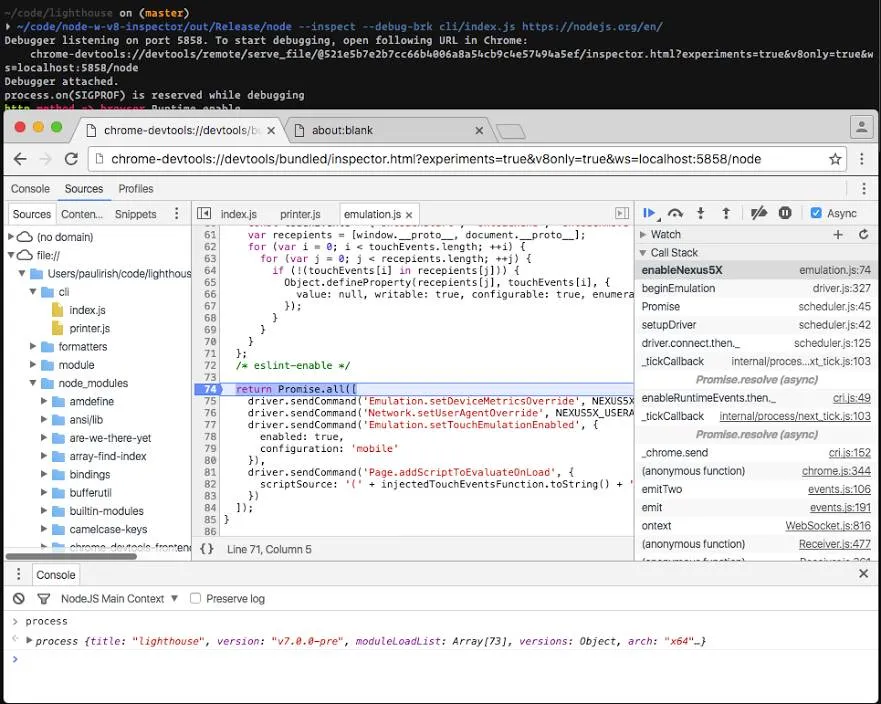
以--inspect参数运行你的Node应用程序,它会反馈你某个URL。将该URL复制到Chrome中并打开,你就可以使用Chrome DevTools来调试你的Node应用程序啦。详细的实验可以参考这篇文章。不过需要注意的是,该参数仍然属于实验性质
nextTick 与 setImmediate的区别
这两货的区别可能光从名字上还看不出来,我觉得应该给它们取个别名:
-
process.nextTick()应该为process.sendThisToTheStartOfTheQueue() -
setImmediate应该为sendThisToTheEndOfTheQueue()
再说句不相关的,React中的Props应该为stuffThatShouldStayTheSameIfTheUserRefreshes,而State应该为stuffThatShouldBeForgottenIfTheUserRefreshes。
Server.listen 可以使用Object作为参数
我更喜欢命名参数的方式调用函数,这样相较于仅按照顺序的无命名参数法会更直观。别忘了Server.listen也可以使用某个Object作为参数:
require(`http`)
.createServer()
.listen({
port: 8080,
host: `localhost`,
})
.on(`request`,(req,res) => {
res.end(`Hello World!`);
});
不过这个特性不是表述在http.Server这个API中,而是在其父级net.Server的文档中。
相对地址
你传入fs模块的距离可以是相对地址,即相对于process.cwd()。估计有些人早就知道了,不过我之前一直以为是只能使用绝对地址:
constfs = require(`fs`);
constpath = require(`path`);
// why have I always done this…
fs.readFile(path.join(__dirname,`myFile.txt`),(err,data) => {
// do something
});
// when I could just do this?
fs.readFile(`./path/to/myFile.txt`,(err,data) => {
// do something
});
Path Parsing:路径解析
之前我一直不知道的某个功能就是从某个文件名中解析出路径,文件名,文件扩展等等:
myFilePath = `/someDir/someFile.json`;
path.parse(myFilePath).base === `someFile.json`;// true
path.parse(myFilePath).name === `someFile`;// true
path.parse(myFilePath).ext === `.json`;// true
Logging with colors
别忘了console.dir(obj,{colors:true})能够以不同的色彩打印出键与值,这一点会大大增加日志的可读性。
使用setInterval执行定时任务
我喜欢使用setInterval来定期执行数据库清理任务,不过默认情况下在存在setInterval的时候NodeJS并不会退出,你可以使用如下的方法让Node沉睡:
constdailyCleanup = setInterval(() => {
cleanup();
},1000 * 60 * 60 * 24);
dailyCleanup.unref();
Use Signal Constants
如果你尝试在NodeJS中杀死某个进程,估计你用过如下语法:
process.kill(process.pid,`SIGTERM`);
这个没啥问题,不过既然第二个参数同时能够使用字符串与整形变量,那么还不如使用全局变量呢:
process.kill(process.pid,os.constants.signals.SIGTERM);
IP Address Validation
NodeJS中含有内置的IP地址校验工具,这一点可以免得你写额外的正则表达式:
require(`net`).isIP(`10.0.0.1`)返回4
require(`net`).isIP(`cats`)返回0
os.EOF
不知道你有没有手写过行结束符,看上去可不漂亮啊。NodeJS内置了os.EOF,其在Windows下是rn,其他地方是n,使用os.EOL能够让你的代码在不同的操作系统上保证一致性:
constfs = require(`fs`);
// bad
fs.readFile(`./myFile.txt`,`utf8`,(err,data) => {
data.split(`\r\n`).forEach(line => {
// do something
});
});
// good
constos = require(`os`);
fs.readFile(`./myFile.txt`,`utf8`,(err,data) => {
data.split(os.EOL).forEach(line => {
// do something
});
});
HTTP 状态码
NodeJS帮我们内置了HTTP状态码及其描述,也就是http.STATUS_CODES,键为状态值,值为描述: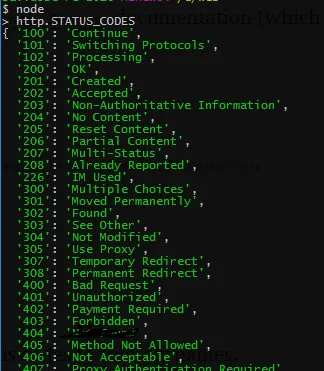
你可以按照如下方法使用:
someResponse.code === 301;// true
require(`http`).STATUS_CODES[someResponse.code] === `Moved Permanently`;// true
避免异常崩溃
有时候碰到如下这种导致服务端崩溃的情况还是挺无奈的:
constjsonData = getDataFromSomeApi();// But oh no, bad data!
constdata = JSON.parse(jsonData);// Loud crashing noise.
我为了避免这种情况,在全局加上了一个:
process.on(`uncaughtException`,console.error);
当然,这种办法绝不是最佳实践,如果是在大型项目中我还是会使用PM2,然后将所有可能崩溃的代码加入到try...catch中。
Just this once()
除了on方法,once方法也适用于所有的EventEmitters,希望我不是最后才知道这个的:
server.once(`request`,(req,res) => res.end(`No more from me.`));
Custom Console
你可以使用new console.Console(standardOut,errorOut),然后设置自定义的输出流。你可以选择创建console将数据输出到文件或者Socket或者第三方中。
DNS lookup
某个年轻人告诉我,Node并不会缓存DNS查询信息,因此你在使用URL之后要等个几毫秒才能获取到数据。不过其实你可以使用dns.lookup()来缓存数据:
dns.lookup(`www.myApi.com`,4,(err,address) => {
cacheThisForLater(address);
});
fs 在不同OS上有一定差异
-
fs.stats()返回的对象中的mode属性在Windows与其他操作系统中存在差异。 -
fs.lchmod()仅在macOS中有效。 -
仅在Windows中支持调用
fs.symlink()时使用type参数。 -
仅仅在macOS与Windows中调用
fs.watch()时传入recursive选项。 -
在Linux与Windows中
fs.watch()的回调可以传入某个文件名 -
使用
fs.open()以及a+属性打开某个目录时仅仅在FreeBSD以及Windows上起作用,在macOS以及Linux上则存在问题。 -
在Linux下以追加模式打开某个文件时,传入到
fs.write()的position参数会被忽略。
net 模块差不多比http快上两倍
笔者在文档中看到一些关于二者性能的讨论,还特地运行了两个服务器来进行真实比较。结果来看http.Server大概每秒可以接入3400个请求,而net.Server可以接入大概5500个请求。
// This makes two connections, one to a tcp server, one to an http server (both in server.js)
// It fires off a bunch of connections and times the response
// Both send strings.
constnet = require(`net`);
consthttp = require(`http`);
functionparseIncomingMessage(res){
returnnewPromise((resolve) => {
let data = “;
res.on(`data`,(chunk) => {
data += chunk;
});
res.on(`end`,() => resolve(data));
});
}
consttestLimit = 5000;
/* —————— */
/* — NET client — */
/* —————— */
functiontestNetClient(){
constnetTest = {
startTime: process.hrtime(),
responseCount: 0,
testCount: 0,
payloadData: {
type: `millipede`,
feet: 100,
test: 0,
},
};
functionhandleSocketConnect(){
netTest.payloadData.test++;
netTest.payloadData.feet++;
constpayload = JSON.stringify(netTest.payloadData);
this.end(payload,`utf8`);
}
functionhandleSocketData(){
netTest.responseCount++;
if(netTest.responseCount === testLimit){
consthrDiff = process.hrtime(netTest.startTime);
constelapsedTime = hrDiff[0] * 1e3 + hrDiff[1] / 1e6;
constrequestsPerSecond = (testLimit / (elapsedTime / 1000)).toLocaleString();
console.info(`net.Server handledanaverageof${requestsPerSecond}requests per second.`);
}
}
while(netTest.testCount < testLimit){
netTest.testCount++;
constsocket = net.connect(8888,handleSocketConnect);
socket.on(`data`,handleSocketData);
}
}
/* ——————- */
/* — HTTP client — */
/* ——————- */
functiontestHttpClient(){
consthttpTest = {
startTime: process.hrtime(),
responseCount: 0,
testCount: 0,
};
constpayloadData = {
type: `centipede`,
feet: 100,
test: 0,
};
constoptions = {
hostname: `localhost`,
port: 8080,
method: `POST`,
headers: {
‘Content-Type’: `application/x–www–form–urlencoded`,
},
};
functionhandleResponse(res){
parseIncomingMessage(res).then(() => {
httpTest.responseCount++;
if(httpTest.responseCount === testLimit){
consthrDiff = process.hrtime(httpTest.startTime);
constelapsedTime = hrDiff[0] * 1e3 + hrDiff[1] / 1e6;
constrequestsPerSecond = (testLimit / (elapsedTime / 1000)).toLocaleString();
console.info(`http.Server handledanaverageof${requestsPerSecond}requests per second.`);
}
});
}
while(httpTest.testCount < testLimit){
httpTest.testCount++;
payloadData.test = httpTest.testCount;
payloadData.feet++;
constpayload = JSON.stringify(payloadData);
options[`Content–Length`] = Buffer.byteLength(payload);
constreq = http.request(options,handleResponse);
req.end(payload);
}
}
/* — Start tests — */
// flip these occasionally to ensure there’s no bias based on order
setTimeout(() => {
console.info(`Starting testNetClient()`);
testNetClient();
},50);
setTimeout(() => {
console.info(`Starting testHttpClient()`);
testHttpClient();
},2000);
// This sets up two servers. A TCP and an HTTP one.
// For each response, it parses the received string as JSON, converts that object and returns a string
constnet = require(`net`);
consthttp = require(`http`);
functionrenderAnimalString(jsonString){
constdata = JSON.parse(jsonString);
return`${data.test}: yourarea${data.type}andyouhave${data.feet}feet.`;
}
/* —————— */
/* — NET server — */
/* —————— */
net
.createServer((socket) => {
socket.on(`data`,(jsonString) => {
socket.end(renderAnimalString(jsonString));
});
})
.listen(8888);
/* ——————- */
/* — HTTP server — */
/* ——————- */
functionparseIncomingMessage(res){
returnnewPromise((resolve) => {
let data = “;
res.on(`data`,(chunk) => {
data += chunk;
});
res.on(`end`,() => resolve(data));
});
}
http
.createServer()
.listen(8080)
.on(`request`,(req,res) => {
parseIncomingMessage(req).then((jsonString) => {
res.end(renderAnimalString(jsonString));
});
});
REPL tricks
-
如果你是在REPL模式下,就是直接输入node然后进入交互状态的模式。你可以直接输入
.load someFile.js然后可以载入包含自定义常量的文件。 -
可以通过设置
NODE_REPL_HISTORY=""来避免将日志写入到文件中。 -
_用来记录最后一个计算值。 -
在REPL启动之后,所有的模块都已经直接加载成功。可以使用
os.arch()而不是require(os).arch()来使用。
关注「前端大全」
看更多精选前端技术文章
↓↓↓