 夜雨聆风
夜雨聆风


gatling 性能测试工具进阶用法:CI/CD 集成
持续集成
接入 github action
以 github action 为例,其他 CI 工具类似
Gradle + Scala 版本
可参考 demo:https://github.com/Automation-Test-Starter/gatling-gradle-scala-demo
-
创建.github/workflows 目录:在你的 GitHub 仓库中,创建一个名为 .github/workflows 的目录。这将是存放 GitHub Actions 工作流程文件的地方。
-
创建工作流程文件:在.github/workflows 目录中创建一个 YAML 格式的工作流程文件,例如 gatling.yml。
-
编辑 gatling.yml 文件:将以下内容复制到文件中。
name: Gatling Performance Teston:push:branches:- mainjobs:performance-test:runs-on: ubuntu-lateststeps:- name: Checkout codeuses: actions/checkout@v2- name: Set up Javauses: actions/setup-java@v2with:java-version: 11distribution: 'adopt'- name: Run Gatling testsrun: |./gradlew gatlingRunenv:GATLING_SIMULATIONS_FOLDER: src/gatling/scala- name: Archive Gatling resultsuses: actions/upload-artifact@v2with:name: gatling-resultspath: build/reports/gatling- name: Upload Gatling results to GitHubuses: actions/upload-artifact@v2with:name: gatling-resultspath: build/reports/gatling
-
提交代码:将 gatling.yml 文件添加到仓库中并提交。 -
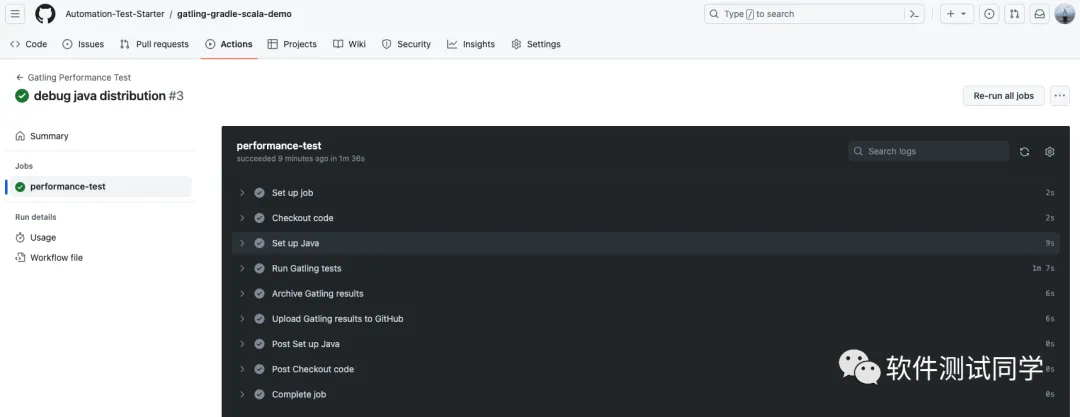
查看测试报告:在 GitHub 中,导航到你的仓库。单击上方的 Actions 选项卡,然后单击左侧的 Performance Test 工作流。你应该会看到工作流正在运行,等待执行完成,就可以查看结果。
Maven + Scala 版本
可参考 demo:https://github.com/Automation-Test-Starter/gatling-maven-scala-demo
-
创建.github/workflows 目录:在你的 GitHub 仓库中,创建一个名为 .github/workflows 的目录。这将是存放 GitHub Actions 工作流程文件的地方。
-
创建工作流程文件:在.github/workflows 目录中创建一个 YAML 格式的工作流程文件,例如 gatling.yml。
-
编辑 gatling.yml 文件:将以下内容复制到文件中。
name: Gatling Performance Teston:push:branches:- mainjobs:performance-test:runs-on: ubuntu-lateststeps:- name: Checkout codeuses: actions/checkout@v2- name: Set up Javauses: actions/setup-java@v2with:java-version: 11distribution: 'adopt'- name: Run Gatling testsrun: |mvn gatling:testenv:GATLING_SIMULATIONS_FOLDER: src/test/scala- name: Archive Gatling resultsuses: actions/upload-artifact@v2with:name: gatling-resultspath: target/gatling- name: Upload Gatling results to GitHubuses: actions/upload-artifact@v2with:name: gatling-resultspath: target/gatling
-
提交代码:将 gatling.yml 文件添加到仓库中并提交。 -
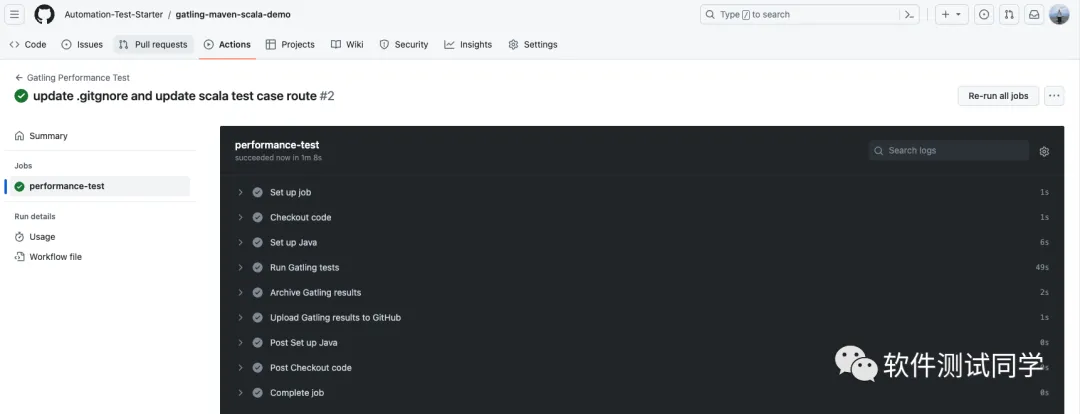
查看测试报告:在 GitHub 中,导航到你的仓库。单击上方的 Actions 选项卡,然后单击左侧的 Performance Test 工作流。你应该会看到工作流正在运行,等待执行完成,就可以查看结果。
参考
-
galting 官网:https://gatling.io/ -
galting 官方文档:https://gatling.io/docs/gatling/ -
galting 官方 github: https://github.com/gatling/
更多信息
-
我的个人博客:https://inaodeng.com -
我的QA自动化测试快速启动项目:https://github.com/Automation-Test-Starter