 夜雨聆风
夜雨聆风


Claude Code源码泄露,纯免费国内保姆级使用教程!!!
2026年3月31日,Claude Code因npm包中残留的source map文件意外泄露了完整的TypeScript源码。1900个文件、51万行代码,让这款顶级AI编程 工具的内部在网络流通。
无需废话,本地全免费跑通 Claude Code 保姆级教程!无需 Claude 账号,免费模型直接用
最近泄露版 Claude Code 火遍技术圈,完整 TUI 界面、多 Agent、代码助手能力拉满,但原版直接跑不通、连不上官方 API、国内还限区域。
这篇手把手教你:Windows 纯本地部署 + OpenRouter 免费模型兜底,不用 WSL、不用付费,一条命令跑起来。
一、项目介绍
本次使用的是 Claude Code修复版,基于泄露源码修复了启动阻塞问题,保留完整官方交互界面,支持:
-
完整 Ink TUI 终端交互(和官方一模一样) -
自定义第三方 API(OpenRouter / DeepSeek / Ollama 等) -
多 Agent、记忆系统、Skills 插件 -
Computer Use 桌面控制 -
无头模式 / 脚本调用
二、前置准备
-
1.安装 Bun(必须)
powershell -c "irm bun.sh/install.ps1 | iex"如果报错请手动下载,并把压缩包里的bun.exe(只有这一个文件)放到C:\Users\你的用户名\.bun\bin中,没有文件夹请手动动创建。注意英文标点
下载地址(GitHub 最新)
- 标准版(现代 CPU)
:https://github.com/oven-sh/bun/releases/latest/download/bun-windows-x64.zip - 兼容版(老 CPU 无 AVX2)
:https://github.com/oven-sh/bun/releases/latest/download/bun-windows-x64-baseline.zip
2.安装 Git for Windows(Windows 运行依赖)
-
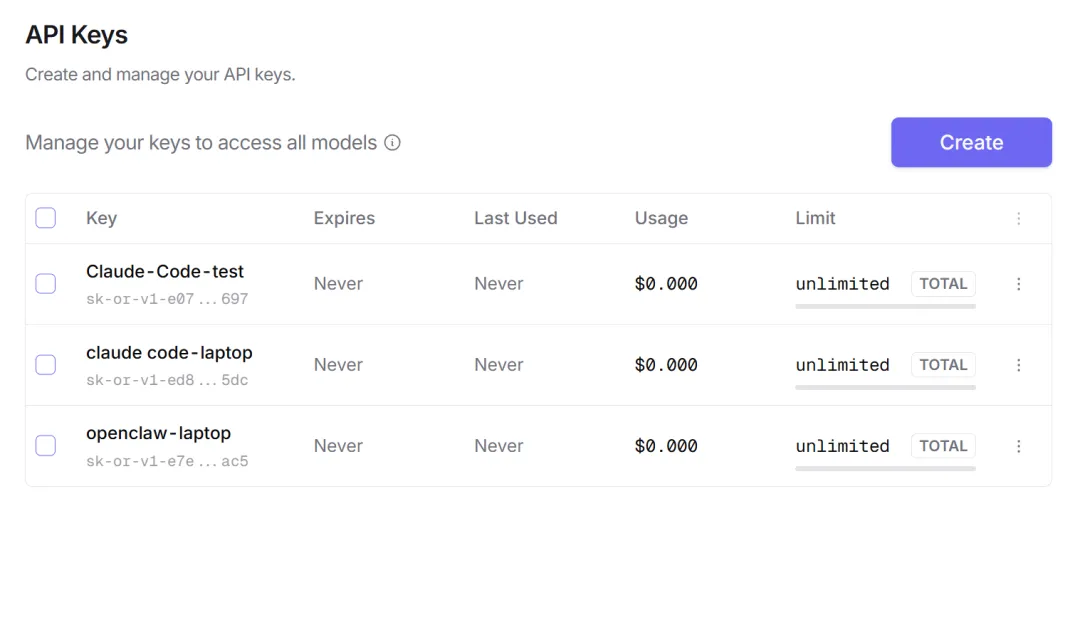
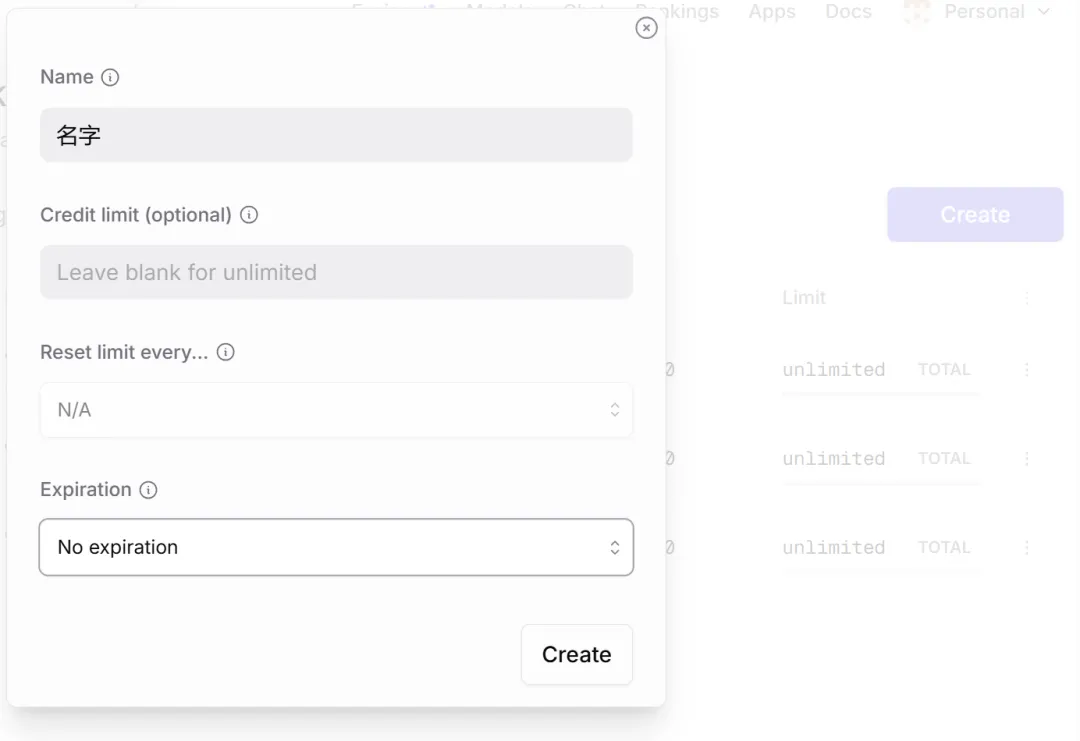
准备一个 OpenRouter 免费 API Key(官网注册即可) -
官网:https://openrouter.ai/ -
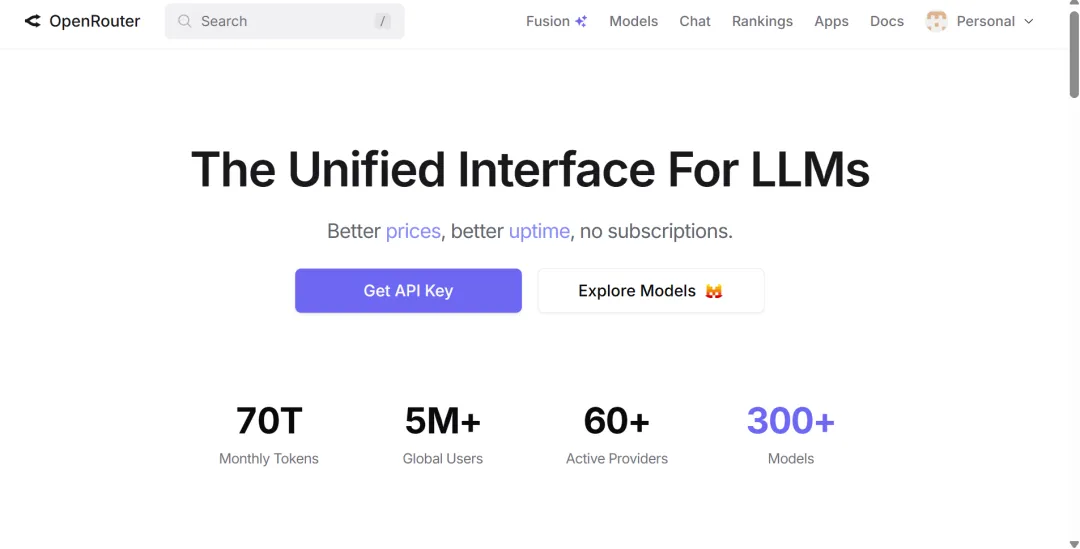
点击Get API Key先注册账号,随后获取API -
三、部署步骤
1. 克隆 / 进入项目
先创建一个文件夹,我我的是在D盘。
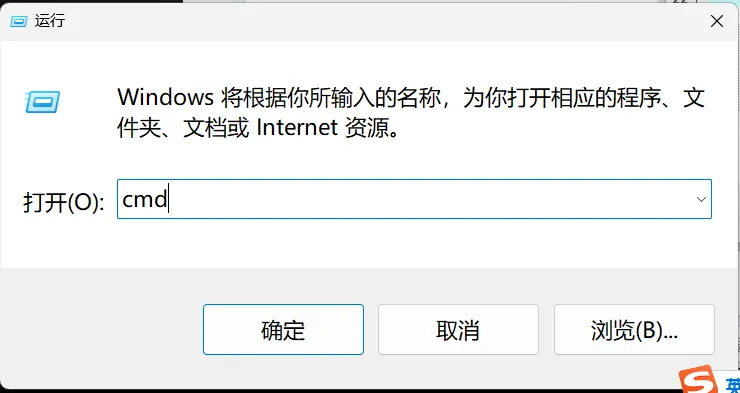
快捷键win+R输入cmd进入命令提示符
输入
cd D:\Claude-Code(按你自己的路径)
克隆项目:
git clone https://gitee.com/wjjleopard/claude-code-haha2. 安装依赖
bun install
3. 关键:配置 .env 代理转发
因为 Claude Code 只认 Anthropic 格式,OpenRouter 是 OpenAI 格式,必须搭一层本地代理。
新建 .env并右键用文本文档打开:
(在Claude-Code文件夹下)
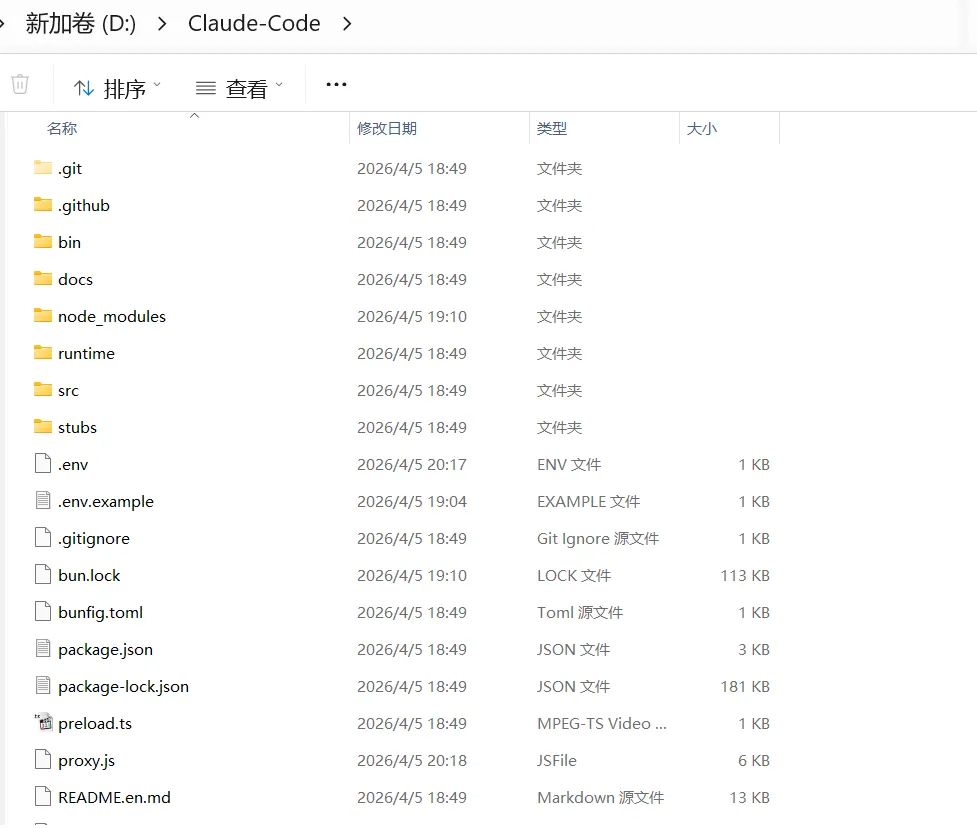
输入
ANTHROPIC_BASE_URL=http://localhost:4000ANTHROPIC_AUTH_TOKEN=dummy-key-for-proxyANTHROPIC_MODEL=openrouter/freeANTHROPIC_DEFAULT_SONNET_MODEL=openrouter/freeANTHROPIC_DEFAULT_HAIKU_MODEL=openrouter/freeANTHROPIC_DEFAULT_OPUS_MODEL=openrouter/freeCLAUDE_CODE_DISABLE_NONESSENTIAL_TRAFFIC=1CLAUDE_CODE_SKIP_AUTH=1DISABLE_TELEMETRY=1API_TIMEOUT_MS=300000
Ctrl+S保存
4. 新建代理文件 proxy.js(也在Claude-Code下)
填写APIKEY
// D:\Claude-Code\proxy.jsconst OPENROUTER_API_KEY = '刚才复制的你的APIkey';const OPENROUTER_BASE_URL = 'https://openrouter.ai/api/v1';// 强制使用免费模型const FREE_MODEL = 'openrouter/free';Bun.serve({port: 4000,async fetch(request) {const url = new URL(request.url);const method = request.method;console.log(`[${newDate().toISOString()}] ${method}${url.pathname}`);// 健康检查端点if (method === 'GET' && url.pathname === '/') {return new Response(JSON.stringify({status: 'ok',message: 'Claude Code Proxy - Free Model Only',model: FREE_MODEL,pricing: '100% Free'}), {status: 200,headers: { 'Content-Type': 'application/json' }});}// 处理 Anthropic Messages APIif (method === 'POST' && (url.pathname === '/v1/messages' || url.pathname === '/messages')) {try {const anthropicBody = await request.json();console.log('收到请求,模型:', anthropicBody.model);console.log('消息数:', anthropicBody.messages?.length || 0);// 转换为 OpenAI Chat Completions 格式,强制使用免费模型const openaiBody = {model: FREE_MODEL, // 强制使用免费模型messages: anthropicBody.messages || [],max_tokens: anthropicBody.max_tokens || 4096,temperature: anthropicBody.temperature || 0.7,top_p: anthropicBody.top_p || 1,stream: false};// 如果有 system prompt,添加到消息开头if (anthropicBody.system) {openaiBody.messages.unshift({role: 'system',content: anthropicBody.system});}// 调用 OpenRouter API(免费模型)const response = await fetch(`${OPENROUTER_BASE_URL}/chat/completions`, {method: 'POST',headers: {'Authorization': `Bearer ${OPENROUTER_API_KEY}`,'Content-Type': 'application/json','HTTP-Referer': 'http://localhost:4000','X-Title': 'Claude Code Proxy (Free)'},body: JSON.stringify(openaiBody)});const data = await response.json();if (!response.ok) {console.error('OpenRouter 错误:', data.error?.message || data);return new Response(JSON.stringify({error: {type: 'api_error',message: data.error?.message || 'OpenRouter API 调用失败'}}), {status: response.status,headers: { 'Content-Type': 'application/json' }});}// 转换回 Anthropic Messages API 格式const anthropicResponse = {id: data.id,type: 'message',role: 'assistant',content: [{type: 'text',text: data.choices[0].message.content}],model: FREE_MODEL,stop_reason: data.choices[0].finish_reason === 'stop' ? 'end_turn' : 'max_tokens',usage: {input_tokens: data.usage.prompt_tokens,output_tokens: data.usage.completion_tokens}};console.log('✅ 响应成功');console.log(` Input tokens: ${data.usage.prompt_tokens}`);console.log(` Output tokens: ${data.usage.completion_tokens}`);console.log(` 总成本: $0 (免费模型)`);return new Response(JSON.stringify(anthropicResponse), {status: 200,headers: {'Content-Type': 'application/json','anthropic-version': '2023-06-01'}});} catch (error) {console.error('代理错误:', error);return new Response(JSON.stringify({error: {type: 'proxy_error',message: error.message}}), {status: 500,headers: { 'Content-Type': 'application/json' }});}}return new Response(JSON.stringify({error: {type: 'not_found',message: `Endpoint ${url.pathname} not found`}}), {status: 404,headers: { 'Content-Type': 'application/json' }});}});console.log('='.repeat(60));console.log('🚀 Claude Code Proxy Server (免费版) 已启动');console.log('='.repeat(60));console.log(`📍 代理地址: http://localhost:4000`);console.log(`🎯 使用模型: ${FREE_MODEL}`);console.log(`💰 价格: 完全免费`);console.log(`🔑 API Key: ${OPENROUTER_API_KEY.substring(0, 15)}...`);console.log('='.repeat(60));console.log('✅ 等待 Claude Code 连接...');console.log('💡 提示: 所有请求将使用免费模型,不会产生任何费用\n');
四、启动!双终端运行
终端 1:启动代理(保持不关闭)
bun run proxy.js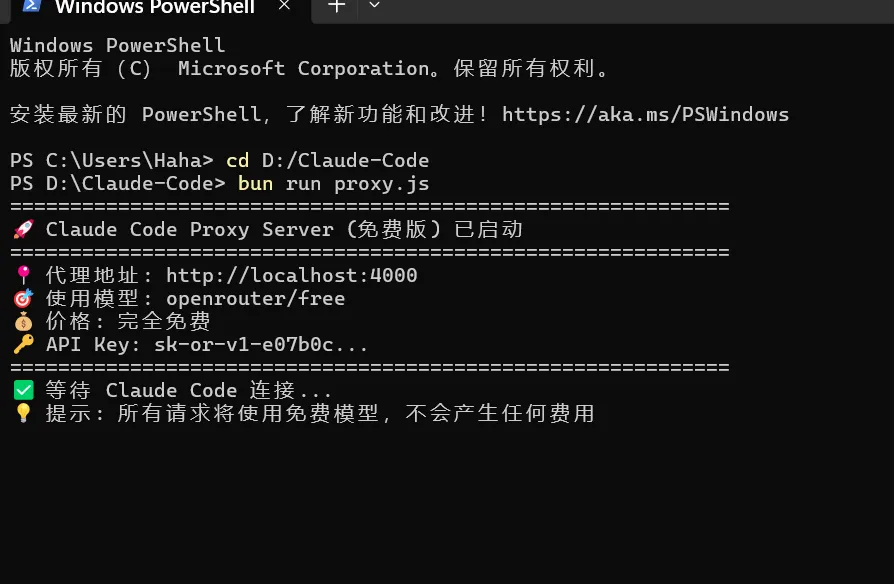
终端 2:启动 Claude Code(在新建一个终端,注意cd一下)
bun --env-file=.env ./src/entrypoints/cli.tsx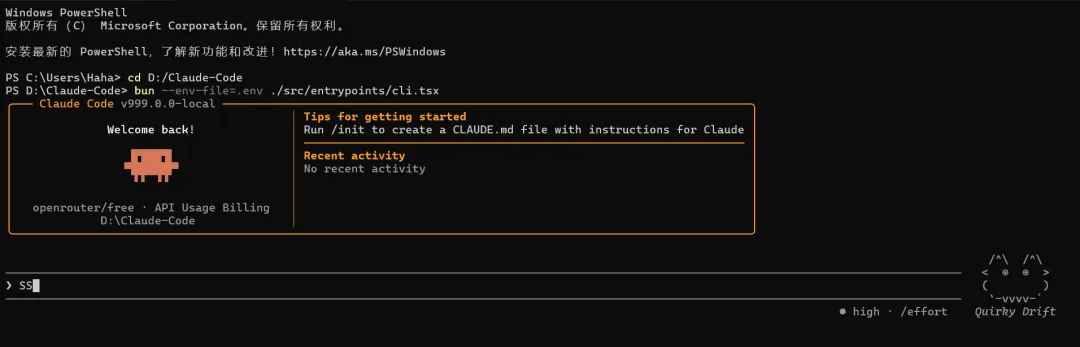
默认配置自己配置一下。出现上图界面即可。确定是免费模型,图形小人下显示openrouter/free.
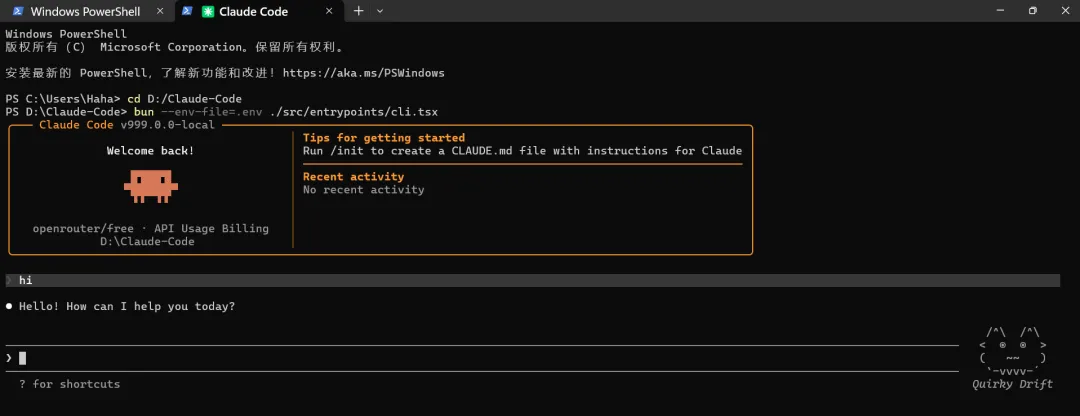
出现官方界面,输入 hi 能正常回复,就成功了!
五、常用指令
/model
切换模型(保持 openrouter/free永久免费)/init
生成任务指令文件 /clear
清空对话 /exit
退出 -
直接输入需求即可让 AI 写代码、改项目、分析结构
六、常见问题
- 连不上 OpenRouter
:检查网络 / 代理 - 模型不可用
:确保用 openrouter/free - 端口被占用
: taskkill掉占用 4000 端口进程 - 响应 null
:免费模型限流,稍等重试即可 -
七、特殊功能 -
1./buddy 还未正式发布的电子宠物,随机设置。输入会触发彩虹特效,并有卡通图案。 -
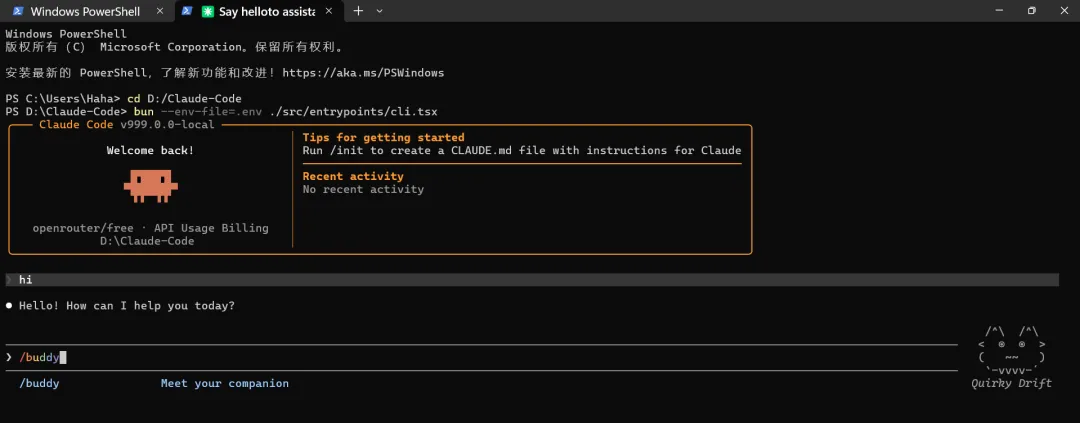
2.ai做梦(生成持久化的上下文文件,方便下次会话快速进入状态。)
-
还有其他的一些直接搬运CSDN的一个表格
-
还有这些隐藏功能
-
KAIROS 24×7 后台常驻 AI 助手,主动监视和行动
ULTRAPLAN 把规划任务交给 Opus 4.6,最多思考30分钟
Daemon 模式 后台会话管理,支持 claude ps、attach、kill
Bridge 模式 手机或 claude.ai 远程控制本地 CLI
语音模式 VOICE_MODE 编译标志,尚未发布
挫败感追踪 遥测系统追踪用户骂人频率
内部代号 项目代号 “Tengu(天狗)”,新模型 “Capybara(卡皮巴拉)”
。。。。。。
-
八、Claude-Code完整文件目录
-
解压 / 克隆后目录如下(关键文件标⭐):
-
Claude-Code/├── .env ⭐ 环境配置(API密钥/代理)├── .env.example 示例配置├── proxy.js ⭐ OpenRouter免费格式转换代理├── proxy-debug.js 调试版代理(没有请忽略)├── src/│ └── entrypoints/│ └── cli.tsx ⭐ 主入口├── bin/│ └── claude-haha├── package.json├── bun.lockb├── README.md└── (近1900个源码文件...)
九、以后如何运行?(目录都是自己的,每个人可能不一样)
cd D:\Claude-Code && bun run proxy.jscd D:\Claude-Code && bun --env-file=.env ./src/entrypoints/cli.tsx十、总结
这套方案完美解决三大痛点:
-
原版无法本地运行 -
官方 API 国内不可用 -
付费模型成本高
全程免费、Windows 原生可跑、界面与官方一致,代码助手直接拉满,适合本地开发、学习研究。
https://blog.csdn.net/qq_43422122/article/details/159725810