 夜雨聆风
夜雨聆风


Qt 菜单插件封装实践:从硬编码 QMenu 到递归生成多级菜单
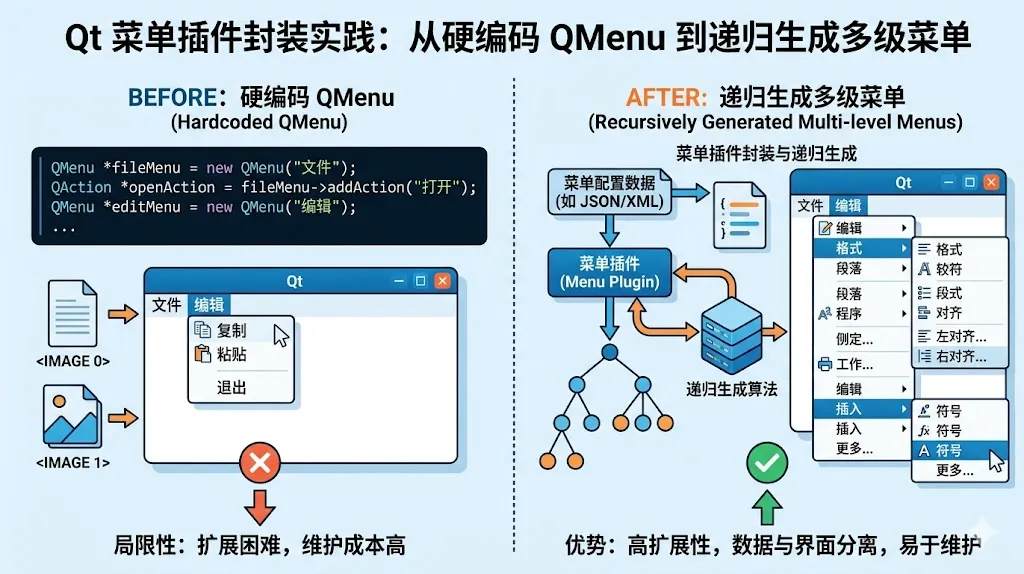
auto *fileMenu = menuBar()->addMenu("文件");fileMenu->addAction("打开");fileMenu->addAction("保存");auto *exportMenu = fileMenu->addMenu("导出");exportMenu->addAction("PNG");exportMenu->addAction("PDF");
但当菜单层级变多、业务菜单需要动态配置、多个窗口都要复用时,这种写法会逐渐变得难维护。
这次我把菜单逻辑抽象成了一个独立插件组件:外部只需要传入菜单树数据,组件内部递归解析并生成 Qt 原生菜单。
目标
这次封装主要解决几个问题:
-
菜单数据不再硬编码在 MainWindow 页面逻辑中。 -
支持任意层级的多级菜单。 -
菜单组件可以在多个窗口中复用。 -
保留 Qt 原生 QMenuBar / QMenu / QAction 的能力。 -
统一处理菜单弹窗的圆角、透明背景和 Windows 阴影问题。
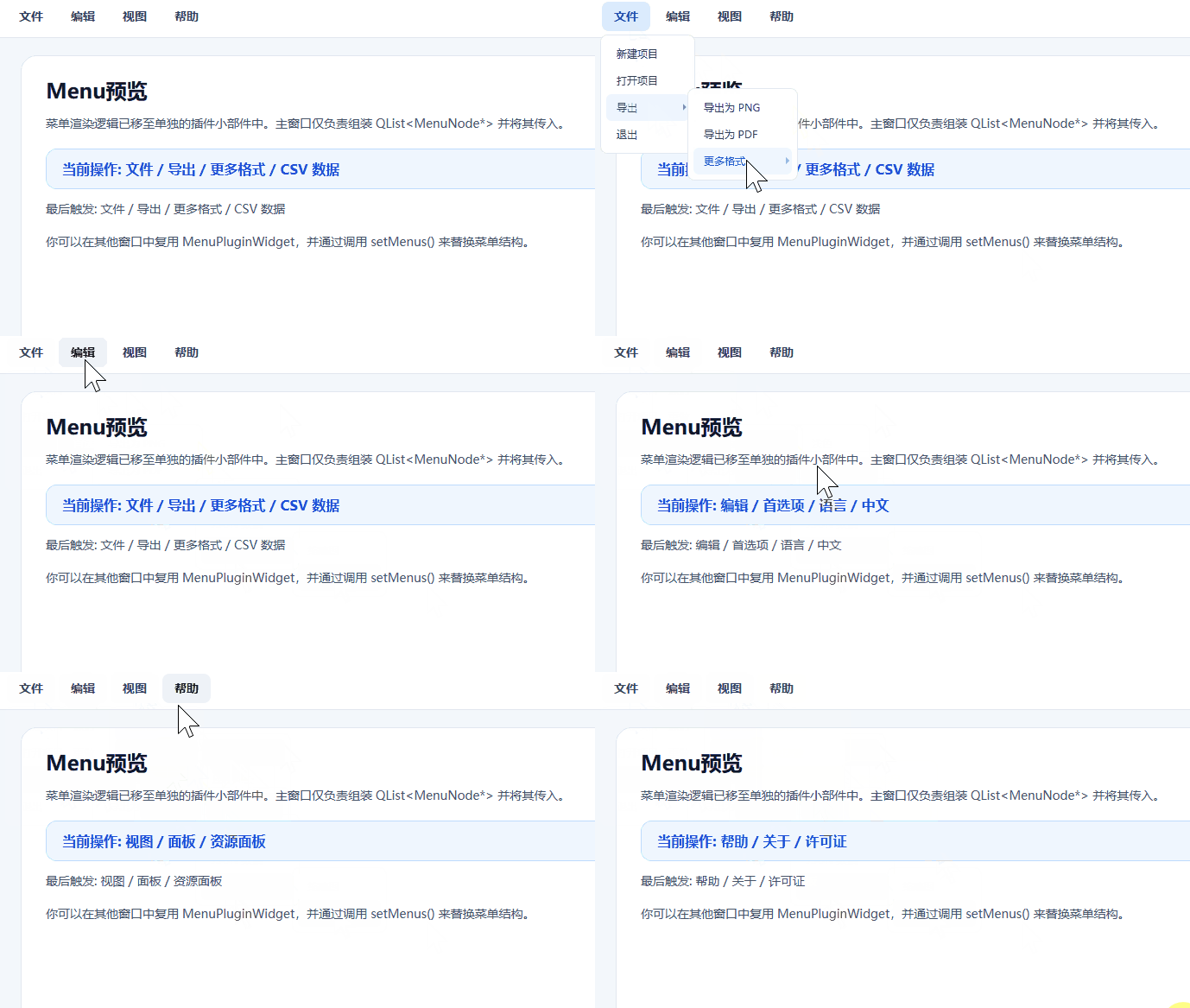
效果如下:
#pragma once#include<QMainWindow>#include"menunode.h"#include"menupluginwidget.h"class QLabel;class MenuPluginWidget;class MainWindow : public QMainWindow{public:explicitMainWindow(QWidget *parent = nullptr);~MainWindow() override;private:voidbuildUi();static QList<MenuDef> createMenus();voidhandleAction(const QString &path);static QString buildStyleSheet();QLabel *m_currentPathLabel;QLabel *m_exampleLabel;MenuPluginWidget *m_menuWidget;QList<MenuDef> m_menus;};
#include"mainwindow.h"#include"menupluginwidget.h"#include<QFrame>#include<QLabel>#include<QStatusBar>#include<QVBoxLayout>#include<QWidget>MainWindow::MainWindow(QWidget *parent): QMainWindow(parent), m_currentPathLabel(nullptr), m_exampleLabel(nullptr), m_menuWidget(nullptr), m_menus(createMenus()){buildUi();setStyleSheet(buildStyleSheet());statusBar()->showMessage(QStringLiteral("Menu plugin is ready"), 3000);}MainWindow::~MainWindow(){}voidMainWindow::buildUi(){resize(1080, 640);setWindowTitle(QStringLiteral("Qt Menu Plugin Demo"));m_menuWidget = new MenuPluginWidget(this);m_menuWidget->setMenus(m_menus);connect(m_menuWidget, &MenuPluginWidget::actionTriggered, this, &MainWindow::handleAction);setMenuWidget(m_menuWidget);auto *centralWidget = new QWidget(this);auto *rootLayout = new QVBoxLayout(centralWidget);rootLayout->setContentsMargins(28, 20, 28, 28);rootLayout->setSpacing(18);auto *contentCard = new QFrame(centralWidget);contentCard->setObjectName(QStringLiteral("contentCard"));auto *contentLayout = new QVBoxLayout(contentCard);contentLayout->setContentsMargins(28, 24, 28, 24);contentLayout->setSpacing(14);auto *sectionTitle = new QLabel(QStringLiteral("Menu预览"), contentCard);sectionTitle->setObjectName(QStringLiteral("sectionTitle"));auto *introLabel = new QLabel(QStringLiteral("菜单渲染逻辑已移至单独的插件小部件中。主窗口仅负责组装 QList<MenuNode*> 并将其传入。"),contentCard);introLabel->setObjectName(QStringLiteral("mutedLabel"));introLabel->setWordWrap(true);m_currentPathLabel = new QLabel(QStringLiteral("当前操作:从插件小部件中选择一个菜单项 "), contentCard);m_currentPathLabel->setObjectName(QStringLiteral("pathLabel"));m_currentPathLabel->setWordWrap(true);m_exampleLabel = new QLabel(QStringLiteral("数据格式:菜单节点 { 文本内容,子节点 }"),contentCard);m_exampleLabel->setObjectName(QStringLiteral("mutedLabel"));m_exampleLabel->setWordWrap(true);auto *notesLabel = new QLabel(QStringLiteral("你可以在其他窗口中复用 MenuPluginWidget,并通过调用 setMenus() 来替换菜单结构。"),contentCard);notesLabel->setObjectName(QStringLiteral("mutedLabel"));notesLabel->setWordWrap(true);contentLayout->addWidget(sectionTitle);contentLayout->addWidget(introLabel);contentLayout->addSpacing(6);contentLayout->addWidget(m_currentPathLabel);contentLayout->addWidget(m_exampleLabel);contentLayout->addSpacing(6);contentLayout->addWidget(notesLabel);contentLayout->addStretch();rootLayout->addWidget(contentCard, 1);setCentralWidget(centralWidget);}//菜单数据QList<MenuDef> MainWindow::createMenus(){QList<MenuDef> menuConfig = {{"文件", {{"新建项目"},{"打开项目"},{"导出", {{"导出为 PNG"},{"导出为 PDF"},{"更多格式", {{"CSV 数据"},{"JSON 数据"},{"图像资源", {{"缩略图"},{"高清原图"}}}}}}},{"退出"}}},{"编辑", {{"撤销"},{"重做"},{"首选项", {{"主题", {{"浅色"},{"深色"}}},{"语言", {{"中文"},{"English"}}}}}}},{"视图", {{"刷新视图"},{"面板", {{"资源面板"},{"属性面板"},{"开发工具", {{"日志控制台"},{"网络请求"}}}}}}},{"帮助", {{"使用文档"},{"快捷键"},{"关于", {{"版本信息"},{"许可证"}}}}}};return menuConfig;}voidMainWindow::handleAction(const QString &path){m_currentPathLabel->setText(QStringLiteral("当前操作: %1").arg(path));m_exampleLabel->setText(QStringLiteral("最后触发: %1").arg(path));statusBar()->showMessage(QStringLiteral("触发: %1").arg(path), 2500);}QString MainWindow::buildStyleSheet(){return QStringLiteral(R"(QMainWindow {background: #f4f7fb;}QFrame#contentCard {background: #ffffff;border: 1px solid #e2e8f0;border-radius: 18px;}QLabel#sectionTitle {color: #0f172a;font-size: 24px;font-weight: 700;}QLabel#pathLabel {color: #1d4ed8;font-size: 16px;font-weight: 600;background: #eff6ff;border: 1px solid #bfdbfe;border-radius: 12px;padding: 12px 14px;}QLabel#mutedLabel {color: #475569;font-size: 14px;}QStatusBar {background: #ffffff;color: #475569;border-top: 1px solid #e2e8f0;})");}
m_menuWidget = new MenuPluginWidget(this);m_menuWidget->setMenus(m_menus);connect(m_menuWidget, &MenuPluginWidget::actionTriggered, this, &MainWindow::handleAction);setMenuWidget(m_menuWidget);
菜单数据结构
#pragma once#include<QList>#include<QString>#include<QtAlgorithms>struct MenuNode{QString text;QList<MenuNode *> children;explicitMenuNode(const QString &menuText = QString(), const QList<MenuNode *> &menuChildren = {}): text(menuText), children(menuChildren){}~MenuNode(){qDeleteAll(children);children.clear();}MenuNode(const MenuNode &) = delete;MenuNode &operator=(const MenuNode &) = delete;};
这个结构只保留两个字段:
QString text;QList<MenuNode *> children;
如果 children 为空,表示这是一个叶子菜单项,对应 QAction。
如果 children 不为空,表示这是一个子菜单,对应 QMenu。
这种结构的好处是非常直观,天然支持多级菜单。
插件组件设计
菜单插件组件继承自 QWidget,内部持有一个 QMenuBar:
menupluginwidget.h
#pragma once#include<QWidget>#include"menunode.h"//定义结构体struct MenuDef {QString key; // 键:菜单名称QList<MenuDef> values = {}; // 值:子菜单列表(默认为空)};class QMenu;class QMenuBar;class MenuPluginWidget : public QWidget{Q_OBJECTpublic:explicitMenuPluginWidget(QWidget *parent = nullptr);~MenuPluginWidget();voidsetMenus(const QList<MenuDef> &menus);QList<MenuNode*> buildMenusFromDef(const QList<MenuDef>& defs);signals:voidactionTriggered(const QString &path);private:QMenu *createMenu(const QString &text, QWidget *parent)const;voidrebuildMenus();voidbuildMenuLevel(QMenu *parentMenu, const QList<MenuNode *> &items, const QStringList &parentPath);QList<MenuNode *> m_menus;QMenuBar *m_menuBar;};
menupluginwidget.cpp
#include"menupluginwidget.h"#include<QAction>#include<QHBoxLayout>#include<QMenu>#include<QMenuBar>#include<QStyleFactory>namespace{QString joinPath(const QStringList &parts){return parts.join(QStringLiteral(" / "));}voidconfigurePopupMenu(QMenu *menu){if (menu == nullptr) {return;}menu->setAttribute(Qt::WA_TranslucentBackground, true);menu->setWindowFlag(Qt::FramelessWindowHint, true);menu->setWindowFlag(Qt::NoDropShadowWindowHint, true);menu->setStyle(QStyleFactory::create("Fusion"));}}MenuPluginWidget::MenuPluginWidget(QWidget *parent): QWidget(parent), m_menuBar(new QMenuBar(this)){//设置样式setStyleSheet(QStringLiteral(R"(QMenuBar {background: #ffffff;border-bottom: 1px solid #e2e8f0;color: #334155;font-size: 14px;font-weight: 600;padding: 4px 10px;}QMenuBar::item {background: transparent;border-radius: 8px;padding: 8px 14px;margin: 4px 2px;}QMenuBar::item:selected {background: #eef2f7;color: #0f172a;}QMenuBar::item:pressed {background: #dbeafe;color: #1d4ed8;}QMenu {background-color: #ffffff;border-radius: 8px;padding: 6px;border: 1px solid #e2e8f0;}QMenu::item {background: transparent;padding: 8px 36px 8px 12px;border-radius: 6px;color: #334155;}QMenu::item:selected {background-color: #eff6ff;color: #1d4ed8;}QMenu::separator {height: 1px;background: #e2e8f0;margin: 6px 10px;}QMenu::right-arrow {width: 10px;height: 10px;})"));auto *layout = new QHBoxLayout(this);layout->setContentsMargins(0, 0, 0, 0);layout->addWidget(m_menuBar);}MenuPluginWidget::~MenuPluginWidget(){qDeleteAll(m_menus);m_menus.clear();}QList<MenuNode*> MenuPluginWidget::buildMenusFromDef(const QList<MenuDef>& defs){QList<MenuNode*> nodes;for (const auto& def : defs) {// 如果 values 不为空,则递归解析子菜单;否则传入空列表QList<MenuNode*> children = def.values.isEmpty() ? QList<MenuNode*>(): buildMenusFromDef(def.values);// 创建当前节点nodes.append(new MenuNode(def.key, children));}return nodes;}voidMenuPluginWidget::setMenus(const QList<MenuDef> &menus){m_menus = buildMenusFromDef(menus);rebuildMenus();}QMenu *MenuPluginWidget::createMenu(const QString &text, QWidget *parent)const{auto *menu = new QMenu(text, parent);configurePopupMenu(menu);return menu;}voidMenuPluginWidget::rebuildMenus(){m_menuBar->clear();for (MenuNode *node : m_menus) {if (node == nullptr || node->text.isEmpty()) {continue;}auto *menu = createMenu(node->text, m_menuBar);m_menuBar->addMenu(menu);buildMenuLevel(menu, node->children, {node->text});}}voidMenuPluginWidget::buildMenuLevel(QMenu *parentMenu, const QList<MenuNode *> &items, const QStringList &parentPath){for (MenuNode *node : items) {if (node == nullptr || node->text.isEmpty()) {continue;}const QStringList currentPath = parentPath + QStringList{node->text};if (!node->children.isEmpty()) {auto *subMenu = createMenu(node->text, parentMenu);parentMenu->addMenu(subMenu);buildMenuLevel(subMenu, node->children, currentPath);continue;}auto *action = parentMenu->addAction(node->text);connect(action, &QAction::triggered, this, [this, currentPath]() {emit actionTriggered(joinPath(currentPath));});}}
对外暴露的接口只有一个
voidsetMenus(const QList<MenuNode *> &menus);外部把菜单树传进来,插件内部负责全部渲染。
处理 Windows 原生阴影
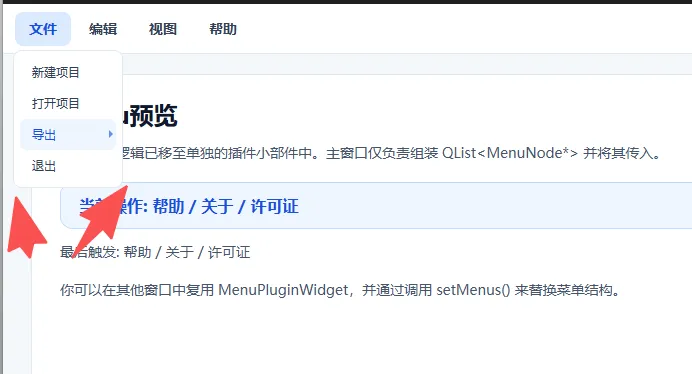
在处理阴影的时候用传统qcss貌似还是无法完美解决圆角带来的阴影问题。
//设置样式setStyleSheet(QStringLiteral(R"(QMenuBar {background: #ffffff;border-bottom: 1px solid #e2e8f0;color: #334155;font-size: 14px;font-weight: 600;padding: 4px 10px;}QMenuBar::item {background: transparent;border-radius: 8px;padding: 8px 14px;、 margin: 4px 2px;}QMenuBar::item:selected {background: #eef2f7;color: #0f172a;}QMenuBar::item:pressed {background: #dbeafe;color: #1d4ed8;}QMenu {background-color: #ffffff;border-radius: 8px;padding: 6px;border: 1px solid #e2e8f0;}QMenu::item {background: transparent;padding: 8px 36px 8px 12px;border-radius: 6px;color: #334155;}QMenu::item:selected {background-color: #eff6ff;color: #1d4ed8;}QMenu::separator {height: 1px;background: #e2e8f0;margin: 6px 10px;}QMenu::right-arrow {width: 10px;height: 10px;})"));
ok,我们还需要添加以下代码方能解决此问题。
//让窗口支持透明背景(RGBA)menu->setAttribute(Qt::WA_TranslucentBackground, true);//去掉窗口的:标题栏 边框 系统按钮(关闭/最小化)menu->setWindowFlag(Qt::FramelessWindowHint, true);//禁止系统自带的窗口阴影menu->setWindowFlag(Qt::NoDropShadowWindowHint, true);//* 强制使用 Qt 自带的 Fusion 风格menu->setStyle(QStyleFactory::create("Fusion"));
效果如图:
总结
这次封装之后,菜单系统变成了三个层次:
MenuNode、MenuDef:菜单数据结构。MenuPluginWidget:递归解析菜单树,生成菜单组件。
最终 MainWindow 只需要准备数据:
QList<MenuDef> menus;然后传给插件:
menuWidget->setMenus(menus);这样的好处是菜单数据、菜单渲染、窗口业务逻辑被拆开了。以后如果菜单来自配置文件、接口、数据库,或者不同窗口有不同菜单,只需要生成不同的 QList<MenuDef>,插件本身不用改。

▼点个「 」赞,是我持续更新的动力 ▼