 夜雨聆风
夜雨聆风


getcensus:用 Stata 下载美国县级 ACS 调查数据
👇 连享会 · 推文导航 |www.lianxh.cn
🍓 连享会 · 2026 AI 实证研究嘉宾:司继春(上海对外经贸大学)时间:2026 年 6 月 27-28 日咨询:王老师 18903405450(微信)

连享会:2026AI-Agent专题 · 线上时间:6月20-21日嘉宾:李学恒 (中山大学)咨询:王老师 18903405450(微信)

A班和B班的区别
-
• 解决的问题不同:A班偏向搭建AI科研协作系统,B班偏向把实证研究做扎实。 -
• 课程定位:A班关注AI科研工作流,包括工作台、文献与知识管理、写作系统和论文修改流程;B班关注实证研究本身,包括数据获取、代码复查、识别策略和理论建模。 -
• 要解决的问题: -
• A班——AI工具很多,但东一榔头西一棒槌,没有稳定系统? -
• B班——数据是否可靠、Stata代码能不能信、识别策略是否站得住、机制解释是否有理论含量?
在A班把工具理顺,在B班把研究做扎实,从而让好的研究想法更高效的产出。
作者: 丁星星 (连享会)邮箱:lianxhcn@163.com[1]
-
• Title: getcensus:用 Stata 下载美国县级 ACS 调查数据 -
• Keywords: getcensus, Stata, ACS, Census API, 美国社区调查, 区域数据, FIPS -
• 提要:getcensus 是一个 Stata 命令,可直接调用美国社区调查 (ACS) 数据,获取县级收入、贫困率、住房负担、医保覆盖等地区变量。本文介绍安装、API key、变量查询、地理层级和可复现代码,适合 DID、政策评估和美国县级面板研究。
相关链接
-
• 项目主页:https://centeronbudget.github.io/getcensus/ -
• GitHub 仓库:https://github.com/CenterOnBudget/getcensus -
• Census API key 申请:https://api.census.gov/data/key_signup.html -
• Census Bureau API 数据集说明:https://www.census.gov/data/developers/data-sets.html -
• ACS 表号说明:https://www.census.gov/programs-surveys/acs/data/data-tables/table-ids-explained.html -
• ACS 表和地理口径变化:https://www.census.gov/programs-surveys/acs/technical-documentation/table-and-geography-changes.html
1. getcensus 简介与安装
做美国经验研究时,很多人都会遇到一个具体问题:论文主数据已经整理好了,但还需要补充县、市、州、都市圈或学区层面的控制变量。例如,中位家庭收入、贫困率、住房负担、医保覆盖、SNAP 参与率、人口年龄结构等。
这些变量通常来自 U.S. Census Bureau 的 American Community Survey (ACS)。传统做法是在 data.census.gov 上手工搜索、下载 CSV、整理变量名,再与论文主数据合并。这个过程不难,但很容易出错:表号记错、变量 ID 选错、年份口径不一致、地理层级不匹配,最后还要反复处理 FIPS 或 GEOID。
getcensus 解决的正是这个问题。它让 Stata 用户可以直接从 Census Bureau API 读取 ACS 数据,并把结果载入 Stata 内存,把繁琐的手工下载流程变成清晰、可复现的代码。
1.1 安装 getcensus
安装命令如下:
* 从 SSC 安装 getcensusssc install getcensusgetcensus 要求 Stata 13.1 或更高版本。如果需要安装 GitHub 上的最新版,可以使用:
* 从 GitHub 安装 getcensusnet install getcensus, /// from("https://raw.githubusercontent.com/CenterOnBudget/getcensus/master/src") /// replace如果已经安装过,可以更新:
* 更新已安装的 getcensusado update getcensus, update1.2 API key 设置
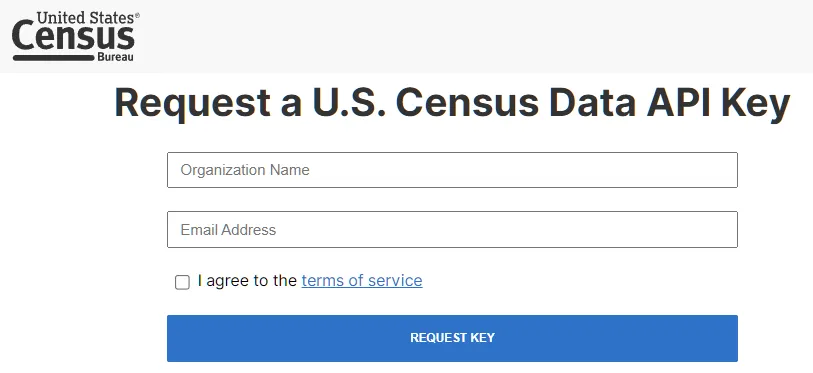
新版 getcensus 必须提供 Census Bureau API key。申请地址为:https://api.census.gov/data/key_signup.html。申请过程很简单 (只需要填写学校名称和邮箱即可),通常几分钟内就能收到 key。
注意:收到邮件后,请务必点击蓝色链接,激活 API:
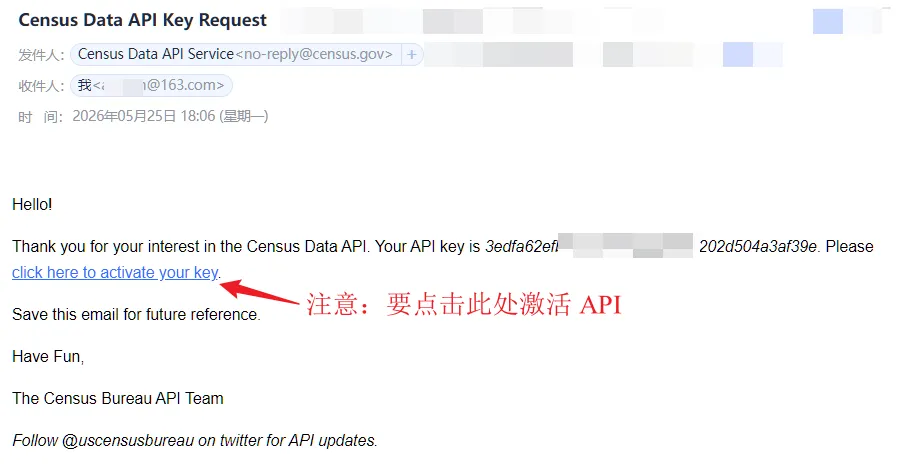
拿到 key 后,可以在命令中使用 key() 选项,也可以把它存为全局宏 $censuskey。更稳妥的做法是写入 profile.do (有关 profile.do 的设定,参见 连享会-profile[2]),这样每次启动 Stata 后都可以自动调用。
-
1. 在 Stata 命令窗口输入如下命令,打开 profile.do 文档: doedit "`c(sysdir_stata)'profile.do" -
2. 在 profile.do 中写入以下内容: * 注意:不要把真实 key 上传到 GitHub 或公开仓库global censuskey "your-api-key-here"
如果只是临时运行,也可以直接在命令中写入 key():
* 临时使用 API keygetcensus B19013_001, /// year(2024) /// geography(state) /// key(your-api-key-here) /// clear注意:公开资料中不建议展示真实 key。API key 虽然不像银行密码那样敏感,但也不应放入 GitHub 仓库、公开 do-file 或推文截图。
2. 基本用法
getcensus 有两类基本用法。第一类是读取 ACS 数据:
getcensus variable_ids_or_table_id_or_keyword [, options]第二类是搜索 API data dictionary:
getcensus catalog [, options]ACS 数据有两个基本概念:
-
• Table ID:表号。例如 S1701是 ACS 中有关贫困状态的表。 -
• Variable ID:变量号。例如 S1701_C02_001表示S1701表中的某个具体统计量。
使用 getcensus 时,用户可以输入三类内容:
-
• 一个或多个变量 ID; -
• 一个表号; -
• 一个内置关键词,例如 pov、medinc、snap、medicaid等。
需要说明的是,指定变量 ID 时不要加后缀 E 或 M。也就是说,应写 B19013_001,不要写 B19013_001E 或 B19013_001M。getcensus 默认同时拉取估计值和 margin of error,会自动处理。
2.1 读取单个变量
* 读取 2024 年州层面的中位家庭收入getcensus B19013_001, /// year(2024) /// geography(state) /// clearyear() 应始终显式写出,不要依赖默认值。年份直接影响数据口径,也是可复现研究的基本要求。严格地说,getcensus 的选项是 years(),year() 是其允许的缩写;在读取单一年份时,帮助文件示例也使用 year(2024)。
如果只需要点估计,不需要 margin of error,可以加入 noerror:
* 只读取点估计,不读取 margin of errorgetcensus B19013_001, /// year(2024) /// geography(state) /// noerror /// clear2.2 读取整张表
如果知道表号,可以一次读取该表下的全部变量:
* 读取 S1701 表中的全部变量getcensus S1701, /// year(2024) /// geography(state) /// clear这种写法适合探索数据结构。正式研究中,建议先用整表了解变量口径,再筛选出论文真正需要的变量 ID。
2.3 读取多个变量
可以一次读取多个变量,但这些变量必须来自相同类型的 ACS 产品。例如,Detailed Table、Subject Table、Data Profile 和 Comparison Profile 不能随意混用。
* 同时读取两个 Subject Table 变量getcensus S1701_C03_001 S2701_C05_001, /// year(2024) /// geography(county) /// statefips(06) /// noerror /// clear这里的 statefips(06) 表示只读取加州,geography(county) 表示读取县级数据。
2.4 读取多个年份
如果要构造地区面板数据,可以一次指定多个年份。getcensus 会把不同年份的数据追加到一起。
* 读取 2022-2024 年州层面中位家庭收入getcensus B19013_001, /// years(2022/2024) /// geography(state) /// noerror /// clear也可以指定不连续年份:
* 读取 2019、2021、2024 年数据getcensus B19013_001, /// years(2019 2021 2024) /// geography(state) /// noerror /// clear做 DID、事件研究或地区面板分析时,这个功能很有用。不过,跨年数据要检查表结构、变量定义和地理边界是否变化,不能机械地把所有年份拼在一起。
2.5 保存和导出数据
getcensus 可以在读取后直接保存为 Stata 数据集。如果指定 exportexcel,还可以同时导出 Excel 文件。
* 读取并保存为 Stata 数据集和 Excel 文件getcensus B19013_001, /// year(2024) /// geography(state) /// saveas("acs_state_income_2024.dta") /// exportexcel /// replace /// clear对于教学示例,这种写法很方便;对于论文项目,我更建议把数据下载、变量清理、变量重命名和数据合并分成几个清楚的代码段,便于后续检查和复现。
2.6 用 catalog 查变量 ID
很多研究者卡住,不是因为不会写 Stata 命令,而是不知道 ACS 中哪个变量对应自己需要的研究概念。getcensus catalog 就是为这个问题设计的。
例如,想找与 poverty 相关的 Subject Table 变量,可以写:
* 搜索 Subject Table 中与 poverty 相关的变量getcensus catalog, /// year(2024) /// product(ST) /// search(poverty) /// cleardescribebrowseproduct() 用来指定 ACS 产品类型:
|
|
|
|---|---|
DT |
|
DP |
|
ST |
|
CP |
|
如果已经知道表号,也可以直接查看某张表下的变量说明:
* 查看 S1701 表中的变量说明getcensus catalog, /// year(2024) /// table(S1701) /// cleardescribebrowsesearch() 支持正则表达式。catalog 的作用是把变量说明直接拉到 Stata 里,减少手工查表的错误,在确认变量口径时尤其有用。
例如,论文中常说「地区贫困率」,但 ACS 里与贫困相关的变量很多,可能按总体人口、儿童、家庭、种族、收入贫困线比率等不同口径定义。此时不能只凭变量名猜含义,而应先用 catalog 看清变量描述和所在表,再决定是否放入回归。
3. 地理层级与地理组成
地理层级是使用 ACS 数据时最容易出错的地方。getcensus 支持 Census Bureau API 中的大部分地理层级,但不是全部。对于跨年数据,ACS 地理边界和表结构也可能变化,构造面板数据时尤其要检查。
3.1 Supported Geographies
下表中,加粗选项表示该地理层级下必须指定;* 表示仅有 5-year estimates;** 表示指定 statefips() 时仅有 5-year estimates;† 表示从 2020 年 5-year estimates 起不可指定,Subject Tables 从 2019 年起不可指定。
|
|
|
|
|---|---|---|
us |
||
region |
||
division |
||
state |
statefips |
|
county |
co |
statefips |
county subdivision
|
cousub |
statefips
countyfips |
tract
|
statefips
countyfips |
|
block group
|
bg |
statefips
countyfips |
place |
statefips |
|
zip code tabulation area
|
zcta |
statefips
|
state legislative district (upper chamber)
|
sldu |
statefips |
state legislative district (lower chamber)
|
sldl |
statefips |
congressional district |
cd |
statefips |
school district (elementary) |
elsd |
statefips |
school district (secondary) |
scsd |
statefips |
school district (unified) |
unsd |
statefips |
public use microdata area |
puma |
statefips |
alaska native regional corporation |
anrc |
statefips |
american indian area/alaska native area/hawaiian home land |
aiannh |
|
metropolitan statistical area/micropolitan statistical area
|
metro |
statefips |
combined statistical area |
cbsa |
|
new england city and town area |
necta |
|
combined new england city and town area |
cnecta |
|
urban area |
urban |
例如,读取 Alabama Autauga County 某个 tract 的 2024 年 5-year 数据:
getcensus B19013_001, /// year(2024) /// sample(5) /// geography(tract) /// statefips(01) /// countyfips(001) /// geoids(020100) /// clear这里要注意一个细节:geoids() 通常只写 GEOID 的最后一段;州代码和县代码分别放在 statefips() 和 countyfips() 中。
例如,一个 tract 的完整 GEOID 可能由州代码、县代码和 tract 代码拼接而成。如果把完整 GEOID 全部写进 geoids(),有时反而会报错。getcensus 的思路是:州这一层交给 statefips(),县这一层交给 countyfips(),最后一段目标地理单元代码才放入 geoids()。
3.2 Geographic components
geocomponents() 用于在某个地理层级下进一步区分城市、农村、都市区内外等。例如,对州层级数据区分都市区内外:
getcensus B19013_001, /// year(2024) /// geography(state) /// geocomponents(H0 C0) /// clear这条命令会为每个州返回两类观测:一类是不在 metropolitan statistical area 中的部分,另一类是在 metropolitan statistical area 中的部分。
Available with geography() us, region, division, or state
|
|
|
|---|---|
00 |
|
H0 |
|
C0 |
|
C1 |
|
C2 |
|
E0 |
|
A0 |
|
E1 |
|
E2 |
|
G0 |
|
01 |
|
43 |
|
Available with geography(us) only
|
|
|
|---|---|
89 |
|
90
|
|
91 |
|
92
|
|
93 |
|
94 |
|
95
|
|
说明:
-
• *:仅有 5-year estimates。 -
• **:无 1-year estimates。
这部分信息在实证研究中很有用。很多研究并不只关心某个州的平均收入,而是关心州内城市和农村地区是否存在差异,或都市区内外的住房负担是否不同。此时,geocomponents() 比单纯使用 geography(state) 更有信息量。
4. Keywords
帮助文件中写道:
Users may use a keyword to retrieve a curated set of variables.
关键词对应的不是单个变量,而是一组经过整理的常用变量。当前可用关键词如下:
|
|
|
|---|---|
pov |
|
povratio |
|
povratio_char |
|
medinc |
|
snap |
|
medicaid |
|
housing_overview |
|
costburden_renters |
|
costburden_owners |
|
tenure_inc |
|
kids_nativity |
|
kids_pov_parents_nativity |
|
例如:
* 读取中位家庭收入相关变量getcensus medinc, /// year(2024) /// geography(state) /// clear有一个细节需要注意:使用 costburden_renters 计算租房者住房负担比例时,分母应从租房者总数 B25070_001 中减去无法计算住房负担的租房者人数 B25070_011。使用 housing_overview 则不需要这一步,该表中租金负担部分的总数 DP04_0136 已经排除了这部分人群。
这个提醒很重要。ACS 表中有些总体数并不是论文直觉中的「全部样本」。如果不检查变量说明,结果可能会出现系统性偏差。
关键词适合快速上手和教学演示。正式论文中,建议最终回到具体变量 ID,并在数据附录中说明变量来源、表号和变量含义。
5. 一个可复现的 Stata 示例
下面给出一个最小可运行示例。目标是读取 2024 年加州县级 ACS 数据,并保存为 Stata 数据集。读者可以把它改造成自己的论文数据准备脚本。
***************************************************** 示例:使用 getcensus 读取 ACS 县级数据* 目的:获取 2024 年加州县级变量,用作论文地区控制变量****************************************************clear allset more off*---------------------------------------------------* Step 1: 设置 API key* 实际使用时,建议把这一行写入 profile.do* 不要把真实 key 上传到 GitHub 或公开仓库*---------------------------------------------------// 如果 API key 已经写入 profile.do, 可以删除此行global censuskey "your-api-key-here"*---------------------------------------------------* Step 2: 搜索 poverty 相关变量* product(ST) 表示在 Subject Table 中搜索*---------------------------------------------------getcensus catalog, /// year(2024) /// product(ST) /// search(poverty) /// cleardescribesave "acs_catalog_st_poverty_2024.dta", replace结果如下:
. describeContains data from ~/AppData/Local/getcensus/acs_dict_2024_1yr_st.dta Observations: 1,475 Variables: 4 25 May 2026 18:39------------------------------------------Variable Storage Display Value name type format label------------------------------------------table_id str8 %9s table_name strL %9s variable_id str8 %9s variable_desc~p strL %9s ------------------------------------------*---------------------------------------------------* Step 3: 读取两个示例变量* geography(county) 表示县级* statefips(06) 表示加州* noerror 表示暂不读取 margin of error,便于课堂演示*---------------------------------------------------getcensus S1701_C03_001 S2701_C05_001, /// year(2024) /// geography(county) /// statefips(06) /// noerror /// cleardescribenotes*---------------------------------------------------* Step 4: 拼接五位县级 FIPS 代码,便于合并主数据* getcensus 返回的 state 和 county 可能是字符串,也可能是数值* 这里写成稳健版本,避免因变量类型不同而出错*---------------------------------------------------capture confirm string variable stateif !_rc { gen str2 state_str = state}else { gen str2 state_str = string(state, "%02.0f")}capture confirm string variable countyif !_rc { gen str3 county_str = county}else { gen str3 county_str = string(county, "%03.0f")}gen str5 county_fips = state_str + county_strlabel var county_fips "Five-digit county FIPS code"*---------------------------------------------------* Step 5: 保存结果*---------------------------------------------------save "acs_ca_county_2024.dta", replace运行后需要重点检查三处:
-
• describe:确认返回了哪些地理标识变量和 ACS 变量; -
• 变量标签和 notes:确认变量口径是否符合论文需要; -
• county_fips:确认是否可以与自己的主数据合并。
如果论文主数据是县级面板,通常可以按 county_fips year 合并;如果是州级面板,可以按州 FIPS 或州名合并;如果是城市、都市圈、国会选区等层级,则需要先统一地理编码口径。
如果希望直接下载并保存多个年份的县级数据,可以把 year(2024) 改成 years(2022/2024),并在后续合并时保留 year 变量:
* 读取 2022-2024 年加州县级数据getcensus S1701_C03_001 S2701_C05_001, /// years(2022/2024) /// geography(county) /// statefips(06) /// noerror /// cleardescribesave "acs_ca_county_2022_2024.dta", replace结果如下:
Contains data from C:\Users\ADMINI~1\AppData\Local\Temp\ST_312c_000001.tmp Observations: 126 Variables: 6 25 May 2026 18:44--------------------------------------------------Variable Storage Display name type format Variable label--------------------------------------------------year int %10.0g state str2 %9s county str3 %9s countyname str34 %34s s1701_c03_001e double %10.0g [[S1701_C03_001Es2701_c05_001e double %10.0g S2701_C05_001E--------------------------------------------------Sorted by: year state county Note: Dataset has changed since last saved.不过,跨年下载只是第一步。正式构造面板数据时,还要确认这些变量在各年是否可得,变量定义是否一致,县级边界是否发生变化。
6. 注意事项与适用场景
getcensus 的语法并不复杂,真正需要谨慎的是数据口径。
6.1 注意事项
-
• 显式写出 year()或years()。年份直接影响数据口径,论文代码不应依赖「最新年份」这种会随时间变化的默认值。 -
• 提前申请 API key。新版中 API key 已经成为必需项。建议把 key 写入本地 profile.do,不要写入公开 do-file。 -
• 区分 1-year、3-year 和 5-year estimates。 sample(1)是默认值;sample(3)只适用于 2007-2013 年;sample(5)覆盖更细的地理层级。1-year estimates 更及时,但只适用于人口较大的地理区域;5-year estimates 覆盖 tract、block group、ZCTA 等更细层级,但代表的是多年累积样本。县级或更细层级的研究,很多变量只能使用 5-year estimates。 -
• 不要混合不同产品类型的变量。Detailed Table、Subject Table、Data Profile、Comparison Profile 属于不同产品类型。一次读取多个变量时,应确认它们属于同一类型。若不确定,先用 getcensus catalog搜索确认。 -
• 跨年数据要检查表和地理边界是否变化。ACS 表结构、变量定义和地理边界并非永远不变。构造面板数据时,应检查变量在各年是否可用、地理单元是否可比,必要时固定在较高层级或使用官方 crosswalk。 -
• 不要忽略 margin of error。ACS 是抽样调查数据,在县、tract、block group 等较小地理层级上,抽样误差可能较大。如果 ACS 变量是核心解释变量或被解释变量,最好保留 margin of error,并在稳健性分析中讨论抽样误差。 -
• 注意 GEOID 的层级。 statefips()是两位州代码,countyfips()是三位县代码,geoids()通常只写目标地理单元 GEOID 的最后一段。把完整 GEOID 直接传给geoids(),有时反而会出错。 -
• 谨慎使用关键词变量集。关键词适合快速获取一组常用变量,但它返回的是「curated set of variables」,不等于已经替研究者完成变量选择。正式论文中应回到具体变量 ID,逐一核对变量定义。 -
• 明确 getcensus和censusapi的关系。getcensus支持多数但不是全部 ACS 地理层级和 geographic components。如果研究需要更完整的 Census API 功能,可以同时了解 Stata 中的censusapi命令。两者不是完全替代关系:getcensus更适合 ACS 常用变量的便捷获取,censusapi更接近通用 API 接口。
6.2 适用场景
对经管类研究者而言,getcensus 最常见的用途不是单独写一篇人口统计论文,而是为主研究补充地区层面的控制变量、分组变量或机制变量。典型场景包括:
-
• 补充公司、银行、学校、医院等微观主体所在地的经济背景变量; -
• 获取县级贫困率、中位收入、住房负担、医保覆盖等社会经济变量; -
• 比较政策评估中处理组和控制组所在地区的基准差异; -
• 为 DID 或事件研究构造地区层面时间变动控制变量; -
• 做城乡、都市区内外、州内不同地区之间的异质性分析; -
• 为美国县级、州级、都市圈层面的面板数据研究补充背景变量。
getcensus 最大的价值不是「多下载几个变量」,而是把 ACS 数据获取过程写进 do-file,让数据来源、年份、地理层级、样本类型和变量 ID 都能被复查和复现。
简言之,getcensus 是 Stata 用户获取 ACS 数据的一个便捷入口。它不能替代研究者对变量口径的判断,但可以把繁琐的手工下载流程变成清晰、可复现的代码流程。
7. 资料来源
-
• getcensus官方主页:https://centeronbudget.github.io/getcensus/ -
• GitHub 仓库:https://github.com/CenterOnBudget/getcensus -
• Census API key 申请:https://api.census.gov/data/key_signup.html -
• Census Bureau API 数据集说明:https://www.census.gov/data/developers/data-sets.html -
• ACS 表号说明:https://www.census.gov/programs-surveys/acs/data/data-tables/table-ids-explained.html -
• ACS 表和地理口径变化:https://www.census.gov/programs-surveys/acs/technical-documentation/table-and-geography-changes.html
getcensus 是 Center on Budget and Policy Priorities 的开源项目,由 Claire Zippel 和 Matt Saenz 开发,Raheem Chaudhry 和 Vincent Palacios 创立。维护者和贡献者信息以项目主页和 GitHub 仓库为准。
8. 相关推文
Note:产生如下推文列表的 Stata 命令为:
lianxh 数据平台 数据共享 数据分享 复现网站 API, md2 nocat安装最新版lianxh命令:ssc install lianxh, replace
-
• 丁晨, 2021, Stata数据处理:通过API获取经济数据[3]. -
• 冷萱, 2021, Stata:我和她离多远?基于百度地图API的地理距离计算[4]. -
• 刘烁华, 2023, 数据共享:土地覆盖数据介绍[5]. -
• 刘烁华, 2023, 数据分享:气候数据哪里找?[6]. -
• 初虹, 2022, Stata:CSMAR数据库API介绍[7]. -
• 吕卓阳, 2025, FinanceDatabase:涵盖30万条全球金融数据的平台[8]. -
• 周豪波, 2020, Python 调用 API 爬取百度 POI 数据小贴士——坐标转换、数据清洗与 ArcGIS 可视化[9]. -
• 周豪波, 2020, Python 调用 API 进行逆地理编码[10]. -
• 孙斯嘉, 2020, Python 调用 API 爬取百度 POI 数据[11]. -
• 孙斯嘉, 2020, Python 调用 API 进行地理编码[12]. -
• 宗景辉, 2025, 数据分享:收藏!宏观经济与金融数据大合集[13]. -
• 张家星, 2025, I4R网站:让复现研究成为社会科学的新常态[14]. -
• 张祖冲, 2025, akshare 与 Python:中国金融数据分析与获取的开源首选工具[15]. -
• 桑倩倩, 2022, 美国社会-人口数据平台-Opportunity-Insights:由Chetty发起[16]. -
• 王舒瑶, 2022, 知乎高赞:各大行业报告的数据都是从哪里找的?[17]. -
• 申维冰, 2022, 金融数据哪里找——Akshare数据平台[18]. -
• 申维冰, 2021, 金融数据哪里找:Tushare数据平台[19]. -
• 肖蕊, 2021, 知乎热议:经济-金融大佬从哪里获得数据?如何处理?[20]. -
• 赵雨鑫, 2023, 数据库分享:年报文本语气数据库[21]. -
• 连享会, 2021, Stata-Python交互-6:调用APIs和JSON数据[22]. -
• 连享会, 2020, 数据分享——EPS数据库-新冠肺炎疫情实时监控平台[23]. -
• 连享会, 2020, 连享会:论文重现复现网站大全[24]. -
• 连小白, 2025, EJD平台:13000篇顶刊论文的复现数据和代码[25]. -
• 连小白, 2026, OpenBB 爆火:用于投喂 AI-Agent 的开源数据平台[26]. -
• 连玉君, 2025, API 是什么?[27].
连享会:2026AI-Agent专题 · 线上时间:6月20-21日嘉宾:李学恒 (中山大学)咨询:王老师 18903405450(微信)

🍓 连享会 · 2026 AI 实证研究嘉宾:司继春(上海对外经贸大学)时间:2026 年 6 月 27-28 日咨询:王老师 18903405450(微信)

New! Stata 搜索神器:
lianxh和songblGIF 动图介绍搜: 推文、数据分享、期刊论文、重现代码 ……👉 安装:. ssc install lianxh. ssc install songbl👉 使用:. lianxh DID 倍分法. songbl all

🍏 关于我们
-
• 连享会 ( www.lianxh.cn,推文列表) 由中山大学连玉君老师团队创办,定期分享实证分析经验。 -
• 直通车: 👉【百度一下:连享会】即可直达连享会主页。亦可进一步添加 「知乎」,「b 站」,「面板数据」,「公开课」 等关键词细化搜索。

引用链接
[1] lianxhcn@163.com: mailto:lianxhcn@163.com[2] 连享会-profile: [3] Stata数据处理:通过API获取经济数据: https://www.lianxh.cn/details/596.html[4] Stata:我和她离多远?基于百度地图API的地理距离计算: https://www.lianxh.cn/details/509.html[5] 数据共享:土地覆盖数据介绍: https://www.lianxh.cn/details/1301.html[6] 数据分享:气候数据哪里找?: https://www.lianxh.cn/details/1149.html[7] Stata:CSMAR数据库API介绍: https://www.lianxh.cn/details/884.html[8] FinanceDatabase:涵盖30万条全球金融数据的平台: https://www.lianxh.cn/details/1696.html[9] Python 调用 API 爬取百度 POI 数据小贴士——坐标转换、数据清洗与 ArcGIS 可视化: https://www.lianxh.cn/details/20.html[10] Python 调用 API 进行逆地理编码: https://www.lianxh.cn/details/59.html[11] Python 调用 API 爬取百度 POI 数据: https://www.lianxh.cn/details/60.html[12] Python 调用 API 进行地理编码: https://www.lianxh.cn/details/62.html[13] 数据分享:收藏!宏观经济与金融数据大合集: https://www.lianxh.cn/details/1720.html[14] I4R网站:让复现研究成为社会科学的新常态: https://www.lianxh.cn/details/1702.html[15] akshare 与 Python:中国金融数据分析与获取的开源首选工具: https://www.lianxh.cn/details/1642.html[16] 美国社会-人口数据平台-Opportunity-Insights:由Chetty发起: https://www.lianxh.cn/details/929.html[17] 知乎高赞:各大行业报告的数据都是从哪里找的?: https://www.lianxh.cn/details/1101.html[18] 金融数据哪里找——Akshare数据平台: https://www.lianxh.cn/details/958.html[19] 金融数据哪里找:Tushare数据平台: https://www.lianxh.cn/details/676.html[20] 知乎热议:经济-金融大佬从哪里获得数据?如何处理?: https://www.lianxh.cn/details/813.html[21] 数据库分享:年报文本语气数据库: https://www.lianxh.cn/details/1225.html[22] Stata-Python交互-6:调用APIs和JSON数据: https://www.lianxh.cn/details/556.html[23] 数据分享——EPS数据库-新冠肺炎疫情实时监控平台: https://www.lianxh.cn/details/23.html[24] 连享会:论文重现复现网站大全: https://www.lianxh.cn/details/232.html[25] EJD平台:13000篇顶刊论文的复现数据和代码: https://www.lianxh.cn/details/1701.html[26] OpenBB 爆火:用于投喂 AI-Agent 的开源数据平台: https://www.lianxh.cn/details/1789.html[27] API 是什么?: https://www.lianxh.cn/details/1686.html