 夜雨聆风
夜雨聆风


OpenClaw 常用命令指南
# 方式一:一键安装脚本(推荐)curl -fsSLhttps://openclaw.ai/install.sh | bash# 方式二:npm全局安装npm install -g openclaw# 方式三:Dockerdocker pull openclaw/openclaw:latestdocker run -d --name openclaw -v ~/.openclaw:/root/.openclawopenclaw/openclaw:latest
# 交互式初始化向导openclaw onboard# 快速配置向导openclaw configure# 验证安装openclaw --versionopenclaw --help# 查看全局帮助openclaw help # 顶级命令列表openclaw helpgateway # gateway 子命令帮助openclaw helpcron # cron 子命令帮助openclaw helpagents # agents 子命令帮助
Gateway 是 OpenClaw 的核心后端 WebSocket 服务(默认ws://127.0.0.1:18789),所有消息、技能调用、渠道路由均经过 Gateway。
openclaw gateway start # 启动网关openclaw gateway stop # 停止网关openclaw gateway restart # 重启网关(配置修改后必须执行)openclaw gateway status # 查看网关状态
# 前台运行(默认)openclaw gateway run# 自定义端口+ 详细日志openclaw gateway--port 18789 --verbose# 绑定模式openclaw gateway--bind loopback # 仅本地访问(最安全,推荐)openclaw gateway--bind lan # 局域网访问openclaw gateway--bind tailnet # Tailscale 网络访问# 认证模式openclaw gateway--auth token --token <t> #Token 认证openclaw gateway--auth password --password <p> #密码认证# 开发模式openclaw gateway--dev# 强制启动(杀掉占用端口的进程)openclaw gateway--force# 日志选项openclaw gateway--ws-log compact # 紧凑WebSocket 日志openclaw gateway--raw-stream # 记录原始模型流事件到 jsonl
openclaw gateway install # 安装为系统服务(开机自启)openclaw gateway uninstall # 移除系统服务openclaw gateway install --port 18789 --token <t> --force
健康检查与诊断
openclaw gateway health # 网关健康检查openclaw gateway health --json # JSON 格式输出openclaw gateway health --verbose # 详细信息openclaw gateway probe # 可达性+ 发现 + 健康 + 状态openclaw gateway discover # 通过Bonjour 发现网关 openclaw gatewaystatus --no-probe # 跳过实时RPC 探测openclaw gateway status --json # 机器可读格式
openclaw gateway call <method> --params '<json>' # 直接 RPC 方法调用openclaw gateway usage-cost # 费用摘要(最近30 天)openclaw gateway usage-cost --days 7 # 最近7 天
Tailscale暴露
openclaw gateway--tailscale serve # Tailscale Serve暴露openclaw gateway--tailscale funnel # TailscaleFunnel 暴露(公网)
openclaw agents list # 列出所有Agentopenclaw agents list --json # JSON 格式openclaw agents list --bindings # 显示每个Agent 的渠道绑定
创建 Agent
# 交互式创建(推荐)openclaw agents addopenclaw agents add[name]# 非交互式创建(自动化部署)openclaw agents addmy-agent \--workspace ~/.openclaw/workspace-my-agent \--model anthropic/claude-sonnet-4-5 \--bind whatsapp:personal \--non-interactive
渠道绑定管理
一个 Agent 可绑定多个渠道,一个渠道可被多个 Agent 共享。openclaw agents bindings # 所有绑定关系openclaw agents bindings --agent <id> # 指定 Agent 的绑定openclaw agents bind --agent <id> --bind <channel[:accountId]> # 添加绑定openclaw agents unbind --agent <id> --bind <channel[:accountId]> # 移除绑定openclaw agents unbind --agent <id> --all # 移除所有绑定
手动运行 Agent
# 发送消息openclaw agent--message "Hello" --to <dest># 指定会话openclaw agent--message "Hello" --session-id <id># 思考级别openclaw agent--message "Hello" --thinking high# 绕过网关(本地直接运行)openclaw agent--message "Hello" --local# 发送并投递到渠道openclaw agent--message "Hello" --channel whatsapp --deliver# JSON 输出openclaw agent--message "Hello" --json
删除 Agent
openclaw agents delete <id> # 删除Agentopenclaw agents delete <id> --force # 强制删除(跳过确认)
会话管理
openclaw sessions # 列出已存储的对话会话Cron 定时任务
在指定时间执行任务——早晨简报、定时提醒、数据检查等。
查看任务
openclaw cron list # 查看所有定时任务openclaw cron list--agent ops # 按Agent 筛选openclaw cron list--json # JSON 输出(含status 字段)openclaw cron status # 任务执行状态概览openclaw cron show<job-id> # 人类可读视图+ 投递路由预览openclaw cron get <job-id> # 原始存储JSON
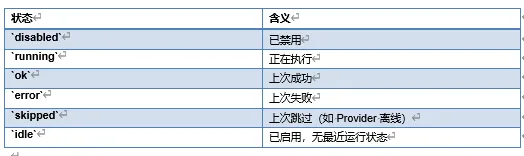
状态字段含义:
创建任务
# Cron 表达式(5字段或6字段+ 可选 --tz)openclaw cron add--name "Morning Briefing" \--cron "0 8 * * *" \--message "Today's weather andschedule" \--channel "telegram:chat:123"# 固定间隔openclaw cron add--name "Check Status" \--every 10m \--message "Check service health"# 一次性/延迟任务(ISO8601 或相对时间)openclaw cron add--name "Reminder" \--at 20m \--message "Remind me in 20 minutes"# 快速创建(别名:create= add)openclaw croncreate "0 7 * * *" "Summarize overnight updates." \--name "Morning brief" --agent ops# 带时区openclaw cron add--name "NYC report" \--cron "0 9 * * 1-5" --tz America/New_York \--message "Workday summary"
会话类型
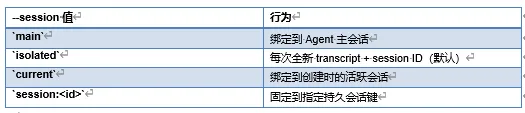
openclaw cron edit <job-id> --session isolatedopenclaw cron edit <job-id> --session "session:daily-brief"
投递模式
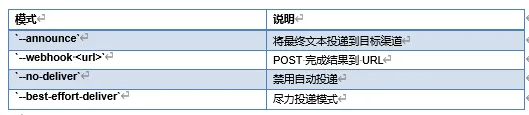
# 投递到Telegram 论坛话题openclaw cron edit<job-id> --announce --channel telegram \--to "-1001234567890" --thread-id 42# 投递到Slackopenclaw cron edit <job-id> --announce --channel slack \--to "channel:C1234567890"# Webhook 投递openclaw croncreate "0 18 * * 1-5" "Summarize today's deploys as JSON."\--name "Deploy digest" --webhook"https://hooks.example.com/openclaw/cron"# 禁用投递openclaw cron edit <job-id> --no-deliver
Shell 命令任务
# 基础Shell 任务openclaw croncreate "*/15 * * * *" \--name "Queue depth probe" \--command "scripts/check-queue.sh"\--command-cwd "/srv/app" \--announce --channel telegram --to"-1001234567890"# 精确argv(不经过 shell 解析)openclaw croncreate "*/30 * * * *" \--name "Position export" \--command-argv'["node","scripts/export-position.mjs"]' \--command-cwd "/srv/app" \--command-env "NODE_ENV=production"\--command-input'{"mode":"summary"}' \--timeout-seconds 120 \--no-output-timeout-seconds 30 \--output-max-bytes 65536 \--webhook"https://hooks.example.com/openclaw/cron"
任务生命周期
openclaw cron edit<id> # 编辑任务openclaw cron rm<id> # 删除任务openclaw cronenable <id> # 启用openclaw crondisable <id> # 禁用openclaw cron run<id> # 手动触发(默认强制运行)openclaw cron run<id> --due # 仅当前到期时运行openclaw cron run<id> --wait --wait-timeout 10m --poll-interval 2s # 阻塞等待完成openclaw cronruns # 查看执行历史openclaw cron runs--id <id> --limit 50openclaw cron runs--id <id> --run-id <run-id> # 检查特定运行
模型与上下文选项
openclaw cron edit<id> --model anthropic/claude-sonnet-4-5 # 模型覆盖openclaw cron edit<id> --clear-model # 移除单任务模型openclaw cron edit<id> --thinking high # 思考级别覆盖openclaw cron edit<id> --light-context # 跳过工作区引导注入openclaw cron edit<id> --tools exec,read # 限制可用工具openclaw cron edit<id> --agent ops # 固定到指定 Agentopenclaw cron edit<id> --clear-agent # 恢复默认 Agent
配置管理
配置文件路径:~/.openclaw/openclaw.json,格式:JSON5(支持//注释和尾随逗号)
配置读写
openclaw config get<path> # 获取配置值openclaw config set<path> <value> # 设置配置值openclaw configunset <path> # 删除配置项openclaw configfile # 打印配置文件路径openclaw config validate # 验证配置schemaopenclaw config validate --json # JSON 格式验证结果openclaw config set <path> <value> --dry-run # 干运行(不写入磁盘)openclaw config patch # JSON mergepatch 方式部分更新
我是大橘子爱学习期待你的分享(❁´◡`❁)