 夜雨聆风
夜雨聆风


【AI-D14】ClaudeCode文档:自定义你的状态行
阅读文章,参考[1]
设置状态行
使用 /statusline 命令
/statusline show model name and context percentage with a progress bar逐步构建状态行
可用数据
示例
上下文窗口使用情况
copy一下
#!/bin/bash# Read all of stdin into a variableinput=$(cat)# Extract fields with jq, "// 0" provides fallback for nullMODEL=$(echo "$input" | jq -r '.model.display_name')PCT=$(echo "$input" | jq -r '.context_window.used_percentage // 0' | cut -d. -f1)# Build progress bar: printf -v creates a run of spaces, then# ${var// /▓} replaces each space with a block characterBAR_WIDTH=10FILLED=$((PCT * BAR_WIDTH / 100))EMPTY=$((BAR_WIDTH - FILLED))BAR=""[ "$FILLED" -gt 0 ] && printf -v FILL "%${FILLED}s" && BAR="${FILL// /▓}"[ "$EMPTY" -gt 0 ] && printf -v PAD "%${EMPTY}s" && BAR="${BAR}${PAD// /░}"echo "[$MODEL] $BAR $PCT%"效果: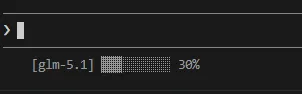
还不错 ^_^
参考
[1]https://code.claude.com/docs/zh-CN/statusline [2]https://code.claude.com/docs/zh-CN/statusline#build-a-status-line-step-by-step [3]https://code.claude.com/docs/zh-CN/statusline#windows-configuration