ARTICLE · 1012596
WinCC 企业微信报警实时推送插件实战 (附:控件)
WinCC 企业微信报警实时推送插件实战 (附:控件)
WinCC 企业微信报警插件实战:从零到部署,完整实现步骤
上期说了为什么报警控件,这期手把手带你做出来。
开始前需要准备的东西
项目类型选择 Windows 窗体控件库 (.NET Framework),不要选 .NET Core/.NET 5+——WinCC V7 不支持。
第一步:建项目
Visual Studio → 新建项目 → Windows 窗体控件库 (.NET Framework)
项目名:
WinCCAlarmPlugin目标框架:
.NET Framework 4.7.2
第二步:装依赖
工具 → NuGet 包管理器 → 程序包管理器控制台:
Install-Package Newtonsoft.Json装完之后,packages 文件夹里会有 Newtonsoft.Json.dll。记下路径,后面部署要用。
第三步:定义数据模型
在项目里新建 AlarmItem.cs:
public enum AlarmLevel { Info = 0, Warning = 1, Critical = 2, Emergency = 3 } public class AlarmItem { public string Key { get; set; } public string TagName { get; set; } public string Message { get; set; } public string Area { get; set; } public DateTime Timestamp { get; set; } public DateTime? RecoveredTime { get; set; } public AlarmLevel Level { get; set; } public bool IsActive { get; set; } public bool IsAcknowledged { get; set; } public int TriggerCount { get; set; } public bool Notified { get; set; } public string StateText { get { if (!IsActive) { return "已恢复"; } return IsAcknowledged ? "已确认" : "待处理"; } } public AlarmItem() { Key = ""; TagName = ""; Message = ""; Area = ""; Timestamp = DateTime.Now; IsActive = true; } }}第四步:写核心报警面板控件
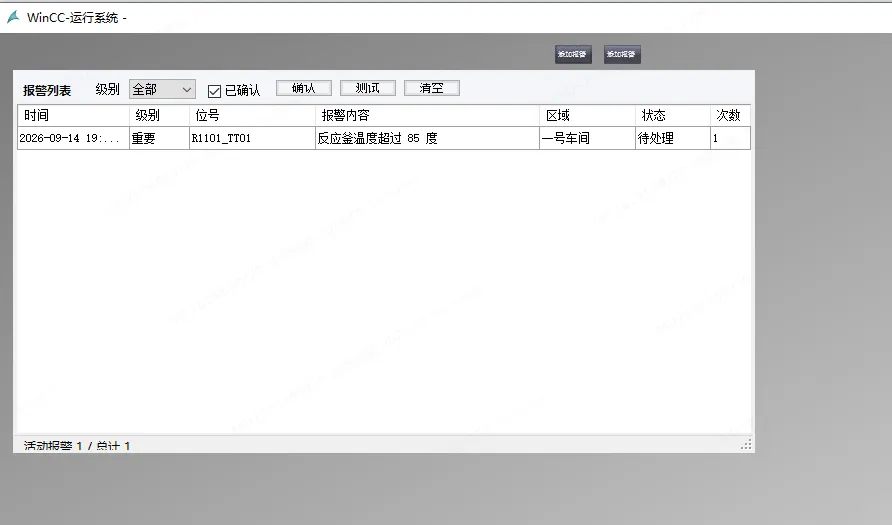
新建 AlarmPanel.cs,这是整个插件的主控件:
partial class AlarmPanel { private System.ComponentModel.IContainer components = null; private System.Windows.Forms.TableLayoutPanel rootLayoutPanel; private System.Windows.Forms.FlowLayoutPanel toolbarFlowLayoutPanel; private System.Windows.Forms.Label titleLabel; private System.Windows.Forms.Label filterLabel; private System.Windows.Forms.ComboBox levelFilterComboBox; private System.Windows.Forms.CheckBox showAcknowledgedCheckBox; private System.Windows.Forms.Button acknowledgeButton; private System.Windows.Forms.Button testButton; private System.Windows.Forms.Button clearButton; private System.Windows.Forms.DataGridView alarmGridView; private System.Windows.Forms.BindingSource alarmBindingSource; private System.Windows.Forms.StatusStrip statusStrip; private System.Windows.Forms.ToolStripStatusLabel activeStatusLabel; private System.Windows.Forms.ToolStripStatusLabel sendStatusLabel; private System.Windows.Forms.ContextMenuStrip alarmContextMenuStrip; private System.Windows.Forms.ToolStripMenuItem acknowledgeToolStrip MenuItem; private System.Windows.Forms.ToolStripMenuItem sendToolStripMenuItem; private System.Windows.Forms.ToolStripMenuItem clearToolStripMenuItem; private System.Windows.Forms.DataGridViewTextBoxColumn timestampColumn; private System.Windows.Forms.DataGridViewTextBoxColumn levelColumn; private System.Windows.Forms.DataGridViewTextBoxColumn tagColumn; private System.Windows.Forms.DataGridViewTextBoxColumn messageColumn; private System.Windows.Forms.DataGridViewTextBoxColumn areaColumn; private System.Windows.Forms.DataGridViewTextBoxColumn stateColumn; private System.Windows.Forms.DataGridViewTextBoxColumn countColumn; protected override void Dispose(bool disposing) { if (disposing && (components != null)) { components.Dispose(); } base.Dispose(disposing); } private void InitializeComponent() { this.components = new System.ComponentModel.Container(); this.rootLayoutPanel = new System.Windows.Forms.TableLayoutPanel(); this.toolbarFlowLayoutPanel = new System.Windows.Forms.FlowLayoutPanel(); this.titleLabel = new System.Windows.Forms.Label(); this.filterLabel = new System.Windows.Forms.Label(); this.levelFilterComboBox = new System.Windows.Forms.ComboBox(); this.showAcknowledgedCheckBox = new System.Windows.Forms.CheckBox(); this.acknowledgeButton = new System.Windows.Forms.Button(); this.testButton = new System.Windows.Forms.Button(); this.clearButton = new System.Windows.Forms.Button(); this.alarmGridView = new System.Windows.Forms.DataGridView(); this.alarmBindingSource = new System.Windows.Forms.BindingSource(this.components); this.statusStrip = new System.Windows.Forms.StatusStrip(); this.activeStatusLabel = new System.Windows.Forms.ToolStripStatusLabel(); this.sendStatusLabel = new System.Windows.Forms.ToolStripStatusLabel(); this.alarmContextMenuStrip = new System.Windows.Forms.ContextMenuStrip(this.components); this.acknowledgeToolStripMenuItem = new System.Windows.Forms.ToolStripMenuItem(); this.sendToolStripMenuItem = new System.Windows.Forms.ToolStripMenuItem(); this.clearToolStripMenuItem = new System.Windows.Forms.ToolStripMenuItem(); this.timestampColumn = new System.Windows.Forms.DataGridViewTextBoxColumn(); this.levelColumn = new System.Windows.Forms.DataGridViewTextBoxColumn(); this.tagColumn = new System.Windows.Forms.DataGridViewTextBoxColumn(); this.messageColumn = new System.Windows.Forms.DataGridViewTextBoxColumn(); this.areaColumn = new System.Windows.Forms.DataGridViewTextBoxColumn(); this.stateColumn = new System.Windows.Forms.DataGridViewTextBoxColumn(); this.countColumn = new System.Windows.Forms.DataGridViewTextBoxColumn(); this.rootLayoutPanel.SuspendLayout(); this.toolbarFlowLayoutPanel.SuspendLayout(); ((System.ComponentModel.ISupportInitialize)(this.alarmGridView)).BeginInit(); ((System.ComponentModel.ISupportInitialize)(this.alarmBindingSource)).BeginInit(); this.statusStrip.SuspendLayout(); this.alarmContextMenuStrip.SuspendLayout(); this.SuspendLayout(); // // rootLayoutPanel // this.rootLayoutPanel.ColumnCount = 1; this.rootLayoutPanel.ColumnStyles.Add(new System.Windows.Forms.ColumnStyle(System.Windows.Forms.SizeType.Percent, 100F)); this.rootLayoutPanel.Controls.Add(this.toolbarFlowLayoutPanel, 0, 0); this.rootLayoutPanel.Controls.Add(this.alarmGridView, 0, 1); this.rootLayoutPanel.Controls.Add(this.statusStrip, 0, 2); this.rootLayoutPanel.Dock = System.Windows.Forms.DockStyle.Fill; this.rootLayoutPanel.Location = new System.Drawing.Point(0, 0); this.rootLayoutPanel.Name = "rootLayoutPanel"; this.rootLayoutPanel.RowCount = 3; this.rootLayoutPanel.RowStyles.Add(new System.Windows.Forms.RowStyle(System.Windows.Forms.SizeType.Absolute, 44F)); this.rootLayoutPanel.RowStyles.Add(new System.Windows.Forms.RowStyle(System.Windows.Forms.SizeType.Percent, 100F)); this.rootLayoutPanel.RowStyles.Add(new System.Windows.Forms.RowStyle(System.Windows.Forms.SizeType.Absolute, 24F)); this.rootLayoutPanel.Size = new System.Drawing.Size(900, 450); this.rootLayoutPanel.TabIndex = 0; // // toolbarFlowLayoutPanel // this.toolbarFlowLayoutPanel.AutoSize = true; this.toolbarFlowLayoutPanel.AutoSizeMode = System.Windows.Forms.AutoSizeMode.GrowAndShrink; this.toolbarFlowLayoutPanel.BackColor = System.Drawing.Color.FromArgb(244, 246, 249); this.toolbarFlowLayoutPanel.Controls.Add(this.titleLabel); this.toolbarFlowLayoutPanel.Controls.Add(this.filterLabel); this.toolbarFlowLayoutPanel.Controls.Add(this.levelFilterComboBox); this.toolbarFlowLayoutPanel.Controls.Add(this.showAcknowledgedCheckBox); this.toolbarFlowLayoutPanel.Controls.Add(this.acknowledgeButton); this.toolbarFlowLayoutPanel.Controls.Add(this.testButton); this.toolbarFlowLayoutPanel.Controls.Add(this.clearButton); this.toolbarFlowLayoutPanel.Dock = System.Windows.Forms.DockStyle.Fill; this.toolbarFlowLayoutPanel.Location = new System.Drawing.Point(1, 1); this.toolbarFlowLayoutPanel.Margin = new System.Windows.Forms.Padding(0); this.toolbarFlowLayoutPanel.Name = "toolbarFlowLayoutPanel"; this.toolbarFlowLayoutPanel.Padding = new System.Windows.Forms.Padding(8, 8, 8, 8); this.toolbarFlowLayoutPanel.Size = new System.Drawing.Size(898, 42); this.toolbarFlowLayoutPanel.TabIndex = 0; this.toolbarFlowLayoutPanel.WrapContents = false; // // titleLabel // this.titleLabel.AutoSize = true; this.titleLabel.Font = new System.Drawing.Font("Microsoft YaHei UI", 9F, System.Drawing.FontStyle.Bold); this.titleLabel.Name = "titleLabel"; this.titleLabel.Margin = new System.Windows.Forms.Padding(0, 8, 12, 0); this.titleLabel.Text = "报警列表"; // // filterLabel // this.filterLabel.AutoSize = true; this.filterLabel.Margin = new System.Windows.Forms.Padding(10, 9, 4, 0); this.filterLabel.Name = "filterLabel"; this.filterLabel.Text = "级别"; // // levelFilterComboBox // this.levelFilterComboBox.DropDownStyle = System.Windows.Forms.ComboBoxStyle.DropDownList; this.levelFilterComboBox.DropDownWidth = 78; this.levelFilterComboBox.FormattingEnabled = true; this.levelFilterComboBox.Items.AddRange(new object[] { "全部", "信息", "警告", "重要", "紧急"}); this.levelFilterComboBox.Location = new System.Drawing.Point(92, 9); this.levelFilterComboBox.Name = "levelFilterComboBox"; this.levelFilterComboBox.Size = new System.Drawing.Size(78, 23); this.levelFilterComboBox.TabIndex = 0; // // showAcknowledgedCheckBox // this.showAcknowledgedCheckBox.AutoSize = true; this.showAcknowledgedCheckBox.Checked = true; this.showAcknowledgedCheckBox.CheckState = System.Windows.Forms.CheckState.Checked; this.showAcknowledgedCheckBox.Margin = new System.Windows.Forms.Padding(10, 9, 4, 0); this.showAcknowledgedCheckBox.Name = "showAcknowledgedCheckBox"; this.showAcknowledgedCheckBox.Text = "已确认"; // // acknowledgeButton // this.acknowledgeButton.Location = new System.Drawing.Point(251, 8); this.acknowledgeButton.Name = "acknowledgeButton"; this.acknowledgeButton.Size = new System.Drawing.Size(68, 26); this.acknowledgeButton.TabIndex = 1; this.acknowledgeButton.Text = "确认"; // // testButton // this.testButton.Location = new System.Drawing.Point(323, 8); this.testButton.Name = "testButton"; this.testButton.Size = new System.Drawing.Size(68, 26); this.testButton.TabIndex = 2; this.testButton.Text = "测试"; // // clearButton // this.clearButton.Location = new System.Drawing.Point(395, 8); this.clearButton.Name = "clearButton"; this.clearButton.Size = new System.Drawing.Size(68, 26); this.clearButton.TabIndex = 3; this.clearButton.Text = "清空"; // // alarmGridView // this.alarmGridView.AllowUserToAddRows = false; this.alarmGridView.AllowUserToDeleteRows = false; this.alarmGridView.AllowUserToResizeRows = false; this.alarmGridView.AutoGenerateColumns = false; this.alarmGridView.AutoSizeColumnsMode = System.Windows.Forms.DataGridViewAutoSizeColumnsMode.Fill; this.alarmGridView.BackgroundColor = System.Drawing.Color.White; this.alarmGridView.BorderStyle = System.Windows.Forms.BorderStyle.None; this.alarmGridView.ColumnHeadersHeightSizeMode = System.Windows.Forms.DataGridViewColumnHeadersHeightSizeMode.DisableResizing; this.alarmGridView.Columns.AddRange(new System.Windows.Forms.DataGridViewColumn[] { this.timestampColumn, this.levelColumn, this.tagColumn, this.messageColumn, this.areaColumn, this.stateColumn, this.countColumn}); this.alarmGridView.ContextMenuStrip = this.alarmContextMenuStrip; this.alarmGridView.DataSource = this.alarmBindingSource; this.alarmGridView.Dock = System.Windows.Forms.DockStyle.Fill; this.alarmGridView.Location = new System.Drawing.Point(1, 45); this.alarmGridView.MultiSelect = false; this.alarmGridView.Name = "alarmGridView"; this.alarmGridView.ReadOnly = true; this.alarmGridView.RowHeadersVisible = false; this.alarmGridView.RowHeadersWidth = 34; this.alarmGridView.SelectionMode = System.Windows.Forms.DataGridViewSelectionMode.FullRowSelect; this.alarmGridView.Size = new System.Drawing.Size(898, 379); this.alarmGridView.TabIndex = 1; this.alarmGridView.CellDoubleClick += new System.Windows.Forms.DataGridViewCellEventHandler(this.AlarmGridView_CellDoubleClick); this.alarmGridView.CellFormatting += new System.Windows.Forms.DataGridViewCellFormattingEventHandler(this.AlarmGridView_CellFormatting); this.alarmGridView.SelectionChanged += new System.EventHandler(this.AlarmGridView_SelectionChanged); // // statusStrip // this.statusStrip.Items.AddRange(new System.Windows.Forms.ToolStripItem[] { this.activeStatusLabel, this.sendStatusLabel}); this.statusStrip.Location = new System.Drawing.Point(1, 424); this.statusStrip.Name = "statusStrip"; this.statusStrip.Padding = new System.Windows.Forms.Padding(8, 0, 12, 0); this.statusStrip.Size = new System.Drawing.Size(898, 25); this.statusStrip.TabIndex = 2; // // activeStatusLabel // this.activeStatusLabel.Name = "activeStatusLabel"; this.activeStatusLabel.Size = new System.Drawing.Size(140, 20); this.activeStatusLabel.Text = "活动报警:0"; this.activeStatusLabel.Spring = false; // // sendStatusLabel // this.sendStatusLabel.Name = "sendStatusLabel"; this.sendStatusLabel.Size = new System.Drawing.Size(0, 20); this.sendStatusLabel.Spring = true; this.sendStatusLabel.TextAlign = System.Drawing.ContentAlignment.MiddleRight; this.sendStatusLabel.Text = ""; // // alarmContextMenuStrip // this.alarmContextMenuStrip.Items.AddRange(new System.Windows.Forms.ToolStripItem[] { this.acknowledgeToolStripMenuItem, this.sendToolStripMenuItem, this.clearToolStripMenuItem}); this.alarmContextMenuStrip.Name = "alarmContextMenuStrip"; this.alarmContextMenuStrip.Size = new System.Drawing.Size(137, 70); // // acknowledgeToolStripMenuItem // this.acknowledgeToolStripMenuItem.Name = "acknowledgeToolStripMenuItem"; this.acknowledgeToolStripMenuItem.Size = new System.Drawing.Size(136, 22); this.acknowledgeToolStripMenuItem.Text = "确认"; this.acknowledgeToolStripMenuItem.Click += new System.EventHandler(this.AcknowledgeButton_Click); // // sendToolStripMenuItem // this.sendToolStripMenuItem.Name = "sendToolStripMenuItem"; this.sendToolStripMenuItem.Size = new System.Drawing.Size(136, 22); this.sendToolStripMenuItem.Text = "重新推送"; this.sendToolStripMenuItem.Click += new System.EventHandler(this.SendToolStripMenuItem_Click); // // clearToolStripMenuItem // this.clearToolStripMenuItem.Name = "clearToolStripMenuItem"; this.clearToolStripMenuItem.Size = new System.Drawing.Size(136, 22); this.clearToolStripMenuItem.Text = "清空"; this.clearToolStripMenuItem.Click += new System.EventHandler(this.ClearButton_Click); // // columns // this.timestampColumn.DataPropertyName = "Timestamp"; this.timestampColumn.FillWeight = 15F; this.timestampColumn.HeaderText = "时间"; this.timestampColumn.Name = "timestampColumn"; this.timestampColumn.ReadOnly = true; this.timestampColumn.DefaultCellStyle.Format = "yyyy-MM-dd HH:mm:ss"; this.levelColumn.DataPropertyName = "Level"; this.levelColumn.FillWeight = 8F; this.levelColumn.HeaderText = "级别"; this.levelColumn.Name = "levelColumn"; this.levelColumn.ReadOnly = true; this.tagColumn.DataPropertyName = "TagName"; this.tagColumn.FillWeight = 17F; this.tagColumn.HeaderText = "位号"; this.tagColumn.Name = "tagColumn"; this.tagColumn.ReadOnly = true; this.messageColumn.DataPropertyName = "Message"; this.messageColumn.FillWeight = 30F; this.messageColumn.HeaderText = "报警内容"; this.messageColumn.Name = "messageColumn"; this.messageColumn.ReadOnly = true; this.areaColumn.DataPropertyName = "Area"; this.areaColumn.FillWeight = 13F; this.areaColumn.HeaderText = "区域"; this.areaColumn.Name = "areaColumn"; this.areaColumn.ReadOnly = true; this.stateColumn.DataPropertyName = "StateText"; this.stateColumn.FillWeight = 10F; this.stateColumn.HeaderText = "状态"; this.stateColumn.Name = "stateColumn"; this.stateColumn.ReadOnly = true; this.countColumn.DataPropertyName = "TriggerCount"; this.countColumn.FillWeight = 7F; this.countColumn.HeaderText = "次数"; this.countColumn.Name = "countColumn"; this.countColumn.ReadOnly = true; // // AlarmPanel // this.AutoScaleDimensions = new System.Drawing.SizeF(7F, 17F); this.AutoScaleMode = System.Windows.Forms.AutoScaleMode.Font; this.Controls.Add(this.rootLayoutPanel); this.Name = "AlarmPanel"; this.Padding = new System.Windows.Forms.Padding(1); this.Size = new System.Drawing.Size(900, 450); this.rootLayoutPanel.ResumeLayout(false); this.toolbarFlowLayoutPanel.ResumeLayout(false); this.toolbarFlowLayoutPanel.PerformLayout(); ((System.ComponentModel.ISupportInitialize)(this.alarmGridView)).EndInit(); ((System.ComponentModel.ISupportInitialize)(this.alarmBindingSource)).EndInit(); this.statusStrip.ResumeLayout(false); this.statusStrip.PerformLayout(); this.alarmContextMenuStrip.ResumeLayout(false); this.ResumeLayout(false); } }}第五步:注册到 WinCC
编译项目,生成 WinCCAlarm.dll用管理员身份打开 cmd,执行:
C:\Windows\Microsoft.NET\Framework64\v4.0.30319\RegAsm.exe ^ WinCCAlarm.dll /codebase /tlb:WinCCAlarm.tlb把 Newtonsoft.Json.dll复制到 WinCC 的bin目录(通常是C:\Program Files (x86)\SIEMENS\WinCC\bin)打开 WinCC Graphics Designer → 工具箱右键 → 添加/删除项 → .NET Framework 组件 → 浏览选中 WinCCAlarm.dll控件出现在工具箱中,拖到画面上即可
第六步:在 WinCC 中调用
在全局脚本中,当 WinCC 报警触发时调用插件:
如果需要手动触发(比如测试),可以直接在按钮点击事件里:
Dim panelSet panel = ScreenItems("AM1")Call panel.AddAlarmEx("R1101_TT01", "反应釜温度超过 85 度", 2, "一号车间", True)第七步:配置企业微信机器人
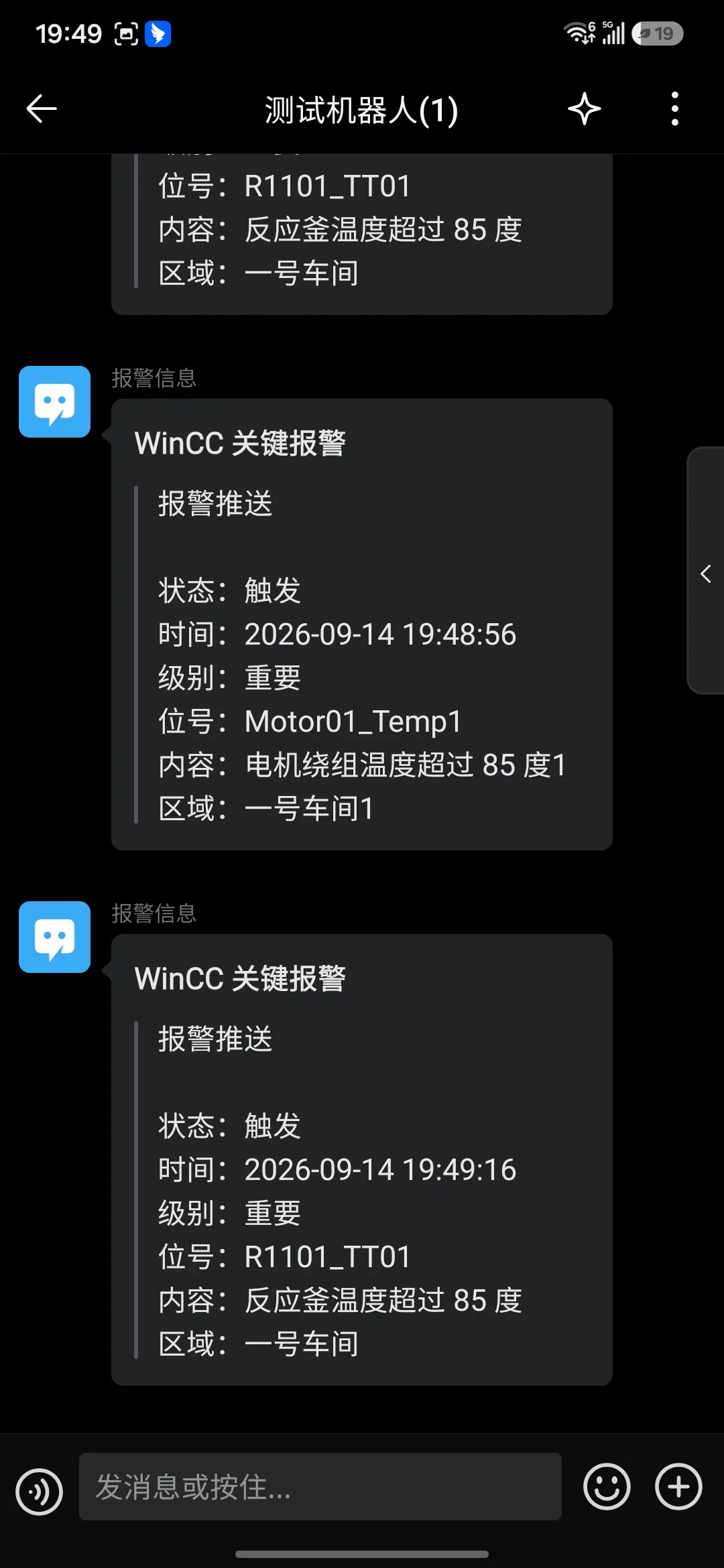
登录企业微信 → 创建一个内部群 群设置 → 消息推送 → 添加 复制 Webhook 地址(形如 https://qyapi.weixin.qq.com/cgi-bin/webhook/send?key=xxxxxx)在 WinCC 画面初始化时传入:
alarmPanel.SetWeChatWebhook("https://qyapi.weixin.qq.com/cgi-bin/webhook/send?key=你的key");alarmPanel.EnableWeChat(true);实例图片