ARTICLE · 1460067
【C语言开源库】 一个只有500行代码的开源http服务器:Tinyhttpd学习
项目搬运,带中文翻译:GitHub - nengm/Tinyhttpd: 一次对Tinyhttpd完整的精读,注释,测试 · GitHub
在嵌入式中,我们HTTP服务器用得最多的就是boa还有就是goahead,但是这2个代码量比较大,而Tinyhttpd只有几百行,比较有助于我们学习。
一、编译及运行
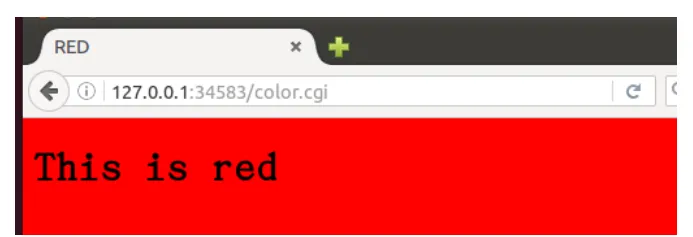
直接make之后,所以假如html有执行权限先把它去除了,chmod 600 index.html color.cgi、date.cgi必须要有执行权限。这样之后还是不行,需要这样cgi脚本第一行 改为 “#!/usr/bin/perl”,就能够运行了。

运行之后http服务器的端口为41163
效果大概是这样,截图不是我本机的
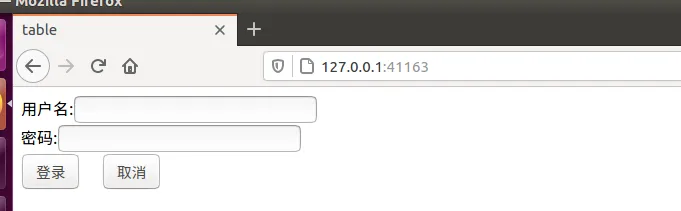
不过我更改了html为这样,本来是把js单独反在另外一个文件,不知道为什么,没有反应,最后只能把js的函数,一起写在了html中。
<html><head><title>table</title><metacharset="UTF-8"><!--这是描述 js中的函数来之哪个js文件--><scripttype="text/javascript">function my_button(arg){if(arg == 1)//登录 admin 123456{//获取网页上输入框的用户名密码var usr = document.getElementById("usr").value;//重点var pwd = document.getElementById("pwd").value;if(usr=="admin" && pwd=="123456"){window.location.href="http://www.baidu.com";}else{alert("用户名或密码错误请重新输入");//清空用户名密码的输入框document.getElementById("usr").value="";document.getElementById("pwd").value="";}}else if(arg == 0)//取消{//清空用户名密码的输入框document.getElementById("usr").value="";document.getElementById("pwd").value="";}}</script></head><body><!--id是唯一 标记一个个标签-->用户名:<inputtype="text"id="usr"><br>密码:<inputtype="password"id="pwd"><br><inputtype="button"value="登录"onclick="my_button(1);"> <inputtype="button"value="取消"onclick="my_button(0);"></body></html>
效果是这样的,来源于我本机:
二、代码解析
阅读这个程序需要UNIX编程的基础,包括socket相关API,多线程(虽然在Linux下没有用到),多进程和进程间通信,HTTP基础知识。
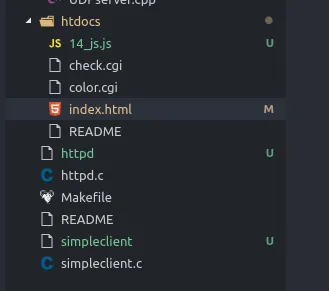
首先将源码下载到本地,我们可以看到项目代码主要有主程序 httpd.c ,一个客户端 simpleclient.c ,htdocs 下则是一个界面和一些 cgi 脚本,其它则是一些编译相关的文件,项目结构如下图:
主文件开头有两段注释,一个是程序注解,包括了程序的简单描述,作者,时间,(好家伙,1999年,远古大神),还有地址,这也是国际惯例了,大家在编码的时候也要良好的习惯。
一般情况下, 在代码层面 main 函数就是程序运行的起点,因此我们阅读源码也从 main 函数入手,我们可以在 main 函数开头看到,作者创建了一些局部变量用来保存后续创建网络连接的参数与一个客户端变量,在后续的代码中,我们可以更直观的看到这些参数的作用。
从main函数开始
intmain(void){//在Ubuntu 16.04下运行,进行了修改int server_sock = -1;//服务器端fdu_short port = 0;//端口号,传0则随机绑定端口int client_sock = -1;//客户端fdstruct sockaddr_in client_name;socklen_t client_name_len = sizeof(client_name);pthread_t newthread;server_sock = startup(&port);//返回一个服务器端socketprintf("httpd running on port %d\n", port);//不断循环接收连接请求while (1){client_sock = accept(server_sock,(struct sockaddr *)&client_name,&client_name_len);//阻塞等待连接if (client_sock == -1)error_die("accept");//本来是线程版本,按照Linux注释修改,现在同一时间只能处理一个请求//应该是1999年Linux还没有线程的功能吧。。。//accept_request(&client_sock);//http请求的具体处理函数if (pthread_create(&newthread , NULL, accept_request, (void *)&client_sock) != 0)perror("pthread_create");}//关闭服务器端socketclose(server_sock);return(0);}
可以看到整个过程非常简单,注释写的很清楚了。
用startup(&port);函数初始化后,处理的逻辑由accept_request(&client_sock);实现。
初始化函数startup(&port)
这个函数开启一个socket来监听特定端口的网络请求,输入参数为0时则动态生成一个端口号,否则用输入的参数做端口号。
intstartup(u_short *port){int httpd = 0;int on = 1;struct sockaddr_in name;httpd = socket(PF_INET, SOCK_STREAM, 0);//创建socketif (httpd == -1)//创建失败处理error_die("socket");memset(&name, 0, sizeof(name));//清空name内容//设置name的参数,分别代表采用IPv4、端口的主机字节序转网络字节序、地址name.sin_family = AF_INET;name.sin_port = htons(*port);name.sin_addr.s_addr = htonl(INADDR_ANY);//设置端口复用if ((setsockopt(httpd, SOL_SOCKET, SO_REUSEADDR, &on, sizeof(on))) < 0){error_die("setsockopt failed");}//绑定socket和地址if (bind(httpd, (struct sockaddr *)&name, sizeof(name)) < 0)error_die("bind");//如果传入参数为0,则动态分配端口,获取端口号并传出if (*port == 0) /* if dynamically allocating a port */{socklen_t namelen = sizeof(name);if (getsockname(httpd, (struct sockaddr *)&name, &namelen) == -1)error_die("getsockname");*port = ntohs(name.sin_port);}//设置同时监听的上限数为5if (listen(httpd, 5) < 0)error_die("listen");return(httpd);}
初始化函数也很基础,过一遍APUE基本都一样,唯一不同就是这个端口分配的骚操作,注意一下就行。接下来就是重头戏accept_request(&client_sock);,我这个计网0基础的不得不补习了半天HTTP才勉强整明白。
请求处理accept_request(&client_sock)
由于该函数较长,分为多个部分分析。
请求行的处理
函数一开始对socket发送过来的数据按照HTTP协议进行了处理,HTTP请求格式如下:
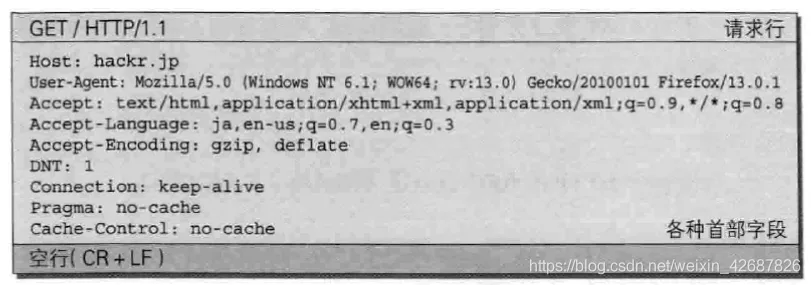
先对第一行请求行进行处理。
void *accept_request(void* tclient){int client = *(int *)tclient;char buf[1024];size_t numchars;char method[255];char url[255];char path[512];size_t i, j;struct stat st;int cgi = 0; /* becomes true if server decides this is a CGI* program */char *query_string = NULL;numchars = get_line(client, buf, sizeof(buf));//读取一行http请求到buf中// 根据HTTP协议,第一行为请求行包括:// 方法+URI+HTTP版本 例如:GET / HTTP/1.1// 即目前的buf中包括以上三部分i = 0; j = 0;// ①先获取方法到method中// isspace判断字符是否为空字符,为空则返回truewhile (!ISspace(buf[i]) && (i < sizeof(method) - 1)){method[i] = buf[i];i++;j++;}method[i] = '\0';// 由于httpd比较简单,仅支持GET方法或POST方法// strcasecmp忽略大小写比较字符串是否相等,如果都不等,则返回错误信息给客户端if (strcasecmp(method, "GET") && strcasecmp(method, "POST")){unimplemented(client);return NULL;}// 如果是POST方法则将cgi置1if (strcasecmp(method, "POST") == 0)cgi = 1;// ②获取url到变量url中i = 0;while (ISspace(buf[j]) && (j < numchars))j++;while (!ISspace(buf[j]) && (i < sizeof(url) - 1) && (j < numchars)){url[i] = buf[j];i++; j++;}url[i] = '\0';// 如果是GET方法,可能含有查询请求,将url问号后的内容保存到query_string中if (strcasecmp(method, "GET") == 0){query_string = url;// 一直把url中问号之前内容遍历while ((*query_string != '?') && (*query_string != '\0'))query_string++;if (*query_string == '?'){// 如果有问号则表示需要执行cgi文件,将其变量置1cgi = 1;// 将url分割成两段,现在url表示问号前的部分,query_string表示问号后的部分*query_string = '\0';query_string++;}}
此时分割出了请求方法和URL,为了避免文章过长,其中用到的int get_line(int sock, char *buf, int size)等函数可以下载我注释的完整文件来看。
本地处理
// 将url添加到htdocs后并赋值给pathsprintf(path, "htdocs%s", url);// 如果是以/结尾则把主页加在后面if (path[strlen(path) - 1] == '/')strcat(path, "index.html");// 在系统中查看path路径文件是否存在if (stat(path, &st) == -1) {// 如果不存在则将本次HTTP请求的后续内容全部丢弃while ((numchars > 0) && strcmp("\n", buf)) /* read & discard headers */numchars = get_line(client, buf, sizeof(buf));not_found(client);}else{// 如果存在该文件,判断其是否为路径名,是则在后面加上/index.htmlif ((st.st_mode & S_IFMT) == S_IFDIR)strcat(path, "/index.html");// 只要该文件具有可执行权限,则将cgi置1if ((st.st_mode & S_IXUSR) ||(st.st_mode & S_IXGRP) ||(st.st_mode & S_IXOTH) )cgi = 1;// 根据cgi的值执行不同的处理函数if (!cgi)serve_file(client, path);elseexecute_cgi(client, path, method, query_string);}close(client);
其中stat函数原型为:int stat(const char *file_name, struct stat *buf ),它通过文件名filename获取文件信息,并保存在buf所指的结构体stat中。
如果没有执行cgi请求,则执行serve_file
voidserve_file(int client, constchar *filename){FILE *resource = NULL;int numchars = 1;char buf[1024];// 保证能进入下面的whilebuf[0] = 'A'; buf[1] = '\0';// 将本次Http请求后续内容丢弃while ((numchars > 0) && strcmp("\n", buf)) /* read & discard headers */numchars = get_line(client, buf, sizeof(buf));// 打开文件resource = fopen(filename, "r");// 文件不存在则返回一个404状态码if (resource == NULL)not_found(client);else{// 返回200成功状态码headers(client, filename);// 将文件内容发送到clientcat(client, resource);}fclose(resource);}
如果cgi被置1,则执行execute_cgi
voidexecute_cgi(int client, constchar *path,const char *method, const char *query_string){char buf[1024];int cgi_output[2];int cgi_input[2];pid_t pid;int status;int i;char c;int numchars = 1;int content_length = -1;// 保证能进入while循环buf[0] = 'A'; buf[1] = '\0';// 如果是GET,丢弃本次HTTP请求后续内容if (strcasecmp(method, "GET") == 0)while ((numchars > 0) && strcmp("\n", buf)) /* read & discard headers */numchars = get_line(client, buf, sizeof(buf));else if (strcasecmp(method, "POST") == 0) /*POST*/{numchars = get_line(client, buf, sizeof(buf));//这个循环的目的是读出指示 body 长度大小的参数,并记录 body 的长度大小。其余的 header 里面的参数一律忽略//注意这里只读完 header 的内容,body 的内容没有读while ((numchars > 0) && strcmp("\n", buf)){buf[15] = '\0';if (strcasecmp(buf, "Content-Length:") == 0)content_length = atoi(&(buf[16]));numchars = get_line(client, buf, sizeof(buf));}// 如果header没有表示body的长度则返回错误if (content_length == -1) {bad_request(client);return;}}else/*HEAD or other*/{}sprintf(buf, "HTTP/1.0 200 OK\r\n");send(client, buf, strlen(buf), 0);// 创建两个管道if (pipe(cgi_output) < 0) {cannot_execute(client);return;}if (pipe(cgi_input) < 0) {cannot_execute(client);return;}// 创建子进程if ( (pid = fork()) < 0 ) {cannot_execute(client);return;}// 子进程用于处理CGI脚本if (pid == 0) /* child: CGI script */{char meth_env[255];char query_env[255];char length_env[255];//将子进程的输出由标准输出重定向到 cgi_output 的管道写端上dup2(cgi_output[1], STDOUT);//将子进程的输入由标准输入重定向到 cgi_input 的管道读端上dup2(cgi_input[0], STDIN);// 关闭cgi_ouput的读和cgi_input的写close(cgi_output[0]);close(cgi_input[1]);//构造一个环境变量sprintf(meth_env, "REQUEST_METHOD=%s", method);putenv(meth_env);//将这个环境变量加进子进程的运行环境中//根据http 请求的不同方法,构造并存储不同的环境变量if (strcasecmp(method, "GET") == 0) {sprintf(query_env, "QUERY_STRING=%s", query_string);putenv(query_env);}else { /* POST */sprintf(length_env, "CONTENT_LENGTH=%d", content_length);putenv(length_env);}// 执行path处的脚本execl(path, path, NULL);exit(0);} else { /* parent */// 关闭cgi_ouput的写和cgi_input的读close(cgi_output[1]);close(cgi_input[0]);//如果是 POST 方法的话就继续读 body 的内容,并写到 cgi_input 管道里让子进程去读if (strcasecmp(method, "POST") == 0)for (i = 0; i < content_length; i++) {recv(client, &c, 1, 0);write(cgi_input[1], &c, 1);}//然后从 cgi_output 管道中读子进程的输出,并发送到客户端去while (read(cgi_output[0], &c, 1) > 0)send(client, &c, 1, 0);//关闭管道close(cgi_output[0]);close(cgi_input[1]);//等待子进程的退出waitpid(pid, &status, 0);}}
这里创建了一个子进程用来执行cgi程序,而父进程用于和socket通信,那么子进程执行的结果就需要发送给父进程,再由父进程发给socket,这里使用的是pipe管道,过程如下图。注意:这里的cgi_input和cgi_output是两个管道的名字,其in和out是对于子进程来说的,即cgi_input管道用于向子进程写入数据、cgi_output用于由子进程向父进程发出数据:
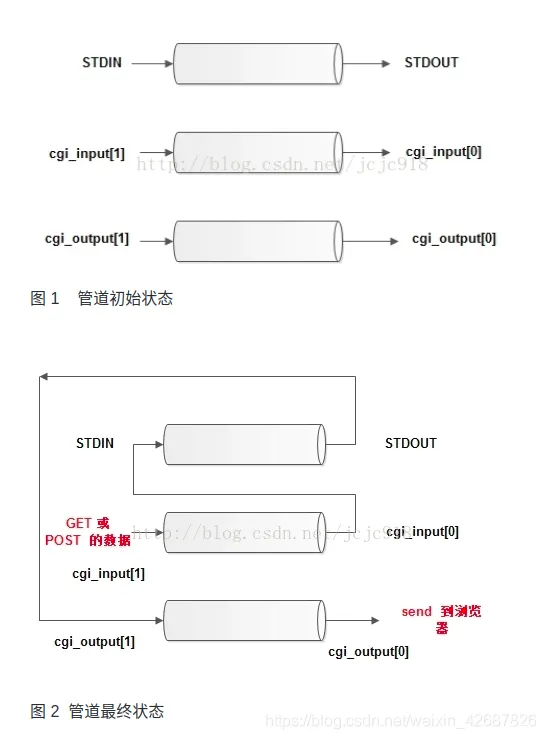
那么数据会先由父进程从socket读入,再发送到cgi_input的写端,子进程读入后给cgi处理,然后通过cgi_output发给父进程,父进程再发给socket。