 夜雨聆风
夜雨聆风——从零搭建手机远程摄像头监控系统全记录
一、这个系统能做什么?
想象这样一个场景:你不在家,担心家里有没有陌生人进入;或者你出门办事,想看看电脑桌上的快递到了没有——只需要拿起手机,打开微信,发一条消息:
"开启监控"
几秒钟后,微信会自动回复你一条链接,点开它,手机屏幕上就出现了你电脑摄像头拍到的实时画面,同时你自己的手机摄像头也可以反过来给电脑看——就像微信视频通话一样,随时随地,双向实时。
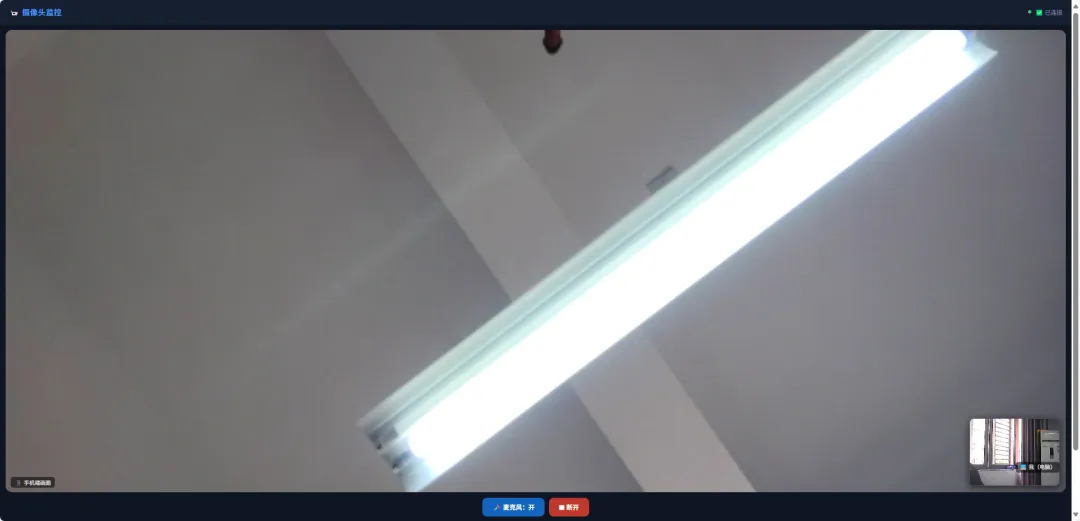
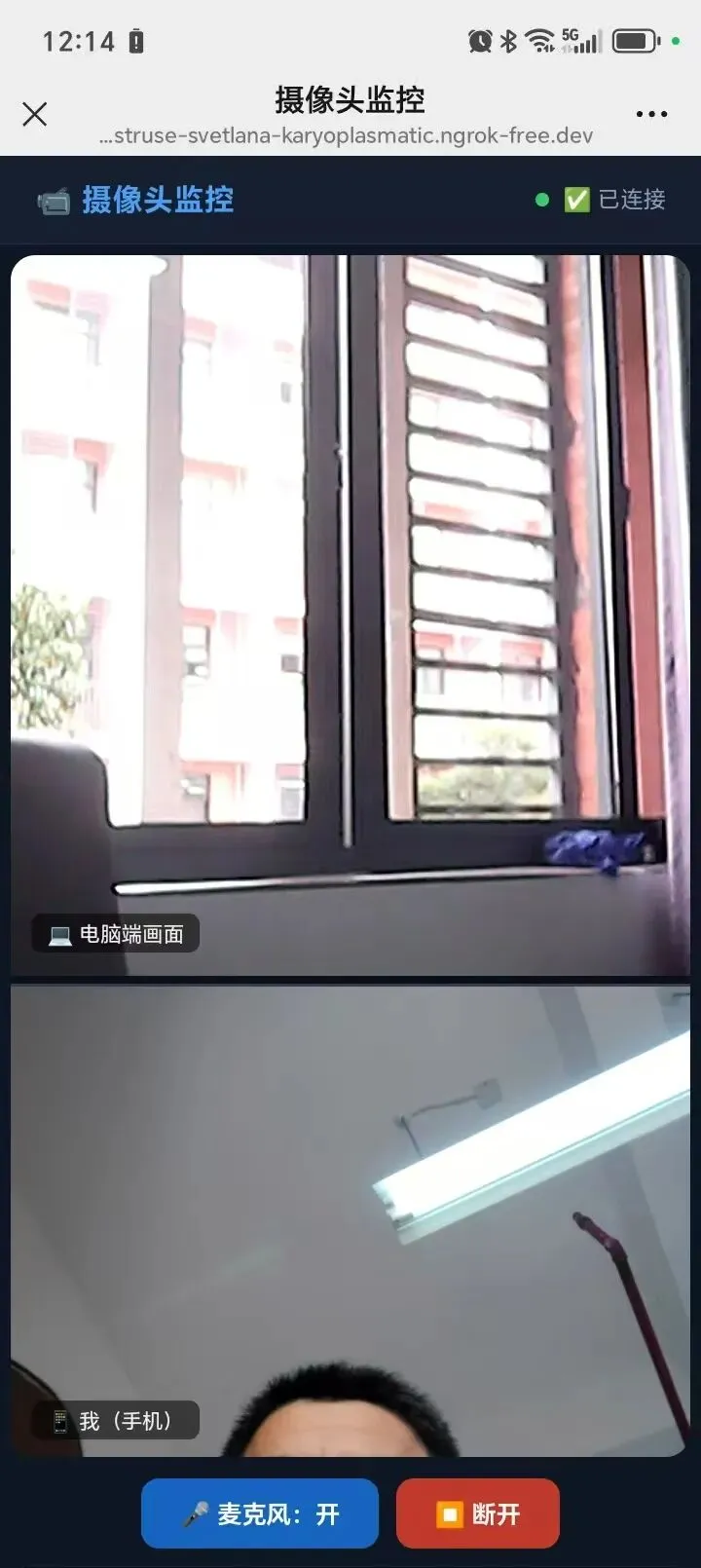
整个系统由三部分组成:
•电脑端:负责采集摄像头画面,开启本地视频服务
•ngrok(内网穿透):把你家里的电脑暴露到互联网上,让手机能访问到
•微信ClawBot(AI机器人):接收你的指令,自动帮你把上面两件事都做好
二、整体架构——信号是怎么走的?
很多人觉得这很神奇,其实原理并不复杂。下面用一张"信号流向图"来解释:
你的手机微信 |发送"开启监控" v WorkBuddy AI(电脑上的智能助手) |执行PowerShell命令 v Node.js 服务(端口3000)+ ngrok(内网穿透) |WebRTC 建立点对点视频连接 v 手机浏览器打开链接 → 双向实时视频通话 |
💡 什么是 WebRTC? WebRTC(网页实时通信)是一种内置在浏览器里的技术,不需要安装任何 App,打开网页就能进行视频通话。微信视频、Google Meet、腾讯会议底层都在用类似的技术。 |
💡 什么是ngrok(内网穿透)? 你家里的电脑有一个局域网 IP(比如 192.168.1.100),外面的手机是访问不到的。ngrok就像一个"中转站",帮你把电脑的 3000 端口映射到一个公网地址(固定域名),手机通过这个公网地址就能访问到你家的电脑。 |
三、从零到完成——完整配置过程
第一步:搭建本地视频服务
首先需要在电脑上建一个"本地网页服务器",它的职责是:
•接收电脑摄像头的画面
•通过 WebRTC 协议,将画面实时传输给连接进来的手机
•同时接收手机摄像头画面,显示在电脑屏幕上
用到的技术:Node.js(一种运行 JavaScript 的服务端环境)+ WebSocket(实时双向通信协议)
核心文件:server.js—— 信令服务器,负责让电脑和手机"找到对方"
前端文件:public/index.html—— 视频通话界面,手机和电脑都访问这个页面
📌 什么是信令服务器? 视频通话需要两个设备先"打招呼",交换各自的网络地址和视频参数,这个"打招呼"的过程就叫信令。server.js 里用 WebSocket 实现了这个过程,相当于两人通话前先互换了联系方式。 |
第二步:注册ngrok获取固定域名
ngrok是一个内网穿透工具。免费账号可以绑定一个固定子域名,这意味着你的手机端链接永远不会变,可以保存到书签里反复用。
操作步骤:
1.访问 ngrok.com 注册免费账号
2.下载 ngrok.exe 安装到电脑
3.在控制台申请一个固定子域名,格式类似:你的名字.ngrok-free.app
4.运行命令:ngrok http --url=你的域名 3000—— 这样手机就能通过这个域名访问电脑的 3000 端口
🔒 安全提示 ngrok免费版的固定域名是公开可访问的,建议在视频通话页面加上密码保护,或者用完就关闭ngrok进程,避免被陌生人访问。 |
第三步:设计视频通话界面
前端界面(index.html)需要支持两种角色、两种屏幕方向,共四种布局模式:
电脑端 | 手机端 | |
任意方向 | 画中画(大屏看手机,右下角小窗看自己) | |
竖屏 | 上下分屏 上60%电脑画面,下40%自己 | |
横屏 | 画中画 全屏对方+右下角可拖动小窗 |
第四步:配置 URL 参数自动进入角色
原来的设计是打开网页后要手动点"电脑端"或"手机端"按钮,很麻烦。改进方案:在网址后面加一个参数,页面自动识别并跳转。
•http://localhost:3000?role=camera→打开即自动进入电脑端(无需点击)
•https://你的域名.ngrok-free.app?role=viewer→打开即自动进入手机端(无需点击)
第五步:接入WorkBuddy微信ClawBot
WorkBuddy是一个 AI 编程助手,它支持绑定微信账号(ClawBot),绑定后,你在微信发的消息会直接传到 AI,AI 可以在你的电脑上执行命令。
绑定步骤:
5.打开WorkBuddy → 左侧"设置" → 找到"微信ClawBot"
6.扫描弹出的二维码(用手机微信扫)
7.完成!微信里出现ClawBot对话框
🎉 绑定完成后的效果 你在微信ClawBot发送任何消息,AI 都能收到并在你的电脑上执行对应操作。整个过程在后台悄悄完成,就像有个助手在守着电脑等你的指令。 |
四、发出"开启监控",背后发生了什么?
这是本文的核心!下面把每一步发生的事情,像拆快递一样逐层解开:
1 | 微信消息传到 AI ClawBot收到你发的"开启监控",通过微信服务器转发给本地运行的WorkBuddy AI。 AI 识别出关键词,判断:这是启动监控指令。 |
2 | 检查并清理旧进程 AI 运行 PowerShell 命令:Get-Process -Name "node","ngrok" 查看电脑上有没有之前残留的进程。如果有,先 Stop-Process 强制停掉,确保从干净状态启动。 |
3 | 启动 Node.js 服务 AI 执行:Start-Process node server.js -WindowStyle Hidden 在后台静默启动视频服务器。-WindowStyle Hidden 意味着不会弹出任何黑色命令行窗口,完全无感。服务在端口 3000 开始监听。 |
4 | 验证服务就绪 AI 等待约 3 秒,然后运行 netstat -ano | findstr ":3000" 确认 3000 端口已处于 LISTENING(监听)状态。如果成功则继续,失败则报错。 |
5 | 启动ngrok内网穿透 执行:Start-Process ngrok.exe "http --url=你的固定域名 3000" ngrok在后台连接到ngrok服务器,将你电脑的 3000 端口映射到公网固定域名。从这一刻起,全世界都能通过那个域名访问你家的摄像头画面。 |
6 | 自动打开浏览器进入摄像头模式 执行:Start-Process "http://localhost:3000?role=camera" 系统默认浏览器自动打开,URL 里的 ?role=camera 参数让页面自动跳过选择界面,直接进入电脑端摄像头采集模式。浏览器申请摄像头权限后开始采集画面。 |
7 | AI 回复两条微信消息 所有步骤成功后,AI 通过ClawBot给你回复: ① ✅ 电脑端已启动,摄像头画面正在显示中 ② 📱 手机端链接:https://你的域名?role=viewer |
8 | 手机点开链接建立视频通话 你点开链接,手机浏览器打开页面,?role=viewer 参数让页面自动进入手机端模式。 手机申请摄像头权限后,WebRTC 开始"打洞"——两端交换网络地址,建立点对点连接。几秒内画面出现,视频通话开始! |
五、日常使用——只需这么简单
配置只需要做一次,之后每次使用都极其简单:
步骤 1 | 手机打开微信 → ClawBot对话框 |
步骤 2 | 发送:"开启监控"(或"打开监控""启动监控"等) |
步骤 3 | 等待 5~10 秒,收到 AI 回复的两条消息 |
步骤 4 | 点击手机端链接,允许摄像头权限 |
步骤 5 | 看到电脑摄像头画面,双向视频通话开始! |
六、用到的技术和工具清单
•Node.js + Express:搭建本地 HTTP 服务器,提供网页访问
•WebSocket(ws库):实现信令交换,让两端互相找到对方
•WebRTC:浏览器原生视频通话技术,无需插件,点对点传输
•ngrok:内网穿透工具,暴露本地服务到公网
•CSS 媒体查询:@media (orientation: landscape) 实现横竖屏自适应
•PowerShell:Windows 任务自动化脚本,被 AI 调用执行启动命令
•WorkBuddy + ClawBot:AI 编程助手,绑定微信后接收指令并执行本地操作
写在最后
整个项目从零开始,靠的是一步一步和 AI 对话来完成的。你不需要懂代码,不需要懂网络,只需要描述你想要什么效果,AI 帮你写代码、调 Bug、设计界面。
这套系统的最终效果是:在任何地方,只要手机有网,发一条微信,就能看到家里的实时画面。
技术不是门槛,它只是一个工具。有了 AI 助手,任何人都可以造出自己的"黑科技"。
附录:完整源代码
以下为本系统两个核心文件的完整代码,可直接复制使用。
一、server.js — 信令服务器
职责:接收电脑端和手机端的 WebSocket 连接,转发 WebRTC 信令(offer / answer / ICE 候选),让两端能找到对方并建立点对点视频连接。
JavaScript·server.js const express = require('express'); const http = require('http'); const WebSocket = require('ws'); const path = require('path'); const app = express(); const server = http.createServer(app); const wss = new WebSocket.Server({ server }); app.use(express.static(path.join(__dirname, 'public'))); // 存储连接的客户端 const clients = new Map(); wss.on('connection', (ws) => { const id = Date.now() + Math.random(); clients.set(id, ws); console.log(`客户端连接: ${id}, 当前连接数: ${clients.size}`); // 新客户端加入时,把已有在线客户端的角色信息告知新客户端(解决先后顺序问题) clients.forEach((otherWs, otherId) => { if (otherId !== id && otherWs.readyState === WebSocket.OPEN && otherWs._role) { ws.send(JSON.stringify({ type: 'joined', role: otherWs._role, from: otherId })); } }); ws.on('message', (data) => { try { const msg = JSON.parse(data); // 记录角色,供新加入者感知 if (msg.type === 'joined') { ws._role = msg.role; } // 转发信令给其他所有客户端(WebRTC 信令交换) clients.forEach((client, clientId) => { if (clientId !== id && client.readyState === WebSocket.OPEN) { client.send(JSON.stringify({ ...msg, from: id })); } }); } catch (e) { // 忽略非 JSON 消息 } }); ws.on('close', () => { clients.delete(id); console.log(`客户端断开: ${id}, 当前连接数: ${clients.size}`); // 通知其他客户端有人离开 clients.forEach((client) => { if (client.readyState === WebSocket.OPEN) { client.send(JSON.stringify({ type: 'peer-left', from: id })); } }); }); // 发送欢迎消息和当前 ID ws.send(JSON.stringify({ type: 'welcome', id })); }); const PORT = process.env.PORT || 3000; server.listen(PORT, '0.0.0.0', () => { console.log(`\n✅ 服务器启动成功!`); console.log(`📡 局域网访问:http://局域网IP:${PORT}`); console.log(`🔗 本机访问:http://localhost:${PORT}\n`); // 获取本机局域网 IP const { networkInterfaces } = require('os'); const nets = networkInterfaces(); for (const name of Object.keys(nets)) { for (const net of nets[name]) { if (net.family === 'IPv4' && !net.internal) { console.log(`📱 手机局域网地址:http://${net.address}:${PORT}`); } } } }); |
二、public/index.html — 前端视频通话界面
职责:提供电脑端和手机端统一的视频通话界面。包含 URL 参数自动进入角色、竖屏/横屏自适应布局、WebRTC 视频采集与接收、小窗拖拽等全部功能。
HTML·public/index.html <!DOCTYPE html> <html lang="zh-CN"> <head> <meta charset="UTF-8"> <meta name="viewport" content="width=device-width, initial-scale=1.0"> <title>摄像头监控</title> <style> * { box-sizing: border-box; margin: 0; padding: 0; } body { background: #0f1623; color: #eee; font-family: 'Segoe UI', sans-serif; min-height: 100vh; } /* 顶部状态栏 */ .header { background: #161f30; padding: 14px 20px; display: flex; align-items: center; justify-content: space-between; border-bottom: 1px solid #1e2d47; } .header h1 { font-size: 17px; color: #4d9ef5; letter-spacing: 0.5px; } .status{ display: flex; align-items: center; gap: 8px; font-size: 13px; color: #8a9bb5; } .dot { width: 8px; height: 8px; border-radius: 50%; background: #3a4a5e; flex-shrink: 0; } .dot.online{ background: #3ecf6e; animation: pulse 1.5s infinite; } .dot.connecting{ background: #f59e0b; animation: pulse 0.8s infinite; } @keyframes pulse { 0%,100%{opacity:1} 50%{opacity:0.35} } /* 角色选择页 */ .role-select { display: flex; flex-direction: column; align-items: center; justify-content: center; min-height: calc(100vh - 54px); gap: 18px; } .role-select h2 { font-size: 20px; color: #c8d8f0; margin-bottom: 6px; font-weight: 500; } .role-btn { width: 240px; padding: 15px 0; border: none; border-radius: 12px; font-size: 16px; font-weight: 600; cursor: pointer; transition: transform 0.15s, box-shadow 0.15s, filter 0.15s; letter-spacing: 0.5px; } .role-btn:hover{ transform: translateY(-3px); box-shadow: 0 10px 28px rgba(30,100,220,0.35); filter: brightness(1.1); } .role-btn:active{ transform: translateY(0); } .btn-pc { background: linear-gradient(135deg, #1565c0, #1e88e5); color: #fff; } .btn-phone { background: linear-gradient(135deg, #0d47a1, #1565c0); color: #fff; } /* 主界面 */ .main{ display: none; padding: 12px; } /* 手机端竖屏:减少内边距让视频更大 */ @media (orientation: portrait) { body.role-viewer .main{ padding: 6px 6px 8px; } } /* ============================================= 电脑端布局:画中画(始终) ============================================= */ .pip-container { position: relative; width: 100%; background: #000; border-radius: 14px; overflow: hidden; margin-bottom: 12px; height: calc(100vh - 130px); min-height: 280px; } /* 大画面:对方 */ width: 100%; height: 100%; object-fit: cover; display: block; background: #0a0f1a; } /* 等待占位 */ .remote-placeholder { position: absolute; inset: 0; display: flex; flex-direction: column; align-items: center; justify-content: center; gap: 12px; color: #3a5070; pointer-events: none; } .remote-placeholder .icon{ font-size: 52px; } .remote-placeholder .hint{ font-size: 14px; } /* 小画面:自己(画中画模式) */ position: absolute; width: 26%; min-width: 100px; max-width: 200px; aspect-ratio: 4/3; object-fit: cover; border-radius: 10px; border: 2px solid rgba(255,255,255,0.25); box-shadow: 0 4px 18px rgba(0,0,0,0.6); bottom: 14px; right: 14px; cursor: grab; z-index: 10; background: #111a28; transition: all 0.3s ease; } #localVideo:active{ cursor: grabbing; } #localVideo.hidden { display: none; } /* 视频标签 */ .video-label { position: absolute; background: rgba(0,0,0,0.55); padding: 3px 9px; border-radius: 6px; font-size: 12px; pointer-events: none; z-index: 11; } #remoteLabel { bottom: 10px; left: 12px; } #localLabel{ bottom: 14px; right: 14px; transform: translateY(calc(-100% - 6px)); } /* ============================================= 手机端竖屏:上下分屏布局 ============================================= */ body.role-viewer .pip-container { display: flex; flex-direction: column; height: calc(100vh - 120px); border-radius: 14px; overflow: hidden; gap: 4px; background: #0a0f1a; } /* 竖屏:上半大屏(对方画面,约 60%) */ body.role-viewer .pip-container #remoteVideo { width: 100%; height: 60%; flex-shrink: 0; object-fit: cover; border-radius: 12px 12px 0 0; } /* 竖屏:下半自己画面(约 40%) */ body.role-viewer .pip-container #localVideo { position: relative; width: 100%; height: 40%; min-width: unset; max-width: unset; aspect-ratio: unset; bottom: unset; right: unset; border-radius: 0 0 12px 12px; border: none; border-top: 2px solid rgba(255,255,255,0.15); box-shadow: none; cursor: default; object-fit: cover; } /* 竖屏标签位置微调 */ body.role-viewer .pip-container #remoteLabel { bottom: 42%; left: 12px; } body.role-viewer .pip-container #localLabel{ bottom: 10px; left: 12px; transform: none; right: auto; } /* ============================================= 手机端横屏:画中画(全屏对方 + 右下角自己) 使用 @media orientation:landscape ============================================= */ @media (orientation: landscape) { body.role-viewer .pip-container { display: block;/* 回到position:relative模式 */ flex-direction: unset; height: calc(100vh - 110px); gap: 0; } body.role-viewer .pip-container #remoteVideo { width: 100%; height: 100%; border-radius: 14px; } body.role-viewer .pip-container #localVideo { position: absolute; width: 26%; height: auto; min-width: 90px; max-width: 180px; aspect-ratio: 3/4; bottom: 14px; right: 14px; border-radius: 10px; border: 2px solid rgba(255,255,255,0.25); box-shadow: 0 4px 18px rgba(0,0,0,0.6); cursor: grab; border-top: none; } body.role-viewer .pip-container #localVideo:active{ cursor: grabbing; } body.role-viewer .pip-container #remoteLabel { bottom: 10px; left: 12px; } body.role-viewer .pip-container #localLabel{ bottom: 14px; right: 14px; left: auto; transform: translateY(calc(-100% - 6px)); } /* 横屏时隐藏日志节省空间 */ body.role-viewer .log-box { display: none; } } /* 操作按钮 */ .controls { display: flex; gap: 10px; flex-wrap: wrap; justify-content: center; margin-bottom: 10px; } .ctrl-btn { padding: 11px 22px; border: none; border-radius: 10px; font-size: 14px; font-weight: 600; cursor: pointer; transition: all 0.15s; } .btn-stop { background: #c0392b; color: #fff; } .btn-stop:hover{ background: #e74c3c; } .btn-mic{ background: #1565c0; color: #fff; } .btn-mic:hover{ background: #1e88e5; } .btn-mic.muted{ background: #2a3a50; color: #7a9bc0; } /* 日志 */ .log-box { background: #080d15; border-radius: 10px; padding: 10px 14px; font-size: 11.5px; line-height: 1.85; font-family: monospace; max-height: 140px; overflow-y: auto; color: #4a8a4a; border: 1px solid #1a2535; } .log-box .err{ color: #e05555; } .log-box .warn{ color: #c47a20; } .log-box .info { color: #3a8abf; } </style> </head> <body> <div class="header"> <h1>📹 摄像头监控</h1> <div class="status"> <div class="dot" id="statusDot"></div> <span id="statusText">未连接</span> </div> </div> <!--角色选择 --> <div class="role-select" id="roleSelect"> <h2>选择角色</h2> <button class="role-btnbtn-pc"onclick="startAs('camera')">💻 电脑端</button> <button class="role-btnbtn-phone" onclick="startAs('viewer')">📱 手机端</button> <!--保留隐藏的仅音频手机端供未来使用 --> </div> <!--主界面 --> <div class="main" id="mainUI"> <div class="pip-container" id="pipContainer"> <video id="remoteVideo" autoplay playsinline></video> <div class="remote-placeholder" id="placeholder"> <div class="icon">📡</div> <div class="hint">等待对方连接...</div> </div> <video id="localVideo" autoplay muted playsinline></video> <div class="video-label" id="remoteLabel">等待连接...</div> <div class="video-label" id="localLabel">本地</div> </div> <audio id="peerAudio" autoplay playsinline style="display:none"></audio> <div class="controls"> <button class="ctrl-btnbtn-mic"id="micBtn" onclick="toggleMic()">🎤 麦克风:开</button> <button class="ctrl-btnbtn-stop" onclick="disconnect()">⏹ 断开</button> </div> <div class="log-box" id="logBox"></div> </div> <script> // ===== 自动角色检测(URL 参数) ===== // ?role=camera → 自动进入电脑端 // ?role=viewer → 自动进入手机端 window.addEventListener('DOMContentLoaded', () => { const params = new URLSearchParams(location.search); const role = params.get('role'); if (role === 'camera' || role === 'viewer') { startAs(role); } }); // ===== STUN 服务器(国内优先) ===== const ICE_SERVERS = [ { urls: 'stun:stun.miwifi.com:3478' }, { urls: 'stun:stun.qq.com:3478' }, { urls: 'stun:stun.l.google.com:19302' }, { urls: 'stun:stun1.l.google.com:19302' }, { urls: 'stun:global.stun.twilio.com:3478' } ]; let ws, pc, localStream, myRole, myId; let micEnabled = true; let retryTimer = null; const wsProto = location.protocol === 'https:' ? 'wss' : 'ws'; const wsUrl = `${wsProto}://${location.host}`; // ===== 工具 ===== function log(msg, type = '') { const box = document.getElementById('logBox'); if (!box) return; const t = new Date().toLocaleTimeString(); box.innerHTML += `<div${type ? ` class="${type}"` : ''}>[${t}] ${msg}</div>`; box.scrollTop = box.scrollHeight; } function setStatus(text, state) { document.getElementById('statusText').textContent = text; document.getElementById('statusDot').className = 'dot' + (state === 'online' ? ' online' : state === 'connecting' ? ' connecting' : ''); } function showPlaceholder(show) { document.getElementById('placeholder').style.display = show ? 'flex' : 'none'; } // ===== 启动 ===== async function startAs(role) { myRole = role; document.getElementById('roleSelect').style.display = 'none'; document.getElementById('mainUI').style.display = 'block'; const isCamera = role === 'camera'; // 手机端给 body 加标记,用于 CSS 布局切换 if (!isCamera) document.body.classList.add('role-viewer'); document.getElementById('localLabel').textContent= isCamera ? '💻 电脑' : '📱 手机'; document.getElementById('remoteLabel').textContent = '等待对方...'; showPlaceholder(true); log(`角色:${isCamera ? '电脑端' : '手机端'}`, 'info'); try { // 两端都开摄像头 + 麦克风 const constraints = { video: true, audio: true }; log('获取媒体权限...', 'info'); localStream = await navigator.mediaDevices.getUserMedia(constraints); log('✅ 媒体权限获取成功', 'info'); // 自己画面放小窗 const lv = document.getElementById('localVideo'); lv.srcObject = localStream; lv.classList.remove('hidden'); document.getElementById('localLabel').style.display = ''; document.getElementById('localLabel').textContent = isCamera ? '💻 我(电脑)' : '📱 我(手机)'; } catch (e) { log('❌ 无法获取权限:' + e.message, 'err'); alert('无法获取摄像头/麦克风权限:' + e.message); return; } connectWS(); } // ===== WebSocket ===== function connectWS() { log('连接信令服务器...', 'info'); setStatus('连接中...', 'connecting'); if (ws) { try{ ws.close(); } catch(e){} } ws = new WebSocket(wsUrl); ws.onopen = () => { setStatus('已连接', 'online'); log('✅ 信令服务器连接成功'); }; ws.onclose = () => { setStatus('重连中...', ''); log('⚠️ 连接断开,3秒后重连...', 'warn'); retryTimer = setTimeout(connectWS, 3000); }; ws.onerror = () => log('❌ WebSocket 错误', 'err'); ws.onmessage = async (evt) => { let msg; try { msg = JSON.parse(evt.data); } catch { return; } // ---- 收到服务端分配的 ID ---- if (msg.type === 'welcome') { myId = msg.id; log(`📌 已就绪,广播加入...`); send({ type: 'joined', role: myRole }); } // ---- 对方加入 ---- if (msg.type === 'joined') { const peerRole = msg.role; log(`👋 对方加入(${peerRole === 'camera' ? '电脑端' : '手机端'})`, 'info'); document.getElementById('remoteLabel').textContent = peerRole === 'camera' ? '💻 电脑端' : '📱 手机端'; // 关键修复:无论谁先来,都由 viewer 发起 offer // 如果我是 viewer,立即发起 // 如果我是 camera,等 viewer 发 offer(无需操作) if (myRole === 'viewer') { log('📤 发起连接...', 'info'); await createOffer(); } else { // camera 端:如果此时已有对方(viewer 先进来了,我后进来), // viewer 那边会收到我的 joined 消息并发起 offer,所以这里等待即可 log('⏳ 等待手机端发起连接...', 'info'); } } // ---- camera 后进来:viewer 收到 camera 的 joined,重新发 offer ---- // (由 viewer 端处理,camera 端不需要做额外操作) if (msg.type === 'offer') { log('📨 收到 offer,应答中...', 'info'); await handleOffer(msg.sdp); } if (msg.type === 'answer') { log('📨 收到 answer'); if (pc) { try { await pc.setRemoteDescription({ type: 'answer', sdp: msg.sdp }); log('✅ 远端描述设置成功'); } catch(e) { log('❌ setRemoteDesc失败: ' + e.message, 'err'); } } } if (msg.type === 'ice') { if (pc && msg.candidate) { try { awaitpc.addIceCandidate(msg.candidate); } catch(e) {} } } if (msg.type === 'peer-left') { log('⚠️ 对方已断开', 'warn'); document.getElementById('remoteLabel').textContent = '对方已断开'; document.getElementById('remoteVideo').srcObject = null; showPlaceholder(true); if (pc) { pc.close(); pc = null; } } // ---- 新增:对方重新加入(比如电脑端刷新后重新 joined)---- // viewer 端收到新的 joined 后会重新走createOffer,保证重连 }; } function send(data) { if (ws && ws.readyState === WebSocket.OPEN) { ws.send(JSON.stringify(data)); } } // ===== WebRTC ===== function createPC() { if (pc) { try{ pc.close(); } catch(e){} } pc = new RTCPeerConnection({ iceServers: ICE_SERVERS }); localStream.getTracks().forEach(track => pc.addTrack(track, localStream)); pc.ontrack = (evt) => { log(`📥 收到对方 ${evt.track.kind} 轨道`, 'info'); const stream = evt.streams[0]; if (evt.track.kind === 'video') { // 对方视频放大屏 document.getElementById('remoteVideo').srcObject = stream; showPlaceholder(false); document.getElementById('remoteLabel').textContent = myRole === 'camera' ? '📱 手机端画面' : '💻 电脑端画面'; } else if (evt.track.kind === 'audio') { // 对方声音 document.getElementById('peerAudio').srcObject = stream; } }; pc.onicecandidate = (evt) => { if (evt.candidate) send({ type: 'ice', candidate: evt.candidate }); }; pc.oniceconnectionstatechange = () => { const s = pc.iceConnectionState; log(`ICE: ${s}`, s === 'connected' || s === 'completed' ? 'info' : s === 'failed' ? 'err' : ''); if (s === 'connected' || s === 'completed') { setStatus('✅ 已连接', 'online'); } if (s === 'failed') { setStatus('ICE 失败', ''); log('❌ ICE 连接失败', 'err'); } if (s === 'disconnected') setStatus('连接中断', ''); }; pc.onconnectionstatechange = () => log(`P2P: ${pc.connectionState}`); } async function createOffer() { createPC(); try { const offer = await pc.createOffer({ offerToReceiveVideo: true, offerToReceiveAudio: true }); await pc.setLocalDescription(offer); send({ type: 'offer', sdp: offer.sdp }); log('📤 Offer 已发送'); } catch(e) { log('❌ createOffer失败: ' + e.message, 'err'); } } async function handleOffer(sdp) { createPC(); try { await pc.setRemoteDescription({ type: 'offer', sdp }); const answer = await pc.createAnswer(); await pc.setLocalDescription(answer); send({ type: 'answer', sdp: answer.sdp }); log('📤 Answer 已发送'); } catch(e) { log('❌ handleOffer失败: ' + e.message, 'err'); } } // ===== 控制 ===== function toggleMic() { micEnabled= !micEnabled; if (localStream) localStream.getAudioTracks().forEach(t => t.enabled = micEnabled); const btn = document.getElementById('micBtn'); btn.textContent = micEnabled ? '🎤 麦克风:开' : '🔇 麦克风:关'; btn.className = 'ctrl-btnbtn-mic' + (micEnabled ? '' : ' muted'); } function disconnect() { if (retryTimer) { clearTimeout(retryTimer); retryTimer = null; } if (pc) { pc.close(); pc = null; } if (ws) { ws.onclose = null; ws.close(); } location.reload(); } // ===== 小画面拖拽(画中画模式下可用) ===== (function() { const el = document.getElementById('localVideo'); let dragging = false, startX, startY, origRight, origBottom; // 仅在"画中画模式"下允许拖拽:电脑端 始终允许;手机端 仅横屏允许 function isPipMode() { const isViewer = document.body.classList.contains('role-viewer'); if (!isViewer) return true;// 电脑端始终画中画 return window.matchMedia('(orientation: landscape)').matches; } function startDrag(cx, cy) { if (!isPipMode()) return; dragging = true; const rect = el.getBoundingClientRect(); const box=el.parentElement.getBoundingClientRect(); startX = cx; startY = cy; origRight=box.right- rect.right; origBottom = box.bottom - rect.bottom; } function moveDrag(cx, cy) { if (!dragging || !isPipMode()) return; const dx = cx - startX, dy = cy - startY; const box = el.parentElement.getBoundingClientRect(); let nr = origRight- dx; let nb = origBottom + dy; const ew = el.offsetWidth, eh = el.offsetHeight; nr = Math.max(6, Math.min(nr, box.width- ew - 6)); nb = Math.max(6, Math.min(nb, box.height - eh - 6)); el.style.right= nr + 'px'; el.style.bottom = nb + 'px'; const lbl = document.getElementById('localLabel'); lbl.style.right= nr + 'px'; lbl.style.bottom= (nb + eh + 4) + 'px'; lbl.style.left= 'auto'; lbl.style.transform = 'none'; } function stopDrag() { dragging = false; } // 屏幕方向变化时重置小画面位置 window.addEventListener('orientationchange', () => { setTimeout(() => { el.style.right = ''; el.style.bottom = ''; const lbl = document.getElementById('localLabel'); lbl.style.right = ''; lbl.style.bottom = ''; lbl.style.left = ''; lbl.style.transform = ''; }, 350); }); el.addEventListener('mousedown',e => { startDrag(e.clientX, e.clientY); e.preventDefault(); }); el.addEventListener('touchstart', e => startDrag(e.touches[0].clientX, e.touches[0].clientY), { passive: true }); document.addEventListener('mousemove',e => moveDrag(e.clientX, e.clientY)); document.addEventListener('touchmove',e => moveDrag(e.touches[0].clientX, e.touches[0].clientY), { passive: true }); document.addEventListener('mouseup',stopDrag); document.addEventListener('touchend', stopDrag); })(); </script> </body> </html> |