 夜雨聆风
夜雨聆风手把手教你用Python打造系统垃圾清理工具,一键释放电脑空间!
你是否遇到过电脑越用越卡,C盘空间越来越小,却不知道哪些文件可以删除?今天,我们用Python开发一款简洁高效的系统垃圾清理工具,一键清理临时文件、缓存、预读文件等,让电脑重获新生!(文后附下附成品方法!)
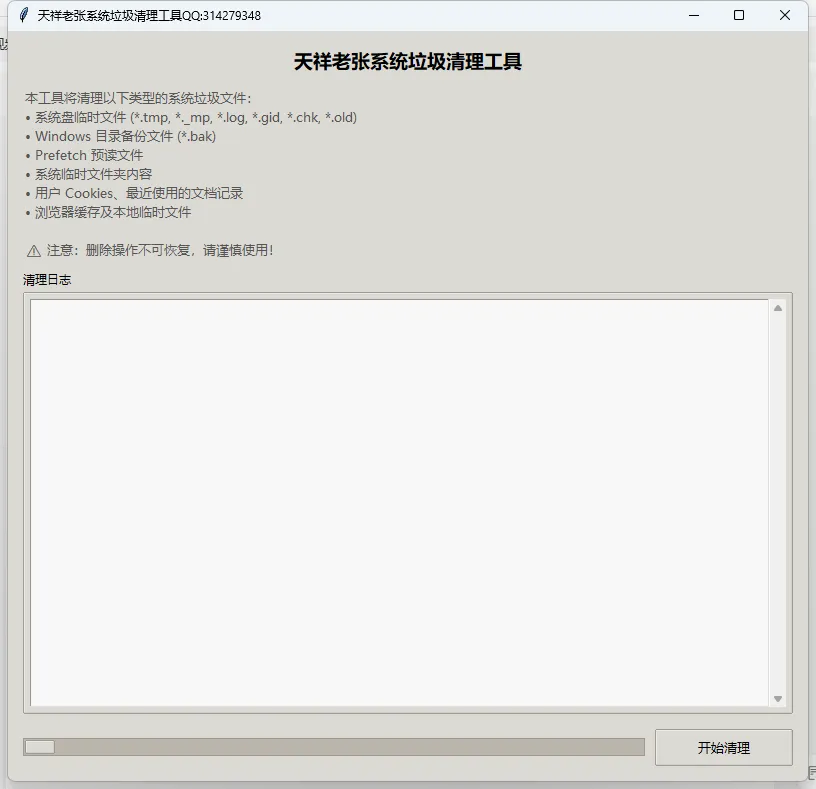
📌 工具亮点
✅ 一键清理系统垃圾文件(临时文件、日志、备份、浏览器缓存等)
✅ 支持管理员权限检测,尽可能删除顽固文件
✅ 实时日志输出,清晰展示清理进度和结果
✅ 美观的GUI界面,操作简单,小白也能轻松上手
✅ 后台线程执行,界面不卡顿
🛠️ 功能一览
本工具主要清理以下类型垃圾:
| 类型 | 说明 |
|---|---|
*.tmp*._mp, *.log, *.gid, *.chk, *.old | |
*.bak | |
C:\Windows\Temp | |
Recent | |
Temporary Internet Files | |
Local Settings\Temp |
💻 完整代码(Python实现)
import osimport shutilimport statimport fnmatchimport threadingimport tkinter as tkfrom tkinter import ttk, scrolledtext, messageboximport time# 尝试获取管理员权限检测所需的库try: import ctypes IS_ADMIN = ctypes.windll.shell32.IsUserAnAdmin() != 0except Exception: IS_ADMIN = Falseclass SystemCleanerApp: """系统垃圾清理工具 GUI 应用""" def __init__(self): self.root = tk.Tk() self.root.title("天祥老张系统垃圾清理工具QQ:314279348") self.root.geometry("700x650") self.root.minsize(800,750) self.center_window() # 设置样式 self.style = ttk.Style() self.style.theme_use('clam') self.style.configure('TButton', font=('微软雅黑', 10), padding=6) self.style.configure('TLabel', font=('微软雅黑', 10)) self.style.configure('Header.TLabel', font=('微软雅黑', 14, 'bold')) # 变量 self.is_cleaning = False # 创建界面组件 self.create_widgets() # 检查管理员权限并提示 if not IS_ADMIN: messagebox.showwarning( "权限提示", "当前未以管理员身份运行,部分系统文件可能无法删除。\n" "建议右键选择“以管理员身份运行”以获得最佳清理效果。" ) self.root.protocol("WM_DELETE_WINDOW", self.on_closing) self.root.mainloop() def center_window(self): """窗口居中""" self.root.update_idletasks() w = self.root.winfo_width() h = self.root.winfo_height() x = (self.root.winfo_screenwidth() // 2) - (w // 2) y = (self.root.winfo_screenheight() // 2) - (h // 2) self.root.geometry(f'{w}x{h}+{x}+{y}') def create_widgets(self): """创建界面元素""" # 主框架 main_frame = ttk.Frame(self.root, padding="15") main_frame.pack(fill=tk.BOTH, expand=True) # 标题 title_label = ttk.Label(main_frame, text="天祥老张系统垃圾清理工具", style='Header.TLabel') title_label.pack(pady=(0, 10)) # 说明文字 desc_text = ("本工具将清理以下类型的系统垃圾文件:\n" "• 系统盘临时文件 (*.tmp, *._mp, *.log, *.gid, *.chk, *.old)\n" "• Windows 目录备份文件 (*.bak)\n" "• Prefetch 预读文件\n" "• 系统临时文件夹内容\n" "• 用户 Cookies、最近使用的文档记录\n" "• 浏览器缓存及本地临时文件\n\n" "⚠ 注意:删除操作不可恢复,请谨慎使用!") desc_label = ttk.Label(main_frame, text=desc_text, justify=tk.LEFT, foreground="#555555") desc_label.pack(anchor=tk.W, pady=(0, 10)) # 日志文本框 log_frame = ttk.LabelFrame(main_frame, text="清理日志", padding="5") log_frame.pack(fill=tk.BOTH, expand=True, pady=(0, 10)) self.log_text = scrolledtext.ScrolledText( log_frame, wrap=tk.WORD, font=('Consolas', 9), bg="#f8f8f8", fg="#333333" ) self.log_text.pack(fill=tk.BOTH, expand=True) # 按钮和进度条框架 bottom_frame = ttk.Frame(main_frame) bottom_frame.pack(fill=tk.X, pady=(5, 0)) self.progress = ttk.Progressbar(bottom_frame, mode='indeterminate') self.progress.pack(side=tk.LEFT, fill=tk.X, expand=True, padx=(0, 10)) self.clean_btn = ttk.Button( bottom_frame, text="开始清理", command=self.start_cleanup, width=15 ) self.clean_btn.pack(side=tk.RIGHT) def log_message(self, message, level="INFO"): """在日志文本框添加一条消息""" timestamp = time.strftime("%H:%M:%S") if level == "ERROR": tag = "error" formatted = f"[{timestamp}] ❌ {message}\n" elif level == "SUCCESS": tag = "success" formatted = f"[{timestamp}] ✅ {message}\n" else: tag = "info" formatted = f"[{timestamp}] ℹ️ {message}\n" self.log_text.insert(tk.END, formatted, tag) self.log_text.see(tk.END) # 配置颜色标签 self.log_text.tag_config("error", foreground="#d32f2f") self.log_text.tag_config("success", foreground="#2e7d32") self.log_text.tag_config("info", foreground="#1976d2") self.root.update_idletasks() def start_cleanup(self): """启动清理线程""" if self.is_cleaning: return # 确认对话框 if not messagebox.askyesno( "确认清理", "即将删除系统垃圾文件,此操作不可撤销。\n\n是否继续?", icon='warning' ): return self.is_cleaning = True self.clean_btn.config(state=tk.DISABLED, text="清理中...") self.progress.start(10) self.log_text.delete(1.0, tk.END) self.log_message("开始执行系统垃圾清理...") # 在新线程中执行清理任务 thread = threading.Thread(target=self.run_cleanup_tasks, daemon=True) thread.start() def run_cleanup_tasks(self): """执行所有清理任务(在后台线程中运行)""" try: # 获取系统关键路径 system_drive = os.environ.get('SystemDrive', 'C:') windir = os.environ.get('SystemRoot', 'C:\\Windows') userprofile = os.environ.get('USERPROFILE', '') # 定义任务列表:每个任务包含描述、处理函数、参数 tasks = [ ("删除系统盘临时文件 (.tmp, ._mp, .log, .gid, .chk, .old)", self.delete_files_recursive, system_drive, ['*.tmp', '*._mp', '*.log', '*.gid', '*.chk', '*.old']), ("删除 Windows 目录备份文件 (.bak)", self.delete_files_recursive, windir, ['*.bak']), ("清空 Prefetch 预读文件夹", self.clear_directory_files, os.path.join(windir, 'Prefetch'), False), ("清空 Windows 临时文件夹", self.clear_directory_completely, os.path.join(windir, 'temp')), ("删除 Cookies 文件", self.delete_files_non_recursive, os.path.join(userprofile, 'Cookies')), ("删除最近使用的文档记录", self.delete_files_non_recursive, os.path.join(userprofile, 'Recent')), ("清空 IE 缓存 (Temporary Internet Files)", self.clear_directory_recursive, os.path.join(userprofile, 'Local Settings', 'Temporary Internet Files')), ("清空本地临时文件夹 (Local Settings\\Temp)", self.clear_directory_recursive, os.path.join(userprofile, 'Local Settings', 'Temp')), ] total = len(tasks) for idx, (desc, func, *args) in enumerate(tasks, 1): self.log_message(f"[{idx}/{total}] {desc} ...") try: func(*args) self.log_message(f"{desc} 完成", "SUCCESS") except Exception as e: self.log_message(f"{desc} 失败: {str(e)}", "ERROR") # 稍微延时,让界面响应 time.sleep(0.1) self.log_message("\n所有清理任务执行完毕!", "SUCCESS") except Exception as e: self.log_message(f"清理过程发生未预期错误: {str(e)}", "ERROR") finally: # 恢复界面状态 self.root.after(0, self.cleanup_finished) def cleanup_finished(self): """清理结束后的界面恢复""" self.progress.stop() self.clean_btn.config(state=tk.NORMAL, text="开始清理") self.is_cleaning = False messagebox.showinfo("完成", "系统垃圾清理已完成。") # ---------- 文件操作辅助函数 ---------- def force_remove_file(self, file_path): """强制删除只读文件""" try: # 去除只读属性 os.chmod(file_path, stat.S_IWRITE) os.remove(file_path) return True except Exception: return False def delete_files_recursive(self, root_dir, patterns): """递归删除 root_dir 下所有匹配 patterns 的文件(不删除目录)""" if not os.path.exists(root_dir): self.log_message(f"路径不存在,跳过: {root_dir}", "ERROR") return deleted_count = 0 error_count = 0 for dirpath, dirnames, filenames in os.walk(root_dir): for filename in filenames: # 检查是否匹配任一模式 for pat in patterns: if fnmatch.fnmatch(filename, pat): full_path = os.path.join(dirpath, filename) if self.force_remove_file(full_path): deleted_count += 1 else: error_count += 1 break # 匹配到一个模式即可 self.log_message(f" 删除了 {deleted_count} 个文件,失败 {error_count} 个") def delete_files_non_recursive(self, dir_path): """仅删除目录下的直接文件,不递归子目录""" if not os.path.exists(dir_path): self.log_message(f"路径不存在,跳过: {dir_path}", "ERROR") return deleted_count = 0 error_count = 0 try: for item in os.listdir(dir_path): item_path = os.path.join(dir_path, item) if os.path.isfile(item_path): if self.force_remove_file(item_path): deleted_count += 1 else: error_count += 1 except PermissionError: self.log_message(f"无法访问目录: {dir_path}", "ERROR") self.log_message(f" 删除了 {deleted_count} 个文件,失败 {error_count} 个") def clear_directory_files(self, dir_path, recursive=False): """清空目录下所有文件(可选是否递归删除子目录中的文件)""" if not os.path.exists(dir_path): self.log_message(f"路径不存在,跳过: {dir_path}", "ERROR") return deleted_count = 0 error_count = 0 try: if recursive: for dirpath, dirnames, filenames in os.walk(dir_path): for filename in filenames: full_path = os.path.join(dirpath, filename) if self.force_remove_file(full_path): deleted_count += 1 else: error_count += 1 else: for item in os.listdir(dir_path): item_path = os.path.join(dir_path, item) if os.path.isfile(item_path): if self.force_remove_file(item_path): deleted_count += 1 else: error_count += 1 except PermissionError: self.log_message(f"无法访问目录: {dir_path}", "ERROR") self.log_message(f" 删除了 {deleted_count} 个文件,失败 {error_count} 个") def clear_directory_recursive(self, dir_path): """递归清空目录下的所有文件和子目录(保留顶层目录)""" if not os.path.exists(dir_path): self.log_message(f"路径不存在,跳过: {dir_path}", "ERROR") return deleted_files = 0 error_files = 0 try: for root, dirs, files in os.walk(dir_path, topdown=False): for name in files: file_path = os.path.join(root, name) if self.force_remove_file(file_path): deleted_files += 1 else: error_files += 1 for name in dirs: dir_full = os.path.join(root, name) try: shutil.rmtree(dir_full, onerror=self.on_rmtree_error) deleted_files += 1 # 粗略计数 except Exception: error_files += 1 except Exception as e: self.log_message(f"清理目录出错: {e}", "ERROR") self.log_message(f" 清理了 {deleted_files} 个项,失败 {error_files} 个") def clear_directory_completely(self, dir_path): """完全删除目录并重新创建(模拟 rd /s /q + md)""" if not os.path.exists(dir_path): self.log_message(f"路径不存在,跳过: {dir_path}", "ERROR") return try: shutil.rmtree(dir_path, onerror=self.on_rmtree_error) os.makedirs(dir_path, exist_ok=True) self.log_message(" 已清空并重建目录") except Exception as e: self.log_message(f"清空目录失败: {e}", "ERROR") def on_rmtree_error(self, func, path, exc_info): """处理 shutil.rmtree 删除失败时的回调""" # 尝试修改只读属性后重试 try: os.chmod(path, stat.S_IWRITE) func(path) except Exception: pass def on_closing(self): """关闭窗口时确保线程安全""" if self.is_cleaning: if messagebox.askokcancel("退出", "清理任务正在运行,确定要退出吗?"): self.root.destroy() else: self.root.destroy()if __name__ == "__main__": SystemCleanerApp()🚀 如何运行?
环境要求
Windows系统(因为涉及系统路径和权限检测)
Python 3.6+(已内置tkinter)
运行步骤
将上述代码保存为
cleaner.py打开命令提示符,进入代码所在目录
执行命令:
python cleaner.py建议右键以管理员身份运行,以获得最佳清理效果
🧩 代码解析
1. 权限检测
import ctypesIS_ADMIN = ctypes.windll.shell32.IsUserAnAdmin() != 0通过调用Windows API检测当前进程是否具有管理员权限,并给出相应提示。
2. 多线程清理
为避免界面卡顿,所有文件删除操作都在后台线程中执行:
thread = threading.Thread(target=self.run_cleanup_tasks, daemon=True)thread.start()3. 递归删除与权限处理
使用
os.walk遍历目录树使用
fnmatch匹配文件名模式通过
os.chmod移除只读属性后再删除
4. 日志彩色输出
在文本框中用不同颜色标记信息、成功、错误消息,提升用户体验。
⚠️ 注意事项
数据不可恢复:清理的文件会被永久删除,请谨慎操作。
管理员权限:部分系统目录需要管理员权限才能访问,建议以管理员身份运行。
路径适配:代码中使用了环境变量获取系统路径,适用于大多数Windows系统,但个别精简版系统可能需要手动调整。
安全性:本工具仅删除公认的无用临时文件,不会影响系统稳定。
🎉 结语
通过不到300行代码,我们实现了一个功能完整、界面友好的系统垃圾清理工具。你可以根据自己的需求扩展清理规则(如增加Chrome缓存、微信缓存等),让工具更加个性化。
如果觉得文章有用,欢迎点赞、收藏、转发,让更多朋友摆脱C盘爆满的烦恼!
获取本软件成品方法:关注本公众号并私信“888”即可获得下载地址!
获取本软件成品方法:关注本公众号并私信“888”即可获得下载地址!
获取本软件成品方法:关注本公众号并私信“888”即可获得下载地址!