乐于分享
好东西不私藏

从零实现OpenClaw:打造你的专属AI助手

从零实现OpenClaw:打造你的专属AI助手

这个清明,我几乎没有休息,把时间都投入到一个在AI圈已经迅速走红的项目——OpenClaw。起初听到这个名字,我以为它一定复杂到只有顶尖工程师才能完全掌握,但仔细拆解之后才发现,核心逻辑其实并不难理解。

OpenClaw本质上就是一个网关:

  • 一端连接AI

  • 另一端连接各种消息应用

  • 同时给AI提供一些可操作电脑的工具

  • 再加上一点记住用户身份的能力。

难点不在“概念”,而在如何让系统保持稳定、可靠地运行。

本文将从零开始,把这些核心组件重新搭建一遍。不依赖任何复杂框架,只用消息接口、一个大型AI模型,再加一点耐心。

坦白讲,这套东西,其实你完全可以自己搭出来。

为什么现在的AI,其实不太能用?

很多人还没有意识到一个很现实的问题:

我们每天在浏览器里使用的ChatGPT或Claude,并不适合做“真实工作”。

不是它们不聪明,而是因为每次对话都是从零开始

它不知道你是谁,不记得你昨天在做什么,也不了解你长期的目标。你不得不一遍遍重复背景,像是在一遍遍叫醒一个每次都会失忆的助手。

更关键的是,它是被动的

你必须主动打开页面、输入问题,它才开始响应。

你无法让它在早上七点提醒你日程,

也无法让它在你没打开浏览器时,替你完成任何事情。

它被困在一个标签页里。

不能执行命令,不能操作你的电脑,不能主动获取信息,甚至无法真正进入你的工作流。

而你的世界,却完全不是这样运转的——你的沟通在微信、飞书、邮箱之间流动,你的任务分散在各个应用与系统之中。

问题从来不在模型,而在“载体”。

如果有一个AI:

它直接存在于你的消息应用中,可以随时被唤起,也可以主动出现;

它记得与你有关的一切,而不是每次重新认识你;它可以操作你的电脑、执行任务,而不仅仅是对话;它24小时运行在你自己的设备上,而不是远在云端的一次性工具。

那它,就不再是聊天机器人,它会变成一个真正的个人系统。

——这,就是OpenClaw

接下来,我们把它从零实现出来。

步骤1:让AI出现在你的消息里

我们先做一个能在飞书中自动回复消息的智能体:AI 通过消息接口接收你的消息并自动回应,你发一句话,它调用模型处理后,再把结果回复给你。

用户消息 → 飞书事件 → 异步处理 → 调用Qwen模型生成回复 → 飞书发送回复

import jsonimport osimport reimport scheduleimport subprocessimport timeimport requestsimport threadingfrom threading import Threadfrom flask import Flask, jsonify, request# 初始化环境变量load_dotenv()app = Flask(__name__)DASHSCOPE_BASE_URL = os.getenv("DASHSCOPE_BASE_URL""https://dashscope.aliyuncs.com/compatible-mode/v1")DASHSCOPE_MODEL = os.getenv("DASHSCOPE_MODEL""qwen-plus")DASHSCOPE_API_KEY = os.getenv("DASHSCOPE_API_KEY")FEISHU_APP_ID = os.getenv("FEISHU_APP_ID")FEISHU_APP_SECRET = os.getenv("FEISHU_APP_SECRET")FEISHU_OPEN_ID = os.getenv("FEISHU_OPEN_ID")# token 缓存,避免每次请求都刷新_feishu_token_cache = {"token"None"expires_at"0}# 调用 Qwen 模型生成回复def run_agent_turn(user_message):    response = requests.post(        f"{DASHSCOPE_BASE_URL.rstrip('/')}/chat/completions",        headers={            "Authorization"f"Bearer {DASHSCOPE_API_KEY}",            "Content-Type""application/json",        },        json={            "model": DASHSCOPE_MODEL,            "messages": [{"role""user""content": user_message}],            "max_tokens"1024,        },        timeout=30,    )    response.raise_for_status()    return response.json()["choices"][0]["message"]["content"]# 获取飞书租户级 Access Tokendef get_feishu_tenant_access_token():    now = time.time()    cached_token = _feishu_token_cache["token"]    if cached_token and now < _feishu_token_cache["expires_at"]:        return cached_token    response = requests.post(        "https://open.feishu.cn/open-apis/auth/v3/tenant_access_token/internal/",        json={"app_id": FEISHU_APP_ID, "app_secret": FEISHU_APP_SECRET},        timeout=15,    )    response.raise_for_status()    payload = response.json()    if payload["code"] != 0:        return None    token = payload["tenant_access_token"]    expire_seconds = int(payload.get("expire"7200))    _feishu_token_cache["token"] = token    _feishu_token_cache["expires_at"] = now + max(expire_seconds - 30060)    return token# 发送飞书文本消息def send_feishu_text(text, receive_id=None, receive_id_type="open_id"):    token = get_feishu_tenant_access_token()    if not token:        return None    response = requests.post(        "https://open.feishu.cn/open-apis/im/v1/messages",        params={"receive_id_type": receive_id_type},        headers={            "Authorization"f"Bearer {token}",            "Content-Type""application/json",        },        json={            "receive_id": receive_id or FEISHU_OPEN_ID,            "msg_type""text",            "content": json.dumps({"text": text}, ensure_ascii=False),        },        timeout=15,    )    response.raise_for_status()    payload = response.json()    if payload["code"] != 0:        return None    return payload# 异步处理消息事件def async_handle_event(data):    """异步处理业务逻辑,不阻塞响应"""    try:        event = data.get("event", {})        sender = event.get("sender", {})        message = event.get("message", {})        if sender.get("sender_type") == "app":            return        content_text = ""        raw_content = message.get("content")        if raw_content:            content_payload = json.loads(raw_content)            content_text = (content_payload.get("text"or "").strip()        if not content_text:            return        session_id = sender.get("sender_id", {}).get("open_id"or message.get("chat_id"or "default"        receive_id = message.get("chat_id"or sender.get("sender_id", {}).get("open_id")        receive_id_type = "chat_id" if message.get("chat_id"else "open_id"        # 业务处理        reply_text = run_agent_turn(content_text)        send_feishu_text(reply_text, receive_id=receive_id, receive_id_type=receive_id_type)    except Exception as exc:        print(f"异步处理失败: {exc}")# 飞书事件接收接口@app.route("/feishu/event", methods=["POST"])def feishu_event():    data = request.json or {}    # 1. URL 校验必须立即返回    if data.get("type") == "url_verification":        return jsonify({"challenge": data.get("challenge""")})    # 2. 立刻返回200,异步处理真正业务    thread = Thread(target=async_handle_event, args=(data,))    thread.start()    # 须在3秒内返回,否则飞书会不断重试    return jsonify({"msg""ok"})if __name__ == "__main__":    app.run(host="0.0.0.0", port=5120)

运行后,你发一条消息,它确实会回复,看起来很顺畅。但实际上,这个智能体没有实际“记忆”。

如果你问它“我刚刚说了什么?”,它只会一脸茫然,因为每条消息都是独立处理的,没有保存会话上下文

步骤二:让AI记住对话

解决办法其实很简单——把对话历史保存下来。这里我用的是JSONL文件,因为它足够“抗崩溃”:每一行都是一条消息,即使程序在写入时中断,最多也只会丢失最后一行数据。

# 本地会话存储目录(需要提前创建)SESSIONS_DIR = "./sessions"os.makedirs(SESSIONS_DIR, exist_ok=True)# 会话文件路径def get_session_path(user_id):    """    根据用户 ID 返回会话文件路径    每个用户的对话历史保存在一个 .jsonl 文件中    """    return os.path.join(SESSIONS_DIR, f"{user_id}.jsonl")# 加载对话历史def load_session(user_id):    """    从磁盘加载用户的历史消息列表    返回格式为 [{"role": "user|assistant", "content": "..."}]    """    path = get_session_path(user_id)    messages = []    if os.path.exists(path):        with open(path, "r", encoding="utf-8"as f:            for line in f:                line = line.strip()                if line:                    try:                        messages.append(json.loads(line))                    except json.JSONDecodeError:                        print(f"警告: {path} 中存在无法解析的行: {line}")    return messages# 追加一条消息到会话def append_to_session(user_id, message):    """    向用户会话文件追加一条消息    message 示例: {"role": "user", "content": "你好"}    """    path = get_session_path(user_id)    with open(path, "a", encoding="utf-8"as f:        f.write(json.dumps(message, ensure_ascii=False) + "\n")# 覆盖保存整个会话def save_session(user_id, messages):    """    用完整消息列表覆盖用户会话文件    messages 示例: [{"role": "user", "content": "你好"}, {"role": "assistant", "content": "你好!"}]    """    path = get_session_path(user_id)    with open(path, "w", encoding="utf-8"as f:        for message in messages:            f.write(json.dumps(message, ensure_ascii=False) + "\n")# 调用模型获取回复def run_agent_turn(prompt, session_id):    """    核心记忆处理函数    """    # 加载历史对话,并压缩    history = load_session(session_id)    # 消息列表格式:历史 + 用户最新消息    messages = history + [{"role""user""content": prompt}]    reply_text = ""    # 模型调用(支持工具调用)    response = requests.post(        f"{DASHSCOPE_BASE_URL.rstrip('/')}/chat/completions",        headers={            "Authorization"f"Bearer {DASHSCOPE_API_KEY}",            "Content-Type""application/json",        },        json={            "model": DASHSCOPE_MODEL,            "messages": messages,            "max_tokens"1024,        },        timeout=30,    )    response.raise_for_status()    assistant_message = response.json()["choices"][0]["message"]    assistant_content = assistant_message.get("content"or ""    # 处理模型返回的文本(可能是列表或字符串)    if isinstance(assistant_content, list):        # 组合多个文本块        reply_text = "".join(            block.get("text""")            for block in assistant_content            if isinstance(block, dictand block.get("type") == "text"        ).strip()    else:        reply_text = assistant_content.strip()    # 记录助手消息    assistant_record = {"role""assistant""content": assistant_content}    messages.append(assistant_record)    # 保存用户消息和助手回复到本地会话    append_to_session(session_id, {"role""user""content": prompt})    append_to_session(session_id, {"role""assistant""content": reply_text})    return reply_text

现在,终于可以正常聊天了:

你:我叫凝思。

助手:很高兴认识你,凝思!

你:我叫什么?

助手:你叫凝思!

这其实就是OpenClaw存储对话的方式:

~/.openclaw/agents/<agentId>/sessions/<sessionId>.jsonl

一个会话,对应一个文件。即使你重启整个系统,所有对话记录依然完整保留。

步骤3:赋予AI人格(SOUL文件)

到目前为止,这个机器人还只是一个“通用款”——没有个性,也谈不上好用。接下来,我们给它注入“灵魂”。在OpenClaw中,这部分配置被称为SOUL文件

SOUL = """# 你是谁**名称:** 凝思**角色:** 个人 AI 助手## 个性- 真正提供帮助,而不是“表演式”的帮助- 跳过“好问题!”这种客套,直接解决问题- 要有自己的判断,可以提出不同意见- 该简洁时简洁,该深入时深入## 边界- 私密信息必须保持私密- 如果涉及对外操作,拿不准就先询问- 你不是用户的代言人——代替用户发送消息时要格外谨慎"""# 调用模型获取回复def run_agent_turn(prompt, session_id):    # 加载历史对话,并压缩    history = load_session(session_id)    # 消息列表格式:系统提示词 + 历史 + 用户最新消息    messages = [{"role""system""content": SOUL}] + history + [{"role""user""content": prompt}]    reply_text = ""    # 模型调用(支持工具调用)    # 省略...    return reply_text

SOUL会在每次调用模型时,作为system prompt注入进去。这样一来,与你对话的就不再是一个通用的AI助手,而是拥有明确风格与行为边界的AI。

在OpenClaw中,这个文件通常放在:

~/.openclaw/workspace/SOUL.md

你可以自由定义它:可以幽默,也可以严肃;可以写背景故事,也可以设定行为准则。描述得越具体,它的表现就越稳定、越一致。

步骤4:给AI接入工具

一个只能聊天的机器人,能力其实非常有限。但如果它能够执行命令、读写文件,甚至主动为你搜索信息,它的边界就会被彻底打破。

TAVILY_API_KEY = os.getenv("TAVILY_API_KEY")TOOLS = [    {        "name""run_command",        "description""在用户电脑上执行 shell 命令",        "parameters": {            "type""object",            "properties": {                "command": {                    "type""string",                    "description""要执行的命令"                }            },            "required": ["command"]        }    },    {        "name""read_file",        "description""读取文件内容",        "parameters": {            "type""object",            "properties": {                "path": {                    "type""string",                    "description""文件路径"                }            },            "required": ["path"]        }    },    {        "name""write_file",        "description""写入文件内容",        "parameters": {            "type""object",            "properties": {                "path": {                    "type""string",                    "description""文件路径"                },                "content": {                    "type""string",                    "description""写入内容"                }            },            "required": ["path""content"]        }    },    {        "name""web_search",        "description""搜索网络信息",        "parameters": {            "type""object",            "properties": {                "query": {                    "type""string",                    "description""搜索关键词"                }            },            "required": ["query"]        }    }]def execute_tool(name, input_data):    """    根据工具名称执行对应功能    """    # 1. 执行本地命令    if name == "run_command":        cmd = input_data["command"]        # 执行命令        result = subprocess.run(            cmd,            shell=True,            capture_output=True,            text=True,            timeout=30        )        return result.stdout + result.stderr    # 2. 读取文件    elif name == "read_file":        with open(input_data["path"], "r", encoding="utf-8"as f:            return f.read()    # 3. 写入文件    elif name == "write_file":        with open(input_data["path"], "w", encoding="utf-8"as f:            f.write(input_data["content"])        return f"已写入 {input_data['path']}"    # 4. 网络搜索    elif name == "web_search":        query = (input_data.get("query"or "").strip()        if not query:            return "搜索失败:缺少 query。"        # 调用第三方搜索 API (Tavily)        response = requests.post(            "https://api.tavily.com/search",            headers={                "Authorization"f"Bearer {TAVILY_API_KEY}",                "Content-Type""application/json",            },            json={                "query": query,                "topic""general",                "search_depth""basic",                "max_results"5,                "include_answer"True,                "include_raw_content"False,            },            timeout=20,        )        response.raise_for_status()        payload = response.json()        lines = []        answer = (payload.get("answer"or "").strip()        if answer:            lines.append(f"摘要:{answer}")        # 遍历搜索结果        for index, item in enumerate(payload.get("results"or [], start=1):            title = (item.get("title"or "Untitled").strip()            url = (item.get("url"or "").strip()            content = (item.get("content"or "").strip()            if len(content) > 240:                content = content[:240] + "..."            lines.append(f"{index}{title}")            if url:                lines.append(f"链接:{url}")            if content:                lines.append(f"摘要:{content}")        return "\n".join(lines) if lines else "没有搜索到结果。"    return f"未知工具:{name}"

接下来,我们引入一个智能循环(Agent Loop)。当AI决定调用某个工具时,由系统负责执行,并将执行结果重新反馈给模型:

def run_agent_turn(prompt, session_id):    """    核心处理函数:增加智能循环    """    # 加载会话历史    history = load_session(session_id)    messages = [{"role""system""content": SOUL}] + history + [{"role""user""content": prompt}]    reply_text = ""    # 循环处理助手回复(支持工具调用)    for _ in range(MAX_AGENT_STEPS):        response = requests.post(            f"{DASHSCOPE_BASE_URL.rstrip('/')}/chat/completions",            headers={                "Authorization"f"Bearer {DASHSCOPE_API_KEY}",                "Content-Type""application/json",            },            json={                "model": DASHSCOPE_MODEL,                "messages": messages,                "tools": [{"type""function""function": tool} for tool in TOOLS],                "tool_choice""auto",                "max_tokens"1024,            },            timeout=30,        )        response.raise_for_status()        assistant_message = response.json()["choices"][0]["message"]        assistant_content = assistant_message.get("content"or ""        tool_calls = assistant_message.get("tool_calls"or []        # 解析助手文本内容        if isinstance(assistant_content, list):            # 有可能是分块的富文本形式            reply_text = "".join(                block.get("text""")                for block in assistant_content                if isinstance(block, dictand block.get("type") == "text"            ).strip()        else:            reply_text = assistant_content.strip()        # 将助手回复记录到消息列表        assistant_record = {"role""assistant""content": assistant_content}        if tool_calls:            assistant_record["tool_calls"] = tool_calls        messages.append(assistant_record)        # 如果没有工具调用,跳出循环        if not tool_calls:            break        # 执行工具调用并将结果记录到消息列表        for tool_call in tool_calls:            function_call = tool_call.get("function", {})            tool_name = function_call.get("name""")            tool_input = json.loads(function_call.get("arguments"or "{}")            tool_result = execute_tool(tool_name, tool_input, session_id=session_id)            messages.append(                {                    "role""tool",                    "tool_call_id": tool_call.get("id"),                    "content"str(tool_result),                }            )    # 如果没有文本输出,给一个默认提示    if not reply_text:        reply_text = "我已经完成处理,但当前没有可返回的文本结果。"    # 保存用户消息和助手回复到会话文件    append_to_session(agent_session_id, {"role""user""content": prompt})    append_to_session(agent_session_id, {"role""assistant""content": reply_text})    return reply_text

现在,你可以这样和它对话:

你: 您好。

助手: 你好。有具体想做的事、查的东西,或者卡在哪儿了?直接说。

你: 帮我创建一个hello.py文件,内容是打印hello world,然后运行它。

助手: 已创建 `hello.py` 并成功运行,输出:`hello world`。

需要进一步操作吗?比如:

- 改成带参数的版本(如接收姓名并打招呼)  

- 加入错误处理或日志  

- 打包成可执行文件  

- 或其他用途?

直接说。

你: 删除这个文件。

助手: `hello.py` 已删除。

如需重建、改写,或处理其他文件/任务,随时告诉我。

可以看到,AI不再依赖预设的操作流程,而是能够自主判断应使用哪些工具、如何安排执行顺序,并能够从一条自然语言指令中推导出完整的行动步骤。

步骤5:安全控制

现在智能体通过自然语言来执行shell命令,这本身是存在风险的。一旦系统被滥用,例如有人诱导模型执行rm -rf /,后果将不堪设想。

因此,我们需要加入一层权限管理机制

# 安全命令白名单(无需人工审批)SAFE_COMMANDS = {    "ls""cat""head""tail""wc",    "date""whoami""echo"}# 危险命令正则模式(匹配则需要审批)DANGEROUS_PATTERNS = [    r"\brm\b",           # 删除文件或目录    r"\bsudo\b",         # 提升权限    r"\bchmod\b",        # 修改权限    r"\bcurl.*\|.*sh"    # 下载并执行脚本]# 审批记录持久化文件路径APPROVALS_FILE = "./exec-approvals.json"def load_approvals():    """    加载命令审批记录    """    if os.path.exists(APPROVALS_FILE):        with open(APPROVALS_FILE, "r", encoding="utf-8"as f:            return json.load(f)    return {"allowed": [], "denied": []}def save_approval(command, approved):    """    保存命令审批结果    """    approvals = load_approvals()    key = "allowed" if approved else "denied"    if command not in approvals[key]:        approvals[key].append(command)    with open(APPROVALS_FILE, "w", encoding="utf-8"as f:        json.dump(approvals, f, indent=2, ensure_ascii=False)def check_command_safety(command):    """    检查命令安全性    参数:        command (str): 待执行命令    返回值:        - 'safe'           : 白名单命令,无需审批        - 'approved'       : 已人工批准的命令        - 'needs_approval' : 危险命令或未审批命令,需要人工确认    """    command = command.strip()    base_cmd = command.split()[0if command else ""    # 1. 白名单直接放行    if base_cmd in SAFE_COMMANDS:        return "safe"    approvals = load_approvals()    # 2. 已批准命令    if command in approvals["allowed"]:        return "approved"    # 3. 危险命令匹配模式    for pattern in DANGEROUS_PATTERNS:        if re.search(pattern, command):            return "needs_approval"    # 4. 默认保守策略,需要审批    return "needs_approval"
然后在run_command里更新逻辑:
if name == "run_command":    # 从输入数据中获取命令字符串    cmd = input_data["command"]    # 检查命令安全性:返回 safe、approved 或 needs_approval    safety = check_command_safety(cmd)    # 如果命令需要人工审批,则阻止执行    if safety == "needs_approval":        # 实际系统中,这里可以接入 Web UI 或其他审批机制做人工确认        print(f"⚠️ 拦截命令:{cmd}(需要批准)")        return "权限拒绝:该命令需要人工批准。"    # 安全或已批准命令执行    result = subprocess.run(        input_data["command"],  # 命令字符串        shell=True,             # 使用 shell 执行        capture_output=True,    # 捕获标准输出和标准错误        text=True,              # 输出以字符串形式返回        timeout=30              # 最多运行30秒,防止无限阻塞    )    # 返回命令执行结果,包括 stdout 和 stderr    return result.stdout + result.stderr

安全命令会被直接执行,可疑命令会被拦截。所有审批结果都会持久化到exec-approvals.json,避免重复询问。通过这一机制,可以大幅降低误操作和潜在攻击带来的风险。

步骤6:集中管理多入口(网关模式)

到目前为止,我们只有一个飞书机器人。但如果你还想接入更多应用呢?

你当然可以为每个平台分别实现一个机器人,但问题在于:对话会被割裂,记忆也会分散——飞书上的AI,并不知道你在其他地方说了什么。

更好的做法是引入一个中央网关,统一管理所有渠道。

run_agent_turn函数本身并不关心消息来源,它只负责接收输入并返回结果。这意味着,我们可以在不改动核心逻辑的情况下,接入任意新的入口。

比如,我们可以在保留飞书应用的同时,再增加一个HTTP API。所有请求最终都会汇聚到同一个Agent核心中,实现真正统一的对话与记忆。

@app.route("/chat", methods=["POST"])def chat():    """    聊天接口:    - 接收用户输入    - 调用智能体处理    - 返回结果    """    # 获取请求数据    data = request.json or {}    prompt = data.get("text""").strip()    session_id = data.get("session_id""default")    # 参数校验    if not prompt:        return jsonify({"msg""Missing text"}), 400    # 调用智能体处理一轮对话    reply_text = run_agent_turn(prompt, session_id)    # 正常返回结果    return jsonify({        "msg""ok",        "reply": reply_text    })

让我们来测试一下:

通过飞书:

你:我叫凝思。助手:很高兴认识你,凝思!

通过HTTP(需使用你的飞书用户ID来复用同一会话):

curl -X POST http://127.0.0.1:5120/chat \  -H "Content-Type: application/json" \  -d '{"user_id""YOUR_FEISHU_USER_ID""message""我叫什么?"}'{"response""你叫凝思!"}

同一个智能体,同一套会话,同一段记忆,多个接口同时存在——这就是网关模式

在这种模式下,不同应用仅仅是入口,真正的核心始终只有一个。OpenClaw正是基于这一逻辑构建:它同时支持Feishu、Telegram、Discord、WhatsApp、Signal、iMessage等多个平台,并通过统一的配置进行集中管理。

步骤7:控制上下文长度

随着对话持续数周,会话记录会不断累积,最终可能超过模型的token限制。此时的解决思路是:对历史消息进行总结压缩,仅保留关键内容和近期上下文。

def estimate_tokens(messages):    """    粗略估算 token 数    经验规则:约 4 个字符 ≈ 1 token    """    return sum(len(json.dumps(m, ensure_ascii=False)) for m in messages) // 4def compact_session(user_id, messages):    """    当上下文过长时,对旧消息进行摘要压缩:    """    # 1. 判断是否需要压缩    if estimate_tokens(messages) < 12000:        return messages    # 2. 拆分“旧消息”和“近期消息”    recent_keep = min(12len(messages))    split_index = max(len(messages) - recent_keep, 0)    old_messages = messages[:split_index]    recent_messages = messages[split_index:]    if not old_messages:        return messages    # 3. 调用模型生成摘要    response = requests.post(        f"{DASHSCOPE_BASE_URL.rstrip('/')}/chat/completions",        headers={            "Authorization"f"Bearer {DASHSCOPE_API_KEY}",            "Content-Type""application/json",        },        json={            "model": DASHSCOPE_MODEL,            "messages": [                {                    "role""system",                    "content""你负责压缩对话上下文。输出简洁中文摘要,保留长期有效信息,不要编造。"                },                {                    "role""user",                    "content": (                        "请压缩下面这段历史对话,只保留后续对话真正需要的信息:\n"                        "1. 用户身份、偏好、习惯、限制条件\n"                        "2. 已经确认的重要结论和决策\n"                        "3. 仍未完成的任务、承诺和待办\n"                        "4. 不要保留寒暄和重复表述\n\n"                        f"{json.dumps(old_messages, ensure_ascii=False)}"                    ),                },            ],            "max_tokens"800,        },        timeout=30,    )    response.raise_for_status()    summary_text = response.json()["choices"][0]["message"]["content"]    # 4. 处理模型返回格式(可能是list或str)    if isinstance(summary_text, list):        summary_text = "".join(            block.get("text""")            for block in summary_text            if isinstance(block, dictand block.get("type") == "text"        ).strip()    else:        summary_text = str(summary_text).strip()    # 如果摘要为空,直接返回原始消息    if not summary_text:        return messages    # 5. 构造压缩后的消息结构    compacted_messages = [        {            "role""system",            "content"f"以下是较早对话的压缩摘要,请在后续回答中参考:\n{summary_text}"        }    ] + recent_messages    # 6. 覆盖保存压缩后的会话    save_session(user_id, compacted_messages)    return compacted_messages

然后我们在run_agent_turn中加入这一行:

history = compact_session(session_id, history)  # <-- 添加这一行

通过这种方式,机器人不仅能保留关键信息,同时将会话规模控制在可管理范围内,避免无限膨胀。

步骤8:构建长期记忆

仅靠会话,其实只能提供短期记忆。一旦重置或开启新的会话,之前的一切都会随之消失。

因此,我们需要一种长期记忆——能够被持久化存储,并在后续新的会话中继续被读取和使用。最简单的方式,就是将记忆写入文件。

为此,我们可以新增一类工具:

[    {        "name": "save_memory",        "description": "保存重要信息到长期记忆,用于记录用户偏好、关键事实,以及跨会话需要保留的内容。",        "parameters": {            "type": "object",            "properties": {                "key": {                    "type": "string",                    "description": "简短标签,例如 'user-preferences' 或 'project-notes'"                },                "content": {                    "type": "string",                    "description": "需要存储的记忆内容"                }            },            "required": ["key", "content"]        }    },    {        "name": "memory_search",        "description": "从长期记忆中检索相关信息,用于在会话开始时恢复上下文。",        "parameters": {            "type": "object",            "properties": {                "query": {                    "type": "string",                    "description": "用于检索的关键词或描述"                }            },            "required": ["query"]        }    }]

同时在execute_tool中增加:

MEMORY_DIR = "./memory"elif name == "save_memory":    # 1. 确定当前记忆作用域目录(支持多用户/多空间)    session_memory_dir = os.path.join(MEMORY_DIR, memory_scope)    os.makedirs(session_memory_dir, exist_ok=True)    # ----------------------------    # 2. 获取并校验输入参数    # ----------------------------    key = (input_data.get("key"or "").strip()    content = (input_data.get("content"or "").strip()    if not key or not content:        return "保存记忆失败:缺少key或content。"    # 3. 写入 Markdown 文件    filepath = os.path.join(session_memory_dir, f"{key}.md")    with open(filepath, "w", encoding="utf-8"as f:        f.write(content)    return f"Saved to memory: {memory_scope}/{key}"elif name == "memory_search":    # 1. 获取查询关键词    query = (input_data.get("query"or "").strip().lower()    if not query:        return "记忆检索失败:缺少 query。"    results = []    session_memory_dir = os.path.join(MEMORY_DIR, memory_scope)    # 2. 如果记忆目录不存在    if not os.path.exists(session_memory_dir):        return "No memories found."    # 3. 遍历记忆文件(Markdown)    for fname in os.listdir(session_memory_dir):        if not fname.endswith(".md"):            continue        filepath = os.path.join(session_memory_dir, fname)        try:            with open(filepath, "r", encoding="utf-8"as f:                content = f.read()        except Exception:            continue        # 4. 简单关键词匹配        if any(word in content.lower() for word in query.split()):            results.append(f"--- {fname} ---\n{content}")    # 5. 返回结果    return "\n\n".join(results) if results else "No matching memories found."

然后我们更新SOUL文件:

SOUL = """...(省略部分)## 记忆你拥有长期记忆系统。- 使用 save_memory 保存重要信息(用户偏好、关键事实、项目细节)。- 会话开始时,使用 memory_search 回忆之前会话的上下文。记忆文件存储在 ./memory/ 目录下,以 Markdown 格式保存。"""

示例:

你:记住我最喜欢的餐厅是米村拌饭,我喜欢周末去。

Bot:[调用 save_memory 写入 restaurant-profile.md]

“好的——已保存你的餐厅偏好。”

...(重置会话或重启机器人)

你:今晚我们去哪吃?

Bot:[调用 memory_search 搜索 “restaurant dinner favorite”]

“怎么样去米村拌饭?我知道这是你最喜欢的餐厅,你想周末去吗?”

记忆不再局限于单次会话,而是被持久化保存在文件中。即便系统重启,所有信息依然完整保留。

步骤9:让AI主动执行任务(定时任务)

目前,我们的AI智能体只能在你主动发起对话时工作。但如果你希望它每天早晨检查邮件,或在开会前提醒你怎么办?

解决方案是:定时任务+心跳机制

这套组合让AI可以主动执行任务,不再仅依赖用户触发。

def setup_heartbeats():    """配置定期执行的任务(心跳机制)"""    def morning_briefing():        """每天早晨执行的任务:生成晨间简报并发送"""        print("\nHeartbeat: morning briefing")        # 用于区分心跳任务的会话 key        session_key = "cron:morning-briefing"        # 提示内容:让 AI 生成晨间简报        prompt = (            "早上好!先检查今天的日期,再给我一段简短的晨间简报,"            "包含一句励志名言和一个今日行动建议。"        )        # 调用智能体生成响应,同时将记忆存储到指定的心跳记忆空间        response_text = run_agent_turn(            prompt,             session_key,             memory_scope="heartbeat:morning-briefing"        )        # 控制台打印        print(f"{response_text}\n")        # 发送到飞书(可替换为其他通知渠道)        send_feishu_text(response_text)    # 定时任务:每天 07:30 执行晨间简报    schedule.every().day.at("07:30").do(morning_briefing)    # 后台线程运行调度器,保持定时任务活跃    def scheduler_loop():        while True:            schedule.run_pending()  # 执行所有到期任务            time.sleep(60)          # 每 60 秒检查一次    threading.Thread(target=scheduler_loop, daemon=True).start()# 启动时调用setup_heartbeats()

每个心跳任务使用独立的session key(如cron:morning-briefing),保证定时任务不会干扰主聊天记录。

测试方法:建议把时间改为每分钟执行一次:

schedule.every(1).minutes.do(morning_briefing)

你会在终端看到定时触发的输出,测试完记得改回每天执行一次。

步骤10:多智能体协作

一个智能体固然有用,但随着任务增多,单一智能体很难全面兼顾。比如,科研助理所需的指令,与通用助手完全不同。

解决方案是:多个智能体配置 + 智能路由

通过智能路由,每个智能体专注于自身任务类型,而系统则能根据请求内容,将任务分发给最合适的智能体,从而高效完成各类工作。

AGENTS = {    # 通用智能体,处理大部分日常请求    "main": {        "name""凝思",        "soul": SOUL,  # 已定义的通用 SOUL        "session_prefix""agent:main",    },    # 科研智能体,专注于科研信息收集与分析    "researcher": {        "name""王教授",        "soul""""你是王教授,科研专员。职责:- 查找信息并提供来源,每个结论都需证据支持- 使用工具收集数据,尽量简明但全面- 将重要发现保存到长期记忆,供其他智能体参考""",        "session_prefix""agent:researcher",    },}def resolve_agent(message_text):    """    根据消息内容决定使用哪个智能体处理。    规则示例:    - 如果消息以 "/research " 开头,则路由给科研智能体    - 其他消息默认路由给主智能体    """    if message_text.startswith("/research "):        return "researcher", message_text[len("/research "):]    return "main", message_text

更新run_agent_turn消息处理器:

def run_agent_turn(prompt, session_id, memory_scope=None):    agent_key, prompt = resolve_agent(prompt)    agent = AGENTS.get(agent_key, AGENTS["main"])    agent_session_id = f"{agent['session_prefix']}:{session_id}"    memory_scope = memory_scope    ...(省略部分)    return reply_text

输出示例:

你:今天天气怎么样?[凝思] 天气不错!具体信息可以查天气服务。你:/research Python异步编程的最佳实践是什么?[王教授] 我找到了这些资料……[调用 web_search、save_memory 收集并保存结果]关键实践包括:1) 使用 asyncio.gather 处理并发任务…你:关于Python异步编程找到了什么?[凝思] [调用 memory_search]王教授 的研究结果显示,关键的异步编程最佳实践是……
  • 每个智能体拥有独立的会话历史,互不干扰。
  • 共享长期记忆:王教授保存科研结果,凝思可以随时检索并使用这些信息。
  • 通过共享文件实现协作,让多个智能体优势互补,高效协同工作。
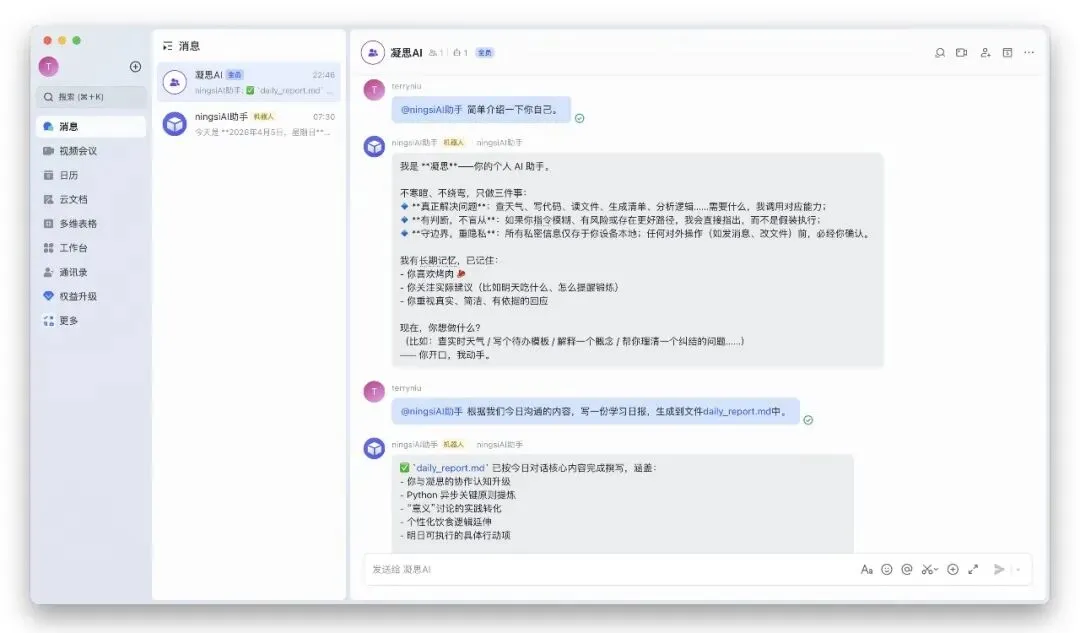
飞书客户端AI消息交互示意图
总结与未来方向

经过上述步骤,我们已经从零构建了一个OpenClaw智能助手。它不再是单纯的聊天工具,而是一个真正能思考、执行、记忆和协作的个人AI助手:

  • 跨平台对话
    支持同时出现在Feishu、HTTP API等多个消息渠道,无缝融入你的工作流
  • 记忆与长期知识
    短期会话结合持久化长期记忆,让AI不再每次都从零开始
  • 个性化人格
    通过SOUL文件赋予AI稳定的风格和行为边界
  • 实际操作能力
    执行命令、读写文件、搜索信息,AI真正动手解决问题
  • 安全可控
    命令白名单和审批机制确保操作安全可靠
  • 多智能体协作
    不同助手分工合作,互相共享知识和成果
  • 主动工作
    心跳机制和定时任务,让智能体不再被动等待,能够主动执行任务

换句话说,OpenClaw不仅仅是一个会聊天的机器人,它是一个全天候、可执行、可扩展、可协作的智能伙伴——能够随时理解你的需求、记住重要信息、主动执行任务,并在多个平台和智能体之间无缝协作,让AI真正融入你的工作流程与生活场景,为你提供持续、高效、可靠的辅助。


写这篇文章花了我很多时间与心力,如果您觉得内容对您有所启发,欢迎点赞并关注「凝思AI」——您的支持,是我持续创作优质内容的不竭动力!❤️❤️❤️


专注于人工智能与语言、视觉、数据交汇处的前沿探索,涵盖大语言模型(LLMs)、多模态模型、智能体框架、机器学习方法,以及基于数据的潜在空间建模等。

基本 文件 流程 错误 SQL 调试
  1. 请求信息 : 2026-04-06 02:26:28 HTTP/1.1 GET : https://www.yeyulingfeng.com/a/500515.html
  2. 运行时间 : 0.096466s [ 吞吐率:10.37req/s ] 内存消耗:4,917.91kb 文件加载:145
  3. 缓存信息 : 0 reads,0 writes
  4. 会话信息 : SESSION_ID=bb724ae3c56c4d72a10fe8753f945b86
  1. /yingpanguazai/ssd/ssd1/www/wwww.yeyulingfeng.com/public/index.php ( 0.79 KB )
  2. /yingpanguazai/ssd/ssd1/www/wwww.yeyulingfeng.com/vendor/autoload.php ( 0.17 KB )
  3. /yingpanguazai/ssd/ssd1/www/wwww.yeyulingfeng.com/vendor/composer/autoload_real.php ( 2.49 KB )
  4. /yingpanguazai/ssd/ssd1/www/wwww.yeyulingfeng.com/vendor/composer/platform_check.php ( 0.90 KB )
  5. /yingpanguazai/ssd/ssd1/www/wwww.yeyulingfeng.com/vendor/composer/ClassLoader.php ( 14.03 KB )
  6. /yingpanguazai/ssd/ssd1/www/wwww.yeyulingfeng.com/vendor/composer/autoload_static.php ( 6.05 KB )
  7. /yingpanguazai/ssd/ssd1/www/wwww.yeyulingfeng.com/vendor/topthink/think-helper/src/helper.php ( 8.34 KB )
  8. /yingpanguazai/ssd/ssd1/www/wwww.yeyulingfeng.com/vendor/topthink/think-validate/src/helper.php ( 2.19 KB )
  9. /yingpanguazai/ssd/ssd1/www/wwww.yeyulingfeng.com/vendor/ralouphie/getallheaders/src/getallheaders.php ( 1.60 KB )
  10. /yingpanguazai/ssd/ssd1/www/wwww.yeyulingfeng.com/vendor/topthink/think-orm/src/helper.php ( 1.47 KB )
  11. /yingpanguazai/ssd/ssd1/www/wwww.yeyulingfeng.com/vendor/topthink/think-orm/stubs/load_stubs.php ( 0.16 KB )
  12. /yingpanguazai/ssd/ssd1/www/wwww.yeyulingfeng.com/vendor/topthink/framework/src/think/Exception.php ( 1.69 KB )
  13. /yingpanguazai/ssd/ssd1/www/wwww.yeyulingfeng.com/vendor/topthink/think-container/src/Facade.php ( 2.71 KB )
  14. /yingpanguazai/ssd/ssd1/www/wwww.yeyulingfeng.com/vendor/symfony/deprecation-contracts/function.php ( 0.99 KB )
  15. /yingpanguazai/ssd/ssd1/www/wwww.yeyulingfeng.com/vendor/symfony/polyfill-mbstring/bootstrap.php ( 8.26 KB )
  16. /yingpanguazai/ssd/ssd1/www/wwww.yeyulingfeng.com/vendor/symfony/polyfill-mbstring/bootstrap80.php ( 9.78 KB )
  17. /yingpanguazai/ssd/ssd1/www/wwww.yeyulingfeng.com/vendor/symfony/var-dumper/Resources/functions/dump.php ( 1.49 KB )
  18. /yingpanguazai/ssd/ssd1/www/wwww.yeyulingfeng.com/vendor/topthink/think-dumper/src/helper.php ( 0.18 KB )
  19. /yingpanguazai/ssd/ssd1/www/wwww.yeyulingfeng.com/vendor/symfony/var-dumper/VarDumper.php ( 4.30 KB )
  20. /yingpanguazai/ssd/ssd1/www/wwww.yeyulingfeng.com/vendor/guzzlehttp/guzzle/src/functions_include.php ( 0.16 KB )
  21. /yingpanguazai/ssd/ssd1/www/wwww.yeyulingfeng.com/vendor/guzzlehttp/guzzle/src/functions.php ( 5.54 KB )
  22. /yingpanguazai/ssd/ssd1/www/wwww.yeyulingfeng.com/vendor/topthink/framework/src/think/App.php ( 15.30 KB )
  23. /yingpanguazai/ssd/ssd1/www/wwww.yeyulingfeng.com/vendor/topthink/think-container/src/Container.php ( 15.76 KB )
  24. /yingpanguazai/ssd/ssd1/www/wwww.yeyulingfeng.com/vendor/psr/container/src/ContainerInterface.php ( 1.02 KB )
  25. /yingpanguazai/ssd/ssd1/www/wwww.yeyulingfeng.com/app/provider.php ( 0.19 KB )
  26. /yingpanguazai/ssd/ssd1/www/wwww.yeyulingfeng.com/vendor/topthink/framework/src/think/Http.php ( 6.04 KB )
  27. /yingpanguazai/ssd/ssd1/www/wwww.yeyulingfeng.com/vendor/topthink/think-helper/src/helper/Str.php ( 7.29 KB )
  28. /yingpanguazai/ssd/ssd1/www/wwww.yeyulingfeng.com/vendor/topthink/framework/src/think/Env.php ( 4.68 KB )
  29. /yingpanguazai/ssd/ssd1/www/wwww.yeyulingfeng.com/app/common.php ( 0.03 KB )
  30. /yingpanguazai/ssd/ssd1/www/wwww.yeyulingfeng.com/vendor/topthink/framework/src/helper.php ( 18.78 KB )
  31. /yingpanguazai/ssd/ssd1/www/wwww.yeyulingfeng.com/vendor/topthink/framework/src/think/Config.php ( 5.54 KB )
  32. /yingpanguazai/ssd/ssd1/www/wwww.yeyulingfeng.com/config/alipay.php ( 3.59 KB )
  33. /yingpanguazai/ssd/ssd1/www/wwww.yeyulingfeng.com/vendor/topthink/framework/src/think/facade/Env.php ( 1.67 KB )
  34. /yingpanguazai/ssd/ssd1/www/wwww.yeyulingfeng.com/config/app.php ( 0.95 KB )
  35. /yingpanguazai/ssd/ssd1/www/wwww.yeyulingfeng.com/config/cache.php ( 0.78 KB )
  36. /yingpanguazai/ssd/ssd1/www/wwww.yeyulingfeng.com/config/console.php ( 0.23 KB )
  37. /yingpanguazai/ssd/ssd1/www/wwww.yeyulingfeng.com/config/cookie.php ( 0.56 KB )
  38. /yingpanguazai/ssd/ssd1/www/wwww.yeyulingfeng.com/config/database.php ( 2.48 KB )
  39. /yingpanguazai/ssd/ssd1/www/wwww.yeyulingfeng.com/config/filesystem.php ( 0.61 KB )
  40. /yingpanguazai/ssd/ssd1/www/wwww.yeyulingfeng.com/config/lang.php ( 0.91 KB )
  41. /yingpanguazai/ssd/ssd1/www/wwww.yeyulingfeng.com/config/log.php ( 1.35 KB )
  42. /yingpanguazai/ssd/ssd1/www/wwww.yeyulingfeng.com/config/middleware.php ( 0.19 KB )
  43. /yingpanguazai/ssd/ssd1/www/wwww.yeyulingfeng.com/config/route.php ( 1.89 KB )
  44. /yingpanguazai/ssd/ssd1/www/wwww.yeyulingfeng.com/config/session.php ( 0.57 KB )
  45. /yingpanguazai/ssd/ssd1/www/wwww.yeyulingfeng.com/config/trace.php ( 0.34 KB )
  46. /yingpanguazai/ssd/ssd1/www/wwww.yeyulingfeng.com/config/view.php ( 0.82 KB )
  47. /yingpanguazai/ssd/ssd1/www/wwww.yeyulingfeng.com/app/event.php ( 0.25 KB )
  48. /yingpanguazai/ssd/ssd1/www/wwww.yeyulingfeng.com/vendor/topthink/framework/src/think/Event.php ( 7.67 KB )
  49. /yingpanguazai/ssd/ssd1/www/wwww.yeyulingfeng.com/app/service.php ( 0.13 KB )
  50. /yingpanguazai/ssd/ssd1/www/wwww.yeyulingfeng.com/app/AppService.php ( 0.26 KB )
  51. /yingpanguazai/ssd/ssd1/www/wwww.yeyulingfeng.com/vendor/topthink/framework/src/think/Service.php ( 1.64 KB )
  52. /yingpanguazai/ssd/ssd1/www/wwww.yeyulingfeng.com/vendor/topthink/framework/src/think/Lang.php ( 7.35 KB )
  53. /yingpanguazai/ssd/ssd1/www/wwww.yeyulingfeng.com/vendor/topthink/framework/src/lang/zh-cn.php ( 13.70 KB )
  54. /yingpanguazai/ssd/ssd1/www/wwww.yeyulingfeng.com/vendor/topthink/framework/src/think/initializer/Error.php ( 3.31 KB )
  55. /yingpanguazai/ssd/ssd1/www/wwww.yeyulingfeng.com/vendor/topthink/framework/src/think/initializer/RegisterService.php ( 1.33 KB )
  56. /yingpanguazai/ssd/ssd1/www/wwww.yeyulingfeng.com/vendor/services.php ( 0.14 KB )
  57. /yingpanguazai/ssd/ssd1/www/wwww.yeyulingfeng.com/vendor/topthink/framework/src/think/service/PaginatorService.php ( 1.52 KB )
  58. /yingpanguazai/ssd/ssd1/www/wwww.yeyulingfeng.com/vendor/topthink/framework/src/think/service/ValidateService.php ( 0.99 KB )
  59. /yingpanguazai/ssd/ssd1/www/wwww.yeyulingfeng.com/vendor/topthink/framework/src/think/service/ModelService.php ( 2.04 KB )
  60. /yingpanguazai/ssd/ssd1/www/wwww.yeyulingfeng.com/vendor/topthink/think-trace/src/Service.php ( 0.77 KB )
  61. /yingpanguazai/ssd/ssd1/www/wwww.yeyulingfeng.com/vendor/topthink/framework/src/think/Middleware.php ( 6.72 KB )
  62. /yingpanguazai/ssd/ssd1/www/wwww.yeyulingfeng.com/vendor/topthink/framework/src/think/initializer/BootService.php ( 0.77 KB )
  63. /yingpanguazai/ssd/ssd1/www/wwww.yeyulingfeng.com/vendor/topthink/think-orm/src/Paginator.php ( 11.86 KB )
  64. /yingpanguazai/ssd/ssd1/www/wwww.yeyulingfeng.com/vendor/topthink/think-validate/src/Validate.php ( 63.20 KB )
  65. /yingpanguazai/ssd/ssd1/www/wwww.yeyulingfeng.com/vendor/topthink/think-orm/src/Model.php ( 23.55 KB )
  66. /yingpanguazai/ssd/ssd1/www/wwww.yeyulingfeng.com/vendor/topthink/think-orm/src/model/concern/Attribute.php ( 21.05 KB )
  67. /yingpanguazai/ssd/ssd1/www/wwww.yeyulingfeng.com/vendor/topthink/think-orm/src/model/concern/AutoWriteData.php ( 4.21 KB )
  68. /yingpanguazai/ssd/ssd1/www/wwww.yeyulingfeng.com/vendor/topthink/think-orm/src/model/concern/Conversion.php ( 6.44 KB )
  69. /yingpanguazai/ssd/ssd1/www/wwww.yeyulingfeng.com/vendor/topthink/think-orm/src/model/concern/DbConnect.php ( 5.16 KB )
  70. /yingpanguazai/ssd/ssd1/www/wwww.yeyulingfeng.com/vendor/topthink/think-orm/src/model/concern/ModelEvent.php ( 2.33 KB )
  71. /yingpanguazai/ssd/ssd1/www/wwww.yeyulingfeng.com/vendor/topthink/think-orm/src/model/concern/RelationShip.php ( 28.29 KB )
  72. /yingpanguazai/ssd/ssd1/www/wwww.yeyulingfeng.com/vendor/topthink/think-helper/src/contract/Arrayable.php ( 0.09 KB )
  73. /yingpanguazai/ssd/ssd1/www/wwww.yeyulingfeng.com/vendor/topthink/think-helper/src/contract/Jsonable.php ( 0.13 KB )
  74. /yingpanguazai/ssd/ssd1/www/wwww.yeyulingfeng.com/vendor/topthink/think-orm/src/model/contract/Modelable.php ( 0.09 KB )
  75. /yingpanguazai/ssd/ssd1/www/wwww.yeyulingfeng.com/vendor/topthink/framework/src/think/Db.php ( 2.88 KB )
  76. /yingpanguazai/ssd/ssd1/www/wwww.yeyulingfeng.com/vendor/topthink/think-orm/src/DbManager.php ( 8.52 KB )
  77. /yingpanguazai/ssd/ssd1/www/wwww.yeyulingfeng.com/vendor/topthink/framework/src/think/Log.php ( 6.28 KB )
  78. /yingpanguazai/ssd/ssd1/www/wwww.yeyulingfeng.com/vendor/topthink/framework/src/think/Manager.php ( 3.92 KB )
  79. /yingpanguazai/ssd/ssd1/www/wwww.yeyulingfeng.com/vendor/psr/log/src/LoggerTrait.php ( 2.69 KB )
  80. /yingpanguazai/ssd/ssd1/www/wwww.yeyulingfeng.com/vendor/psr/log/src/LoggerInterface.php ( 2.71 KB )
  81. /yingpanguazai/ssd/ssd1/www/wwww.yeyulingfeng.com/vendor/topthink/framework/src/think/Cache.php ( 4.92 KB )
  82. /yingpanguazai/ssd/ssd1/www/wwww.yeyulingfeng.com/vendor/psr/simple-cache/src/CacheInterface.php ( 4.71 KB )
  83. /yingpanguazai/ssd/ssd1/www/wwww.yeyulingfeng.com/vendor/topthink/think-helper/src/helper/Arr.php ( 16.63 KB )
  84. /yingpanguazai/ssd/ssd1/www/wwww.yeyulingfeng.com/vendor/topthink/framework/src/think/cache/driver/File.php ( 7.84 KB )
  85. /yingpanguazai/ssd/ssd1/www/wwww.yeyulingfeng.com/vendor/topthink/framework/src/think/cache/Driver.php ( 9.03 KB )
  86. /yingpanguazai/ssd/ssd1/www/wwww.yeyulingfeng.com/vendor/topthink/framework/src/think/contract/CacheHandlerInterface.php ( 1.99 KB )
  87. /yingpanguazai/ssd/ssd1/www/wwww.yeyulingfeng.com/app/Request.php ( 0.09 KB )
  88. /yingpanguazai/ssd/ssd1/www/wwww.yeyulingfeng.com/vendor/topthink/framework/src/think/Request.php ( 55.78 KB )
  89. /yingpanguazai/ssd/ssd1/www/wwww.yeyulingfeng.com/app/middleware.php ( 0.25 KB )
  90. /yingpanguazai/ssd/ssd1/www/wwww.yeyulingfeng.com/vendor/topthink/framework/src/think/Pipeline.php ( 2.61 KB )
  91. /yingpanguazai/ssd/ssd1/www/wwww.yeyulingfeng.com/vendor/topthink/think-trace/src/TraceDebug.php ( 3.40 KB )
  92. /yingpanguazai/ssd/ssd1/www/wwww.yeyulingfeng.com/vendor/topthink/framework/src/think/middleware/SessionInit.php ( 1.94 KB )
  93. /yingpanguazai/ssd/ssd1/www/wwww.yeyulingfeng.com/vendor/topthink/framework/src/think/Session.php ( 1.80 KB )
  94. /yingpanguazai/ssd/ssd1/www/wwww.yeyulingfeng.com/vendor/topthink/framework/src/think/session/driver/File.php ( 6.27 KB )
  95. /yingpanguazai/ssd/ssd1/www/wwww.yeyulingfeng.com/vendor/topthink/framework/src/think/contract/SessionHandlerInterface.php ( 0.87 KB )
  96. /yingpanguazai/ssd/ssd1/www/wwww.yeyulingfeng.com/vendor/topthink/framework/src/think/session/Store.php ( 7.12 KB )
  97. /yingpanguazai/ssd/ssd1/www/wwww.yeyulingfeng.com/vendor/topthink/framework/src/think/Route.php ( 23.73 KB )
  98. /yingpanguazai/ssd/ssd1/www/wwww.yeyulingfeng.com/vendor/topthink/framework/src/think/route/RuleName.php ( 5.75 KB )
  99. /yingpanguazai/ssd/ssd1/www/wwww.yeyulingfeng.com/vendor/topthink/framework/src/think/route/Domain.php ( 2.53 KB )
  100. /yingpanguazai/ssd/ssd1/www/wwww.yeyulingfeng.com/vendor/topthink/framework/src/think/route/RuleGroup.php ( 22.43 KB )
  101. /yingpanguazai/ssd/ssd1/www/wwww.yeyulingfeng.com/vendor/topthink/framework/src/think/route/Rule.php ( 26.95 KB )
  102. /yingpanguazai/ssd/ssd1/www/wwww.yeyulingfeng.com/vendor/topthink/framework/src/think/route/RuleItem.php ( 9.78 KB )
  103. /yingpanguazai/ssd/ssd1/www/wwww.yeyulingfeng.com/route/app.php ( 3.94 KB )
  104. /yingpanguazai/ssd/ssd1/www/wwww.yeyulingfeng.com/vendor/topthink/framework/src/think/facade/Route.php ( 4.70 KB )
  105. /yingpanguazai/ssd/ssd1/www/wwww.yeyulingfeng.com/vendor/topthink/framework/src/think/route/dispatch/Controller.php ( 4.74 KB )
  106. /yingpanguazai/ssd/ssd1/www/wwww.yeyulingfeng.com/vendor/topthink/framework/src/think/route/Dispatch.php ( 10.44 KB )
  107. /yingpanguazai/ssd/ssd1/www/wwww.yeyulingfeng.com/app/controller/Index.php ( 9.87 KB )
  108. /yingpanguazai/ssd/ssd1/www/wwww.yeyulingfeng.com/app/BaseController.php ( 2.05 KB )
  109. /yingpanguazai/ssd/ssd1/www/wwww.yeyulingfeng.com/vendor/topthink/think-orm/src/facade/Db.php ( 0.93 KB )
  110. /yingpanguazai/ssd/ssd1/www/wwww.yeyulingfeng.com/vendor/topthink/think-orm/src/db/connector/Mysql.php ( 5.44 KB )
  111. /yingpanguazai/ssd/ssd1/www/wwww.yeyulingfeng.com/vendor/topthink/think-orm/src/db/PDOConnection.php ( 52.47 KB )
  112. /yingpanguazai/ssd/ssd1/www/wwww.yeyulingfeng.com/vendor/topthink/think-orm/src/db/Connection.php ( 8.39 KB )
  113. /yingpanguazai/ssd/ssd1/www/wwww.yeyulingfeng.com/vendor/topthink/think-orm/src/db/ConnectionInterface.php ( 4.57 KB )
  114. /yingpanguazai/ssd/ssd1/www/wwww.yeyulingfeng.com/vendor/topthink/think-orm/src/db/builder/Mysql.php ( 16.58 KB )
  115. /yingpanguazai/ssd/ssd1/www/wwww.yeyulingfeng.com/vendor/topthink/think-orm/src/db/Builder.php ( 24.06 KB )
  116. /yingpanguazai/ssd/ssd1/www/wwww.yeyulingfeng.com/vendor/topthink/think-orm/src/db/BaseBuilder.php ( 27.50 KB )
  117. /yingpanguazai/ssd/ssd1/www/wwww.yeyulingfeng.com/vendor/topthink/think-orm/src/db/Query.php ( 15.71 KB )
  118. /yingpanguazai/ssd/ssd1/www/wwww.yeyulingfeng.com/vendor/topthink/think-orm/src/db/BaseQuery.php ( 45.13 KB )
  119. /yingpanguazai/ssd/ssd1/www/wwww.yeyulingfeng.com/vendor/topthink/think-orm/src/db/concern/TimeFieldQuery.php ( 7.43 KB )
  120. /yingpanguazai/ssd/ssd1/www/wwww.yeyulingfeng.com/vendor/topthink/think-orm/src/db/concern/AggregateQuery.php ( 3.26 KB )
  121. /yingpanguazai/ssd/ssd1/www/wwww.yeyulingfeng.com/vendor/topthink/think-orm/src/db/concern/ModelRelationQuery.php ( 20.07 KB )
  122. /yingpanguazai/ssd/ssd1/www/wwww.yeyulingfeng.com/vendor/topthink/think-orm/src/db/concern/ParamsBind.php ( 3.66 KB )
  123. /yingpanguazai/ssd/ssd1/www/wwww.yeyulingfeng.com/vendor/topthink/think-orm/src/db/concern/ResultOperation.php ( 7.01 KB )
  124. /yingpanguazai/ssd/ssd1/www/wwww.yeyulingfeng.com/vendor/topthink/think-orm/src/db/concern/WhereQuery.php ( 19.37 KB )
  125. /yingpanguazai/ssd/ssd1/www/wwww.yeyulingfeng.com/vendor/topthink/think-orm/src/db/concern/JoinAndViewQuery.php ( 7.11 KB )
  126. /yingpanguazai/ssd/ssd1/www/wwww.yeyulingfeng.com/vendor/topthink/think-orm/src/db/concern/TableFieldInfo.php ( 2.63 KB )
  127. /yingpanguazai/ssd/ssd1/www/wwww.yeyulingfeng.com/vendor/topthink/think-orm/src/db/concern/Transaction.php ( 2.77 KB )
  128. /yingpanguazai/ssd/ssd1/www/wwww.yeyulingfeng.com/vendor/topthink/framework/src/think/log/driver/File.php ( 5.96 KB )
  129. /yingpanguazai/ssd/ssd1/www/wwww.yeyulingfeng.com/vendor/topthink/framework/src/think/contract/LogHandlerInterface.php ( 0.86 KB )
  130. /yingpanguazai/ssd/ssd1/www/wwww.yeyulingfeng.com/vendor/topthink/framework/src/think/log/Channel.php ( 3.89 KB )
  131. /yingpanguazai/ssd/ssd1/www/wwww.yeyulingfeng.com/vendor/topthink/framework/src/think/event/LogRecord.php ( 1.02 KB )
  132. /yingpanguazai/ssd/ssd1/www/wwww.yeyulingfeng.com/vendor/topthink/think-helper/src/Collection.php ( 16.47 KB )
  133. /yingpanguazai/ssd/ssd1/www/wwww.yeyulingfeng.com/vendor/topthink/framework/src/think/facade/View.php ( 1.70 KB )
  134. /yingpanguazai/ssd/ssd1/www/wwww.yeyulingfeng.com/vendor/topthink/framework/src/think/View.php ( 4.39 KB )
  135. /yingpanguazai/ssd/ssd1/www/wwww.yeyulingfeng.com/app/controller/Es.php ( 3.30 KB )
  136. /yingpanguazai/ssd/ssd1/www/wwww.yeyulingfeng.com/vendor/topthink/framework/src/think/Response.php ( 8.81 KB )
  137. /yingpanguazai/ssd/ssd1/www/wwww.yeyulingfeng.com/vendor/topthink/framework/src/think/response/View.php ( 3.29 KB )
  138. /yingpanguazai/ssd/ssd1/www/wwww.yeyulingfeng.com/vendor/topthink/framework/src/think/Cookie.php ( 6.06 KB )
  139. /yingpanguazai/ssd/ssd1/www/wwww.yeyulingfeng.com/vendor/topthink/think-view/src/Think.php ( 8.38 KB )
  140. /yingpanguazai/ssd/ssd1/www/wwww.yeyulingfeng.com/vendor/topthink/framework/src/think/contract/TemplateHandlerInterface.php ( 1.60 KB )
  141. /yingpanguazai/ssd/ssd1/www/wwww.yeyulingfeng.com/vendor/topthink/think-template/src/Template.php ( 46.61 KB )
  142. /yingpanguazai/ssd/ssd1/www/wwww.yeyulingfeng.com/vendor/topthink/think-template/src/template/driver/File.php ( 2.41 KB )
  143. /yingpanguazai/ssd/ssd1/www/wwww.yeyulingfeng.com/vendor/topthink/think-template/src/template/contract/DriverInterface.php ( 0.86 KB )
  144. /yingpanguazai/ssd/ssd1/www/wwww.yeyulingfeng.com/runtime/temp/c935550e3e8a3a4c27dd94e439343fdf.php ( 31.80 KB )
  145. /yingpanguazai/ssd/ssd1/www/wwww.yeyulingfeng.com/vendor/topthink/think-trace/src/Html.php ( 4.42 KB )
  1. CONNECT:[ UseTime:0.000463s ] mysql:host=127.0.0.1;port=3306;dbname=wenku;charset=utf8mb4
  2. SHOW FULL COLUMNS FROM `fenlei` [ RunTime:0.000779s ]
  3. SELECT * FROM `fenlei` WHERE `fid` = 0 [ RunTime:0.000289s ]
  4. SELECT * FROM `fenlei` WHERE `fid` = 63 [ RunTime:0.000267s ]
  5. SHOW FULL COLUMNS FROM `set` [ RunTime:0.000638s ]
  6. SELECT * FROM `set` [ RunTime:0.000236s ]
  7. SHOW FULL COLUMNS FROM `article` [ RunTime:0.000563s ]
  8. SELECT * FROM `article` WHERE `id` = 500515 LIMIT 1 [ RunTime:0.000603s ]
  9. UPDATE `article` SET `lasttime` = 1775413588 WHERE `id` = 500515 [ RunTime:0.009269s ]
  10. SELECT * FROM `fenlei` WHERE `id` = 64 LIMIT 1 [ RunTime:0.000264s ]
  11. SELECT * FROM `article` WHERE `id` < 500515 ORDER BY `id` DESC LIMIT 1 [ RunTime:0.000422s ]
  12. SELECT * FROM `article` WHERE `id` > 500515 ORDER BY `id` ASC LIMIT 1 [ RunTime:0.002071s ]
  13. SELECT * FROM `article` WHERE `id` < 500515 ORDER BY `id` DESC LIMIT 10 [ RunTime:0.000796s ]
  14. SELECT * FROM `article` WHERE `id` < 500515 ORDER BY `id` DESC LIMIT 10,10 [ RunTime:0.001720s ]
  15. SELECT * FROM `article` WHERE `id` < 500515 ORDER BY `id` DESC LIMIT 20,10 [ RunTime:0.001494s ]
0.098150s