夜雨聆风
夜雨聆风
有了PDF记账时,也需要电脑多开屏幕,一张一张的翻看着录入会计系统。于是开始琢磨有啥办法将PDF回单转换为银行流水,说干就干,首先想到的就是deepseek。

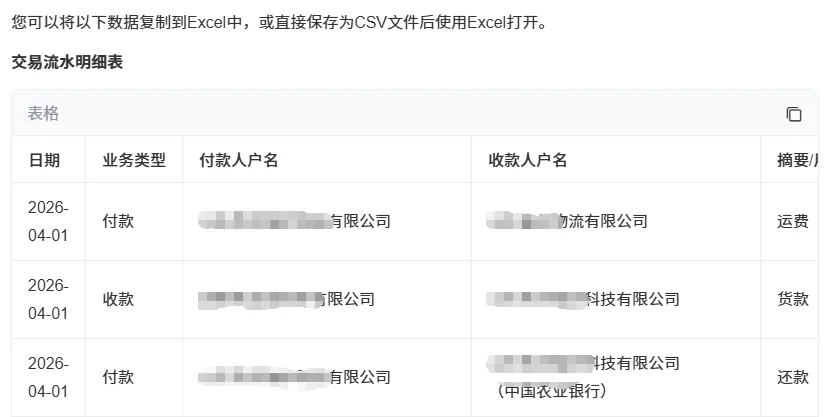
我使用的是网页版,将PDF文档扔给他,并提出要求:根据提供PDF文档,提取其中银行回单记账信息(日期、收/付款方、金额、摘要、交易代码等),并整理为Excel表格或CSV格式。4月初很顺利的提取到了信息,并一条条的列出来,根据这些流水就可以生成会计分录,用于导入会计系统了(我有专门的生成代码,需要者留言)。
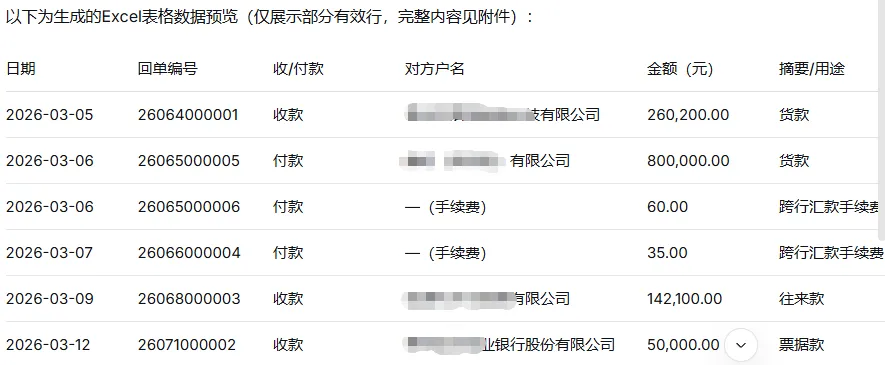
接着找办法,试试百度的“文心”,将PDF文档丢给文心,再提要求:“根据pdf文档,提前每张回单中的记账信息,生成列表”。

第一步,将PDF内容全部复制到Excel中,生成一行行的回单信息。
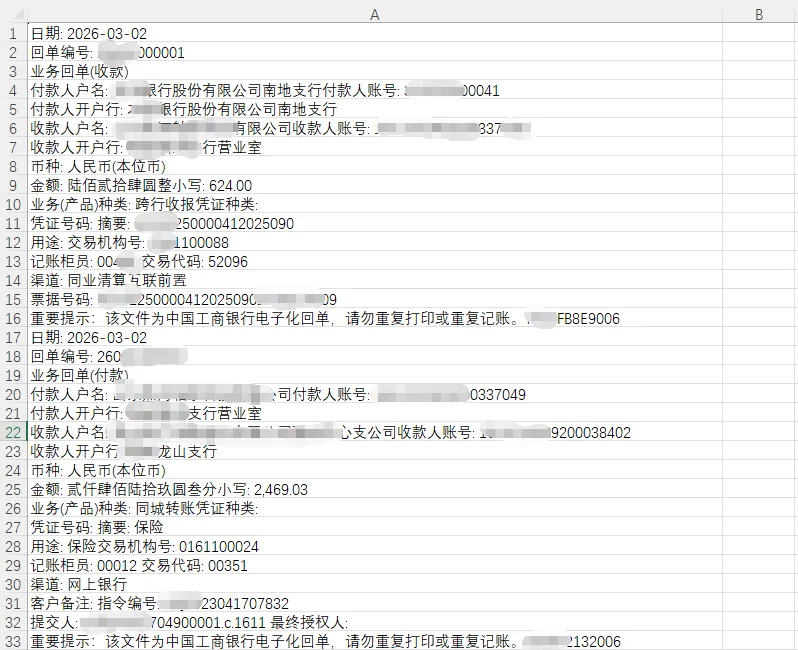
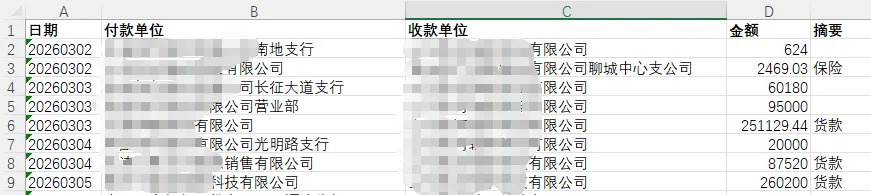
第二步,将Excel文件保存后扔给DeepSeek,提要求:“这份Excel文档内容是从工行PDF格式的电子回单上提取的信息,将这些信息整理成银行流水放入新工作表,流水中包括日期、收款单位、付款单位、金额和摘要几列,根据要求写一段VBA代码”。结果大喜过望,DeepSeek真的给我写出了可以成功运行的vba代码。
Sub ExtractBankReceiptDataSimple()
Dim wsSource As Worksheet
Dim wsTarget As Worksheet
Dim lastRow As Long
Dim i As Long
Dim targetRow As Long
Dim currentDate As String
Dim currentPayer As String
Dim currentPayee As String
Dim currentAmount As String
Dim currentSummary As String
Dim currentBizType As String
Dim lineText As String
Set wsSource = ThisWorkbook.Sheets("Sheet1")
lastRow = wsSource.Cells(wsSource.Rows.Count, 1).End(xlUp).Row
' 创建目标工作表
On Error Resume Next
Set wsTarget = ThisWorkbook.Sheets("提取结果")
If wsTarget Is Nothing Then
Set wsTarget = ThisWorkbook.Sheets.Add(After:=wsSource)
wsTarget.Name = "提取结果"
Else
wsTarget.Cells.Clear
End If
On Error GoTo 0
' 设置表头
With wsTarget
.Cells(1, 1) = "日期"
.Cells(1, 2) = "付款单位"
.Cells(1, 3) = "收款单位"
.Cells(1, 4) = "金额"
.Cells(1, 5) = "摘要"
.Cells(1, 6) = "业务类型"
.Rows(1).Font.Bold = True
.Columns("A").NumberFormat = "@" ' 日期列设为文本格式
End With
targetRow = 2
' 逐行扫描,寻找回单开始标记
For i = 1 To lastRow
lineText = Trim(wsSource.Cells(i, 1).Value)
' 检测新回单的开始(以"日期:"开头)
If InStr(lineText, "日期:") > 0 Then
' 先保存上一个回单(如果有有效数据)
If currentDate <> "" And (currentPayer <> "" Or currentPayee <> "") Then
Call SaveToTarget(wsTarget, targetRow, currentDate, currentPayer, currentPayee, currentAmount, currentSummary, currentBizType)
targetRow = targetRow + 1
End If
' 重置变量
currentDate = ""
currentPayer = ""
currentPayee = ""
currentAmount = ""
currentSummary = ""
currentBizType = ""
' 提取当前回单的日期
currentDate = ExtractSimpleValue(lineText, "日期:")
' 转换日期格式
currentDate = ConvertDateFormatSimple(currentDate)
End If
' 提取付款人户名
If InStr(lineText, "付款人户名:") > 0 Then
currentPayer = ExtractSimpleValue(lineText, "付款人户名:")
' 清理可能拼接的账号信息
If InStr(currentPayer, "付款人账号:") > 0 Then
currentPayer = Left(currentPayer, InStr(currentPayer, "付款人账号:") - 1)
End If
currentPayer = Trim(currentPayer)
End If
' 提取收款人户名
If InStr(lineText, "收款人户名:") > 0 Then
currentPayee = ExtractSimpleValue(lineText, "收款人户名:")
If InStr(currentPayee, "收款人账号:") > 0 Then
currentPayee = Left(currentPayee, InStr(currentPayee, "收款人账号:") - 1)
End If
currentPayee = Trim(currentPayee)
End If
' 提取小写金额
If InStr(lineText, "小写:") > 0 Then
currentAmount = ExtractSimpleValue(lineText, "小写:")
' 清理金额中的逗号
currentAmount = Replace(currentAmount, ",", "")
currentAmount = Trim(currentAmount)
End If
' 如果小写金额没提取到,尝试从"金额:"字段提取
If currentAmount = "" And InStr(lineText, "金额:") > 0 Then
Dim amountTemp As String
amountTemp = ExtractSimpleValue(lineText, "金额:")
If InStr(amountTemp, "小写:") > 0 Then
currentAmount = ExtractSimpleValue(amountTemp, "小写:")
currentAmount = Replace(currentAmount, ",", "")
currentAmount = Trim(currentAmount)
End If
End If
' 提取摘要
If InStr(lineText, "摘要:") > 0 Then
currentSummary = ExtractSimpleValue(lineText, "摘要:")
currentSummary = Trim(currentSummary)
End If
Next i
' 保存最后一个回单
If currentDate <> "" And (currentPayer <> "" Or currentPayee <> "") Then
Call SaveToTarget(wsTarget, targetRow, currentDate, currentPayer, currentPayee, currentAmount, currentSummary, currentBizType)
targetRow = targetRow + 1
End If
' 删除无效行
For i = targetRow - 1 To 2 Step -1
If wsTarget.Cells(i, 2) = "" And wsTarget.Cells(i, 3) = "" Then
wsTarget.Rows(i).Delete
End If
Next i
' 调整列宽
wsTarget.Columns("A:F").AutoFit
Dim recordCount As Long
recordCount = wsTarget.Cells(wsTarget.Rows.Count, 1).End(xlUp).Row - 1
If recordCount > 0 Then
MsgBox "提取完成!共提取 " & recordCount & " 条银行回单记录。" & vbCrLf & _
"日期已转换为 YYYYMMDD 格式。", vbInformation, "提取完成"
Else
MsgBox "未提取到任何记录。请检查:1) 源工作表名称是否为'Sheet1';2) 数据是否包含'日期:'等关键字", vbExclamation, "提取失败"
End If
End Sub
' 简单提取函数
Function ExtractSimpleValue(ByVal text As String, ByVal fieldName As String) As String
Dim startPos As Long
Dim endPos As Long
Dim result As String
Dim nextFields As Variant
Dim field As Variant
startPos = InStr(text, fieldName)
If startPos > 0 Then
result = Mid(text, startPos + Len(fieldName))
' 常见的后续字段标记
nextFields = Array("付款人户名:", "付款人账号:", "收款人户名:", "收款人账号:", _
"金额:", "小写:", "摘要:", "用途:", "业务(", "凭证种类:", _
"交易机构号:", "回单编号:", "币种:", "日期:", "收款人开户行:", _
"付款人开户行:", "业务回单", "重要提示")
For Each field In nextFields
endPos = InStr(result, field)
If endPos > 0 Then
result = Left(result, endPos - 1)
Exit For
End If
Next field
ExtractSimpleValue = Trim(result)
Else
ExtractSimpleValue = ""
End If
End Function
' 日期格式转换函数
Function ConvertDateFormatSimple(ByVal dateStr As String) As String
Dim yearPart As String
Dim monthPart As String
Dim dayPart As String
If dateStr = "" Then
ConvertDateFormatSimple = ""
Exit Function
End If
' 移除横线
dateStr = Replace(dateStr, "-", "")
' 如果是8位数字,直接返回
If Len(dateStr) = 8 And IsNumeric(dateStr) Then
ConvertDateFormatSimple = dateStr
Else
' 尝试从字符串中提取8位数字
Dim i As Integer
Dim numStr As String
numStr = ""
For i = 1 To Len(dateStr)
If IsNumeric(Mid(dateStr, i, 1)) Then
numStr = numStr & Mid(dateStr, i, 1)
End If
Next i
If Len(numStr) >= 8 Then
ConvertDateFormatSimple = Left(numStr, 8)
Else
ConvertDateFormatSimple = dateStr
End If
End If
End Function
' 保存数据到目标工作表
Sub SaveToTarget(ws As Worksheet, rowNum As Long, dt As String, payer As String, payee As String, amt As String, smm As String, bizType As String)
' 判断业务类型
Dim bizTypeTemp As String
If payer = "轴承科技有限公司" Then
bizTypeTemp = "付款"
ElseIf payee = "轴承科技有限公司" Then
bizTypeTemp = "收款"
Else
bizTypeTemp = "其他"
End If
ws.Cells(rowNum, 1) = dt
ws.Cells(rowNum, 2) = payer
ws.Cells(rowNum, 3) = payee
ws.Cells(rowNum, 4) = amt
ws.Cells(rowNum, 5) = smm
ws.Cells(rowNum, 6) = bizTypeTemp
End Sub
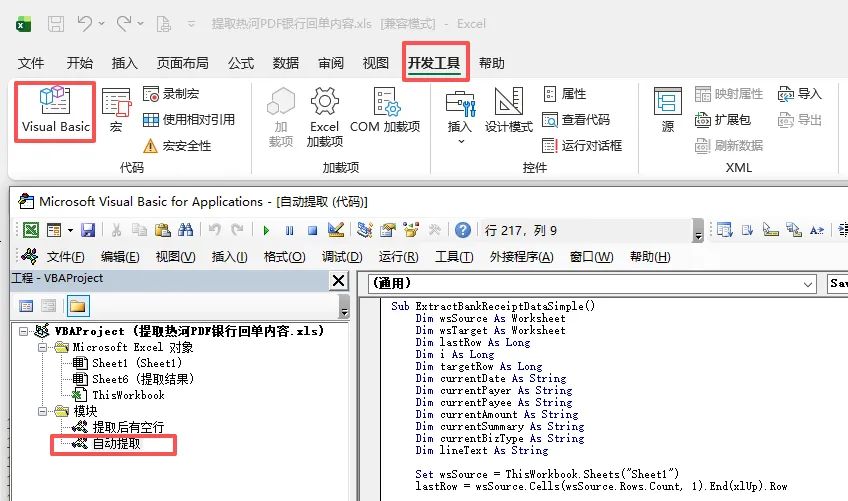
将上面的代码复制到Excel中,通过“开发工具-Visual Basic”打开VBA程序,在工程窗口新建“模块”,将代码粘贴到编辑窗口。