 夜雨聆风
夜雨聆风AI Case 11 · 图片理解与OCR识别:让AI"看懂"你的图片
双引擎融合方案:VLM 负责"理解语义",OCR 负责"精准文字",两者互补,一次性解决图片识别难题。
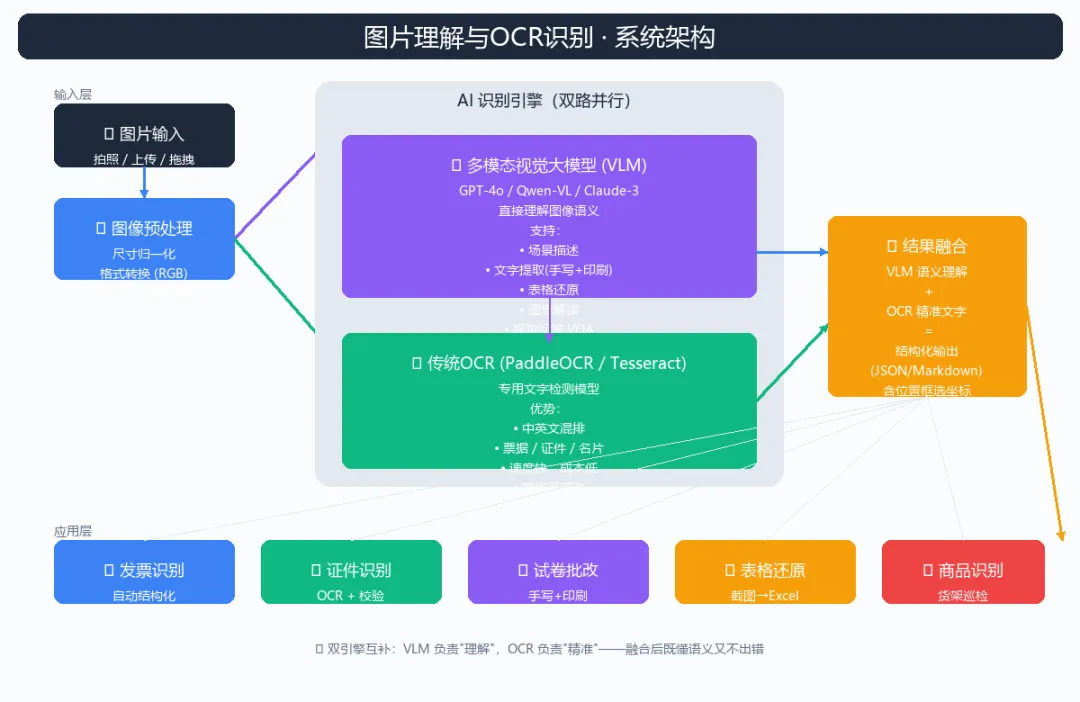
为什么需要"双引擎"?
在企业实际业务中,图片识别从来不是"能识别"就够了——
纯OCR的痛点:传统OCR(Tesseract、PaddleOCR)只能提取文字,遇到图表、场景图、混合内容就抓瞎。识别发票能凑合,识别一道数学题就歇菜。 纯VLM的痛点:GPT-4o、Qwen-VL 这类多模态大模型理解能力一流,但单字识别偶尔会"幻觉"——尤其在密集小字、特殊字体、低清图上,准确率不如专业OCR。 业务诉求:我们要的不是"差不多",而是又快又准又懂上下文。
双引擎融合就是这个问题的最优解:让 VLM 做"语义理解",OCR 做"精准文字提取",再把两者结果智能合并——既不会漏掉关键信息,也不会让模型瞎编。
系统架构
整个系统分四层:输入层 → 预处理层 → 双引擎识别层 → 结果融合层。
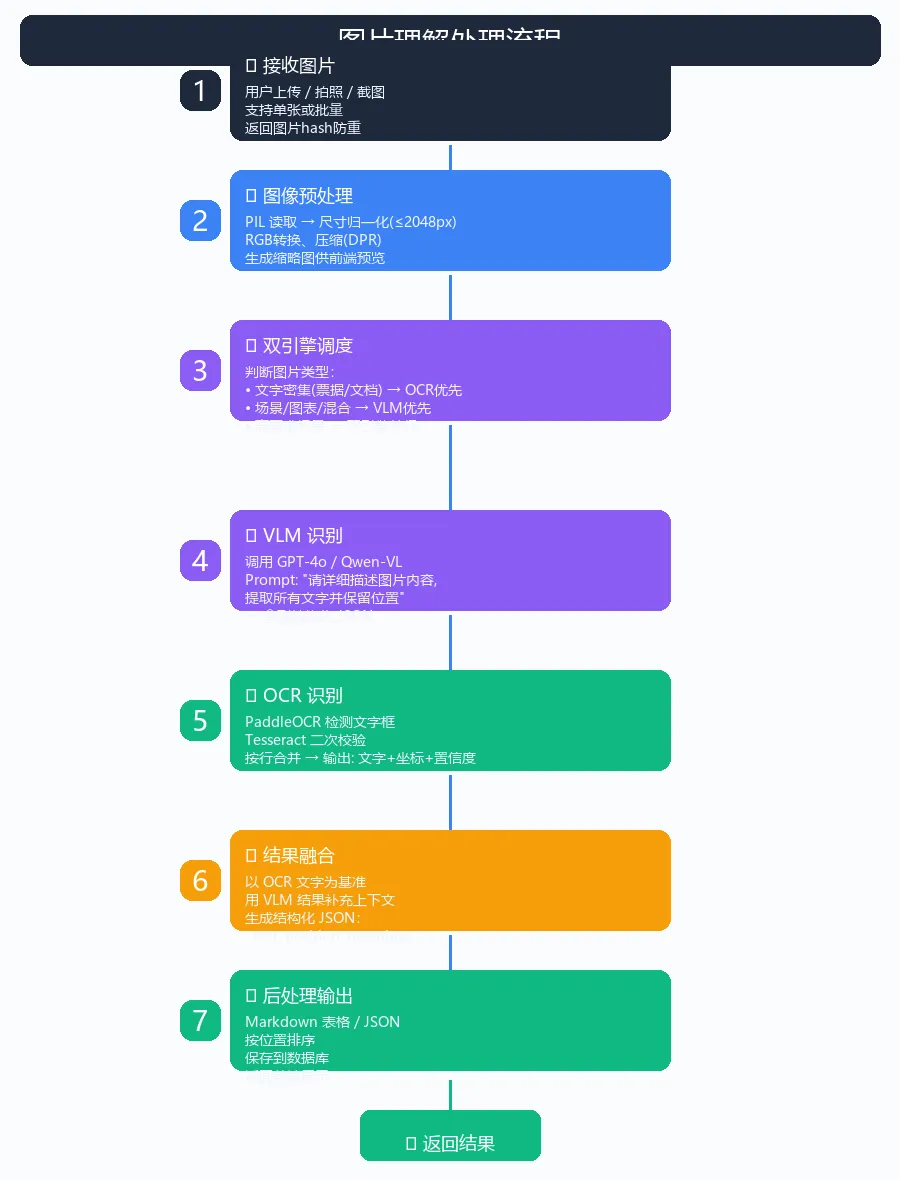
1. 输入层
支持三种入口:
# 入口1:文件上传
from fastapi import FastAPI, UploadFile
app = FastAPI()

@app.post("/api/recognize")
async def recognize(file: UploadFile):
    content = await file.read()
    return await image_pipeline.process(content)

# 入口2:图片URL
@app.post("/api/recognize_url")
async def recognize_url(url: str):
    import httpx
    async with httpx.AsyncClient() as client:
        resp = await client.get(url)
        return await image_pipeline.process(resp.content)

# 入口3:Base64(适合小程序/移动端)
@app.post("/api/recognize_b64")
async def recognize_b64(b64: str):
    import base64
    content = base64.b64decode(b64)
    return await image_pipeline.process(content)
2. 预处理层
PIL 做好三件事:尺寸归一化、格式转换、压缩。
from PIL import Image
import io

def preprocess(image_bytes: bytes, max_side: int = 2048) -> Image.Image:
    """图像预处理:限制最大边长,转RGB,压缩"""
    img = Image.open(io.BytesIO(image_bytes))

    # 1. 转RGB(去除alpha通道、CMYK等)
    if img.mode != 'RGB':
        img = img.convert('RGB')

    # 2. 限制最大边长(避免超大图OOM和超长API延迟)
    w, h = img.size
    if max(w, h) > max_side:
        if w > h:
            new_w = max_side
            new_h = int(h * max_side / w)
        else:
            new_h = max_side
            new_w = int(w * max_side / h)
        img = img.resize((new_w, new_h), Image.LANCZOS)

    return img

def to_jpeg_bytes(img: Image.Image, quality: int = 85) -> bytes:
    """转JPEG格式,压缩到合理大小"""
    buf = io.BytesIO()
    img.save(buf, format='JPEG', quality=quality, optimize=True)
    return buf.getvalue()
3. 双引擎识别层
这是核心。我们让 VLM 和 OCR 并行执行,最后融合。
3.1 VLM 引擎:调用多模态大模型
import openai
import base64
import json

class VLMEngine:
    """多模态视觉大模型引擎"""

    def __init__(self, api_key: str, base_url: str = "https://api.openai.com/v1"):
        self.client = openai.OpenAI(api_key=api_key, base_url=base_url)
        self.model = "gpt-4o-mini"  # 或 qwen-vl-plus, claude-3-5-sonnet

    def recognize(self, img_b64: str, task: str = "general") -> dict:
        """调用 VLM 识别图片"""
        prompts = {
            "general": """请详细分析这张图片,输出 JSON 格式:
{
  "scene": "场景描述(如:办公桌/教室/户外)",
  "objects": ["主要物体1", "主要物体2"],
  "text_content": "图片中的所有文字(保留原始排版)",
  "text_blocks": [{"text": "...", "position": "top-left/center/..."}],
  "summary": "一句话总结"
}""",
            "table": """这是一张表格图片。请提取为 Markdown 表格:
| 列1 | 列2 | 列3 |
|-----|-----|-----|
| ... | ... | ... |""",
            "receipt": """这是一张发票/票据。请提取为 JSON:
{
  "type": "发票/收据/小票",
  "items": [{"name": "...", "qty": 1, "price": 0.0}],
  "total": 0.0,
  "date": "YYYY-MM-DD",
  "merchant": "..."
}""",
            "idcard": """这是身份证图片。请提取关键信息:
姓名/性别/民族/出生/住址/公民身份号码
输出为键值对 JSON。"""
        }

        response = self.client.chat.completions.create(
            model=self.model,
            messages=[{
                "role": "user",
                "content": [
                    {"type": "text", "text": prompts.get(task, prompts["general"])},
                    {"type": "image_url", "image_url": {
                        "url": f"data:image/jpeg;base64,{img_b64}"
                    }}
                ]
            }],
            max_tokens=2000,
            response_format={"type": "json_object"}
        )
        return json.loads(response.choices[0].message.content)
3.2 OCR 引擎:PaddleOCR
from paddleocr import PaddleOCR

class OCREngine:
    """传统 OCR 引擎 - PaddleOCR"""

    def __init__(self, lang: str = 'ch'):
        self.ocr = PaddleOCR(
            use_angle_cls=True,  # 方向分类
            lang=lang,           # ch=中英文, en=英文
            show_log=False
        )

    def recognize(self, img_path: str) -> list:
        """识别图片中的文字,返回 [(bbox, text, confidence), ...]"""
        result = self.ocr.ocr(img_path, cls=True)

        blocks = []
        for line in result[0]:
            bbox, (text, conf) = line
            # bbox 是 [[x1,y1], [x2,y2], [x3,y3], [x4,y4]]
            x_coords = [p[0] for p in bbox]
            y_coords = [p[1] for p in bbox]
            blocks.append({
                "text": text,
                "confidence": round(conf, 3),
                "bbox": {
                    "x1": min(x_coords), "y1": min(y_coords),
                    "x2": max(x_coords), "y2": max(y_coords)
                }
            })
        # 按 y 坐标排序(从上到下)
        blocks.sort(key=lambda b: (b["bbox"]["y1"], b["bbox"]["x1"]))
        return blocks
4. 结果融合层
把 VLM 的"语义"和 OCR 的"精准文字"结合:
class ResultFusion:
    """结果融合器:VLM 语义 + OCR 精准文字"""

    def __init__(self, vlm: VLMEngine, ocr: OCREngine):
        self.vlm = vlm
        self.ocr = ocr

    async def process(self, image_bytes: bytes, task: str = "general") -> dict:
        # Step 1: 预处理
        img = preprocess(image_bytes)
        img_b64 = base64.b64encode(to_jpeg_bytes(img)).decode('utf-8')
        img.save('/tmp/_ocr_input.jpg')

        # Step 2: 并行调用双引擎
        import asyncio
        vlm_task = asyncio.to_thread(self.vlm.recognize, img_b64, task)
        ocr_task = asyncio.to_thread(
            self.ocr.recognize, '/tmp/_ocr_input.jpg'
        )
        vlm_result, ocr_result = await asyncio.gather(vlm_task, ocr_task)

        # Step 3: 融合结果
        # - VLM 提供语义理解(场景/含义/上下文)
        # - OCR 提供精准文字(保真度更高)
        # - 对文字内容,用 OCR 校正 VLM
        fused_text = self._fuse_text(vlm_result.get('text_content', ''),
                                      ocr_result)

        return {
            "scene": vlm_result.get("scene", ""),
            "objects": vlm_result.get("objects", []),
            "text": fused_text,
            "text_blocks": ocr_result,        # 保留OCR的坐标信息
            "summary": vlm_result.get("summary", ""),
            "engine": "vlm+ocr-fusion",
            "ocr_confidence_avg": sum(b["confidence"] for b in ocr_result)
                                  / max(len(ocr_result), 1)
        }

    def _fuse_text(self, vlm_text: str, ocr_blocks: list) -> str:
        """融合 VLM 文本和 OCR 文字,OCR 优先"""
        ocr_text = "\n".join(b["text"] for b in ocr_blocks)
        # 简单策略:如果 OCR 识别到了,用 OCR;否则用 VLM
        return ocr_text if ocr_text.strip() else vlm_text
完整调用示例
import asyncio
import os

async def main():
    # 初始化
    vlm = VLMEngine(api_key=os.getenv("OPENAI_API_KEY"))
    ocr = OCREngine(lang='ch')
    pipeline = ResultFusion(vlm, ocr)

    # 场景1:识别发票
    with open('发票.jpg', 'rb') as f:
        result = await pipeline.process(f.read(), task="receipt")
    print("发票识别:", json.dumps(result, ensure_ascii=False, indent=2))

    # 场景2:识别截图里的表格
    with open('表格.png', 'rb') as f:
        result = await pipeline.process(f.read(), task="table")
    print("表格内容:\n", result["text"])

    # 场景3:通用图片理解
    with open('街景.jpg', 'rb') as f:
        result = await pipeline.process(f.read(), task="general")
    print("场景:", result["scene"])
    print("总结:", result["summary"])

asyncio.run(main())
5 个企业级应用场景
| 场景 | 难点 | 我们的方案 |
|---|---|---|
| 发票/票据识别 | 字段多、格式乱 | OCR 提取文字 + VLM 校验字段语义 |
| 身份证/证件识别 | 隐私+精度 | VLM 解析 + OCR 校对号码准确性 |
| 试卷/作业批改 | 手写+印刷混合 | OCR 优先 + VLM 理解题目含义 |
| 表格截图→Excel | 复杂合并单元格 | VLM 识别结构 + OCR 提取单元格文字 |
| 货架巡检 | 商品种类多 | VLM 识别商品 + OCR 读价签/标签 |
性能与成本优化
路由选择:纯文字场景(文档/票据)走 OCR 优先,省 VLM 调用成本(OCR 单次约 0.001 元,VLM 约 0.05 元) 缓存命中:相同图片 hash 直接返回缓存 异步并发:OCR 和 VLM 用 asyncio.gather并行执行小图免VLM:图片宽度 < 512px 且纯文字 → 只调 OCR
def should_use_vlm(img: Image.Image, ocr_text_density: float) -> bool:
    """路由判断:是否需要 VLM"""
    w, h = img.size
    # 小图 + 文字密集 → 只用OCR
    if max(w, h) < 512 and ocr_text_density > 0.3:
        return False
    return True
踩坑记录
PaddleOCR 装包慢:建议用国内镜像源 pip install paddlepaddle paddleocr -i https://pypi.tuna.tsinghua.edu.cn/simple/GPT-4o 图片大小限制:单图 < 20MB,超出需要预处理压缩 VLM 输出不稳定:用 response_format={"type": "json_object"}强制 JSON 输出OCR 在低清图效果差:分辨率 < 200dpi 时建议先做超分辨率重建 中文+英文混排: PaddleOCR(lang='ch')已经支持,避免用lang='en'然后再单独识别中文
一键运行
完整代码已开源(复制到本地即可运行):
# 1. 安装依赖
pip install openai pillow paddleocr paddlepaddle fastapi uvicorn

# 2. 设置 API Key
export OPENAI_API_KEY="sk-xxx"

# 3. 运行
python image_recognition.py
下期预告
第12期:代码审查助手——让 AI 帮你审 PR、查 Bug、写测试。我们将基于 GitHub API + LangChain 构建一个能"理解代码上下文"的智能审查员,团队共享的代码质量守门人。
我是「AI 案例实践」系列作者,每周一更 21 天 AI 实战案例。关注公众号,回复
AI11获取本文完整源码。# 评论区见