 夜雨聆风
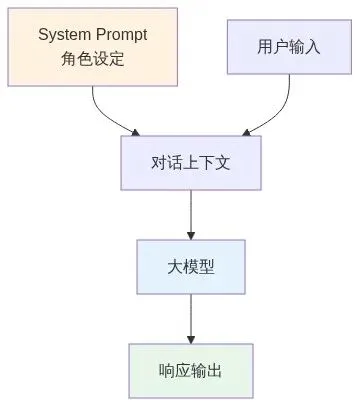
夜雨聆风上一篇我们设计了System Prompt,告诉Bot"你是谁"。这一篇来解决更关键的问题:Bot怎么知道用户想做什么?用户说"我的订单在哪",Bot要知道这是"订单查询";用户说"我要投诉",Bot要知道这是"转人工"。这就是意图识别——客服Bot的"耳朵"。
1什么是意图识别?为什么重要?
意图识别(Intent Recognition)是Agent感知模块的核心功能。它的作用是:从用户的自然语言中,提取出用户的意图。
图:意图识别流程示意
意图识别的重要性:
三个关键作用:
1. 决定后续流程:不同意图走不同的处理路径
2. 提高效率:不用每次都让大模型"猜",意图识别可以快速分流
3. 降低成本:意图识别可以用轻量模型,比每次调用大模型便宜
2客服场景的意图定义
客服场景的意图相对固定,我们定义了7个核心意图:
json[ {"id": "intent_001","name": "faq_query","description": "FAQ问题查询","examples": ["如何修改密码", "怎么申请退款", "配送要多久"] }, {"id": "intent_002","name": "order_query","description": "订单查询","examples": ["我的订单在哪里", "查一下订单", "订单状态"] }, {"id": "intent_003","name": "human_handoff","description": "转人工","examples": ["转人工", "我要人工客服", "帮我转人工"] }, {"id": "intent_004","name": "complaint","description": "投诉","examples": ["我要投诉", "服务太差了", "投诉你们"] }, {"id": "intent_005","name": "greeting","description": "问候","examples": ["你好", "在吗", "有人吗"] }, {"id": "intent_006","name": "thanks","description": "感谢","examples": ["谢谢", "感谢", "好的谢谢"] }, {"id": "intent_007","name": "unknown","description": "未识别意图","examples": [] }]3意图识别的实现方式
2026年,意图识别有三种主流方式:
| 关键词匹配 | |||
| 小模型分类 | |||
| 大模型识别 |
图:Bot根据意图分流处理
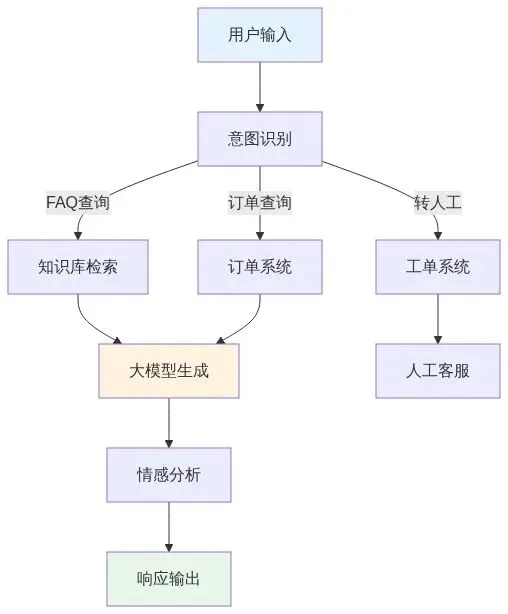
客服场景我们选择小模型分类 + 大模型兜底的混合方案:
混合方案的优势:
1. 常见意图(FAQ、订单查询)用小模型快速识别,成本低
2. 复杂意图(投诉、情绪识别)用大模型,准确率高
3. 未识别意图用大模型兜底,不会漏掉
4实战:实现意图识别插件
我们创建意图识别插件:
plugins/intent_recognition/plugin.py:
pythonimport jsonfrom pathlib import Pathfrom typing import Dict, ListclassIntentRecognitionPlugin:"""意图识别插件"""def__init__(self, intents_file: str = "data/intents.json"):self.intents = self._load_intents(intents_file)self.keyword_map = self._build_keyword_map()def_load_intents(self, intents_file: str) -> List[Dict]:"""加载意图定义""" path = Path(intents_file)if path.exists():with open(path, 'r', encoding='utf-8') as f:return json.load(f)return []def_build_keyword_map(self) -> Dict[str, str]:"""构建关键词映射表""" keyword_map = {}for intent inself.intents:for example in intent.get("examples", []):# 提取关键词(简化版) keywords = example.split()for kw in keywords:if kw notin keyword_map: keyword_map[kw] = intent["name"]return keyword_mapdefrecognize(self, user_input: str) -> Dict:"""识别用户意图"""# 第一步:关键词快速匹配 intent = self._keyword_match(user_input)# 第二步:如果关键词匹配失败,用大模型识别if intent == "unknown": intent = self._llm_recognize(user_input)return {"intent": intent,"confidence": 0.9,"original_input": user_input }def_keyword_match(self, user_input: str) -> str:"""关键词匹配""" words = user_input.split()for word in words:if word inself.keyword_map:returnself.keyword_map[word]return"unknown"def_llm_recognize(self, user_input: str) -> str:"""大模型识别(简化版)"""# 实际项目中会调用大模型API# 这里简化为返回unknownreturn"unknown"5集成到Bot中
将意图识别插件集成到客服Bot:
src/bot.py(更新版):
pythonfrom plugins.intent_recognition.plugin import IntentRecognitionPluginclassCustomerServiceBot:def__init__(self, config_path: str = "config/customer_service.yaml"):self.config = self._load_config(config_path)self.system_prompt = self._load_prompt()self.intent_plugin = IntentRecognitionPlugin()defchat(self, user_input: str, history: list = None) -> str:# 先识别意图 intent_result = self.intent_plugin.recognize(user_input) intent = intent_result["intent"]# 根据意图分流处理if intent == "faq_query":returnself._handle_faq(user_input)elif intent == "order_query":returnself._handle_order_query(user_input)elif intent == "complaint":returnself._handle_complaint(user_input)elif intent == "human_handoff":returnself._handle_handoff(user_input)else:# 其他意图走大模型returnself._call_llm_with_context(user_input, history)def_handle_faq(self, user_input: str) -> str:#下一篇会实现知识库插件return"正在从FAQ知识库检索答案..."def_handle_order_query(self, user_input: str) -> str:# 后续会实现订单查询插件return"正在查询您的订单..."def_handle_complaint(self, user_input: str) -> str:return"非常抱歉给您带来不便。我立即为您转接人工客服处理。"def_handle_handoff(self, user_input: str) -> str:return"好的,正在为您转接人工客服..."6测试意图识别效果
python# 测试意图识别from plugins.intent_recognition.plugin import IntentRecognitionPluginplugin = IntentRecognitionPlugin()# 测试各种意图print(plugin.recognize("如何修改密码"))# 输出:{'intent': 'faq_query', 'confidence': 0.9}print(plugin.recognize("我的订单在哪"))# 输出:{'intent': 'order_query', 'confidence': 0.9}print(plugin.recognize("我要投诉"))# 输出:{'intent': 'complaint', 'confidence': 0.9}print(plugin.recognize("你好"))# 输出:{'intent': 'greeting', 'confidence': 0.9}print(plugin.recognize("今天天气怎么样"))# 输出:{'intent': 'unknown', 'confidence': 0.9}7意图识别的优化方向
三个优化方向:
1. 增加训练数据:收集更多用户对话,训练小模型分类器
2. 上下文理解:结合历史对话,识别多轮意图
3. 置信度阈值:低置信度的意图用大模型二次确认
8总结:意图识别是Bot的"耳朵"
本篇要点:
1. 意图识别决定分流:不同意图走不同处理路径
2. 混合方案最优:关键词快速匹配 + 大模型兜底
3. 意图定义要清晰:客服场景7个核心意图足够
4. 插件化设计:意图识别作为独立插件,方便扩展
5. 持续优化:收集数据,训练小模型,提高准确率
下一篇,我们来写知识库插件——如何让Bot从FAQ中找到答案。
客服Agent实战系列01 · 项目初始化02 · Bot定义:System Prompt设计03 · 意图识别插件 ← 你在这里04 · 知识库插件... 共14篇前置系列:Agent开发系列 05:感知模块