夜雨聆风
夜雨聆风

Python,速成心法
敲代码,查资料,问Ai
练习,探索,总结,优化

★★★★★博文创作不易,源码代码的过程中,如有疑问的地方,欢迎大家指正留言交流。喜欢的老铁可以多多点赞+收藏分享+置顶,小红牛在此表示感谢。★★★★★
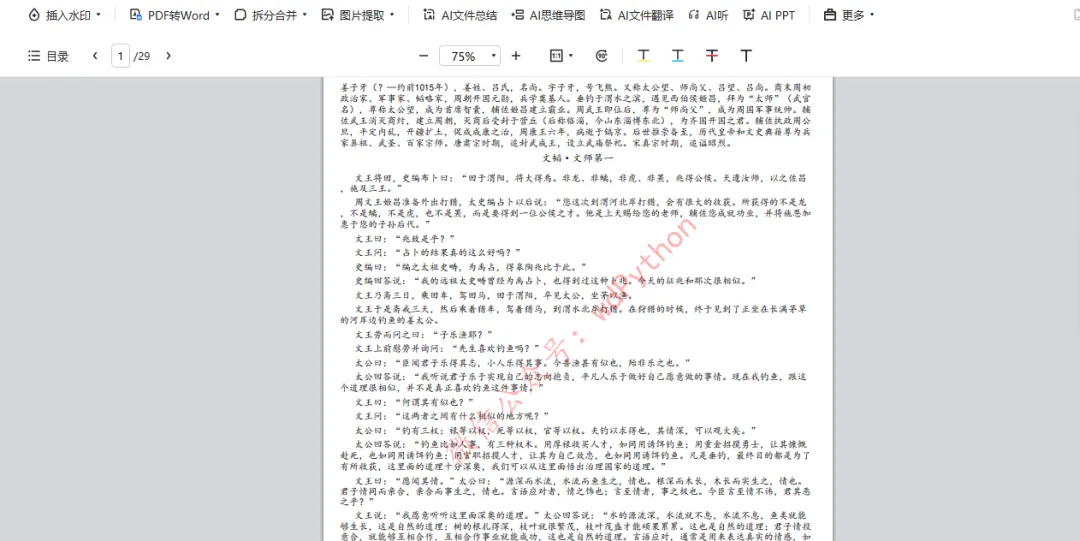
office办公python代码:PDF书籍封面生成器1.0(tk+reportlab)
pip install pypdf reportlab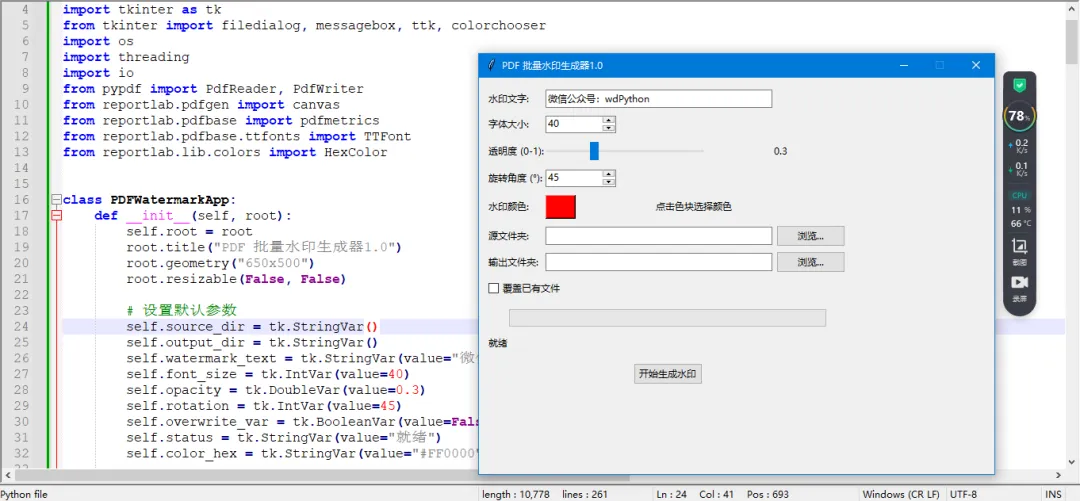
↓ 完整源码如下 ↓
# -*- coding: utf-8 -*-# @Author : 小红牛# 微信公众号:wdPythonimport tkinter as tkfrom tkinter import filedialog, messagebox, ttk, colorchooserimport osimport threadingimport iofrom pypdf import PdfReader, PdfWriterfrom reportlab.pdfgen import canvasfrom reportlab.pdfbase import pdfmetricsfrom reportlab.pdfbase.ttfonts import TTFontfrom reportlab.lib.colors import HexColorclass PDFWatermarkApp:def __init__(self, root):self.root = rootroot.title("PDF 批量水印生成器1.0")root.geometry("650x500")root.resizable(False, False)# 设置默认参数self.source_dir = tk.StringVar()self.output_dir = tk.StringVar()self.watermark_text = tk.StringVar(value="微信公众号:wdPython")self.font_size = tk.IntVar(value=40)self.opacity = tk.DoubleVar(value=0.3)self.rotation = tk.IntVar(value=45)self.overwrite_var = tk.BooleanVar(value=False)self.status = tk.StringVar(value="就绪")self.color_hex = tk.StringVar(value="#FF0000") # 默认红色self.create_widgets()def create_widgets(self):main = ttk.Frame(self.root, padding="10")main.grid(row=0, column=0, sticky=(tk.W, tk.E, tk.N, tk.S))# 水印文字ttk.Label(main, text="水印文字:").grid(row=0, column=0, sticky=tk.W, pady=5)ttk.Entry(main, textvariable=self.watermark_text, width=40).grid(row=0, column=1, columnspan=3, sticky=tk.W, pady=5)# 字体大小ttk.Label(main, text="字体大小:").grid(row=1, column=0, sticky=tk.W, pady=5)ttk.Spinbox(main, from_=10, to=200, textvariable=self.font_size, width=10).grid(row=1, column=1, sticky=tk.W, pady=5)# 透明度ttk.Label(main, text="透明度 (0-1):").grid(row=2, column=0, sticky=tk.W, pady=5)scale = ttk.Scale(main, from_=0.0, to=1.0, orient=tk.HORIZONTAL, variable=self.opacity, length=200)scale.grid(row=2, column=1, columnspan=2, sticky=tk.W, pady=5)ttk.Label(main, textvariable=self.opacity).grid(row=2, column=3, sticky=tk.W)# 旋转角度ttk.Label(main, text="旋转角度 (°):").grid(row=3, column=0, sticky=tk.W, pady=5)ttk.Spinbox(main, from_=0, to=360, textvariable=self.rotation, width=10).grid(row=3, column=1, sticky=tk.W, pady=5)# 水印颜色(新增)ttk.Label(main, text="水印颜色:").grid(row=4, column=0, sticky=tk.W, pady=5)self.color_btn = tk.Button(main, bg=self.color_hex.get(), width=4,command=self.choose_color)self.color_btn.grid(row=4, column=1, sticky=tk.W, pady=5)ttk.Label(main, text="点击色块选择颜色").grid(row=4, column=2, sticky=tk.W, padx=5)# 源文件夹ttk.Label(main, text="源文件夹:").grid(row=5, column=0, sticky=tk.W, pady=5)ttk.Entry(main, textvariable=self.source_dir, width=40).grid(row=5, column=1, columnspan=2, sticky=tk.W+tk.E, pady=5)ttk.Button(main, text="浏览...", command=self.browse_source).grid(row=5, column=3, sticky=tk.W, padx=5)# 输出文件夹ttk.Label(main, text="输出文件夹:").grid(row=6, column=0, sticky=tk.W, pady=5)ttk.Entry(main, textvariable=self.output_dir, width=40).grid(row=6, column=1, columnspan=2, sticky=tk.W+tk.E, pady=5)ttk.Button(main, text="浏览...", command=self.browse_output).grid(row=6, column=3, sticky=tk.W, padx=5)# 覆盖选项ttk.Checkbutton(main, text="覆盖已有文件", variable=self.overwrite_var).grid(row=7, column=0, columnspan=2, sticky=tk.W, pady=5)# 进度条和状态self.progress = ttk.Progressbar(main, orient=tk.HORIZONTAL, length=400, mode='determinate')self.progress.grid(row=8, column=0, columnspan=4, pady=10)ttk.Label(main, textvariable=self.status).grid(row=9, column=0, columnspan=4, sticky=tk.W)# 开始按钮ttk.Button(main, text="开始生成水印", command=self.start_watermark).grid(row=10, column=0, columnspan=4, pady=15)main.columnconfigure(1, weight=1)main.columnconfigure(2, weight=1)def choose_color(self):"""弹出颜色选择器,更新颜色变量和按钮背景色"""color = colorchooser.askcolor(initialcolor=self.color_hex.get())[1]if color:self.color_hex.set(color)self.color_btn.config(bg=color)def browse_source(self):dirname = filedialog.askdirectory()if dirname:self.source_dir.set(dirname)# 自动生成输出路径:同级目录下,源文件夹名 + "pdf水印"parent = os.path.dirname(dirname)base = os.path.basename(dirname)if parent:output = os.path.join(parent, "pdf水印")else:# 如果源文件夹是根目录,则在同一级(根目录下)创建output = base + "pdf水印"self.output_dir.set(output)def browse_output(self):dirname = filedialog.askdirectory()if dirname:self.output_dir.set(dirname)def start_watermark(self):source = self.source_dir.get().strip()output = self.output_dir.get().strip()if not source:messagebox.showerror("错误", "请选择源文件夹")returnif not output:messagebox.showerror("错误", "请选择输出文件夹")returnif not os.path.exists(source):messagebox.showerror("错误", "源文件夹不存在")returnif not os.path.exists(output):try:os.makedirs(output)except Exception as e:messagebox.showerror("错误", f"无法创建输出文件夹: {e}")returnif not self.watermark_text.get().strip():messagebox.showerror("错误", "请输入水印文字")returnself.status.set("正在处理...")self.progress['value'] = 0threading.Thread(target=self.process_pdfs, args=(source, output), daemon=True).start()def process_pdfs(self, source_dir, output_dir):try:pdf_files = []for root, _, files in os.walk(source_dir):for f in files:if f.lower().endswith('.pdf'):pdf_files.append(os.path.join(root, f))total = len(pdf_files)if total == 0:self.root.after(0, lambda: messagebox.showinfo("提示", "未找到任何 PDF 文件"))self.root.after(0, lambda: self.status.set("就绪"))returnself.progress['maximum'] = totalprocessed = 0for pdf_path in pdf_files:rel_path = os.path.relpath(pdf_path, source_dir)out_path = os.path.join(output_dir, rel_path)out_dir = os.path.dirname(out_path)if not os.path.exists(out_dir):os.makedirs(out_dir)if os.path.exists(out_path) and not self.overwrite_var.get():self.status.set(f"跳过已存在: {rel_path}")processed += 1self.progress['value'] = processedself.root.update_idletasks()continuetry:self.add_watermark_to_pdf(pdf_path, out_path)except Exception as e:self.status.set(f"处理 {rel_path} 失败: {e}")processed += 1self.progress['value'] = processedself.status.set(f"处理 {rel_path} ({processed}/{total})")self.root.update_idletasks()self.root.after(0, lambda: messagebox.showinfo("完成", f"处理完成!共处理 {processed} 个文件。"))self.root.after(0, lambda: self.status.set("就绪"))except Exception as e:self.root.after(0, lambda: messagebox.showerror("错误", f"发生错误: {e}"))self.root.after(0, lambda: self.status.set("错误"))def add_watermark_to_pdf(self, input_pdf, output_pdf):reader = PdfReader(input_pdf)writer = PdfWriter()text = self.watermark_text.get()font_size = self.font_size.get()opacity = self.opacity.get()rotation = self.rotation.get()color_hex = self.color_hex.get() # 如 "#FF0000"# ---------- 注册楷体字体 ----------font_name = Nonefont_candidates = [('KaiTi', 'simkai.ttf'),('KaiTi', 'KaiTi.ttf'),('STKaiti', 'STKaiti.ttf'),('KaiTi_GB2312', 'kaiu.ttf'),]for name, file in font_candidates:try:pdfmetrics.registerFont(TTFont(name, file))font_name = namebreakexcept:continueif font_name is None:font_name = 'Helvetica'print("警告:未找到楷体字体,使用 Helvetica,中文可能显示为方框。")# ---------------------------------# 转换颜色try:color_obj = HexColor(color_hex)except:color_obj = HexColor("#FF0000") # 若格式错误则回退红色for page in reader.pages:box = page.mediaboxwidth = float(box.width)height = float(box.height)packet = io.BytesIO()c = canvas.Canvas(packet, pagesize=(width, height))c.setFont(font_name, font_size)c.setFillColor(color_obj) # 设置颜色c.setFillAlpha(opacity)c.setStrokeAlpha(opacity)c.saveState()c.translate(width / 2, height / 2)c.rotate(rotation)c.drawCentredString(0, 0, text)c.restoreState()c.save()packet.seek(0)watermark_reader = PdfReader(packet)watermark_page = watermark_reader.pages[0]page.merge_page(watermark_page, over=True)writer.add_page(page)with open(output_pdf, 'wb') as f:writer.write(f)if __name__ == "__main__":root = tk.Tk()app = PDFWatermarkApp(root)root.mainloop()
完毕!!感谢您的收看
------★★历史博文集合★★------