 夜雨聆风
夜雨聆风
AI时代的第一步,不是学提示词,是养成录音的习惯
叶老师在一开场,就提了一个很反常识的要求:他要求所有在场的学员,都把他讲课的过程录下来。
一般的课是怕你录音的,他的课是必须录音。为什么呢?因为他说,今天讲的所有东西,不是只在今天用的,是你们日后会无数次用到的。隔一个礼拜再回来看,你在某个场合下需要用什么工具,今天可能都讲过,只是你当时没意识到。
而且他说,这些录音录完,几乎没有人会回去听第二遍——录音的价值根本不在“听”,而在于丢给AI,让AI替你把活干了。
他自己就是这么工作的。出去谈客户,全程录音,回来往智能体里一丢,AI自动把谈话梳理成需求、出方案、出报价单,三步一气呵成。他分享了一个极具说服力的案例:过去因团队产能所限,难以承接小规模定制需求;而如今,即便是跨行业的复杂方案,也能在极短时间内高效交付。他坦言,这得益于将大量执行工作交由AI完成,自己则专注于核心决策。
这其实就是整场课的暗线:先采集,再沉淀,让AI调用,最后产出东西。而千问,就是这条流水线上的第一环。
「这些东西录完了不是让你听的,是让你用的。」
———
实操步骤:怎么用千问录音
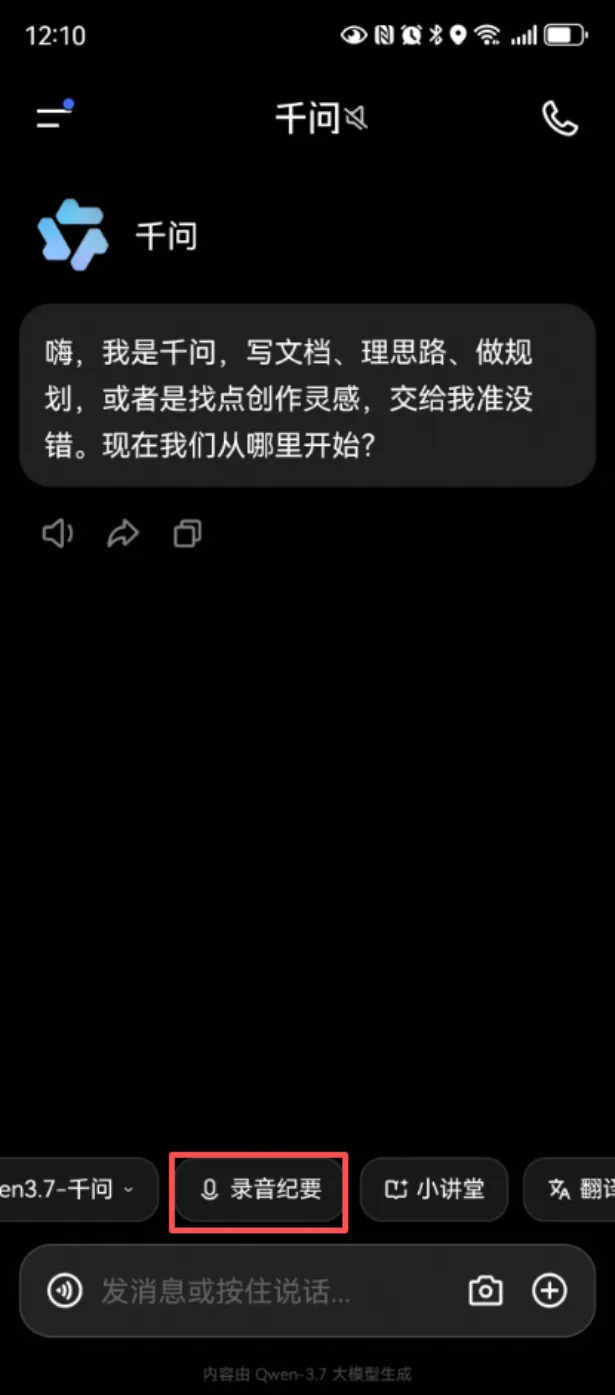
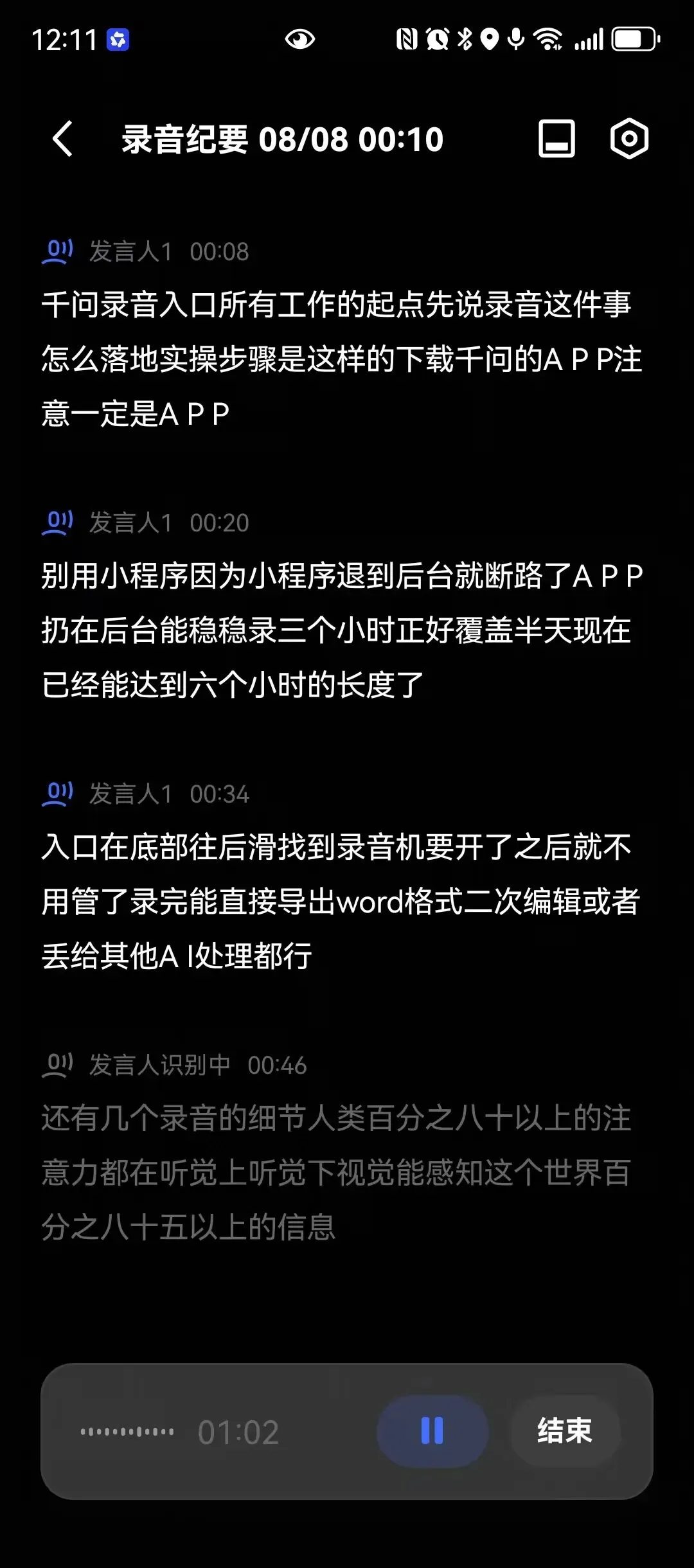
第一步:下载千问的APP——注意,一定是APP,别用小程序,因为小程序退到后台就断录了,APP扔在后台能稳稳录6个小时。
第二步:入口在底部往后滑,找到“录音纪要”,开了就不用管。
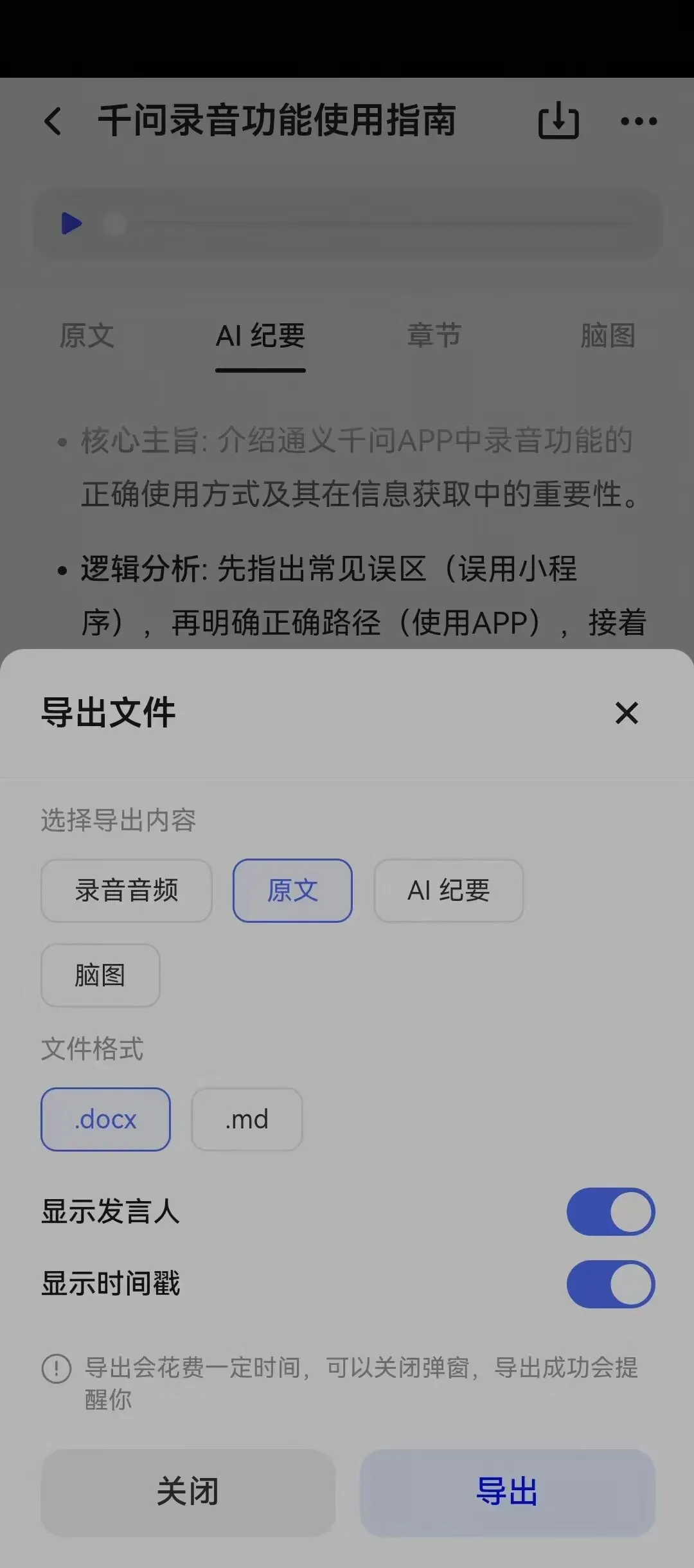
第三步:录完能直接导出Word格式,二次编辑或者丢给其他AI处理都行。
职场应用场景
会议录音自不必说。有些不适合当场录的会,他会后自己补录一段。涉密场合除外。
关键不在于录了什么,而在于录完之后,这些内容能被AI调用。你只要简单告诉AI干什么,它会基于你录下来的内容,自己去完成。
「为什么要养成录音的习惯?因为接着干活的是AI。你只要简单告诉它干什么,它会基于你录下来的内容,自己去完成。」
———
为什么这是所有工作的起点
没有采集,就没有沉淀;没有沉淀,AI就无米下炊。千问的价值不在于它本身有多聪明,而在于它帮你把真实世界里发生的事情,变成了AI可以处理的数据。
从今天开始,养成一个习惯:重要会议、客户沟通、灵感闪现,打开千问,按下录音。剩下的,交给AI。
「AI的使用到最后,是考验大家能力的上限,而不是工具的上限。」
Qwen: Voice Recording – The Starting Point of All Work
The first step in the AI era isn’t learning prompt engineering—it’s building the habit of recording.
Right at the start of the session, Mr. Ye made a rather counterintuitive request: he asked all attendees to record his entire lecture. While most courses discourage recording, his class requires it. Why? Because everything covered today isn’t just for immediate use—it’s material you’ll revisit countless times in the future. Come back to it in a week, and you’ll find that for a specific scenario or tool you need, the answer was likely already covered today—you just didn’t realize it at the time.
Moreover, he pointed out that almost no one ever listens to these recordings a second time. The real value of recording isn’t in listening—it’s in feeding the audio to AI so it can do the work for you.
This is exactly how he works. When meeting clients, he records the entire conversation. Back to the office, he drops the recording into an AI agent, which automatically distills the discussion into requirements, drafts a proposal, and generates a quote—all in one seamless flow. He shared a compelling case study: previously constrained by team capacity, his firm struggled to take on small-scale custom projects. Today, however, he can deliver complex, cross-industry solutions with remarkable efficiency—often within an exceptionally short timeframe. He attributes this shift to delegating the bulk of execution to AI, allowing him to focus squarely on high-level strategic decisions.
This is the underlying thread of the entire course: collect first, then codify, let AI retrieve and apply it, and finally produce output. And Qwen is the first link in that assembly line.
“These recordings aren’t for you to listen to—they’re for you to use.”
Step-by-Step: How to Record with Qwen
1.Download the Qwen app.
Make sure it’s the app—not the mini-program. Mini-programs stop recording once you switch to another app. The Qwen app, however, can keep recording steadily in the background for up to six hours.
2.Find the entry point.
Swipe right on the bottom navigation bar and tap "Meeting Minutes (Recording).” Once started, you can leave it running.
3.Export and reuse.
After recording, you can export the transcript directly as a Word document—ready for further editing or to be fed into other AI tools for processing.
Workplace Applications
Recording meetings goes without saying. For meetings that aren’t suitable to record on the spot, Instructor Ye often does a quick voice memo recap right afterward (excluding confidential settings).
The key isn’t what you record—it’s what happens after. Once recorded, this content becomes retrievable and usable by AI. You simply tell the AI what to do, and it will draw on your recordings to complete the task.
“Why build the habit of recording? Because AI is the one picking up the work afterward. You just tell it what to do, and it will draw on your recordings to complete the task.”
Why This Is the Starting Point of All Work
Without collection, there is no codification. Without codification, AI has nothing to work with. The value of Qwen isn’t in how “smart” it is on its own—it’s in turning real-world events into data that AI can process.
Starting today, build this habit: for important meetings, client conversations, or sudden bursts of inspiration—open Qwen, hit record, and let AI handle the rest.
“In the end, using AI tests the upper limit of your own capabilities—not the limits of the tool.”