ARTICLE · 998494
电脑软件:自动清理Windows系统垃圾的脚本-可直接启动(更新网址)

推荐理由

这是参考互联网上清理C盘空间的方法,写的应用于Windows的脚本,可以直接启动清理。对于脚本爱好者也可以自己改写。自动清理电脑C盘垃圾,有效提高电脑速度。


百度网盘:
https://pan.baidu.com/s/109HBjVYMHcP2-90FuuBrWg?pwd=4ni2
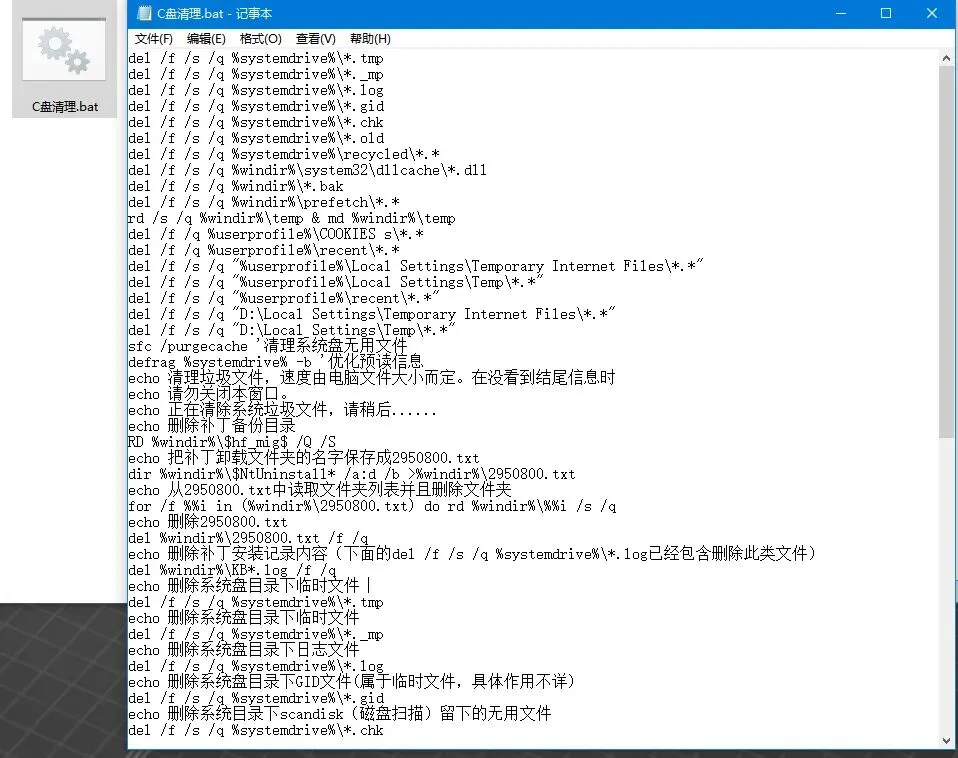
代码如下(欢迎大家指证):
del /f /s /q %systemdrive%\*.tmp
del /f /s /q %systemdrive%\*._mp
del /f /s /q %systemdrive%\*.log
del /f /s /q %systemdrive%\*.gid
del /f /s /q %systemdrive%\*.chk
del /f /s /q %systemdrive%\*.old
del /f /s /q %systemdrive%\recycled\*.*
del /f /s /q %windir%\system32\dllcache\*.dll
del /f /s /q %windir%\*.bak
del /f /s /q %windir%\prefetch\*.*
rd /s /q %windir%\temp & md %windir%\temp
del /f /q %userprofile%\COOKIES s\*.*
del /f /q %userprofile%\recent\*.*
del /f /s /q "%userprofile%\Local Settings\Temporary Internet Files\*.*"
del /f /s /q "%userprofile%\Local Settings\Temp\*.*"
del /f /s /q "%userprofile%\recent\*.*"
del /f /s /q "D:\Local Settings\Temporary Internet Files\*.*"
del /f /s /q "D:\Local Settings\Temp\*.*"
sfc /purgecache '清理系统盘无用文件
defrag %systemdrive% -b '优化预读信息
echo 清理垃圾文件,速度由电脑文件大小而定。在没看到结尾信息时
echo 请勿关闭本窗口。
echo 正在清除系统垃圾文件,请稍后......
echo 删除补丁备份目录
RD %windir%\$hf_mig$ /Q /S
echo 把补丁卸载文件夹的名字保存成2950800.txt
dir %windir%\$NtUninstall* /a:d /b >%windir%\2950800.txt
echo 从2950800.txt中读取文件夹列表并且删除文件夹
for /f %%i in (%windir%\2950800.txt) do rd %windir%\%%i /s /q
echo 删除2950800.txt
del %windir%\2950800.txt /f /q
echo 删除补丁安装记录内容(下面的del /f /s /q %systemdrive%\*.log已经包含删除此类文件)
del %windir%\KB*.log /f /q
echo 删除系统盘目录下临时文件
del /f /s /q %systemdrive%\*.tmp
echo 删除系统盘目录下临时文件
del /f /s /q %systemdrive%\*._mp
echo 删除系统盘目录下日志文件
del /f /s /q %systemdrive%\*.log
echo 删除系统盘目录下GID文件(属于临时文件,具体作用不详)
del /f /s /q %systemdrive%\*.gid
echo 删除系统目录下scandisk(磁盘扫描)留下的无用文件
del /f /s /q %systemdrive%\*.chk
echo 删除系统目录下old文件
del /f /s /q %systemdrive%\*.old
echo 删除回收站的无用文件
del /f /s /q %systemdrive%\recycled\*.*
echo 删除系统目录下备份文件
del /f /s /q %windir%\*.bak
echo 删除应用程序临时文件
del /f /s /q %windir%\prefetch\*.*
echo 删除系统维护等操作产生的临时文件
rd /s /q %windir%\temp & md %windir%\temp
echo 删除当前用户的COOKIE(IE)
del /f /q %userprofile%\cookies\*.*
echo 删除internet临时文件
del /f /s /q "%userprofile%\local settings\temporary internet files\*.*"
echo 删除当前用户日常操作临时文件
del /f /s /q "%userprofile%\local settings\temp\*.*"
echo 删除访问记录(开始菜单中的文档里面的东西)
del /f /s /q "%userprofile%\recent\*.*"
del /f /s /q %systemdrive%\*.tmp
del /f /s /q %systemdrive%\*._mp
del /f /s /q %systemdrive%\*.log
del /f /s /q %systemdrive%\*.gid
del /f /s /q %systemdrive%\*.chk
del /f /s /q %systemdrive%\*.old
del /f /s /q %systemdrive%\recycled\*.*
del /f /s /q %windir%\*.bak
del /f /s /q %windir%\prefetch\*.*
rd /s /q %windir%\temp & md %windir%\temp
del /f /q %userprofile%\cookies\*.*
del /f /q %userprofile%\recent\*.*
del /f /s /q "%userprofile%\Local Settings\Temporary Internet Files\*.*"
del /f /s /q "%userprofile%\Local Settings\Temp\*.*"
del /f /s /q "%userprofile%\recent\*.*"
写在最后:
虽然有大量清理电脑垃圾的软件,但写一脚本还是清理起来比较放心。
希望以上内容对您有用。有时间来“美时课堂”学点有用东西,让生活更加美好!