 夜雨聆风
夜雨聆风


万能的小程序登录注册页面,包含源码和效果图.拷贝可直接运行看效果
 |
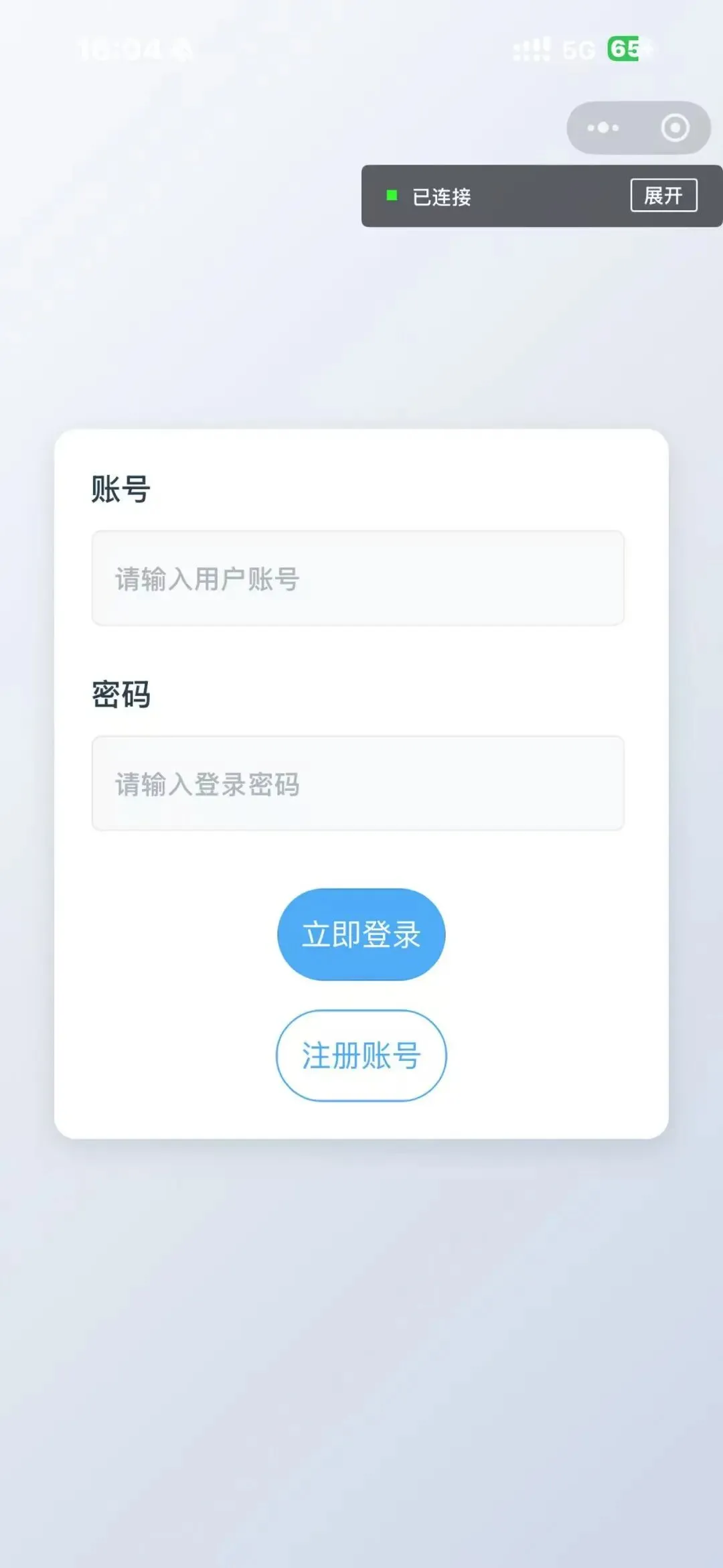 |
用户通过账号密码或手机号验证码登录,登录成功后生成 token 并存储在本地,后续请求自动携带 token,实现接口权限管理,登录失败可提示用户具体原因(如账号不存在、密码错误)
<viewclass="login-container"><viewclass="login-card"><viewclass="form-group"><textclass="form-label">账号</text><inputclass="form-input"type="text"model:value="{{userAccount}}"placeholder="请输入用户账号"placeholder-class="input-placeholder" /></view><viewclass="form-group"><textclass="form-label">密码</text><inputclass="form-input"type="password"model:value="{{password}}"placeholder="请输入登录密码"placeholder-class="input-placeholder" /></view><viewclass="btn-group"><buttonclass="primary-btn"bind:tap="login">立即登录</button><buttonclass="secondary-btn"bind:tap="zhuce">注册账号</button></view></view></view>
/* pages/login_main/login_main.wxss */.login-container {height: 100vh;display: flex;justify-content: center;align-items: center;background: linear-gradient(135deg, rgba(245, 247, 250, 0.8) 0%, rgba(195, 207, 226, 0.8) 100%),url('https://tse2.mm.bing.net/th/id/OIP.tcjwPdWiG7x8Oz8QKyAh_gHaLG') no-repeat center center;background-size: cover;}.login-card {background: #fff;width: 85vw;padding: 40rpx;border-radius: 24rpx;box-shadow: 0 10rpx 30rpx rgba(0, 0, 0, 0.1);}.form-group {margin-bottom: 48rpx;}.form-label {display: block;font-size: 32rpx;color: #2c3e50;margin-bottom: 20rpx;font-weight: 500;}.form-input {width: 90%;height: 96rpx;background: #f8f9fa;border-radius: 12rpx;padding: 0 24rpx;font-size: 28rpx;border: 2rpx solid #e9ecef;transition: all 0.3s ease;}.form-input:focus {border-color: #4dabf7;background: #fff;box-shadow: 0 0 8rpx rgba(77, 171, 247, 0.2);}.input-placeholder {color: #adb5bd;font-size: 28rpx;}.btn-group {margin-top: 60rpx;display: flex;flex-direction: column;gap: 30rpx;}.primary-btn {background: #4dabf7;color: white;border-radius: 50rpx;height: 96rpx;font-size: 32rpx;text-align: center;display: flex;/* 增加:启用 Flex 布局 */justify-content: center;/* 增加:水平居中 */align-items: center;/* 增加:垂直居中 */transition: all 0.3s ease;}.primary-btn:active {background: #339af0;transform: scale(0.98);}.secondary-btn {background: transparent;color: #4dabf7;border: 2rpx solid #4dabf7;border-radius: 50rpx;height: 96rpx;font-size: 32rpx;text-align: center;display: flex;/* 增加:启用 Flex 布局 */justify-content: center;/* 增加:水平居中 */align-items: center;/* 增加:垂直居中 */}.secondary-btn:active {background: rgba(77, 171, 247, 0.1);}
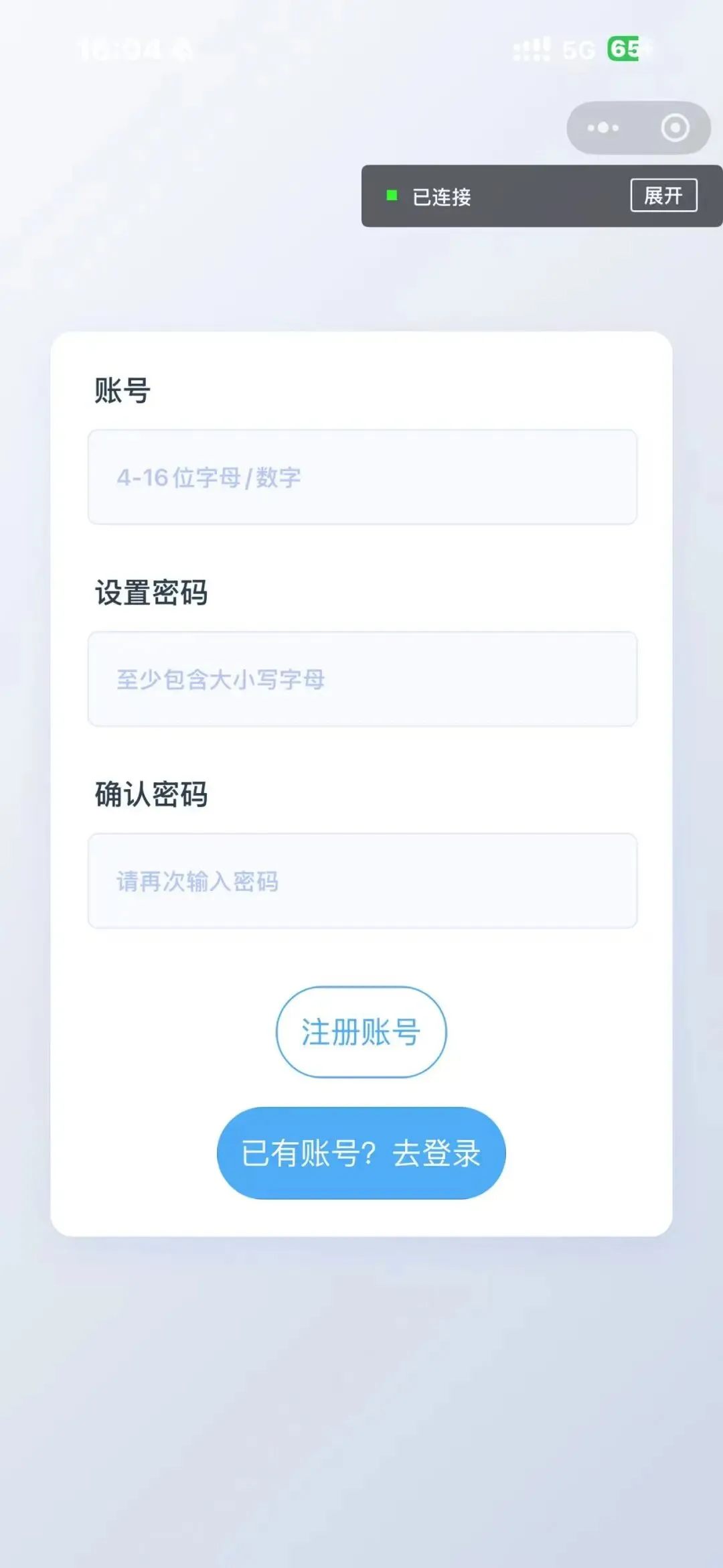
用户通过手机号、邮箱或账号密码进行注册,支持基本表单校验(如手机号格式、密码长度、两次密码一致性),注册成功后可自动登录或引导用户登录。
<!-- pages/register/register.wxml --><viewclass="register-container"><viewclass="register-card"><viewclass="form-group"><textclass="form-label">账号</text><inputclass="form-input"type="text"model:value="{{userAccount}}"placeholder="4-16位字母/数字"placeholder-class="input-placeholder" /></view><viewclass="form-group"><textclass="form-label">设置密码</text><inputclass="form-input"type="password"model:value="{{password}}"placeholder="至少包含大小写字母"placeholder-class="input-placeholder" /></view><viewclass="form-group"><textclass="form-label">确认密码</text><inputclass="form-input"type="password"model:value="{{passwordSure}}"placeholder="请再次输入密码"placeholder-class="input-placeholder" /></view><viewclass="btn-group"><buttonclass="secondary-btn"bind:tap="zhuce">注册账号</button><buttonclass="primary-btn"bind:tap="login">已有账号?去登录</button></view></view></view>
/* pages/register/register.wxss */.register-container {height: 100vh;display: flex;justify-content: center;align-items: center;background: linear-gradient(135deg, rgba(245, 247, 250, 0.8) 0%, rgba(195, 207, 226, 0.8) 100%),url('https://tse2.mm.bing.net/th/id/OIP.tcjwPdWiG7x8Oz8QKyAh_gHaLG') no-repeat center center;background-size: cover;}.register-card {background: #fff;width: 86vw;padding: 40rpx;border-radius: 24rpx;box-shadow: 0 12rpx 40rpx rgba(28, 100, 242, 0.08);}.form-group {margin-bottom: 48rpx;position: relative;}.form-label {display: block;font-size: 30rpx;color: #2c3e50;margin-bottom: 20rpx;font-weight: 500;padding-left: 8rpx;}.form-input {width: 90%;height: 96rpx;background: #f8faff;border-radius: 12rpx;padding: 0 28rpx;font-size: 28rpx;border: 2rpx solid #e1ebff;transition: all 0.3s ease;}.form-input:focus {border-color: #4d7cfe;background: #fff;box-shadow: 0 0 12rpx rgba(77, 124, 254, 0.15);}.avatar-group {text-align: center;}.upload-btn {width: 240rpx;height: 72rpx;line-height: 72rpx;background: #ecf2ff;color: #4d7cfe;font-size: 26rpx;border-radius: 40rpx;margin: 20rpx auto;transition: all 0.2s;}.btn-hover {background: #dbe5ff !important;}.avatar-preview {width: 200rpx;height: 200rpx;border-radius: 50%;background: #f8faff;margin: 20rpx auto;overflow: hidden;border: 4rpx solid #e1ebff;box-shadow: 0 8rpx 20rpx rgba(77, 124, 254, 0.1);}.avatar-preview image {width: 100%;height: 100%;opacity: 0.6;transition: all 0.3s;}.avatar-preview .uploaded {opacity: 1;filter: drop-shadow(0 4rpx 12rpx rgba(77, 124, 254, 0.2));}/* 注册按钮 */.submit-btn {width: 100%;height: 96rpx;background: linear-gradient(45deg, #4d7cfe, #6a93ff);color: white;font-size: 32rpx;border-radius: 50rpx;margin-top: 40rpx;transition: all 0.3s;}.submit-btn:active {opacity: 0.9;transform: scale(0.98);}.input-placeholder {color: #b4c6f8;font-size: 26rpx;}.btn-group {margin-top: 60rpx;display: flex;flex-direction: column;gap: 30rpx;}.primary-btn {background: #4dabf7;color: white;border-radius: 50rpx;height: 96rpx;font-size: 32rpx;text-align: center;display: flex;justify-content: center;align-items: center;transition: all 0.3s ease;}.primary-btn:active {background: #339af0;transform: scale(0.98);}.secondary-btn {background: transparent;color: #4dabf7;border: 2rpx solid #4dabf7;border-radius: 50rpx;height: 96rpx;font-size: 32rpx;text-align: center;display: flex;justify-content: center;align-items: center;}.secondary-btn:active {background: rgba(77, 171, 247, 0.1);}
分享几个开源的项目(在GitHub上)
🎯 项目一:美妆商城系统
技术栈:SpringBoot + Vue + mybatis + mysql
https://github.com/zhengyuzh/meizhuangshop
🚀 项目二:智能美妆商城系统
技术栈:SpringBoot + Vue + 协同过滤算法 + 敏感词过滤 + mybatis + mysql
https://github.com/zhengyuzh/mzshop
🛍️ 项目三:通用商城系统
技术栈:前后端分离 SpringBoot + Vue + mybatis + mysql
https://github.com/zhengyuzh/mallsystem
💗 项目四:大学生心理健康管理系统
技术栈:SpringBoot + mybatis + mysql 等
https://github.com/zhengyuzh/Mental-health-management-system
📚 项目六:智能书籍借阅系统
技术栈:SpringBoot + Vue + Redis + Mybatis-plus + 微信小程序
https://github.com/zhengyuzh/Book-borrowing-system
数字 1、表示获取后端开发学习资料
数字 2、表示获取前端开发学习资料
数字 3、表示获取 软考中级设计师资料
数字 4、表示获取后端常用在线免费学习资料
数字 5、计算机毕业设计优秀论文模板
数字 6、前后端分离项目案例源码
数字 7、SSM项目案例源码
数字 8、视频轮播图全部案例源码
数字 9、SpringBoot + Vue 商城系统项目 前后端分离源码
数字10:SpringBoot + Vue 商城系统源码 前后端分离项目【毕业设计系统】
数字11:毕业论文答辩PPT模板案例
数字12:系统部署+论文指导+开题指导+开发指导
数字13:万字答辩问题汇总文档
数字14:前后端项目结构模块详细讲解说明(小白可懂)
数字15:协同过滤算法+敏感词过滤+SpringBoot+Vue 商城源码
数字16:微信小程序考勤打卡 系统源码
数字17:基于SpringBoot 精准扶贫系统源码 系统源码
更多。。。

