 夜雨聆风
夜雨聆风


3D 叠塔小游戏(附源码)
演示效果
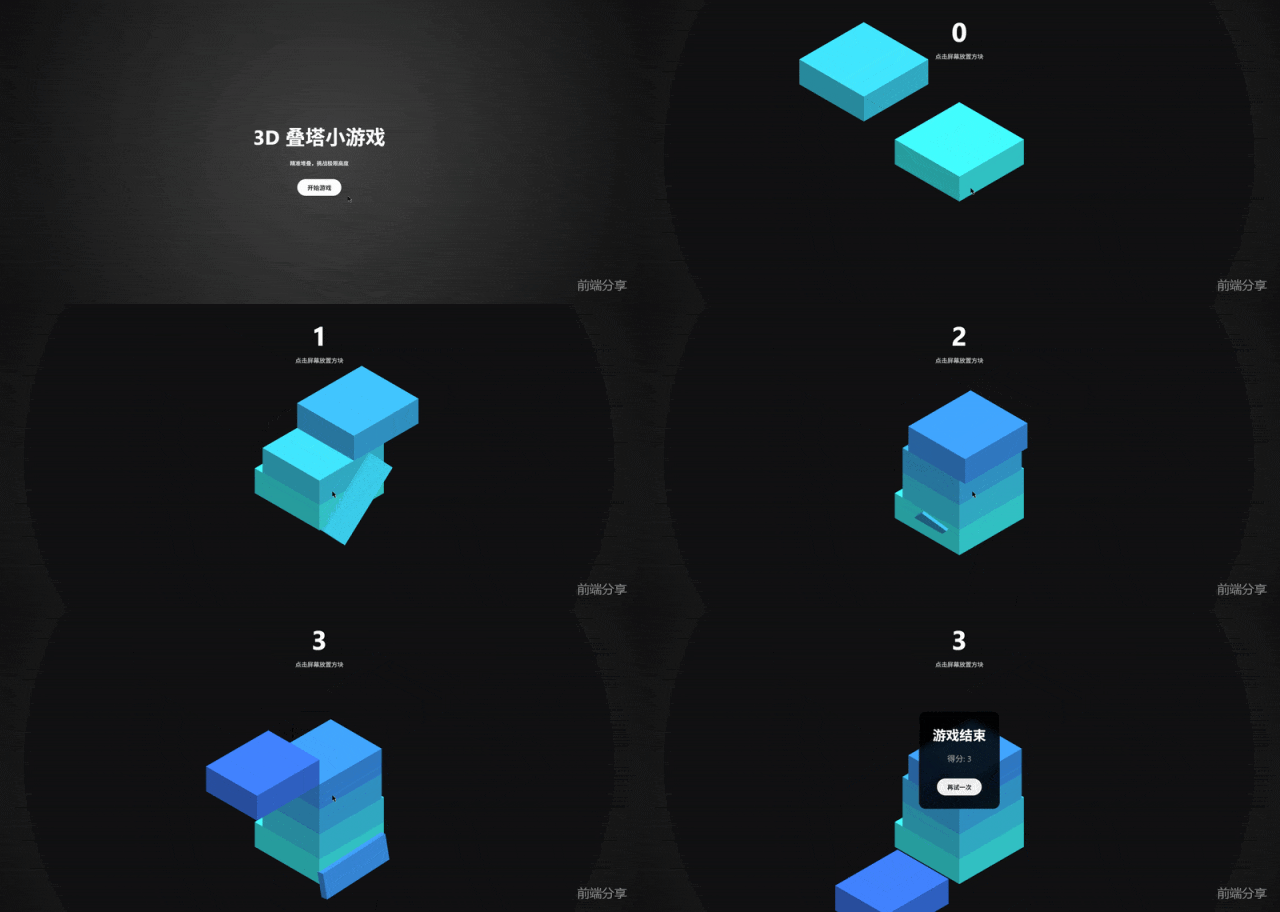
完整代码
<!DOCTYPE html><html lang="zh-CN"><head> <meta charset="UTF-8"> <meta name="viewport" content="width=device-width, initial-scale=1.0, maximum-scale=1.0, user-scalable=no"> <title>3D 叠塔小游戏</title> <script src="https://cdnjs.cloudflare.com/ajax/libs/three.js/r128/three.min.js"></script> <script src="https://cdnjs.cloudflare.com/ajax/libs/gsap/3.9.1/gsap.min.js"></script> <style> body { margin: 0; overflow: hidden; font-family: 'Segoe UI', Tahoma, Geneva, Verdana, sans-serif; background-color: #222; color: white; touch-action: none; } #ui { position: absolute; top: 40px; width: 100%; text-align: center; pointer-events: none; z-index: 10; } #score { font-size: 80px; font-weight: bold; text-shadow: 0 4px 10px rgba(0,0,0,0.3); margin: 0; } #instructions { font-size: 18px; opacity: 0.8; margin-top: 10px; } #game-over { position: absolute; top: 50%; left: 50%; transform: translate(-50%, -50%); background: rgba(0, 0, 0, 0.85); padding: 40px; border-radius: 20px; text-align: center; display: none; z-index: 20; backdrop-filter: blur(10px); border: 1px solid rgba(255,255,255,0.1); } button { background: #fff; color: #222; border: none; padding: 12px 30px; font-size: 18px; font-weight: bold; border-radius: 50px; cursor: pointer; margin-top: 20px; transition: transform 0.2s, background 0.2s; } button:hover { transform: scale(1.05); background: #eee; } #start-screen { position: absolute; width: 100%; height: 100%; background: radial-gradient(circle, #444 0%, #111 100%); display: flex; flex-direction: column; justify-content: center; align-items: center; z-index: 30; } </style></head><body> <div id="start-screen"> <h1 style="font-size: 60px; margin-bottom: 10px;">3D 叠塔小游戏</h1> <p>精准堆叠,挑战极限高度</p> <button onclick="startGame()">开始游戏</button> </div> <div id="ui"> <div id="score">0</div> <div id="instructions">点击屏幕放置方块</div> </div> <div id="game-over"> <h2 style="font-size: 40px; margin: 0;">游戏结束</h2> <p id="final-score" style="font-size: 24px; color: #aaa;"></p> <button onclick="restartGame()">再试一次</button> </div><script>/** * 游戏配置与常量 */const BOX_HEIGHT = 1;const ORIGINAL_BOX_SIZE = 3;const MOVE_SPEED = 0.12;let scene, camera, renderer;let stack = [];let leftovers = [];let gameStarted = false;let gameOver = false;let score = 0;let direction = 'x'; // 当前方块移动轴向let speed = MOVE_SPEED;/** * 初始化场景 */function init() { scene = new THREE.Scene(); scene.background = new THREE.Color(0x111111); // 相机配置 (正交相机,适合叠塔视觉) const aspect = window.innerWidth / window.innerHeight; const d = 5; camera = new THREE.OrthographicCamera(-d * aspect, d * aspect, d, -d, 0.1, 1000); camera.position.set(4, 4, 4); camera.lookAt(0, 0, 0); // 灯光 const ambientLight = new THREE.AmbientLight(0xffffff, 0.6); scene.add(ambientLight); const dirLight = new THREE.DirectionalLight(0xffffff, 0.8); dirLight.position.set(10, 20, 5); scene.add(dirLight); renderer = new THREE.WebGLRenderer({ antialias: true }); renderer.setSize(window.innerWidth, window.innerHeight); renderer.setPixelRatio(window.devicePixelRatio); document.body.appendChild(renderer.domElement); window.addEventListener('resize', onWindowResize, false); window.addEventListener('mousedown', handleInteraction); window.addEventListener('touchstart', handleInteraction); window.addEventListener('keydown', (e) => { if(e.code === 'Space') handleInteraction(); }); resetGameData();}/** * 重置游戏数据 */function resetGameData() { // 清除旧物体 stack.forEach(b => scene.add(b.mesh)); // 先确保在场景中 stack.forEach(b => scene.remove(b.mesh)); leftovers.forEach(l => scene.remove(l)); stack = []; leftovers = []; score = 0; gameOver = false; direction = 'x'; speed = MOVE_SPEED; document.getElementById('score').innerText = score; document.getElementById('game-over').style.display = 'none'; // 基础平台 addLayer(0, 0, ORIGINAL_BOX_SIZE, ORIGINAL_BOX_SIZE, 'stable'); // 第一层移动方块 addLayer(0, 0, ORIGINAL_BOX_SIZE, ORIGINAL_BOX_SIZE, 'moving'); camera.position.set(4, 4, 4); camera.lookAt(0, 0, 0);}/** * 添加一层方块 * @description * 该函数添加一层方块到当前游戏场景中。 * @param {number} x - 方块的x坐标 * @param {number} z - 方块的z坐标 * @param {number} width - 方块的宽度 * @param {number} depth - 方块的深度 * @param {string} state - 方块的状态,可能是'stable'(静止)或'moving'(移动) */function addLayer(x, z, width, depth, state) { const y = stack.length * BOX_HEIGHT; const color = new THREE.Color(`hsl(${180 + stack.length * 10}, 60%, 50%)`); // 创建一个长方体的几何体 const geometry = new THREE.BoxGeometry(width, BOX_HEIGHT, depth); // 创建一个材质对象 const material = new THREE.MeshLambertMaterial({ color }); // 创建一个网格模型对象 const mesh = new THREE.Mesh(geometry, material); // 设置网格模型对象的位置 mesh.position.set(x, y, z); // 将网格模型对象添加到场景中 scene.add(mesh); // 创建一个layer对象,用于存储方块的信息 const layer = { mesh, width, depth, state, x, z }; // 如果方块是'moving'状态,设置初始偏置位置 if (state === 'moving') { // 根据方向设置偏置位置 if (direction === 'x') { mesh.position.x = -6; } else { mesh.position.z = -6; } } // 将layer对象添加到stack数组中 stack.push(layer);}/** * 处理游戏结束 * * @description * 该函数处理游戏结束的逻辑。当游戏结束时,它会显示游戏结束的UI,并显示玩家的最终得分。 */function handleGameOver() { gameOver = true; document.getElementById('game-over').style.display = 'flex'; document.getElementById('final-score').innerText = `最终得分: ${score}`;}/** * 处理交互(点击/空格) * * @description * 该函数处理玩家的交互(点击/空格),它会判断当前的游戏状态,如果游戏已经结束,直接返回。 * 如果游戏还没有开始,直接返回。 * 否后,它会计算当前层和上一层的差值,判断当前层是否可以和上一层合并,如果可以合并,更新当前层的几何体和材质。 * 否后,它会生成掉落的碎屑(视觉效果),并增加玩家的得分。 * 最后,它会更改当前层的状态,添加新层,和相机随之上升。 */function handleInteraction() { if (!gameStarted || gameOver) return; const topLayer = stack[stack.length - 1]; const prevLayer = stack[stack.length - 2]; const delta = direction === 'x' ? topLayer.mesh.position.x - prevLayer.mesh.position.x : topLayer.mesh.position.z - prevLayer.mesh.position.z; const size = direction === 'x' ? topLayer.width : topLayer.depth; const overlap = size - Math.abs(delta); if (overlap <= 0) { handleGameOver(); return; } // 切分方块 const newWidth = direction === 'x' ? overlap : topLayer.width; const newDepth = direction === 'z' ? overlap : topLayer.depth; // 计算中心位置 const newX = direction === 'x' ? prevLayer.mesh.position.x + delta / 2 : topLayer.mesh.position.x; const newZ = direction === 'z' ? prevLayer.mesh.position.z + delta / 2 : topLayer.mesh.position.z; // 更新当前层为稳定状态 topLayer.state = 'stable'; topLayer.width = newWidth; topLayer.depth = newDepth; // 重新创建缩减后的几何体防止缩放导致光照异常 topLayer.mesh.geometry.dispose(); topLayer.mesh.geometry = new THREE.BoxGeometry(newWidth, BOX_HEIGHT, newDepth); topLayer.mesh.position.set(newX, topLayer.mesh.position.y, newZ); // 生成掉落的碎屑 (视觉效果) createLeftover(topLayer, delta, overlap, size); // 增加得分 score++; document.getElementById('score').innerText = score; // 改变方向并添加新层 direction = direction === 'x' ? 'z' : 'x'; speed += 0.002; // 逐渐加速 addLayer(newX, newZ, newWidth, newDepth, 'moving'); // 相机随之上升 gsap.to(camera.position, { y: camera.position.y + BOX_HEIGHT, duration: 0.5, ease: "power2.out" });}/** * 创建掉落部分 * @param {Object} topLayer - 最上层的块 * @param {number} delta - 当前层和当前层的差值 * @param {number} overlap - 当前层和当前层的重叠部分的大小 * @param {number} size - 当前层的大小 */function createLeftover(topLayer, delta, overlap, size) { // 计算当前层的剩余大小 const leftoverSize = size - overlap; if (leftoverSize <= 0) return; // 创建当前层的几何体和材质 const lWidth = direction === 'x' ? leftoverSize : topLayer.width; const lDepth = direction === 'z' ? leftoverSize : topLayer.depth; const geo = new THREE.BoxGeometry(lWidth, BOX_HEIGHT, lDepth); const mat = new THREE.MeshLambertMaterial({ color: topLayer.mesh.material.color }); const mesh = new THREE.Mesh(geo, mat); // 计算当前层的中心位置 let lX = topLayer.mesh.position.x; let lZ = topLayer.mesh.position.z; if (direction === 'x') { lX += (delta > 0 ? overlap / 2 + leftoverSize / 2 : -overlap / 2 - leftoverSize / 2); } else { lZ += (delta > 0 ? overlap / 2 + leftoverSize / 2 : -overlap / 2 - leftoverSize / 2); } mesh.position.set(lX, topLayer.mesh.position.y, lZ); scene.add(mesh); leftovers.push(mesh); // 简单的物理掉落动画 gsap.to(mesh.position, { y: mesh.position.y - 10, duration: 2, ease: "power1.in" }); gsap.to(mesh.rotation, { x: Math.random() * 2, z: Math.random() * 2, duration: 2 }); // 延迟销毁碎屑 setTimeout(() => { scene.remove(mesh); leftovers = leftovers.filter(l => l !== mesh); }, 2000);}/** * 处理游戏结束 * * @description * 该函数处理游戏结束的逻辑。当游戏结束时,它会显示游戏结束的UI,并显示玩家的最终得分。 */function handleGameOver() { gameOver = true; document.getElementById('final-score').innerText = "得分: " + score; document.getElementById('game-over').style.display = 'block'; // 给最顶层一个掉落动画 const topLayer = stack[stack.length - 1]; gsap.to(topLayer.mesh.position, { y: topLayer.mesh.position.y - 15, duration: 2, ease: "power1.in" });}/** * 主要渲染循环 * - 使用 requestAnimationFrame 来实现无限循环 * - 在游戏开始且游戏未结束时,处理当前最上层的方块 * - 如果当前方块是移动状态,更新其位置 * - 使用 Three.js 的渲染器来渲染场景 */function animate() { requestAnimationFrame(animate); if (gameStarted && !gameOver) { const topLayer = stack[stack.length - 1]; if (topLayer && topLayer.state === 'moving') { if (direction === 'x') { topLayer.mesh.position.x += speed; if (topLayer.mesh.position.x > 6) topLayer.mesh.position.x = -6; } else { topLayer.mesh.position.z += speed; if (topLayer.mesh.position.z > 6) topLayer.mesh.position.z = -6; } } } renderer.render(scene, camera);}/** * 处理窗口调整大小 */function onWindowResize() { const aspect = window.innerWidth / window.innerHeight; const d = 5; camera.left = -d * aspect; camera.right = d * aspect; camera.top = d; camera.bottom = -d; camera.updateProjectionMatrix(); renderer.setSize(window.innerWidth, window.innerHeight);}function startGame() { document.getElementById('start-screen').style.display = 'none'; gameStarted = true;}function restartGame() { resetGameData();}// 初始化并启动init();animate();</script></body></html>源码获取
私信回复叠塔游戏获取完整源码