 夜雨聆风
夜雨聆风





AI Specialist – 你的智能工具导航专家

🎉 **AI Specialist – 你的智能工具导航专家** 🎉
还在为找适合的AI工具而发愁?别担心,AI Specialist来了!
✅ 集成8大AI工具分类
✅ 60+精选AI工具一键直达
✅ 本地部署,安全可靠
✅ 简洁界面,操作流畅
从写作创作到编程辅助,从图像生成到数据分析,AI Specialist为你精选最实用的AI工具,让你的工作效率提升10倍!
🔥 **AI Specialist – 解锁你的AI潜能** 🔥
无论是职场人、创作者还是学生党,AI Specialist都能为你找到最适合的AI工具:
✍️ 写作创作:文案、论文、脚本一键生成
🎨 设计制图:海报、插画、UI设计轻松搞定
📊 数据分析:报表、图表、预测一步到位
💻 编程辅助:代码生成、错误检测事半功倍
AI Specialist,让AI成为你的最佳助手!
⚡ **AI Specialist – 本地部署的AI工具导航** ⚡
担心在线AI工具的安全性?AI Specialist采用本地部署方式,数据不离开你的电脑!
🔒 本地运行,隐私保护
🖥️ 跨平台支持
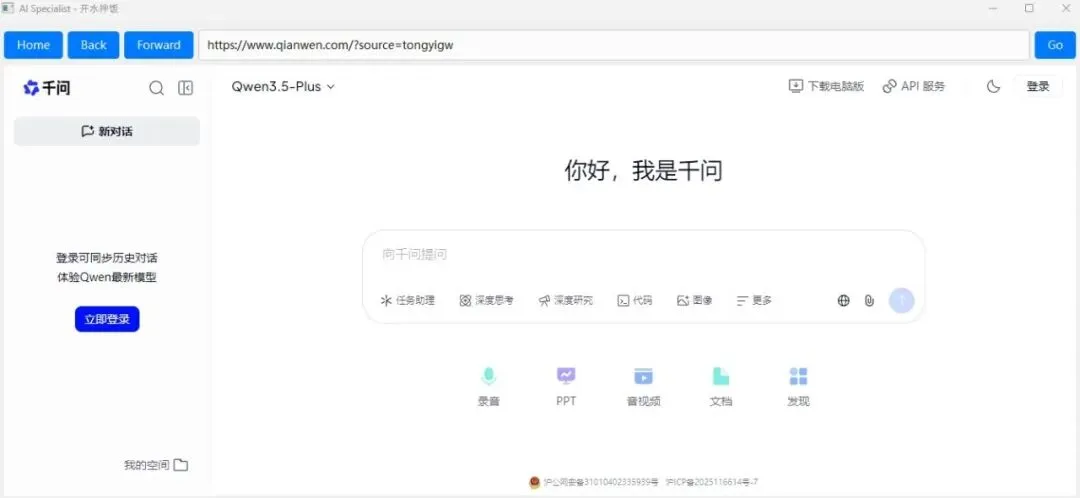
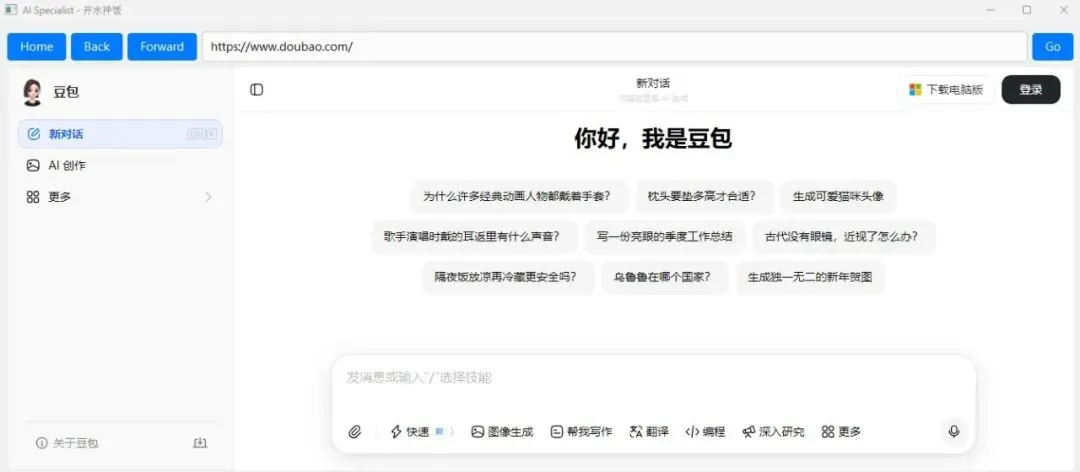
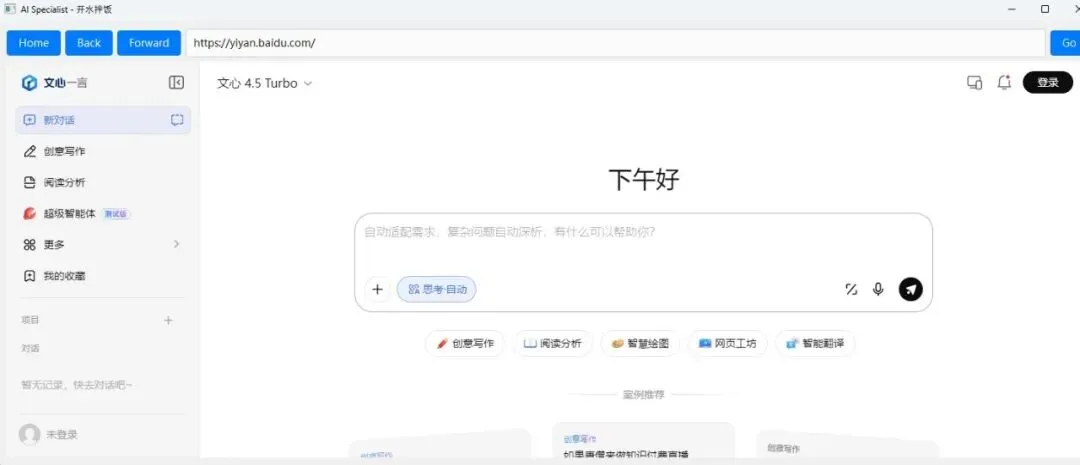
🌐 内置浏览器,无需切换
📱 响应式设计,适配多种设备
60+精选AI工具,8大功能分类,让你轻松找到最适合的AI解决方案。
💪 释放AI力量,从AI Specialist开始!
🚀 立即下载
https://pan.baidu.com/s/116cq5IT0ylEVWnscHqk9cg?pwd=jxa2
提取码:jxa2
安装指南
系统要求
– Windows 10/11
安装步骤
-下载 `Ai Specialist.exe` 文件到本地(绿色版,无需安装)
启动与基本操作
– 运行 `Ai Specialist.exe`即可
界面介绍
– **导航栏**:包含 Home、Back、Forward 按钮,用于网页导航
– **地址栏**:输入网址并按 Enter 或点击 Go 按钮访问
– **主窗口**:显示网页内容,默认加载 AI 功能导航页面
基本操作
– **访问 AI 工具**:在主页面点击对应工具链接
– **返回主页**:点击 Home 按钮
– **前进/后退**:使用 Back/Forward 按钮导航浏览历史
– **访问其他网站**:在地址栏输入网址并按 Enter
功能详解
AI 功能导航页面
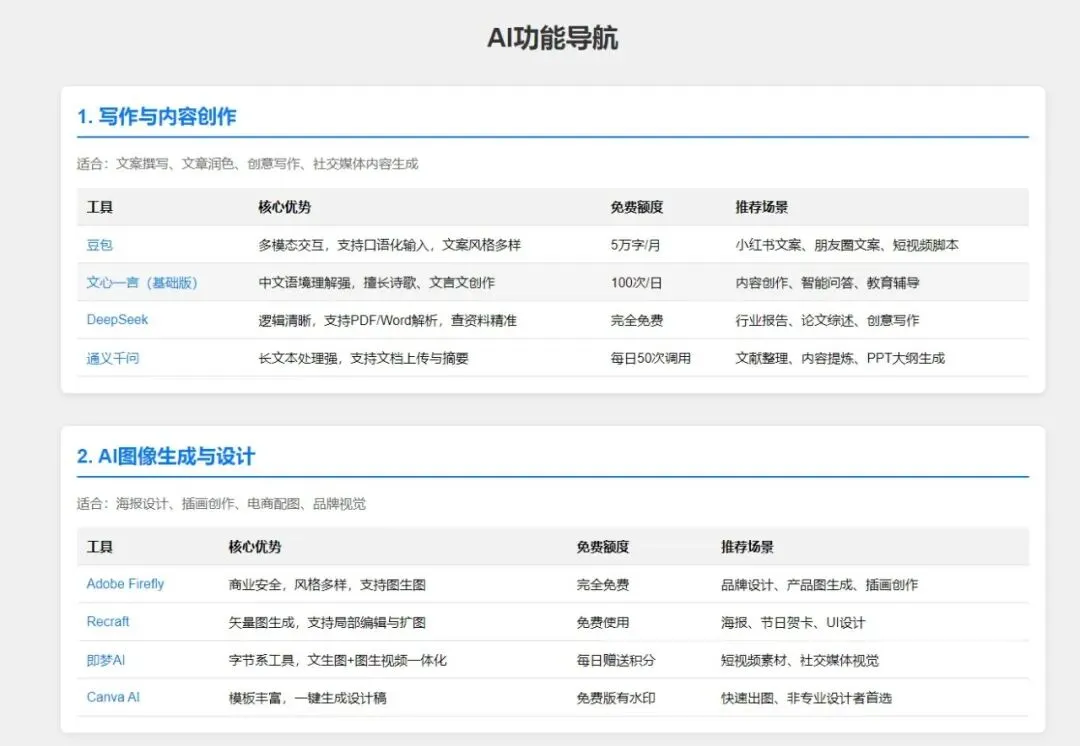
程序启动后会自动创建并加载 `ai_homepage.html` 文件,该页面包含以下8个分类:
1. **写作与内容创作**
– 推荐工具:豆包、文心一言、DeepSeek、通义千问
– 适用场景:文案撰写、文章润色、创意写作、社交媒体内容生成
2. **AI 图像生成与设计**
– 推荐工具:Adobe Firefly、Recraft、即梦AI、Canva AI
– 适用场景:海报设计、插画创作、电商配图、品牌视觉
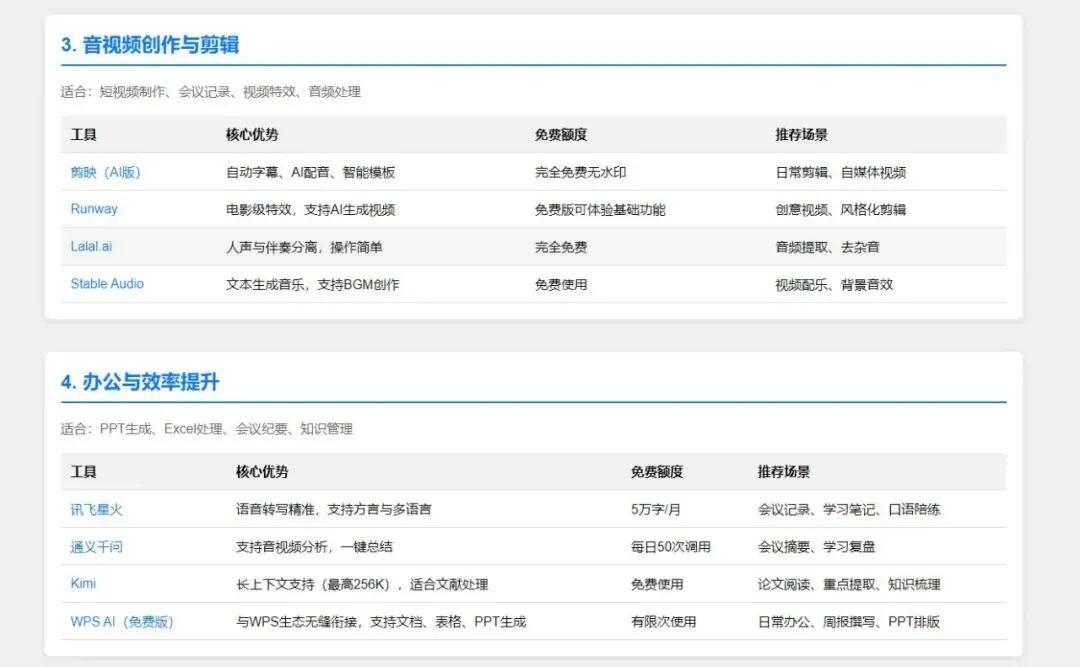
3. **音视频创作与剪辑**
– 推荐工具:剪映(AI版)、Runway、Lalal.ai、Stable Audio
– 适用场景:短视频制作、会议记录、视频特效、音频处理
4. **办公与效率提升**
– 推荐工具:讯飞星火、通义千问、Kimi、WPS AI
– 适用场景:PPT生成、Excel处理、会议纪要、知识管理
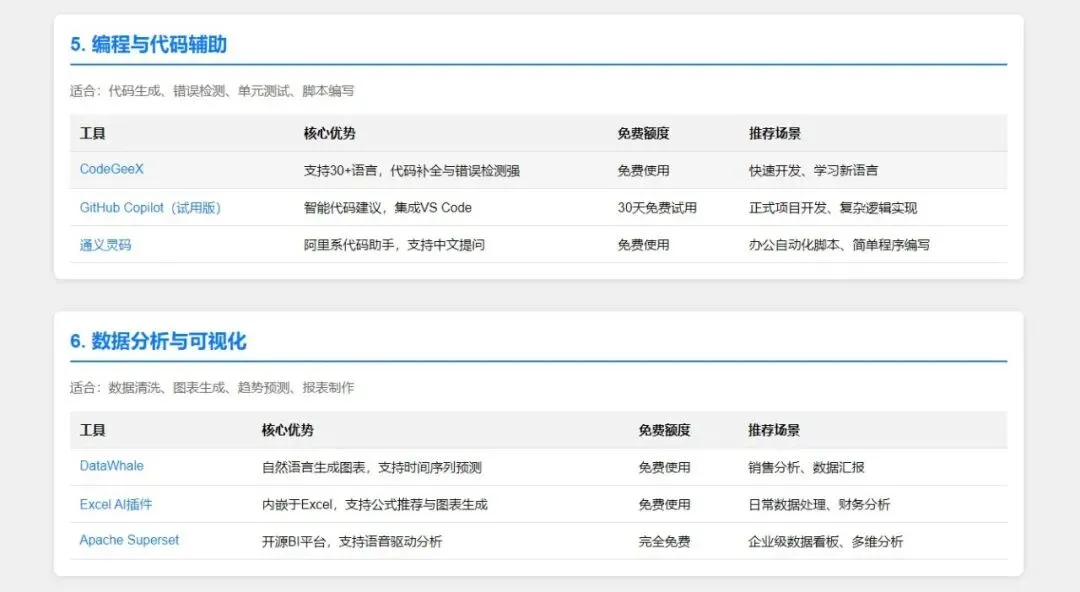
5. **编程与代码辅助**
– 推荐工具:CodeGeeX、GitHub Copilot、通义灵码
– 适用场景:代码生成、错误检测、单元测试、脚本编写
6. **数据分析与可视化**
– 推荐工具:DataWhale、Excel AI插件、Apache Superset
– 适用场景:数据清洗、图表生成、趋势预测、报表制作
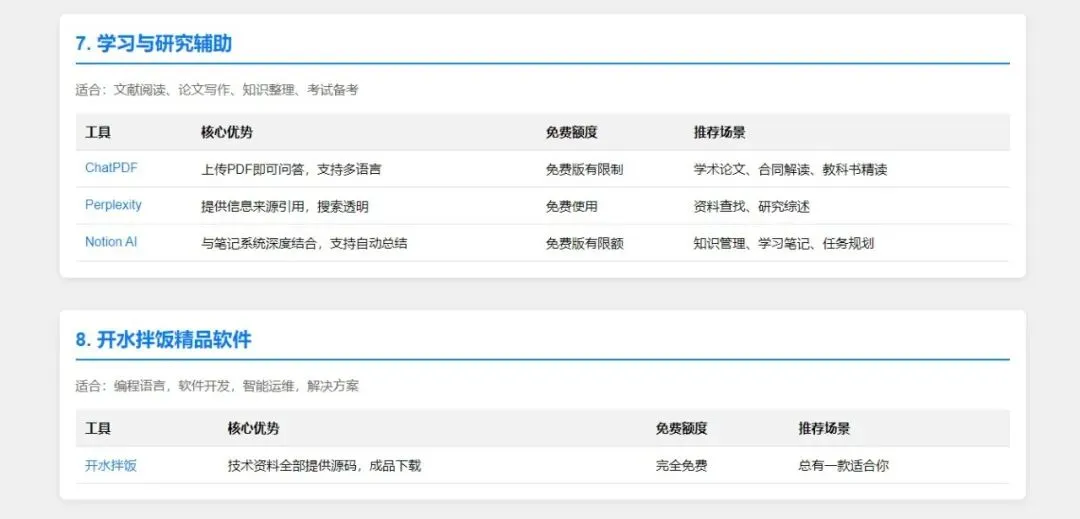
7. **学习与研究辅助**
– 推荐工具:ChatPDF、Perplexity、Notion AI
– 适用场景:文献阅读、论文写作、知识整理、考试备考
8. **开水拌饭精品软件**
– 推荐工具:开水拌饭
– 适用场景:编程语言,软件开发,智能运维,解决方案
工具详情
每个工具条目包含以下信息:
– **工具名称**:点击可直接访问该工具
– **核心优势**:工具的主要特点和优势
– **免费额度**:工具的免费使用限制
– **推荐场景**:工具最适合的应用场景
高级功能
多窗口浏览
– 点击链接时,默认在当前窗口打开
– 按住 Ctrl 键点击链接,会在新窗口打开
自定义主页
– 可以修改 `create_ai_homepage` 方法中的 HTML 内容,自定义导航页面
– 或修改 `self.home_url` 为其他网址
界面定制
– 可以修改 `initUI` 方法中的样式表,自定义按钮和输入框的外观
– 可以调整 `setGeometry` 方法中的窗口大小和位置
常见问题
1. **无法启动程序**
– 核对运行软件的系统要求
2. **网页加载失败**
– 检查网络连接
– 网站被封禁
3. 联系与支持
– 访问 [开水拌饭](http://www.davis-wiki.com/) 获取更多资源
– 如有问题或建议,欢迎反馈
AI Specialist 致力于为用户提供最便捷的 AI 工具导航体验,帮助你充分利用 AI 技术提升工作和学习效率。
import sysimport osfrom PyQt6.QtCore import QUrlfrom PyQt6.QtGui import QPalette, QColor,QIconfrom PyQt6.QtWidgets import QApplication, QWidget, QVBoxLayout, QLineEdit, QPushButton, QHBoxLayoutfrom PyQt6.QtWebEngineCore import QWebEnginePage, QWebEngineSettingsfrom PyQt6.QtWebEngineWidgets import QWebEngineViewclass CustomWebEnginePage(QWebEnginePage):def __init__(self, browser, *args, **kwargs):super().__init__(*args, **kwargs)self.browser = browserdef acceptNavigationRequest(self, url: QUrl, type: QWebEnginePage.NavigationType, isMainFrame: bool):if type == QWebEnginePage.NavigationType.NavigationTypeLinkClicked: protocol = url.scheme()if protocol in ['http', 'https']:# Update the URL in the search barself.browser.url_input.setText(url.toString())# Load the linkself.browser.web_view.load(url)return False elif protocol in ['javascript', 'mailto']:return super().acceptNavigationRequest(url, type, isMainFrame)return super().acceptNavigationRequest(url, type, isMainFrame)def createWindow(self, _type):# 创建一个新的浏览器窗口new_browser = Browser() new_browser.show()return new_browser.web_view.page()class Browser(QWidget):def __init__(self):super().__init__()# Create AI homepage HTMLself.create_ai_homepage()self.home_url = f"file:///{os.path.abspath('ai_homepage.html').replace('\\', '/')}" # Set the home page URLself.initUI()def create_ai_homepage(self):"""Create a local HTML file for AI homepage"""html_content = '''<!DOCTYPE html><html lang="zh-CN"><head> <meta charset="UTF-8"> <meta name="viewport" content="width=device-width, initial-scale=1.0"> <title>AI功能导航</title> <style> body { font-family: Arial, sans-serif; background-color: #f0f0f0; margin: 0; padding: 20px; } .container { max-width: 1200px; margin: 0 auto; } h1 { text-align: center; color: #333; } .category { margin: 40px 0; background-color: white; border-radius: 8px; padding: 20px; box-shadow: 0 2px 10px rgba(0,0,0,0.1); } .category h2 { color: #007BFF; margin-top: 0; border-bottom: 2px solid #007BFF; padding-bottom: 10px; } .category p { color: #666; margin-bottom: 20px; } .tool-table { width: 100%; border-collapse: collapse; margin-top: 20px; } .tool-table th, .tool-table td { padding: 12px; text-align: left; border-bottom: 1px solid #ddd; } .tool-table th { background-color: #f2f2f2; font-weight: bold; } .tool-table tr:hover { background-color: #f5f5f5; } .tool-table a { color: #007BFF; text-decoration: none; } .tool-table a:hover { text-decoration: underline; } </style></head><body> <div class="container"> <h1>AI功能导航</h1> <!-- 1. 写作与内容创作 --> <div class="category"> <h2>1. 写作与内容创作</h2> <p>适合:文案撰写、文章润色、创意写作、社交媒体内容生成</p> <table class="tool-table"> <tr> <th>工具</th> <th>核心优势</th> <th>免费额度</th> <th>推荐场景</th> </tr> <tr> <td><a href="https://www.doubao.com/" target="_blank">豆包</a></td> <td>多模态交互,支持口语化输入,文案风格多样</td> <td>5万字/月</td> <td>小红书文案、朋友圈文案、短视频脚本</td> </tr> <tr> <td><a href="https://yiyan.baidu.com/" target="_blank">文心一言(基础版)</a></td> <td>中文语境理解强,擅长诗歌、文言文创作</td> <td>100次/日</td> <td>内容创作、智能问答、教育辅导</td> </tr> <tr> <td><a href="https://www.deepseek.com/" target="_blank">DeepSeek</a></td> <td>逻辑清晰,支持PDF/Word解析,查资料精准</td> <td>完全免费</td> <td>行业报告、论文综述、创意写作</td> </tr> <tr> <td><a href="https://www.qianwen.com/?source=tongyigw" target="_blank">通义千问</a></td> <td>长文本处理强,支持文档上传与摘要</td> <td>每日50次调用</td> <td>文献整理、内容提炼、PPT大纲生成</td> </tr> </table> </div> <!-- 2. AI图像生成与设计 --> <div class="category"> <h2>2. AI图像生成与设计</h2> <p>适合:海报设计、插画创作、电商配图、品牌视觉</p> <table class="tool-table"> <tr> <th>工具</th> <th>核心优势</th> <th>免费额度</th> <th>推荐场景</th> </tr> <tr> <td><a href="https://firefly.adobe.com/" target="_blank">Adobe Firefly</a></td> <td>商业安全,风格多样,支持图生图</td> <td>完全免费</td> <td>品牌设计、产品图生成、插画创作</td> </tr> <tr> <td><a href="https://www.recraft.ai/" target="_blank">Recraft</a></td> <td>矢量图生成,支持局部编辑与扩图</td> <td>免费使用</td> <td>海报、节日贺卡、UI设计</td> </tr> <tr> <td><a href="https://jimeng.jianying.com/" target="_blank">即梦AI</a></td> <td>字节系工具,文生图+图生视频一体化</td> <td>每日赠送积分</td> <td>短视频素材、社交媒体视觉</td> </tr> <tr> <td><a href="https://www.canva.com/ai/" target="_blank">Canva AI</a></td> <td>模板丰富,一键生成设计稿</td> <td>免费版有水印</td> <td>快速出图、非专业设计者首选</td> </tr> </table> </div> <!-- 3. 音视频创作与剪辑 --> <div class="category"> <h2>3. 音视频创作与剪辑</h2> <p>适合:短视频制作、会议记录、视频特效、音频处理</p> <table class="tool-table"> <tr> <th>工具</th> <th>核心优势</th> <th>免费额度</th> <th>推荐场景</th> </tr> <tr> <td><a href="https://capcut.com/" target="_blank">剪映(AI版)</a></td> <td>自动字幕、AI配音、智能模板</td> <td>完全免费无水印</td> <td>日常剪辑、自媒体视频</td> </tr> <tr> <td><a href="https://runwayml.com/" target="_blank">Runway</a></td> <td>电影级特效,支持AI生成视频</td> <td>免费版可体验基础功能</td> <td>创意视频、风格化剪辑</td> </tr> <tr> <td><a href="https://www.lalal.ai/" target="_blank">Lalal.ai</a></td> <td>人声与伴奏分离,操作简单</td> <td>完全免费</td> <td>音频提取、去杂音</td> </tr> <tr> <td><a href="https://stability.ai/stable-audio" target="_blank">Stable Audio</a></td> <td>文本生成音乐,支持BGM创作</td> <td>免费使用</td> <td>视频配乐、背景音效</td> </tr> </table> </div> <!-- 4. 办公与效率提升 --> <div class="category"> <h2>4. 办公与效率提升</h2> <p>适合:PPT生成、Excel处理、会议纪要、知识管理</p> <table class="tool-table"> <tr> <th>工具</th> <th>核心优势</th> <th>免费额度</th> <th>推荐场景</th> </tr> <tr> <td><a href="https://xinghuo.xfyun.cn/" target="_blank">讯飞星火</a></td> <td>语音转写精准,支持方言与多语言</td> <td>5万字/月</td> <td>会议记录、学习笔记、口语陪练</td> </tr> <tr> <td><a href="https://www.qianwen.com/?source=tongyigw" target="_blank">通义千问</a></td> <td>支持音视频分析,一键总结</td> <td>每日50次调用</td> <td>会议摘要、学习复盘</td> </tr> <tr> <td><a href="https://kimi.moonshot.cn/" target="_blank">Kimi</a></td> <td>长上下文支持(最高256K),适合文献处理</td> <td>免费使用</td> <td>论文阅读、重点提取、知识梳理</td> </tr> <tr> <td><a href="https://ai.wps.cn/" target="_blank">WPS AI(免费版)</a></td> <td>与WPS生态无缝衔接,支持文档、表格、PPT生成</td> <td>有限次使用</td> <td>日常办公、周报撰写、PPT排版</td> </tr> </table> </div> <!-- 5. 编程与代码辅助 --> <div class="category"> <h2>5. 编程与代码辅助</h2> <p>适合:代码生成、错误检测、单元测试、脚本编写</p> <table class="tool-table"> <tr> <th>工具</th> <th>核心优势</th> <th>免费额度</th> <th>推荐场景</th> </tr> <tr> <td><a href="https://codegeex.cn/" target="_blank">CodeGeeX</a></td> <td>支持30+语言,代码补全与错误检测强</td> <td>免费使用</td> <td>快速开发、学习新语言</td> </tr> <tr> <td><a href="https://github.com/features/copilot" target="_blank">GitHub Copilot(试用版)</a></td> <td>智能代码建议,集成VS Code</td> <td>30天免费试用</td> <td>正式项目开发、复杂逻辑实现</td> </tr> <tr> <td><a href="https://lingma.aliyun.com/" target="_blank">通义灵码</a></td> <td>阿里系代码助手,支持中文提问</td> <td>免费使用</td> <td>办公自动化脚本、简单程序编写</td> </tr> </table> </div> <!-- 6. 数据分析与可视化 --> <div class="category"> <h2>6. 数据分析与可视化</h2> <p>适合:数据清洗、图表生成、趋势预测、报表制作</p> <table class="tool-table"> <tr> <th>工具</th> <th>核心优势</th> <th>免费额度</th> <th>推荐场景</th> </tr> <tr> <td><a href="https://www.datawhale.cn/" target="_blank">DataWhale</a></td> <td>自然语言生成图表,支持时间序列预测</td> <td>免费使用</td> <td>销售分析、数据汇报</td> </tr> <tr> <td><a href="https://support.microsoft.com/en-us/office/ai-features-in-excel-3e5693b1-c16c-4086-a680-67f0e4861f72" target="_blank">Excel AI插件</a></td> <td>内嵌于Excel,支持公式推荐与图表生成</td> <td>免费使用</td> <td>日常数据处理、财务分析</td> </tr> <tr> <td><a href="https://superset.apache.org/" target="_blank">Apache Superset</a></td> <td>开源BI平台,支持语音驱动分析</td> <td>完全免费</td> <td>企业级数据看板、多维分析</td> </tr> </table> </div> <!-- 7. 学习与研究辅助 --> <div class="category"> <h2>7. 学习与研究辅助</h2> <p>适合:文献阅读、论文写作、知识整理、考试备考</p> <table class="tool-table"> <tr> <th>工具</th> <th>核心优势</th> <th>免费额度</th> <th>推荐场景</th> </tr> <tr> <td><a href="https://www.chatpdf.com/" target="_blank">ChatPDF</a></td> <td>上传PDF即可问答,支持多语言</td> <td>免费版有限制</td> <td>学术论文、合同解读、教科书精读</td> </tr> <tr> <td><a href="https://www.perplexity.ai/" target="_blank">Perplexity</a></td> <td>提供信息来源引用,搜索透明</td> <td>免费使用</td> <td>资料查找、研究综述</td> </tr> <tr> <td><a href="https://www.notion.so/ai" target="_blank">Notion AI</a></td> <td>与笔记系统深度结合,支持自动总结</td> <td>免费版有限额</td> <td>知识管理、学习笔记、任务规划</td> </tr> </table> </div> <!-- 8. 开水拌饭精品软件 --> <div class="category"> <h2>8. 开水拌饭精品软件</h2> <p>适合:编程语言,软件开发,智能运维,解决方案</p> <table class="tool-table"> <tr> <th>工具</th> <th>核心优势</th> <th>免费额度</th> <th>推荐场景</th> </tr> <tr> <td><a href="http://www.davis-wiki.com/" target="_blank">开水拌饭</a></td> <td>技术资料全部提供源码,成品下载</td> <td>完全免费</td> <td>总有一款适合你</td> </tr> </table> </div> </div></body></html> '''with open('ai_homepage.html', 'w', encoding='utf-8') as f: f.write(html_content)def initUI(self):# Set the overall layout of the windowmain_layout = QVBoxLayout()# Create a horizontal layout for buttons and input boxbutton_input_layout = QHBoxLayout()# Create the home buttonself.home_button = QPushButton('Home', self)self.home_button.setStyleSheet(""" QPushButton { padding: 8px 16px; font-size: 14px; background-color: #007BFF; color: white; border: none; border-radius: 4px; } QPushButton:hover { background-color: #0056b3; } """)self.home_button.clicked.connect(self.go_home) button_input_layout.addWidget(self.home_button)# Create the back buttonself.back_button = QPushButton('Back', self)self.back_button.setStyleSheet(""" QPushButton { padding: 8px 16px; font-size: 14px; background-color: #007BFF; color: white; border: none; border-radius: 4px; } QPushButton:hover { background-color: #0056b3; } """)self.back_button.clicked.connect(self.go_back) button_input_layout.addWidget(self.back_button)# Create the forward buttonself.forward_button = QPushButton('Forward', self)self.forward_button.setStyleSheet(""" QPushButton { padding: 8px 16px; font-size: 14px; background-color: #007BFF; color: white; border: none; border-radius: 4px; } QPushButton:hover { background-color: #0056b3; } """)self.forward_button.clicked.connect(self.go_forward) button_input_layout.addWidget(self.forward_button)# Create the input boxself.url_input = QLineEdit(self)self.url_input.setPlaceholderText("Enter URL")# Set the style of the input boxself.url_input.setStyleSheet(""" QLineEdit { padding: 8px; font-size: 14px; border: 1px solid #ccc; border-radius: 4px; } QLineEdit:focus { border-color: #007BFF; outline: none; } """)# Connect the return key signal to the load URL methodself.url_input.returnPressed.connect(self.load_url) button_input_layout.addWidget(self.url_input)# Create the go buttonself.go_button = QPushButton('Go', self)# Set the style of the buttonself.go_button.setStyleSheet(""" QPushButton { padding: 8px 16px; font-size: 14px; background-color: #007BFF; color: white; border: none; border-radius: 4px; } QPushButton:hover { background-color: #0056b3; } """)self.go_button.clicked.connect(self.load_url) button_input_layout.addWidget(self.go_button)# Add the horizontal layout of buttons and input box to the main layoutmain_layout.addLayout(button_input_layout)# Create the WebEngineViewself.web_view = QWebEngineView()# Configure WebEngineSettingssettings = self.web_view.settings() settings.setAttribute(QWebEngineSettings.WebAttribute.JavascriptEnabled, True) settings.setAttribute(QWebEngineSettings.WebAttribute.PluginsEnabled, True) page = CustomWebEnginePage(self, self.web_view)self.web_view.setPage(page)# Handle loading errorsself.web_view.loadFinished.connect(lambda ok: self.handle_load_finished(ok, self.url_input.text()))# Open the initial page (AI homepage)self.url_input.setText(self.home_url)self.web_view.load(QUrl(self.home_url)) main_layout.addWidget(self.web_view)# Set the main layoutself.setLayout(main_layout)# Set the window title and sizeself.setWindowTitle('AI Specialist - 开水拌饭')self.setGeometry(100, 100, 800, 600)# 设置窗口图标icon_path = 'dq.ico' # 替换为你的图标文件路径self.setWindowIcon(QIcon(icon_path))# Set the window background colorpalette = self.palette() palette.setColor(QPalette.ColorRole.Window, QColor(240, 240, 240))self.setPalette(palette)def go_home(self):self.url_input.setText(self.home_url)self.web_view.load(QUrl(self.home_url))def load_url(self): url = self.url_input.text()if not url.startswith(('http://', 'https://')): url = 'http://' + urlprint(f"Loading URL: {url}")self.web_view.load(QUrl(url))def go_back(self):if self.web_view.history().canGoBack():self.web_view.back()# Update the URL in the search barself.url_input.setText(self.web_view.url().toString())def go_forward(self):if self.web_view.history().canGoForward():self.web_view.forward()# Update the URL in the search barself.url_input.setText(self.web_view.url().toString())def handle_load_finished(self, ok, url):if not ok:print(f"Failed to load URL: {url}")if __name__ == '__main__': app = QApplication(sys.argv) browser = Browser() browser.show() sys.exit(app.exec())