 夜雨聆风
夜雨聆风


【源码】文本附加工具、在输入框里输入“附加内容”,选择“前面/后面”,右侧实时展示结果,并支持一键复制
我能为你提供什么服务?
网站建设 | 小程序开发 | 软件定制
我是鹏魔王,一个做网站、小程序的程序员,记录生活日常、及技术分享。
本欲起身离红尘,奈何影子落人间,欢迎关注,祝大家早日实现财务自由!
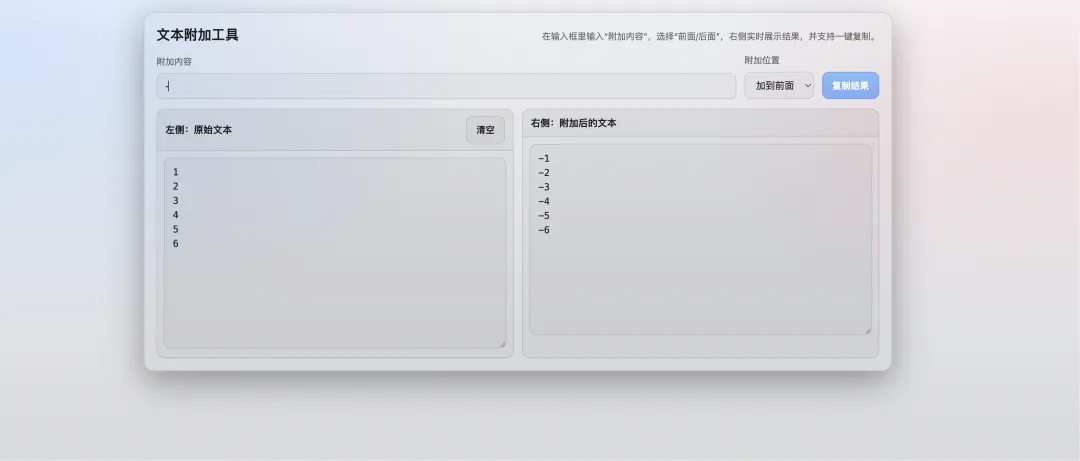
<!DOCTYPE html><htmllang="zh-CN"><head><metacharset="UTF-8" /><metaname="viewport"content="width=device-width, initial-scale=1.0" /><title>文本附加工具-by鹏魔王</title><style>:root {color-scheme: light dark;--bg: #0b1020;--panel: rgba(255, 255, 255, 0.08);--border: rgba(255, 255, 255, 0.14);--text: rgba(255, 255, 255, 0.92);--muted: rgba(255, 255, 255, 0.7);--primary: #60a5fa;--primary-strong: #3b82f6;--danger: #f87171;}@media (prefers-color-scheme: light) {:root {--bg: #f6f7fb;--panel: rgba(0, 0, 0, 0.04);--border: rgba(0, 0, 0, 0.12);--text: rgba(0, 0, 0, 0.88);--muted: rgba(0, 0, 0, 0.6);}}* {box-sizing: border-box;}body {margin: 0;min-height: 100vh;padding: 28px 18px;font-family: ui-sans-serif, system-ui, -apple-system, BlinkMacSystemFont, "Segoe UI","PingFang SC", "Hiragino Sans GB", "Microsoft YaHei", Arial, sans-serif;background: radial-gradient(1200px 700px at 10% 10%, rgba(96, 165, 250, 0.22), transparent 60%),radial-gradient(900px 600px at 90% 20%, rgba(248, 113, 113, 0.14), transparent 55%),linear-gradient(180deg, var(--bg), color-mix(in srgb, var(--bg) 84%, black 16%));color: var(--text);}.app {max-width: 1100px;margin: 0 auto;border: 1px solid var(--border);background: color-mix(in srgb, var(--panel) 82%, transparent 18%);backdrop-filter: blur(12px);border-radius: 14px;padding: 18px;box-shadow: 0 16px 50px rgba(0, 0, 0, 0.35);}header {display: flex;gap: 12px;align-items: baseline;justify-content: space-between;flex-wrap: wrap;margin-bottom: 14px;}h1 {margin: 0;font-size: 20px;letter-spacing: 0.2px;}.hint {color: var(--muted);font-size: 13px;}.controls {display: grid;grid-template-columns: 1fr auto auto;gap: 12px;align-items: end;margin-bottom: 14px;}@media (max-width: 720px) {.controls {grid-template-columns: 1fr;align-items: stretch;}}.field {display: grid;gap: 8px;}label {font-size: 13px;color: var(--muted);}input[type="text"],select,textarea {width: 100%;border: 1px solid var(--border);background: color-mix(in srgb, var(--panel) 70%, transparent 30%);color: var(--text);border-radius: 10px;outline: none;padding: 10px 12px;font-size: 14px;}textarea {resize: vertical;min-height: 280px;line-height: 1.5;font-family: ui-monospace, SFMono-Regular, Menlo, Monaco, Consolas, "Liberation Mono","Courier New", monospace;}select {height: 40px;}.btn {height: 40px;border-radius: 10px;border: 1px solid color-mix(in srgb, var(--primary) 55%, var(--border) 45%);background: linear-gradient(180deg, color-mix(in srgb, var(--primary) 65%, transparent 35%), color-mix(in srgb, var(--primary-strong) 58%, transparent 42%));color: white;font-weight: 650;letter-spacing: 0.2px;cursor: pointer;padding: 0 14px;}.btn:active {transform: translateY(1px);}.btn.secondary {background: color-mix(in srgb, var(--panel) 82%, transparent 18%);border-color: var(--border);color: var(--text);font-weight: 600;}.grid {display: grid;grid-template-columns: 1fr 1fr;gap: 12px;}@media (max-width: 920px) {.grid {grid-template-columns: 1fr;}textarea {min-height: 220px;}}.panel {border: 1px solid var(--border);border-radius: 12px;overflow: hidden;background: color-mix(in srgb, var(--panel) 76%, transparent 24%);}.panel-head {display: flex;gap: 10px;align-items: center;justify-content: space-between;padding: 10px 12px;border-bottom: 1px solid var(--border);background: color-mix(in srgb, var(--panel) 86%, transparent 14%);}.panel-title {font-size: 14px;font-weight: 650;}.panel-actions {display: flex;gap: 10px;align-items: center;}.status {font-size: 12px;color: var(--muted);min-height: 16px;}.danger {color: var(--danger);}.panel-body {padding: 10px;}</style></head><body><divclass="app"><header><h1>文本附加工具</h1><divclass="hint">在输入框里输入“附加内容”,选择“前面/后面”,右侧实时展示结果,并支持一键复制。</div></header><sectionclass="controls"><divclass="field"><labelfor="affix">附加内容</label><inputid="affix"type="text"placeholder="例如:前缀/后缀/标签..."autocomplete="off" /></div><divclass="field"><labelfor="position">附加位置</label><selectid="position"><optionvalue="prepend">加到前面</option><optionvalue="append">加到后面</option></select></div><buttonid="copyBtn"class="btn"type="button">复制结果</button></section><sectionclass="grid"><divclass="panel"><divclass="panel-head"><divclass="panel-title">左侧:原始文本</div><divclass="panel-actions"><buttonid="clearLeft"class="btn secondary"type="button">清空</button></div></div><divclass="panel-body"><textareaid="baseText"placeholder="把原始文本粘贴到这里..."></textarea></div></div><divclass="panel"><divclass="panel-head"><divclass="panel-title">右侧:附加后的文本</div><divclass="panel-actions"><spanid="copyStatus"class="status"aria-live="polite"></span></div></div><divclass="panel-body"><textareaid="resultText"readonlyplaceholder="这里会自动展示附加后的结果..."></textarea></div></div></section></div><script>const baseTextEl = document.getElementById("baseText");const affixEl = document.getElementById("affix");const positionEl = document.getElementById("position");const resultTextEl = document.getElementById("resultText");const copyBtn = document.getElementById("copyBtn");const copyStatusEl = document.getElementById("copyStatus");const clearLeftBtn = document.getElementById("clearLeft");function computeResult() {const base = baseTextEl.value ?? "";const affix = affixEl.value ?? "";const position = positionEl.value;if (!affix) {return base;}if (!base) {return "";}const lineSep = base.includes("\r\n") ? "\r\n" : "\n";const lines = base.split(/\r?\n/);const transformed = lines.map((line) => {if (!line) {return line;}return position === "prepend" ? affix + line : line + affix;});return transformed.join(lineSep);}function render() {resultTextEl.value = computeResult();copyStatusEl.textContent = "";copyStatusEl.classList.remove("danger");}async function copyToClipboard(text) {if (navigator.clipboard && typeof navigator.clipboard.writeText === "function") {await navigator.clipboard.writeText(text);return;}const temp = document.createElement("textarea");temp.value = text;temp.setAttribute("readonly", "true");temp.style.position = "fixed";temp.style.left = "-9999px";temp.style.top = "0";document.body.appendChild(temp);temp.select();document.execCommand("copy");document.body.removeChild(temp);}function setCopyStatus(text, isError) {copyStatusEl.textContent = text;copyStatusEl.classList.toggle("danger", Boolean(isError));}baseTextEl.addEventListener("input", render);affixEl.addEventListener("input", render);positionEl.addEventListener("change", render);clearLeftBtn.addEventListener("click", () => {baseTextEl.value = "";render();baseTextEl.focus();});copyBtn.addEventListener("click", async () => {const text = resultTextEl.value ?? "";if (!text) {setCopyStatus("没有可复制的内容", true);return;}try {await copyToClipboard(text);setCopyStatus("已复制到剪贴板", false);} catch (e) {setCopyStatus("复制失败:浏览器可能禁止剪贴板权限", true);}});render();</script></body></html>