 夜雨聆风
夜雨聆风


Claude Code 源码深度解析
基于 2026-03-31 npm source map 泄露的 Anthropic Claude Code TypeScript 源码,面向二次开发者的完整技术参考文档。
1 项目概述
Claude Code 是 Anthropic 开发的命令行 AI 编程助手,运行于终端中,能够执行 Shell 命令、读写文件、搜索代码库,并协调多 Agent 工作流。它是一个完整的Agentic AI 系统,而非简单的聊天界面。
|
|
|
|
|---|---|---|
| 文件操作 |
|
FileReadTool / FileWriteTool / FileEditTool |
| Shell 执行 |
|
BashTool + permissions/ |
| 代码搜索 |
|
GrepTool / GlobTool |
| Web 能力 |
|
WebFetchTool / WebSearchTool |
| 多 Agent |
|
AgentTool / TeamCreateTool |
| IDE 集成 |
|
bridge/ |
| MCP 协议 |
|
services/mcp/ |
| 持久记忆 |
|
memdir/ + sessionStorage.ts |
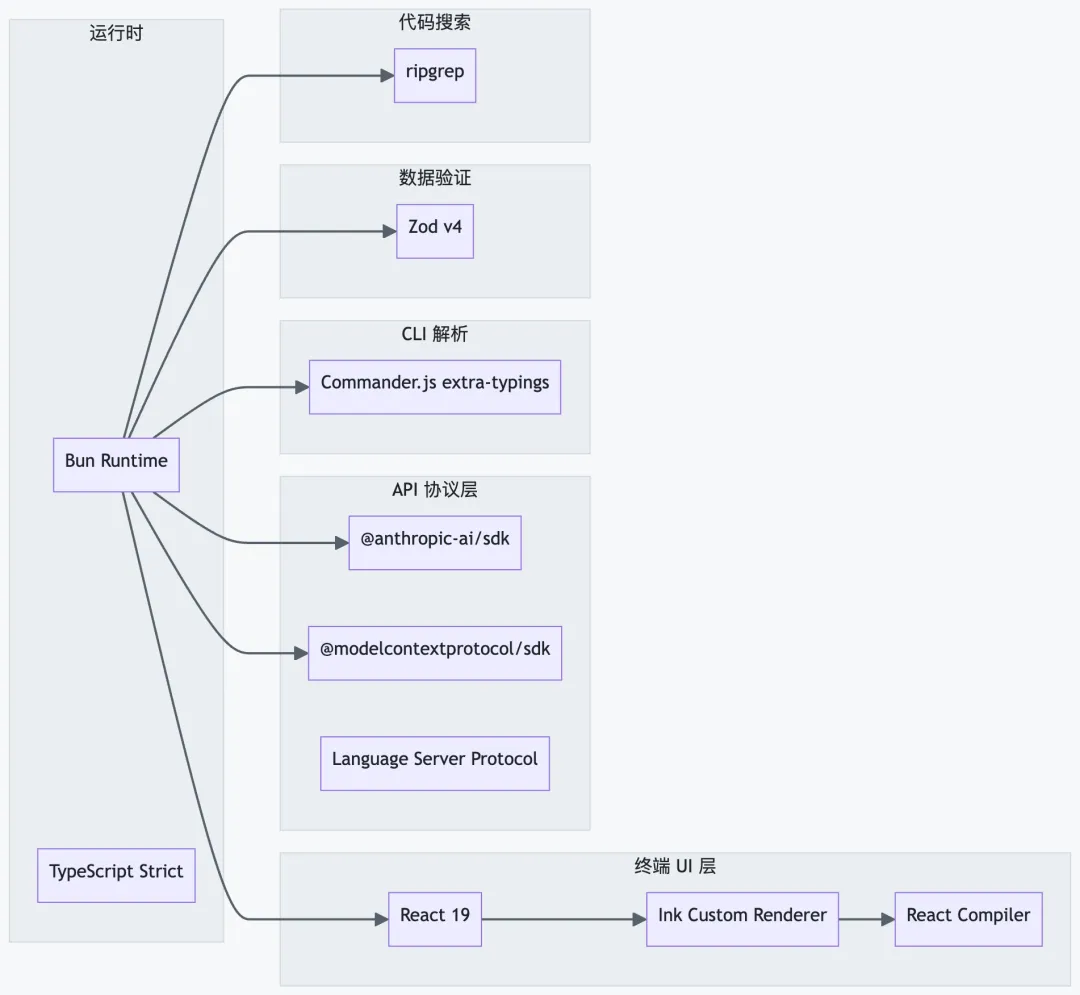
2 技术栈全景
|
|
|
|
|---|---|---|
bun |
|
|
@anthropic-ai/sdk |
|
|
@modelcontextprotocol/sdk |
|
|
react
ink |
|
|
react/compiler-runtime |
|
|
@commander-js/extra-typings |
|
|
zod/v4 |
|
|
bun:bundle |
|
|
lodash-es |
|
|
GrowthBook |
|
|
OpenTelemetry |
|
|
3 目录结构详解
src/├── main.tsx # ① CLI 入口,Commander.js 解析,React/Ink 初始化├── commands.ts # ② 所有 slash 命令注册表(含 DCE 条件导入)├── tools.ts # ③ 所有 Tool 注册表(含 feature-flag 条件导入)├── Tool.ts # ④ Tool 接口定义、ToolUseContext、权限类型├── QueryEngine.ts # ⑤ 查询引擎(对话生命周期管理)├── query.ts # ⑥ 核心 LLM 调用循环(tool-call loop)├── context.ts # ⑦ 系统/用户上下文收集├── cost-tracker.ts # ⑧ Token 成本追踪│├── entrypoints/│ ├── cli.tsx # CLI bootstrap(版本快速路径)│ ├── init.ts # 初始化(telemetry、设置加载)│ ├── mcp.ts # MCP 服务器入口│ └── agentSdkTypes.ts # SDK 模式类型定义│├── commands/ # ~50 个斜杠命令实现│ ├── commit.ts # /commit│ ├── review.ts # /review│ ├── compact/ # /compact(上下文压缩)│ ├── config/ # /config(设置管理)│ ├── doctor/ # /doctor(环境诊断)│ ├── mcp/ # /mcp(MCP 服务器管理)│ ├── plugin/ # /plugin(插件管理)│ └── memory/ # /memory(持久记忆)│├── tools/ # ~40 个 Agent 工具│ ├── BashTool/ # Shell 命令执行│ ├── FileReadTool/ # 文件读取(含图片/PDF)│ ├── FileWriteTool/ # 文件写入│ ├── FileEditTool/ # 字符串替换编辑│ ├── GlobTool/ # 文件模式匹配│ ├── GrepTool/ # ripgrep 内容搜索│ ├── WebFetchTool/ # URL 获取│ ├── WebSearchTool/ # 网络搜索│ ├── AgentTool/ # 子 Agent 生成│ ├── SkillTool/ # Skill 执行│ ├── MCPTool/ # MCP 工具封装│ ├── TeamCreateTool/ # 多 Agent 团队创建│ ├── SendMessageTool/ # Agent 间消息传递│ └── TodoWriteTool/ # Todo 列表管理│├── components/ # ~140 个 Ink UI 组件├── hooks/ # ~100 个 React Hooks├── services/ # 外部服务集成(api/mcp/oauth/lsp)├── state/ # 应用状态管理(AppStateStore)├── bridge/ # IDE <-> CLI 双向桥接├── utils/ # ~330 个工具模块├── ink/ # 自定义 Ink 终端渲染器├── keybindings/ # 键绑定系统├── vim/ # Vim 模式实现├── memdir/ # 持久记忆目录扫描├── migrations/ # 配置版本迁移├── plugins/ # 内置插件├── skills/ # Skill 系统├── coordinator/ # 多 Agent 协调(feature-gated)├── remote/ # 远程会话管理└── tasks/ # 任务状态管理
4 系统整体架构
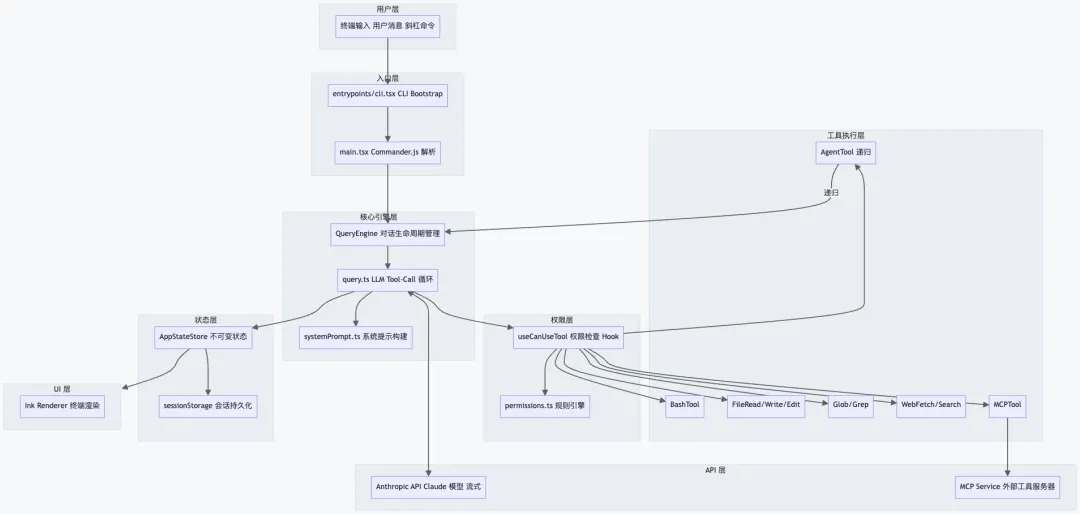
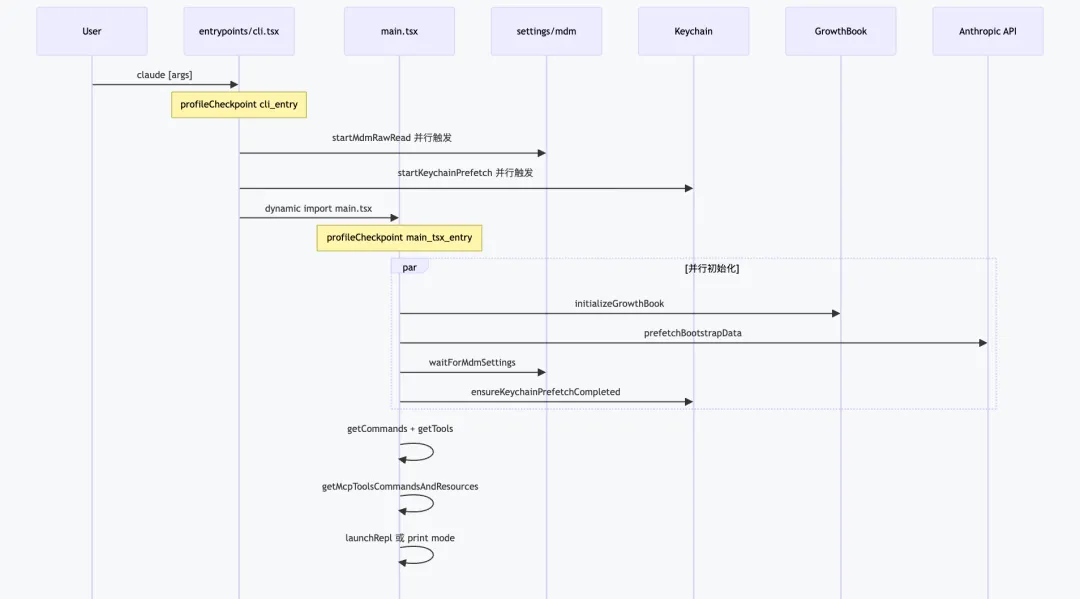
5 启动流程
关键优化:startMdmRawRead()和startKeychainPrefetch()在所有import语句执行之前以副作用方式触发,利用 Bun 的并发 I/O,将 macOS 冷启动从约 300ms 降低至约 150ms。
|
|
|
|
|
|---|---|---|---|
| Phase 0
|
startMdmRawRead
startKeychainPrefetch |
|
|
| Phase 1
|
|
|
|
| Phase 2
|
|
|
|
| Phase 3
|
|
|
|
| Phase 4
|
|
|
|
6 查询引擎(QueryEngine)
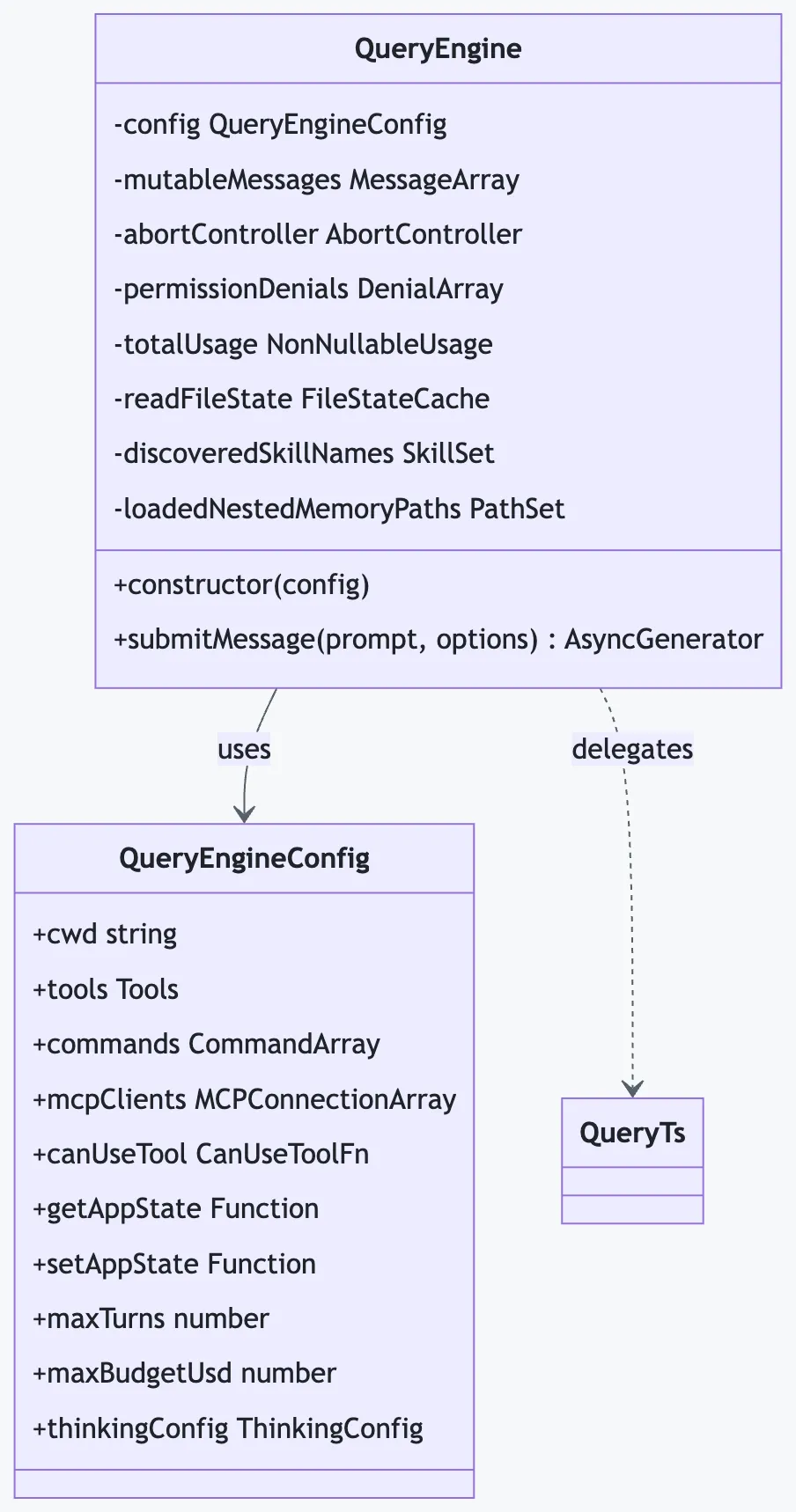
QueryEngine是整个系统的大脑,管理一次完整对话的生命周期(src/QueryEngine.ts,约 1300 行)。每个实例对应一个会话,submitMessage()每次调用启动一个新的 Turn。
6.1 类结构
6.2 Tool-Call 主循环
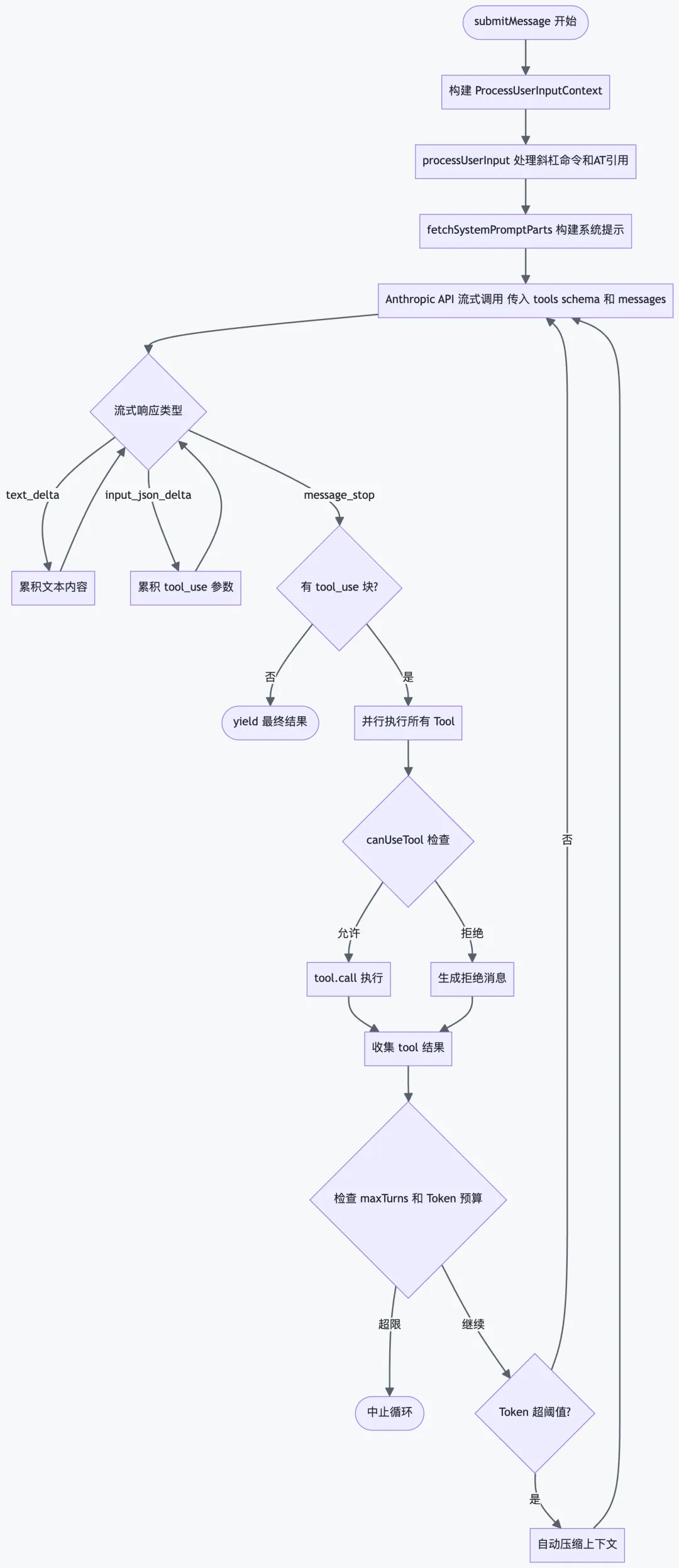
6.3 系统提示构建优先级
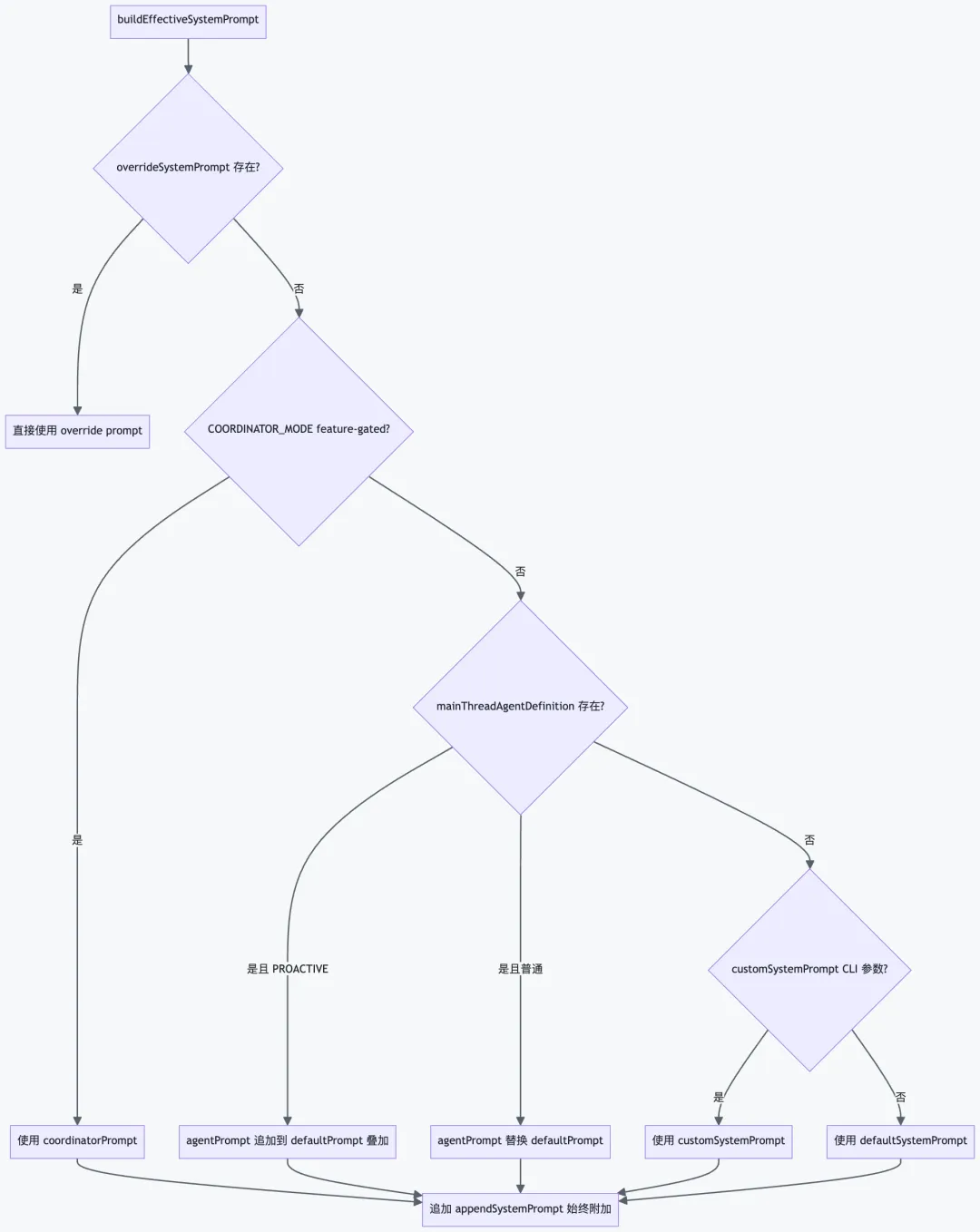
|
|
|
|
|
|---|---|---|---|
|
|
|
最高 |
|
|
|
COORDINATOR_MODE
|
高 |
|
|
|
.claude/agents/*.md |
中高 |
|
|
|
--system-prompt |
中 |
|
|
|
|
普通 |
|
|
|
--append-system-prompt |
追加 |
|
|
|
|
注入 |
|
7 工具系统(Tool System)
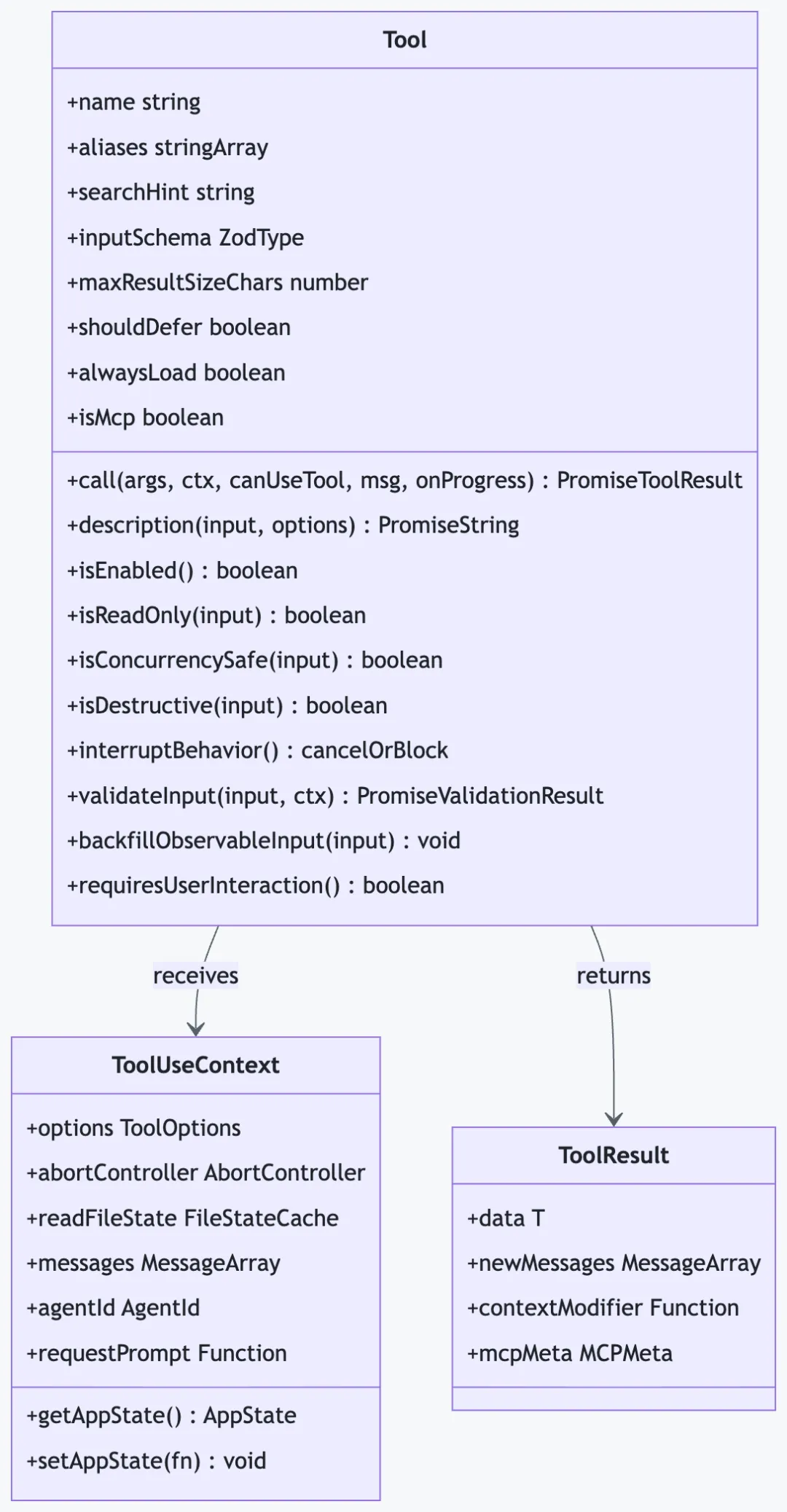
每个工具是一个自包含的模块,实现统一的Tool接口,包含 Zod schema、权限控制、执行逻辑和 UI 组件。
7.1 Tool 接口核心方法
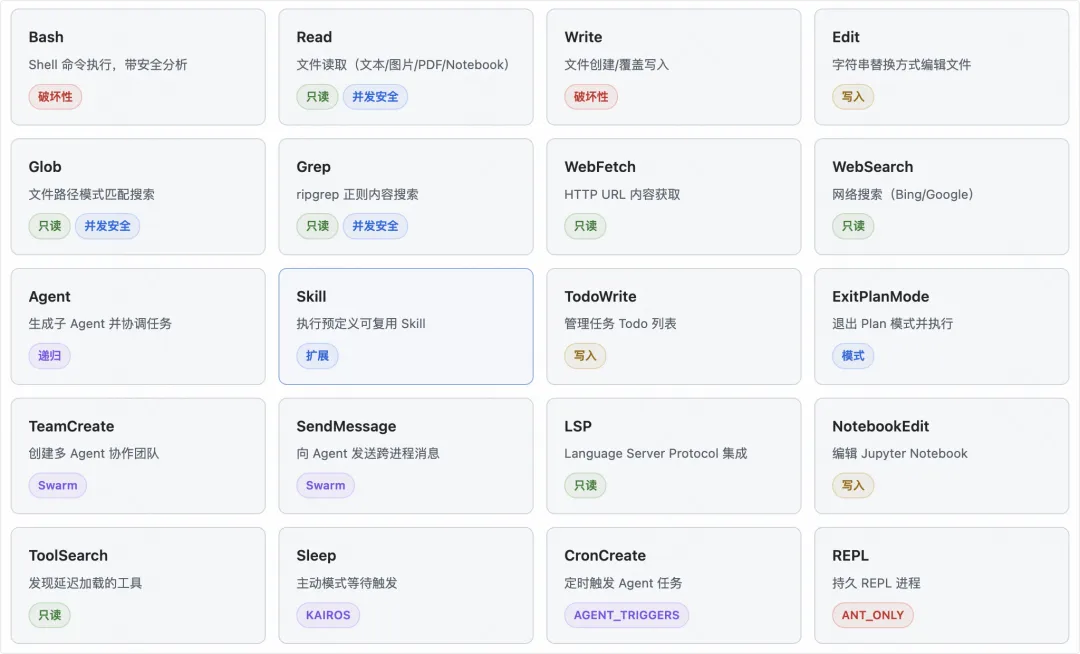
7.2 内置工具清单
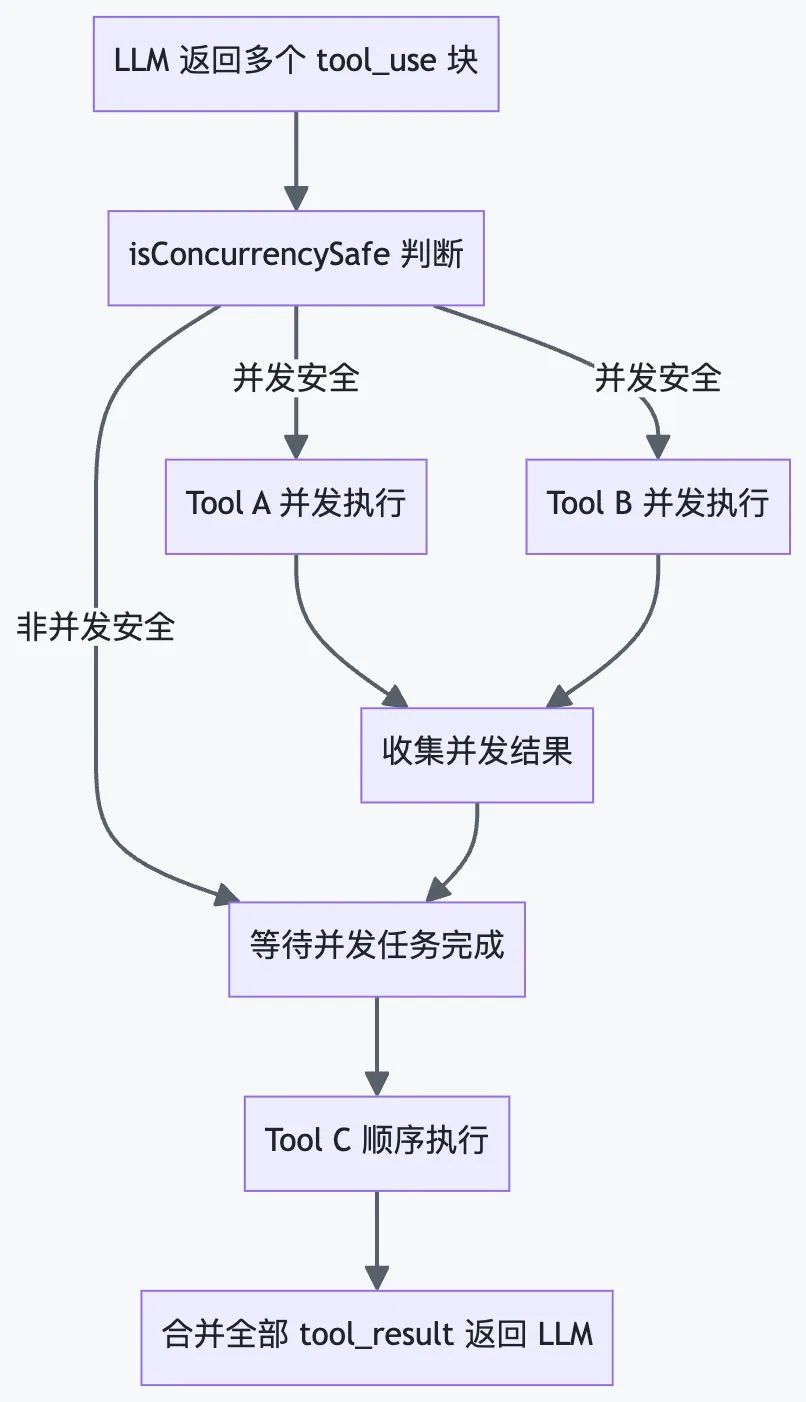
7.3 工具并发执行模型
8 命令系统(Command System)
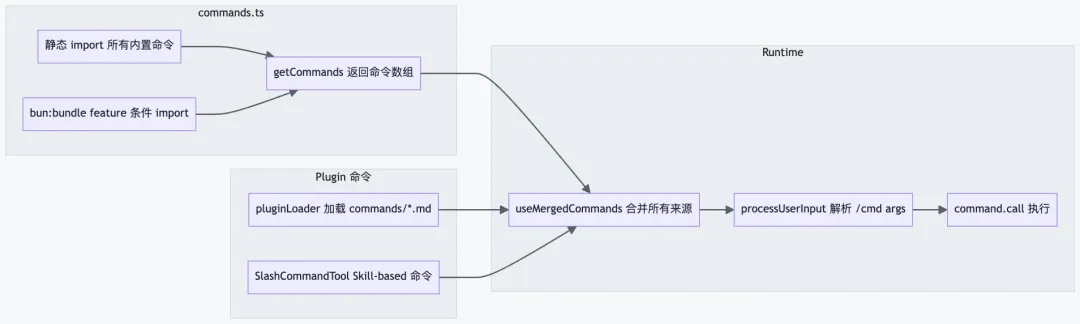
8.1 命令注册机制
8.2 内置命令分类
|
|
|
|
|---|---|---|
| 代码操作 | /commit |
|
/review |
|
|
/diff |
|
|
/compact |
|
|
| 配置管理 | /config |
|
/doctor |
|
|
/mcp |
|
|
/model |
|
|
| 记忆状态 | /memory |
|
/tasks |
|
|
/context |
|
|
| 扩展 | /plugin |
|
/skills |
|
|
/hooks |
|
|
| 集成 | /ide |
|
/bridge |
|
|
/desktop |
|
9 权限系统(Permission System)
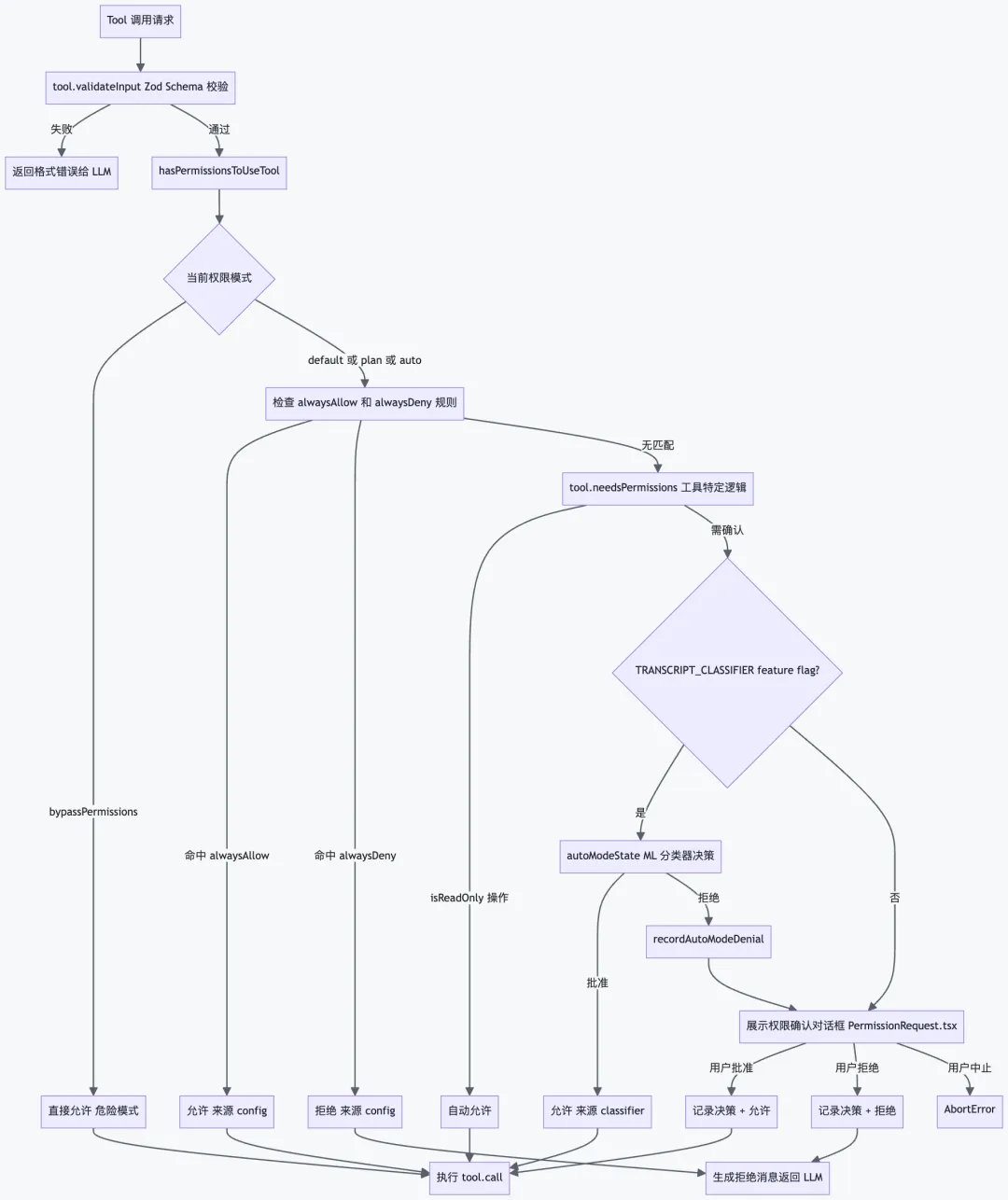
Claude Code 实现了一套精细的多层权限系统,在每次工具调用前进行安全检查,防止意外的破坏性操作。
9.1 权限决策流程
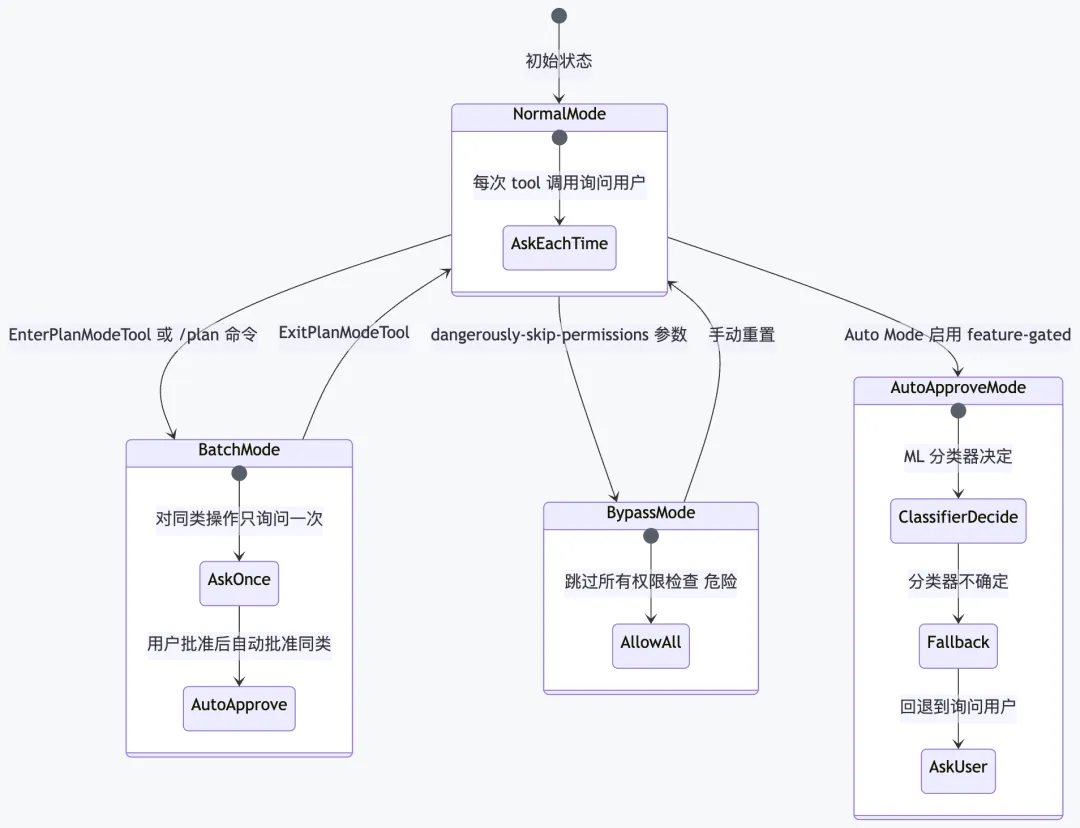
9.2 权限模式状态机
9.3 Bash 命令安全分析
|
|
|
|
|
|---|---|---|---|
|
|
rm -rf / |
极高 |
|
|
|
curl | bash |
极高 |
|
|
|
> /etc/passwd |
高 |
|
|
|
chmod 777 |
中 |
|
|
|
git push origin main |
中 |
|
|
|
ls
cat, grep |
低 |
|
实现位置:src/utils/permissions/bashClassifier.ts— 基于命令语义分析(非简单字符串匹配),通过src/utils/bash/parser.ts解析 Shell AST 后判断危险模式。
10 插件系统(Plugin System)
10.1 插件目录结构
~/.config/claude/plugins/my-plugin/├── plugin.json # 插件元数据(可选)├── commands/ # 自定义斜杠命令(Markdown 格式)│ ├── build.md # /build 命令│ ├── deploy.md # /deploy 命令│ └── test.md # /test 命令├── agents/ # 自定义 AI Agents│ └── code-reviewer.md # Agent 系统提示定义├── hooks/ # Hook 配置│ └── hooks.json # PreToolUse/PostToolUse/SessionStart├── output-styles/ # 自定义输出样式│ └── compact.md└── skills/ # 可复用 Skill 定义└── refactor.md
10.2 插件加载时序
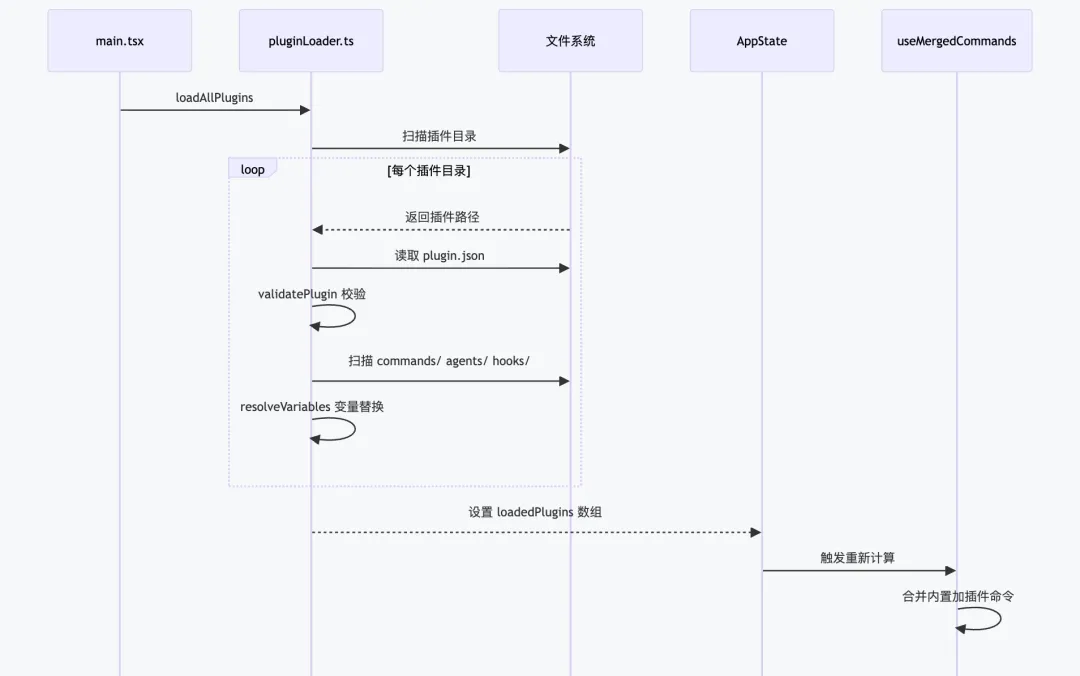
10.3 Hook 事件类型
|
|
|
|
|---|---|---|
PreToolUse |
|
$CLAUDE_TOOL_NAME
$CLAUDE_TOOL_INPUT_* |
PostToolUse |
|
$CLAUDE_TOOL_OUTPUT |
PreCompact |
|
$CLAUDE_SESSION_ID |
PostCompact |
|
|
SessionStart |
|
$CLAUDE_SESSION_ID
$CLAUDE_CWD |
SessionStop |
|
|
11 MCP 集成
11.1 传输类型对比
|
|
|
|
|
|---|---|---|---|
| stdio |
|
command
args + env |
|
| sse |
|
url
headers |
|
| http |
|
url
headers |
|
| ws |
|
url |
|
| sdk |
|
|
|
11.2 MCP 工具集成流程
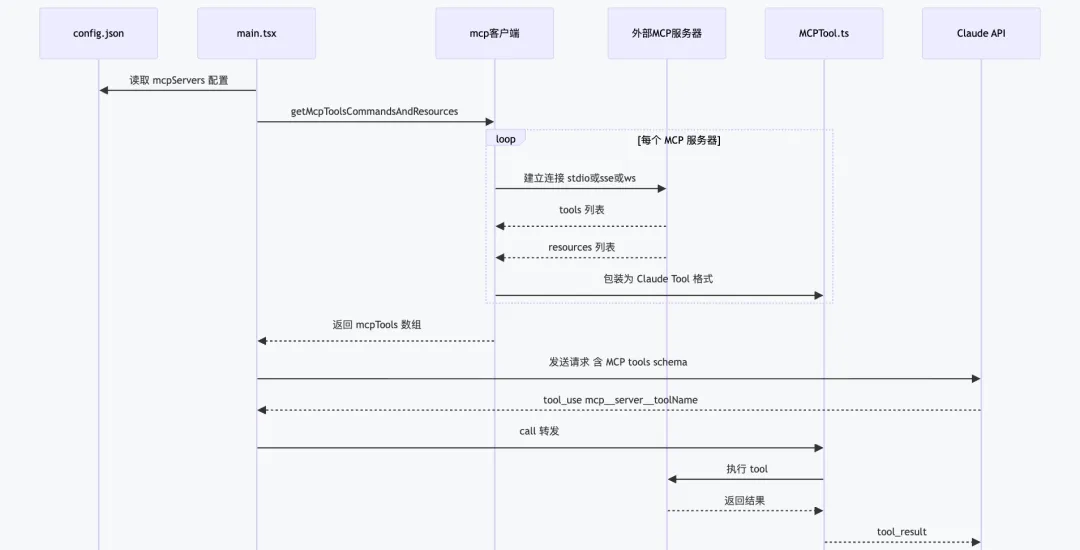
11.3 配置示例
{"mcpServers": {"filesystem": {"type": "stdio","command": "npx","args": ["-y", "@modelcontextprotocol/server-filesystem", "/path/to/dir"]},"github": {"type": "sse","url": "https://api.githubcopilot.com/mcp/","headers": {"Authorization": "Bearer ${GITHUB_TOKEN}"}},"my-server": {"type": "stdio","command": "node","args": ["/path/to/my-mcp-server.js"],"env": { "API_KEY": "${MY_API_KEY}" }}}}
12 Bridge 系统(IDE 集成)
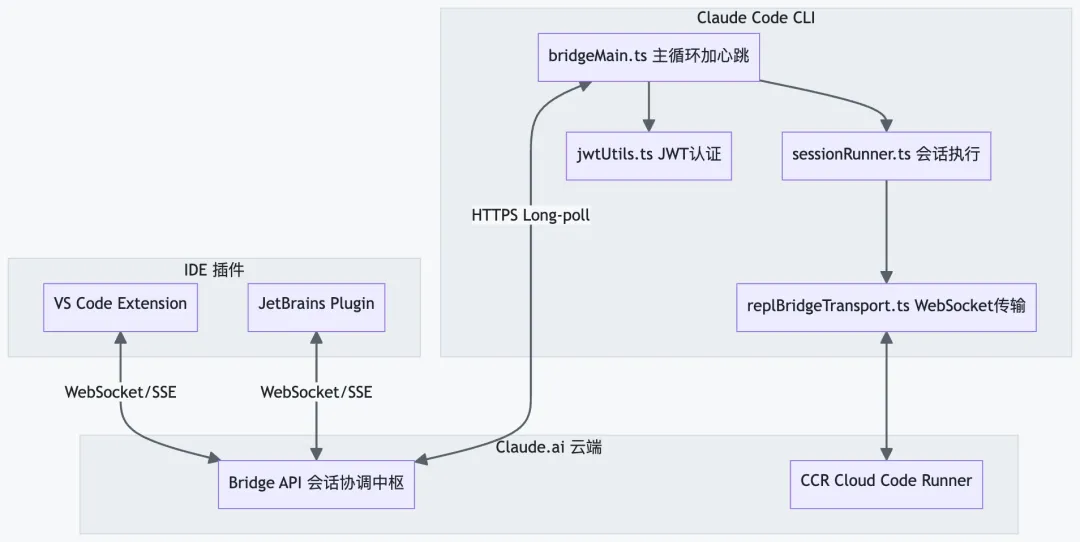
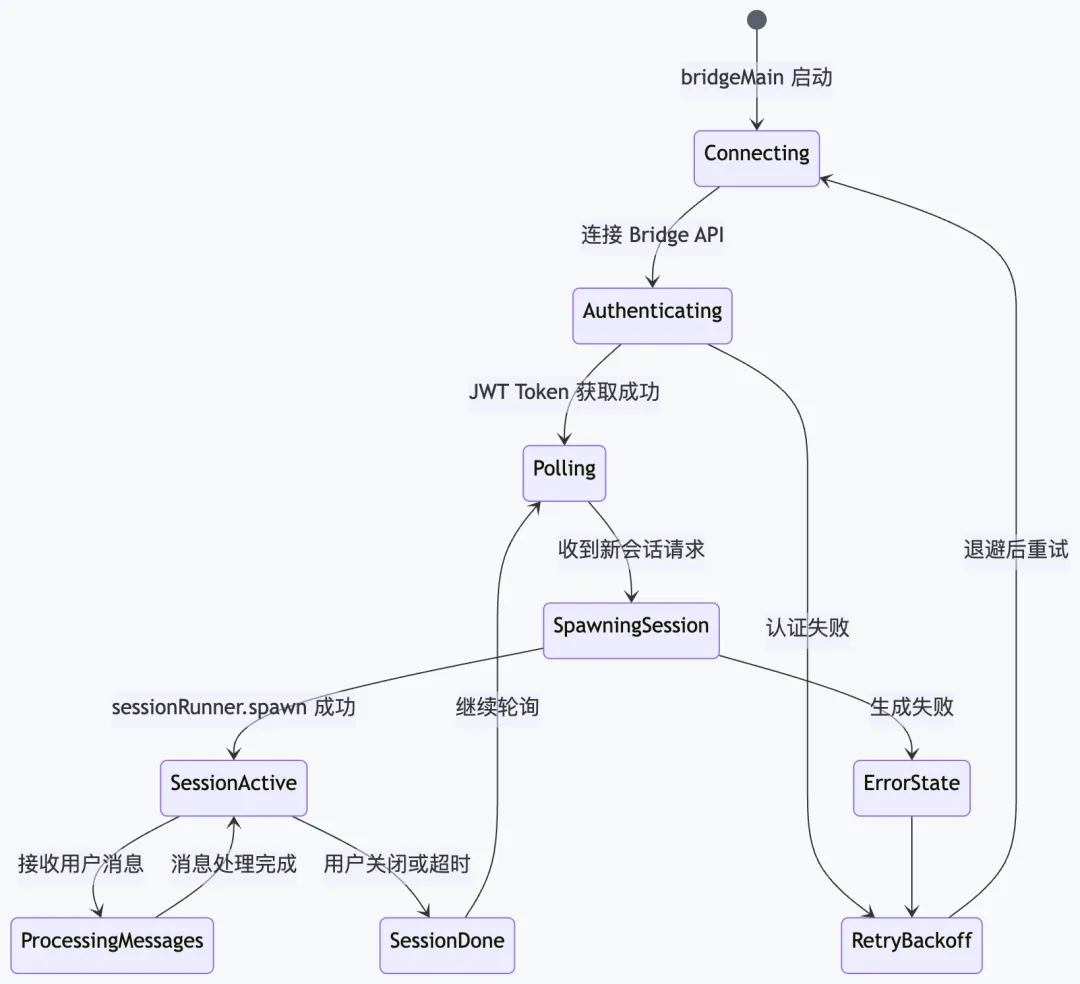
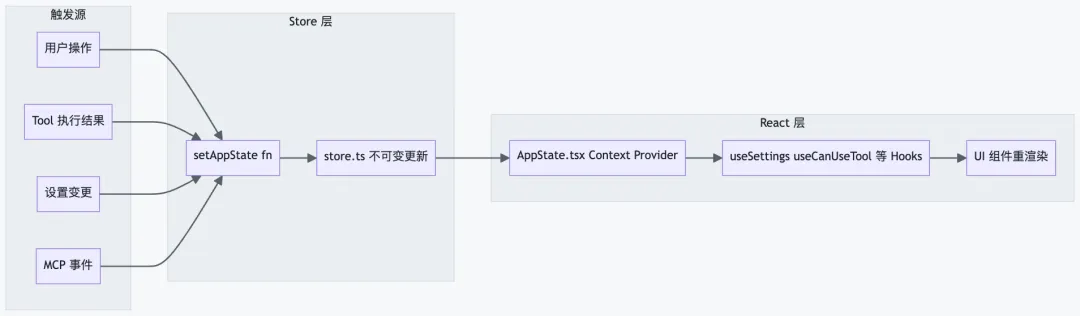
13 状态管理
Claude Code 使用自制的 Zustand-like 不可变状态管理,核心是AppState类型(被DeepImmutable包裹)。
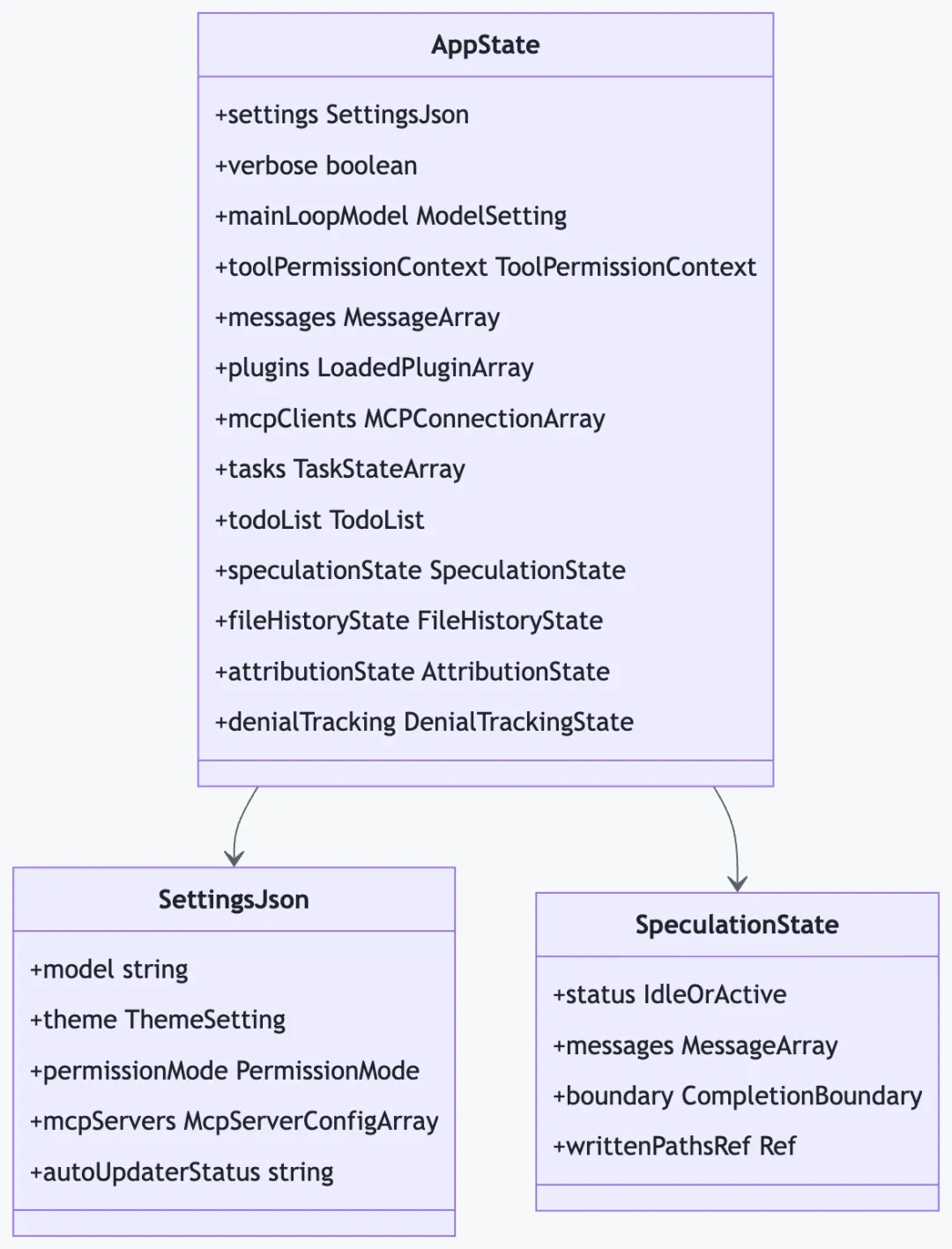
投机执行(Speculation):SpeculationState实现了一种预取优化——当用户正在输入时,系统会用当前上下文预先执行下一次查询,将结果暂存在文件覆盖层(overlay)中,用户提交后直接使用预计算结果,减少等待时间。
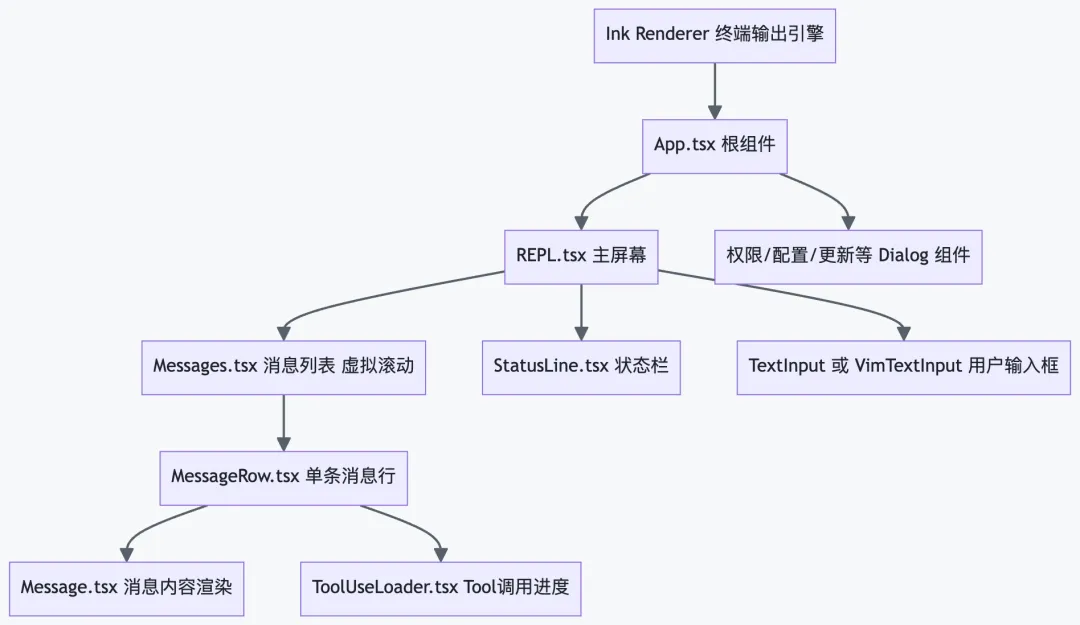
14 Terminal UI(React + Ink)
Claude Code 使用 React 组件模型渲染终端界面,Ink 作为 React 的自定义渲染器将 JSX 渲染为 TTY 输出。
|
|
|
|
|---|---|---|
|
|
ink/terminal.ts |
|
|
|
ink/supports-hyperlinks.ts |
|
|
|
ink/bidi.ts |
|
|
|
ink/selection.ts |
|
|
|
ink/Ansi.tsx |
|
|
|
hooks/useVirtualScroll.ts |
|
|
|
ink/searchHighlight.ts |
|
|
|
ink/tabstops.ts |
|
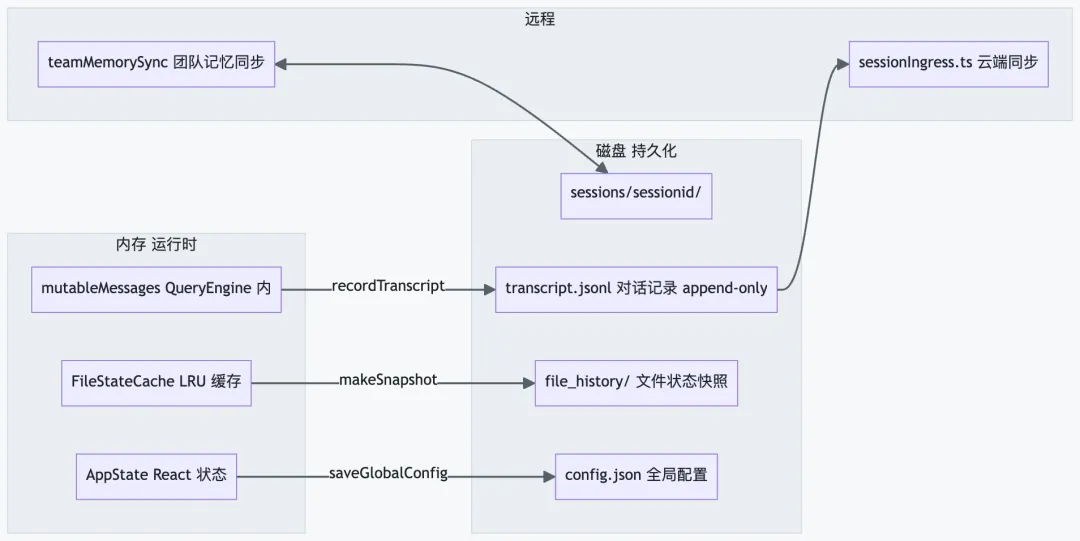
15 会话存储与持久化
|
|
|
|
|---|---|---|
transcript.jsonl |
|
|
file_history/ |
|
|
config.json |
|
|
.claude/CLAUDE.md |
|
|
~/.claude/CLAUDE.md |
|
|
~/.config/claude/plugins/ |
|
|
16 Feature Flags 与死代码消除
Anthropic 利用 Bun 的bun:bundle实现构建时 Feature Flag 注入。当 flag 为false时,整个代码分支在打包时被完全移除,外部发布版本不包含任何内部专属功能的代码或字符串。
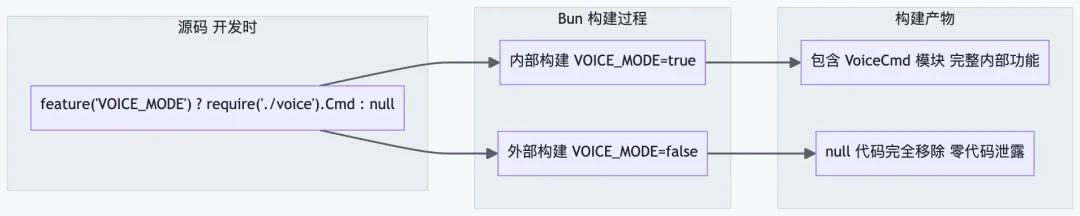
|
|
|
|
|---|---|---|
KAIROS |
|
❌ 移除 |
PROACTIVE |
|
❌ 移除 |
VOICE_MODE |
|
❌ 移除 |
BRIDGE_MODE |
|
✅ 保留 |
COORDINATOR_MODE |
|
❌ 移除 |
AGENT_TRIGGERS |
|
❌ 移除 |
AGENT_TRIGGERS_REMOTE |
|
❌ 移除 |
MONITOR_TOOL |
|
❌ 移除 |
TRANSCRIPT_CLASSIFIER |
|
✅ 保留 |
HISTORY_SNIP |
|
✅ 保留 |
REACTIVE_COMPACT |
|
✅ 保留 |
ENABLE_AGENT_SWARMS |
|
✅ 保留 |
ANT_ONLY |
|
❌ 移除 |
CONTEXT_COLLAPSE |
|
✅ 保留 |
DAEMON |
|
❌ 移除 |
ABLATION_BASELINE |
|
❌ 移除 |
DUMP_SYSTEM_PROMPT |
|
❌ 移除 |
17 二次开发指南
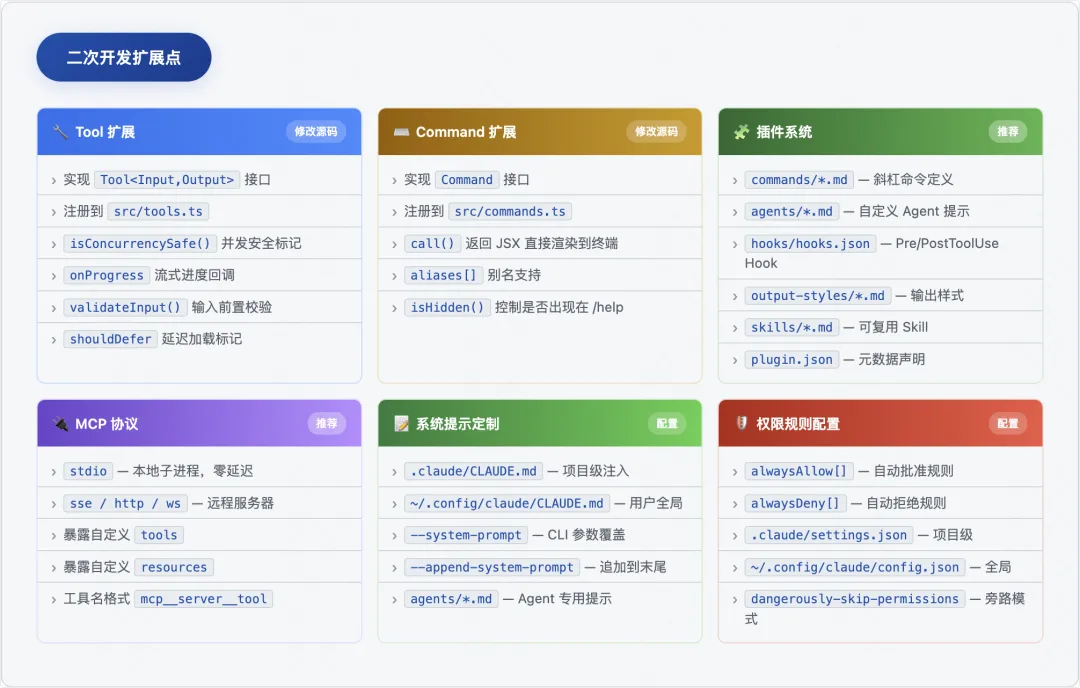
前提:这是源码研究版本,无 package.json/build 脚本。二次开发建议基于官方 npm 包的插件系统或通过 MCP 协议扩展,无需修改源码。
17.1 添加新 Tool(修改源码方式)
📄 MyCustomTool.ts 完整示例
// src/tools/MyCustomTool/MyCustomTool.tsimport { z } from 'zod/v4'import type { Tool, ToolUseContext, ToolResult } from '../../Tool.js'const InputSchema = z.object({target: z.string().describe('操作目标路径或标识符'),options: z.object({verbose: z.boolean().default(false).describe('是否输出详细信息'),dryRun: z.boolean().default(false).describe('是否只模拟执行'),}).optional(),})export const MyCustomTool: Tool<typeof InputSchema, string> = {name: 'MyCustom',searchHint: 'custom operation for specific domain task',inputSchema: InputSchema,maxResultSizeChars: 10_000,async call(args, context: ToolUseContext, canUseTool, parentMsg, onProgress) {const { target, options } = argsonProgress?.({ toolUseID: '...', data: { type: 'progress', percent: 50 } })const result = await doSomething(target, context.abortController.signal)return { data: result }},async description(input) { return `执行: ${input.target}` },isEnabled() { return true },isReadOnly() { return false },isConcurrencySafe() { return true },isDestructive() { return false },}
17.2 通过插件系统扩展(推荐,无需修改源码)
📄 命令插件示例(commands/analyze.md)
---description: Deep code analysis with metricsallowedTools:- Bash- Read- Glob- Grep---You are a code analysis expert. Analyze the codebase for:1. Code complexity metrics2. Dependency structure3. Test coverage gaps4. Performance bottlenecksTarget: $ARGUMENTSProvide actionable recommendations with file:line references.
📄 Hook 插件示例(hooks/hooks.json)
{"PostToolUse": [{"matcher": "Write","hooks": [{"type": "command","command": "prettier --write \"$CLAUDE_TOOL_INPUT_FILE_PATH\" 2>/dev/null || true"}]},{"matcher": "Edit","hooks": [{"type": "command","command": "eslint --fix \"$CLAUDE_TOOL_INPUT_PATH\" 2>/dev/null || true"}]}],"SessionStart": [{"hooks": [{ "type": "command", "command": "git status --short" }]}]}
17.3 关键扩展点总览
17.4 重要配置文件路径
|
|
|
|
|---|---|---|
~/.config/claude/config.json |
|
/config
|
~/.config/claude/CLAUDE.md |
|
|
.claude/CLAUDE.md
|
|
|
.claude/settings.json |
|
|
~/.cache/claude/sessions/ |
|
|
~/.config/claude/plugins/ |
|
/plugin
|
~/.config/claude/skills/ |
|
|