 夜雨聆风
夜雨聆风


【应用实战】OpenClaw开发小助手
未来已来,只需一句指令,养龙虾专栏导航,持续更新ing…
📋 概述
版本信息:基于OpenClaw v2026.4.15适用场景:面向独立开发者的日常效能提升,通过 QQ 频道集中管理开发任务、代码审查、知识沉淀与消息聚合核心价值:将分散在 GitHub、Notion、QQ 等多个平台的信息流,通过 OpenClaw 调度中枢汇聚到单一对话窗口,减少上下文切换损耗
🏗️ 小助手架构全景
OpenClaw 的调度逻辑,小助手采用**「中央调度 + 渠道适配」**的分层架构:
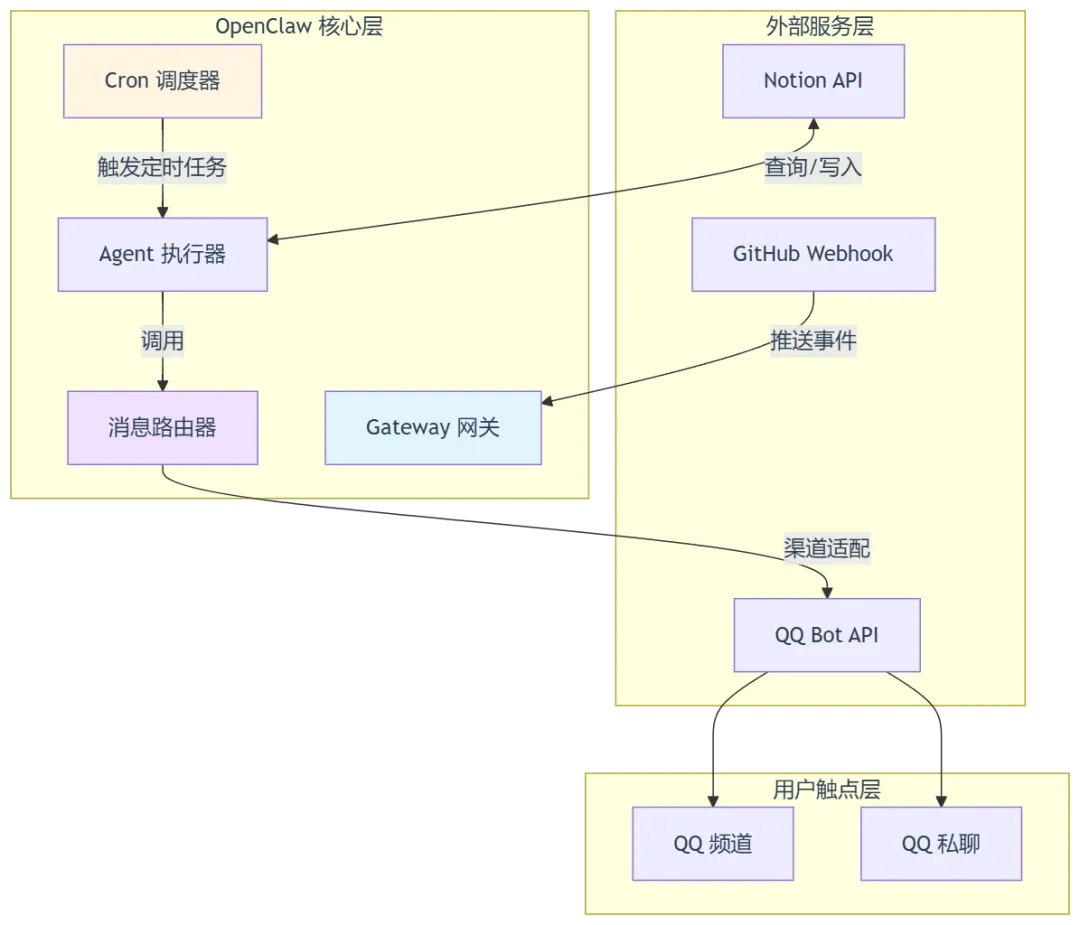
架构要点解析:
- Gateway 网关
:统一接收外部 Webhook 请求(如 GitHub 推送),进行签名验证与事件解析 - Cron 调度器
:基于 node-cron实现,支持at(单次)与cron(周期)两种调度模式,所有任务持久化存储,重启后自动恢复 - 消息路由器
:根据 payload.channel与payload.to字段,将消息投递到对应的渠道适配器,实现「一次生成,多渠道投递」 - Agent 执行器
:携带上下文( sessionTarget)运行,可以调用工具链完成复杂操作
🎯 核心功能详解
1. 任务管理自动化
1.1 定时任务
OpenClaw 的定时任务系统本质上是一个时间驱动的 Agent 调用器。其设计哲学是:到指定时间点,自动唤醒 Agent 执行预设逻辑,并将结果推送到用户指定的会话中。
系统支持两种时间表达式:
|
|
|
|
|
|---|---|---|---|
| 单次提醒 | schedule.kind = "at"
|
|
|
| 周期提醒 | schedule.kind = "cron"
|
|
|
会话隔离模式说明:sessionTarget: "isolated" 表示每次定时任务都在全新的独立上下文中执行,不会污染当前用户的活跃对话上下文。这对于自动化推送非常重要,可避免打断用户正在进行的工作流。
1.2 任务调度流程
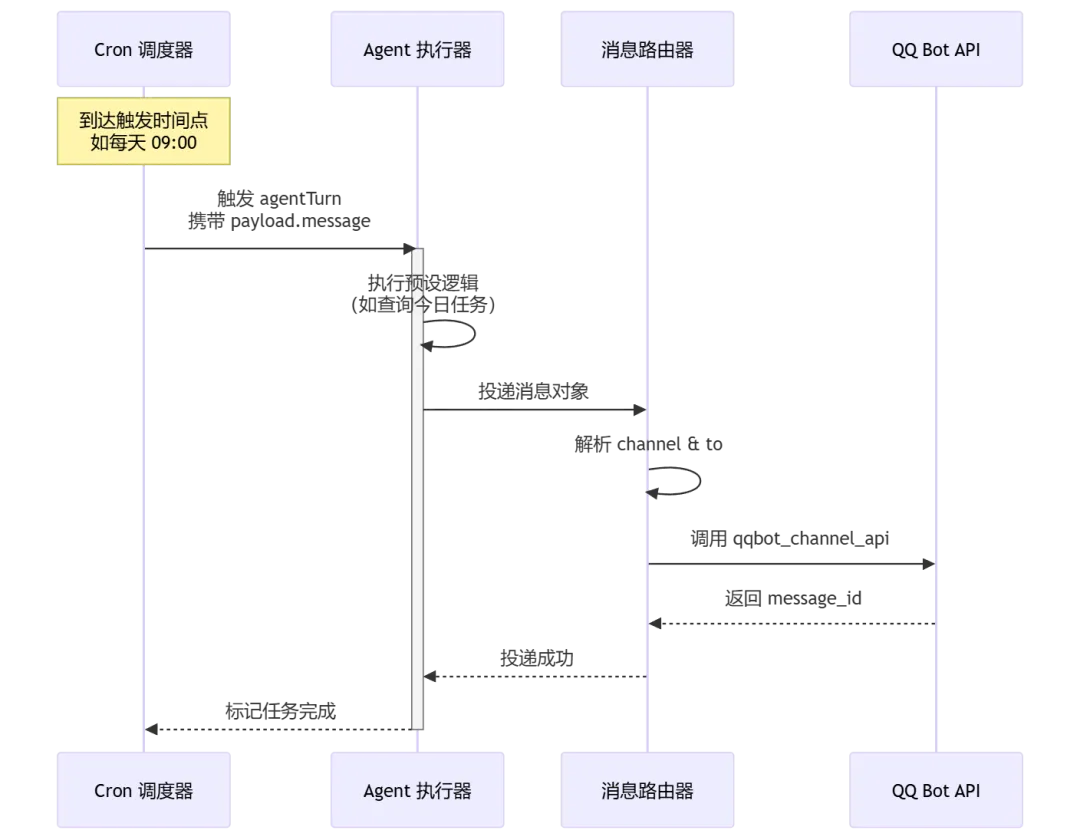
1.3 配置实践
场景 A:每日任务汇总提醒
第一步,使用 qqbot_remind 工具快速生成 cron 参数(辅助函数,会自动处理时区与表达式校验):
// 生成 cron 参数qqbot_remind({action: "add",content: "今日任务汇总",time: "0 9 * * *" // 每天早上 9 点执行})// 返回结构示例:// { expr: "0 9 * * *", tz: "Asia/Shanghai", nextRun: "..." }
第二步,将返回参数注入到 cron 工具中,配置完整的调度任务:
cron({action: "add",job: {name: "每日任务汇总",schedule: {kind: "cron",expr: "0 9 * * *",tz: "Asia/Shanghai"},// 关键配置:isolated 模式确保不干扰当前对话sessionTarget: "isolated",// wakeMode: now 表示如果添加时错过了时间,立即补执行一次wakeMode: "now",payload: {kind: "agentTurn",message: "【每日任务汇总】请检查今日任务列表,确认优先级与阻塞项...",deliver: true,channel: "qqbot",to: "{用户 openid}" // 替换为实际用户 openid}}})
场景 B:PR 审查提醒(仅工作日触发)
cron({action: "add",job: {name: "PR 审查提醒",schedule: {kind: "cron",expr: "0 10 * * 1-5", // 工作日(周一至周五)早上 10 点tz: "Asia/Shanghai"},sessionTarget: "isolated",payload: {kind: "agentTurn",// 使用模板变量,Agent 执行时会动态替换 {n}message: "【PR 审查】今日有 {n} 个待审查的 PR,请查看...",deliver: true,channel: "qqbot",to: "{用户 openid}"}}})
💡 优化建议:
{n}这类动态变量需要配合 Agent 的执行逻辑使用。建议在实际配置中,将message设计为调用函数或直接查询 GitHub API 获取真实 PR 数量,而非依赖文本替换。
2. GitHub 集成
2.1 原理解析
GitHub 集成采用经典的 Webhook 推送模式:
- 事件触发
:GitHub 仓库发生指定事件(Push、PR、Issues)时,向 OpenClaw 网关发送 HTTP POST 请求 - 签名验证
:OpenClaw 使用 X-Hub-Signature-256对请求体进行 HMAC-SHA256 校验,防止伪造请求 - 事件分发
:验证通过后,网关将事件解析为标准格式,通过 qqbot_channel_api工具投递到 QQ 频道
注意:OpenClaw v2026.4.15 版本暂不支持自动注册 Webhook,需要在 GitHub 后台手动配置。
2.2 事件流转时序
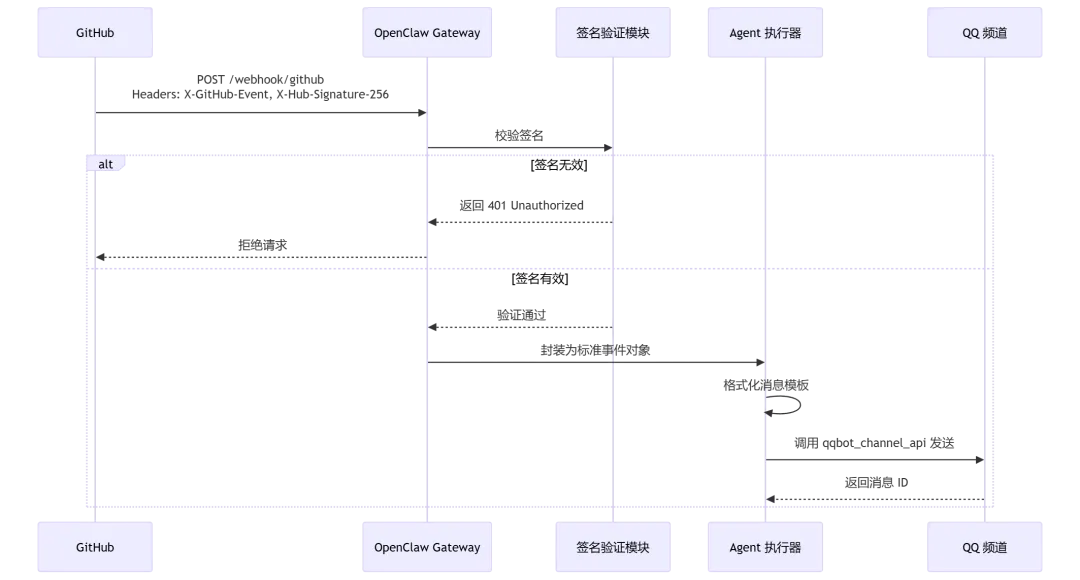
2.3 配置步骤
步骤 1:GitHub 仓库侧配置
进入目标仓库页面,依次点击 Settings → Webhooks → Add webhook,如下图所示: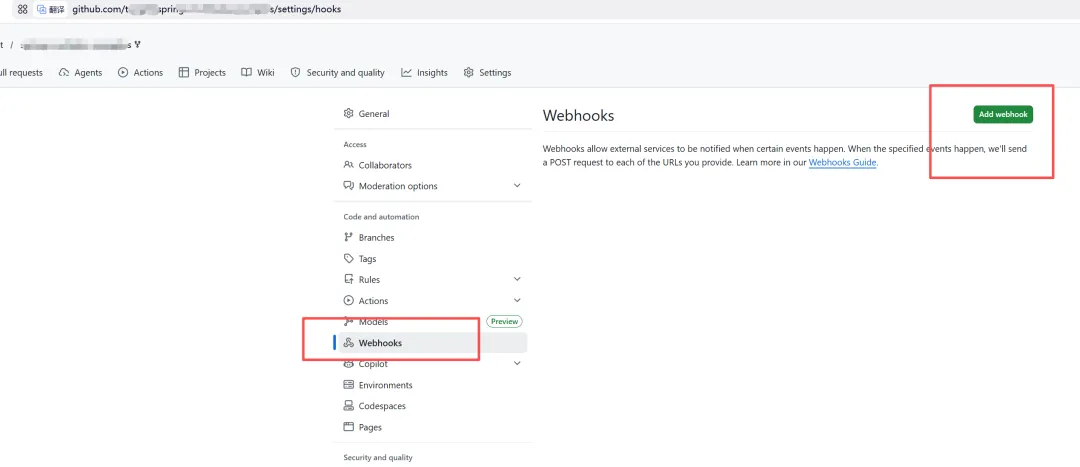
|
|
|
|
|---|---|---|
| Payload URL | https://api.openclaw.ai/webhook/github
|
|
| Content type | application/json |
|
| Secret |
ghp_xxx_2026) |
|
| SSL verification |
|
|
| Events |
|
|
步骤 2:OpenClaw 侧配置
在 openclaw.json 配置文件的 integrations.github 节点添加:
{"integrations": {"github": {"webhook_secret": "ghp_xxx_2026", // 与 GitHub 配置的 Secret 一致"enabled_events": ["push", "pull_request", "issues"],"default_channel_id": "your-channel-id" // 默认投递频道}}}
步骤 3:消息推送逻辑
当收到 GitHub 事件时,使用以下模板推送通知:
// 事件处理函数示例function handleGitHubEvent(event) {const emojiMap = {push: "🚀",pull_request: "🔀",issues: "🐛"};const icon = emojiMap[event.type] || "📢";return qqbot_channel_api({method: "POST",path: `/channels/{icon} **GitHub 事件通知**\n` +`> 📦 仓库:\`{event.type}\n` +`> 📝 描述:{event.url})`,// 如需富媒体展示,可添加 embed 或 ark 消息msg_type: 0 // 0: 文本消息}});}
⚠️ 错误修正:
path不能使用模板字符串但不声明变量,不能缺少msg_type字段。在实际调用中,建议将channel_id提前定义或从配置读取,并显式指定消息类型避免默认行为不一致。
3. Notion 集成
3.1 解析
Notion 集成基于官方 REST API,OpenClaw 通过封装以下核心能力实现双向同步:
- 分页查询(Pagination)
:Notion 查询接口默认返回 100 条记录,通过 has_more与next_cursor迭代获取全量数据 - Block 操作
:Notion 的页面内容由 Block 组成,支持追加( append block children)、更新(update block)等操作 - 富文本属性
:标题、状态、日期等属性需包装为 Notion 特定的 rich_text 对象
核心端点对照:
|
|
|
|
|
|---|---|---|---|
|
|
|
/v1/databases/{id}/query |
notion_api |
|
|
|
/v1/pages |
notion_api |
|
|
|
/v1/blocks/{id}/children |
notion_api |
3.2 数据同步流程

3.3 配置步骤
步骤 1:创建 Notion Integration
-
访问 Notion Integrations 页面 -
点击「New integration」,填写名称(如 OpenClaw-Dev) -
选择关联的 Workspace(工作区) -
复制生成的 Internal Integration Token(格式为 secret_xxx)
步骤 2:授权数据库访问
这是最容易遗漏的一步。创建 Integration 后,Notion 默认没有任何页面权限,需要手动共享:
-
在 Notion 中打开目标数据库页面 -
点击右上角「⋯」(更多)→「Add connections」 -
搜索并选择刚才创建的 Integration 名称 -
确认授权(页面右上角会显示该 Integration 的图标)
步骤 3:OpenClaw 配置
在 openclaw.json 中添加 Notion 凭证:
{"integrations": {"notion": {"token": "secret_xxx", // Internal Integration Token"default_database_id": "a1b2c3d4-e5f6-7890-abcd-ef1234567890"}}}
步骤 4:同步任务到 Notion
创建带属性的任务页面:
notion_api({method: "POST",path: "/v1/pages",body: {parent: {database_id: "a1b2c3d4-e5f6-7890-abcd-ef1234567890"},icon: {type: "emoji",emoji: "✅"},properties: {"任务名称": {title: [{ text: { content: "完成 OpenClaw 文档整理" } }]},"状态": {select: { name: "进行中" }},"优先级": {select: { name: "高" }},"截止日期": {date: { start: "2026-04-20" }},"标签": {multi_select: [{ name: "文档" },{ name: "自动化" }]}}}})
步骤 5:追加页面内容(笔记正文)
如果需要在创建的任务页面下添加详细描述或子任务:
// 假设上一步返回了 page_id: xxxxnotion_api({method: "PATCH",path: "/v1/blocks/xxxx/children",body: {children: [{object: "block",type: "heading_2",heading_2: {rich_text: [{ text: { content: "执行步骤" } }]}},{object: "block",type: "bulleted_list_item",bulleted_list_item: {rich_text: [{ text: { content: "梳理核心功能模块" } }]}},{object: "block",type: "bulleted_list_item",bulleted_list_item: {rich_text: [{ text: { content: "补充配置细节与边界情况" } }]}}]}})
3.4 每日笔记归档自动化
结合 Cron 实现「每日归档提醒」:
cron({action: "add",job: {name: "每日笔记归档",schedule: {kind: "cron",expr: "0 18 * * *", // 每天晚上 18:00tz: "Asia/Shanghai"},sessionTarget: "isolated",payload: {kind: "agentTurn",message: "【笔记归档】今日学习笔记已整理,请确认是否同步到 Notion?\n" +"如确认,请回复「归档」我将自动执行同步。",deliver: true,channel: "qqbot",to: "{用户 openid}"}}})
💡 进阶方案:可以配置 Agent 在收到用户确认后,自动调用
notion_api查询当日对话中的知识卡片,批量写入 Notion 的每日归档数据库,实现「提醒 → 确认 → 执行」的全自动闭环。
4. 跨平台消息统一
4.1 解析
OpenClaw 通过**渠道抽象层(Channel Abstraction Layer)**统一不同平台的消息接口。其核心设计是将「消息内容」与「投递渠道」解耦:
- 内容层
:统一的消息对象结构( content,embeds,attachments) - 渠道层
:各平台适配器负责将统一对象转换为目标平台的原生格式 - 路由层
:根据规则或显式配置,决定消息最终投递到哪个渠道
比如:渠道工具QQ机器人:
|
|
|
|
|---|---|---|
qqbot_channel_api |
|
|
qqbot_remind |
|
|
cron |
|
|
<qqmedia> |
|
|
4.2 消息路由决策图
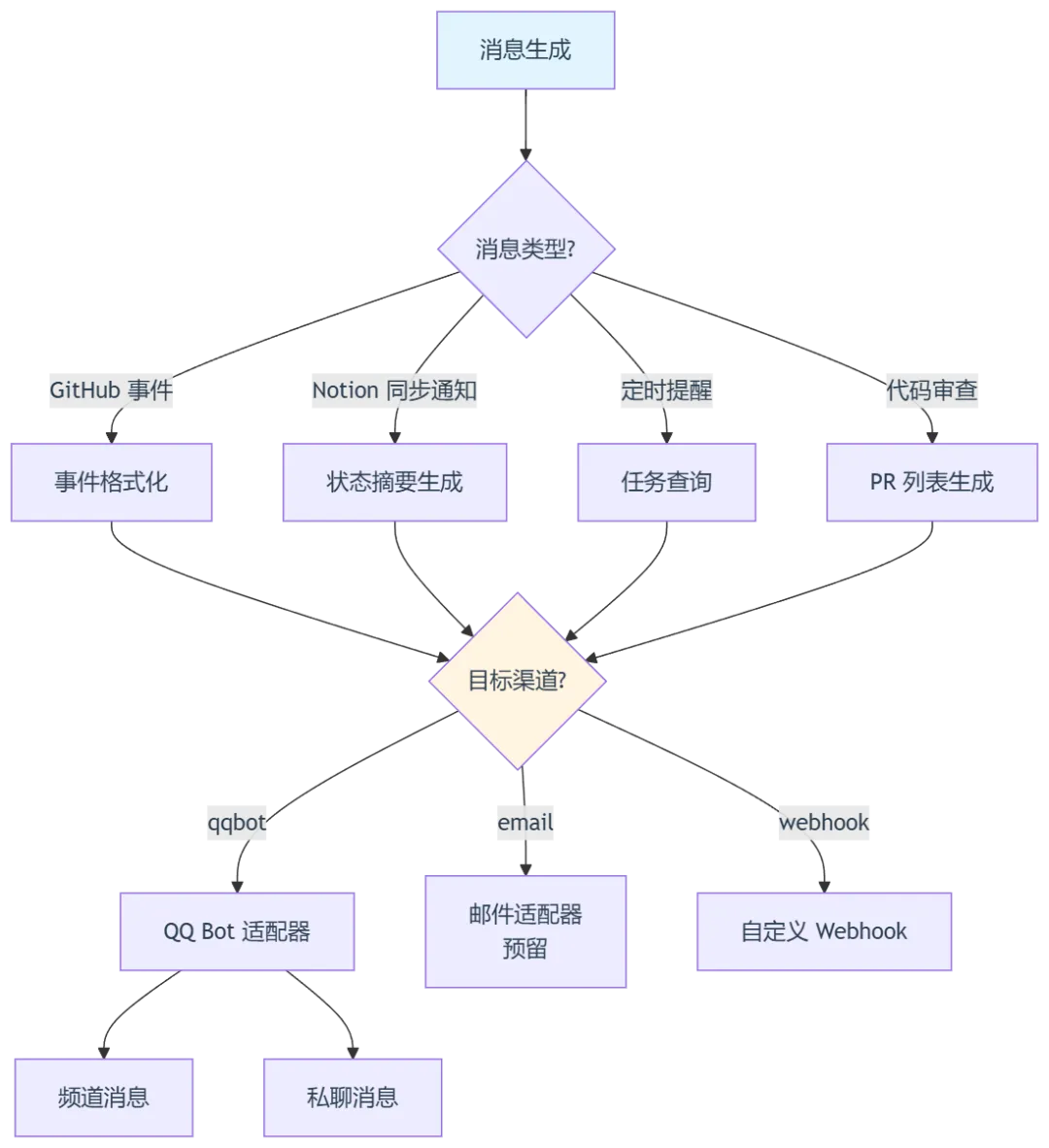
4.3 渠道配置(openclaw.json)
{"channels": {"qqbot": {"appid": "your-bot-appid","token": "your-bot-token","secret": "your-bot-secret","sandbox": false,"default_channel_id": "channel-id-for-default-push"}},"routing": {"rules": [{"name": "github_events","match": { "source": "github" },"target": { "channel": "qqbot", "channel_id": "dev-channel-id" }},{"name": "daily_reminders","match": { "type": "cron", "job_name": "*提醒*" },"target": { "channel": "qqbot", "to": "{用户 openid}" }},{"name": "notion_sync","match": { "source": "notion" },"target": { "channel": "qqbot", "channel_id": "doc-channel-id" }}]}}
动态路由规则代码示例:
// 路由决策函数(可在 Agent 逻辑中使用)function routeMessage(message) {const rules = {github_event: {channel: "qqbot",target: "dev-channel-id",priority: "high",template: "github_notify"},notion_sync: {channel: "qqbot",target: "doc-channel-id",priority: "normal",template: "simple_text"},daily_reminder: {channel: "qqbot",target: "user-private",priority: "normal",mention: true},code_review: {channel: "qqbot",target: "review-channel-id",priority: "high",mention_all: false}};const rule = rules[message.type];if (!rule) {console.warn(`未知消息类型: {NOTION_TOKEN}"}}}
- 消息过滤
:对于包含敏感信息的仓库或页面,配置显式排除规则:
const filterRules = {// 排除指定标签的 Issuesexclude_labels: ["wontfix", "duplicate", "security"],// 最低优先级阈值min_priority: "medium",// 排除指定作者(通常是机器人)exclude_authors: ["github-actions", "dependabot", "snyk-bot"],// 排除私有仓库事件(可选)exclude_private_repos: true};
备份与容灾机制
- Notion 数据
:每月通过 Notion 的导出功能(Markdown + CSV)备份一次数据库 - 配置备份
: openclaw.json与自定义脚本纳入 Git 版本控制(注意脱敏) - 消息日志
:开启 OpenClaw 的审计日志,保留最近 30 天的消息投递记录,便于排查「消息未收到」问题 - 任务持久化
:Cron 任务默认持久化到本地数据库,建议定期导出任务列表,避免单点故障导致任务丢失
🔧 监控与故障排查
常用调试命令
# 1. 查看所有定时任务状态openclaw cron list# 输出示例:# ID NAME SCHEDULE NEXT_RUN STATUS# 1 每日任务汇总 0 9 * * * 2026-04-18 09:00 active# 2 PR 审查提醒 0 10 * * 1-5 2026-04-18 10:00 active# 2. 查看网关实时日志(按 Ctrl+C 退出)【路径以你自己的实际路径为准】tail -f /home/tht/.openclaw/logs/gateway.log | grep -E "(webhook|cron|qqbot)"# 3. 查看 Agent 执行日志(排查消息未发送原因)【路径以你自己的实际路径为准】tail -f /home/tht/.openclaw/logs/agent.log# 4. 手动触发一次任务(用于调试)openclaw cron trigger --id 1
典型问题排查指南
|
|
|
|
|---|---|---|
|
|
|
signature mismatch 错误 |
|
|
|
|
|
|
|
tz 字段是否为 Asia/Shanghai |
|
|
|
qqbot_channel_api 手动测试 |
|
|
|
event.id 做了幂等处理 |
💡 持续优化建议
1. 渐进式配置原则
不要试图在第一天就搭建完整的自动化体系。建议按照以下顺序迭代:
-
** 1**:只配置每日 09:00 的「任务汇总提醒」,先培养查看习惯 -
** 2**:接入 GitHub Push 事件通知,确认事件流转正常 -
** 3**:加入 PR 审查提醒与 Notion 任务同步 -
** 4+**:根据实际使用数据,优化提醒频率与消息模板
2. 消息降噪策略
随着集成增多,消息量可能激增。建议设置分级通知:
const notificationLevels = {urgent: {pattern: /(CI failed|security alert|production error)/i,action: "immediate_mention" // 立即 @ 用户},daily: {pattern: /(每日汇总|待办任务)/,action: "morning_digest" // 仅早推送一次},silent: {pattern: /(dependabot|github-actions)/,action: "log_only" // 只记录日志,不推送}};
3. 定期清理与维护
- 1
:审查 Cron 任务列表,删除过期或不再使用的提醒 - 2
:评估各集成的 ROI,关闭低频使用的通知源 - 3
:轮换 GitHub Webhook Secret 与 Notion Integration Token