 夜雨聆风
夜雨聆风


Claude Code:第15章:插件开发与代码生成
Claude Code 插件开发与代码生成完全指南
大家好,这里是漫绘资管。今天介绍 Claude Code 插件开发与代码生成。
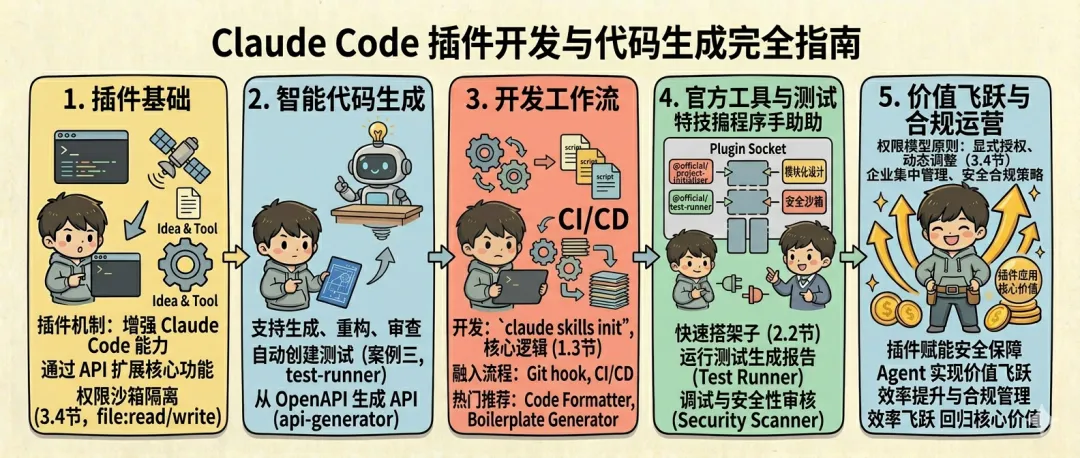
1. 插件开发基础
1.1 插件开发环境搭建
1.1.1 系统要求
基本要求
|
|
|
|
|---|---|---|
|
|
|
|
|
|
|
|
|
|
|
|
|
|
|
|
|
|
|
|
软件依赖
|
|
|
|
|---|---|---|
|
|
|
|
|
|
|
|
|
|
|
|
|
|
|
|
1.1.2 安装开发工具
1. 安装 Node.js
推荐使用 nvm 进行 Node.js 版本管理:
# 安装 nvm
curl -o- https://raw.githubusercontent.com/nvm-sh/nvm/v0.39.0/install.sh | bash
source ~/.bashrc

# 安装并使用 Node.js 18
nvm install 18
nvm use 18

# 验证安装
node --version
npm --version
2. 安装 Python
macOS:
brew install python@3.10
Ubuntu/Debian:
sudo apt update
sudo apt install python3.10 python3.10-venv python3-pip
Windows: 从 Python 官方网站下载安装程序。
3. 安装 Git
macOS:
brew install git
Ubuntu/Debian:
sudo apt install git
Windows: 从 Git 官方网站下载安装程序。
4. 安装 Claude Code CLI
# 使用 npm 安装
npm install -g @anthropic-ai/claude-code

# 验证安装
claude --version
1.1.3 安装插件开发工具
1. 安装插件脚手架工具
# 安装插件脚手架
npm install -g @claude-code/plugin-scaffold

# 验证安装
claude-plugin-scaffold --version
2. 安装插件开发工具
# 安装开发工具
npm install -g @claude-code/plugin-devtools

# 验证安装
claude-plugin-devtools --version
3. 安装插件测试工具
# 安装测试工具
npm install -g @claude-code/plugin-test

# 验证安装
claude-plugin-test --version
1.1.4 创建开发环境
1. 创建项目目录
# 创建插件项目目录
mkdir my-plugin
cd my-plugin

# 初始化项目
npm init -y
2. 安装开发依赖
# 安装插件 SDK
npm install @claude-code/plugin-sdk --save-dev

# 安装 TypeScript(推荐)
npm install typescript @types/node --save-dev

# 安装测试框架
npm install jest @types/jest --save-dev

# 安装代码检查工具
npm install eslint @typescript-eslint/parser @typescript-eslint/eslint-plugin --save-dev
3. 配置 TypeScript
// tsconfig.json
{
"compilerOptions":{
"target":"ES2020",
"module":"commonjs",
"lib":["ES2020"],
"outDir":"./dist",
"rootDir":"./src",
"strict":true,
"esModuleInterop":true,
"skipLibCheck":true,
"forceConsistentCasingInFileNames":true,
"resolveJsonModule":true,
"declaration":true,
"declarationMap":true,
"sourceMap":true,
"moduleResolution":"node"
},
"include":["src/**/*"],
"exclude":["node_modules","dist","**/*.test.ts"]
}
4. 配置 ESLint
// .eslintrc.json
{
"parser":"@typescript-eslint/parser",
"extends":[
"eslint:recommended",
"plugin:@typescript-eslint/recommended"
],
"plugins":["@typescript-eslint"],
"rules":{
"@typescript-eslint/no-unused-vars":"error",
"@typescript-eslint/explicit-function-return-type":"warn",
"@typescript-eslint/no-explicit-any":"warn"
}
}
5. 配置 Jest
// jest.config.json
{
"preset":"ts-jest",
"testEnvironment":"node",
"roots":["<rootDir>/src"],
"testMatch":["**/__tests__/**/*.ts","**/?(*.)+(spec|test).ts"],
"collectCoverageFrom":[
"src/**/*.ts",
"!src/**/*.d.ts",
"!src/**/*.test.ts"
]
}
6. 配置 package.json
{
"name":"my-plugin",
"version":"1.0.0",
"description":"My Claude Code Plugin",
"main":"dist/index.js",
"types":"dist/index.d.ts",
"scripts":{
"build":"tsc",
"dev":"tsc --watch",
"test":"jest",
"test:watch":"jest --watch",
"lint":"eslint src/**/*.ts",
"lint:fix":"eslint src/**/*.ts --fix",
"clean":"rm -rf dist"
},
"keywords":["claude-code","plugin"],
"author":"Your Name",
"license":"MIT",
"devDependencies":{
"@claude-code/plugin-sdk":"^1.0.0",
"@types/jest":"^29.0.0",
"@types/node":"^18.0.0",
"@typescript-eslint/eslint-plugin":"^5.0.0",
"@typescript-eslint/parser":"^5.0.0",
"eslint":"^8.0.0",
"jest":"^29.0.0",
"ts-jest":"^29.0.0",
"typescript":"^4.9.0"
}
}
1.1.5 创建插件项目结构
标准项目结构
my-plugin/
├── src/
│   ├── index.ts              # 插件入口
│   ├── plugin.ts            # 插件主类
│   ├── tools/               # 工具定义
│   │   ├── tool1.ts
│   │   └── tool2.ts
│   ├── commands/            # 命令定义
│   │   ├── command1.ts
│   │   └── command2.ts
│   ├── utils/               # 工具函数
│   │   └── helpers.ts
│   └── types/               # 类型定义
│       └── index.ts
├── __tests__/               # 测试文件
├── dist/                    # 编译输出
├── templates/               # 模板文件
├── docs/                    # 文档
├── examples/                # 示例
├── .eslintrc.json          # ESLint 配置
├── .gitignore              # Git 忽略文件
├── jest.config.json        # Jest 配置
├── package.json            # 项目配置
├── plugin.yaml             # 插件清单
├── tsconfig.json           # TypeScript 配置
└── README.md               # 项目说明
1.1.6 配置开发环境
1. 配置 IDE
VS Code 配置:
// .vscode/settings.json
{
"typescript.tsdk":"node_modules/typescript/lib",
"editor.formatOnSave":true,
"editor.codeActionsOnSave":{
"source.fixAll.eslint":true
},
"files.exclude":{
"**/node_modules":true,
"**/dist":true,
"**/coverage":true
}
}
VS Code 扩展推荐:
// .vscode/extensions.json
{
"recommendations":[
"dbaeumer.vscode-eslint",
"esbenp.prettier-vscode",
"ms-vscode.vscode-typescript-next"
]
}
2. 配置调试
// .vscode/launch.json
{
"version":"0.2.0",
"configurations":[
{
"name":"Debug Plugin",
"type":"node",
"request":"launch",
"runtimeExecutable":"npm",
"runtimeArgs":["run","dev"],
"console":"integratedTerminal",
"internalConsoleOptions":"neverOpen"
},
{
"name":"Debug Tests",
"type":"node",
"request":"launch",
"runtimeExecutable":"npm",
"runtimeArgs":["run","test:watch"],
"console":"integratedTerminal",
"internalConsoleOptions":"neverOpen"
}
]
}
3. 配置 Git Hooks
# 安装 husky
npm install husky --save-dev

# 初始化 husky
npx husky install

# 添加 pre-commit hook
npx husky add .husky/pre-commit "npm run lint && npm run test"
1.1.7 创建插件清单
plugin.yaml 配置
# plugin.yaml
name:my-plugin
version:1.0.0
description:MyClaudeCodePlugin
author:YourName
license:MIT
homepage:https://github.com/yourname/my-plugin
repository:https://github.com/yourname/my-plugin

# 插件入口
main:dist/index.js
types:dist/index.d.ts

# 插件权限
permissions:
file:
-read:"/"
network:
-https: ["api.example.com"]

# 插件依赖
dependencies:
claude-code:">=1.0.0"

# 开发依赖
devDependencies:
typescript:"^4.9.0"
jest:"^29.0.0"

# 插件配置
config:
timeout:30
retries:3

# 插件元数据
metadata:
category:development
tags:
-code-generation
-productivity
keywords:
-plugin
-claude-code
1.1.8 验证开发环境
1. 创建测试文件
// src/index.ts
export * from'./plugin';
// src/plugin.ts
import { Plugin } from'@claude-code/plugin-sdk';

exportclassMyPluginextendsPlugin {
constructor() {
super({
name: 'my-plugin',
version: '1.0.0',
description: 'My Claude Code Plugin'
    });
  }

asyncinitialize(): Promise<void> {
console.log('Plugin initialized');
  }

asyncstart(): Promise<void> {
console.log('Plugin started');
  }

asyncstop(): Promise<void> {
console.log('Plugin stopped');
  }
}
2. 编译项目
# 编译 TypeScript
npm run build

# 检查编译输出
ls -la dist/
3. 运行测试
# 运行测试
npm test

# 运行测试并生成覆盖率报告
npm run test -- --coverage
4. 运行代码检查
# 运行 ESLint
npm run lint

# 自动修复问题
npm run lint:fix
1.2 插件架构与生命周期
1.2.1 插件架构概述
Claude Code 插件采用分层架构设计,确保模块化和可扩展性。
┌─────────────────────────────────────────┐
│         Claude Code 核心系统             │
├─────────────────────────────────────────┤
│         插件接口层 (Plugin Interface)     │
├─────────────────────────────────────────┤
│         插件核心层 (Plugin Core)          │
├─────────────────────────────────────────┤
│  ┌──────────┐  ┌──────────┐  ┌────────┐ │
│  │ 工具层    │  │ 命令层    │  │钩子层   │ │
│  │(Tools)   │  │(Commands)│  │(Hooks) │ │
│  └──────────┘  └──────────┘  └────────┘ │
├─────────────────────────────────────────┤
│         插件基础层 (Plugin Base)          │
├─────────────────────────────────────────┤
│         插件实现层 (Plugin Impl)          │
└─────────────────────────────────────────┘
1.2.2 插件接口定义
1. IPlugin 接口
exportinterfaceIPlugin {
name: string;
version: string;
description: string;
author?: string;
license?: string;

initialize(config: PluginConfig): Promise<void>;
start(): Promise<void>;
stop(): Promise<void>;
cleanup(): Promise<void>;
getStatus(): PluginStatus;
}
2. ITool 接口
exportinterfaceITool {
name: string;
description: string;
parameters: ToolParameter[];
execute(params: Record<string, any>, context: PluginContext): Promise<ToolResult>;
validate(params: Record<string, any>): ValidationResult;
}

exportinterfaceToolParameter {
name: string;
type: 'string' | 'number' | 'boolean' | 'object' | 'array';
description: string;
required: boolean;
default?: any;
enum?: any[];
}
3. ICommand 接口
exportinterfaceICommand {
name: string;
description: string;
parameters: CommandParameter[];
execute(args: string[], context: PluginContext): Promise<CommandResult>;
help(): string;
}
4. IHook 接口
exportinterfaceIHook {
name: string;
type: HookType;
description: string;
execute(event: HookEvent, context: PluginContext): Promise<HookResult>;
}

exporttypeHookType =
  | 'before_command'
  | 'after_command'
  | 'on_error'
  | 'on_start'
  | 'on_stop'
  | 'on_message';
1.2.3 插件生命周期
生命周期阶段
exportenumPluginLifecycleStage {
UNLOADED = 'unloaded',
LOADED = 'loaded',
INITIALIZED = 'initialized',
RUNNING = 'running',
STOPPED = 'stopped',
UNLOADED_FINAL = 'unloaded_final'
}
生命周期管理
exportclassPluginimplementsIPlugin {
privatestage: PluginLifecycleStage = PluginLifecycleStage.UNLOADED;
privateenabled: boolean = false;
privatestartTime?: Date;
privateerror?: string;

asyncinitialize(config: PluginConfig): Promise<void> {
if (this.stage !== PluginLifecycleStage.UNLOADED) {
thrownewError(`Plugin ${this.name} is already initialized`);
    }

try {
this.loadConfig(config);
awaitthis.initializeDependencies();
this.registerTools();
this.registerCommands();
this.registerHooks();
this.stage = PluginLifecycleStage.INITIALIZED;
console.log(`Plugin ${this.name} initialized`);
    } catch (error) {
this.error = error.message;
throw error;
    }
  }

asyncstart(): Promise<void> {
if (this.stage !== PluginLifecycleStage.INITIALIZED) {
thrownewError(`Plugin ${this.name} is not initialized`);
    }

try {
awaitthis.startBackgroundTasks();
awaitthis.establishConnections();
this.stage = PluginLifecycleStage.RUNNING;
this.enabled = true;
this.startTime = newDate();
console.log(`Plugin ${this.name} started`);
    } catch (error) {
this.error = error.message;
throw error;
    }
  }

asyncstop(): Promise<void> {
if (this.stage !== PluginLifecycleStage.RUNNING) {
thrownewError(`Plugin ${this.name} is not running`);
    }

try {
awaitthis.stopBackgroundTasks();
awaitthis.closeConnections();
this.stage = PluginLifecycleStage.STOPPED;
this.enabled = false;
console.log(`Plugin ${this.name} stopped`);
    } catch (error) {
this.error = error.message;
throw error;
    }
  }

asynccleanup(): Promise<void> {
try {
awaitthis.cleanupResources();
this.unregisterAll();
this.stage = PluginLifecycleStage.UNLOADED_FINAL;
this.error = undefined;
console.log(`Plugin ${this.name} cleaned up`);
    } catch (error) {
this.error = error.message;
throw error;
    }
  }

getStatus(): PluginStatus {
const uptime = this.startTime ? Date.now() - this.startTime.getTime() : 0;
return {
stage: this.stage,
enabled: this.enabled,
error: this.error,
startTime: this.startTime,
      uptime
    };
  }
}
1.3 插件开发 API
核心 API 接口
IPlugin 接口
exportinterfaceIPlugin {
metadata: PluginMetadata;
config: PluginConfig;
status: PluginStatus;
initialize(context: PluginContext): Promise<void>;
start(): Promise<void>;
stop(): Promise<void>;
cleanup(): Promise<void>;
handleMessage(message: PluginMessage): Promise<PluginMessageResponse>;
getCapabilities(): PluginCapabilities;
}
PluginMetadata 接口
exportinterfacePluginMetadata {
id: string;
name: string;
version: string;
description: string;
author?: string;
license?: string;
homepage?: string;
dependencies?: PluginDependency[];
compatibility?: PluginCompatibility;
}
PluginContext 接口
exportinterfacePluginContext {
services: ServiceProvider;
logger: Logger;
configService: ConfigService;
eventBus: EventBus;
pluginManager: PluginManager;
resourceManager: ResourceManager;
getSystemInfo(): SystemInfo;
sendNotification(notification: Notification): Promise<void>;
executeCommand(command: Command): Promise<CommandResult>;
}
工具 API
exportinterfaceITool {
metadata: ToolMetadata;
config: ToolConfig;
execute(parameters: ToolParameters): Promise<ToolResult>;
validate(parameters: ToolParameters): ToolValidationResult;
getHelp(): ToolHelp;
}
命令 API
exportinterfaceICommand {
metadata: CommandMetadata;
execute(args: string[], options: CommandOptions): Promise<CommandResult>;
validate(args: string[], options: CommandOptions): CommandValidationResult;
getHelp(): CommandHelp;
}
钩子 API
exportinterfaceIHook {
metadata: HookMetadata;
execute(context: HookContext): Promise<HookResult>;
register(): void;
unregister(): void;
}
API 使用示例
创建简单插件
import { IPlugin, PluginMetadata, PluginContext } from'@claude-code/plugin-sdk';

exportclassHelloWorldPluginimplementsIPlugin {
metadata: PluginMetadata = {
id: 'hello-world-plugin',
name: 'Hello World Plugin',
version: '1.0.0',
description: 'A simple hello world plugin',
author: 'Claude Code Team',
license: 'MIT'
  };

config: any = {};
status: any = {};

asyncinitialize(context: PluginContext): Promise<void> {
    context.logger.info('Hello World Plugin initialized');
  }

asyncstart(): Promise<void> {
console.log('Hello World Plugin started');
  }

asyncstop(): Promise<void> {
console.log('Hello World Plugin stopped');
  }

asynccleanup(): Promise<void> {
console.log('Hello World Plugin cleaned up');
  }

asynchandleMessage(message: any): Promise<any> {
return { message: 'Hello from plugin' };
  }

getCapabilities(): any {
return { features: ['hello-world'] };
  }
}
1.4 基本插件示例
1.4.1 简单的 Hello World 插件
// src/plugin.ts
import { Plugin, PluginConfig, PluginContext } from'@claude-code/plugin-sdk';

exportclassHelloWorldPluginextendsPlugin {
constructor() {
super({
name: 'hello-world',
version: '1.0.0',
description: 'A simple Hello World plugin'
    });
  }

asyncinitialize(config: PluginConfig): Promise<void> {
console.log('Hello World Plugin initialized');
  }

asyncstart(): Promise<void> {
console.log('Hello World Plugin started');
  }

asyncstop(): Promise<void> {
console.log('Hello World Plugin stopped');
  }

asynccleanup(): Promise<void> {
console.log('Hello World Plugin cleaned up');
  }
}
1.4.2 带工具的插件
// src/tools/greeting.ts
import { Tool, ToolResult, PluginContext } from'@claude-code/plugin-sdk';

exportclassGreetingToolextendsTool {
constructor() {
super({
name: 'greeting',
description: 'Generate a greeting message',
parameters: [
        {
name: 'name',
type: 'string',
description: 'The name to greet',
required: true
        },
        {
name: 'language',
type: 'string',
description: 'The language of the greeting',
required: false,
default: 'english'
        }
      ]
    });
  }

asyncexecute(params: Record<string, any>, context: PluginContext): Promise<ToolResult> {
const name = params.name;
const language = params.language || 'english';
letgreeting: string;

switch (language.toLowerCase()) {
case'english':
        greeting = `Hello, ${name}!`;
break;
case'spanish':
        greeting = `¡Hola, ${name}!`;
break;
case'chinese':
        greeting = `你好,${name}!`;
break;
default:
        greeting = `Hello, ${name}!`;
    }

return {
success: true,
data: { greeting, language }
    };
  }
}
1.4.3 带命令的插件
// src/commands/calc.ts
import { Command, CommandResult, PluginContext } from'@claude-code/plugin-sdk';

exportclassCalcCommandextendsCommand {
constructor() {
super({
name: 'calc',
description: 'Perform mathematical calculations',
parameters: [
        {
name: 'expression',
type: 'string',
description: 'The mathematical expression to evaluate',
required: true,
short: 'e'
        },
        {
name: 'precision',
type: 'number',
description: 'Number of decimal places',
required: false,
default: 2,
short: 'p'
        }
      ]
    });
  }

asyncexecute(args: string[], context: PluginContext): Promise<CommandResult> {
const parsed = this.parseArgs(args);
const expression = parsed.expression;
const precision = parsed.precision || 2;

try {
const result = this.evaluateExpression(expression);
const formatted = result.toFixed(precision);
return {
success: true,
output: `${expression} = ${formatted}`
      };
    } catch (error) {
return {
success: false,
output: '',
error: error.message,
exitCode: 1
      };
    }
  }

privateevaluateExpression(expression: string): number {
const sanitized = expression.replace(/[^0-9+\-*/().]/g, '');
returnnewFunction(`return ${sanitized}`)();
  }
}
1.4.4 带钩子的插件
// src/hooks/logging.ts
import { Hook, HookResult, HookEvent, PluginContext, HookType } from'@claude-code/plugin-sdk';

exportclassLoggingHookextendsHook {
constructor() {
super({
name: 'logging',
type: 'before_command'asHookType,
description: 'Log all commands before execution',
priority: 10
    });
  }

asyncexecute(event: HookEvent, context: PluginContext): Promise<HookResult> {
const command = event.data.command;
const args = event.data.args;
console.log(`[LoggingHook] Executing command: ${command}${args.join(' ')}`);
return { success: true };
  }
}
1.5 插件测试与调试
1.5.1 单元测试
测试框架配置
// jest.config.ts
exportdefault {
preset: 'ts-jest',
testEnvironment: 'node',
roots: ['/src'],
testMatch: ['/**/*.test.ts'],
collectCoverageFrom: [
'src/**/*.ts',
'!src/**/*.d.ts',
'!src/**/*.test.ts'
  ],
coverageThreshold: {
global: {
branches: 80,
functions: 80,
lines: 80,
statements: 80
    }
  }
};
基本单元测试
// __tests__/plugin.test.ts
import { MyPlugin } from'../src/plugin';

describe('MyPlugin', () => {
letplugin: MyPlugin;

beforeEach(() => {
    plugin = newMyPlugin();
  });

afterEach(async () => {
try {
await plugin.cleanup();
    } catch (error) {
// 忽略清理错误
    }
  });

describe('initialization', () => {
test('should initialize with correct configuration', async () => {
await plugin.initialize({
name: 'test-plugin',
version: '1.0.0',
description: 'Test plugin'
      });

const info = plugin.getInfo();
expect(info.name).toBe('test-plugin');
expect(info.version).toBe('1.0.0');
    });

test('should throw error if already initialized', async () => {
await plugin.initialize({});
awaitexpect(plugin.initialize({})).rejects.toThrow();
    });
  });

describe('lifecycle', () => {
test('should start after initialization', async () => {
await plugin.initialize({});
await plugin.start();
const status = plugin.getStatus();
expect(status.enabled).toBe(true);
    });

test('should stop after starting', async () => {
await plugin.initialize({});
await plugin.start();
await plugin.stop();
const status = plugin.getStatus();
expect(status.enabled).toBe(false);
    });
  });
});
1.5.2 调试技巧
使用 VS Code 调试
// .vscode/launch.json
{
"version":"0.2.0",
"configurations":[
{
"name":"Debug Plugin",
"type":"node",
"request":"launch",
"runtimeExecutable":"npm",
"runtimeArgs":["run","dev"],
"console":"integratedTerminal",
"internalConsoleOptions":"neverOpen"
}
]
}
日志调试
exportclassDebugLogger {
privateenabled: boolean;

constructor(enabled: boolean = process.env.DEBUG === 'true') {
this.enabled = enabled;
  }

log(message: string, data?: any): void {
if (!this.enabled) return;
console.log(`[DEBUG] ${message}`, data || '');
  }

error(message: string, error?: Error): void {
console.error(`[ERROR] ${message}`, error || '');
  }
}
2. 高级插件开发
2.1 复合插件设计
2.1.1 插件架构模式
1. 分层架构
exportclassLayeredPluginextendsPlugin {
privatepresentationLayer: PresentationLayer;
privatebusinessLayer: BusinessLayer;
privatedataLayer: DataLayer;

constructor() {
super({
name: 'layered-plugin',
version: '1.0.0',
description: 'A plugin with layered architecture'
    });

this.dataLayer = newDataLayer();
this.businessLayer = newBusinessLayer(this.dataLayer);
this.presentationLayer = newPresentationLayer(this.businessLayer);
  }

asyncinitialize(config: PluginConfig): Promise<void> {
awaitthis.dataLayer.initialize(config.data);
awaitthis.businessLayer.initialize(config.business);
awaitthis.presentationLayer.initialize(config.presentation);
  }

asyncstart(): Promise<void> {
awaitthis.dataLayer.start();
awaitthis.businessLayer.start();
awaitthis.presentationLayer.start();
  }

asyncstop(): Promise<void> {
awaitthis.presentationLayer.stop();
awaitthis.businessLayer.stop();
awaitthis.dataLayer.stop();
  }
}
2. 事件驱动架构
exportclassEventDrivenPluginextendsPlugin {
privateeventBus: EventBus;
privateeventHandlers: Map<string, EventHandler[]> = newMap();

constructor() {
super({
name: 'event-driven-plugin',
version: '1.0.0',
description: 'An event-driven plugin'
    });

this.eventBus = newEventBus();
  }

asyncinitialize(config: PluginConfig): Promise<void> {
this.registerEventHandlers();
this.subscribeToEvents();
  }

asyncstart(): Promise<void> {
awaitthis.eventBus.start();
  }

asyncstop(): Promise<void> {
awaitthis.eventBus.stop();
  }

privateregisterEventHandlers(): void {
this.on('user.created', newUserCreatedHandler());
this.on('user.updated', newUserUpdatedHandler());
this.on('user.deleted', newUserDeletedHandler());
  }

privatesubscribeToEvents(): void {
this.eventBus.subscribe('user.created', async (event) => {
awaitthis.handleEvent('user.created', event);
    });
  }
}
3. 微服务架构
exportclassMicroservicePluginextendsPlugin {
privateservices: Map<string, Microservice> = newMap();
privateserviceRegistry: ServiceRegistry;
privateapiGateway: ApiGateway;

constructor() {
super({
name: 'microservice-plugin',
version: '1.0.0',
description: 'A microservice architecture plugin'
    });

this.serviceRegistry = newServiceRegistry();
this.apiGateway = newApiGateway(this.serviceRegistry);
  }

asyncinitialize(config: PluginConfig): Promise<void> {
this.createServices(config.services);
this.registerServices();
this.configureApiGateway(config.gateway);
  }

asyncstart(): Promise<void> {
for (const service ofthis.services.values()) {
await service.start();
    }
awaitthis.apiGateway.start();
  }

asyncstop(): Promise<void> {
awaitthis.apiGateway.stop();
for (const service ofthis.services.values()) {
await service.stop();
    }
  }
}
2.1.2 设计模式应用
1. 工厂模式
interfaceToolFactory {
createTool(type: string): Tool;
}

classConcreteToolFactoryimplementsToolFactory {
createTool(type: string): Tool {
switch (type) {
case'greeting':
returnnewGreetingTool();
case'time':
returnnewTimeTool();
case'calc':
returnnewCalcTool();
default:
thrownewError(`Unknown tool type: ${type}`);
    }
  }
}
2. 策略模式
interfaceDataProcessingStrategy {
process(data: any): Promise<any>;
}

classDataProcessor {
privatestrategy: DataProcessingStrategy;

constructor(strategy: DataProcessingStrategy) {
this.strategy = strategy;
  }

setStrategy(strategy: DataProcessingStrategy): void {
this.strategy = strategy;
  }

asyncprocessData(data: any): Promise<any> {
returnthis.strategy.process(data);
  }
}
3. 观察者模式
interfaceObserver {
update(event: Event): void;
}

classEventSubjectimplementsSubject {
privateobservers: Observer[] = [];

attach(observer: Observer): void {
this.observers.push(observer);
  }

detach(observer: Observer): void {
const index = this.observers.indexOf(observer);
if (index > -1) {
this.observers.splice(index, 1);
    }
  }

notify(event: Event): void {
for (const observer ofthis.observers) {
      observer.update(event);
    }
  }
}
4. 装饰器模式
abstractclassToolDecoratorimplementsTool {
protectedtool: Tool;

constructor(tool: Tool) {
this.tool = tool;
  }

asyncexecute(params: any): Promise<any> {
returnthis.tool.execute(params);
  }
}

classLoggingDecoratorextendsToolDecorator {
asyncexecute(params: any): Promise<any> {
console.log(`[Logging] Executing tool with params:`, params);
const result = awaitthis.tool.execute(params);
console.log(`[Logging] Result:`, result);
return result;
  }
}

classCachingDecoratorextendsToolDecorator {
privatecache: Map<string, any> = newMap();

asyncexecute(params: any): Promise<any> {
const cacheKey = JSON.stringify(params);
if (this.cache.has(cacheKey)) {
returnthis.cache.get(cacheKey);
    }
const result = awaitthis.tool.execute(params);
this.cache.set(cacheKey, result);
return result;
  }
}
2.2 多插件协作
2.2.1 插件间通信机制
事件总线通信
exportclassPluginEventBus {
privatelisteners: Map<string, EventListener[]> = newMap();
privatehistory: Event[] = [];

subscribe(eventType: string, listener: EventListener): void {
if (!this.listeners.has(eventType)) {
this.listeners.set(eventType, []);
    }
this.listeners.get(eventType)!.push(listener);
  }

unsubscribe(eventType: string, listener: EventListener): void {
const listeners = this.listeners.get(eventType);
if (listeners) {
const index = listeners.indexOf(listener);
if (index > -1) {
        listeners.splice(index, 1);
      }
    }
  }

asyncpublish(event: PluginEvent): Promise<void> {
this.history.push(event);
const listeners = this.listeners.get(event.type);
if (!listeners || listeners.length === 0) return;

const promises = listeners.map(listener =>
this.safeNotify(listener, event)
    );
awaitPromise.all(promises);
  }

getHistory(eventType?: string): PluginEvent[] {
if (eventType) {
returnthis.history.filter(event => event.type === eventType);
    }
return [...this.history];
  }
}
RPC 通信
exportclassPluginRPCService {
privateservices: Map<string, RPCHandler> = newMap();

registerService(serviceName: string, handler: RPCHandler): void {
this.services.set(serviceName, handler);
  }

asynccall(serviceName: string, method: string, params: any): Promise<any> {
const handler = this.services.get(serviceName);
if (!handler) {
thrownewError(`Service not found: ${serviceName}`);
    }
returnhandler(method, params);
  }
}
2.2.2 插件依赖管理
exportclassPluginDependencyResolver {
privateplugins: Map<string, PluginInfo> = newMap();

addPlugin(pluginInfo: PluginInfo): void {
this.plugins.set(pluginInfo.name, pluginInfo);
  }

resolve(): string[] {
constvisited: Set<string> = newSet();
constvisiting: Set<string> = newSet();
constorder: string[] = [];

for (const pluginName ofthis.plugins.keys()) {
if (!visited.has(pluginName)) {
this.visit(pluginName, visited, visiting, order);
      }
    }

return order;
  }

privatevisit(
pluginName: string,
visited: Set<string>,
visiting: Set<string>,
order: string[]
  ): void {
if (visiting.has(pluginName)) {
thrownewError(`Circular dependency detected: ${pluginName}`);
    }

if (visited.has(pluginName)) {
return;
    }

    visiting.add(pluginName);

const plugin = this.plugins.get(pluginName);
if (plugin) {
for (const dep of plugin.dependencies || []) {
this.visit(dep, visited, visiting, order);
      }
    }

    visiting.delete(pluginName);
    visited.add(pluginName);
    order.push(pluginName);
  }
}
2.2.3 插件生命周期协调
exportclassPluginLifecycleManager {
privateplugins: Map<string, ManagedPlugin> = newMap();

asyncinitializeAll(): Promise<void> {
const resolver = newPluginDependencyResolver();
for (const plugin ofthis.plugins.values()) {
      resolver.addPlugin({
name: plugin.name,
version: plugin.version,
dependencies: plugin.dependencies
      });
    }

const order = resolver.resolve();
for (const pluginName of order) {
const plugin = this.plugins.get(pluginName);
if (plugin) {
await plugin.initialize();
      }
    }
  }

asyncstartAll(): Promise<void> {
const resolver = newPluginDependencyResolver();
for (const plugin ofthis.plugins.values()) {
      resolver.addPlugin({
name: plugin.name,
version: plugin.version,
dependencies: plugin.dependencies
      });
    }

const order = resolver.resolve();
for (const pluginName of order) {
const plugin = this.plugins.get(pluginName);
if (plugin) {
await plugin.start();
      }
    }
  }

asyncstopAll(): Promise<void> {
const resolver = newPluginDependencyResolver();
for (const plugin ofthis.plugins.values()) {
      resolver.addPlugin({
name: plugin.name,
version: plugin.version,
dependencies: plugin.dependencies
      });
    }

const order = resolver.resolve().reverse();
for (const pluginName of order) {
const plugin = this.plugins.get(pluginName);
if (plugin) {
await plugin.stop();
      }
    }
  }
}
2.3 插件发布与维护
2.3.1 插件打包
基本打包配置
{
"name":"my-claude-plugin",
"version":"1.0.0",
"description":"My Claude Code Plugin",
"main":"dist/index.js",
"types":"dist/index.d.ts",
"files":["dist","plugin.yaml"],
"scripts":{
"build":"tsc",
"prepack":"npm run build",
"pack":"npm pack",
"publish":"npm publish"
}
}
2.3.2 版本管理
exportclassSemanticVersion {
major: number;
minor: number;
patch: number;

constructor(version: string) {
const parsed = this.parse(version);
this.major = parsed.major;
this.minor = parsed.minor;
this.patch = parsed.patch;
  }

bumpMajor(): SemanticVersion {
returnnewSemanticVersion(`${this.major + 1}.0.0`);
  }

bumpMinor(): SemanticVersion {
returnnewSemanticVersion(`${this.major}.${this.minor + 1}.0`);
  }

bumpPatch(): SemanticVersion {
returnnewSemanticVersion(`${this.major}.${this.minor}.${this.patch + 1}`);
  }

compare(other: SemanticVersion): number {
if (this.major !== other.major) {
returnthis.major - other.major;
    }
if (this.minor !== other.minor) {
returnthis.minor - other.minor;
    }
if (this.patch !== other.patch) {
returnthis.patch - other.patch;
    }
return0;
  }
}
2.3.3 文档生成
README 模板
# My Claude Code Plugin
[](https://www.npmjs.com/package/my-claude-plugin)
[](LICENSE)
My Claude Code Plugin is a powerful plugin for Claude Code that provides [brief description].
## Features
- Feature 1
- Feature 2
- Feature 3
## Installation
\`\`\`bash
claude plugin install my-claude-plugin
\`\`\`
## Usage
### Basic Usage
\`\`\`typescript
import { MyPlugin } from 'my-claude-plugin';
const plugin = new MyPlugin();
await plugin.initialize({});
await plugin.start();
\`\`\`
2.3.4 持续集成
# .github/workflows/ci.yml
name:CI
on:
push:
branches: [ main, develop ]
pull_request:
branches: [ main, develop ]

jobs:
test:
runs-on:ubuntu-latest
strategy:
matrix:
node-version: [14.x, 16.x, 18.x]
steps:
-uses:actions/checkout@v2
-name:UseNode.js${{matrix.node-version}}
uses:actions/setup-node@v2
with:
node-version:${{matrix.node-version}}
-name:Installdependencies
run:npmci
-name:Runtests
run:npmtest
2.3.5 错误监控
exportclassErrorTracker {
privateerrors: ErrorReport[] = [];

track(error: Error, context?: ErrorContext): void {
constreport: ErrorReport = {
id: this.generateId(),
message: error.message,
stack: error.stack,
timestamp: newDate(),
context: context || {}
    };
this.errors.push(report);
  }

getReports(limit?: number): ErrorReport[] {
if (limit) {
returnthis.errors.slice(-limit);
    }
return [...this.errors];
  }

getStats(): ErrorStats {
conststats: ErrorStats = {
total: this.errors.length,
byType: {},
byHour: {}
    };

for (const error ofthis.errors) {
consttype = error.context.type || 'unknown';
      stats.byType[type] = (stats.byType[type] || 0) + 1;
const hour = error.timestamp.getHours();
      stats.byHour[hour] = (stats.byHour[hour] || 0) + 1;
    }

return stats;
  }
}
2.3.6 用户反馈
exportclassFeedbackCollector {
privatefeedbacks: Feedback[] = [];

collect(feedback: Omit<Feedback, 'id' | 'timestamp'>): string {
constnewFeedback: Feedback = {
id: this.generateId(),
timestamp: newDate(),
      ...feedback
    };
this.feedbacks.push(newFeedback);
return newFeedback.id;
  }

getStats(): FeedbackStats {
conststats: FeedbackStats = {
total: this.feedbacks.length,
byType: {},
byRating: {},
averageRating: 0
    };

let totalRating = 0;
let ratingCount = 0;

for (const feedback ofthis.feedbacks) {
      stats.byType[feedback.type] = (stats.byType[feedback.type] || 0) + 1;
if (feedback.rating) {
        stats.byRating[feedback.rating] = (stats.byRating[feedback.rating] || 0) + 1;
        totalRating += feedback.rating;
        ratingCount++;
      }
    }

if (ratingCount > 0) {
      stats.averageRating = totalRating / ratingCount;
    }

return stats;
  }
}
2.4 插件通信与协作
插件通信机制
1. 事件总线 (Event Bus)
exportinterfaceIEventBus {
publish(event: string, data?: any): Promise<void>;
subscribe(event: string, handler: EventHandler): Subscription;
unsubscribe(subscription: Subscription): void;
once(event: string, handler: EventHandler): Subscription;
}
2. 消息队列 (Message Queue)
exportinterfaceIMessageQueue {
send(queue: string, message: Message): Promise<MessageId>;
receive(queue: string, handler: MessageHandler): void;
sendDelayed(queue: string, message: Message, delay: number): Promise<MessageId>;
sendWithRetry(queue: string, message: Message, retryOptions: RetryOptions): Promise<MessageId>;
}
3. RPC 调用 (Remote Procedure Call)
exportinterfaceIRPCClient {
call(service: string, method: string, parameters?: any[]): Promise<any>;
callWithTimeout(service: string, method: string, parameters?: any[], timeout?: number): Promise<any>;
subscribeService(service: string, callback: ServiceStatusCallback): void;
}
插件协作模式
1. 插件依赖管理
{
"name":"my-plugin",
"version":"1.0.0",
"dependencies":{
"auth-plugin":"^1.0.0",
"storage-plugin":"^2.0.0"
}
}
2. 服务发现与注册
// 注册服务
context.serviceRegistry.register('payment-service', {
name: 'Stripe Payment',
version: '1.0.0',
endpoint: 'stripe-payment',
metadata: { supportedCurrencies: ['USD', 'EUR', 'CNY'] }
});

// 发现服务
const services = await context.serviceRegistry.discover('payment-service');
数据共享与同步
1. 分布式缓存
await context.cache.set('user:123', { id: '123', name: 'John' }, { ttl: 3600 });
const user = await context.cache.get('user:123');
await context.cache.delete('user:123');
2. 分布式锁
const lock = await context.lock.acquire('resource:lock', { ttl: 30000 });
try {
awaitupdateResource();
} finally {
await lock.release();
}
事务处理
const transaction = await context.transactionManager.begin();

try {
await pluginA.createUser(transaction, userData);
await pluginB.createOrder(transaction, orderData);
await pluginC.sendNotification(transaction, notificationData);
await transaction.commit();
} catch (error) {
await transaction.rollback();
throw error;
}
2.5 插件测试与调试
测试策略
1. 测试金字塔
          UI 测试
         /
      集成测试
     /
   单元测试
2. 单元测试
import { CalculatorTool } from'./calculator-tool';

describe('CalculatorTool', () => {
lettool: CalculatorTool;

beforeEach(() => {
    tool = newCalculatorTool();
  });

describe('add', () => {
it('should add two numbers', async () => {
const result = await tool.execute({ operation: 'add', a: 2, b: 3 });
expect(result).toBe(5);
    });

it('should handle negative numbers', async () => {
const result = await tool.execute({ operation: 'add', a: -2, b: 3 });
expect(result).toBe(1);
    });
  });
});
3. 集成测试
import { UserPlugin } from'./user-plugin';
import { DatabaseService } from'./database-service';

describe('UserPlugin', () => {
letplugin: UserPlugin;
letdatabaseService: DatabaseService;

beforeEach(() => {
    databaseService = newDatabaseService();
    plugin = newUserPlugin({ databaseService });
  });

it('should create user and store in database', async () => {
const user = await plugin.createUser({ name: 'John', email: 'john@example.com' });
const storedUser = await databaseService.getUser(user.id);
expect(storedUser).toBeDefined();
expect(storedUser.name).toBe('John');
  });
});
调试技术
1. 日志调试
classUserPlugin {
asynccreateUser(userData) {
this.logger.debug('Creating user', { userData });

try {
const user = awaitthis.database.create(userData);
this.logger.info('User created', { userId: user.id });
return user;
    } catch (error) {
this.logger.error('Failed to create user', { error: error.message });
throw error;
    }
  }
}
2. 断点调试
{
"version":"0.2.0",
"configurations":[
{
"name":"Debug Plugin",
"type":"node",
"request":"launch",
"program":"${workspaceFolder}/src/plugin.ts",
"args":["--debug"],
"outFiles":["${workspaceFolder}/dist/**/*.js"]
}
]
}
3. 代码生成
3.1 代码生成基础
3.1.1 代码生成原理
1. 大语言模型
Claude Code 基于 Anthropic 的 Claude 大语言模型,具有强大的代码理解和生成能力。
输入: 自然语言描述
→ 模型处理: 理解需求、分析上下文、生成代码
→ 输出: 高质量代码
2. 代码生成流程
-
1. 需求分析:理解用户的代码需求 -
2. 上下文理解:分析代码上下文和环境 -
3. 代码生成:生成符合要求的代码 -
4. 代码优化:优化代码质量和性能 -
5. 代码验证:验证代码正确性
3.1.2 基本使用方法
1. 简单代码生成
functionadd(a: number, b: number): number {
return a + b;
}
2. 类生成
classCalculator {
add(a: number, b: number): number {
return a + b;
  }

subtract(a: number, b: number): number {
return a - b;
  }

multiply(a: number, b: number): number {
return a * b;
  }

divide(a: number, b: number): number {
if (b === 0) {
thrownewError('Cannot divide by zero');
    }
return a / b;
  }
}
3. 接口生成
interfaceUser {
id: string;
name: string;
email: string;
age?: number;
createdAt: Date;
}
3.1.3 代码生成技巧
1. 明确需求
# 好的需求
"生成一个 TypeScript 函数,用于验证电子邮件地址格式"

# 更好的需求
"生成一个 TypeScript 函数,使用正则表达式验证电子邮件地址格式,返回布尔值,包含单元测试"
2. 提供上下文
# 提供上下文
"我有一个 User 接口:
interface User {
  id: string;
  name: string;
  email: string;
}
生成一个函数,将 User 对象转换为 JSON 字符串"
3. 指定技术栈
# 指定技术栈
"使用 React 18 和 TypeScript 生成一个 TodoList 组件,包含添加、删除、切换完成状态功能"
4. 要求测试
# 要求测试
"生成一个 TypeScript 函数,用于计算斐波那契数列,包含单元测试"
3.1.4 代码生成示例
1. 算法生成
functionquickSort(arr: number[]): number[] {
if (arr.length <= 1) {
return arr;
  }

const pivot = arr[Math.floor(arr.length / 2)];
const left = arr.filter(x => x < pivot);
const middle = arr.filter(x => x === pivot);
const right = arr.filter(x => x > pivot);

return [...quickSort(left), ...middle, ...quickSort(right)];
}
2. 数据结构生成
classListNode {
val: number;
next: ListNode | null;

constructor(val: number = 0, next: ListNode | null = null) {
this.val = val;
this.next = next;
  }
}

classLinkedList {
head: ListNode | null;

constructor() {
this.head = null;
  }

add(val: number): void {
const newNode = newListNode(val);
if (!this.head) {
this.head = newNode;
return;
    }

let current = this.head;
while (current.next) {
      current = current.next;
    }
    current.next = newNode;
  }
}
3. API 客户端生成
classGitHubAPI {
privatetoken: string;

constructor(token: string) {
this.token = token;
  }

asyncgetUser(username: string): Promise<any> {
const response = awaitfetch(`https://api.github.com/users/${username}`, {
headers: {
Authorization: `token ${this.token}`
      }
    });
return response.json();
  }

asyncgetRepos(username: string): Promise<any[]> {
const response = awaitfetch(`https://api.github.com/users/${username}/repos`, {
headers: {
Authorization: `token ${this.token}`
      }
    });
return response.json();
  }
}
3.2 智能代码补全
3.2.1 智能代码补全原理
1. 上下文理解
Claude Code 能够理解代码上下文:
functiongetUser(userId: string) {
// 当输入 "db." 时,Claude Code 会理解需要数据库操作
return db.query('SELECT * FROM users WHERE id = ?', [userId]);
}
2. 模式识别
通过模式识别提供代码建议:
const users = [
  { id: '1', name: 'John' },
  { id: '2', name: 'Jane' }
];

// 当输入 "users.map(" 时,Claude Code 会提供常见的映射模式
const userNames = users.map(user => user.name);
3. 机器学习
基于机器学习模型提供智能建议。
3.2.2 代码补全类型
1. 基本补全
// 变量补全
const userName = "John";
console.log(userN); // 补全为 userName

// 函数补全
functioncalculateTotal(prices: number[]) {
return prices.reduce((total, price) => total + price, 0);
}
calculateT(); // 补全为 calculateTotal
2. 方法补全
// 数组方法补全
const numbers = [1, 2, 3];
numbers.map(n => n * 2);

// 字符串方法补全
const message = "Hello";
message.toUpperCase();
3. 参数补全
functioncreateUser(name: string, email: string, age?: number) {
return { name, email, age };
}
createUser("John", "john@example.com", 30);
4. 模板补全
// 循环模板补全
for (const user of users) {
// 补全循环体
}

// 条件模板补全
if (user.isActive) {
// 补全条件体
}
5. 导入补全
import { useState } from'react';
3.2.3 代码补全使用技巧
1. 触发补全
# VS Code 快捷键
Ctrl+Space # Windows/Linux
Cmd+Space # macOS
2. 接受/拒绝补全
Tab   # 接受当前补全
Esc   # 取消补全
3.2.4 高级补全功能
1. 智能感知
interfaceUser {
id: string;
name: string;
email: string;
}

const user = getUser();
user. // 智能感知 user 的属性
2. 代码片段
for (const item of items) {
// 补全 for-of 循环
}
3.2.5 代码补全最佳实践
1. 保持代码简洁
// 好的代码
const user = getUser();
console.log(user.name);

// 不好的代码
console.log(getUser().name);
2. 使用类型注解
// 好的代码
constuser: User = getUser();
user.

// 不好的代码
const user = getUser();
user.
3. 合理命名
// 好的命名
const users = getUsers();
users.map(user => user.name);

// 不好的命名
const u = getUsers();
u.map(x => x.n);
3.3 代码生成最佳实践
3.3.1 需求描述最佳实践
1. 明确需求
# 好的需求
"生成一个 TypeScript 函数,用于验证电子邮件地址格式"

# 更好的需求
"生成一个 TypeScript 函数,使用正则表达式验证电子邮件地址格式,返回布尔值,包含单元测试"

# 最佳需求
"生成一个 TypeScript 函数,使用正则表达式验证电子邮件地址格式,返回布尔值,包含单元测试,符合 Airbnb 编码规范"
2. 提供上下文
"我有一个 User 接口:
interface User {
  id: string;
  name: string;
  email: string;
}
生成一个函数,将 User 对象转换为 JSON 字符串"
3. 指定技术栈
"使用 React 18 和 TypeScript 生成一个 TodoList 组件,包含添加、删除、切换完成状态功能"
4. 要求测试
"生成一个 TypeScript 函数,用于计算斐波那契数列,包含单元测试"
5. 定义输出格式
"生成一个 TypeScript 函数,用于验证密码强度,返回包含验证结果和错误信息的对象,使用 JSDoc 注释"
3.3.2 代码质量最佳实践
1. 代码审查
// 生成的代码
functioncalculateTotal(prices: number[]): number {
let total = 0;
for (const price of prices) {
    total += price;
  }
return total;
}

// 审查后优化
functioncalculateTotal(prices: number[]): number {
return prices.reduce((total, price) => total + price, 0);
}
2. 代码格式化
npx prettier --write code.ts
3. 类型检查
npx tsc --noEmit code.ts
4. 代码分析
npx eslint code.ts
3.3.3 代码生成策略
1. 分步骤生成
-
1. 生成数据模型 -
2. 生成业务逻辑 -
3. 生成 API 接口 -
4. 生成测试代码
2. 迭代优化
# 初始需求
"生成一个 TypeScript 函数,用于验证密码强度"

# 迭代优化
"优化密码强度验证函数,增加对特殊字符的要求"
3. 模块化生成
"生成一个用户管理模块,包含用户列表、用户详情、用户创建、用户编辑、用户删除功能"
4. 复用生成
"使用之前生成的 User 接口,生成一个用户管理 API 客户端"
3.3.4 代码生成技巧
1. 使用示例代码
"参考以下代码风格:
function add(a: number, b: number): number {
  return a + b;
}
生成一个减法函数"
2. 指定编码规范
"生成一个 TypeScript 函数,符合 Airbnb 编码规范,使用箭头函数风格"
3. 要求性能优化
"生成一个 TypeScript 函数,用于处理大型数组,时间复杂度不超过 O(n log n)"
4. 要求安全性
"生成一个 TypeScript 函数,用于处理用户输入,防止 SQL 注入和 XSS 攻击"
3.3.5 代码生成可维护性
1. 代码注释
"生成一个 TypeScript 函数,包含 JSDoc 注释和使用示例"
2. 文档生成
"生成一个 TypeScript 函数,包含 API 文档和使用示例"
3. 版本控制
git add .
git commit -m "Add generated code"
4. 代码审查
使用 GitHub Pull Request 进行代码审查。
3.3.6 最佳实践总结
-
1. 需求描述 -
◦ 提供清晰、明确的需求描述 -
◦ 提供代码上下文信息 -
◦ 指定技术栈和版本 -
◦ 要求测试代码 -
◦ 定义输出格式 -
2. 代码质量 -
◦ 生成代码后进行审查 -
◦ 使用代码格式化工具 -
◦ 使用类型检查工具 -
◦ 使用代码分析工具 -
3. 生成策略 -
◦ 分步骤生成复杂代码 -
◦ 迭代优化生成的代码 -
◦ 模块化生成代码 -
◦ 复用生成的代码 -
4. 可维护性 -
◦ 要求生成注释 -
◦ 要求生成文档 -
◦ 使用版本控制 -
◦ 进行代码审查 -
5. 安全性 -
◦ 要求输入验证 -
◦ 要求防止攻击 -
◦ 要求权限控制 -
6. 性能 -
◦ 要求性能优化 -
◦ 要求内存优化 -
◦ 要求并发处理 -
7. 测试 -
◦ 要求单元测试 -
◦ 要求集成测试 -
◦ 要求端到端测试 -
◦ 要求性能测试
欢迎关注交流~