 夜雨聆风
夜雨聆风


OpenClaw CLI 完整命令手册
摘要
1. 引言
2. OpenClaw CLI 概述与安装验证
2.1 什么是 OpenClaw CLI
2.2 安装与环境要求
|
环境要求 |
最低配置 |
推荐配置 |
|
操作系统 |
Linux / macOS / Windows WSL |
Linux (Ubuntu 22.04+) |
|
Node.js |
v18.0.0+ |
v22.0.0+ LTS |
|
内存 |
2GB |
4GB+ |
|
磁盘空间 |
1GB |
5GB+ |
|
网络 |
能访问 AI 模型 API |
稳定的网络连接 |
# 全局安装 OpenClawnpm install -g @openclaw/cli# 或者使用 yarnyarn global add @openclaw/cli# 或者使用 pnpmpnpm add -g @openclaw/cli# 验证安装openclaw --version# 输出: 🦞 OpenClaw 2026.2.26
2.3 验证安装
# 查看版本信息openclaw --version# 输出示例:# 🦞 OpenClaw 2026.2.26 (unknown) — Gateway online# 查看帮助信息openclaw --help# 输出所有可用命令和全局选项# 查看详细系统信息openclaw doctor# 执行系统诊断,检查所有依赖项
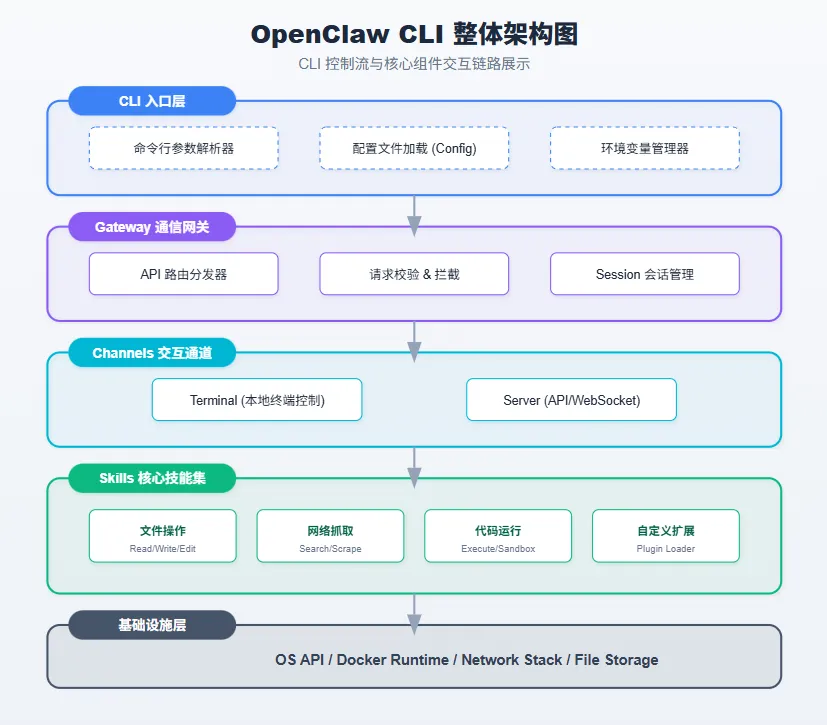
3. 命令结构总览
3.1 层级命令体系

3.2 全局选项
|
选项 |
说明 |
|
|
开发模式:使用 ~/.openclaw-dev 目录隔离状态,默认端口 19001 |
|
|
显示命令帮助信息 |
|
|
日志级别覆盖(silent/fatal/error/warn/info/debug/trace) |
|
|
禁用彩色输出 |
|
|
使用命名配置文件(隔离状态目录) |
|
|
显示版本信息 |
# 开发模式启动 Gatewayopenclaw --dev gateway run# 指定日志级别openclaw --log-level debug gateway status# 使用命名配置openclaw --profile production gateway start
4. Gateway 网关命令
4.1 Gateway 概述
4.2 Gateway 子命令一览
|
子命令 |
说明 |
|
|
前台运行 Gateway(开发调试用) |
|
|
启动 Gateway 服务(systemd/launchd) |
|
|
停止 Gateway 服务 |
|
|
重启 Gateway 服务 |
|
|
查看服务状态和可达性 |
|
|
获取 Gateway 健康状态 |
|
|
安装 Gateway 系统服务 |
|
|
卸载 Gateway 系统服务 |
|
|
通过 Bonjour 发现 Gateway |
|
|
显示 Gateway 可达性和发现状态 |
|
|
直接调用 Gateway RPC 方法 |
|
|
获取使用成本统计 |
4.3 启动网关
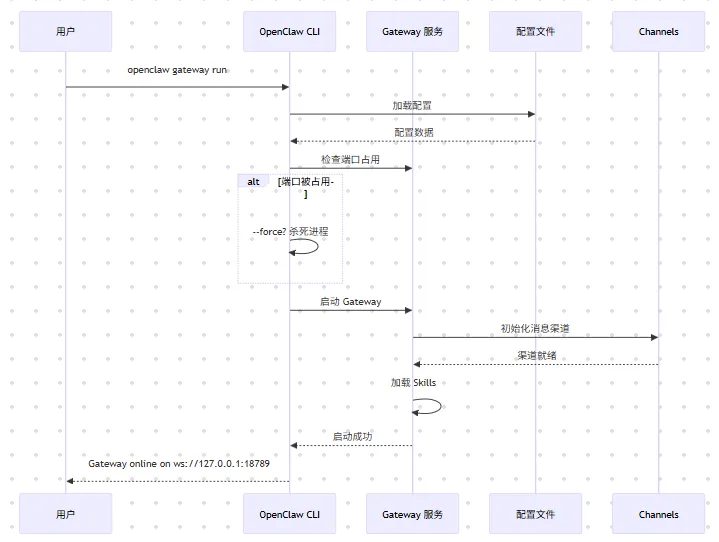
# 前台运行(开发调试)openclaw gateway run# 后台启动系统服务openclaw gateway start# 指定端口和认证模式openclaw gateway run --port 18789 --auth token --token my-secret-token# 强制启动(杀死占用端口的进程)openclaw gateway run --force# 开发模式(隔离配置)openclaw --dev gateway run# 绑定到局域网openclaw gateway run --bind lan# 通过 Tailscale 暴露openclaw gateway run --tailscale serve
|
参数 |
说明 |
默认值 |
|
|
监听端口 |
18789(开发模式 19001) |
|
|
认证模式(none/token/password/trusted-proxy) |
token |
|
|
认证令牌 |
环境变量 OPENCLAW_GATEWAY_TOKEN |
|
|
绑定模式(loopback/lan/tailnet/auto/custom) |
loopback |
|
|
强制启动,杀死占用端口的进程 |
false |
|
|
详细日志输出 |
false |
|
|
Tailscale 暴露模式(off/serve/funnel) |
off |
4.4 停止与重启
# 停止网关服务openclaw gateway stop# 重启网关服务openclaw gateway restart# 查看服务状态openclaw gateway status
4.5 Gateway 运行流程
5. Status 状态命令
5.1 系统状态概览
# 查看系统状态openclaw status# 输出示例:# Gateway: online# Channels: telegram ✓, feishu ✓, discord ✗# Sessions: 3 active# Model: gpt-4o-mini (default)
5.2 详细状态选项
# 完整诊断(只读,可粘贴分享)openclaw status --all# 深度探测消息渠道openclaw status --deep# 显示模型使用配额openclaw status --usage# 以 JSON 格式输出openclaw status --json# 设置探测超时openclaw status --deep --timeout 5000
JSON 格式输出特别适合在监控脚本中使用,可以通过 jq 等工具进行解析:
# 获取 Gateway 状态openclaw status --json | jq '.gateway.status'# 获取活跃会话数openclaw status --json | jq '.sessions.active'
5.3 Status 命令参数
|
参数 |
说明 |
|
|
完整诊断输出(只读,便于分享) |
|
|
深度探测消息渠道(WhatsApp/Telegram/Discord/Slack/Signal) |
|
|
JSON 格式输出 |
|
|
探测超时时间(毫秒) |
|
|
显示模型提供商使用配额 |
|
|
详细日志 |
6. Config 配置管理命令
6.1 配置文件结构
# OpenClaw 配置文件示例{"gateway": {"mode": "local","port": 18789,"bind": "loopback","auth": "token"},"model": {"default": "gpt-4o-mini","reasoning": "o1-mini"},"channels": {"telegram": {"enabled": true,"botToken": "${TELEGRAM_BOT_TOKEN}"},"feishu": {"enabled": true,"appId": "${FEISHU_APP_ID}","appSecret": "${FEISHU_APP_SECRET}"}},"agents": {"defaults": {"workspace": "~/.openclaw/workspace"}}}
6.2 配置管理命令
# 交互式配置向导openclaw configure# 获取配置值openclaw config get gateway.portopenclaw config get model.default# 设置配置值openclaw config set gateway.port 19000openclaw config set model.default "gpt-4o"# 删除配置值openclaw config unset channels.discord.enabled# 指定配置部分运行向导openclaw config --section gateway --section model
6.3 Config 命令详解
|
命令 |
说明 |
示例 |
|
|
获取配置值 |
|
|
|
设置配置值 |
|
|
|
删除配置值 |
|
# 点号语法openclaw config get gateway.port# 方括号语法(用于数组或特殊键名)openclaw config get "channels[0].name"、
7. Sessions 会话控制命令
7.1 会话概念
7.2 会话管理命令
# 列出所有会话openclaw sessions# 输出示例:# Session ID Channel Recipient Updated# sess_abc123... telegram user_001 2h ago# sess_def456... feishu user_002 1d ago# 仅显示最近活跃的会话openclaw sessions --active 120# 指定 Agent 查看openclaw sessions --agent work# 聚合所有 Agent 的会话openclaw sessions --all-agents# JSON 格式输出openclaw sessions --json# 运行会话存储维护openclaw sessions cleanup
7.3 Sessions 命令参数
|
参数 |
说明 |
|
|
仅显示最近 N 分钟内更新的会话 |
|
|
指定 Agent ID |
|
|
聚合所有 Agent 的会话 |
|
|
JSON 格式输出 |
|
|
指定会话存储路径 |
|
|
详细日志 |
8. Skills 技能系统命令
8.1 Skill 系统概述
8.2 技能管理命令
# 列出已安装技能openclaw skills list# 输出示例:# Name Description# weather 天气查询与预报# translator 多语言翻译# calendar 日程管理# web-search 网络搜索# 查看技能详情openclaw skills info weather# 检查技能状态openclaw skills check# 输出示例:# ✓ weather: ready# ✓ translator: ready# ✗ custom-helper: missing requirements
8.3 技能开发流程

9. Nodes 节点管理命令
9.1 节点系统介绍
9.2 节点管理命令
# 列出节点状态openclaw nodes status# 输出示例:# ID Name Platform Status Last Seen# node_001 我的手机 android online 2m ago# node_002 工作电脑 mac online 1h ago# 列出待审批的配对请求openclaw nodes pending# 批准配对请求openclaw nodes approve# 拒绝配对请求openclaw nodes reject# 查看节点详情openclaw nodes describe node_001# 重命名节点openclaw nodes rename node_001 --name "我的手机"
9.3 节点高级功能
# 拍照openclaw nodes camera snap --node node_001 --facing back# 录制屏幕openclaw nodes screen record --node node_002 --duration 10# 获取位置openclaw nodes location --node node_001# 发送通知openclaw nodes notify --node node_001 --title "测试" --body "消息内容"# 在节点上执行命令(仅 Mac)openclaw nodes run --node node_002 --command "uname -a"# 调用节点命令openclaw nodes invoke --node node_001 --command
9.4 Nodes 子命令一览
|
子命令 |
说明 |
|
|
列出节点状态和能力 |
|
|
列出待审批和已配对节点 |
|
|
列出待审批配对请求 |
|
|
批准配对请求 |
|
|
拒绝配对请求 |
|
|
查看节点详情 |
|
|
重命名节点 |
|
|
发送本地通知 |
|
|
摄像头操作 |
|
|
屏幕录制 |
|
|
获取位置 |
|
|
执行命令(仅 Mac) |
|
|
调用节点命令 |
10. Logs 日志查看命令
10.1 日志系统概述
10.2 日志查看命令
# 查看最新日志openclaw logs# 实时跟踪日志openclaw logs --follow# 限制行数openclaw logs --limit 100# JSON 格式输出openclaw logs --json# 显示本地时间openclaw logs --local-time# 禁用颜色openclaw logs --no-color# 纯文本输出openclaw logs --plain
10.3 Logs 命令参数
|
参数 |
说明 |
默认值 |
|
|
实时跟踪日志 |
false |
|
|
轮询间隔 |
1000 |
|
|
JSON 格式输出 |
false |
|
|
最大行数 |
200 |
|
|
显示本地时间 |
false |
|
|
最大字节数 |
250000 |
|
|
禁用颜色 |
false |
|
|
纯文本输出 |
false |
|
|
超时时间 |
30000 |
|
|
Gateway 令牌 |
– |
|
|
Gateway WebSocket URL |
– |
11. Doctor 诊断工具命令
11.1 Doctor 功能介绍
11.2 诊断命令使用
# 运行完整诊断openclaw doctor# 输出示例:# ✓ Node.js version: v22.22.0 (supported)# ✓ OpenClaw CLI: 2026.2.26# ✓ Configuration file: valid# ✓ Gateway: running# ✓ Model API: connected# ✓ Telegram channel: configured# ✗ Discord channel: not configured# ⚠ Skills: 1 skill has errors# 自动修复问题openclaw doctor --fix# 非交互模式openclaw doctor --non-interactive# 深度扫描(检查系统服务)openclaw doctor --deep# 生成 Gateway 令牌openclaw doctor --generate-gateway-token
11.3 Doctor 检查项
|
检查项 |
说明 |
|
Node.js 版本 |
是否满足最低要求 |
|
CLI 版本 |
是否为最新版本 |
|
配置文件 |
语法是否正确,必填项是否完整 |
|
Gateway 状态 |
是否正常运行 |
|
模型 API |
是否能正常连接和调用 |
|
渠道配置 |
各消息渠道是否正确配置 |
|
技能状态 |
是否有加载失败的技能 |
|
系统服务 |
是否有多个 Gateway 安装 |
11.4 Doctor 参数说明
|
参数 |
说明 |
|
|
深度扫描系统服务 |
|
|
自动修复问题 |
|
|
强制修复(覆盖自定义配置) |
|
|
生成并配置 Gateway 令牌 |
|
|
非交互模式 |
|
|
禁用工作区建议 |
|
|
接受默认值 |
12. 其他重要命令
12.1 Channels 渠道管理
# 列出已配置渠道openclaw channels list# 查看渠道状态openclaw channels status --probe# 登录渠道(如 WhatsApp Web)openclaw channels login --channel whatsapp# 登出渠道openclaw channels logout --channel whatsapp# 添加渠道配置openclaw channels add --channel telegram --token# 移除渠道openclaw channels remove --channel discord# 查看渠道日志openclaw channels logs --channel telegram# 解析用户/群组 IDopenclaw channels resolve --channel telegram --query "username"
12.2 Models 模型管理
# 列出可用模型openclaw models list# 查看模型状态openclaw models status# 设置默认模型openclaw models set gpt-4o# 设置图像模型openclaw models set-image dall-e-3# 扫描 OpenRouter 免费模型openclaw models scan# 管理模型别名openclaw models aliases# 管理认证配置openclaw models auth# 管理回退模型列表openclaw models fallbacks
12.3 Agents 代理管理
# 列出已配置 Agentopenclaw agents list# 添加新 Agentopenclaw agents add --id work --workspace ~/work-agent# 删除 Agentopenclaw agents delete work# 设置 Agent 身份openclaw agents set-identity work --name "工作助手" --emoji "💼"# 管理路由绑定openclaw agents bind --agent work --channel telegram --target @mygroupopenclaw agents unbind --agent work --channel telegramopenclaw agents bindings
12.4 Setup 与 Onboard
# 初始化配置和工作区openclaw setup# 交互式引导向导openclaw onboard# 非交互模式openclaw setup --non-interactive# 远程模式openclaw setup --mode remote --remote-url wss://gateway.example.com
13. 实战场景示例
13.1 场景一:从零搭建 OpenClaw 服务
#!/bin/bashOpenClaw 快速部署脚本# 1. 安装 OpenClawnpm install -g @openclaw/cli# 2. 初始化配置openclaw setup --mode local# 3. 配置模型 APIopenclaw config set model.default "gpt-4o-mini"openclaw config set model.apiKey "${OPENAI_API_KEY}"# 4. 配置 Telegram 渠道openclaw channels add --channel telegram --token "${TELEGRAM_BOT_TOKEN}"# 5. 安装 Gateway 服务openclaw gateway install# 6. 启动服务openclaw gateway start# 7. 验证状态openclaw status --all# 8. 运行诊断openclaw doctor
13.2 场景二:健康检查与告警脚本
#!/bin/bash# OpenClaw 健康检查脚本# 检查 Gateway 是否运行GATEWAY_STATUS=$(openclaw gateway status --json 2>/dev/null | jq -r '.status')if [ "$GATEWAY_STATUS" != "running" ]; thenecho "Gateway not running, attempting to start..."openclaw gateway startsleep 5# 再次检查GATEWAY_STATUS=$(openclaw gateway status --json 2>/dev/null | jq -r '.status')if [ "$GATEWAY_STATUS" != "running" ]; thenecho "Failed to start Gateway"# 发送告警通知openclaw nodes notify --node node_001 --title "OpenClaw Alert" --body "Gateway 启动失败"exit 1fifi# 检查渠道状态CHANNEL_ERRORS=$(openclaw status --deep --json 2>/dev/null | jq '[.channels[] | select(.status != "ok")] | length')if [ "$CHANNEL_ERRORS" -gt 0 ]; thenecho "Channel errors detected: $CHANNEL_ERRORS"openclaw nodes notify --node node_001 --title "OpenClaw Alert" --body "检测到 $CHANNEL_ERRORS 个渠道异常"fi# 检查错误日志ERROR_COUNT=$(openclaw logs --level error --limit 1000 2>/dev/null | grep -c "error")if [ "$ERROR_COUNT" -gt 10 ]; thenecho "High error rate: $ERROR_COUNT errors"fi# 清理过期会话openclaw sessions cleanupecho "Health check completed at $(date)"
13.3 场景三:多环境配置管理
# 开发环境openclaw --profile dev config set gateway.port 19001openclaw --profile dev config set model.default "gpt-4o-mini"openclaw --profile dev gateway run# 生产环境openclaw --profile prod config set gateway.port 18789openclaw --profile prod config set model.default "gpt-4o"openclaw --profile prod gateway start# 测试环境openclaw --profile test config set gateway.port 19002openclaw --profile test gateway run
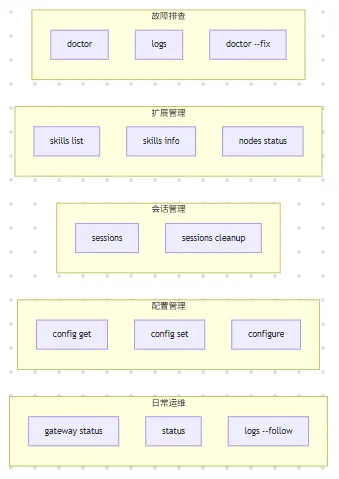
14. 命令速查表
|
命令 |
说明 |
示例 |
|
|
查看版本 |
|
|
|
前台运行网关 |
|
|
|
启动网关服务 |
|
|
|
停止网关服务 |
|
|
|
查看网关状态 |
|
|
|
查看系统状态 |
|
|
|
获取配置值 |
|
|
|
设置配置值 |
|
|
|
列出会话 |
|
|
|
列出技能 |
|
|
|
查看技能详情 |
|
|
|
列出节点状态 |
|
|
|
发送通知 |
|
|
|
查看日志 |
|
|
|
系统诊断 |
|
|
|
列出渠道 |
|
|
|
查看模型状态 |
|
15. 常见问题与解决方案
15.1 Gateway 启动失败
# 1. 检查端口是否被占用lsof -i :18789# 2. 运行诊断openclaw doctor# 3. 查看详细错误openclaw gateway run --verbose# 4. 强制启动openclaw gateway run --force
-
端口被占用:使用 –force 参数或修改端口 -
配置文件错误:运行 openclaw doctor 检查 -
权限不足:检查文件权限或使用 sudo
15.2 模型 API 连接失败
# 检查 API 配置openclaw config get model# 测试网络连接curl -I https://api.openai.com# 检查诊断结果openclaw doctor --check network
-
确认 API Key 正确且未过期 -
检查网络是否能访问模型 API -
如需代理,配置 HTTP_PROXY 环境变量
15.3 技能加载失败
# 查看技能状态openclaw skills check# 查看相关日志openclaw logs --grep "skill"
-
检查 SKILL.md 语法 -
确认依赖项已安装 -
查看错误日志定位具体问题
15.4 渠道连接问题
# 深度检查渠道状态openclaw status --deep# 查看渠道日志openclaw channels logs --channel telegram# 重新登录渠道openclaw channels login --channel whatsapp
16. 总结
-
在你的实际场景中,哪些命令会最频繁使用?如何为它们设计更高效的 Shell 别名? -
如果要将 OpenClaw 集成到现有的监控告警系统中(如 Prometheus/Grafana),你会如何设计健康检查脚本? -
当系统出现异常时,你会按照什么顺序使用 CLI 命令进行排查?如何构建一个自动化的故障恢复流程?
参考资料
-
OpenClaw 官方文档
-
OpenClaw CLI 文档
-
OpenClaw GitHub 仓库
-
Node.js 官方文档
-
jq 命令手册