 夜雨聆风
夜雨聆风


〖OpenClaw系列〗openclaw doctor 诊断工具详解
上篇回顾
上一篇〖OpenClaw系列〗Control UI 与 WebChat 使用指南,我们介绍了 Gateway 的 Web 管理界面——Control UI。你学会了用浏览器监控 Gateway 状态、管理会话、查看日志,以及用 WebChat 直接和 AI 对话。
但 Gateway 出问题时,如何快速定位问题根源?一条条看日志效率太低。OpenClaw 内置了一个专门的诊断工具——openclaw doctor。这篇详细介绍它的检查项、自动修复能力,以及如何用它排查常见问题。
本文定位:doctor 诊断工具的完全指南。读完这篇,你能独立使用 doctor 排查配置错误、理解每个检查项的含义、知道哪些问题可以自动修复、哪些需要手动处理。
一、doctor 是什么
openclaw doctor 是 OpenClaw 的内置诊断工具,类似于 macOS 的「磁盘工具」或 Linux 的 fsck。它会对你的 OpenClaw 环境进行全面扫描,检测潜在问题,并尝试自动修复。
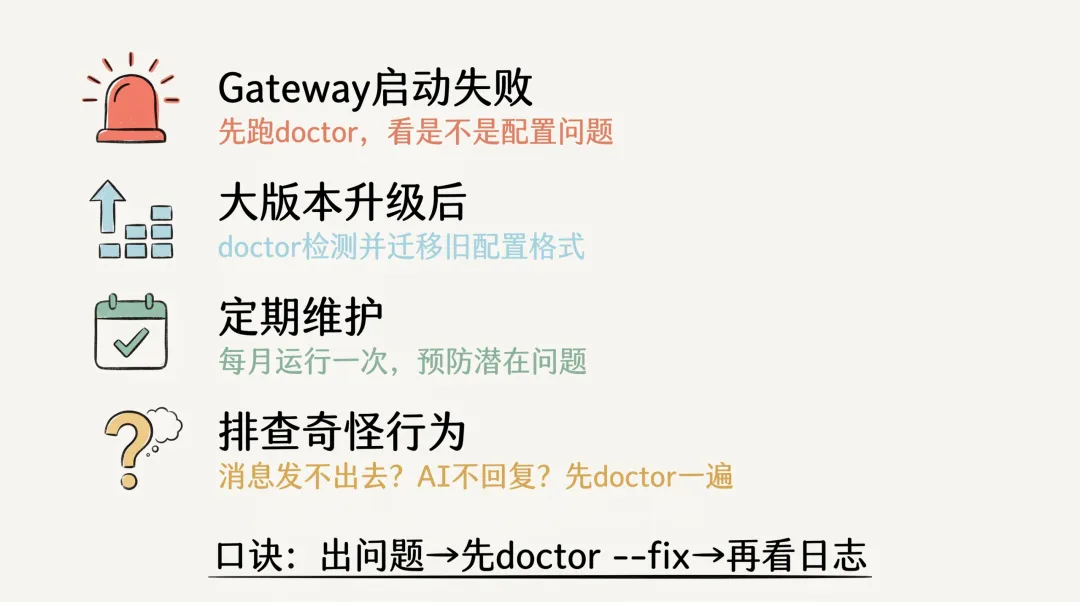
什么时候需要运行 doctor
|
|
|
|---|---|
| Gateway 启动失败 |
|
| 升级后异常 |
|
| 定期维护 |
|
| 排查奇怪行为 |
|
基本用法
# 基本扫描(只检查,不修复)
openclaw doctor

# 扫描并尝试自动修复
openclaw doctor --fix

# 非交互模式(CI/CD 使用)
openclaw doctor --non-interactive

# 详细输出(显示更多信息)
openclaw doctor --verbose
二、doctor 检查流程全景
这张图展示了 doctor 的完整检查流程。5个彩色区域代表5大类检查,底部蓝色区域是诊断的4个阶段。下面逐个详解。
三、检查项详解
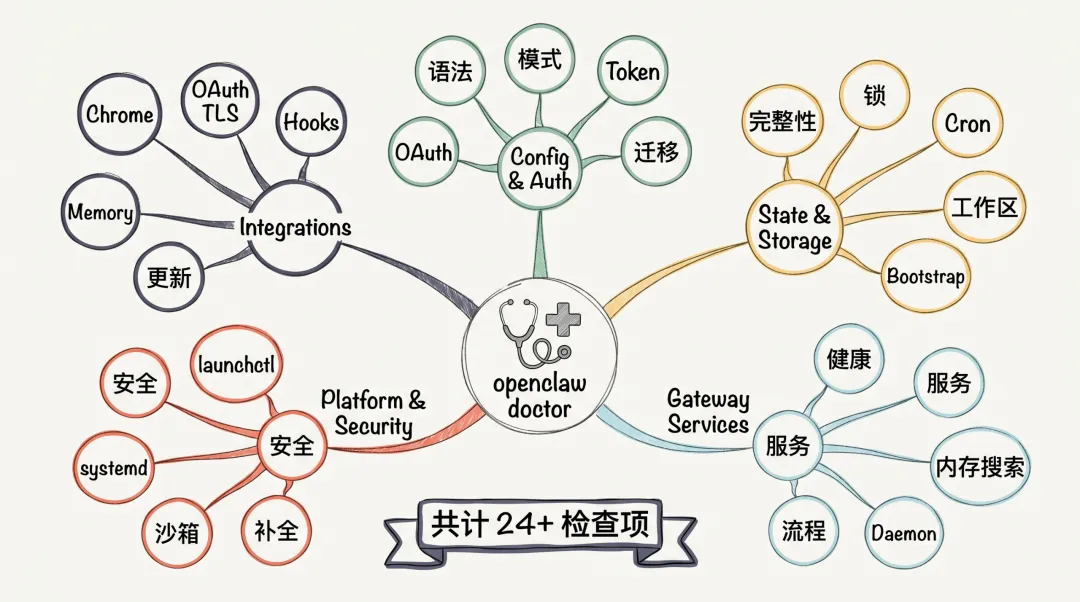
第一类:配置与认证(Config & Auth)
这是 doctor 最先检查的部分,也是最常出问题的地方。
1. 配置语法校验
│  ✓ Config file syntax valid
# 或
│  ✗ Config file syntax invalid
│    → .agents.defaults.model: expected string, got number
doctor 会读取 ~/.openclaw/openclaw.json,用 JSON Schema 逐字段校验。任何语法错误都会在这里暴露。
2. Gateway 模式检查
│  ✓ Gateway mode: local
# 或
│  ⚠ gateway.mode is unset; gateway start will be blocked
│    → Fix: openclaw config set gateway.mode local
doctor 会检查 gateway.mode 是否配置。如果没有,会提示你设置 local 或 remote。
3. 认证配置检查
│  ✓ Gateway auth: token mode, token configured
# 或
│  ⚠ Gateway auth missing token
│    → Generate and configure a gateway token now? [Y/n]
从 OpenClaw 2.1 开始,Gateway 默认使用 token 认证(包括本机访问)。doctor 会检查:
-
是否配置了 gateway.auth.token -
如果同时配置了 token和password,是否明确指定了auth.mode -
OAuth 配置文件是否健康
4. 旧配置迁移
│  Legacy state detected
│    - sessions/ directory in old format
│    - WhatsApp auth in legacy location
│  → Migrate legacy state now? [Y/n]
大版本升级后,doctor 会自动检测旧版数据格式,并提示迁移。
第二类:状态与存储(State & Storage)
5. 状态完整性检查
│  ✓ State integrity OK
# 或
│  ✗ State corruption detected
│    → sessions/tg:12345.json: invalid JSON
│    → Backup created: ~/.openclaw/sessions/tg:12345.json.bak
doctor 会扫描 ~/.openclaw/ 目录下的所有状态文件,检查:
-
JSON 格式是否有效 -
必要字段是否存在 -
文件权限是否正确
6. 会话锁健康检查
│  ✓ Session locks healthy
# 或
│  ⚠ Stale session locks detected
│    → 3 locks older than 24h
│    → Clean up now? [Y/n]
Gateway 用文件锁防止多进程同时操作会话。如果 Gateway 异常退出,锁可能残留。doctor 会检测并清理过期锁。
7. Cron 存储修复
│  ✓ Cron store OK
# 或
│  ⚠ Legacy cron store format detected
│    → Migrating to new format... done
定时任务(Cron)的数据存储格式升级时,doctor 会自动迁移。
8. 工作区状态
│  ✓ Workspace: ~/.openclaw/workspace
│    ✓ SOUL.md found (2.4 KB)
│    ✓ .git initialized
doctor 检查 Agent 工作区:
-
目录是否存在 -
SOUL.md是否存在 -
是否初始化了 git(用于版本控制)
9. Bootstrap 文件大小
│  ✓ Bootstrap file: 156 KB (healthy)
# 或
│  ⚠ Bootstrap file: 2.3 MB (unusually large)
│    → Consider cleaning up old agent states
Bootstrap 文件存储 Agent 的初始状态。如果异常增大,可能是有旧状态未清理。
第三类:Gateway 服务(Gateway Services)
10. Gateway 健康探测
│  ✓ Gateway is healthy (v2.1.0)
│    Uptime: 3d 5h
│    Active sessions: 12
│    Memory usage: 145 MB
# 或
│  ✗ Gateway health check failed
│    → Connection refused on localhost:18789
│    → Is Gateway running? Start with: openclaw gateway start
doctor 会尝试连接 Gateway 的健康检查端点,获取实时状态。
11. 服务配置修复
│  ✓ Gateway service config OK
# 或
│  ⚠ systemd service file outdated
│    → Updating service file... done
│    → Reload systemd: systemctl --user daemon-reload
如果 Gateway 配置了 systemd 服务,doctor 会检查服务文件是否最新。
12. 额外服务扫描
│  ✓ No extra services found
# 或
│  ⚠ Multiple Gateway services detected
│    → Service A: /Users/alice/.config/systemd/user/openclaw.service
│    → Service B: /Users/bob/.config/systemd/user/openclaw.service
│    → Consider removing unused services
检测系统中是否存在多个 Gateway 服务配置(多用户场景)。
13. 内存搜索就绪检查
│  ✓ Memory search ready
│    Index: 1,247 memories
│    Vector DB: connected
# 或
│  ⚠ Memory search not ready
│    → Vector DB initializing (this may take a few minutes)
检查 AI 的长期记忆系统(Memory System)是否就绪。
14. Daemon 流程修复
│  ✓ Gateway daemon flow OK
# 或
│  ⚠ Gateway daemon needs restart
│    → Restart now? [Y/n]
检查 Gateway 守护进程(daemon)的状态,必要时提示重启。
第四类:平台与安全(Platform & Security)
15. 安全检查
│  ✓ No security warnings
# 或
│  ⚠ Security warnings:
│    - gateway.auth is off (anyone can access Gateway)
│    - sandbox.docker is off (tools run without isolation)
doctor 会检查安全配置:
-
是否启用了认证 -
是否启用了沙箱隔离 -
是否使用了默认/弱密码
16. macOS launchctl 检查
│  ✓ macOS launchctl OK
# 或
│  ⚠ launchctl environment overrides detected
│    → OPENCLAW_STATE_DIR is overridden in launchctl
│    → Current: /Users/alice/.openclaw-custom
macOS 用户如果用了 launchctl 管理 Gateway,doctor 会检查环境变量覆盖情况。
17. systemd linger 检查(Linux)
│  ✓ systemd user linger enabled
# 或
│  ⚠ systemd user linger is disabled
│    → Gateway will stop when you log out
│    → Enable linger now? [Y/n]
Linux 系统上,如果 Gateway 以 systemd 用户服务运行,需要启用 “linger” 才能在用户登出后保持运行。
18. 沙箱范围检查
│  ✓ Sandbox scope: docker
│    Docker image: openclaw/sandbox:latest
# 或
│  ⚠ Sandbox enabled but Docker is not running
│    → Start Docker Desktop to enable sandbox isolation
检查沙箱配置和 Docker 状态。
19. Shell 补全检查
│  ✓ Shell completion configured (zsh)
# 或
│  ⚠ Shell completion not configured
│    → Run: openclaw completion install
doctor 会检查是否配置了命令行自动补全,提升使用体验。
第五类:集成(Integrations)
20. Chrome MCP 浏览器准备状态
│  ✓ Chrome MCP browser ready
│    Chrome: /Applications/Google Chrome.app
│    Profile: /Users/alice/Library/Application Support/OpenClaw/Chrome
# 或
│  ⚠ Chrome MCP browser not ready
│    → Chrome not found at default location
│    → Set OPENCLAW_CHROME_PATH to Chrome executable
检查浏览器自动化(Browser Skill)所需的 Chrome 浏览器是否就绪。
21. OpenAI OAuth TLS 前提条件
│  ✓ OpenAI OAuth TLS prerequisites OK
# 或
│  ✗ OpenAI OAuth TLS prerequisites missing
│    → HTTPS required for OAuth callback
│    → Current: http://localhost:18789
│    → Set up HTTPS or use token-based auth
如果使用 OpenAI OAuth 认证,doctor 会检查 TLS/HTTPS 配置。
22. Hooks 模型检查
│  ✓ hooks.gmail.model: anthropic/claude-sonnet-4-6
│    ✓ Model in allowlist
│    ✓ Model in catalog
# 或
│  ⚠ hooks.gmail.model "gpt-5" not in allowlist
│    → Will use primary model instead
检查 Hooks(如 Gmail 集成)配置的模型是否有效。
23. Memory System 建议
│  ✓ Memory system already configured
# 或
│  💡 Memory system suggestion
│    → Your workspace has grown to 500+ memories
│    → Consider enabling memory system for better context
│    → Run: openclaw memory init
根据工作区大小,doctor 可能会建议启用 Memory System。
24. 更新检查
│  ✓ OpenClaw is up to date (v2.1.0)
# 或
│  ⚠ OpenClaw v2.2.0 is available
│    → Run: openclaw update
│    → Or: npm install -g @openclaw/cli@latest
doctor 会检查是否有新版本可用。
四、自动修复 vs 手动修复
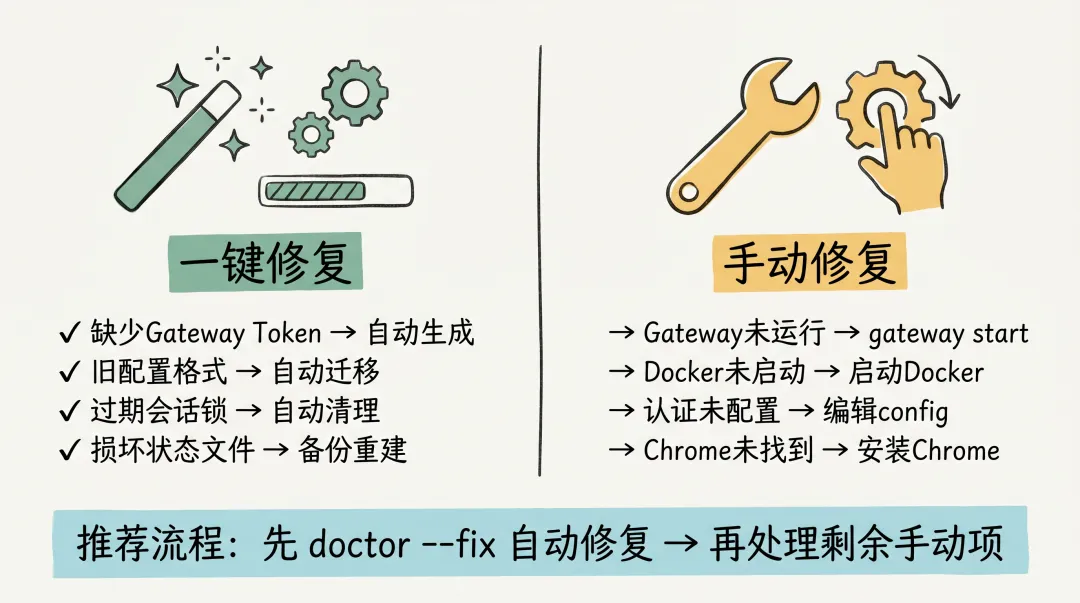
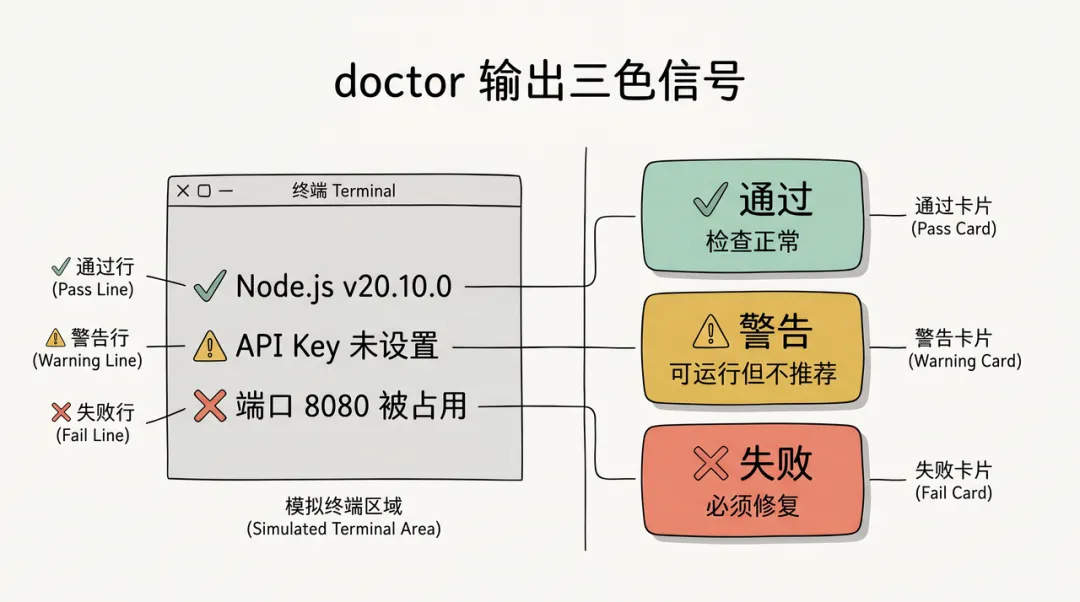
这张图展示了 doctor 的典型输出。左侧终端区域显示各类检查的结果,右侧图例解释了符号含义。
自动修复(Auto-fix)
以下问题 doctor 可以自动修复(使用 --fix 选项):
|
|
|
|---|---|
|
|
|
|
|
|
|
|
|
|
|
|
|
|
|
|
|
|
需要手动修复的问题
以下问题 doctor 只能检测和提示,需要手动处理:
|
|
|
|---|---|
|
|
openclaw gateway start |
|
|
|
|
|
openclaw completion install |
|
|
|
|
|
OPENCLAW_CHROME_PATH |
|
|
gateway.auth |
五、踩坑
坑1:doctor 报告「Config file syntax invalid」但看不出哪里错
现象:doctor 说配置语法错误,但提示信息不够具体
解决:
# 使用详细模式
openclaw doctor --verbose

# 或使用 config validate
openclaw config validate

# 直接检查 JSON5 语法
node -e "JSON5 = require('json5'); JSON5.parse(require('fs').readFileSync(process.env.HOME + '/.openclaw/openclaw.json', 'utf8'))"
坑2:–fix 修复后问题还在
现象:运行了 openclaw doctor --fix,但再次运行 doctor 还是报告同样的问题
排查:
# 1. 检查是否有多个配置文件
cat ~/.openclaw/openclaw.json
cat .openclaw.json  # 当前目录

# 2. 检查 OPENCLAW_STATE_DIR 环境变量
echo$OPENCLAW_STATE_DIR

# 3. 检查 doctor 实际修改的是哪个文件
openclaw doctor --verbose 2>&1 | grep "Writing config"
常见原因:环境变量 OPENCLAW_STATE_DIR 指向了非标准位置,doctor 修改了 A 位置的配置,但 Gateway 读取的是 B 位置的配置。
坑3:非交互模式下 doctor 不修复问题
现象:在 CI/CD 中运行 openclaw doctor --fix,但问题没有被修复
解决:
# 非交互模式需要显式启用自动修复
openclaw doctor --non-interactive --fix

# 或者设置环境变量
export OPENCLAW_NON_INTERACTIVE=1
openclaw doctor --fix
注意:某些修复操作(如生成 token)在非交互模式下默认跳过,需要显式配置:
openclaw doctor --non-interactive --fix --generate-gateway-token
坑4:doctor 报告 Gateway healthy 但实际有问题
现象:doctor 说 Gateway 健康,但消息发不出去
排查:
# doctor 的健康检查只验证 Gateway 进程是否存在
# 需要进一步检查:

# 1. 查看 Gateway 日志
openclaw logs --follow

# 2. 检查具体渠道状态
openclaw channels status

# 3. 测试消息发送
openclaw send --channel telegram --message "test"

# 4. 检查 Agent 配置
openclaw config get agents.defaults.model
原因:doctor 的「健康」只表示 Gateway 进程在运行,不代表配置正确或渠道连接正常。
六、常见问题(FAQ)
Q:doctor 会修改我的配置吗?
A:默认不会。只有加上 --fix 选项时,doctor 才会尝试修复问题。即使如此,它也会先备份原配置(~/.openclaw/openclaw.json.bak)。
Q:doctor 检查需要多长时间?
A:通常 5-15 秒。如果启用了 --deep 模式或需要检查大量会话数据,可能需要 30-60 秒。
Q:可以只检查特定类别吗?
A:目前不支持。但你可以通过输出过滤查看特定部分:
openclaw doctor | grep -A5 "Config & Auth"
Q:doctor 和 openclaw config validate 有什么区别?
A:config validate 只检查配置语法;doctor 是全面诊断,包括配置、状态、服务、平台等多个维度。
Q:应该在什么时候运行 doctor?
A:建议:
-
首次安装后运行一次 -
每次大版本升级后运行一次 -
Gateway 出现异常时先运行 doctor -
每月定期运行一次作为预防性维护
Q:doctor 能检测所有问题吗?
A:不能。doctor 主要检测「环境配置」类问题,不能检测:
-
模型 API 密钥是否有效(需要实际调用验证) -
渠道 Bot Token 是否正确(需要连接验证) -
网络连通性问题(需要外部探测)
总结
openclaw doctor 是 OpenClaw 的「体检医生」,覆盖 5 大类 20+ 检查项:
|
|
|
|
|---|---|---|
| Config & Auth |
|
|
| State & Storage |
|
|
| Gateway Services |
|
|
| Platform & Security |
|
|
| Integrations |
|
|
再看两张图:
-
检查流程图(第二章):5大类检查项的全景 -
输出示例图(第四章):doctor 报告的实际样式
一句话记住:Gateway 出问题,先跑 openclaw doctor --fix;定期维护,每月跑一次 openclaw doctor。
运维速查:doctor 使用 SOP
按场景选命令,不用翻全文。
|
|
|
|
|---|---|---|
|
|
openclaw doctor |
|
|
|
openclaw doctor --fix |
|
|
|
|
|
|
|
openclaw doctor --fix |
|
|
|
✗ 标记的项 → 按提示操作 |
✓
✗ 失败 / ⚠ 警告 |
常见自动修复项:配置迁移、锁文件清理、状态完整性修复、Cron 任务恢复。
需要手动处理的:安全配置(auth 模式)、系统服务(launchctl/systemd)、Chrome 浏览器路径、沙箱权限。
下一篇预告
〖OpenClaw系列〗日志系统与调试技巧
doctor 能发现配置问题,但运行时问题需要看日志。下一篇详细介绍 OpenClaw 的日志系统:日志级别、日志位置、如何开启 DEBUG 模式、以及常见问题的日志排查方法。
本文是系列第7篇,前序文章
〖OpenClaw系列〗Control UI 与 WebChat 使用指南
〖OpenClaw系列〗配置文件 openclaw.json 详解
本文是系列第7篇,前序文章:[第6篇:Control UI 与 WebChat 使用指南](./第06篇-Control UI 与 WebChat 使用指南.md) | [第3篇:配置文件详解](./第03篇-配置文件 openclaw.json 详解.md)
📌 觉得有用?点个「在看」 👇 👨💻 关注「敏叔侃技术」,每周更新 OpenClaw 实战干货 ⭐ 收藏这篇文章,遇到 Gateway 问题时先用 doctor 排查