 夜雨聆风
夜雨聆风


Freemarker 生成 Word 报告(图片、超链接)
近期需求,生成Word类型的报告,由于之前一直使用poi进行报告下载,这次想尝试新的方法。
注意:开发前需先将Word模板样式定下来,否则后期返工很麻烦!
1、拿到要导出的Word文档,先为文档内所有步骤填充模拟测试数据。其中动态展示多条数据的模块需额外新增多条数据,便于清晰查看 XML 结构。(例如:图片)
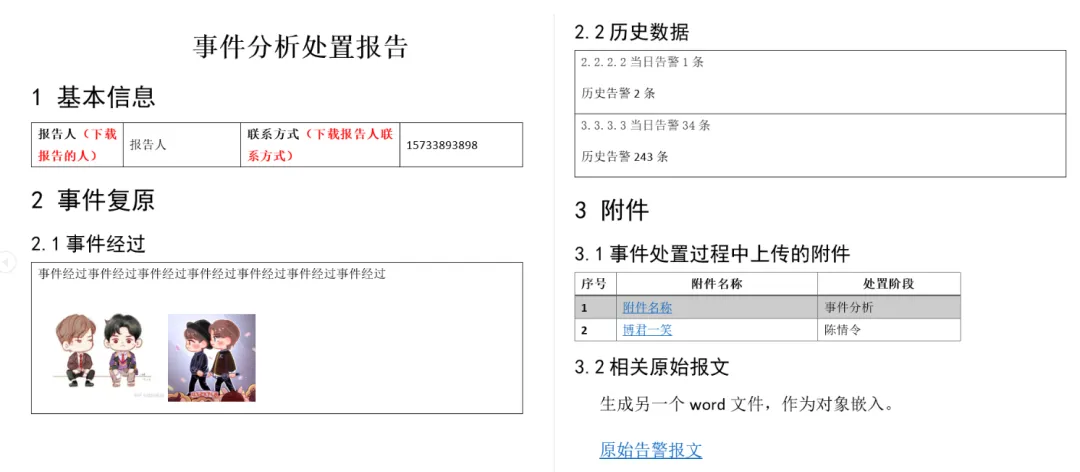
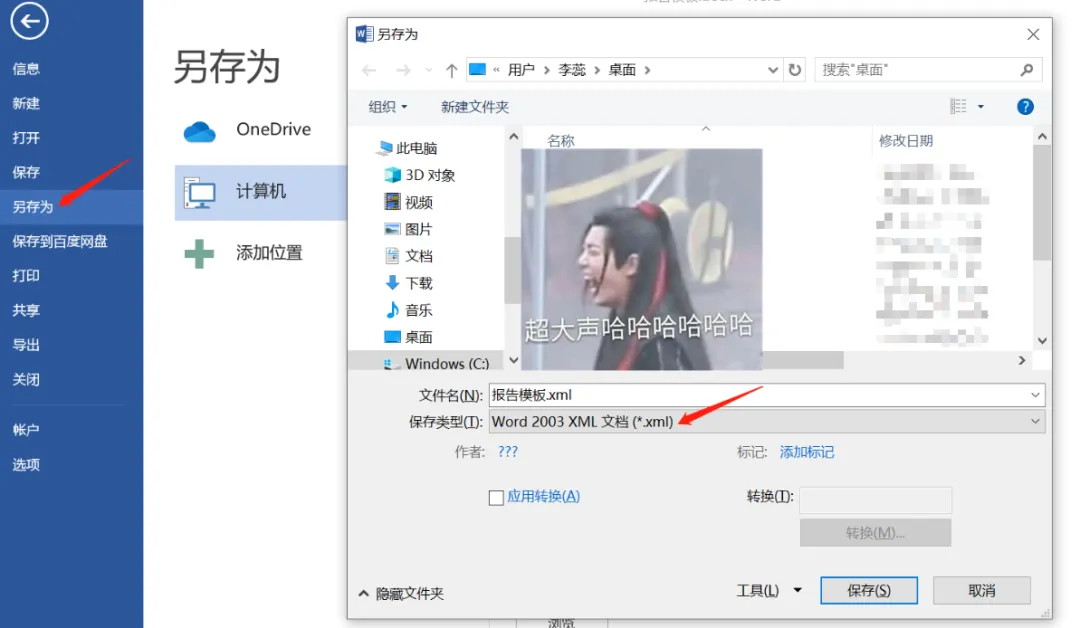
3、用notepad++等文本编辑器打开刚生成的xml文档。xml格式化一下,随后用替换符修改。
-
将填充的测试数据 用${变量名}进行替换 -
if判断是否等于null
<#if eventCourse??>${eventCourse}</#if>
-
if判断是否为null且不为空字符串
<#if originalAlarm.id?default(“”)?trim?length gt 1>
${originalAlarm.id}
</#if>
<#if falseAlarm==”1″>1<#else>2</#if>
-
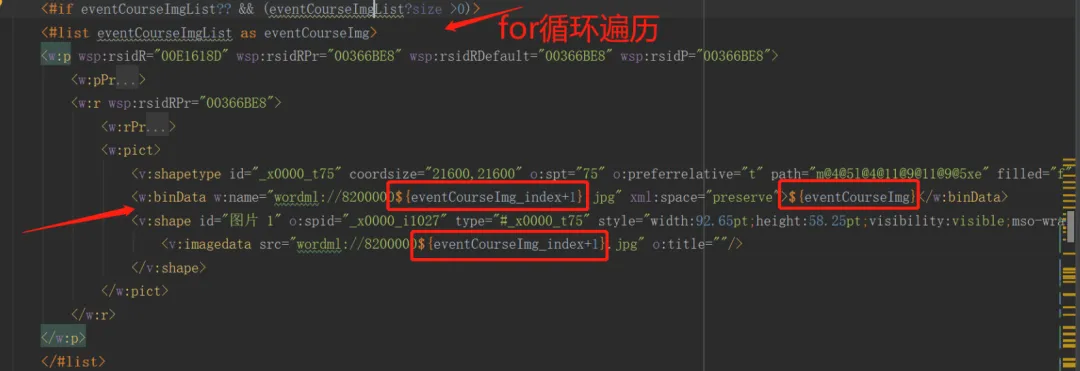
图片的替换 (修改三处即可)
1.将之前测试数据中图片base64删除
2.<w:binData>中的w:name和base64码
3.<v:shape>中的<v:imagedata src要与上面的w:name保持一致
-
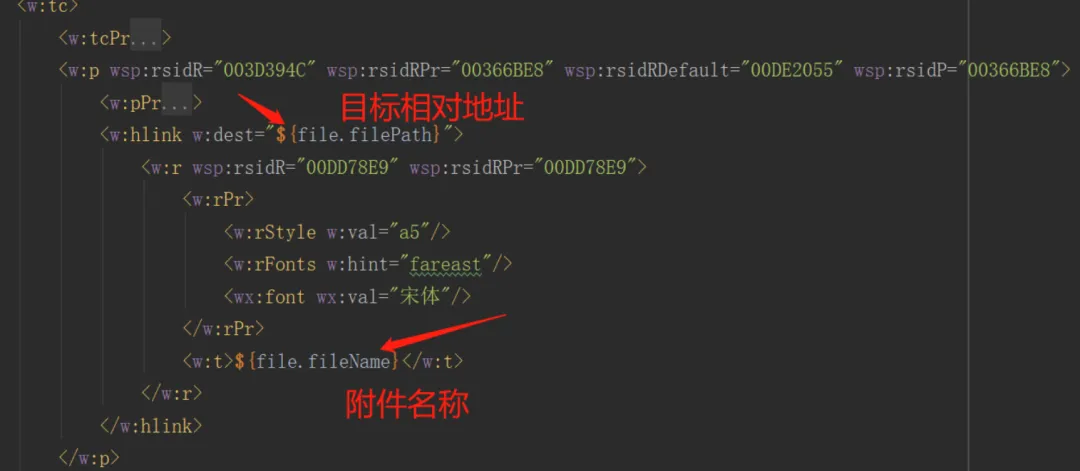
超链接的修改(修改两处 **目标地址及附件名称**)
4、简单程序编写
@GetMapping("/createWord1")public void createWord1(){String basePath="D:/"; //todoString wordName ="报告" + System.currentTimeMillis() + ".doc";Map<String, Object> dataMap = new HashMap<>();this.getData1(dataMap);//模板文件名称String templateFileName = "报告模板.ftl";//生成word文档Boolean result = TestWordUtil.writeWordReport(basePath, wordName, templateFileName, dataMap);System.out.println(result+"====");}// 模拟测试数据void getData1(Map<String, Object> dataMap){// 基础信息填写SimpleDateFormat simpleDateFormat=new SimpleDateFormat("yyyy 年 MM 月 dd 日");String reportTime = simpleDateFormat.format(new Date());dataMap.put("eventName", "事件名称name");dataMap.put("reportUser", "李大壮");dataMap.put("reportMobile","15733187909");//事件经过dataMap.put("eventCourse", "事件经过");List<String> eventCourseImgList=new ArrayList<>();eventCourseImgList.add(imageToBase64("D:/1.png"));eventCourseImgList.add(imageToBase64("D:/2.png"));dataMap.put("eventCourseImgList",eventCourseImgList);//事件分析 历史数据List<Map<String,Object>> alarmList=new ArrayList<>();for(int i=0;i<4;i++){Map<String,Object> alarmMap=new HashMap<>();String ipDst= RandomStringUtils.randomAlphanumeric(4);alarmMap.put("ipDst",ipDst);alarmMap.put("alarmTodayCount",i+10);alarmMap.put("alarmHistoryCount",i+100);alarmList.add(alarmMap);}dataMap.put("alarmList",alarmList);//事件处置过程上传的附件List<Map<String,Object>> fileList=new ArrayList<>();for(int i=0;i<3;i++){Map<String,Object> fileMap=new HashMap<>();fileMap.put("num",i+1);fileMap.put("fileName","附件名称"+i);fileMap.put("fileStage","阶段"+i);if(i==0){fileMap.put("filePath","1.png");}else if(i==1){fileMap.put("filePath","报告模板.doc");}else {fileMap.put("filePath", "2.png");}fileList.add(fileMap);}dataMap.put("fileList",fileList);dataMap.put("alarmFilePath","报告模板.doc");//Map 转成 JSONObject 字符串JSONObject jsonObj=new JSONObject(dataMap);System.out.println(jsonObj.toString());}
TestWordUtil工具类
public class TestWordUtil {private static final String FTL_FP = "/template/"; //模板路径private static Configuration configuration = null;static{configuration = new Configuration();configuration.setDefaultEncoding("utf-8");//设置默认的编码}public static Boolean writeWordReport(String wordFilePath,String wordFileName,String templateFileName, Map<String, Object> beanParams) {Writer out = null;try {configuration.setClassForTemplateLoading(TestWordUtil.class, FTL_FP);Template template = configuration.getTemplate(templateFileName, "UTF-8");File file1 = new File(wordFilePath);if (!file1.exists()) {file1.mkdirs();}//输出文件File file = new File(wordFilePath + wordFileName);out = new OutputStreamWriter(new FileOutputStream(file), "UTF-8");template.process(beanParams, out);return true;} catch (Exception e) {e.printStackTrace();return false;} finally {try {if (out != null) {out.close();}} catch (IOException e) {e.printStackTrace();}}}}
imageToBase64工具类(图片生成base64码)
public static String imageToBase64(String path) {InputStream in = null;byte[] data = null;try {in = new FileInputStream(path);} catch (FileNotFoundException e) {e.printStackTrace();}try {data = new byte[in.available()];in.read(data);in.close();} catch (IOException e) {e.printStackTrace();}BASE64Encoder encoder = new BASE64Encoder();return encoder.encode(data);}
5、验证并启动项目
-
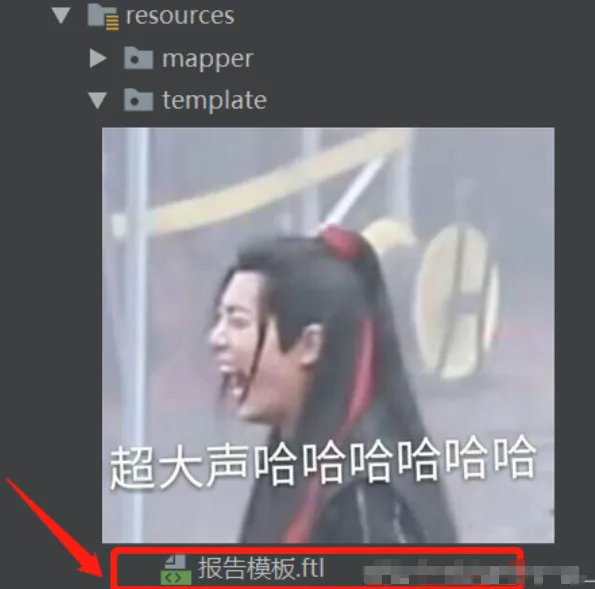
将修改完成的XML文件后缀改为ftl,放置至resources/template目录;
-
D盘根目录需提前准备1.png、2.png、报告模板.docx三个文件,缺失会触发文件不存在报错;
-
项目启动后,D盘根目录将自动生成「报告」文件。