 夜雨聆风
夜雨聆风模型特点对比
场景化选择策略
日常对话:
推荐:Claude Sonnet 4.5
理由:
响应速度快
质量稳定
价格适中
复杂推理:
推荐:Claude Opus 4.6
理由:
推理能力最强
准确率最高
适合难题
图片识别:
推荐:Gemini 3 Pro
理由:
多模态能力强
免费额度大
识别准确
编程任务:
推荐:DeepSeek-V3
理由:
代码能力强
价格便宜
中文友好 ```text
模型内容灾机制(Fallback)
🛡️ 高可用保障:通过配置主模型和备用模型,确保服务不中断。
什么是模型内容灾?
当主模型(primary)出现以下情况时,系统会自动切换到备用模型(fallbacks):
API 调用失败
请求超时
速率限制(Rate Limit)
服务不可用
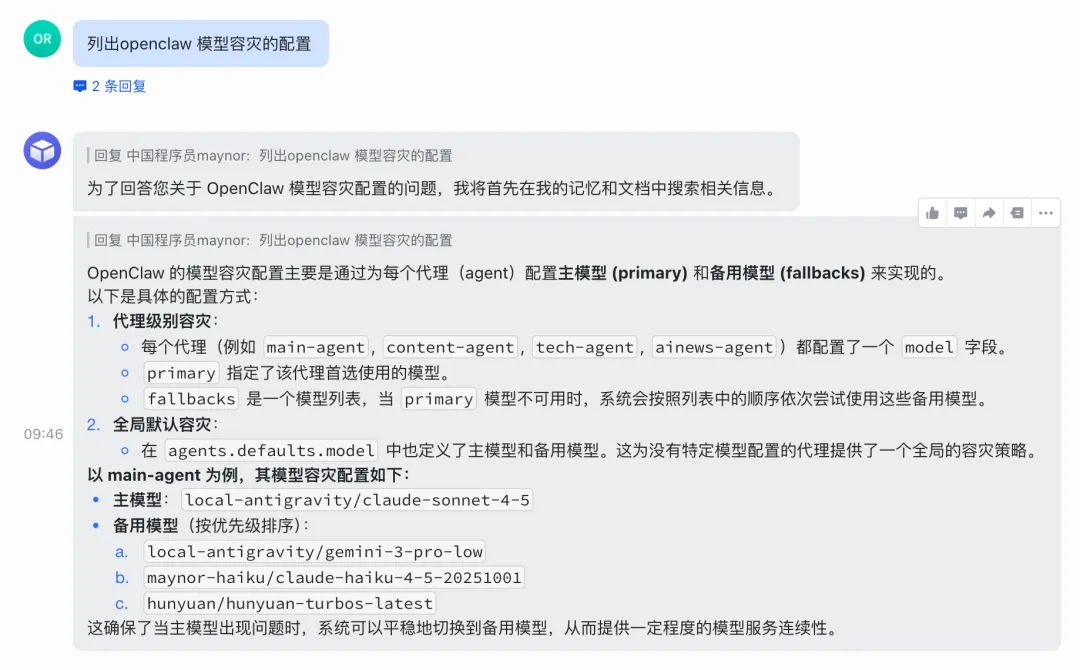
基础内容灾配置
配置文件路径:~/.openclaw/openclaw.json
{"agents": {"defaults": {"model": {"primary": "anthropic/claude-opus-4-6","fallbacks": ["openai-codex/gpt-5.3-codex","google-antigravity/claude-opus-4-6-thinking"]}},"list": [{"id": "main","default": true,"model": {"primary": "anthropic/claude-opus-4-6","fallbacks": ["openai-codex/gpt-5.3-codex","google-antigravity/claude-opus-4-6-thinking"]}}]}}
工作流程:
1. 尝试使用主模型:anthropic/claude-opus-4-6↓ 失败2. 切换到备用模型1:openai-codex/gpt-5.3-codex↓ 失败3. 切换到备用模型2:google-antigravity/claude-opus-4-6-thinking↓ 失败4. 返回错误信息
实战案例1:成本优化型内容灾
场景:优先使用便宜模型,失败后使用高质量模型
{"agents": {"defaults": {"model": {"primary": "deepseek/deepseek-chat","fallbacks": ["anthropic/claude-sonnet-4-5","anthropic/claude-opus-4-6"]}}}}
优势:
✅ 日常使用 DeepSeek(极低成本)
✅ DeepSeek 限流时自动切换到 Claude Sonnet
✅ 重要任务失败时使用 Claude Opus 兜底
✅ 成本节省 80%+
实战案例2:性能优先型内容灾
场景:优先使用最强模型,失败后降级
{"agents": {"defaults": {"model": {"primary": "anthropic/claude-opus-4-6","fallbacks": ["anthropic/claude-sonnet-4-5","deepseek/deepseek-chat"]}}}}
优势:
✅ 保证最佳质量
✅ 高峰期自动降级
✅ 确保服务不中断
实战案例3:多提供商内容灾
场景:跨提供商内容灾,避免单点故障
{"agents": {"defaults": {"model": {"primary": "anthropic/claude-sonnet-4-5","fallbacks": ["openai/gpt-4o","google/gemini-2.0-flash-exp","deepseek/deepseek-chat"]}}}}
优势:
✅ Anthropic 故障时切换到 OpenAI
✅ OpenAI 故障时切换到 Google
✅ 最后使用 DeepSeek 兜底
✅ 最大化服务可用性
配置命令行方式
# 设置主模型openclaw config set agents.defaults.model.primary "anthropic/claude-opus-4-6"# 设置备用模型(需要手动编辑 JSON)# 或使用 jq 命令cat ~/.openclaw/openclaw.json | jq '.agents.defaults.model.fallbacks = ["openai-codex/gpt-5.3-codex","google-antigravity/claude-opus-4-6-thinking"]' > /tmp/openclaw-temp.json && mv /tmp/openclaw-temp.json ~/.openclaw/openclaw.json# 重启 Gateway 使配置生效openclaw gateway restart
验证内容灾配置
# 查看当前配置openclaw config get agents.defaults.model# 输出示例:{"primary": "anthropic/claude-opus-4-6","fallbacks": ["openai-codex/gpt-5.3-codex","google-antigravity/claude-opus-4-6-thinking"]}
内容灾最佳实践
1. 选择不同提供商:
✅ 推荐:Anthropic → OpenAI → Google
❌ 不推荐:Claude Opus → Claude Sonnet(同提供商)
2. 按能力梯度配置:
✅ 推荐:高能力 → 中能力 → 低能力
❌ 不推荐:低能力 → 高能力(浪费资源)
3. 考虑成本因素:
✅ 推荐:便宜 → 中等 → 昂贵(成本优化)
✅ 推荐:昂贵 → 中等 → 便宜(质量优先)
4. 限制备用数量:
✅ 推荐:2-3 个备用模型
❌ 不推荐:5+ 个备用模型(过度复杂)
多认证 Profile + Token 轮换
🔐 账号管理:配置多个认证配置,实现账号轮换和负载均衡。
什么是认证 Profile?
认证 Profile 允许你为同一个提供商配置多个账号,系统会按照指定顺序轮换使用,避免单账号限流。
基础配置
配置文件路径:~/.openclaw/openclaw.json
{"auth": {"profiles": {"openai-codex:default": {"provider": "openai-codex","mode": "oauth"},"anthropic:default": {"provider": "anthropic","mode": "token"},"anthropic:manual": {"provider": "anthropic","mode": "token"},"google-antigravity:mail1@gmail.com": {"provider": "google-antigravity","mode": "oauth","email": "mail1@gmail.com"},"google-antigravity:mail2@gmail.com": {"provider": "google-antigravity","mode": "oauth"}},"order": {"anthropic": ["anthropic:default","anthropic:manual"],"google-antigravity": ["google-antigravity:mail1@gmail.com","google-antigravity:mail2@gmail.com"]}}}
配置说明
profiles 字段:
定义所有可用的认证配置
格式:
"提供商:标识符"mode:认证方式(oauth或token)email:OAuth 账号邮箱(可选)
order 字段:
定义每个提供商的账号使用顺序
系统会按顺序轮换使用
当前账号限流时自动切换到下一个
实战案例1:Anthropic 双账号轮换
场景:配置 2 个 Claude API Key,避免限流
{"auth": {"profiles": {"anthropic:account1": {"provider": "anthropic","mode": "token"},"anthropic:account2": {"provider": "anthropic","mode": "token"}},"order": {"anthropic": ["anthropic:account1","anthropic:account2"]}}}
配置 API Key:
# 在 Antigravity Manager 中分别配置两个 API Key# 或在 OpenClaw 配置中添加:{"models": {"providers": {"anthropic": {"apiKey": "sk-ant-api-key-1",...},"anthropic-2": {"apiKey": "sk-ant-api-key-2",...}}}}
工作流程:
1. 使用 account1 发布送请求2. account1 达到限流 → 自动切换到 account23. account2 达到限流 → 等待 account1 恢复4. 循环往复
实战案例2:Google 多邮箱轮换
场景:使用多个 Google 账号访问 Gemini
{"auth": {"profiles": {"google-antigravity:work@gmail.com": {"provider": "google-antigravity","mode": "oauth","email": "work@gmail.com"},"google-antigravity:personal@gmail.com": {"provider": "google-antigravity","mode": "oauth","email": "personal@gmail.com"},"google-antigravity:backup@gmail.com": {"provider": "google-antigravity","mode": "oauth","email": "backup@gmail.com"}},"order": {"google-antigravity": ["google-antigravity:work@gmail.com","google-antigravity:personal@gmail.com","google-antigravity:backup@gmail.com"]}}}
优势:
✅ 3 个账号轮换,限流概率降低 66%
✅ 免费额度叠加(3 倍免费额度)
✅ 高峰期自动负载均衡
实战案例3:混合认证模式
场景:同时使用 OAuth 和 API Token
{"auth": {"profiles": {"anthropic:oauth-account": {"provider": "anthropic","mode": "oauth"},"anthropic:token-account": {"provider": "anthropic","mode": "token"}},"order": {"anthropic": ["anthropic:oauth-account","anthropic:token-account"]}}}
使用场景:
OAuth 账号:日常使用(更安全)
Token 账号:备用(更稳定)
配置最佳实践
1. 账号数量建议:
✅ 推荐:2-3 个账号❌ 不推荐:5+ 个账号(管理复杂)
2. 认证方式选择:
OAuth:更安全,适合个人账号Token:更稳定,适合 API 密钥
3. 轮换策略:
✅ 按使用频率排序(高频 → 低频)✅ 按账号等级排序(付费 → 免费)
4. 监控和维护:
# 查看当前使用的认证配置openclaw config get auth.profiles# 测试认证是否有效openclaw test api
自动切换配置
基于任务类型切换:
{"rules": [{"condition": "task.type === 'code'","model": "deepseek-v3"},{"condition": "task.type === 'image'","model": "gemini-3-pro"},{"condition": "task.complexity === 'high'","model": "claude-opus-4.6"},{"condition": "default","model": "claude-sonnet-4.5"}]}
基于成本切换:
{"rules": [{"condition": "cost.daily < 10","model": "claude-opus-4.6"},{"condition": "cost.daily >= 10","model": "claude-sonnet-4.5"}]}