 夜雨聆风
夜雨聆风前置阅读:第 1 篇 — Plugin SDK 入门
本篇深入 OpenClaw 的工具注册机制。工具是 Agent 与外部世界交互的唯一通道——Agent 的一切操作(读文件、执行命令、搜索网页、调用 API)都通过工具完成。理解工具注册,就是理解如何扩展 Agent 的能力边界。
01
—
工具在 OpenClaw 中的角色
技能(Skills) → 指导 Agent 「何时用」哪个工具工具(Tools) → 定义 Agent 「做什么」的具体操作插件(Plugins) → 提供工具的载体和注册机制
技能是 Markdown 格式的行为指令(SKILL.md),告诉 Agent 在什么场景下应该使用什么工具
工具是类型化的函数,LLM 可以通过函数调用(Function Calling)机制调用它们
插件是工具的打包和分发单元
三者形成清晰的职责分离:技能管决策,工具管执行,插件管承载。
—
内置工具一览
OpenClaw 自带一组内置工具,无需任何插件即可使用: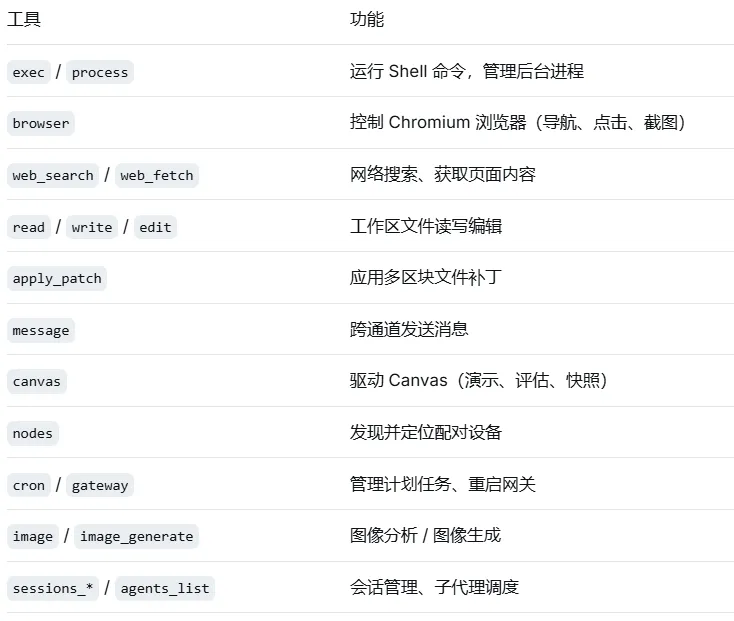
插件可以注册额外的工具来扩展这个集合。
03
—
api.registerTool() 详解
基本签名
api.registerTool(toolDefinition, options?)工具定义
一个工具需要定义以下字段:
import { Type } from "openclaw/plugin-sdk/typebox"; // TypeBox:类型安全的 JSON Schema 构建库api.registerTool({name: "tool_name", // 工具名称(必需),全局唯一,Agent 通过名称调用description: "...", // 工具描述(必需),LLM 根据此字段判断是否调用该工具parameters: Type.Object({ // 参数 Schema(必需),使用 TypeBox 定义,确保类型安全param1: Type.String(),param2: Type.Optional(Type.Number()),}),async execute(_id, params) { // 执行函数(必需),Agent 调用工具时自动触发// _id: 本次调用的唯一标识(通常不需要使用,用下划线前缀忽略)// params: 经过 Schema 校验的参数对象,可直接使用,无需再做类型检查return {content: [{ type: "text", text: "执行结果" },],};},});
参数定义
参数使用 TypeBox 库定义 JSON Schema。TypeBox 提供类型安全的 Schema 构建器:
import { Type } from "openclaw/plugin-sdk/typebox";// 简单参数Type.Object({query: Type.String({ description: "搜索关键词" }),})// 带默认值的可选参数Type.Object({query: Type.String(),limit: Type.Optional(Type.Number({ default: 10 })),})// 枚举参数Type.Object({format: Type.Union([Type.Literal("json"),Type.Literal("text"),Type.Literal("markdown"),]),})// 嵌套对象Type.Object({config: Type.Object({host: Type.String(),port: Type.Number(),}),})// 数组参数Type.Object({urls: Type.Array(Type.String()),})
description 字段很重要——LLM 根据它判断参数的用途,也根据工具整体的 description 判断是否应该调用这个工具。描述写得越准确,Agent 的行为就越可预测。
返回值格式
工具的返回值遵循 OpenClaw 的内容块格式:
// 纯文本返回return {content: [{ type: "text", text: "操作成功" },],};// 多内容块return {content: [{ type: "text", text: "分析结果如下:" },{ type: "text", text: JSON.stringify(data, null, 2) },],};
错误处理
当工具执行失败时,返回包含错误信息的内容块:
async execute(_id, params) {try {const result = await someOperation(params.url);return {content: [{ type: "text", text: JSON.stringify(result) }],};} catch (error) {return {content: [{type: "text",text: `操作失败: ${error instanceofError ? error.message : String(error)}`,},],isError: true, // 标记为错误结果};}}
isError: true 让 Agent 知道这是一个失败结果,而不是正常的输出。
04
—
必需工具 vs 可选工具
必需工具(默认)
注册时不传第二个参数,工具始终可用:
api.registerTool({name: "read_file",// ...});
可选工具
传递 { optional: true } 作为第二个参数:
api.registerTool({name: "deploy_to_production",description: "Deploy to production server",// ...},{ optional: true });
可选工具默认不可用。用户需要在 OpenClaw 配置文件中显式允许。
在配置文件(.openclaw/config.json 或 ~/.openclaw/config.json)中添加:
{"tools": {"allow": ["deploy_to_production"]}}
allow 的值可以是一个工具名称,也可以是一个插件 ID(表示允许该插件的所有可选工具):
{"tools": {"allow": ["my-deploy-plugin"]}}
修改配置后需重启 Gateway:openclaw gateway restart。
何时使用可选工具:
工具有副作用(如部署、删除操作)
工具需要额外的二进制依赖或外部服务
工具的使用需要用户显式确认
05
—
工具命名规范与冲突处理
命名规范
使用蛇形命名法(snake_case):
search_database、create_issue名称应该简洁且描述性:
web_search而非perform_a_web_search如果工具属于特定服务,可以加前缀:
github_create_issue、jira_get_ticket
冲突处理
如果插件注册的工具名称与已有工具(内置或其他插件)冲突:
系统会跳过这个工具,不会覆盖已有注册
日志中会记录冲突警告
因此,为工具选择唯一的名称是插件开发者的责任。
06
—
工具权限控制
OpenClaw 提供多层次的工具权限控制:
允许列表与拒绝列表
在 OpenClaw 配置文件中设置:
{"tools": {"allow": ["browser", "web_search", "exec"],"deny": ["exec"]}}
deny始终优先于allow如果同时出现在两个列表中,工具被拒绝
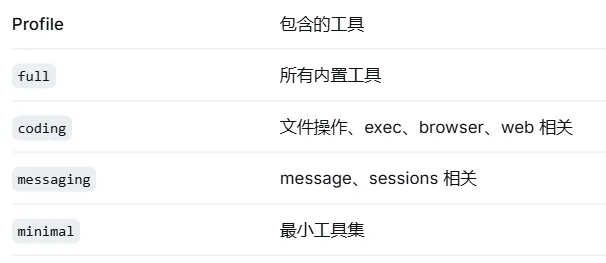
工具配置文件
通过 tools.profile 设置基础权限:
工具组缩写
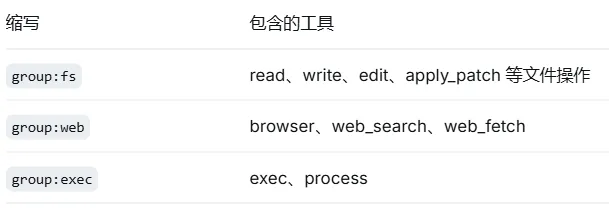
使用 group:* 批量管理(同样在配置文件中设置):
{"tools": {"allow": ["group:fs", "group:web", "my_custom_tool"]}}
常用工具组:
提供商级别限制
可以为特定模型提供商设置不同的工具权限:
{"tools": {"providerOverrides": {"anthropic": {"allow": ["group:fs"],"deny": ["exec"]}}}}
07
—
自定义命令
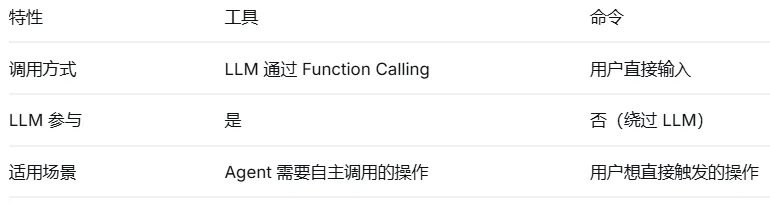
api.registerCommand({name: "/status",description: "Show current system status",async execute(context) {// context 包含消息上下文return {content: [{ type: "text", text: "All systems operational." }],};},});
08
—
实战:构建一个天气查询工具
import { definePluginEntry } from "openclaw/plugin-sdk/plugin-entry";import { Type } from "openclaw/plugin-sdk/typebox";export default definePluginEntry({id: "weather-plugin",name: "Weather Plugin",version: "1.0.0",register(api) {const apiKey = (api.pluginConfig as { apiKey?: string })?.apiKey;api.registerTool({name: "get_weather",description:"Get current weather conditions for a given city. " +"Returns temperature, humidity, wind speed, and weather description.",parameters: Type.Object({city: Type.String({ description: "City name (e.g., Beijing, Tokyo)" }),units: Type.Optional(Type.Union([Type.Literal("metric"), Type.Literal("imperial")], {default: "metric",description: "Temperature units",})),}),async execute(_id, params) {if (!apiKey) {return {content: [{type: "text",text: "Weather API key not configured. Set plugins.entries.weather-plugin.config.apiKey.",},],isError: true,};}try {const response = await fetch(`https://api.weatherapi.com/v1/current.json?key=${apiKey}&q=${encodeURIComponent(params.city)}&units=${params.units ?? "metric"}`);if (!response.ok) {throw new Error(`API returned ${response.status}`);}const data = await response.json();const current = data.current;return {content: [{type: "text",text: [`📍 ${data.location.name}, ${data.location.country}`,`🌡️ Temperature: ${current.temp_c}°C (${current.temp_f}°F)`,`💧 Humidity: ${current.humidity}%`,`💨 Wind: ${current.wind_kph} km/h ${current.wind_dir}`,`☁️ Condition: ${current.condition.text}`,].join("\n"),},],};} catch (error) {return {content: [{type: "text",text: `Failed to fetch weather: ${error instanceofError ? error.message : String(error)}`,},],isError: true,};}},},{ optional: true });},});
这个示例展示了工具开发的几个最佳实践:
完善的 description:让 LLM 能准确判断何时调用
TypeBox 参数定义:带 description 的类型安全 Schema
可选工具:需要 API Key 的工具设为 optional
配置读取:从
api.pluginConfig读取敏感配置错误处理:对配置缺失和网络错误都有覆盖
09
—
小结
本篇覆盖了工具注册的完整机制:
工具是 Agent 与外部世界交互的唯一通道
工具调用基于 LLM 的 Function Calling 机制
api.registerTool()定义名称、参数、执行逻辑TypeBox 提供类型安全的参数 Schema
必需工具始终可用,可选工具需用户显式启用
多层权限控制(allow/deny、profile、group、provider)
自定义命令绕过 LLM,适合确定性操作