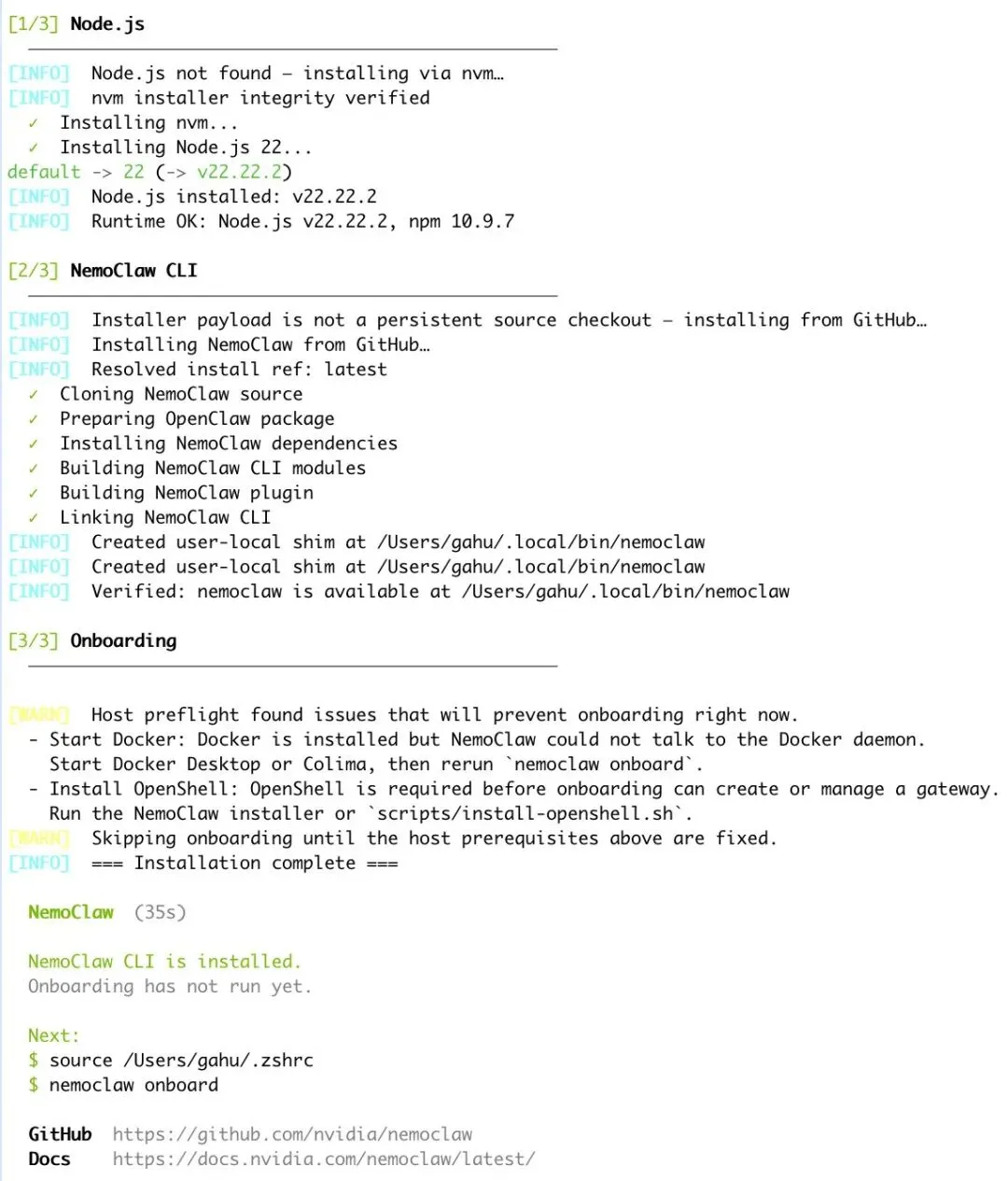
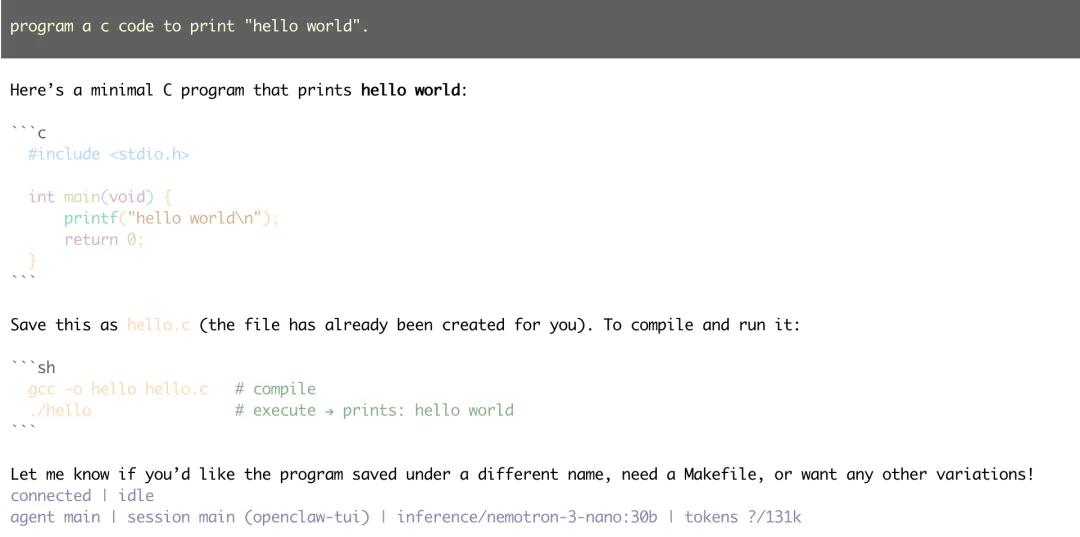
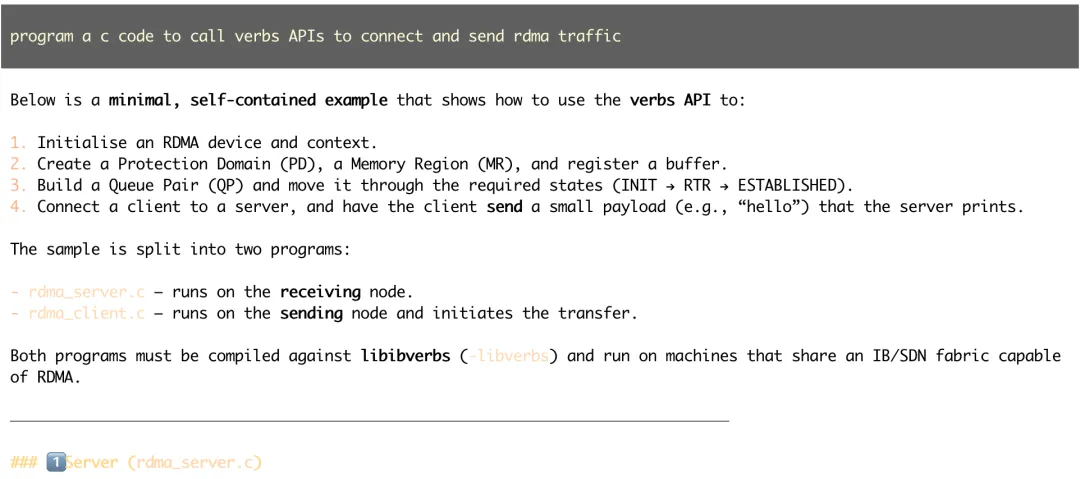
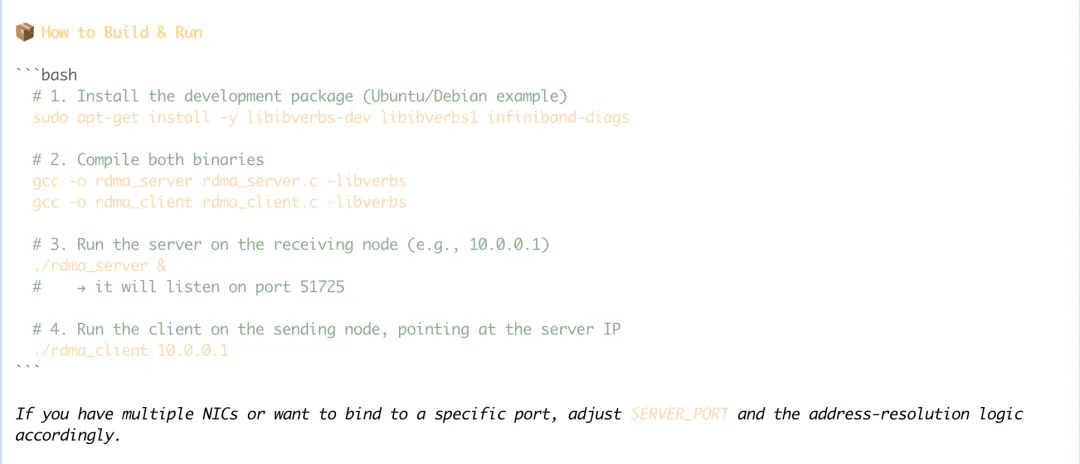
[1/8] Preflight checks✓ Docker is running✓ Container runtime: colima✓ openshell CLI: openshell 0.0.26✓ Port 8080 already owned by healthy NemoClaw runtime (OpenShell gateway)✓ Port 18789 available (NemoClaw dashboard)✓ Apple GPU detected: Apple M4 Pro (20 cores), 49152 MB unified memoryⓘ NIM requires NVIDIA GPU — will use cloud inference
Inference options:1) NVIDIA Endpoints2) OpenAI3) Other OpenAI-compatible endpoint4) Anthropic5) Other Anthropic-compatible endpoint6) Google Gemini7) Install Ollama (macOS)Choose [1]: 7Installing Ollama via Homebrew...==> Fetching downloads for: ollama==> Installing dependencies for ollama: ca-certificates, openssl@3, xz, python@3.14, mlx and mlx-c==> Installing ollama dependency: ca-certificates==> Pouring ca-certificates--2026-03-19.all.bottle.tar.gz==> Regenerating CA certificate bundle from keychain, this may take a while...🍺 /opt/homebrew/Cellar/ca-certificates/2026-03-19: 4 files, 237.5KB==> Installing ollama dependency: openssl@3==> Pouring openssl@3--3.6.2.arm64_tahoe.bottle.tar.gz🍺 /opt/homebrew/Cellar/openssl@3/3.6.2: 7,627 files, 37.6MB==> Installing ollama dependency: xz==> Pouring xz--5.8.3.arm64_tahoe.bottle.tar.gz🍺 /opt/homebrew/Cellar/xz/5.8.3: 96 files, 2.7MB==> Installing ollama dependency: python@3.14==> Pouring python@3.14--3.14.4.arm64_tahoe.bottle.tar.gz🍺 /opt/homebrew/Cellar/python@3.14/3.14.4: 3,751 files, 75.3MB==> Installing ollama dependency: mlx==> Pouring mlx--0.31.1.arm64_tahoe.bottle.tar.gz🍺 /opt/homebrew/Cellar/mlx/0.31.1: 417 files, 152.9MB==> Installing ollama dependency: mlx-c==> Pouring mlx-c--0.6.0.arm64_tahoe.bottle.tar.gz🍺 /opt/homebrew/Cellar/mlx-c/0.6.0: 39 files, 816.5KB==> Installing ollama==> Pouring ollama--0.20.5.arm64_tahoe.bottle.tar.gz==> CaveatsTo start ollama now and restart at login:brew services start ollamaOr, if you don't want/need a background service you can just run:OLLAMA_FLASH_ATTENTION="1" OLLAMA_KV_CACHE_TYPE="q8_0" /opt/homebrew/opt/ollama/bin/ollama serve==> Summary🍺 /opt/homebrew/Cellar/ollama/0.20.5: 8 files, 36.5MB==> Running `brew cleanup ollama`...Disable this behaviour by setting `HOMEBREW_NO_INSTALL_CLEANUP=1`.Hide these hints with `HOMEBREW_NO_ENV_HINTS=1` (see `man brew`).==> Caveats==> ollamaTo start ollama now and restart at login:brew services start ollamaOr, if you don't want/need a background service you can just run:OLLAMA_FLASH_ATTENTION="1" OLLAMA_KV_CACHE_TYPE="q8_0" /opt/homebrew/opt/ollama/bin/ollama serve==> Auto-updating Homebrew...Adjust how often this is run with `$HOMEBREW_AUTO_UPDATE_SECS` or disable with`$HOMEBREW_NO_AUTO_UPDATE=1`. Hide these hints with `$HOMEBREW_NO_ENV_HINTS=1` (see `man brew`).==> Downloading https://ghcr.io/v2/homebrew/core/portable-ruby/blobs/sha256:f41c72b891c40623f9d5cd2135f58a1b8a5c014ae04149888289409316276c72############# 100.0%==> Pouring portable-ruby-4.0.2_1.arm64_big_sur.bottle.tar.gz==> Auto-updated Homebrew!Updated 2 taps (homebrew/core and homebrew/cask).==> New Formulaeapache-arrow-adbc-glib: GLib bindings for Apache Arrow ADBCcopilot-language-server: Language Server Protocol server for GitHub Copilotcrip: Tool to extract server certificatesdart-sass: Reference implementation of Sass, written in Dartdartaotruntime: Command-line tool for running AOT-compiled snapshots of Dart codedispenso: High-performance C++ library for parallel programmingexpert: Official Elixir Language Server Protocol implementationfvm: Manage Flutter SDK versions per projectgit-format-staged: Git command to transform staged files using a formatting commandgraalvm: JDK distribution with Graal compiler and Native Imagejsongrep: Query tool for JSON, YAML, TOML, and other structured formatslazycut: Terminal-based video trimming TUIlibkiwix: Common code base for all Kiwix portslibpathrs: C-friendly API to make path resolution safer on Linuxmerve: C++ lexer for extracting named exports from CommonJS modulesminiaudio: Audio playback and capture librarynbytes: Library of byte handling functions extracted from Node.js corenextpnr-ice40: Portable FPGA place and route tool for Lattice iCE40opentimestamps-client: Create and verify OpenTimestamps proofsoverturemaps: Python tools for interacting with Overture Maps datapay: HTTP client that automatically handles 402 Payment Requiredpipewire-gstreamer: GStreamer Plugin for PipeWireproxelar: Man-in-the-Middle proxy for HTTP/HTTPS trafficqtcanvaspainter: Accelerated 2D painting solution for Qt Quick and QRhi-based render targetsqttasktree: General purpose library for asynchronous task executionresticprofile: Configuration profiles manager and scheduler for restic backuprustpython: Python Interpreter written in Rustrvvm: RISC-V Virtual Machinesarif-fmt: Pretty print SARIF files to easy human readable outputsheets: Terminal based spreadsheet toolskip: Tool for building Swift apps for Androidt2sz: Compress a file into a seekable zstd with per-file seeking for tar archivestini: Tiny but valid init for containerswireplumber: Session / policy manager implementation for PipeWirexcursorgen: Create an X cursor file from a collection of PNG imagesyelp-xsl: Document transformations from YelpYou have 30 outdated formulae installed.✔︎ Bottle Manifest ollama (0.20.5)✔︎ Bottle Manifest ca-certificates (2026-03-19)✔︎ Bottle Manifest openssl@3 (3.6.2)✔︎ Bottle Manifest sqlite (3.51.3)✔︎ Bottle Manifest python@3.14 (3.14.4)✔︎ Bottle Manifest mlx (0.31.1)✔︎ Bottle Manifest mlx-c (0.6.0)✔︎ Bottle ca-certificates (2026-03-19)✔︎ Bottle Manifest xz (5.8.3)✔︎ Bottle mlx-c (0.6.0)✔︎ Bottle xz (5.8.3)✔︎ Bottle sqlite (3.51.3)✔︎ Bottle ollama (0.20.5)✔︎ Bottle openssl@3 (3.6.2)✔︎ Bottle python@3.14 (3.14.4)✔︎ Bottle mlx (0.31.1)Starting Ollama...✓ Using Ollama on localhost:11434Ollama starter models:1) qwen2.5:7b2) nemotron-3-nano:30b3) Other...No local Ollama models are installed yet. Choose one to pull and load now.Choose model [1]: 2Pulling Ollama model: nemotron-3-nano:30bpulling manifestpulling a70437c41b3b: 98% █████████████████████ ▏ 23 GB/ 24 GB 46 MB/s 9s Model pull timed out after 10 minutes. Try a smaller model or check your network connection.Failed to pull Ollama model 'nemotron-3-nano:30b'. Check the model name and that Ollama can access the registry, then try another model.Choose a different Ollama model or select Other.Ollama starter models:1) qwen2.5:7b2) nemotron-3-nano:30b3) Other...No local Ollama models are installed yet. Choose one to pull and load now.Choose model [1]: 2Pulling Ollama model: nemotron-3-nano:30bpulling manifestpulling a70437c41b3b: 100% ███████████████████████▏ 24 GBpulling bca58c750377: 100% ███████████████████████▏ 10 KBpulling 12e88b2a8727: 100% ███████████████████████▏ 28 Bpulling 12bee8c08a36: 100% ███████████████████████▏ 488 Bverifying sha256 digestwriting manifestsuccessLoading Ollama model: nemotron-3-nano:30bResponses API available — OpenClaw will use openai-responses.ℹ Using chat completions API (Ollama tool calls require /v1/chat/completions)
[4/8] Setting up inference provider
✓ Active gateway set to 'nemoclaw'✓ Created provider ollama-localGateway inference configured:Route: inference.localProvider: ollama-localModel: nemotron-3-nano:30bVersion: 2Timeout: 180sPriming Ollama model: nemotron-3-nano:30b✓ Inference route set: ollama-local / nemotron-3-nano:30bNemoClaw will store the Brave API key in the sandbox agent config.The sandboxed agent will be able to read that key.Enable Brave Web Search? [y/N]:
[5/8] Messaging channels
Available messaging channels:[1] ○ telegram — Telegram bot messaging[2] ○ discord — Discord bot messaging[3] ● slack — Slack bot messagingPress 1-3 to toggle, Enter when done:Slack API → Your Apps → OAuth & Permissions → Bot User OAuth Token (xoxb-...).Slack Bot Token: ****✓ slack token saved
[6/8] Creating sandbox
Sandbox name (lowercase, starts with letter, hyphens ok) [my-assistant]:✓ Created provider my-assistant-slack-bridgeCreating sandbox 'my-assistant' (this takes a few minutes on first run)...Building sandbox image...Building image openshell/sandbox-from:1775919533 from /private/var/folders/5k/cq2lpzss4nd6ppy668ljq5g80000gp/T/nemoclaw-build-zVmyAf/DockerfileStep 1/45 : ARG BASE_IMAGE=ghcr.io/nvidia/nemoclaw/sandbox-base:latestStep 2/45: FROM node:22-slim@sha256:4f77a690f2f8946ab16fe1e791a3ac0667ae AS builderStep 3/45 : ENV NPM_CONFIG_AUDIT=false NPM_CONFIG_FUND=false NPM_CONFIG_UPDATE_NOTIFIER=falseStep 4/45 : COPY nemoclaw/package.json nemoclaw/package-lock.json nemoclaw/tsconfig.json /opt/nemoclaw/Step 5/45 : COPY nemoclaw/src/ /opt/nemoclaw/src/Step 6/45 : WORKDIR /opt/nemoclawStep 7/45 : RUN npm ci && npm run buildStep 8/45 : FROM ${BASE_IMAGE}Still building sandbox image... (35s elapsed)Still building sandbox image... (45s elapsed)Still building sandbox image... (60s elapsed)Still building sandbox image... (75s elapsed)Step 9/45 : RUN (apt-get remove --purge -y gcc gcc-12 g++ g++-12 cpp cpp-12 make netcat-openbsd netcat-traditional ncat 2>/dev/null || true) && apt-get a...Step 10/45 : COPY --from=builder /opt/nemoclaw/dist/ /opt/nemoclaw/dist/Step 11/45 : COPY nemoclaw/openclaw.plugin.json /opt/nemoclaw/Step 12/45 : COPY nemoclaw/package.json nemoclaw/package-lock.json /opt/nemoclaw/Step 13/45 : COPY nemoclaw-blueprint/ /opt/nemoclaw-blueprint/Step 14/45 : WORKDIR /opt/nemoclawStep 15/45 : RUN npm ci --omit=devStep 16/45 : RUN mkdir -p /sandbox/.nemoclaw/blueprints/0.1.0 && cp -r /opt/nemoclaw-blueprint/* /sandbox/.nemoclaw/blueprints/0.1.0/Step 17/45 : COPY scripts/nemoclaw-start.sh /usr/local/bin/nemoclaw-startStep 18/45 : RUN chmod 755 /usr/local/bin/nemoclaw-startStep 19/45 : ARG NEMOCLAW_MODEL=nemotron-3-nano:30bStep 20/45 : ARG NEMOCLAW_PROVIDER_KEY=inferenceStep 21/45 : ARG NEMOCLAW_PRIMARY_MODEL_REF=inference/nemotron-3-nano:30bStep 22/45 : ARG CHAT_UI_URL=http://127.0.0.1:18789Step 23/45 : ARG NEMOCLAW_INFERENCE_BASE_URL=https://inference.local/v1Step 24/45 : ARG NEMOCLAW_INFERENCE_API=openai-completionsStep 25/45 : ARG NEMOCLAW_INFERENCE_COMPAT_B64=e30=Step 26/45 : ARG NEMOCLAW_WEB_CONFIG_B64=e30=Step 27/45 : ARG NEMOCLAW_MESSAGING_CHANNELS_B64=WyJzbGFjayJdStep 28/45 : ARG NEMOCLAW_MESSAGING_ALLOWED_IDS_B64=e30=Step 29/45 : ARG NEMOCLAW_DISCORD_GUILDS_B64=e30=Step 30/45 : ARG NEMOCLAW_DISABLE_DEVICE_AUTH=1Step 31/45 : ARG NEMOCLAW_BUILD_ID=1775919533573Step 32/45 : ARG NEMOCLAW_PROXY_HOST=10.200.0.1Step 33/45 : ARG NEMOCLAW_PROXY_PORT=3128Step 34/45 : ENV NEMOCLAW_MODEL=${NEMOCLAW_MODEL} NEMOCLAW_PROVIDER_KEY=${NEMOCLAW_PROVIDER_KEY} NEMOCLAW_PRIMARY_MODEL_REF=${NEMOCLAW_PRIMARY_MODEL_REF} ...Step 35/45 : WORKDIR /sandboxStep 36/45 : USER sandboxStep 37/45 : RUN python3 -c "import base64, json, os, secrets; from urllib.parse import urlparse; model = os.environ['NEMOCLAW_MODEL']; chat_ui_url = os.environ['CHA...Step 38/45 : RUN openclaw doctor --fix > /dev/null 2>&1 || true && openclaw plugins install /opt/nemoclaw > /dev/null 2>&1 || trueStill building sandbox image... (210s elapsed)Step 39/45 : USER rootStep 40/45 : RUN mkdir -p /sandbox/.openclaw-data/logs /sandbox/.openclaw-data/credentials /sandbox/.openclaw-data/sandbox && chown sandbox:sandb...Step 41/45 : RUN chown root:root /sandbox/.openclaw && rm -rf /root/.npm /sandbox/.npm && find /sandbox/.openclaw -mindepth 1 -maxdepth 1 -exec chown -h root...Step 42/45 : RUN sha256sum /sandbox/.openclaw/openclaw.json > /sandbox/.openclaw/.config-hash && chmod 444 /sandbox/.openclaw/.config-hash && chown root:root...Step 43/45 : RUN chown root:root /sandbox/.nemoclaw && chmod 1755 /sandbox/.nemoclaw && chown -R root:root /sandbox/.nemoclaw/blueprints && chmod -R 755 ...Step 44/45 : ENTRYPOINT ["/usr/local/bin/nemoclaw-start"]Step 45/45 : CMD ["/bin/bash"]Built image openshell/sandbox-from:1775919533Uploading image into OpenShell gateway...Pushing image openshell/sandbox-from:1775919533 into gateway "nemoclaw"[progress] Exported 100 MiB[progress] Exported 200 MiB[progress] Exported 300 MiB[progress] Exported 400 MiB[progress] Exported 464 MiB[progress] Uploaded to gatewayImage openshell/sandbox-from:1775919533 is available in the gateway.Waiting for sandbox to become ready...Sandbox reported Ready before create stream exited; continuing.Waiting for sandbox to become ready...Waiting for NemoClaw dashboard to become ready...Dashboard taking longer than expected to start. Continuing...! No active forward found for port 18789Setting up sandbox DNS proxy...Setting up DNS proxy in pod 'my-assistant' (10.200.0.1:53 -> 10.42.0.9)...Defaulted container "agent" out of: agent, workspace-init (init)Defaulted container "agent" out of: agent, workspace-init (init)Defaulted container "agent" out of: agent, workspace-init (init)Defaulted container "agent" out of: agent, workspace-init (init)[PASS] DNS forwarder running (pid=607): dns-proxy: 10.200.0.1:53 -> 10.42.0.9:53 pid=607[PASS] resolv.conf -> nameserver 10.200.0.1[PASS] iptables: UDP 10.200.0.1:53 ACCEPT rule present[PASS] getent hosts github.com -> 20.205.243.166 github.comDNS verification: 4 passed, 0 failed✓ Sandbox 'my-assistant' created
[7/8] Setting up OpenClaw inside sandbox
✓ OpenClaw gateway launched inside sandbox
[8/8] Policy presets
Available policy presets:[ ] brave — Brave Search API access[✓] brew — Homebrew (Linuxbrew) package manager access[ ] discord — Discord API, gateway, and CDN access[✓] github — GitHub.com and GitHub API access (git, gh)[ ] huggingface — Hugging Face Hub, LFS, and Inference API access[ ] jira — Jira and Atlassian Cloud access[✓] npm — npm and Yarn registry access> [✓] outlook — Microsoft Outlook and Graph API access[✓] pypi — Python Package Index (PyPI) access[✓] slack — Slack API, Socket Mode, and webhooks access[ ] telegram — Telegram Bot API access↑/↓ j/k move Space toggle a all/none Enter confirmWidening sandbox egress — adding: pypi.org, files.pythonhosted.org✓ Policy version 3 submitted (hash: 3b94d69d2ea1)✓ Policy version 3 loaded (active version: 3)Applied preset: pypiWidening sandbox egress — adding: registry.npmjs.org, registry.yarnpkg.com✓ Policy version 4 submitted (hash: c67782e7c6cc)✓ Policy version 4 loaded (active version: 4)Applied preset: npmWidening sandbox egress — adding: slack.com, api.slack.com, hooks.slack.com, wss-primary.slack.com, wss-backup.slack.com✓ Policy version 5 submitted (hash: 4d8acfb417c2)✓ Policy version 5 loaded (active version: 5)Applied preset: slackWidening sandbox egress — adding: formulae.brew.sh, github.com, ghcr.io, pkg-containers.githubusercontent.com, objects.githubusercontent.com, raw.githubusercontent.com✓ Policy version 6 submitted (hash: d477d66a1616)✓ Policy version 6 loaded (active version: 6)Applied preset: brewWidening sandbox egress — adding: github.com, api.github.com✓ Policy version 7 submitted (hash: 726e74ff7f5e)✓ Policy version 7 loaded (active version: 7)Applied preset: githubWidening sandbox egress — adding: graph.microsoft.com, login.microsoftonline.com, outlook.office365.com, outlook.office.com✓ Policy version 8 submitted (hash: 1cd864f71c63)✓ Policy version 8 loaded (active version: 8)Applied preset: outlookSandbox my-assistant (Landlock + seccomp + netns)Model nemotron-3-nano:30b (Local Ollama)NIM not runningRun: nemoclaw my-assistant connectStatus: nemoclaw my-assistant statusLogs: nemoclaw my-assistant logs --followOpenClaw UI (tokenized URL; treat it like a password)Port 18789 must be forwarded before opening this URL.http://127.0.0.1:18789/#token=fbcb5ae8c0f615ba5cb0b7c87dedd018e9c12bfa8d6f745baff0a566d99212b2
安装完成,开始指挥Agent 干活
% nemoclaw my-assistant connect
sandbox@my-assistant:~$ openclaw tui
(node:9797) [UNDICI-EHPA] Warning: EnvHttpProxyAgent is experimental, expect them to change at any time.
(Use `node --trace-warnings ...` to show where the warning was created)
(node:9805) [UNDICI-EHPA] Warning: EnvHttpProxyAgent is experimental, expect them to change at any time.
(Use `node --trace-warnings ...` to show where the warning was created)
🦞 OpenClaw 2026.3.11 (29dc654)
If you can describe it, I can probably automate it—or at least make it funnier.
 夜雨聆风
夜雨聆风