 夜雨聆风
夜雨聆风前置阅读:第 1 篇 — Plugin SDK 入门
本篇讲解 api.runtime 命名空间——插件在运行时可以调用的辅助能力。这些能力包括持久化存储、配置管理、审批系统、HTTP 请求、TTS、媒体理解、子代理等。理解 api.runtime,就是理解插件在运行环境中「能做什么」。
01
—
api.runtime 概览
api.runtime 是 register(api) 回调中 api 对象的一个字段,提供了一组运行时辅助功能。在前面的篇章中,我们学习了各种 api.registerXxx() 方法——它们用来「注册能力」。而 api.runtime 中的方法不是用来注册能力的,而是在插件的执行逻辑(如工具的 execute 函数、钩子的处理器等)中直接调用的。
可以将 api.runtime 理解为插件的后台工具箱——它让插件能够完成存储数据、发起网络请求、调用其他 AI 能力等操作。没有 api.runtime,插件就只能注册能力但不能做任何需要与外部世界交互的事情。
—
持久化存储
插件经常需要在运行期间存储和读取数据——用户偏好、缓存、会话状态等。api.runtime 提供了存储管理能力。
createPluginRuntimeStore
createPluginRuntimeStore 创建一个键值存储实例。第一个参数是存储的名称(同一个插件可以创建多个命名存储):
const store = api.runtime.createPluginRuntimeStore("my-store");// 写入await store.set("user-preferences", { theme: "dark", language: "zh" });// 读取const prefs = await store.get("user-preferences");// => { theme: "dark", language: "zh" }// 删除await store.delete("user-preferences");// 检查是否存在const exists = await store.has("user-preferences");// 获取所有键const keys = await store.keys();
关键特性:
作用域隔离:每个插件的存储相互隔离,不会互相覆盖
持久化:数据在 Gateway 重启后依然存在
类型安全:可以通过泛型指定值的类型
interface UserPrefs {theme: "dark" | "light";language: string;lastSeen?: number;}const store = api.runtime.createPluginRuntimeStore<UserPrefs>("user-prefs");// TypeScript 会对值类型进行检查await store.set("current", { theme: "dark", language: "zh" });const prefs = await store.get("current"); // 类型为 UserPrefs | undefined
使用场景
缓存 API 响应,减少重复请求
存储用户配置的默认值
维护插件级别的状态(如认证 token 的刷新时间)
记录使用统计
03
—
配置管理
api 对象本身就提供了配置访问能力(在前面的篇章中我们已经用过 api.pluginConfig),这里做一个系统的总结。
配置层次
// 全局配置快照(只读)const globalConfig = api.config;// => OpenClawConfig 对象,包含所有配置项// 插件专属配置(从 plugins.entries.<id>.config 读取)const myConfig = api.pluginConfig;// => Record<string, unknown>,需要在 openclaw.plugin.json 的 configSchema 中定义 Schema
配置读取
interface MyPluginConfig {apiUrl: string;maxRetries: number;features: {enabled: boolean;limit: number;};}const config = api.pluginConfig as MyPluginConfig;const url = config.apiUrl;const retries = config.maxRetries ?? 3;
配置安全性
api.pluginConfig 中的值已经过 openclaw.plugin.json 中 configSchema 的 JSON Schema 验证。如果用户提供了不符合 Schema 的配置值,系统会在启动时拒绝并报错,插件代码不会执行。
这意味着在插件内部读取 api.pluginConfig 时,可以假设数据格式是正确的——不需要额外的运行时校验。
04
—
审批系统
某些工具的操作可能有副作用或安全风险(如执行 shell 命令、发送消息、删除文件等),需要用户确认后才能执行。api.runtime.requestApproval() 让插件可以主动请求用户审批:
执行审批
// 请求用户审批const approval = await api.runtime.requestApproval({type: "tool_execution",tool: "exec",description: "执行 shell 命令: ls -la",risk: "medium",params: { command: "ls -la" },});if(approval.granted) {// 用户批准,执行操作const result = await executeCommand("ls -la");} else {// 用户拒绝api.logger.info("User declined approval");}
审批超时
审批请求可以有超时时间:
const approval = await api.runtime.requestApproval({type: "tool_execution",description: "删除文件",timeout: 30000, // 30 秒超时// ...});if (approval.timedOut) {// 超时处理return { content: [{ type: "text", text: "审批超时,操作已取消" }] };}
05
—
HTTP 请求
插件经常需要与外部服务通信。api.runtime 提供了封装的 HTTP 请求工具。
基础请求
const response = await api.runtime.fetch("https://api.example.com/data", {method: "GET",headers: {"Authorization": `Bearer ${token}`,"Content-Type": "application/json",},});const data = await response.json();
代理支持
OpenClaw 网关的代理配置会自动应用到 api.runtime.fetch:
// 如果用户在 OpenClaw 配置中设置了 HTTP 代理,// api.runtime.fetch 会自动使用该代理// 插件无需手动处理代理配置const response = await api.runtime.fetch("https://api.example.com/data");
固定查找
某些 API 可能有多个可用端点(如 CDN 节点),api.runtime 提供了固定查找功能来选择最优端点:
// 自动选择延迟最低的端点const response = await api.runtime.fetchWithPinpoint({urls: ["https://cdn1.example.com/api","https://cdn2.example.com/api","https://cdn3.example.com/api",],options: { method: "GET" },});
06
—
错误处理与重试
错误图
api.runtime 提供了结构化的错误处理工具:
import { PluginError } from "openclaw/plugin-sdk/errors";// 创建带分类的错误throw new PluginError({code: "API_ERROR",message: "Failed to call external API",details: { statusCode: 500, endpoint: "/data" },recoverable: true, // 标记为可恢复错误});
重试机制
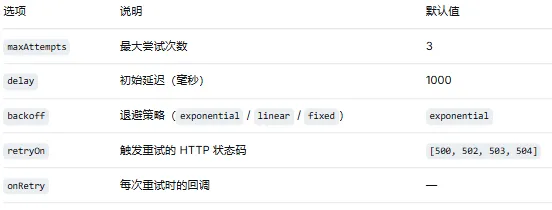
const result = await api.runtime.retry(async () => {const response = await fetch("https://api.example.com/data");if (!response.ok) throw new Error(`HTTP ${response.status}`);return response.json();},{maxAttempts: 3,delay: 1000, // 初始延迟 1 秒backoff: "exponential", // 指数退避retryOn: [500, 502, 503, 504], // 对这些状态码重试});
重试配置选项:
07
—
TTS 与媒体理解
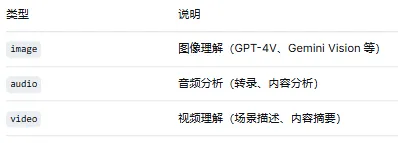
api.runtime 提供了对其他 AI 能力的便捷访问接口。这些能力由对应的 Provider 提供(参见第 3 篇),api.runtime 只是封装了调用方式。如果对应的 Provider 没有注册,调用会失败。
文本转语音
const audioBuffer = await api.runtime.tts.synthesize("Hello, this is a test message.",{voice: "alloy",speed: 1.0,});// audioBuffer 可以直接发送到支持语音的通道
媒体理解
const description = await api.runtime.mediaUnderstanding.analyze({type: "image",url: "https://example.com/image.jpg",prompt: "Describe this image in detail.",});// => "A white cat sitting on a wooden desk..."
网络搜索
const searchResults = await api.runtime.webSearch.search("OpenClaw plugin development guide",{ limit: 5 });// searchResults 是搜索结果数组for (const result of searchResults) {console.log(`${result.title}: ${result.url}`);console.log(result.snippet);}
08
—
子代理
const result = await api.runtime.subAgent.run({prompt: "分析这段代码的安全性问题并提出改进建议。",context: {code: userCode,language: "typescript",},model: "anthropic/claude-sonnet-4-20250514",tools: ["read", "edit"], // 子代理可用的工具timeout: 60000,});
子代理的特点:
独立上下文:子代理有独立的对话历史,不污染父 Agent 的上下文
工具限制:可以限制子代理只能使用指定的工具
超时控制:可以设置最大执行时间
结构化输出:子代理的返回值可以指定格式
09
—
日志
api.logger 提供了带作用域的日志功能:api.logger.debug("Detailed debug info", { requestId: "abc123" });api.logger.info("Operation completed", { duration: 1500 });api.logger.warn("Rate limit approaching", { remaining: 10 });api.logger.error("API call failed", { error: err.message, code: err.code });
[hello-world] INFO Operation completed {"duration":1500}[hello-world] ERROR API call failed {"error":"timeout","code":"ETIMEDOUT"}
10
—
路径解析
api.resolvePath 用于解析相对于插件根目录的路径:// 假设插件根目录是 /opt/openclaw/plugins/my-plugin/const templatePath = api.resolvePath("./templates/email.md");// => "/opt/openclaw/plugins/my-plugin/templates/email.md"const configPath = api.resolvePath("../shared/config.json");// => 解析相对于根目录的路径(不是相对于当前文件)
这在插件需要读取自身附带的静态文件(模板、配置、字典等)时非常有用。
11
—
小结
本篇覆盖了 api.runtime 的核心能力:
持久化存储:
createPluginRuntimeStore提供隔离的键值存储配置管理:
api.config和api.pluginConfig提供配置访问审批系统:请求用户确认敏感操作
HTTP 请求:封装的 fetch,自动代理,固定查找
错误处理:结构化错误 + 指数退避重试
AI 能力调用:TTS、媒体理解、网络搜索、子代理
下一篇:HTTP 路由与 CLI 扩展 — 构建完整基础设施。我们将学习如何为 OpenClaw 网关添加自定义 HTTP 端点和 CLI 子命令。