 夜雨聆风
夜雨聆风

2023-2024 年,随着 GPT-4、Claude 3.5 Sonnet、Gemini Pro 等前沿大语言模型的发布,AI-Generated UI 从实验室概念迅速演变为生产级技术。从 Vercel 的 v0.dev 到 StackBlitz 的 Bolt.new,从 Cursor 到 Windsurf,一系列革命性产品正在重新定义开发者与 UI 的交互方式。
这些应用有一个共同的技术核心:如何在大模型流式输出的场景下构建流畅、稳定、高性能的前端 UI。这不是一个简单的"接收文本并显示"的问题,而是涉及到增量解析、错误恢复、实时预览、性能优化等多个维度的复杂工程挑战。
本文将从底层协议到上层应用,系统性地剖析这一技术领域的核心原理与实践模式。

▐Server-Sent Events (SSE) 协议详解
SSE 是 AI 流式输出的事实标准传输协议。与 WebSocket 的双向通信不同,SSE 专为服务器向客户端的单向推送设计——这恰好契合 LLM 生成文本的场景。
协议格式
SSE 基于 HTTP 协议,响应头设置为:
Content-Type: text/event-streamCache-Control: no-cacheConnection: keep-alive
数据以文本行形式传输,每个事件由以下字段组成:
event: <event-type>data: <payload>id: <event-id>retry: <reconnection-time>
注意每个事件以空行结尾。实际的 LLM 响应通常只使用 data 字段:
data: {"choices":[{"delta":{"content":"Hello"}}]}data: {"choices":[{"delta":{"content":" World"}}]}data: [DONE]
浏览器端消费
浏览器原生支持 EventSource API:
const eventSource = new EventSource('/api/stream');eventSource.onmessage = (event) => {if (event.data === '[DONE]') {eventSource.close();return;}const { choices } = JSON.parse(event.data);const content = choices[0]?.delta?.content;if (content) appendToUI(content);};eventSource.onerror = (error) => {console.error('Stream error:', error);eventSource.close();};
然而,EventSource 有一个显著限制:只支持 GET 请求。对于需要发送复杂 payload 的 LLM API 调用,我们通常使用 fetch + ReadableStream:
async function streamCompletion(messages) {const response = await fetch('/api/chat', {method: 'POST',headers: { 'Content-Type': 'application/json' },body: JSON.stringify({ messages, stream: true }),});const reader = response.body.getReader();const decoder = new TextDecoder();let buffer = '';while (true) {const { done, value } = await reader.read();if (done) break;buffer += decoder.decode(value, { stream: true });// 按行解析 SSE 事件const lines = buffer.split('\n');buffer = lines.pop(); // 保留不完整的行for (const line of lines) {if (line.startsWith('data: ')) {const data = line.slice(6);if (data === '[DONE]') return;try {const parsed = JSON.parse(data);yield parsed.choices[0]?.delta?.content || '';} catch (e) {// 忽略解析错误}}}}}
这里有几个关键细节值得注意:
{stream: true}参数:告诉 TextDecoder这是流式解码,避免在多字节字符边界处截断- Buffer 处理:网络包可能在任意位置切分,需要缓存不完整的行
- Generator 模式:使用 yield 允许调用方以异步迭代器方式消费
▐主流 LLM 提供商的流式 API 对比
OpenAI Chat Completions API
import OpenAI from 'openai';const client = new OpenAI();const stream = await client.chat.completions.create({model: 'gpt-4o',messages: [{ role: 'user', content: 'Hello' }],stream: true,stream_options: { include_usage: true }, // 获取 token 统计});for await (const chunk of stream) {const content = chunk.choices[0]?.delta?.content;if(content) process.stdout.write(content);}
事件结构:
{"id": "chatcmpl-xxx","object": "chat.completion.chunk","created": 1234567890,"model": "gpt-4o","choices": [{"index": 0,"delta": { "content": "Hello" },"finish_reason": null}]}
Anthropic Claude Messages API
Claude 的流式 API 采用了更结构化的事件类型系统:
import Anthropic from '@anthropic-ai/sdk';const client = new Anthropic();const stream = await client.messages.create({model: 'claude-3-5-sonnet-20241022',max_tokens: 1024,messages: [{ role: 'user', content: 'Hello' }],stream: true,});for await (const event of stream) {if(event.type === 'content_block_delta') {process.stdout.write(event.delta.text);}}
事件类型序列:
message_start → content_block_start → content_block_delta (多次)→ content_block_stop → message_delta → message_stop
这种设计的优势在于:
- 语义清晰:每种事件类型有明确的含义
- 多模态支持:可以区分文本块、工具调用块、图像块
- 思考链支持:Extended Thinking 可以作为独立的 content block
关键差异对比
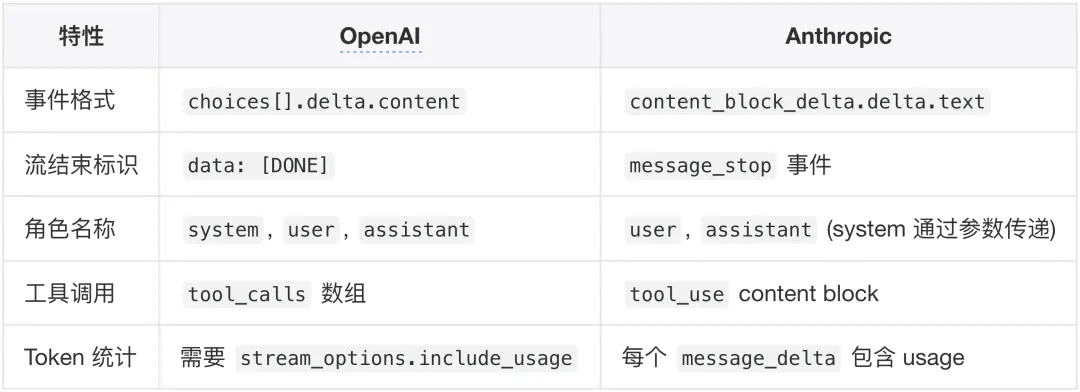
▐WebSocket vs SSE:技术选型
在 AI 流式输出场景下,SSE 几乎是压倒性的选择。原因如下:
SSE 的优势:
- HTTP 原生:无需协议升级,兼容性极佳
- 自动重连:浏览器原生支持断线重连
- 简单可靠:单向通信模型降低复杂度
- CDN 友好:可以通过标准 HTTP 基础设施代理
- 调试方便:标准 HTTP 响应,易于抓包分析
WebSocket 的适用场景:
- 双向实时通信:如 OpenAI 的 Realtime API(语音对话)
- 高频小数据包:如实时协作编辑
- 二进制数据:如音视频流
OpenAI 的 Realtime API 是一个典型的 WebSocket 用例:
import { OpenAIRealtimeWebSocket } from 'openai/realtime/websocket';const rt = new OpenAIRealtimeWebSocket({ model: 'gpt-4o-realtime-preview' });rt.socket.addEventListener('open', () => {rt.send({type: 'response.create',response: { modalities: ['text', 'audio'] }});});rt.on('response.audio.delta', (event) => {playAudioChunk(event.delta); // 播放音频片段});

▐Vercel AI SDK:流式 UI 的统一抽象层
Vercel AI SDK 是目前最成熟的 AI UI 开发框架,它解决了一个核心问题:如何以统一的 API 对接不同的 LLM 提供商,并在 React/Vue/Svelte 等框架中优雅地处理流式 UI。
架构层次
┌─────────────────────────────────────────────────────────────┐│ 应用层 (Your App) │├─────────────────────────────────────────────────────────────┤│ UI 集成层: @ai-sdk/react | @ai-sdk/vue | @ai-sdk/svelte ││ (useChat, useCompletion, useAgent hooks) │├─────────────────────────────────────────────────────────────┤│ 核心层: ai ││ (generateText, streamText, generateObject, streamObject) │├─────────────────────────────────────────────────────────────┤│ Provider 层: @ai-sdk/openai | @ai-sdk/anthropic | ... ││ (provider-specific adapters) │├─────────────────────────────────────────────────────────────┤│ 传输层: SSE / WebSocket │└─────────────────────────────────────────────────────────────┘
核心 API:streamText
streamText 是流式文本生成的核心函数:
import { streamText } from 'ai';import { openai } from '@ai-sdk/openai';const result = await streamText({model: openai('gpt-4o'),messages: [{ role: 'system', content: 'You are a helpful assistant.' },{ role: 'user', content: 'Write a poem about coding.' },],});// 方式一:异步迭代器for await (const chunk of result.textStream) {process.stdout.write(chunk);}// 方式二:转换为 Response(用于 API 路由)return result.toTextStreamResponse();// 方式三:转换为数据流响应(包含元信息)return result.toDataStreamResponse();
React Hook:useChat
useChat 是客户端消费流式响应的核心 Hook:
'use client';import { useChat } from '@ai-sdk/react';export default function ChatPage() {const {messages, // 消息历史input, // 输入框值handleInputChange,handleSubmit,isLoading, // 是否正在生成error, // 错误信息stop, // 停止生成reload, // 重新生成最后一条} = useChat({api: '/api/chat',onFinish: (message) => {console.log('Generation complete:', message);},onError: (error) => {console.error('Stream error:', error);},});return (<divclassName="flex flex-col h-screen"><divclassName="flex-1 overflow-y-auto p-4">{messages.map((m) => (<divkey={m.id}className={m.role === 'user' ? 'text-right' : ''}><spanclassName="font-bold">{m.role}: </span>{m.content}</div>))}</div><formonSubmit={handleSubmit}className="p-4 border-t"><inputvalue={input}onChange={handleInputChange}placeholder="Say something..."disabled={isLoading}className="w-full p-2 border rounded"/>{isLoading && (<buttontype="button"onClick={stop}>Stop</button>)}</form></div>);}
服务端 API 路由
// app/api/chat/route.ts (Next.js App Router)import { streamText } from 'ai';import { openai } from '@ai-sdk/openai';export async function POST(req: Request) {const { messages } = await req.json();const result = await streamText({model: openai('gpt-4o'),messages,});return result.toDataStreamResponse();}
结构化输出流式生成
AI SDK 支持基于 Zod Schema 的结构化输出:
import { streamObject } from 'ai';import { openai } from '@ai-sdk/openai';import { z } from 'zod';const result = await streamObject({model: openai('gpt-4o'),schema: z.object({recipe: z.object({name: z.string(),ingredients: z.array(z.object({name: z.string(),amount: z.string(),})),steps: z.array(z.string()),}),}),prompt: 'Generate a lasagna recipe.',});// 流式获取部分对象for await (const partialObject of result.partialObjectStream) {console.log('Partial:', partialObject);// { recipe: { name: "Lasagna" } }// { recipe: { name: "Lasagna", ingredients: [...] } }// ...}
▐v0.dev:实时 UI 生成的工业级实践
Vercel 的 v0.dev 是 AI-Generated UI 的标杆产品。虽然其核心实现未开源,但通过分析其行为和公开信息,我们可以还原其技术架构。
核心工作流
┌──────────────┐ ┌──────────────┐ ┌──────────────┐│ 用户 Prompt │───►│ LLM 生成 │───►│ 代码解析 ││ "创建登录页" │ │ React 代码 │ │ & 验证 │└──────────────┘ └──────┬───────┘ └──────┬───────┘│ │▼ ▼┌──────────────┐ ┌──────────────┐│ Token 流式 │ │ 增量渲染 ││ 输出 (SSE) │ │ 预览面板 │└──────────────┘ └──────────────┘
关键技术决策
1. shadcn/ui 组件体系
v0 生成的代码基于 shadcn/ui 组件库。这是一个关键的设计选择:
- 非黑盒:组件源码直接复制到项目,完全可定制
- Radix UI 基础:无障碍访问开箱即用
- Tailwind CSS:原子化样式,易于 AI 理解和生成
- TypeScript:类型安全,减少 AI 生成错误
2. 流式代码预览
v0 的预览面板在代码生成过程中实时更新。这需要解决:
不完整代码的错误容忍 语法高亮的增量更新 预览沙箱的热重载
3. Artifact 检测
AI 输出中混合了解释性文本和代码。v0 使用 XML 风格的标记来区分:
I'll create a login page with a modern design.<v0_artifact type="react" title="Login Page">import { Button } from "@/components/ui/button"import { Input } from "@/components/ui/input"export default function LoginPage() {return (<div className="flex min-h-screen items-center justify-center">{/* ... */}</div>)}</v0_artifact>This component uses shadcn/ui for styling...
▐Bolt.new/Bolt.diy:浏览器内全栈开发
Bolt.new 是 StackBlitz 推出的革命性产品,它将 AI 代码生成与浏览器内 Node.js 运行时结合,实现了真正的"无需本地环境"的全栈开发体验。
架构概览
┌─────────────────────────────────────────────────────────────┐│ Browser Tab ││ ┌─────────────────────────────────────────────────────────┐││ │ Bolt.new UI │││ │ ┌───────────┐ ┌──────────────┐ ┌──────────────┐ │││ │ │ Chat │ │ Code Editor │ │ Preview │ │││ │ │ Panel │ │ (Monaco) │ │ (iframe) │ │││ │ └─────┬─────┘ └──────┬───────┘ └──────┬───────┘ │││ └────────┼───────────────┼──────────────────┼─────────────┘││ │ │ │ ││ ┌────────┴───────────────┴──────────────────┴─────────────┐││ │ WebContainer Runtime │││ │ ┌─────────────────────────────────────────────────────┐│││ │ │ Node.js (WASM) ││││ │ │ • npm/pnpm 包管理 ││││ │ │ • Vite 开发服务器 ││││ │ │ • 虚拟文件系统 ││││ │ └─────────────────────────────────────────────────────┘│││ └─────────────────────────────────────────────────────────┘│└─────────────────────────────────────────────────────────────┘
技术栈
- 前端框架:Remix (React Router)
- 代码编辑器:Monaco Editor
- 运行时:WebContainers
- AI SDK:Vercel AI SDK (支持 19+ 提供商)
- 样式:UnoCSS
- 构建工具:Vite
流式代码同步机制
Bolt 的核心挑战是:如何在 AI 流式生成代码的同时,保持文件系统和预览的同步。
1. 文件操作解析
AI 输出被解析为结构化的文件操作:
interface FileOperation {type: 'create' | 'update' | 'delete';path: string;content?: string;}// AI 输出格式示例// <bolt_file path="src/App.tsx">// import React from 'react';// export default function App() { ... }// </bolt_file>
2. 增量文件写入
class StreamingFileWriter {private buffer: Map<string, string> = new Map();private writeQueue: Promise<void> = Promise.resolve();appendToFile(path: string, chunk: string) {const current = this.buffer.get(path) || '';this.buffer.set(path, current + chunk);// 防抖写入,避免频繁 I/Othis.scheduleFlush(path);}private scheduleFlush(path: string) {this.writeQueue = this.writeQueue.then(async () => {await this.debounce(50); // 50ms 防抖const content = this.buffer.get(path);if (content) {await webcontainer.fs.writeFile(path, content);// Vite HMR 自动触发}});}}
3. 预览同步
WebContainers 运行的 Vite 开发服务器提供原生 HMR 支持:
// 监听服务器就绪webcontainer.on('server-ready', (port, url) => {// 将预览 iframe 指向本地服务器previewIframe.src = url;});// 文件变更自动触发 HMR,无需手动刷新
Bolt.diy:开源社区版
Bolt.diy 是社区驱动的开源版本,增加了以下功能:
- 多提供商支持:OpenAI, Anthropic, Google, Groq, DeepSeek, Ollama 等
- 本地模型:通过 Ollama 支持本地运行的 LLM
- Git 集成:直接从 GitHub 导入/推送
- 部署集成:一键部署到 Netlify/Vercel
- MCP 支持:Model Context Protocol 集成

▐不完整代码的增量解析
当 AI 流式输出代码时,我们面临一个根本性问题:不完整的代码无法解析。
// 收到的 token 序列"function hello" // 无法解析"function hello(" // 无法解析"function hello() {" // 无法解析"function hello() { return 'world'; }" // 可以解析!
解决方案一:错误容忍解析
使用具有错误恢复能力的解析器,如 Tree-sitter:
// Tree-sitter 的增量解析let mut parser = Parser::new();parser.set_language(tree_sitter_javascript::language())?;// 初始解析let tree = parser.parse("function hello() {", None)?;// 即使语法不完整,Tree-sitter 也能生成部分 AST// 增量更新let edit = InputEdit {start_byte: 18,old_end_byte: 18,new_end_byte: 32,// ...};tree.edit(&edit);let new_tree = parser.parse("function hello() { return 'hi'; }", Some(&tree))?;// 只重新解析变化的部分
Tree-sitter 的关键特性:
- 增量解析:O(log n) 时间复杂度更新
- 错误恢复:在语法错误处插入 ERROR 节点,继续解析
- 语言无关:通过 DSL 定义语法,支持所有主流语言
解决方案二:延迟渲染边界
不试图解析每个 token,而是等待"安全边界":
function findSafeBoundary(code: string): number {// 策略1:完整的语句(以分号或闭括号结尾)const statementEnd = code.lastIndexOf(';');// 策略2:完整的代码块const braceBalance = countBraces(code);if (braceBalance === 0) {return code.lastIndexOf('}') + 1;}// 策略3:完整的行return code.lastIndexOf('\n');}class StreamingCodeRenderer {private buffer = '';private rendered = '';onChunk(chunk: string) {this.buffer += chunk;const boundary = findSafeBoundary(this.buffer);if (boundary > 0) {const toRender = this.buffer.slice(0, boundary);this.rendered += toRender;this.buffer = this.buffer.slice(boundary);this.render(this.rendered);}}}
解决方案三:语法高亮延迟
在流式过程中使用简化的高亮策略:
functionstreamingSyntaxHighlight(code: string, isComplete: boolean) {if(isComplete) {// 完整代码使用 Shiki/Prism 精确高亮return highlightWithShiki(code);} else {// 流式过程中使用简单的正则高亮return code.replace(/\b(function|const|let|var|return|if|else)\b/g,'<span class="keyword">$1</span>').replace(/'[^']*'/g, '<span class="string">$&</span>').replace(/\/\/.*/g, '<span class="comment">$&</span>');}}
▐Markdown 流式渲染策略
AI 对话场景中,Markdown 是主要的输出格式。流式 Markdown 渲染面临独特挑战:
# 这是一个标题这是正文,包含 **加粗但还没闭
上面的 Markdown 中,**加粗但还没闭 是不完整的语法。
策略一:乐观渲染 + 回退
import { marked } from 'marked';function renderStreamingMarkdown(partial: string): string {try {// 尝试直接渲染return marked.parse(partial);} catch (e) {// 失败则回退到纯文本return escapeHtml(partial);}}
策略二:块级延迟渲染
只渲染完整的块级元素:
function parseMarkdownBlocks(text: string) {const blocks: { content: string; complete: boolean }[] = [];// 代码块检测const codeBlockRegex = /```[\s\S]*?```/g;// 检测是否有未闭合的代码块const openFences = (text.match(/```/g) || []).length;const hasUnclosedCodeBlock = openFences % 2 !== 0;if (hasUnclosedCodeBlock) {// 找到最后一个 ``` 的位置const lastFence = text.lastIndexOf('```');return {complete: text.slice(0, lastFence),pending: text.slice(lastFence),};}return { complete: text, pending: '' };}
策略三:使用增量 Markdown 解析器
micromark(GitHub 的 Markdown 解析器)支持流式处理:
import { micromark } from 'micromark';import { gfm, gfmHtml } from 'micromark-extension-gfm';const options = {extensions: [gfm()],htmlExtensions: [gfmHtml()],allowDangerousHtml: true,};class StreamingMarkdownParser {private completedHtml = '';private buffer = '';processChunk(chunk: string): string {this.buffer += chunk;// 找到可以安全渲染的部分const { complete, pending } = this.splitAtSafeBoundary(this.buffer);if (complete) {const html = micromark(complete, options);this.completedHtml += html;this.buffer = pending;}return this.completedHtml;}private splitAtSafeBoundary(text: string) {// 在双换行处分割(段落边界)const lastParagraphBreak = text.lastIndexOf('\n\n');if (lastParagraphBreak > -1) {return {complete: text.slice(0, lastParagraphBreak),pending: text.slice(lastParagraphBreak),};}return { complete: '', pending: text };}}
▐流式 JSON 解析技术
当 AI 输出结构化数据(如 JSON Schema 定义的对象)时,标准 JSON.parse() 无法处理不完整的 JSON:
{"name": "John", "age": 30, "addre方案一:启发式补全
function parsePartialJson<T>(partial: string): Partial<T> | null {// 首先尝试直接解析try {return JSON.parse(partial);} catch (e) {// 尝试补全}let attempt = partial.trim();// 补全未闭合的字符串const quoteCount = (attempt.match(/"/g) || []).length;if (quoteCount % 2 !== 0) {attempt += '"';}// 补全未闭合的数组const openBrackets = (attempt.match(/\[/g) || []).length;const closeBrackets = (attempt.match(/\]/g) || []).length;attempt += ']'.repeat(openBrackets - closeBrackets);// 补全未闭合的对象const openBraces = (attempt.match(/{/g) || []).length;const closeBraces = (attempt.match(/}/g) || []).length;attempt += '}'.repeat(openBraces - closeBraces);try {return JSON.parse(attempt);} catch (e) {return null;}}
方案二:SAX 风格流式解析
import { parser as jsonParser } from 'stream-json';import { streamValues } from 'stream-json/streamers/StreamValues';// Node.js 流式处理const pipeline = chain([jsonParser(),streamValues(),]);pipeline.on('data', ({ key, value }) => {console.log(`Found ${key}: ${value}`);});// 逐块写入pipeline.write('{"name": ');pipeline.write('"John",');pipeline.write(' "age": 30}');pipeline.end();
方案三:Vercel AI SDK 的 streamObject
AI SDK 提供了开箱即用的流式结构化输出:
import { streamObject } from 'ai';import { openai } from '@ai-sdk/openai';import { z } from 'zod';const schema = z.object({name: z.string(),age: z.number(),address: z.object({city: z.string(),country: z.string(),}),});const result = await streamObject({model: openai('gpt-4o'),schema,prompt: 'Generate a person profile',});// 流式获取部分解析结果forawait (constpartial of result.partialObjectStream) {console.log(partial);// 第一次: { name: "John" }// 第二次: { name: "John", age: 30 }// 第三次: { name: "John", age: 30, address: { city: "NYC" } }// ...}// 获取最终完整对象const finalObject = await result.object;

▐Cursor 的架构设计
Cursor 是目前最流行的 AI 代码编辑器,基于 VS Code 构建。其核心创新在于将 LLM 深度集成到编辑体验中。
核心组件
┌────────────────────────────────────────────────────────────┐│ Cursor Editor ││ ┌────────────────────────────────────────────────────────┐││ │ VS Code Core (Monaco + Electron) │││ ├────────────────────────────────────────────────────────┤││ │ ┌──────────────┐ ┌──────────────┐ ┌──────────────┐ │││ │ │ Tab Complete │ │ Composer │ │ Chat Panel │ │││ │ │ (Ghost Text) │ │ (Agent) │ │ │ │││ │ └──────┬───────┘ └──────┬───────┘ └──────┬───────┘ │││ │ │ │ │ │││ │ ┌──────┴─────────────────┴─────────────────┴───────┐ │││ │ │ AI Integration Layer │ │││ │ │ • Context Collection (files, cursor, imports) │ │││ │ │ • Model Router (Claude, GPT-4, Cursor-1.5) │ │││ │ │ • Streaming Handler │ │││ │ └──────────────────────────────────────────────────┘ │││ └────────────────────────────────────────────────────────┘│└────────────────────────────────────────────────────────────┘
Tab Completion 流程
// 简化的 Tab Completion 实现interface CompletionContext {prefix: string; // 光标前的代码suffix: string; // 光标后的代码language: string; // 文件语言filePath: string; // 文件路径imports: string[]; // 相关导入}async function* streamCompletion(context: CompletionContext) {const response = await fetch('/api/complete', {method: 'POST',body: JSON.stringify({model: 'cursor-small', // 快速模型用于补全context,max_tokens: 200,stream: true,}),});const reader = response.body.getReader();const decoder = new TextDecoder();while (true) {const { done, value } = await reader.read();if (done) break;const chunk = decoder.decode(value);yield parseSSEChunk(chunk);}}
▐Ghost Text 与 Diff View
Ghost Text 渲染
"Ghost Text" 是 AI 建议以半透明形式显示在光标位置的技术:
// Monaco Editor decoration APIclassGhostTextProvider{private decorations: string[] = [];showSuggestion(editor: monaco.editor.IStandaloneCodeEditor,position: monaco.Position,suggestion: string) {// 移除旧的装饰this.decorations = editor.deltaDecorations(this.decorations, []);// 添加 Ghost Textthis.decorations = editor.deltaDecorations([], [{range: new monaco.Range(position.lineNumber,position.column,position.lineNumber,position.column),options: {after: {content: suggestion,inlineClassName: 'ghost-text', // 半透明样式cursorStops: InjectedTextCursorStops.None,},},}]);}accept(editor: monaco.editor.IStandaloneCodeEditor) {// 将 Ghost Text 转为实际文本const position = editor.getPosition();const suggestion = this.getCurrentSuggestion();editor.executeEdits('ghost-text', [{range: new monaco.Range(position.lineNumber, position.column,position.lineNumber, position.column),text: suggestion,}]);this.clearDecorations(editor);}}
Diff View 流式更新
Composer 模式下,AI 生成的代码变更以 Diff 形式展示:
// 流式 Diff 计算class StreamingDiffView {private originalContent: string;private newContent: string = '';constructor(original: string) {this.originalContent = original;}appendChunk(chunk: string) {this.newContent += chunk;this.updateDiff();}private updateDiff() {// 使用 diff-match-patch 或 jsdiff 计算差异const diffs = diffLines(this.originalContent, this.newContent);// 渲染为并排或内联 diff 视图this.renderDiff(diffs);}private renderDiff(diffs: DiffResult[]) {// 对于流式更新,只更新变化的部分// 避免整体重渲染导致的闪烁diffs.forEach((diff, index) => {const element = this.getDiffElement(index);if (diff.added) {element.className = 'diff-added';element.textContent = diff.value;} else if (diff.removed) {element.className = 'diff-removed';element.textContent = diff.value;}});}}

WebContainers 是 Bolt.new 等应用的核心技术,它使在浏览器中运行完整的 Node.js 环境成为可能。
技术原理
┌─────────────────────────────────────────────────────────────┐│ WebContainer ││ ┌─────────────────────────────────────────────────────────┐││ │ Node.js Runtime (编译为 WebAssembly) │││ │ ┌─────────────┐ ┌─────────────┐ ┌─────────────┐ │││ │ │ V8 JS │ │ libuv │ │ Node API │ │││ │ │ Engine │ │ Event Loop │ │ Polyfills │ │││ │ └─────────────┘ └─────────────┘ └─────────────┘ │││ └─────────────────────────────────────────────────────────┘││ ┌─────────────────────────────────────────────────────────┐││ │ Virtual File System │││ │ • 内存存储 (主要) │││ │ • IndexedDB 持久化 (可选) │││ │ • 文件监听 API │││ └─────────────────────────────────────────────────────────┘││ ┌─────────────────────────────────────────────────────────┐││ │ Virtual Network Stack │││ │ • Service Worker 拦截请求 │││ │ • localhost 模拟 │││ │ • HTTP/HTTPS 支持 │││ └─────────────────────────────────────────────────────────┘│└─────────────────────────────────────────────────────────────┘
API 使用示例
import { WebContainer } from '@webcontainer/api';async function bootDevEnvironment() {// 启动 WebContainerconst webcontainer = await WebContainer.boot();// 挂载项目文件await webcontainer.mount({'package.json': {file: {contents: JSON.stringify({name: 'my-app',scripts: { dev: 'vite' },dependencies: { 'vite': '^5.0.0' },}),},},'index.html': {file: {contents: '<html><body><div id="app"></div></body></html>',},},'src': {directory: {'main.js': {file: { contents: 'console.log("Hello!")' },},},},});// 安装依赖const installProcess = await webcontainer.spawn('npm', ['install']);installProcess.output.pipeTo(new WritableStream({write(data) {console.log(data);}}));await installProcess.exit;// 启动开发服务器const devProcess = await webcontainer.spawn('npm', ['run', 'dev']);// 监听服务器就绪webcontainer.on('server-ready', (port, url) => {console.log(`Dev server ready at ${url}`);document.querySelector('iframe').src = url;});// 文件监听(用于实现自定义 HMR 逻辑)webcontainer.fs.watch('/src', { recursive: true }, (event, filename) => {console.log(`File ${filename} changed`);});}
关键限制
- 浏览器兼容性:需要 SharedArrayBuffer 和 Cross-Origin Isolation
- 原生模块:无法运行包含原生代码的 npm 包
- 网络访问:只能访问有 CORS 头的外部 API
- 性能:WASM 比原生 Node.js 慢,但对于开发场景足够
为 AI 生成代码提供的优势
- 即时预览:文件写入后毫秒级预览更新
- 零配置:无需本地安装任何开发工具
- 安全沙箱:AI 生成的代码在隔离环境运行
- 一致性:所有用户相同的运行环境

▐性能优化
防抖与节流
class StreamingUIManager {private buffer = '';private renderScheduled = false;private lastRenderTime = 0;private readonly MIN_RENDER_INTERVAL = 16; // ~60fpsonToken(token: string) {this.buffer += token;if (!this.renderScheduled) {this.renderScheduled = true;const timeSinceLastRender = Date.now() - this.lastRenderTime;const delay = Math.max(0, this.MIN_RENDER_INTERVAL - timeSinceLastRender);setTimeout(() => {this.render(this.buffer);this.renderScheduled = false;this.lastRenderTime = Date.now();}, delay);}}}
虚拟滚动
对于长对话,使用虚拟滚动避免 DOM 节点过多:
import { useVirtualizer } from '@tanstack/react-virtual';function ChatHistory({ messages }) {const parentRef = useRef<HTMLDivElement>(null);const virtualizer = useVirtualizer({count: messages.length,getScrollElement: () => parentRef.current,estimateSize: () => 100,overscan: 5,});return (<divref={parentRef}style={{height: '100%', overflow: 'auto' }}><divstyle={{height: `${virtualizer.getTotalSize()}px`, position: 'relative' }}>{virtualizer.getVirtualItems().map((virtualRow) => (<divkey={virtualRow.key}style={{position: 'absolute',top: 0,transform: `translateY(${virtualRow.start}px)`,}}><Messagemessage={messages[virtualRow.index]} /></div>))}</div></div>);}
▐错误处理与恢复
async function* robustStream(messages: Message[]): AsyncGenerator<string> {let retries = 0;const MAX_RETRIES = 3;let lastSuccessfulChunk = '';while (retries < MAX_RETRIES) {try {const response = await fetch('/api/chat', {method: 'POST',body: JSON.stringify({ messages }),});if (!response.ok) {throw new APIError(response.status, await response.text());}const reader = response.body.getReader();while (true) {const { done, value } = await reader.read();if (done) return;const chunk = new TextDecoder().decode(value);lastSuccessfulChunk += chunk;yield chunk;}} catch (error) {if (error instanceof RateLimitError) {const backoff = Math.pow(2, retries) * 1000;await sleep(backoff);retries++;} else if (error instanceof NetworkError) {// 网络错误可以立即重试retries++;// 从上次成功的位置继续yield `\n[Connection restored, continuing...]\n`;} else {throw error; // 不可恢复的错误}}}throw new Error('Max retries exceeded');}
▐用户体验模式
打字机效果
function useTypingEffect(text: string, speed = 30) {const [displayText, setDisplayText] = useState('');useEffect(() => {let index = 0;const timer = setInterval(() => {if (index < text.length) {setDisplayText(text.slice(0, index + 1));index++;} else {clearInterval(timer);}}, speed);return () => clearInterval(timer);}, [text, speed]);return displayText;}
流式中断
function useAbortableStream() {const abortControllerRef = useRef<AbortController | null>(null);const startStream = async (prompt: string) => {// 取消之前的请求abortControllerRef.current?.abort();abortControllerRef.current = new AbortController();try {const response = await fetch('/api/chat', {method: 'POST',body: JSON.stringify({ prompt }),signal: abortControllerRef.current.signal,});// ... 处理流} catch (error) {if (error.name === 'AbortError') {console.log('Stream aborted by user');return;}throw error;}};const stopStream = () => {abortControllerRef.current?.abort();};return { startStream, stopStream };}
▐可访问性考虑
function StreamingMessage({ content, isStreaming }) {return (<divrole="article"aria-live={isStreaming ? "polite" : "off"}aria-busy={isStreaming}aria-label={isStreaming ? "AI is typing..." : "AI response"}>{content}{isStreaming && (<spanclassName="sr-only">AI is currently generating a response</span>)}</div>);}

多模态流式输出
随着 GPT-4o 和 Gemini 等多模态模型的发展,流式输出不再局限于文本:
// 未来的多模态流式 API(概念示例)forawait (const chunk of multimodalStream) {switch (chunk.type) {case 'text':appendText(chunk.content);break;case 'image':// 图像可能分块传输updateImageProgress(chunk.data, chunk.progress);break;case 'audio':playAudioChunk(chunk.data);break;case 'ui_component':// 直接生成可渲染的组件renderComponent(chunk.component);break;}}
Agent 驱动的 UI 生成
AI Agent 将不仅生成 UI 代码,还能:
自主测试生成的组件 根据用户反馈迭代优化 与设计系统集成确保一致性
边缘计算与本地模型
随着 Ollama、llama.cpp 等技术的成熟,本地模型的流式 UI 生成将变得普遍:
更低延迟(无网络往返) 更强隐私保护 离线工作能力
标准化与互操作性
Model Context Protocol (MCP) 等协议的出现预示着 AI 工具生态的标准化:
统一的工具调用接口 跨平台的上下文共享 可组合的 AI 能力

AI-Generated UI 代表了人机交互的一次范式转变。从本文的分析可以看出,这一领域的技术挑战是多维度的:
- 协议层:SSE 成为事实标准,但多模态场景可能催生新协议
- 解析层:增量解析、错误恢复、流式 JSON 是核心难点
- 渲染层:防抖、虚拟滚动、Diff View 等技术确保流畅体验
- 运行时层:WebContainers 等技术突破浏览器限制
Vercel AI SDK、Bolt.new、Cursor 等项目已经证明了这些技术的可行性和价值。随着模型能力的持续提升和工具链的不断完善,AI-Generated UI 将从"辅助工具"进化为"创作伙伴",深刻改变软件开发的方式。

Vercel AI SDK Documentation OpenAI Streaming Guide Anthropic Claude API Reference WebContainers API Tree-sitter Documentation Bolt.diy GitHub Repository React Server Components RFC

本文作者祥子,来自淘天集团-私域技术团队。我们直接支撑淘宝天猫核心商业系统的技术底座,覆盖商品详情、店铺商户、私域关系运营等核心业务场景,服务亿级消费者与千万商家。团队聚焦AI原生及衍生技术的探索与落地,覆盖从问题定义、方案设计、模型选型与训练微调,到工程交付与效果迭代的全链路闭环,致力于通过系统架构、平台能力、上下文工程及评测体系,沉淀可复用的技术资产与能力底座,高效支撑业务的探索与持续发展。从高并发C端交互到AI驱动的B端解决方案,从架构性能优化到算法模型落地,持续挑战系统边界,以技术重构商家经营效率,定义下一代智慧零售新标准。