 夜雨聆风
夜雨聆风- 📋 模式定义
- 🏗️ UML类图
- 🌟 Spring中的命令模式
- 1. `JdbcTemplate` 回调(Command对象)
- 2. `TaskExecutor` / `AsyncTaskExecutor` - 异步命令
- 3. `Runnable`事务命令
- 4. `Action` / `Callback` 命令
- 5. `ResourceEditor` / `PropertyEditor` - 属性编辑命令
- 🔄 命令 vs 策略
- 练习
- 练习1:自定义JdbcTemplate
- 练习2:命令队列
- 下一步
- 参考
📋 模式定义
将请求封装为对象,从而使你可以用不同的请求对客户端进行参数化,并支持请求的队列、记录和撤销操作。
❝Spring核心应用:
JdbcTemplate回调、TaskExecutor、AsyncRestTemplate
🏗️ UML类图
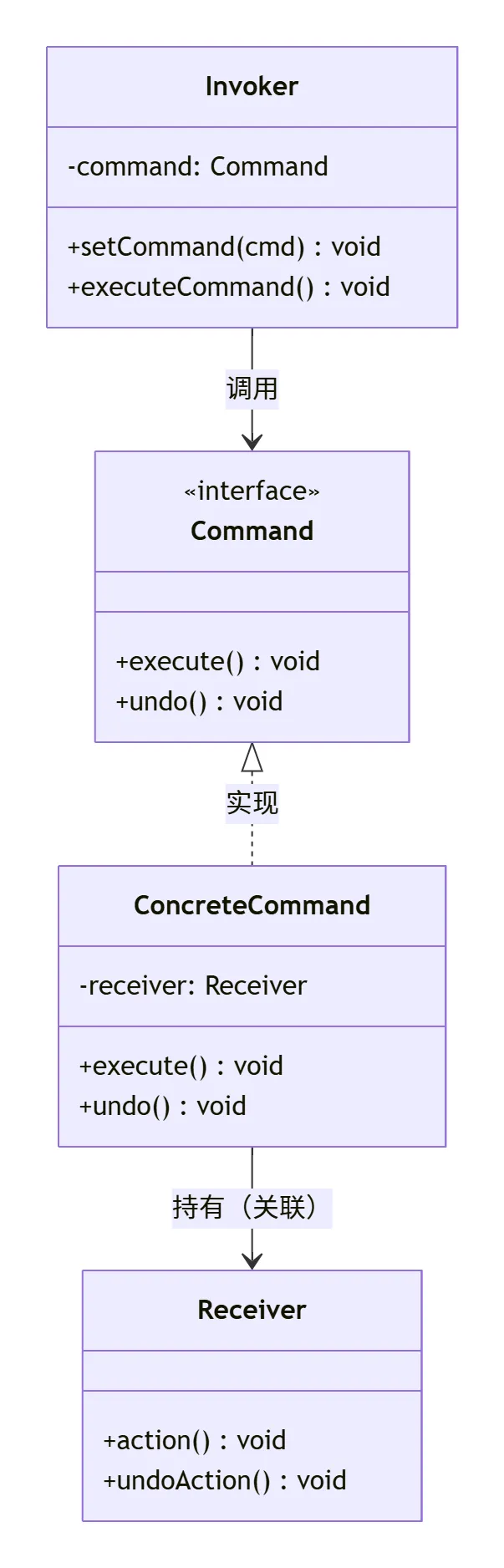
classDiagram
    class Command {
        <<interface>>
        +execute() void
        +undo() void
    }
    class ConcreteCommand {
        -receiver: Receiver
        +execute() void
        +undo() void
    }
    class Invoker {
        -command: Command
        +set_command(cmd) void
        +execute() void
    }
    class Receiver {
        +action() void
        +undo_action() void
    }

    Command <|-- ConcreteCommand : 实现
    ConcreteCommand --> Receiver : 持有
    Invoker --> Command : 调用
🌟 Spring中的命令模式
1. JdbcTemplate 回调(Command对象)
// JdbcTemplate将SQL操作封装为Command对象(回调)

// Command接口
publicinterfacePreparedStatementCallback<T> {
T doInPreparedStatement(PreparedStatement ps)throws SQLException, DataAccessException;
}

publicinterfaceRowMapper<T> {
T mapRow(ResultSet rs, int rowNum)throws SQLException;
}

publicinterfaceResultSetExtractor<T> {
T extractData(ResultSet rs)throws SQLException, DataAccessException;
}

// ConcreteCommand: PreparedStatementCreator
publicinterfacePreparedStatementCreator{
PreparedStatement createPreparedStatement(Connection con)throws SQLException;
}

// 使用:JdbcTemplate执行(Invoker)
jdbcTemplate.query(
"SELECT * FROM users WHERE age > ? AND status = ?",
new PreparedStatementSetter() {
@Override
publicvoidsetValues(PreparedStatement ps)throws SQLException {
            ps.setInt(1, 18);
            ps.setString(2, "ACTIVE");
        }
    },
new RowMapper<User>() {
@Override
public User mapRow(ResultSet rs, int rowNum)throws SQLException {
returnnew User(rs.getLong("id"), rs.getString("name"));
        }
    }
);

// 内部执行流程:
// 1. JdbcTemplate(Invoker)接收回调对象(Command)
// 2. 获取Connection
// 3. 执行PreparedStatementCallback(执行Command)
// 4. 返回结果

// ✅ Client(调用方)只需提供回调对象(Command),不关心执行流程
// ✅ JdbcTemplate统一管理连接、异常、资源(Invoker职责)
JdbcTemplate核心方法:
publicclassJdbcTemplate{
public <T> T query(String sql, RowMapper<T> rowMapper){
return query(sql, (ResultSet rs) -> {
            List<T> results = new ArrayList<>();
int rowNum = 0;
while (rs.next()) {
                results.add(rowMapper.mapRow(rs, rowNum++));
            }
return results;
        });
    }

public <T> T query(String sql, ResultSetExtractor<T> rse){
return execute(con -> {
            PreparedStatement ps = con.prepareStatement(sql);
try {
                ResultSet rs = ps.executeQuery();
try {
return rse.extractData(rs);
                } finally {
                    DataSourceUtils.closeResultSet(rs);
                }
            } finally {
                DataSourceUtils.closeStatement(ps);
            }
        });
    }

public <T> T execute(PreparedStatementCallback<T> action){
        DataSource ds = getDataSource();
        Connection con = DataSourceUtils.getConnection(ds);
try {
            PreparedStatement ps = con.prepareStatement(sql);
try {
return action.doInPreparedStatement(ps);  // 调用Command
            } finally {
                DataSourceUtils.closeStatement(ps);
            }
        } finally {
            DataSourceUtils.releaseConnection(con, ds);
        }
    }
}

// 匿名内部类实现Command
jdbcTemplate.execute((PreparedStatementCallback<Boolean>) ps -> {
    ps.setString(1, "test");
return ps.execute();
});
2. TaskExecutor / AsyncTaskExecutor - 异步命令
// Spring任务执行:将任务封装为Command执行

// Command: Runnable/Callable
Runnable task = () -> {
// 任务逻辑
    System.out.println("执行任务");
};

// Invoker: TaskExecutor
TaskExecutor executor = new SimpleAsyncTaskExecutor();
executor.execute(task);  // 异步执行

// 更丰富的Command
Callable<String> callable = () -> {
    Thread.sleep(1000);
return"任务完成";
};

Future<String> future = executor.submit(callable);  // 执行命令
String result = future.get();  // 获取结果(阻塞)

// AsyncTaskExecutor支持Callable
publicinterfaceAsyncTaskExecutorextendsTaskExecutor{
    <T> Future<T> submit(Callable<T> task);
    <T> Future<T> submit(Runnable task, T result);
}

// ThreadPoolTaskExecutor实现
publicclassThreadPoolTaskExecutorextendsExecutorConfigurationSupport
implementsAsyncListenableTaskExecutor, ScopedTaskExecutor{
private ThreadPoolExecutor threadPoolExecutor;

@Override
publicvoidexecute(Runnable task){
this.threadPoolExecutor.execute(task);  // 池中执行
    }

@Override
public <T> Future<T> submit(Callable<T> task){
returnthis.threadPoolExecutor.submit(task);
    }
}

// 使用:Spring @Async注解(@Async → AsyncAnnotationBeanPostProcessor → 代理 → TaskExecutor)
@Service
publicclassEmailService{
@Async// 声明式异步命令
public CompletableFuture<Void> sendEmail(String to, String content){
// 该方法被包装为AsyncTaskExecutor.execute()
        mailSender.send(to, content);
return CompletableFuture.completedFuture(null);
    }
}

// 异步命令流程:
// 1. EmailService被代理(SimpleAsyncTaskExecutor#submit)
// 2. @Async方法提交到线程池
// 3. 主线程立即返回CompletableFuture
// 4. 工作线程执行sendEmail()
3. Runnable事务命令
// Spring事务模板:TransactionTemplate使用Command模式

// Command: TransactionCallback
publicinterfaceTransactionCallback<T> {
T doInTransaction(TransactionStatus status);
}

// 使用
TransactionTemplate template = new TransactionTemplate(transactionManager);
String result = template.execute(status -> {
// Command执行体
    jdbcTemplate.update("INSERT INTO orders ...");
    jdbcTemplate.update("INSERT INTO order_items ...");
return"订单创建成功";
});

// 支持回滚:throw RuntimeException自动回滚
String result = template.execute(status -> {
try {
        jdbcTemplate.update("UPDATE inventory SET count = count - 1");
int rows = jdbcTemplate.update("INSERT INTO orders ...");
if (rows == 0) {
thrownew RuntimeException("创建订单失败");
        }
return"OK";
    } catch (Exception e) {
        status.setRollbackOnly();  // 命令内部明确回滚
throw e;
    }
});
4. Action / Callback 命令
// Spring Boot Actuator:HealthIndicator命令模式

// Command: HealthIndicator
publicinterfaceHealthIndicator{
Health health();
}

// 具体命令:DataSourceHealthIndicator
@Component
publicclassDataSourceHealthIndicatorextendsAbstractRelationalHealthIndicator{
@Override
protectedvoiddoHealthCheck(Builder builder)throws Exception {
        DataSource dataSource = getDataSource();
try (Connection conn = DataSourceUtils.getConnection(dataSource)) {
            DatabaseMetaData metaData = conn.getMetaData();
            builder.up()
                .withDetail("database", metaData.getDatabaseProductName())
                .withDetail("version", metaData.getDatabaseProductVersion());
        }
    }
}

// 具体命令:RedisHealthIndicator
@Component
publicclassRedisHealthIndicatorextendsAbstractHealthIndicator{
@Override
protectedvoiddoHealthCheck(Builder builder)throws Exception {
        RedisConnectionFactory factory = getRedisConnectionFactory();
try (RedisConnection conn = factory.getConnection()) {
            String info = conn.info();
            builder.up().withDetail("info", info);
        }
    }
}

// Invoker: HealthEndpoint
@Component
publicclassHealthEndpoint{
privatefinal Map<String, HealthIndicator> indicators;

@Autowired
publicHealthEndpoint(List<HealthIndicator> indicatorList){
this.indicators = new LinkedHashMap<>();
for (HealthIndicator indicator : indicatorList) {
            String name = indicator.getClass().getSimpleName().replace("HealthIndicator", "").toLowerCase();
this.indicators.put(name, indicator);
        }
    }

public Health health(){
        HealthAggregator aggregator = new SimpleHealthAggregator();
return aggregator.aggregate(this.indicators);
    }

public Health healthForPath(String path){
        HealthIndicator indicator = this.indicators.get(path);
if (indicator != null) {
return indicator.health();
        }
return health();
    }
}

// 使用:/actuator/health触发所有HealthIndicator命令
// GET /actuator/health/datasource → DataSourceHealthIndicator.health()
// GET /actuator/health/redis → RedisHealthIndicator.health()
5. ResourceEditor / PropertyEditor - 属性编辑命令
// 类型转换:String → Object(命令模式)

// Command: PropertyEditor
publicinterfacePropertyEditor{
voidsetAsText(String text)throws IllegalArgumentException;
String getAsText();
voidsetValue(Object value);
Object getValue();
}

// 具体命令:CustomDateEditor
publicclassCustomDateEditorextendsPropertyEditorSupportimplementsPropertyEditor{
privatefinal DateFormat dateFormat;
privatefinalboolean allowEmpty;

@Override
publicvoidsetAsText(String text)throws IllegalArgumentException {
if (this.allowEmpty && !StringUtils.hasText(text)) {
            setValue(null);
        } else {
try {
                setValue(this.dateFormat.parse(text));
            } catch (ParseException ex) {
thrownew IllegalArgumentException("无效日期格式: " + text, ex);
            }
        }
    }

@Override
public String getAsText(){
        Object value = getValue();
return (value instanceof Date ? this.dateFormat.format((Date) value) : "");
    }
}

// 具体命令:StringTrimmerEditor
publicclassStringTrimmerEditorextendsPropertyEditorSupport{
@Override
publicvoidsetAsText(String text)throws IllegalArgumentException {
if (text == null) {
            setValue(null);
        } else {
            String trimmed = text.trim();
            setValue(trimmed.isEmpty() ? null : trimmed);
        }
    }
}

// Invoker: BeanWrapperImpl
publicclassBeanWrapperImpl{
private PropertyEditorRegistry registry;

publicvoidsetPropertyValue(String propertyName, String value){
        PropertyEditor editor = findCustomEditor(propertyType);
if (editor != null) {
            editor.setAsText(value);  // 执行命令:String → Object
            setPropertyValue(propertyName, editor.getValue());
        }
    }
}

// 使用:Spring自动转换参数
@GetMapping("/users")
public String createUser(@RequestParam @DateTimeFormat(pattern = "yyyy-MM-dd") Date birth) {
// String "1990-01-01" → Date 通过CustomDateEditor(命令)
}
🔄 命令 vs 策略
RunnableCallable、PreparedStatementCallback | SortCacheResolver |
Spring Command:Spring将很多回调接口设计为命令模式 • Runnable/Callable - 任务命令
• PreparedStatementCallback - SQL命令
• RowMapper - 结果集映射命令
• HealthIndicator - 健康检查命令
• PropertyEditor - 类型转换命令
练习
练习1:自定义JdbcTemplate
// 简化版JdbcTemplate,练习命令模式

publicclassSimpleJdbcTemplate{
privatefinal DataSource dataSource;

public <T> T query(String sql, RowCallback<T> callback){
try (Connection conn = dataSource.getConnection();
             PreparedStatement ps = conn.prepareStatement(sql);
             ResultSet rs = ps.executeQuery()) {

            T result = callback.doInRow(rs);
return result;

        } catch (SQLException e) {
thrownew DataAccessException("查询失败", e);
        }
    }
}

// 使用
SimpleJdbcTemplate template = new SimpleJdbcTemplate(dataSource);
List<User> users = template.query("SELECT * FROM users", rs -> {
    List<User> list = new ArrayList<>();
while (rs.next()) {
        list.add(new User(rs.getLong("id"), rs.getString("name")));
    }
return list;
});
练习2:命令队列
// 实现命令队列,支持批量执行和撤销

publicinterfaceCommand{
voidexecute();
voidundo();
}

publicclassCommandQueue{
privatefinal Stack<Command> history = new Stack<>();

publicvoidaddCommand(Command cmd){
        cmd.execute();
        history.push(cmd);
    }

publicvoidundoLast(){
if (!history.isEmpty()) {
            history.pop().undo();
        }
    }

publicvoidexecuteBatch(List<Command> commands){
for (Command cmd : commands) {
            cmd.execute();
            history.push(cmd);
        }
    }
}
下一步
✅ 掌握命令模式后,继续学习:
👉 解释器模式
参考
• 🌐 Spring Framework - PreparedStatementCallback
• 🌐 Spring Framework - TaskExecutor
• 🌐 Spring Framework - HealthIndicator