 夜雨聆风
夜雨聆风
点击蓝字 关注我们 持续更新
距离agent系列文章分享已经过去了一段时间,agent领域的热度不减反增。26年开年的openclaw让非研发同学也体验到了agent的便利。笔者把调研过的agent内容逐步汇总到这个系列中,希望帮助更多人了解 Agent 的核心内容。
💡 系列定位:这一篇讲"怎么做到的"——从顶级 Coding Agent 的源码中提炼设计哲学,再手把手带你从零搭建。
开篇:从"是什么"到"怎么做到的"
2025-2026 年,Coding Agent 全面爆发。Claude Code、OpenAI Codex、Cursor、Windsurf、Cline、Hermes……这些产品代表了不同的设计哲学,却都在"让 AI 自主完成编程任务"这件事上取得了惊人效果。
作为 Agent 应用的核心开发者,过去一年我反复研究了多个顶级开源 Coding Agent 的源码。本文是我的拆解笔记 + 实战对照 + 教学实践——不仅告诉你"它们为什么强"(设计哲学),更带你从零搭建一个具备核心能力的 Agent,还会从非技术视角看一下作为个人应该怎么搭建自己的专属agent。
为什么要拆 Coding Agent?
• 研发同学都在用,甚至不少非技术同学也在用。 • 它是当前最成熟的 Agent 落地场景——有明确的输入输出、可衡量的成功标准、丰富的工具生态 • 它的设计模式可迁移——上下文管理、工具调度、错误恢复等问题,是所有 Agent 的共性挑战 • 它的代码是开源的——可以直接看到生产级实现的每一个细节
前置科普:读懂本文所需的最小知识
📖 已了解agent内容的同学可直接跳到 第一节。本节是为零基础读者准备的速查手册,5 分钟内建立必要的心智模型。
0.1 Agent 和 Chat 有什么本质区别?
大多数人接触 AI 的方式是"一问一答"——你发消息,AI 回一条,结束。这就是 Chat(对话模式)。
Agent(智能体) 的核心区别是:它能自主循环,直到完成目标。你交给它一个任务,它会自己规划步骤、调用工具、观察结果,再决定下一步——整个过程不需要你每步确认。
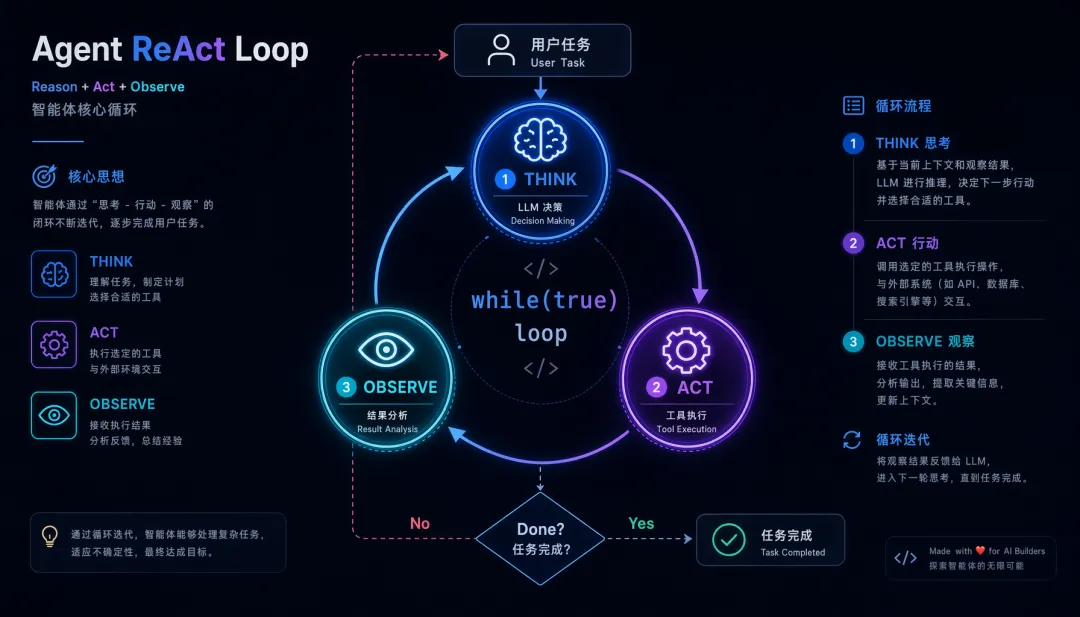
这个 Think → Act → Observe 的循环,就是本文所有源码分析的底层骨架,学术上叫 ReAct(Reasoning + Acting)。
0.2 什么是"工具调用"?
Agent 之所以能完成真实任务,是因为 LLM 可以发出"指令",让外部程序执行操作并把结果返回给它——这就是工具调用(Tool Call / Function Call)。
常见工具类型:文件读写、终端命令、网络搜索、数据库查询……工具越丰富,Agent 能完成的任务边界就越大。
0.3 什么是"上下文窗口"和 Token?
LLM 每次推理都有一个输入长度限制,超出就会报错或遗忘早期内容。这个限制用 Token 衡量——大致理解为"词片段",中文约 1 个汉字 ≈ 1.5 个 Token,英文约 4 个字母 ≈ 1 个 Token。
这就是为什么上下文管理是 Agent 最核心的工程挑战——本文第二节会深入拆解 Claude Code 的五级压缩策略。
0.4 什么是 KV-Cache?
当你每轮都把相同的前缀(System Prompt + 工具列表 + 历史消息)发给 API 时,云端服务器可以复用上次计算的中间结果,不用从头重新计算——这就是 KV-Cache(键值缓存)。
对 Agent 的意义:Cache 命中 → 成本降低 90%,延迟降低 80%。Claude Code 几乎所有设计决策都在保护这个 Cache,后文会详细分析。
0.5 本文阅读建议
一、Coding Agent 全景图:为什么值得拆?
核心问题:为什么效果差异大?
所有 Coding Agent 本质上都在做同一件事:while(true) { 思考 → 行动 → 观察 }。但为什么有的产品一句话就能完成复杂重构,有的却在简单任务上反复犯错?
答案不在模型能力(大家用的是同一批模型),而在架构设计——尤其是以下四个维度:
接下来,我们从五个代表性项目的源码中,逐一拆解这些维度的最佳实践。
二、核心对比与源码拆解
2.1 Claude Code — "KV-Cache 感知是第一公民"
🏷️ 语言:TypeScript/Bun | 架构:单循环流式 Agent | 核心哲学:极简但强大
Claude Code 的架构可以用一句话概括:所有设计决策都围绕"如何最大化 Prompt Cache 命中"展开。这不仅仅是性能优化——当你的 Agent 每一轮对话都要传入完整上下文时,Cache 命中率直接决定了成本和延迟。
Agent Loop:AsyncGenerator + 状态机
Claude Code 的核心循环位于 src/query.ts,采用 AsyncGenerator + while(true) 模式:
// src/query.ts - 核心循环骨架async function* queryLoop(params: QueryParams): AsyncGenerator<StreamEvent, Terminal> { // 可变的跨迭代状态 let state: State = { messages: params.messages, autoCompactTracking: undefined, maxOutputTokensRecoveryCount: 0, hasAttemptedReactiveCompact: false, turnCount: 1, transition: undefined, // 转移原因:compact_retry / escalate / continuation } while (true) { const { messages, turnCount } = state yield { type: 'stream_request_start' } // ====== 分级压缩管线(从轻到重) ====== let messagesForQuery = [...getMessagesAfterCompactBoundary(messages)] messagesForQuery = snipCompact(messagesForQuery) // Level 1: 裁剪旧消息 messagesForQuery = microCompact(messagesForQuery) // Level 2: 压缩单条 tool_result // Level 3 & 4: Context Collapse / AutoCompact 按条件触发 // ====== LLM 调用 + 流式工具执行 ====== const streamingToolExecutor = new StreamingToolExecutor(tools, canUseTool) for await (const message of callModel({ messages: messagesForQuery, ... })) { yield message // 流式透传给消费者 if (message.type === 'assistant') { for (const toolBlock of message.content.filter(c => c.type === 'tool_use')) { streamingToolExecutor.addTool(toolBlock) // 边收边执行,不等响应结束! } } } // ====== 工具结果收集 + 错误恢复 ====== const toolResults = await streamingToolExecutor.getResults() // ... 错误检测、withhold、重试逻辑 ... if (!needsFollowUp) break // 没有工具调用 → 结束 }}关键设计点:
• AsyncGenerator 而非 Promise:允许调用方逐条消费消息,实现真正的流式体验 • 状态机驱动转移: transition字段记录为什么要"再来一轮"——是压缩后重试?是 token 超限升级?还是续写?• 边收边执行:不等 API 响应结束就开始执行工具,极大降低体感延迟
工具系统:StreamingToolExecutor + 智能并发
// src/services/tools/StreamingToolExecutor.tsclass StreamingToolExecutor { private pendingTools: Map<string, { tool: ToolUseBlock; promise: Promise<ToolResult> }> = new Map() private concurrentBatch: ToolUseBlock[] = [] private serialQueue: ToolUseBlock[] = [] addTool(toolBlock: ToolUseBlock): void { const toolDef = this.tools.find(t => t.name === toolBlock.name) if (toolDef?.isConcurrencySafe) { this.concurrentBatch.push(toolBlock) // 并发安全 → 立即执行 this.startExecution(toolBlock) } else { this.serialQueue.push(toolBlock) // 非并发安全 → 排队等待 } } async getResults(): Promise<ToolResult[]> { // 先等并发批完成,再串行执行队列 await Promise.all(this.concurrentBatch.map(t => this.pendingTools.get(t.id)!.promise)) for (const tool of this.serialQueue) { await this.executeSerially(tool) } return this.collectResults() }}每个 Tool 定义通过 isConcurrencySafe 声明自己是否可并发:
• ReadFile、SearchContent、ListDir→ 并发安全,最多 10 个并行• WriteFile、ExecuteCommand→ 非并发安全,严格串行
上下文管理:五级递进压缩
这是 Claude Code 最精妙的设计——不是一上来就全量压缩,而是从轻到重逐级尝试:
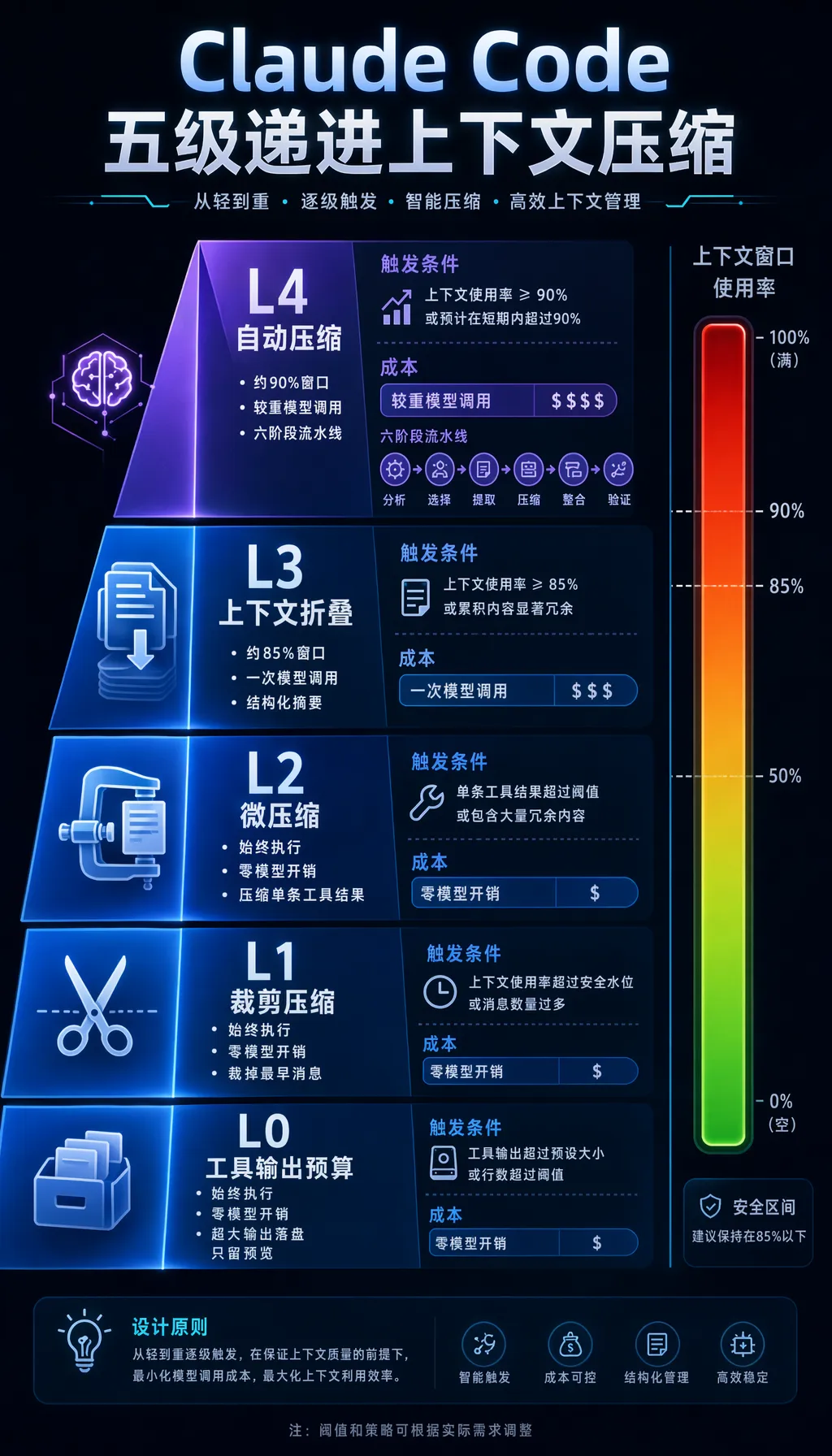
L0 补充:工具输出预算(Tool Output Budget)
在进入任何压缩策略之前,Claude Code 首先对 工具调用的原始输出 设置了严格的字符预算,超出阈值的内容会被持久化到本地磁盘,上下文中仅保留一段 2000 字节的预览:
// src/constants/toolLimits.ts — 核心预算常量const DEFAULT_MAX_RESULT_SIZE_CHARS = 50_000 // 单个工具输出上限:5 万字符const MAX_TOOL_RESULTS_PER_MESSAGE_CHARS = 200_000 // 单条 user message 所有工具输出总和上限:20 万字符const PREVIEW_SIZE_BYTES = 2_000 // 持久化后保留的预览大小// src/utils/toolResultStorage.ts — 超出阈值时持久化到磁盘async function maybePersistLargeToolResult(toolResultBlock, toolName) { const size = contentSize(content) const threshold = getPersistenceThreshold(toolName, tool.maxResultSizeChars) if (size <= threshold) return toolResultBlock // 未超出,直接返回 // 超出:写入 {sessionDir}/tool-results/{tool_use_id}.txt const result = await persistToolResult(content, toolResultBlock.tool_use_id) // 上下文中替换为预览消息: // "<persisted-output>\\nOutput too large (XXX chars). Full output saved to: {path}\\nPreview:\\n..." return { ...toolResultBlock, content: buildLargeToolResultMessage(result) }}两层预算的执行逻辑:
• per-tool 预算:每个工具自己声明 maxResultSizeChars,实际阈值取Math.min(工具声明值, 50_000)。FileReadTool声明为Infinity(永不持久化,因为持久化会触发"读文件→持久化→再读持久化文件"的死循环);BashTool/GrepTool上限分别为 30k / 20k 字符• per-message 聚合预算:一次并行工具调用(同一条 user message)的所有输出字符总和超过 20 万时,从最大的工具结果开始贪心地依次持久化,直到总量满足预算
持久化写入时使用 flag: 'wx'(文件已存在则跳过),保证 MicroCompact 在重放历史消息时不会重复写入同一文件。
// 自动触发逻辑(简化)if (tokenUsage > 0.97) { // 阻塞!必须压缩才能继续 await forceAutoCompact(messages)} else if (tokenUsage > 0.90) { // 自动触发,但有熔断器保护(连续失败3次则停止) if (autoCompactCircuitBreaker.isOpen()) return await autoCompact(messages)}KV-Cache 感知设计(核心中的核心)
Claude API 支持 Prompt Cache——如果你的请求前缀与上一次相同,Anthropic 会复用已缓存的 KV-Cache,成本降低 90%,延迟降低 80%。Claude Code 的所有设计都在保护这个 Cache:
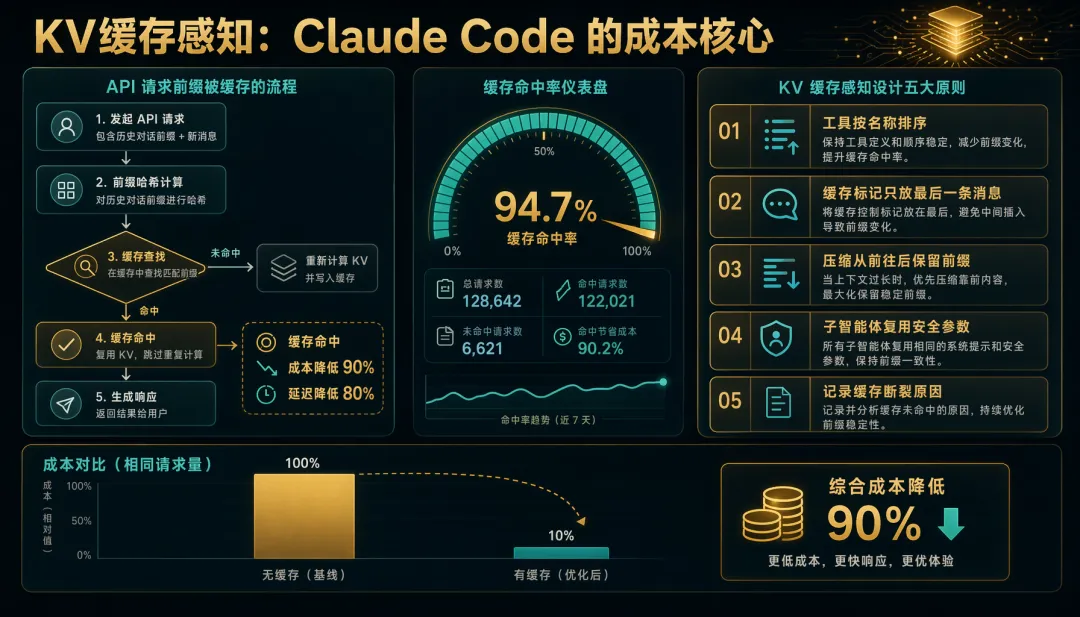
// 1. 工具按名称排序 → 工具列表不变 = Cache 命中const sortedTools = tools.sort((a, b) => a.name.localeCompare(b.name))// 2. cache_control 标记只放在最后一条消息 → 保护前面所有内容的 Cachemessages[messages.length - 1].cache_control = { type: 'ephemeral' }// 3. Compact 方向选择 'from'(从前往后保留)→ 保护 prefixcompact({ direction: 'from', messages })// 4. CacheSafeParams 共享 → Fork Agent 复用父请求的 system prompt + tools + modelconst subAgent = fork({ cacheSafeParams: parent.cacheSafeParams })// 5. 追踪每次 Cache 断裂原因promptCacheBreakDetection.record({ reason: 'tool_list_changed', impact: estimatedCost })📌 实践建议:
• System Prompt 和工具列表一旦确定就别动——每次变更都可能导致 Cache 失效 • 如果你用 Anthropic API,把 cache_control放在对话最后一条消息上• 新增工具时按名称字典序插入,而非追加到末尾
2.2 OpenAI Codex — "安全即架构"
🏷️ 语言:Rust(核心) + TypeScript/Python(SDK) | 架构:沙箱隔离 + 多Agent协作 | 核心哲学:安全是第一架构约束
Codex 与 Claude Code 最大的区别:它不信任 Agent 执行的任何代码。所有代码执行都在操作系统级沙箱中进行,这不是"事后补安全",而是从架构设计之初就把安全作为核心约束。
核心循环:Rust 实现的 Turn Loop
// codex-rs/core/src/session/turn.rs - 核心 turn 循环pub(crate) async fn run_turn( sess: Arc<Session>, turn_context: Arc<TurnContext>,) -> Option<String> { loop { // 1. 收集待处理输入 let pending_input = sess.input_queue.get_pending_input(&sess.active_turn).await; // 2. 构建模型请求 let sampling_request_input: Vec<ResponseItem> = sess.clone_history().await .for_prompt(&turn_context.model_info.input_modalities); // 3. 执行采样请求 match run_sampling_request(sess.clone(), turn_context.clone(), sampling_request_input).await { Ok(result) => { let SamplingRequestResult { needs_follow_up, last_agent_message } = result; if !needs_follow_up { break; // 模型没有请求工具调用 → Turn 结束 } // Token 限制触发自动压缩 if token_limit_reached && needs_follow_up { run_auto_compact(/* ... */).await; } continue; // function_call 执行完毕,继续下一轮采样 } Err(CodexErr::TurnAborted) => break, Err(e) => { sess.send_event(EventMsg::Error(e)).await; break; } } } last_agent_message}沙箱架构:三平台 OS 级隔离
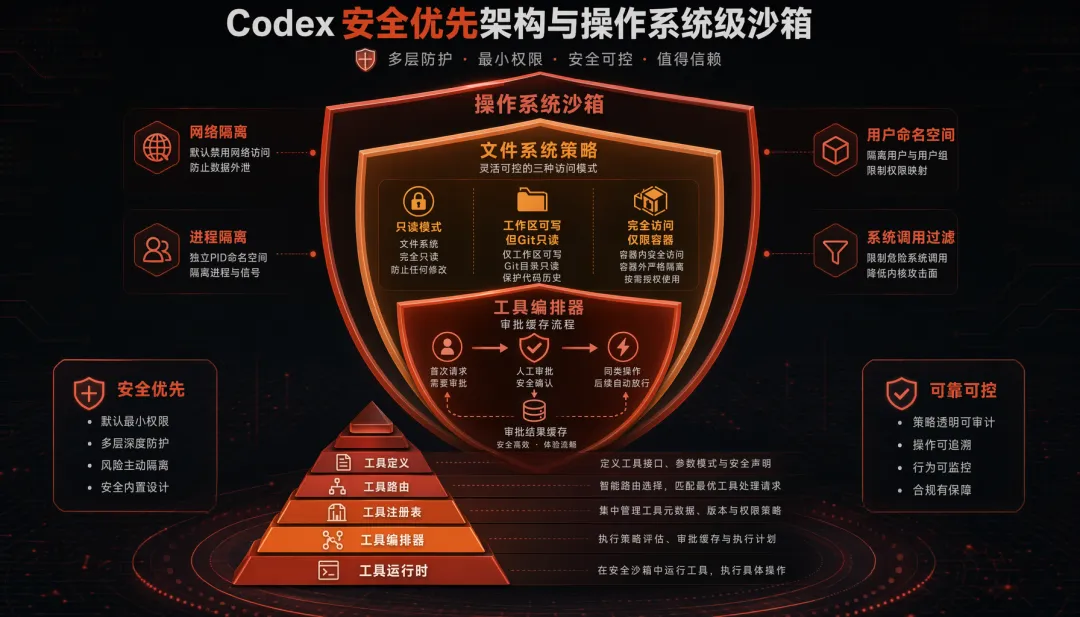
// codex-rs/core/src/sandbox/linux.rs - Linux 沙箱创建(Bubblewrap)fn create_sandbox_command(config: &SandboxConfig) -> Command { let mut cmd = Command::new("bwrap"); cmd.args([ "--unshare-user", // 用户命名空间隔离 "--unshare-pid", // PID 命名空间隔离 "--unshare-net", // 网络命名空间隔离(完全断网) "--die-with-parent", // 父进程退出时自动杀死 ]); // 文件系统策略 match config.policy { ReadOnly => { cmd.args(["--ro-bind", &workspace, &workspace]); // 只读绑定 } WorkspaceWrite => { cmd.args(["--bind", &workspace, &workspace]); // 可写 cmd.args(["--ro-bind", &git_dir, &git_dir]); // .git 强制只读! } FullAccess => { /* 仅容器环境允许 */ } } // Seccomp 系统调用过滤 cmd.args(["--seccomp", &seccomp_filter_fd]); cmd}三级文件系统策略的设计体现了"最小权限原则":
• read-only:Agent 只能看代码,不能改(用于代码审查场景) • workspace-write:可以改代码但 .git强制只读(防止 Agent 篡改版本历史)• danger-full-access:完全不限制(仅在 Docker 容器中允许)
工具编排:五层分层架构
ToolSpec(模型可见定义,JSON Schema) ↓ToolRouter(路由分发,匹配工具名→实现) ↓ToolRegistry(运行时注册表,支持动态注册/注销) ↓ToolOrchestrator(审批 + 沙箱选择 + 重试策略) ↓ToolRuntime(具体执行:Shell / FileSystem / Network)其中 ToolOrchestrator 最值得学习——它引入了"审批缓存"(ApprovalStore):
// 审批缓存逻辑(简化)async fn execute_with_approval(tool_call: &ToolCall) -> ToolResult { // 1. 检查审批缓存:相同类型操作是否已被批准? if approval_store.is_approved(&tool_call.approval_key()) { return execute_in_sandbox(tool_call).await; // 直接执行 } // 2. 请求用户审批 let decision = request_approval(tool_call).await; match decision { Approve(scope) => { approval_store.cache(tool_call.approval_key(), scope); // 缓存审批 execute_in_sandbox(tool_call).await } Deny => ToolResult::Error("User denied".into()), }}用户批准一次"允许写入 src/ 目录"后,后续对 src/ 的写入操作免二次确认——兼顾了安全和流畅。
多 Agent 协作原语
Codex 内置了 Agent 间通信的原语:
// 系统提示中鼓励并行"Prefer multiple sub-agents to parallelize independent tasks."// 5 个核心原语spawn_agent({ name: "test-runner", task: "Run all unit tests" })wait_agent({ name: "test-runner" })send_message({ to: "test-runner", content: "Focus on auth module" })close_agent({ name: "test-runner" })list_agents()📌 实践建议:
• 代码执行必须有沙箱——哪怕最简单的 Docker 隔离也好过裸执行 • "审批缓存"模式兼顾安全和体验:首次审批,后续自动放行同类操作 • 如果你的 Agent 任务复杂度高,考虑"spawn 子 Agent 并行"而非"单 Agent 串行"
2.3 Hermes Agent — "自进化 + Prompt Cache 第一公民"
🏷️ 语言:Python | 架构:单循环 + 自进化闭环 | 核心哲学:模型无锁定 + 经验沉淀
Hermes 的两大特色:1)完全兼容 OpenAI 协议,一行命令切换任意模型;2)完成任务后自动沉淀 Skill,Agent 越用越强。
核心循环:IterationBudget 预算制
# agent/conversation_loop.py - 主循环while (api_call_count < agent.max_iterations and agent.iteration_budget.remaining > 0) or agent._budget_grace_call: # 中断检测 if agent._interrupt_requested: break api_call_count += 1 # 预算消耗(线程安全) if agent._budget_grace_call: agent._budget_grace_call = False # Grace call: 预算耗尽后的"最后一次机会" elif not agent.iteration_budget.consume(): break # === Token 预检 + 上下文压缩 === estimated_tokens = count_tokens(messages) if estimated_tokens > context_window * 0.85: messages = await context_compressor.compress(messages) # 最多重试 3 轮 compression_attempts += 1 if compression_attempts > 3: # Session 分裂:创建 child session,携带压缩摘要继续 session = session.split(summary=generate_handoff_summary(messages)) # === API 调用 === response = await call_model(messages, tools=get_tool_definitions()) # === 工具执行(最多 8 线程并发) === if response.tool_calls: results = await execute_tools_concurrent(response.tool_calls, max_workers=8) messages.extend(results) else: final_response = response.content breakIterationBudget 是一个巧妙的设计:
# agent/iteration_budget.pyclass IterationBudget: """线程安全的迭代计数器。父 Agent 默认 90 轮,子 Agent 50 轮。""" def __init__(self, max_total: int): self.max_total = max_total self._used = 0 self._lock = threading.Lock() def consume(self) -> bool: """尝试消耗一次迭代。返回 True 表示允许。""" with self._lock: if self._used >= self.max_total: return False self._used += 1 return True def refund(self) -> None: """退还一次迭代(如 execute_code 不消耗预算)。""" with self._lock: if self._used > 0: self._used -= 1refund() 方法特别有意思——某些"纯执行"的迭代(如运行测试脚本)不应该消耗思考预算,可以退还。
工具注册:AST 自动发现
Hermes 的工具注册完全是声明式的——新增一个工具只需在 tools/ 目录下创建文件,无需修改任何其他代码:
# tools/registry.py - AST 自动发现import astfrom pathlib import Pathdef _is_registry_register_call(node: ast.AST) -> bool: """检测是否为 registry.register(...) 调用。""" if not isinstance(node, ast.Expr) or not isinstance(node.value, ast.Call): return False func = node.value.func return (isinstance(func, ast.Attribute) and func.attr == "register" and isinstance(func.value, ast.Name) and func.value.id == "registry")def discover_builtin_tools() -> list[str]: """扫描 tools/ 目录,通过 AST 检测哪些模块注册了工具。""" tools_dir = Path(__file__).parent discovered = [] for py_file in tools_dir.glob("*.py"): if py_file.name.startswith("_"): continue try: tree = ast.parse(py_file.read_text(), filename=str(py_file)) if any(_is_registry_register_call(node) for node in ast.iter_child_nodes(tree)): discovered.append(py_file.stem) except (OSError, SyntaxError): continue return discovered为什么用 AST 而不是直接 import?因为 import 有副作用——某些工具模块可能依赖 Docker、GPU 等外部资源,AST 解析是零副作用的。
自进化 Skill 闭环
这是 Hermes 最独特的设计——Agent 完成复杂任务后,自动将经验沉淀为可复用的 Skill:
# skills/creator.py - Skill 创建流程(简化)async def maybe_create_skill(task_trajectory: list[Message]) -> Optional[Skill]: """任务完成后,评估是否值得创建 Skill。""" # 1. 判断任务复杂度是否值得沉淀 if len(task_trajectory) < 5: return None # 太简单的任务不值得 # 2. 提取任务模式 pattern = await extract_task_pattern(task_trajectory) # 3. 生成 SKILL.md(纯 Markdown 格式) skill_content = f"""# {pattern.name}## 触发条件{pattern.trigger_description}## 执行步骤{pattern.steps_markdown}## 注意事项{pattern.caveats}""" # 4. 保存为 Skill 文件 skill_path = SKILLS_DIR / f"{pattern.name}.md" skill_path.write_text(skill_content) # 5. 注册到 Skill 索引 register_skill(skill_path, patch_count=0) return Skill(path=skill_path)自进化闭环:创建 Skill → 后续任务匹配到 Skill → 执行中发现不完善 → 自动 patch → patch_count 递增 → Curator 守护进程定期清理低质量 Skill。
📌 实践建议:
• "AST 自动发现"是工具扩展的最佳实践:新增工具 = 新增文件,零修改核心代码 • IterationBudget + Grace Call 模式值得借鉴:防止 Agent 无限循环,又给它"最后一次机会"体面收尾 • Skill 沉淀思路:Agent 的经验应该结构化保存,而非消失在日志里
2.4 扩展对照
OpenClaw — 多 Agent 编排的"控制平面"
OpenClaw 的核心理念不是"造一个更聪明的 Agent",而是造一个管理 Agent 的操作系统:
┌─────────────────────────────────────────────────┐│ Gateway(控制平面) ││ WebSocket RPC + 22 种消息渠道统一路由 │├─────────────────────────────────────────────────┤│ Bindings 路由表 ││ channel=whatsapp + peer=+86xxx → Agent-A ││ channel=slack + guild=xxx → Agent-B ││ channel=telegram + peer=xxx → Agent-C │├─────────────────────────────────────────────────┤│ Agent-A Agent-B Agent-C ││ (独立工作区) (独立工作区) (独立工作区) ││ AGENTS.md AGENTS.md AGENTS.md ││ SOUL.md SOUL.md SOUL.md │└─────────────────────────────────────────────────┘核心设计哲学:
• "Prompt as Code":AGENTS.md(行为指令) + SOUL.md(人格) + TOOLS.md(工具说明) + BOOT.md(启动逻辑) + HEARTBEAT.md(心跳) → Agent 行为完全版本化管理 • 扁平协作模型:拒绝 Manager-of-Managers 层级框架,用 session-based 的扁平通信 • Node 模式:设备(macOS/iOS/Android)作为远程节点,暴露 camera/screen/location 等能力
Google ADK-Python — 声明式 Agent 框架的典范
ADK 的核心设计是**"函数即工具、代码即定义"**——用 Python 代码而非配置文件定义一切:
# 定义工具:就是一个普通函数!def get_weather(city: str) -> str: """获取指定城市的天气信息。""" return f"{city} 今天 25°C 晴"# 定义 Agent:声明式组合weather_agent = LlmAgent( name="weather_assistant", model="gemini-2.0-flash", tools=[get_weather], # 直接传函数!自动生成 JSON Schema sub_agents=[detail_agent, summary_agent],)框架内部通过 inspect.signature 自动从函数签名提取参数类型,生成 OpenAPI 格式的 FunctionDeclaration——零胶水代码:
# src/google/adk/tools/function_tool.pyclass FunctionTool(BaseTool): def __init__(self, func: Callable[..., Any]): self.func = func # 自动从签名生成 Schema self._declaration = build_function_declaration(func=func) async def run_async(self, *, args: dict, tool_context: ToolContext) -> Any: # 自动注入 tool_context 参数 signature = inspect.signature(self.func) if 'tool_context' in signature.parameters: args['tool_context'] = tool_context return await self._invoke_callable(self.func, args)Workflow 图引擎(2.0 新增)支持声明式 DAG:
from google.adk.workflow import Workflow, node, START, END@nodeasync def validate_input(ctx): ...@nodeasync def process_data(ctx): ...@nodeasync def generate_report(ctx): ...# 声明式定义 DAGpipeline = Workflow( edges=[ (START, validate_input, process_data), # 链式语法 (process_data, generate_report, END), ], max_concurrency=3, # 并发控制)多 Agent 转移——通过 enum 约束防止 LLM 幻觉:
# 自动限制合法的转移目标class TransferToAgentTool(FunctionTool): def __init__(self, agent_names: list[str]): super().__init__(func=transfer_to_agent) self._agent_names = agent_names def _get_declaration(self): decl = super()._get_declaration() # 将 agent_name 参数的 schema 限制为 enum decl.parameters.properties['agent_name'].enum = self._agent_names return decl📌 实践建议:
• OpenClaw 的"多渠道统一路由"适合需要对接多前端的产品——一套 Agent 逻辑,多端触达 • ADK 的"函数即工具"大幅降低开发门槛:不需要手写 JSON Schema,写个函数就行 • Workflow 图引擎适合有确定性流程的场景(审批链、数据管道),比纯 LLM 路由更可控 • enum约束防幻觉是个巧妙的小技巧:限制模型的选择空间 = 减少犯错概率
2.5 横向对比总结表
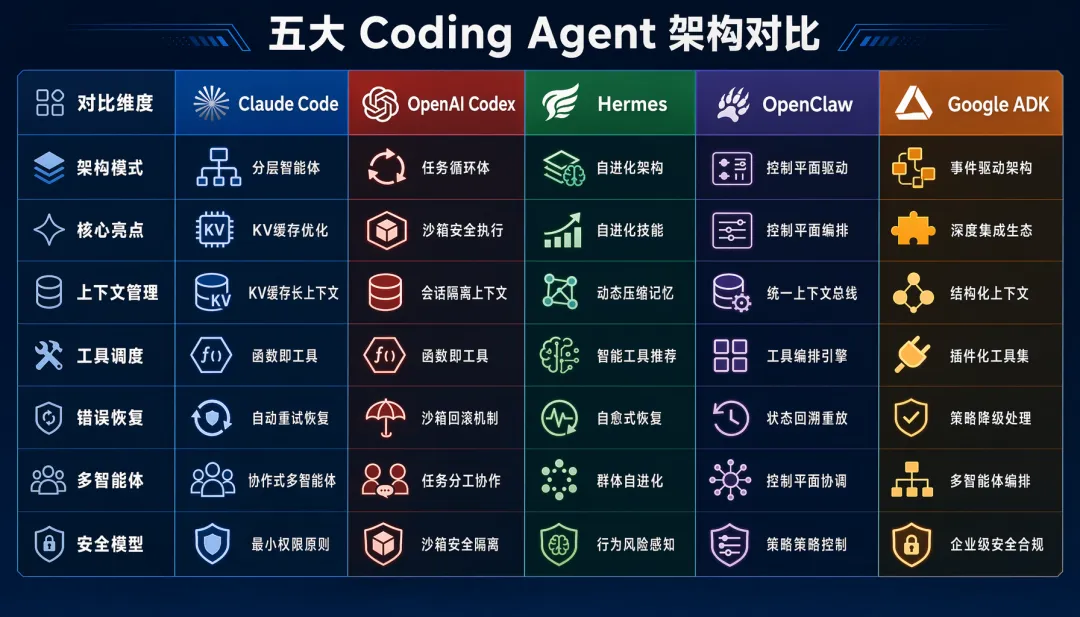
| 核心亮点 | |||||
一句话总结:
• Claude Code:省钱省时间(Cache 优化做到极致) • Codex:安全到骨子里(沙箱是架构而非补丁) • Hermes:越用越强(自进化 Skill + 零锁定) • OpenClaw:管理 Agent 的操作系统 • ADK-Python:开发者体验最优(写函数就是造工具)
三、从零到 Harness:手把手搭建你的 Agent 工程
理论说完了,接下来动手。我们从最简单的 50 行 Agent Loop 开始,逐步添加工具、上下文管理、流式输出、规划和记忆,最终搭建一个完整的 Agent Harness。
3.1 核心骨架:Agent Loop(50行代码)
Agent 的本质就是一个 while 循环——思考、行动、观察、决定是否继续:
"""最小可行 Agent Loop —— 50 行代码"""import jsonfrom openai import OpenAIclient = OpenAI()def agent_loop(user_message: str, tools: list[dict], max_steps: int = 10) -> str: """最小可行的 Agent 主循环。""" messages = [ {"role": "system", "content": "你是一个有帮助的助手。使用工具来完成任务。"}, {"role": "user", "content": user_message}, ] for step in range(max_steps): # 1. 思考:调用 LLM response = client.chat.completions.create( model="gpt-4o", messages=messages, tools=tools, tool_choice="auto", ) assistant_msg = response.choices[0].message messages.append(assistant_msg.model_dump()) # 2. 判断:是否需要行动? if not assistant_msg.tool_calls: return assistant_msg.content # 无工具调用 → 结束 # 3. 行动:执行工具 for tool_call in assistant_msg.tool_calls: result = execute_tool(tool_call.function.name, tool_call.function.arguments) messages.append({ "role": "tool", "tool_call_id": tool_call.id, "content": json.dumps(result, ensure_ascii=False), }) # 4. 观察:工具结果已加入上下文,继续循环 return "达到最大步数限制" # 兜底核心模式:while True → LLM 决策 → 执行 → 观察 → 继续/结束。所有复杂的 Agent 都是这个骨架的扩展。
3.2 工具注册与调度
接下来给 Agent 装上"手脚"——让它能操作文件、执行代码、搜索信息:
"""工具注册中心 —— 声明式 + 自动 Schema 生成"""import inspectimport jsonfrom typing import Any, Callable# 全局工具注册表_TOOL_REGISTRY: dict[str, Callable] = {}def tool(description: str = ""): """装饰器:注册一个函数为 Agent 工具。""" def decorator(func: Callable) -> Callable: func._tool_description = description or func.__doc__ or "" _TOOL_REGISTRY[func.__name__] = func return func return decoratordef get_tool_schemas() -> list[dict]: """自动从注册的函数生成 OpenAI Function Calling Schema。""" schemas = [] for name, func in _TOOL_REGISTRY.items(): sig = inspect.signature(func) properties = {} required = [] for param_name, param in sig.parameters.items(): if param_name in ("self", "cls"): continue prop = {"type": _python_type_to_json_type(param.annotation)} properties[param_name] = prop if param.default is inspect.Parameter.empty: required.append(param_name) schemas.append({ "type": "function", "function": { "name": name, "description": func._tool_description, "parameters": { "type": "object", "properties": properties, "required": required, }, }, }) return schemasdef execute_tool(name: str, arguments: str) -> Any: """执行工具并返回结果。""" func = _TOOL_REGISTRY.get(name) if not func: return {"error": f"未知工具: {name}"} try: args = json.loads(arguments) if isinstance(arguments, str) else arguments result = func(**args) return {"success": True, "result": result} except Exception as e: return {"success": False, "error": str(e)}# ===== 示例工具 =====@tool("读取指定路径的文件内容")def read_file(path: str) -> str: with open(path, 'r', encoding='utf-8') as f: return f.read()@tool("将内容写入指定路径的文件")def write_file(path: str, content: str) -> str: with open(path, 'w', encoding='utf-8') as f: f.write(content) return f"文件已写入: {path}"@tool("在目录中搜索包含关键词的文件")def search_files(directory: str, keyword: str) -> list[str]: import os results = [] for root, dirs, files in os.walk(directory): for file in files: filepath = os.path.join(root, file) try: with open(filepath, 'r', encoding='utf-8') as f: if keyword in f.read(): results.append(filepath) except (UnicodeDecodeError, PermissionError): continue return resultsdef _python_type_to_json_type(annotation) -> str: """Python 类型注解 → JSON Schema 类型。""" type_map = {str: "string", int: "integer", float: "number", bool: "boolean", list: "array"} return type_map.get(annotation, "string")3.3 上下文窗口管理
当对话越来越长时,如何防止 Token 爆炸?借鉴 Claude Code 的"分级压缩"思路:
"""上下文窗口管理 —— 分级压缩策略"""from dataclasses import dataclassfrom typing import Optional@dataclassclass ContextConfig: max_tokens: int = 128000 # 模型窗口大小 compress_threshold: float = 0.7 # 70% 触发规则压缩 summary_threshold: float = 0.9 # 90% 触发摘要压缩 max_tool_result_tokens: int = 4000 # 单条工具结果上限class ContextManager: """分级上下文管理器。""" def __init__(self, config: Optional[ContextConfig] = None): self.config = config or ContextConfig() def manage(self, messages: list[dict]) -> list[dict]: """根据当前 token 使用率执行分级压缩。""" usage = self._estimate_usage(messages) if usage < self.config.compress_threshold: return messages # 不需要压缩 if usage < self.config.summary_threshold: return self._rule_compress(messages) # Level 1: 规则压缩(零 LLM 开销) return self._summary_compress(messages) # Level 2: 摘要压缩(需要 LLM 调用) def _rule_compress(self, messages: list[dict]) -> list[dict]: """Level 1: 规则压缩 —— 截断大型工具结果、移除旧消息。""" compressed = [] for msg in messages: if msg["role"] == "system": compressed.append(msg) # System Prompt 永不压缩 continue if msg["role"] == "tool": content = msg.get("content", "") if len(content) > self.config.max_tool_result_tokens * 4: # 粗估 # 大结果截断 + 标记 msg = {**msg, "content": content[:self.config.max_tool_result_tokens * 4] + "\\n\\n[... 结果已截断,如需完整内容请重新调用工具 ...]"} compressed.append(msg) # 保留最近 N 条消息 + System Prompt if self._estimate_usage(compressed) > self.config.compress_threshold: system_msgs = [m for m in compressed if m["role"] == "system"] other_msgs = [m for m in compressed if m["role"] != "system"] # 保留最近 60% 的消息 keep_count = max(4, int(len(other_msgs) * 0.6)) compressed = system_msgs + other_msgs[-keep_count:] return compressed def _summary_compress(self, messages: list[dict]) -> list[dict]: """Level 2: 摘要压缩 —— 用 LLM 生成对话摘要。""" from openai import OpenAI client = OpenAI() system_msgs = [m for m in messages if m["role"] == "system"] other_msgs = [m for m in messages if m["role"] != "system"] # 将旧消息压缩为摘要 old_msgs = other_msgs[:-4] # 保留最近 4 条不压缩 recent_msgs = other_msgs[-4:] if not old_msgs: return messages summary_response = client.chat.completions.create( model="gpt-4o-mini", # 用小模型做摘要,省钱 messages=[{ "role": "system", "content": "请将以下对话历史压缩为结构化摘要。保留关键信息:用户意图、已完成操作、重要结果、待处理事项。" }, { "role": "user", "content": json.dumps(old_msgs, ensure_ascii=False) }], ) summary = summary_response.choices[0].message.content summary_msg = {"role": "user", "content": f"[历史摘要]\\n{summary}\\n[/历史摘要]"} return system_msgs + [summary_msg] + recent_msgs def _estimate_usage(self, messages: list[dict]) -> float: """估算 token 使用率(粗略:4 字符 ≈ 1 token)。""" total_chars = sum(len(json.dumps(m, ensure_ascii=False)) for m in messages) estimated_tokens = total_chars / 4 return estimated_tokens / self.config.max_tokens3.4 流式输出
让用户实时看到 Agent 的思考过程,而不是等几十秒后突然出一大段:
"""流式输出 —— SSE 模式"""import asynciofrom typing import AsyncGeneratorasync def agent_loop_streaming( user_message: str, tools: list[dict], max_steps: int = 10,) -> AsyncGenerator[dict, None]: """流式 Agent Loop,逐步 yield 事件。""" messages = [ {"role": "system", "content": "你是一个有帮助的助手。"}, {"role": "user", "content": user_message}, ] for step in range(max_steps): yield {"type": "thinking", "content": f"正在思考(第 {step + 1} 步)..."} # 流式调用 LLM stream = client.chat.completions.create( model="gpt-4o", messages=messages, tools=tools, tool_choice="auto", stream=True, ) # 逐 chunk 透传给前端 full_content = "" tool_calls_buffer = {} for chunk in stream: delta = chunk.choices[0].delta if delta.content: full_content += delta.content yield {"type": "text_delta", "content": delta.content} if delta.tool_calls: for tc in delta.tool_calls: idx = tc.index if idx not in tool_calls_buffer: tool_calls_buffer[idx] = {"id": tc.id, "name": "", "arguments": ""} if tc.function.name: tool_calls_buffer[idx]["name"] = tc.function.name if tc.function.arguments: tool_calls_buffer[idx]["arguments"] += tc.function.arguments if not tool_calls_buffer: yield {"type": "done", "content": full_content} return # 执行工具 for idx, tc_info in tool_calls_buffer.items(): yield {"type": "tool_start", "tool": tc_info["name"], "args": tc_info["arguments"]} result = execute_tool(tc_info["name"], tc_info["arguments"]) yield {"type": "tool_result", "tool": tc_info["name"], "result": result} messages.append({ "role": "tool", "tool_call_id": tc_info["id"], "content": json.dumps(result, ensure_ascii=False), }) yield {"type": "max_steps", "content": "达到最大步数限制"}3.5 进阶:加入 Planning + Memory
简易 Planning:todo.md 模式
参考 Manus 和 Codex 的做法——用一个简单的 Markdown 文件作为"任务计划":
"""Planning 模块 —— todo.md 模式"""PLAN_TOOL = { "type": "function", "function": { "name": "update_plan", "description": "创建或更新任务计划。计划应包含多个步骤,不允许只有一步。", "parameters": { "type": "object", "properties": { "steps": { "type": "array", "items": { "type": "object", "properties": { "id": {"type": "integer"}, "description": {"type": "string"}, "status": {"type": "string", "enum": ["pending", "in_progress", "done", "failed"]}, }, }, }, }, "required": ["steps"], }, },}class PlanManager: """管理 Agent 的执行计划。""" def __init__(self): self.steps: list[dict] = [] def update(self, steps: list[dict]) -> str: """更新计划。""" self.steps = steps return self._render() def mark_step(self, step_id: int, status: str) -> str: """标记步骤状态。""" for step in self.steps: if step["id"] == step_id: step["status"] = status break return self._render() def _render(self) -> str: """渲染为 Markdown 格式。""" lines = ["## 📋 执行计划\\n"] status_icons = {"pending": "⬜", "in_progress": "🔄", "done": "✅", "failed": "❌"} for step in self.steps: icon = status_icons.get(step["status"], "⬜") lines.append(f"{icon} {step['id']}. {step['description']}") return "\\n".join(lines) def get_progress_summary(self) -> str: """生成进度摘要,注入到上下文中。""" total = len(self.steps) done = sum(1 for s in self.steps if s["status"] == "done") current = next((s for s in self.steps if s["status"] == "in_progress"), None) summary = f"进度: {done}/{total} 完成" if current: summary += f" | 当前步骤: {current['description']}" return summary简易 Memory:文件系统作为扩展记忆
"""Memory 模块 —— 文件系统持久化"""import osimport jsonfrom datetime import datetimeclass FileMemory: """基于文件系统的持久记忆。""" def __init__(self, memory_dir: str = ".agent_memory"): self.memory_dir = memory_dir os.makedirs(memory_dir, exist_ok=True) def save_session_summary(self, session_id: str, summary: str) -> None: """保存会话摘要。""" filepath = os.path.join(self.memory_dir, f"session_{session_id}.json") data = { "session_id": session_id, "summary": summary, "timestamp": datetime.now().isoformat(), } with open(filepath, 'w', encoding='utf-8') as f: json.dump(data, f, ensure_ascii=False, indent=2) def recall_recent(self, limit: int = 5) -> list[dict]: """回忆最近的会话摘要。""" memories = [] for filename in sorted(os.listdir(self.memory_dir), reverse=True): if filename.startswith("session_") and filename.endswith(".json"): filepath = os.path.join(self.memory_dir, filename) with open(filepath, 'r', encoding='utf-8') as f: memories.append(json.load(f)) if len(memories) >= limit: break return memories def save_learning(self, key: str, content: str) -> None: """保存 Agent 学到的经验。""" filepath = os.path.join(self.memory_dir, "learnings.json") learnings = {} if os.path.exists(filepath): with open(filepath, 'r', encoding='utf-8') as f: learnings = json.load(f) learnings[key] = {"content": content, "timestamp": datetime.now().isoformat()} with open(filepath, 'w', encoding='utf-8') as f: json.dump(learnings, f, ensure_ascii=False, indent=2)3.6 Harness 工程化:从玩具到武器
前面 3.1-3.5 教你造了一辆"能跑的车"。这一节教你造一整套"赛道+测试场+维保系统"——即 Harness 工程。
什么是 Agent Harness?
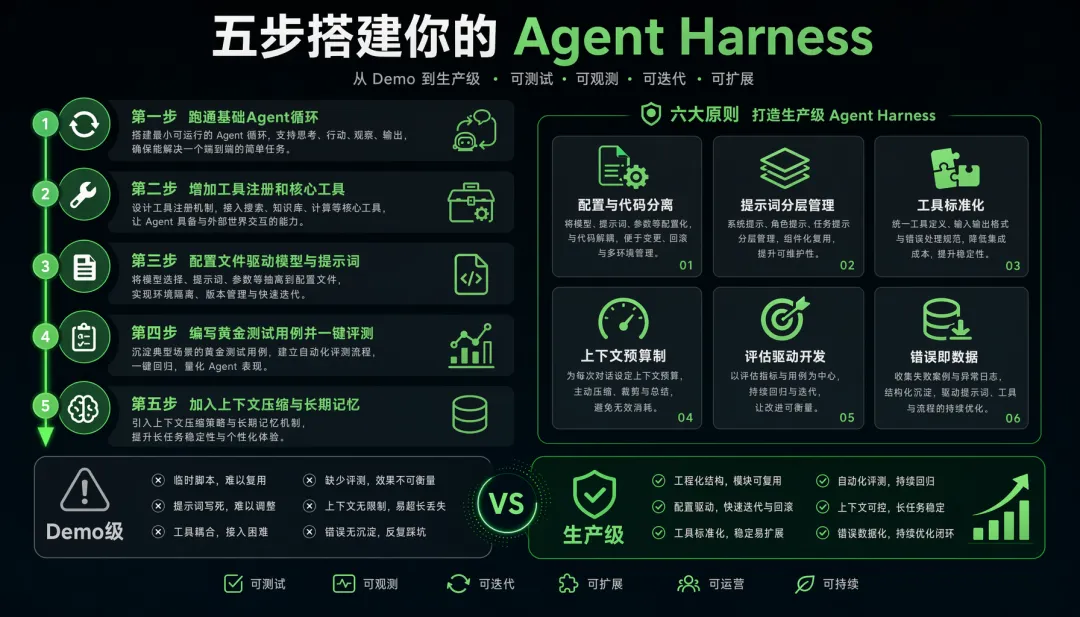
• 定义:包裹在 Agent 外层的工程化脚手架——负责配置管理、工具编排、评估驱动、可观测性 • 类比:Agent 是发动机,Harness 是整车工程(底盘+仪表盘+测试跑道) • 没有 Harness 的痛:每次调试靠"跑一个问题看一下"→ 无法回归 → 无法量化改进 → 永远在"玄学调参" • 有 Harness 的爽:配置改一行 → 自动跑 100 个测试用例 → 5分钟出评估报告 → 精准定位问题
推荐项目目录结构
my-agent-harness/├── agent/│ ├── core.py # Agent Loop 主循环│ ├── planner.py # Planning 模块│ └── router.py # 多 Agent 路由(进阶)├── tools/│ ├── registry.py # 工具注册中心│ ├── builtin/ # 内置工具实现│ └── mcp_client.py # MCP 协议客户端(可选)├── context/│ ├── manager.py # 上下文窗口管理│ ├── compressor.py # 压缩策略│ └── prompt_templates/ # Prompt 模板目录├── memory/│ ├── short_term.py # 短期记忆│ └── long_term.py # 持久记忆├── eval/│ ├── runner.py # 评测运行器│ ├── judge.py # 自动评判(LLM-as-Judge)│ └── cases/ # 黄金测试用例(YAML)│ ├── basic.yaml│ └── edge_cases.yaml├── config/│ ├── models.yaml # 模型配置(主模型/降级模型/路由规则)│ ├── tools.yaml # 工具配置│ └── prompts.yaml # Prompt 配置├── scripts/│ ├── run_eval.sh # 一键跑评测│ └── deploy.sh # 部署脚本├── main.py # 入口└── README.md关键设计原则
从 Claude Code / Codex / Hermes / Dola 中提炼的 6 条通用法则:
| 配置与代码分离 | |||
| Prompt 分层管理 | |||
| 工具标准化 | |||
| 上下文预算制 | |||
| 评估即开发 | |||
| 错误即数据 |
五步搭建你的第一个 Harness
Step 1: 先跑通 Agent Loop(3.1 的 50 行代码) ↓ 验证:能调通模型、能手动输入问题得到回答Step 2: 加工具注册 + 2-3 个核心工具 ↓ 验证:Agent 能自主调用工具并利用结果回答Step 3: 加配置文件(models.yaml + prompts.yaml),实现配置化 ↓ 验证:改配置即可切换模型/Prompt,无需改代码Step 4: 写 5-10 个黄金测试用例(YAML),加评测脚本 ↓ 验证:一键跑评测、输出通过率报告Step 5: 加上下文压缩 + 记忆,进入"改配置→跑评测→看报告"循环 ↓ 验证:长对话不崩、跨会话有记忆💡 核心心法:不要一开始就追求完美架构。先跑通最小闭环(Agent + 工具 + 评测),再逐步加层。每加一层都有评测兜底,确保不退化。
测试用例模板
# eval/cases/basic.yaml- id: "test_001" question: "读取 README.md 文件并总结其内容" expected: tool_used: ["read_file"] answer_contains: ["README", "项目"] tags: ["basic", "file_read"]- id: "test_002" question: "在 src/ 目录中查找包含 'TODO' 的文件,并列出它们" expected: tool_used: ["search_files"] answer_type: "list" tags: ["basic", "search"]- id: "test_003" question: "创建一个新文件 hello.py,内容为打印 Hello World" expected: tool_used: ["write_file"] file_created: "hello.py" file_contains: ["print", "Hello"] tags: ["basic", "file_write"]常见踩坑与避坑指南
四、从 Demo 到生产级:关键差距
Demo 级 Agent 只需 100 行代码,但生产级要解决的问题多得多:
从 Demo 到生产的关键一步:建立"改 Prompt/工具 → 跑评测 → 看报告 → 确认无退化 → 上线"的工程闭环。没有这个闭环,你永远在"玄学调参"。
五、总结与展望
核心设计原则回顾
从五个顶级 Coding Agent 中,我们提炼出以下跨项目共识:
1. 上下文工程 > Prompt 工程——不是写一个好 Prompt,而是设计一套信息管理系统 2. Cache/成本感知应是第一公民——Claude Code 和 Hermes 都将 Prompt Cache 作为核心架构约束 3. 错误即数据,失败即学习——保留错误历史让模型自我修正,比隐藏错误强100倍 4. 工具边界显式化—— isConcurrencySafe、require_confirmation、审批缓存……让系统知道每个工具的"脾气"5. 安全是架构而非补丁——Codex 用 OS 级沙箱证明了这一点 6. 评估驱动开发——先有测试用例,再有 Agent 改进
动手挑战
如果你读完本文想动手实践,这里有一个渐进式挑战清单:
•Level 1:实现 3.1 的 50 行 Agent Loop,能和 LLM 对话 •Level 2:加 3 个工具(读文件/写文件/搜索),Agent 能自主完成文件操作 •Level 3:加上下文压缩,让 Agent 支持 20+ 轮长对话不崩 •Level 4:加 Planning 模块,Agent 能自主拆解多步任务 •Level 5:加评测系统,实现"改配置→跑评测→看报告"闭环 •Boss:加 Skill 沉淀,Agent 完成任务后自动生成可复用经验
参考源码
如果这篇文章对你有帮助,欢迎点赞收藏。有问题欢迎在评论区交流,我会逐一回复。

世界很大,吾来看看。努力活出自己的姿态~