 夜雨聆风
夜雨聆风一、基本信息
PendingIntent对Intent进行包装,可独立存在,由其他应用或系统触发。PendingIntent 有创建者和执行者,执行者在执行的时候有创建者的权限。
二、源码分析
1)以Activity组件为例,简单了解下构建和发送的执行时序
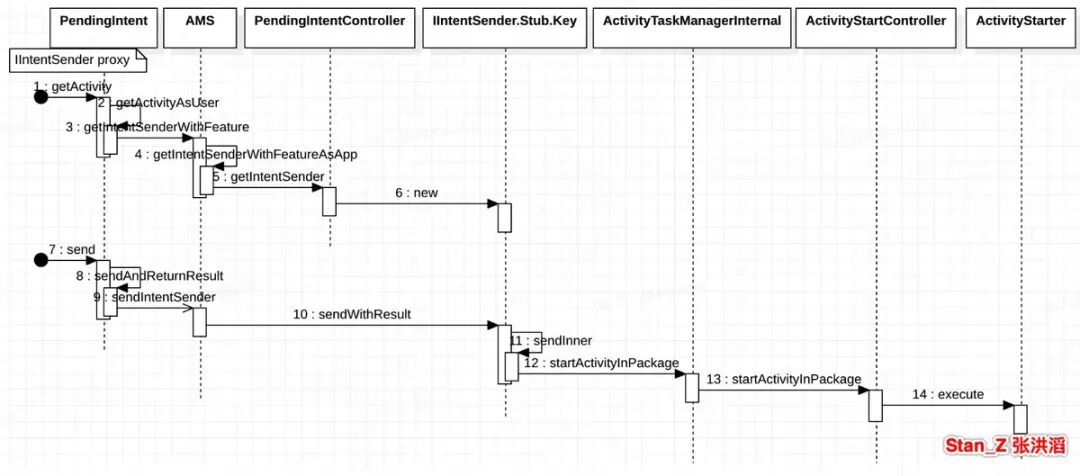
构建和发送的执行时序
PendingIntent.getActivity(...) 返回的是PendingIntentRecord,它是IIntentSender的Stub端,它持有目标Intent; PendingIntent内获取的IntentSender 是IIntentSender.Stub.asInterface(target),它是IIntentSender的proxy端; PendingIntent.send和PendingIntent.getIntentSender().sendIntent是一样 的效果,即通过proxy发起Activity启动。
2)PendingIntent执行身份
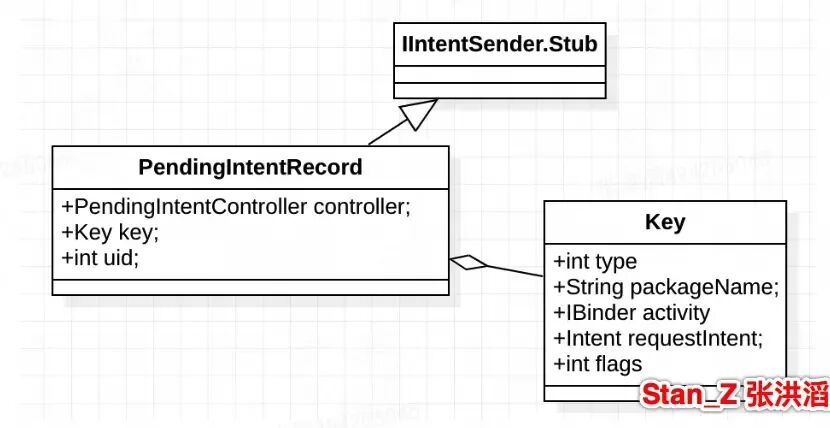
Key封装Intent相关信息:
packageName: PendingIntent创建者包名; requestIntent: PendingIntent创建的组件启动Intent;
PendingIntentRecord.sendInner发送执行:
callingUid: 对应PendingIntent属性uid, 赋值对应创建者uid; realCallingUid: 对应PendingIntentRecord内部函数获取的Binder.getCallingUid(),即:谁触发了send,realCallingUid就是谁。
publicintsendInner(...){final int realCallingUid = Binder.getCallingUid();final int realCallingPid = Binder.getCallingPid();...controller.mAtmInternal.startActivitiesInPackage(uid, // callingUid 构建Intent所在应用realCallingPid,realCallingUid, //realCallingUid 执行Intent所在的应用key.packageName, key.featureId,allIntents, allResolvedTypes, resultTo, mergedOptions, userId,false /* validateIncomingUser */,this /* originatingPendingIntent */,mAllowBgActivityStartsForActivitySender.contains(allowlistToken));}
Alarm执行PendingIntent举例:系统发送PendingIntent的场景有通知,Widget小程序以及Alarm闹钟等等。由于前两者都是用户主动触发,这里以AlarmManager为例测试:
Background activity launch blocked [callingPackage: com.xxx.xxx;callingUid: 10064; //创建者appSwitchState: 1;callingUidHasAnyVisibleWindow: false;callingUidProcState: LAST_ACTIVITY;isCallingUidPersistentSystemProcess: false;balAllowedByPiSender: BackgroundStartPrivileges[allowsBackgroundActivityStarts=false, allowsBackgroundForegroundServiceStarts=false, originatingToken=null]; realCallingPackage: android.uid.system:1000[debugOnly];realCallingUid: 1000; //执行者realCallingUidHasAnyVisibleWindow: false; realCallingUidProcState: PERSISTENT; isRealCallingUidPersistentSystemProcess: true; originatingPendingIntent: PendingIntentRecord{7e7519a com.xxx.xxx startActivity}; backgroundStartPrivileges: BackgroundStartPrivileges[allowsBackgroundActivityStarts=false, allowsBackgroundForegroundServiceStarts=false, originatingToken=null]; intent: Intent { flg=0x10020004 hwFlg=0x100 cmp=com.xxx.xxx/.TargetActivity (has extras) }; callerApp: null; shouldAbortSelfLaunchWhenReturnHome: false; inVisibleTask: false]
被限制原因:
// falsefinal boolean balAllowedByPiSender = PendingIntentRecord.isPendingIntentBalAllowedByCaller(checkedOptions);// 检查 options 的 KEY_PENDING_INTENT_BACKGROUND_ACTIVITY_ALLOWEDprivate static boolean isPendingIntentBalAllowedByCaller(@NullableBundle options) {if (options == null) {return ActivityOptions.PENDING_INTENT_BAL_ALLOWED_DEFAULT;}return options.getBoolean(ActivityOptions.KEY_PENDING_INTENT_BACKGROUND_ACTIVITY_ALLOWED,ActivityOptions.PENDING_INTENT_BAL_ALLOWED_DEFAULT);}
追溯该属性赋值点:
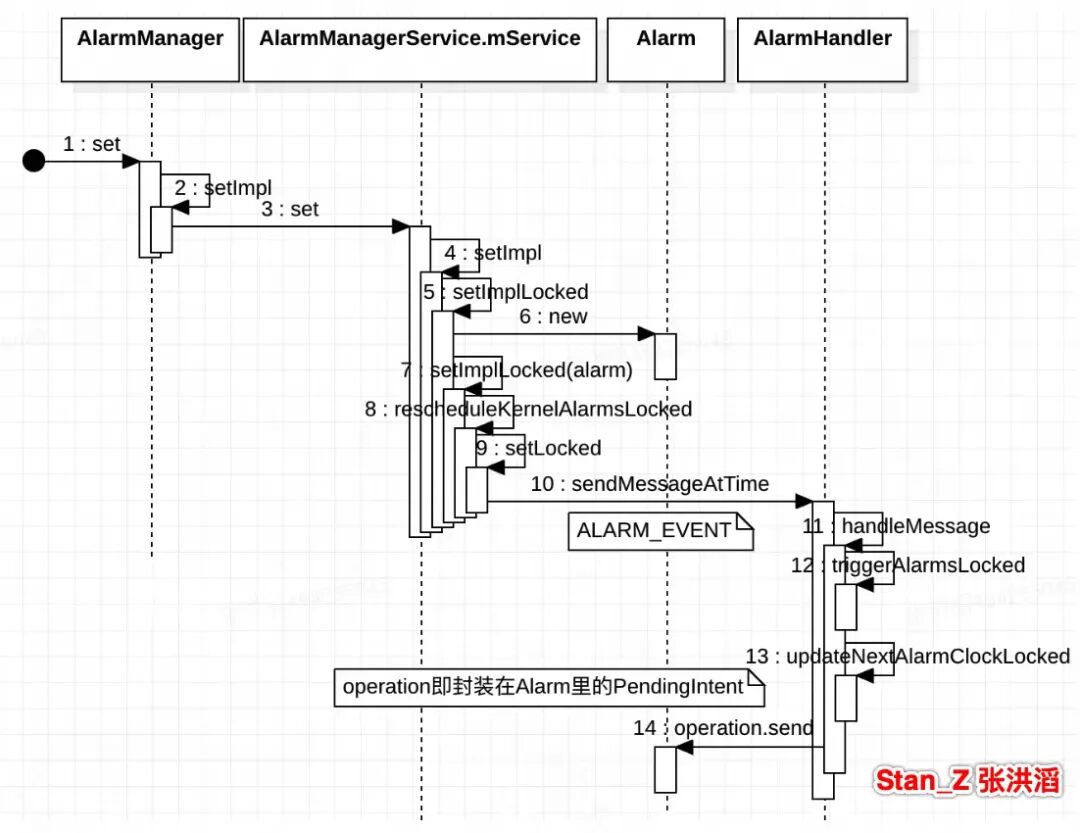
case ALARM_EVENT: {// Disallow AlarmManager to start random background activity.final Bundle bundle = getAlarmOperationBundle(alarm);alarm.operation.send(/* context */ null, /* code */0, /* intent */null, /* onFinished */null, /* handler */ null, /* requiredPermission */ null, bundle); }
AlarmManagerService#onStart{...// mActivityOptsRestrictBal 是 ActivityOptionsmActivityOptsRestrictBal.setPendingIntentBackgroundActivityLaunchAllowed(false);// mBroadcastOptsRestrictBal 是 BroadcastOptionsmBroadcastOptsRestrictBal.setPendingIntentBackgroundActivityLaunchAllowed(false);...}
之后通过PendingIntent#send将bundle参数带进去了。
4)PendingIntent的修改
flag: PendingIntent.FLAG_MUTABLE(可变) 和 PendingIntent.FLAG_IMMUTABLE(不可变)pendingIntent的send(this, 0, modifyIntent); 作为入口com.android.server.am.PendingIntentRecord#sendInner
public int sendInner(...) {final boolean immutable = (key.flags & PendingIntent.FLAG_IMMUTABLE) != 0;if (!immutable) {if (intent != null) {// 构建PendingIntent设置了对应的修改Intent内容的flag,就可以修改其对应内容。例如:// FILL_IN_ACTION、FILL_IN_PACKAGE、FILL_IN_COMPONENT、FILL_IN_DATA等int changes = finalIntent.fillIn(intent, key.flags);if ((changes & Intent.FILL_IN_DATA) == 0) {resolvedType = key.requestResolvedType;}} else {resolvedType = key.requestResolvedType;}flagsMask &= ~Intent.IMMUTABLE_FLAGS;flagsValues &= flagsMask;finalIntent.setFlags((finalIntent.getFlags() & ~flagsMask) | flagsValues);}}
总结:在 Android 中,如果原始 PendingIntent 创建时未设置 Intent.FILL_IN_COMPONENT 标志,即使它是 FLAG_MUTABLE 的,也无法直接修改其底层 Intent 的 Component。仅仅只有新增的内容可以加上去,修改是不可以的。如果能获取系统创建的PendingIntent,且能其flag满足修改组件条件,会存在安全风险。