 夜雨聆风
夜雨聆风


API实战:搭建自己的AI助手
先说结论
|
|
|
|---|---|
|
|
|
|
|
|
|
|
|
|
|
|
为什么需要一个AI助手
-
网页版功能有限:不能定制角色、不能保存历史、不能批量处理 -
工作流不连贯:切换窗口、复制粘贴,打断思路 -
敏感数据问题:有些代码和数据不适合发给网页版
-
完全定制:想要什么功能就加什么 -
数据安全:敏感数据可以本地处理 -
自动化:可以集成到工作流里
整体设计
架构图
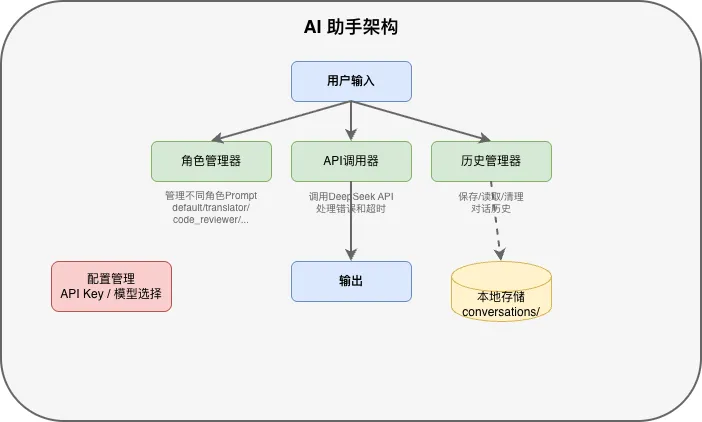
模块划分
|
|
|
|---|---|
|
|
|
|
|
|
|
|
|
|
|
|
第一步:环境准备
安装依赖
pip install openai-
openai:OpenAI官方Python库,DeepSeek API兼容其接口格式 -
需要 Python 3.9 及以上版本(使用了新的类型注解语法)
项目结构
ai-assistant/├── main.py # 主程序入口├── config.py # 配置管理├── roles.py # 角色定义├── history.py # 历史管理├── api_client.py # API调用├── requirements.txt # 依赖列表└── conversations/ # 对话历史存储└── .gitkeep
openai>=1.0.0mkdir -p ai-assistant/conversationscd ai-assistant
第二步:配置管理
# config.pyimport osfrom dataclasses import dataclass@dataclassclass Config:"""配置管理"""api_key: str = os.getenv("DEEPSEEK_API_KEY", "")base_url: str = "https://api.deepseek.com"model: str = "deepseek-chat"max_history: int = 10 # 最多保留10轮对话timeout: int = 30 # 超时时间(秒)def validate(self):"""验证配置"""if not self.api_key:raise ValueError("请设置 DEEPSEEK_API_KEY 环境变量")return True# 全局配置实例config = Config()
-
使用 dataclass 简化代码 -
API Key 从环境变量读取 -
validate() 方法检查配置是否正确
第三步:角色管理
# roles.pyfrom typing import Dictclass RoleManager:"""角色管理器"""# 预定义角色ROLES: Dict[str, str] = {"default": "你是一个有帮助的AI助手。","translator": """你是一个专业的翻译助手。请将用户输入的内容翻译成目标语言。保持原文的语气和风格。专业术语保持原样或给出注释。""","code_reviewer": """你是一个资深的Java代码审查专家。请从以下维度审查代码:1. 安全问题(SQL注入、XSS、敏感信息泄露)2. 空指针风险3. 资源管理(连接、流是否关闭)4. 性能问题5. 代码规范(命名、注释、格式)输出格式使用Markdown。""","doc_helper": """你是一个技术文档助手。帮助用户:- 整理需求文档- 生成API文档- 润色技术文章保持专业、清晰的语言风格。""","sql_expert": """你是一个SQL专家。帮助用户:- 优化SQL查询- 解释执行计划- 设计数据库表结构给出具体的SQL语句和解释。"""}@classmethoddef get_role(cls, role_name: str) -> str:"""获取角色Prompt"""return cls.ROLES.get(role_name, cls.ROLES["default"])@classmethoddef list_roles(cls) -> list:"""列出所有角色"""return list(cls.ROLES.keys())
# 获取角色role_prompt = RoleManager.get_role("code_reviewer")# 列出所有角色roles = RoleManager.list_roles()# ['default', 'translator', 'code_reviewer', 'doc_helper', 'sql_expert']
第四步:历史管理
# history.pyimport jsonimport osfrom datetime import datetimefrom typing import List, Dictclass HistoryManager:"""对话历史管理器"""def __init__(self, storage_dir: str = "./conversations"):self.storage_dir = storage_diros.makedirs(storage_dir, exist_ok=True)def save(self, conversation_id: str, messages: List[Dict]):"""保存对话历史"""filepath = os.path.join(self.storage_dir, f"{conversation_id}.json")data = {"id": conversation_id,"created_at": datetime.now().isoformat(),"messages": messages}with open(filepath, 'w', encoding='utf-8') as f:json.dump(data, f, ensure_ascii=False, indent=2)def load(self, conversation_id: str) -> List[Dict]:"""加载对话历史"""filepath = os.path.join(self.storage_dir, f"{conversation_id}.json")if not os.path.exists(filepath):return []with open(filepath, 'r', encoding='utf-8') as f:data = json.load(f)return data.get("messages", [])def list_conversations(self) -> List[Dict]:"""列出所有对话"""conversations = []for filename in os.listdir(self.storage_dir):if filename.endswith('.json'):filepath = os.path.join(self.storage_dir, filename)with open(filepath, 'r', encoding='utf-8') as f:data = json.load(f)conversations.append({"id": data["id"],"created_at": data["created_at"],"message_count": len(data["messages"])})# 按时间倒序排列conversations.sort(key=lambda x: x["created_at"], reverse=True)return conversationsdef delete(self, conversation_id: str):"""删除对话历史"""filepath = os.path.join(self.storage_dir, f"{conversation_id}.json")if os.path.exists(filepath):os.remove(filepath)
-
每个对话保存为一个JSON文件 -
支持保存、加载、列出、删除操作 -
文件名就是 conversation_id
第五步:API调用器
# api_client.pyfrom openai import OpenAI, APIError, APIConnectionError, RateLimitErrorfrom typing import List, Dict, Optionalimport loggingfrom config import configfrom roles import RoleManagerlogger = logging.getLogger(__name__)class APIClient:"""API调用器"""def __init__(self):config.validate()self.client = OpenAI(api_key=config.api_key,base_url=config.base_url)def chat(self,messages: List[Dict],role: str = "default") -> Optional[str]:"""调用API"""# 添加角色设定system_prompt = RoleManager.get_role(role)full_messages = [{"role": "system", "content": system_prompt}] + messagestry:logger.info(f"调用API, 角色: {role}, 消息数: {len(full_messages)}")response = self.client.chat.completions.create(model=config.model,messages=full_messages,timeout=config.timeout)result = response.choices[0].message.contentlogger.info(f"API调用成功, 返回长度: {len(result)}")return resultexcept APIConnectionError:logger.error("网络连接失败")return "❌ 网络连接失败,请检查网络"except RateLimitError:logger.error("请求太频繁")return "❌ 请求太频繁,请稍后再试"except APIError as e:logger.error(f"API错误: {e}")return f"❌ API错误: {e}"
第六步:主程序
# main.pyimport uuidfrom typing import List, Dictfrom config import configfrom roles import RoleManagerfrom history import HistoryManagerfrom api_client import APIClientclass AIAssistant:"""AI助手主类"""def __init__(self):self.api_client = APIClient()self.history_manager = HistoryManager()self.current_conversation_id: str = str(uuid.uuid4())self.current_role: str = "default"self.messages: List[Dict] = []def chat(self, user_input: str) -> str:"""对话"""# 添加用户消息self.messages.append({"role": "user", "content": user_input})# 调用APIresponse = self.api_client.chat(self.messages, self.current_role)if response:# 添加AI回复self.messages.append({"role": "assistant", "content": response})# 保存历史self.history_manager.save(self.current_conversation_id, self.messages)return response or "❌ 调用失败"def switch_role(self, role: str):"""切换角色"""if role in RoleManager.list_roles():self.current_role = roleprint(f"✅ 已切换到角色: {role}")else:print(f"❌ 角色不存在,可选角色: {RoleManager.list_roles()}")def new_conversation(self):"""新建对话"""self.current_conversation_id = str(uuid.uuid4())self.messages = []print("✅ 已创建新对话")def load_conversation(self, conversation_id: str):"""加载历史对话"""self.messages = self.history_manager.load(conversation_id)self.current_conversation_id = conversation_idprint(f"✅ 已加载对话,共 {len(self.messages)} 条消息")def list_conversations(self):"""列出所有对话"""conversations = self.history_manager.list_conversations()if not conversations:print("暂无历史对话")returnfor conv in conversations:print(f"- {conv['id'][:8]}... | {conv['created_at'][:10]} | {conv['message_count']}条消息")# 命令行交互def main():assistant = AIAssistant()print("=" * 50)print("AI助手 v1.0")print("命令: /role <角色名> /new /load <id> /list /quit")print(f"可用角色: {', '.join(RoleManager.list_roles())}")print("=" * 50)while True:try:user_input = input("\n你: ").strip()if not user_input:continue# 命令处理if user_input.startswith("/"):parts = user_input.split()cmd = parts[0]if cmd == "/quit":print("再见!")breakelif cmd == "/new":assistant.new_conversation()elif cmd == "/role" and len(parts) > 1:assistant.switch_role(parts[1])elif cmd == "/list":assistant.list_conversations()elif cmd == "/load" and len(parts) > 1:assistant.load_conversation(parts[1])else:print("❌ 未知命令")continue# 正常对话response = assistant.chat(user_input)print(f"\nAI: {response}")except KeyboardInterrupt:print("\n再见!")breakif __name__ == "__main__":main()
运行效果
$ python main.py==================================================AI助手 v1.0命令: /role <角色名> /new /load <id> /list /quit可用角色: default, translator, code_reviewer, doc_helper, sql_expert==================================================你: 帮我写一个用户登录接口AI: 好的,我来帮你写一个用户登录接口...你: /role code_reviewer✅ 已切换到角色: code_reviewer你: 帮我审查这段代码:def login(username, password): ...AI: 【安全问题】1. 密码明文传输,应使用HTTPS2. 没有防止暴力破解...你: /new✅ 已创建新对话你: /quit再见!
踩过的坑
# 在 chat 方法中添加if len(self.messages) > config.max_history * 2:# 只保留最近的对话self.messages = self.messages[-config.max_history * 2:]
def switch_role(self, role: str):if role in RoleManager.list_roles():self.current_role = roleif self.messages:print("⚠️ 当前有对话历史,建议使用 /new 创建新对话")
print("正在思考中...")response = self.api_client.chat(self.messages, self.current_role)
后续优化方向
|
|
|
|
|---|---|---|
|
|
|
|
|
|
|
|
|
|
|
|
|
|
|
|
|
|
|
|
写在最后
作者:Tony | 老程序员,正在学AI
本文是AI学习日记系列的第8篇
关注我,一起学习AI