 夜雨聆风
夜雨聆风


Spring AI 对话记忆与工具调用完全指南
让大语言模型拥有”记忆力”,并学会使用工具
@[toc]
一、为什么需要对话记忆?
1.1 大模型的”失忆症”
大语言模型(LLM)本质上是无状态的,每次请求都是独立的。就像金鱼只有7秒记忆,模型不会记住你上一秒说了什么。
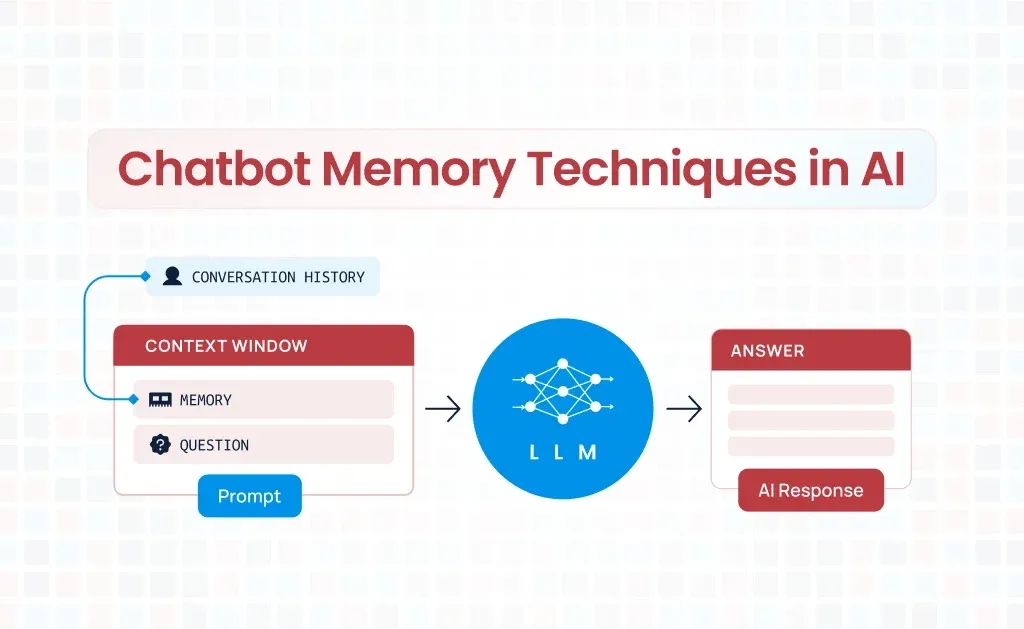
场景对比:
|
|
|
|
AI:你好张三! 用户:我叫什么? AI:抱歉,我不知道你的名字。 |
AI:你好张三! 用户:我叫什么? AI:你刚才告诉我你叫张三。 |
二、Spring AI 记忆架构
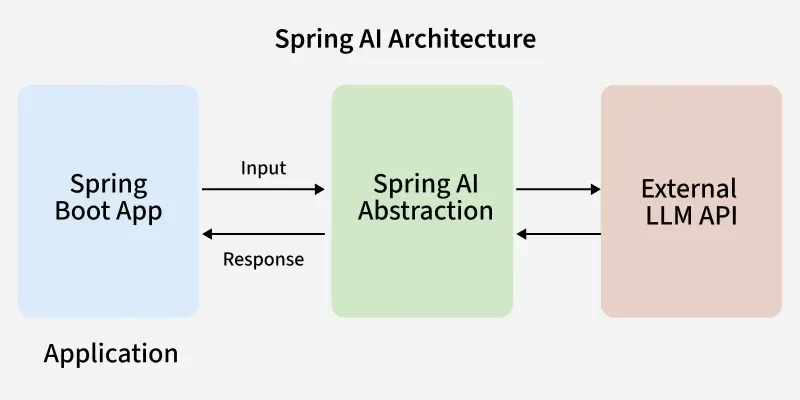
Spring AI 通过 Advisor 机制 实现记忆功能,核心组件:
┌─────────────────────────────────────────┐
│           ChatClient (客户端)            │
├─────────────────────────────────────────┤
│  ┌─────────────────────────────────┐   │
│  │     MessageChatMemoryAdvisor    │   │
│  │         (记忆顾问)               │   │
│  └─────────────────────────────────┘   │
├─────────────────────────────────────────┤
│  ┌─────────────────────────────────┐   │
│  │        ChatMemory (接口)         │   │
│  │   ┌─────────────────────────┐   │   │
│  │   │ ChatMemoryRepository    │   │   │
│  │   │    (存储仓库)            │   │   │
│  │   └─────────────────────────┘   │   │
│  └─────────────────────────────────┘   │
└─────────────────────────────────────────┘
三、环境与依赖
3.1 版本约束
-
• JDK:17 -
• Spring Boot:3.5.7 -
• Spring AI:1.1.3 -
• 数据库:MySQL 8.0+
3.2 Maven 依赖
<?xml version="1.0" encoding="UTF-8"?>
<projectxmlns="http://maven.apache.org/POM/4.0.0"xmlns:xsi="http://www.w3.org/2001/XMLSchema-instance"
xsi:schemaLocation="http://maven.apache.org/POM/4.0.0 https://maven.apache.org/xsd/maven-4.0.0.xsd">
<modelVersion>4.0.0</modelVersion>
<parent>
<groupId>org.springframework.boot</groupId>
<artifactId>spring-boot-starter-parent</artifactId>
<version>3.5.7</version>
<relativePath/><!-- lookup parent from repository -->
</parent>
<groupId>com.example</groupId>
<artifactId>springboot-ai-memory</artifactId>
<version>0.0.1-SNAPSHOT</version>
<name>springboot-ai-memory</name>
<description/>
<url/>
<licenses>
<license/>
</licenses>
<developers>
<developer/>
</developers>
<scm>
<connection/>
<developerConnection/>
<tag/>
<url/>
</scm>
<properties>
<java.version>17</java.version>
<spring-ai.version>1.1.3</spring-ai.version>
</properties>

<dependencies>
<dependency>
<groupId>org.springframework.boot</groupId>
<artifactId>spring-boot-starter-web</artifactId>
</dependency>

<dependency>
<groupId>org.springframework.ai</groupId>
<artifactId>spring-ai-starter-model-chat-memory-repository-jdbc</artifactId>
</dependency>

<dependency>
<groupId>org.springframework.ai</groupId>
<artifactId>spring-ai-starter-model-openai</artifactId>
</dependency>

<dependency>
<groupId>com.mysql</groupId>
<artifactId>mysql-connector-j</artifactId>
<scope>runtime</scope>
</dependency>

<dependency>
<groupId>org.springframework.boot</groupId>
<artifactId>spring-boot-starter-jdbc</artifactId>
</dependency>

<!-- Redis 缓存(用于AI对话记忆) -->
<dependency>
<groupId>org.springframework.boot</groupId>
<artifactId>spring-boot-starter-data-redis</artifactId>
</dependency>


<dependency>
<groupId>org.projectlombok</groupId>
<artifactId>lombok</artifactId>
<optional>true</optional>
</dependency>

<dependency>
<groupId>org.springframework.boot</groupId>
<artifactId>spring-boot-starter-test</artifactId>
<scope>test</scope>
</dependency>

</dependencies>
<dependencyManagement>
<dependencies>
<dependency>
<groupId>org.springframework.ai</groupId>
<artifactId>spring-ai-bom</artifactId>
<version>${spring-ai.version}</version>
<type>pom</type>
<scope>import</scope>
</dependency>
</dependencies>
</dependencyManagement>

<build>
<plugins>
<plugin>
<groupId>org.apache.maven.plugins</groupId>
<artifactId>maven-compiler-plugin</artifactId>
<configuration>
<annotationProcessorPaths>
<path>
<groupId>org.projectlombok</groupId>
<artifactId>lombok</artifactId>
</path>
</annotationProcessorPaths>
</configuration>
</plugin>
<plugin>
<groupId>org.springframework.boot</groupId>
<artifactId>spring-boot-maven-plugin</artifactId>
<configuration>
<excludes>
<exclude>
<groupId>org.projectlombok</groupId>
<artifactId>lombok</artifactId>
</exclude>
</excludes>
</configuration>
</plugin>
</plugins>
</build>

</project>
3.3 配置文件 application.yml
spring:
# MySQL 数据源
datasource:
url:jdbc:mysql://localhost:3306/spring_ai?useSSL=false&serverTimezone=Asia/Shanghai&allowPublicKeyRetrieval=true
username:root
password:123456
driver-class-name:com.mysql.cj.jdbc.Driver

# AI 模型配置
ai:
openai:
api-key:sk-xxxxxxx
chat:
options:
model:gpt-3.5-turbo
temperature:0.7

# JDBC 记忆自动建表(生产环境改为 never)
chat:
memory:
jdbc:
initialize-schema:always
四、基础实现:内存记忆
4.1 快速开始
使用 MessageWindowChatMemory 实现基于内存的对话记忆:
@Test
voidtestMemory() {
// 1. 创建记忆容器
ChatMemorymemory= MessageWindowChatMemory.builder()
            .chatMemoryRepository(newInMemoryChatMemoryRepository())
            .maxMessages(20)
            .build();

// 2. 构建客户端并添加记忆顾问
ChatClientclient= ChatClient.builder(chatModel)
            .defaultAdvisors(newSimpleLoggerAdvisor(),
                    MessageChatMemoryAdvisor.builder(memory).build())
            .build();

// 3. 第一轮对话
Stringresponse1= client.prompt()
            .user("我叫张三,今年28岁")
            .call()
            .content();
    System.out.println("AI: " + response1);
// 输出:你好张三,很高兴认识你!

// 4. 第二轮对话(测试记忆)
Stringresponse2= client.prompt()
            .user("我今年多大了?")
            .call()
            .content();
    System.out.println("AI: " + response2);
// 输出:你今年28岁。
}
4.2 原理解析
MessageChatMemoryAdvisor 工作流程:
// 伪代码展示Advisor的工作流程
publicclassMessageChatMemoryAdvisorimplementsCallAroundAdvisor {

@Override
public AdvisedResponse aroundCall(AdvisedRequest request, CallAroundAdvisorChain chain) {
// 1. 从记忆中读取历史消息
        List<Message> history = chatMemory.get(conversationId);

// 2. 将历史消息添加到当前请求
        request.messages().addAll(0, history);

// 3. 调用模型获取响应
AdvisedResponseresponse= chain.nextAroundCall(request);

// 4. 将新对话存入记忆
        chatMemory.add(conversationId, request.userMessage());
        chatMemory.add(conversationId, response.response());

return response;
    }
}
五、生产级方案:持久化存储
生产环境必须使用持久化方案,保证重启不丢失、可追溯、可归档。
Spring AI 自动建表 SPRING_AI_CHAT_MEMORY,结构如下:
CREATE TABLE SPRING_AI_CHAT_MEMORY (
    id BIGINT AUTO_INCREMENT PRIMARY KEY,
    conversation_id VARCHAR(255) NOT NULL,
    content TEXT NOT NULL,
    type VARCHAR(32) NOT NULL, -- USER/ASSISTANT
timestampTIMESTAMPDEFAULTCURRENT_TIMESTAMP,
    INDEX idx_conversation (conversation_id, timestampDESC)
);
5.1 配置 JDBC 记忆配置类
@Configuration
publicclassChatMemoryConfig {

// 内存记忆
@Bean("inMemoryChatMemory")
public ChatMemory inMemoryChatMemory() {
return MessageWindowChatMemory.builder()
                .maxMessages(10)
                .build();
    }

// 数据库持久化记忆(主 Bean)
@Primary
@Bean("jdbcChatMemory")
public ChatMemory jdbcChatMemory(JdbcChatMemoryRepository repository) {
return MessageWindowChatMemory.builder()
                .chatMemoryRepository(repository)
                .maxMessages(20)
                .build();
    }
}
5.2 抽象聊天业务类
为了避免内存、JDBC 两套实现写重复代码,使用模板方法抽象公共逻辑。
import org.springframework.ai.chat.client.ChatClient;
import org.springframework.ai.chat.memory.ChatMemory;
import org.springframework.ai.chat.messages.AssistantMessage;
import org.springframework.ai.chat.messages.Message;
import org.springframework.ai.chat.messages.UserMessage;
import java.util.List;

publicabstractclassAbstractChatService {

protectedfinal ChatClient chatClient;

publicAbstractChatService(ChatClient chatClient) {
this.chatClient = chatClient;
    }

// 模板方法:统一对话流程
publicfinal String chat(String conversationId, String message) {
ChatMemorymemory= getChatMemory();
        List<Message> history = memory.get(conversationId);

// 调用 AI
Stringreply= chatClient.prompt()
                .messages(history)
                .user(message)
                .call()
                .content();

// 保存对话历史
        memory.add(conversationId, newUserMessage(message));
        memory.add(conversationId, newAssistantMessage(reply));

return reply;
    }

// 清空会话
publicfinalvoidclear(String conversationId) {
        getChatMemory().clear(conversationId);
    }

// 子类实现:切换存储介质
protectedabstract ChatMemory getChatMemory();
}
5.3 数据库记忆实现
@Service("jdbcChatService")
publicclassJdbcChatServiceextendsAbstractChatService {

@Resource(name = "jdbcChatMemory")
private ChatMemory jdbcChatMemory;

publicJdbcChatService(ChatClient chatClient) {
super(chatClient);
    }

@Override
protected ChatMemory getChatMemory() {
return jdbcChatMemory;
    }
}
5.4 ConversationId
生产环境不能使用简单字符串,必须满足:
-
• 全局唯一 -
• 不可预测 -
• 与用户绑定 -
• 支持多会话
package com.example.ai.util;

import java.util.UUID;

publicclassConversationIdUtil {

privatestaticfinalStringPREFIX="chat";
privatestaticfinalStringSEP=":";

publicstatic String generate(String userId) {
Stringuuid= UUID.randomUUID().toString().replace("-", "").substring(0, 16);
return PREFIX + userId + ":" + uuid;
    }

publicstatic String generateGuest() {
return PREFIX + SEP + "guest" + SEP + UUID.randomUUID();
    }
}
示例结果:
chat0001:b9d6f25fd0c448a85.5 接口层提供 HTTP 服务
@RestController
@RequestMapping("/ai/chat")
publicclassChatController {

@Autowired
@Qualifier("jdbcChatService")
private JdbcChatService jdbcChatService;

// 数据库持久化对话
@GetMapping("/jdbc")
public String chatJdbc(
@RequestParam String conversationId,
@RequestParam String message) {
return jdbcChatService.chat(conversationId, message);
  }

// 清空记忆
@PostMapping("/clear")
public String clear(@RequestParam String type,
@RequestParam String conversationId) {
if ("jdbc".equals(type)) {
            jdbcChatService.clear(conversationId);
        } else {
            memoryChatService.clear(conversationId);
        }
return"会话已清空";
    }
}
5.6 测试效果
-
1. 启动项目,自动创建记忆表 -
2. 请求接口:
POST /ai/chat/jdbc
?userId=001
&message=我叫张三-
3. 继续提问:
&message=我叫什么名字?AI 会正确回答:你叫张三,并且重启服务后依然有效。
六、生产级方案:Redis持久化存储
6.1 🚀 Redis 缓存存储(高性能方案)
对于高并发场景,Redis 是更好的选择,提供亚毫秒级响应。
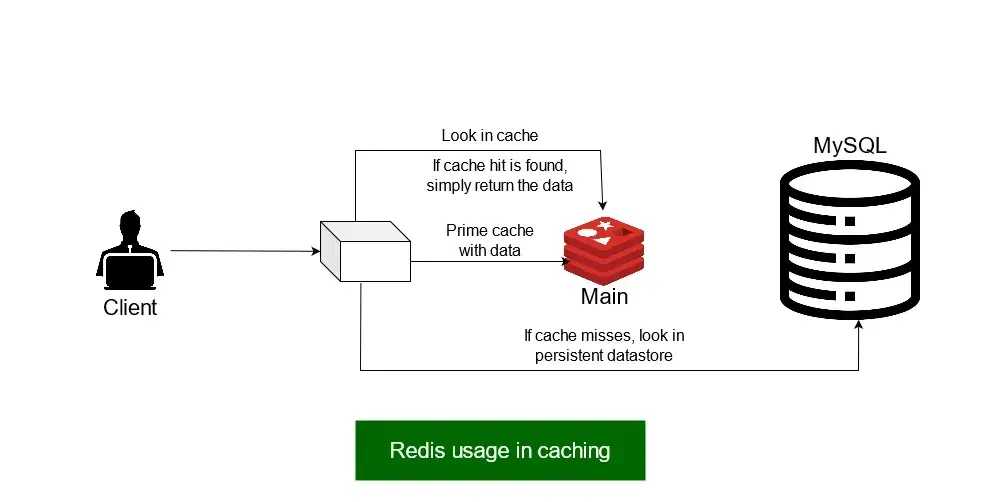
6.2 为什么选 Redis?
|
|
|
|
|
|
|
|
|
|
|
|
|
|
|
|
|
|
|
|
|
|
|
|
6.3 自定义 RedisChatMemory
Spring AI 官方暂未提供 Redis 实现,我们可以自定义:
package com.example.ai.chatmemory;
import com.fasterxml.jackson.core.JsonProcessingException;
import com.fasterxml.jackson.databind.ObjectMapper;
import org.springframework.ai.chat.memory.ChatMemory;
import org.springframework.ai.chat.messages.*;
import org.springframework.data.redis.core.StringRedisTemplate;
import org.springframework.stereotype.Component;
import java.util.List;
import java.util.Map;
import java.util.concurrent.TimeUnit;
import java.util.stream.Collectors;

@Component
publicclassRedisChatMemoryimplementsChatMemory {

privatefinal StringRedisTemplate redisTemplate;
privatefinalObjectMapperobjectMapper=newObjectMapper();

privatestaticfinalStringKEY_PREFIX="ai:chat:memory:";
privatestaticfinallongEXPIRE_DAYS=7;
privatestaticfinalintMAX_MESSAGES=20;

publicRedisChatMemory(StringRedisTemplate redisTemplate) {
this.redisTemplate = redisTemplate;
    }

// ===================== 读取消息 =====================
@Override
public List<Message> get(String conversationId) {
Stringkey= KEY_PREFIX + conversationId;
        List<String> jsonList = redisTemplate.opsForList().range(key, 0, -1);

if (jsonList == null || jsonList.isEmpty()) {
return List.of();
        }

return jsonList.stream()
                .map(this::deserializeMessage)
                .collect(Collectors.toList());
    }

// ===================== 新增单条消息 =====================
@Override
publicvoidadd(String conversationId, Message message) {
try {
Stringkey= KEY_PREFIX + conversationId;
Stringjson= objectMapper.writeValueAsString(message);

            redisTemplate.opsForList().rightPush(key, json);
            redisTemplate.expire(key, EXPIRE_DAYS, TimeUnit.DAYS);
            trimToMaxSize(key);

        } catch (JsonProcessingException e) {
thrownewRuntimeException("消息序列化失败", e);
        }
    }

// ===================== 批量消息 =====================
@Override
publicvoidadd(String conversationId, List<Message> messages) {
        messages.forEach(msg -> add(conversationId, msg));
    }

// ===================== 清空 =====================
@Override
publicvoidclear(String conversationId) {
        redisTemplate.delete(KEY_PREFIX + conversationId);
    }

// ===================== 【核心:手动反序列化】 =====================
private Message deserializeMessage(String json) {
try {
// 先读成 Map,手动判断类型
            Map<String, Object> map = objectMapper.readValue(json, Map.class);
Stringtype= (String) map.get("messageType");
Stringcontent= (String) map.get("text");

returnswitch (MessageType.valueOf(type)) {
case USER -> newUserMessage(content);
case ASSISTANT -> newAssistantMessage(content);
case SYSTEM -> newSystemMessage(content);
default -> thrownewIllegalArgumentException("不支持的消息类型");
            };
        } catch (Exception e) {
thrownewRuntimeException("消息反序列化失败", e);
        }
    }

// ===================== 限制最大条数 =====================
privatevoidtrimToMaxSize(String key) {
Longsize= redisTemplate.opsForList().size(key);
if (size != null && size > MAX_MESSAGES) {
            redisTemplate.opsForList().trim(key, size - MAX_MESSAGES, -1);
        }
    }
}
6.4 RedisChatService类
package com.example.ai.service;

import jakarta.annotation.Resource;
import org.springframework.ai.chat.client.ChatClient;
import org.springframework.ai.chat.memory.ChatMemory;
import org.springframework.stereotype.Service;

@Service("redisChatService")
publicclassRedisChatServiceextendsAbstractAiChatService {

@Resource(name = "redisChatMemory")
private ChatMemory redisChatMemory;

publicRedisChatService(ChatClient chatClient) {
super(chatClient);
    }

@Override
protected ChatMemory getChatMemory() {
return redisChatMemory;
    }
}
6.5 测试类
@GetMapping("/redis")
public String chatRedis(
@RequestParam String conversationId,
@RequestParam String message) {
return redisChatService.chat(conversationId, message);
}
参考资料:
-
• Spring AI 官方文档 -
• Spring AI GitHub 仓库 -
• DeepSeek API 文档