 夜雨聆风
夜雨聆风


Claude Code 源码解析(上):核心架构与基础模块
Claude Code 作为 Anthropic 官方的 CLI 编程助手,其源码设计代表了当前 AI Agent 工具的最佳实践。本文将深入解析 Claude Code 的核心架构,帮助你理解这个强大工具背后的技术实现。
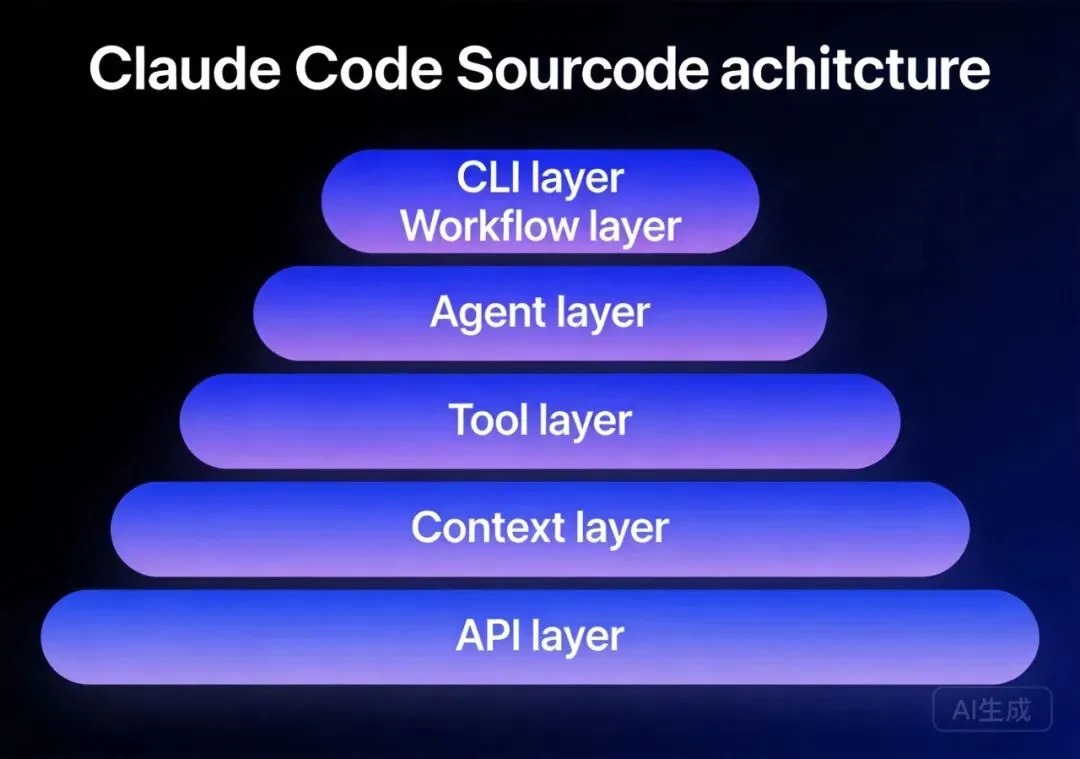
Claude Code 源码项目结构
核心目录布局
claude-code/
├── src/
│   ├── agent/           # Agent 系统核心
│   │   ├── base.ts      # Agent 基类
│   │   ├── types.ts     # Agent 类型定义
│   │   ├── spawn.ts     # Agent 生成逻辑
│   │   └── coordinator.ts # Agent 协调器
│   ├── tools/           # 工具系统
│   │   ├── base.ts      # 工具基类
│   │   ├── read.ts      # 文件读取
│   │   ├── write.ts     # 文件写入
│   │   ├── edit.ts      # 文件编辑
│   │   ├── bash.ts      # 命令执行
│   │   ├── grep.ts      # 内容搜索
│   │   ├── glob.ts      # 文件搜索
│   │   └── agent.ts     # Agent 工具
│   ├── context/         # 上下文管理
│   │   ├── manager.ts   # 上下文管理器
│   │   ├── compression.ts # 压缩算法
│   │   └── memory.ts    # 内存存储
│   ├── workflow/        # 工作流程
│   │   ├── react.ts     # ReAct 循环
│   │   ├── plan.ts      # 规划模式
│   │   └── hooks.ts     # 钩子系统
│   ├── cli/             # CLI 接口
│   │   ├── main.ts      # 入口
│   │   ├── prompt.ts    # 提示处理
│   │   └── output.ts    # 输出格式化
│   └── api/             # API 集成
│       ├── anthropic.ts # Anthropic API
│       └── streaming.ts # 流式响应
├── skills/              # Skills 系统
│   ├── skill-loader.ts  # Skill 加载器
│   └── skill-runner.ts  # Skill 执行器
└── config/              # 配置管理
    ├── settings.ts      # 用户设置
    └── permissions.ts   # 权限控制
模块职责划分
| 模块 | 核心职责 | 关键文件 |
|---|---|---|
| agent | Agent 生命周期管理、并行执行协调 | base.ts, spawn.ts |
| tools | 工具定义、执行、权限控制 | 各工具文件 |
| context | 上下文压缩、记忆管理 | manager.ts, compression.ts |
| workflow | ReAct 循环、规划模式、钩子触发 | react.ts, plan.ts |
| cli | 用户交互、命令解析、输出渲染 | prompt.ts, output.ts |
| api | API 调用、流式处理、错误重试 | anthropic.ts |
一、工具系统源码解析
工具基类设计
所有工具继承自统一的基类,确保一致的行为模式:
// src/tools/base.ts (概念示意)

interface ToolDefinition {
  name: string;           // 工具名称
  description: string;    // 工具描述(给模型看)
  parameters: Schema;     // 参数 Schema
  permissions: Permission[]; // 需要的权限
}

interface ToolResult {
  success: boolean;
  output: string | object;
  error?: string;
  metadata?: Record<string, any>;
}

abstract class BaseTool {
  definition: ToolDefinition;

  // 核心方法
  abstract execute(params: any): Promise<ToolResult>;

  // 权限检查
  checkPermissions(params: any, userPermissions: PermissionSet): boolean;

  // 输出格式化
  formatOutput(result: ToolResult): string;

  // 错误处理
  handleError(error: Error): ToolResult;
}
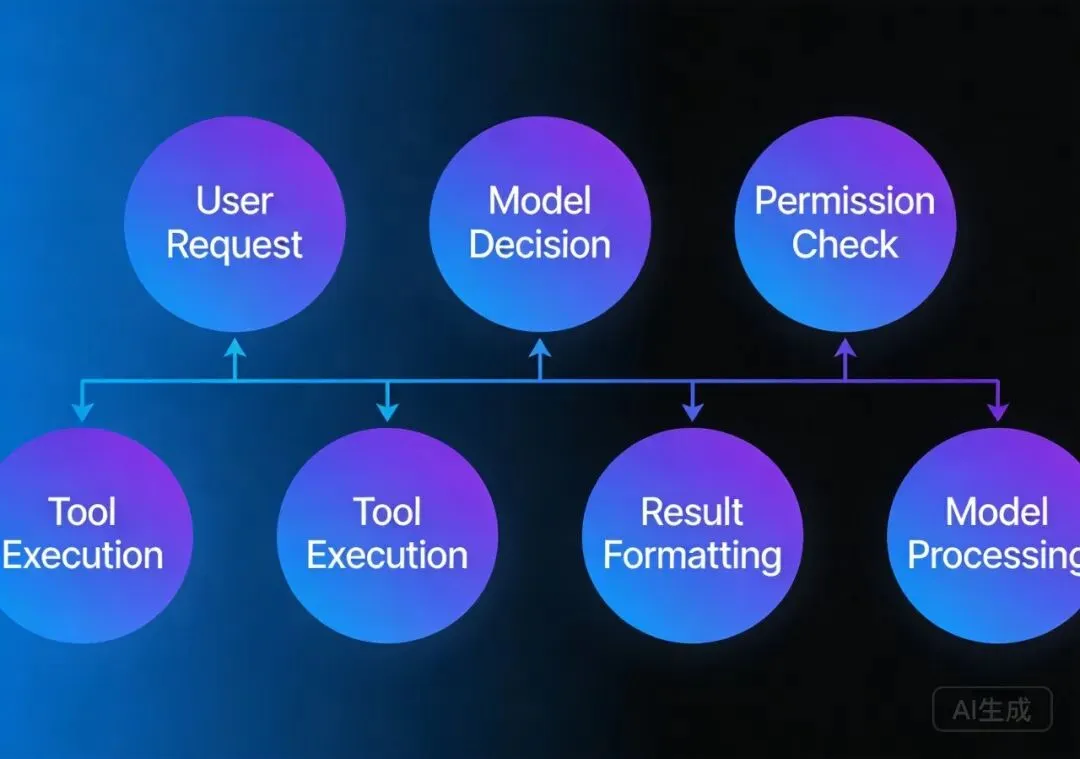
工具执行流程
用户请求
    ↓
模型决策 → 选择工具 + 参数
    ↓
权限检查 → 用户确认(如需要)
    ↓
工具执行 → BaseTool.execute()
    ↓
结果格式化 → 返回给模型
    ↓
模型处理 → 下一步决策
关键工具实现分析
1. Read 工具
// src/tools/read.ts 核心逻辑

class ReadTool extends BaseTool {
  definition = {
    name: "Read",
    description: "读取文件内容,支持分页读取大文件",
    parameters: {
      file_path: { type: "string", required: true },
      offset: { type: "number", default: 0 },
      limit: { type: "number", default: 2000 }
    }
  };

  async execute(params: ReadParams): Promise<ToolResult> {
    const { file_path, offset, limit } = params;

    // 1. 文件存在性检查
    if (!exists(file_path)) {
      return { success: false, error: "File not found" };
    }

    // 2. 大文件处理策略
    const fileSize = getFileSize(file_path);
    if (fileSize > LARGE_FILE_THRESHOLD) {
      // 返回摘要而非全文
      const summary = await generateFileSummary(file_path);
      return { success: true, output: summary, metadata: { truncated: true } };
    }

    // 3. 分页读取
    const content = await readFileWithPagination(file_path, offset, limit);

    // 4. 格式化输出(带行号)
    const formatted = formatWithLineNumbers(content, offset);

    return { success: true, output: formatted };
  }
}设计要点:
- • 大文件自动摘要,防止上下文膨胀
- • 分页读取支持,避免一次性加载
- • 行号格式化,便于定位
2. Agent 工具(并行执行核心)
// src/tools/agent.ts 核心逻辑

interface AgentConfig {
  subagent_type: AgentType;  // Agent 类型
  description: string;       // 任务描述
  prompt: string;            // 具体任务
  run_in_background?: boolean; // 后台执行
  isolation?: "worktree";    // 隔离模式
}

class AgentTool extends BaseTool {
  definition = {
    name: "Agent",
    description: "启动子 Agent 执行任务,支持并行执行",
    parameters: AgentConfigSchema
  };

  async execute(config: AgentConfig): Promise<ToolResult> {
    // 1. 选择 Agent 类型
    const agentClass = getAgentClass(config.subagent_type);

    // 2. 创建独立上下文
    const isolatedContext = createIsolatedContext(config);

    // 3. 启动 Agent
    const agent = new agentClass(isolatedContext);

    // 4. 执行方式选择
    if (config.run_in_background) {
      // 后台执行,返回任务 ID
      const taskId = await runInBackground(agent, config.prompt);
      return {
        success: true,
        output: `Task started: ${taskId}`,
        metadata: { taskId, background: true }
      };
    } else {
      // 同步执行,等待结果
      const result = await agent.execute(config.prompt);
      return {
        success: true,
        output: result.summary,
        metadata: { fullResult: result }
      };
    }
  }
}设计要点:
- • 独立上下文隔离,防止污染主 Agent
- • 后台执行支持,不阻塞主流程
- • 结果摘要返回,控制输出大小
二、Agent 系统源码解析
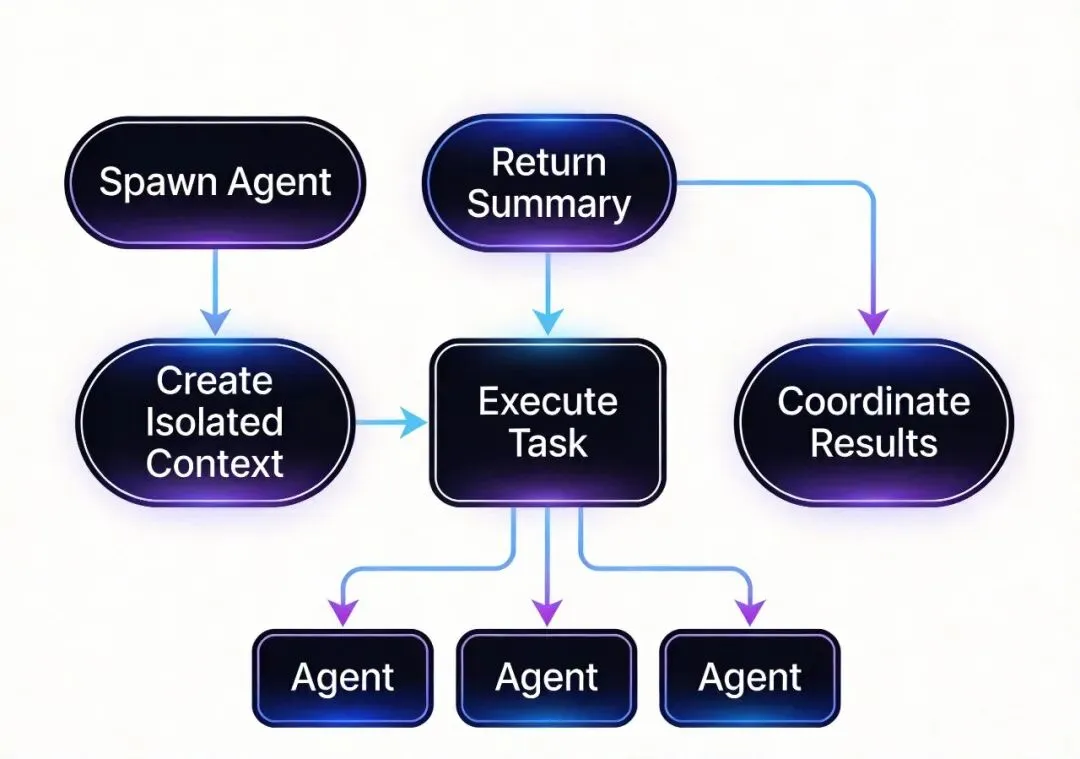
Agent 类型体系
// src/agent/types.ts

enum AgentType {
  GENERAL_PURPOSE = "general-purpose",  // 通用 Agent
  EXPLORE = "Explore",                  // 快速探索
  PLAN = "Plan",                        // 规划 Agent
  CODE_REVIEWER = "code-reviewer",      // 代码审查
  STATUSLINE_SETUP = "statusline-setup", // 状态栏设置
}

interface AgentCapabilities {
  tools: Tool[];          // 可用工具集
  maxSteps: number;       // 最大步数
  contextLimit: number;   // 上下文限制
  outputFormat: "summary" | "full"; // 输出格式
}

const AGENT_CONFIGS: Record<AgentType, AgentCapabilities> = {
  EXPLORE: {
    tools: [Glob, Grep, Read],
    maxSteps: 30,
    contextLimit: 50000,
    outputFormat: "summary"
  },
  PLAN: {
    tools: [Read, Grep, Glob, LSP],
    maxSteps: 50,
    contextLimit: 100000,
    outputFormat: "full"
  },
  // ...
};
Agent 基类实现
// src/agent/base.ts

abstract class BaseAgent {
  protected context: AgentContext;
  protected tools: ToolSet;
  protected maxSteps: number;

  constructor(context: AgentContext) {
    this.context = context;
    this.tools = initializeTools(this.getCapabilities().tools);
    this.maxSteps = this.getCapabilities().maxSteps;
  }

  // 核心执行循环
  async execute(prompt: string): Promise<AgentResult> {
    let stepCount = 0;
    let lastResult: ToolResult;

    while (stepCount < this.maxSteps) {
      // 1. 构造请求
      const request = this.buildRequest(prompt, lastResult);

      // 2. 调用 API
      const response = await this.callAPI(request);

      // 3. 处理响应
      if (response.type === "answer") {
        return this.finalize(response.content);
      }

      if (response.type === "tool_call") {
        // 4. 执行工具
        lastResult = await this.executeTool(response.toolCall);
        stepCount++;

        // 5. 更新上下文
        this.context.addInteraction(response.toolCall, lastResult);
      }
    }

    // 超出最大步数
    return this.timeoutResult();
  }

  // 工具执行
  protected async executeTool(toolCall: ToolCall): Promise<ToolResult> {
    const tool = this.tools[toolCall.name];
    if (!tool) {
      return { success: false, error: `Unknown tool: ${toolCall.name}` };
    }

    // 权限检查
    if (this.needsPermission(tool, toolCall.params)) {
      const granted = await this.requestPermission(toolCall);
      if (!granted) {
        return { success: false, error: "Permission denied" };
      }
    }

    return tool.execute(toolCall.params);
  }

  // 结果汇总
  protected finalize(content: string): AgentResult {
    return {
      success: true,
      summary: this.generateSummary(content),
      fullContent: content,
      stepsUsed: this.context.getStepCount(),
      toolsUsed: this.context.getToolsUsed()
    };
  }
}
Agent 协调器
// src/agent/coordinator.ts

class AgentCoordinator {
  private runningAgents: Map<string, BaseAgent>;
  private taskQueue: TaskQueue;

  // 并行启动多个 Agent
  async spawnMultiple(configs: AgentConfig[]): Promise<string[]> {
    const taskIds: string[] = [];

    for (const config of configs) {
      const agent = this.createAgent(config);
      const taskId = generateTaskId();

      this.runningAgents.set(taskId, agent);

      // 根据配置选择执行方式
      if (config.run_in_background) {
        this.taskQueue.addBackground(taskId, agent, config.prompt);
      } else {
        this.taskQueue.addForeground(taskId, agent, config.prompt);
      }

      taskIds.push(taskId);
    }

    return taskIds;
  }

  // 收集所有 Agent 结果
  async collectResults(taskIds: string[]): Promise<AgentResult[]> {
    const results: AgentResult[] = [];

    for (const taskId of taskIds) {
      const result = await this.taskQueue.getResult(taskId);
      results.push(result);
      this.runningAgents.delete(taskId);
    }

    return results;
  }

  // 冲突检测和处理
  detectConflicts(results: AgentResult[]): ConflictReport {
    const fileEdits = this.extractFileEdits(results);
    return this.analyzeConflicts(fileEdits);
  }
}
三、上下文管理源码解析
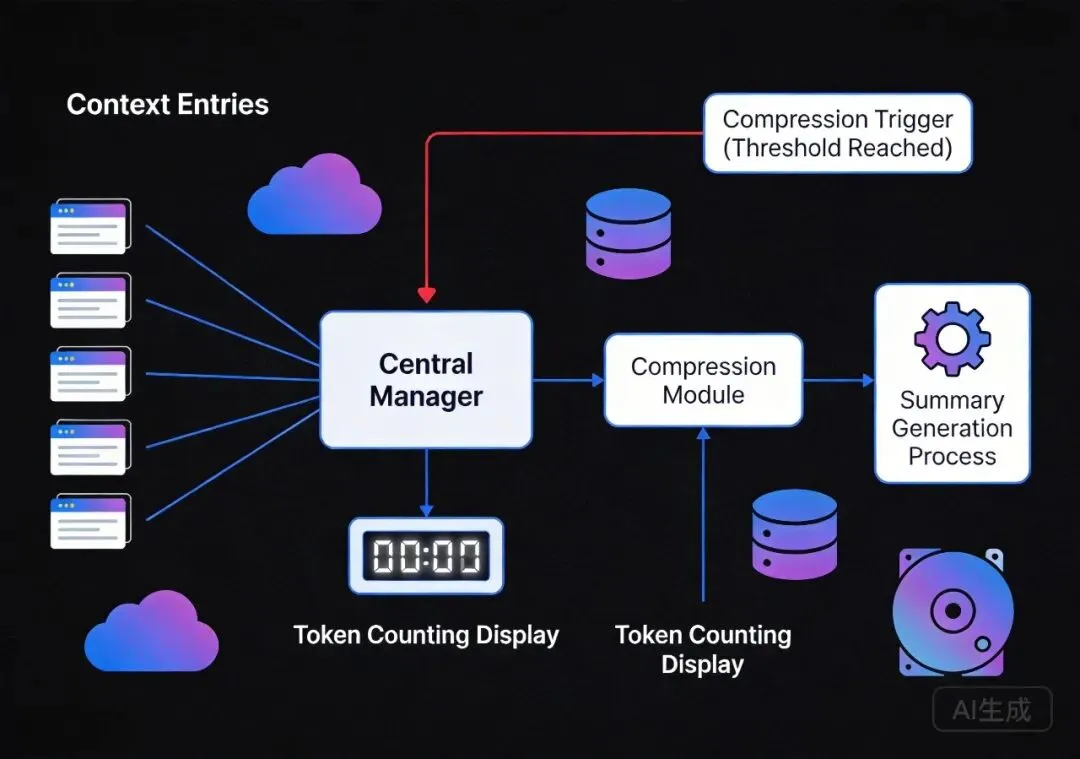
上下文管理器核心实现
// src/context/manager.ts

interface ContextEntry {
  type: "user" | "assistant" | "tool_call" | "tool_result" | "system";
  content: string;
  timestamp: number;
  tokenCount: number;
  priority: number;  // 用于压缩时的优先级判断
}

class ContextManager {
  private entries: ContextEntry[];
  private maxTokens: number;
  private currentTokens: number;

  constructor(maxTokens: number = 200000) {
    this.entries = [];
    this.maxTokens = maxTokens;
    this.currentTokens = 0;
  }

  // 添加条目
  addEntry(entry: ContextEntry): void {
    this.entries.push(entry);
    this.currentTokens += entry.tokenCount;

    // 检查是否需要压缩
    if (this.currentTokens > this.maxTokens * 0.8) {
      this.compress();
    }
  }

  // 压缩算法
  compress(): void {
    // 1. 识别低优先级条目
    const lowPriority = this.entries.filter(e =>
      e.priority < THRESHOLD &&
      e.type !== "system"
    );

    // 2. 生成摘要替代详细内容
    for (const entry of lowPriority) {
      if (entry.type === "tool_result" && entry.tokenCount > SUMMARY_THRESHOLD) {
        const summary = this.generateSummary(entry.content);
        entry.content = summary;
        entry.tokenCount = estimateTokens(summary);
      }
    }

    // 3. 移除冗余条目
    this.entries = this.entries.filter(e =>
      e.priority >= MIN_PRIORITY ||
      e.timestamp > RECENT_THRESHOLD
    );

    // 4. 更新 token 计数
    this.currentTokens = this.entries.reduce((sum, e) => sum + e.tokenCount, 0);
  }

  // 文件内容摘要生成
  private generateFileSummary(content: string): string {
    // 提取关键信息:函数签名、类定义、主要逻辑
    const structure = extractStructure(content);
    const imports = extractImports(content);
    const exports = extractExports(content);

    return `
[File Summary]
Imports: ${imports.length} modules
Structure: ${structure.classes.length} classes, ${structure.functions.length} functions
Key exports: ${exports.join(", ")}
Main logic: ${structure.mainFlow.description}
    `.trim();
  }
}
压缩策略详解
// src/context/compression.ts

interface CompressionStrategy {
  type: "summary" | "remove" | "truncate";
  threshold: number;  // token 阈值
  preserveKey: boolean; // 是否保留关键信息
}

const COMPRESSION_RULES: CompressionStrategy[] = [
  // 工具结果摘要
  {
    type: "summary",
    threshold: 1000,
    preserveKey: true,
    apply: (entry: ContextEntry) => {
      if (entry.content.includes("Read tool result")) {
        return summarizeFileContent(entry.content);
      }
      if (entry.content.includes("Grep result")) {
        return summarizeSearchResults(entry.content);
      }
    }
  },

  // 移除旧的交互
  {
    type: "remove",
    threshold: 5000,
    preserveKey: false,
    apply: (entries: ContextEntry[]) => {
      const cutoff = Date.now() - ONE_HOUR;
      return entries.filter(e => e.timestamp > cutoff);
    }
  },

  // 截断长输出
  {
    type: "truncate",
    threshold: 500,
    preserveKey: true,
    apply: (content: string) => {
      if (content.length > TRUNCATE_LENGTH) {
        return content.slice(0, TRUNCATE_LENGTH) + "\n...[truncated]";
      }
    }
  }
];
上篇小结
本文解析了 Claude Code 的四大核心模块:
- 1. 项目结构:清晰的分层架构,职责分明
- 2. 工具系统:统一的基类设计、灵活的执行流程、大文件智能处理
- 3. Agent 系统:多类型 Agent 配置、并行执行协调、冲突检测机制
- 4. 上下文管理:智能压缩算法、多策略支持、摘要生成
下一篇文章将继续解析工作流程、Skills 系统、权限系统和设计模式。
下篇预告:Claude Code 源码解析(下)- 高级功能与扩展机制
将涵盖:ReAct 循环实现、Plan 模式、Skills 加载机制、权限控制、设计模式总结、源码学习建议。