 夜雨聆风
夜雨聆风


【Azure Container App】使用 yaml 部署 Container App 时遇见 400 Bad Request 错误
问题描述
使用 az containerapp create –yaml <file> 创建 Azure Container App 时, yaml 文件中只包含简单的信息,结果遇见难以理解/无法正常分析的 400 Bad Request问题。
location: chinanorth3properties:environmentId: "/subscriptions/<subscriptionid>/resourceGroups/<resourcegroupname>/providers/Microsoft.App/managedEnvironments/<environmentname>"configuration:ingress:external: truetargetPort: 8080registries:- server: <ARCName>.azurecr.cnidentity: <useridentityresourceid>"template:containers:- name: myappimage: <ImageURL:Tags>resources:cpu: 0.5memory: 1Gi
在实际的操作中的错误信息:
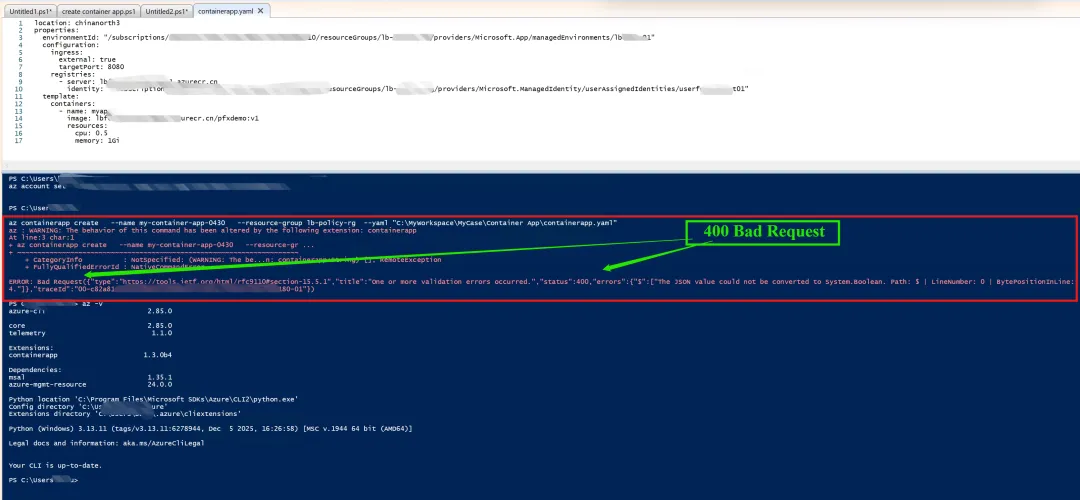
az : WARNING: The behavior of this command has been altered by the following extension: containerappAt line:3 char:1+ az containerapp create --name my-container-app-0430 --resource-gr ...+ ~~~~~~~~~~~~~~~~~~~~~~~~~~~~~~~~~~~~~~~~~~~~~~~~~~~~~~~~~~~~~~~~~~~~~+ CategoryInfo : NotSpecified: (WARNING: The be...n: containerapp:String) [], RemoteException+ FullyQualifiedErrorId : NativeCommandErrorERROR: Bad Request({"type":"https://tools.ietf.org/html/rfc9110#section-15.5.1","title":"One or more validation errors occurred.","status":400,"errors":{"$":["The JSON value could not be converted to System.Boolean. Path: $ | LineNumber: 0 | BytePositionInLine:4."]},"traceId":"00-*********-********-01"})
错误截图:
基于以上问题,应该如何解决呢?
问题解答
在使用 az containerapp create –yaml <file> 创建 Azure Container App 时,CLI 扩展会将完整的内部模型对象序列化后作为 HTTP PUT 请求体发送给 Azure Resource Manager(ARM)。
该序列化行为存在缺陷:即使 YAML 中未设置的可选字段也会被包含进请求体,并被显式赋值为 null 。
这种行为导致 ARM 在反序列化阶段出现类型转换错误,尤其是当某些字段在后端模型中为非空类型(例如 System.Boolean)时,ARM 尝试将 null 转换为布尔值会直接失败,最终返回 HTTP 400 错误。
通过 –debug 日志可以观察到请求体中包含大量 null 字段。
“allowInsecure“: null 这一个字段正是问题的关键,因为 ARM 期望其为布尔类型而非 null,从而导致整体请求失败。
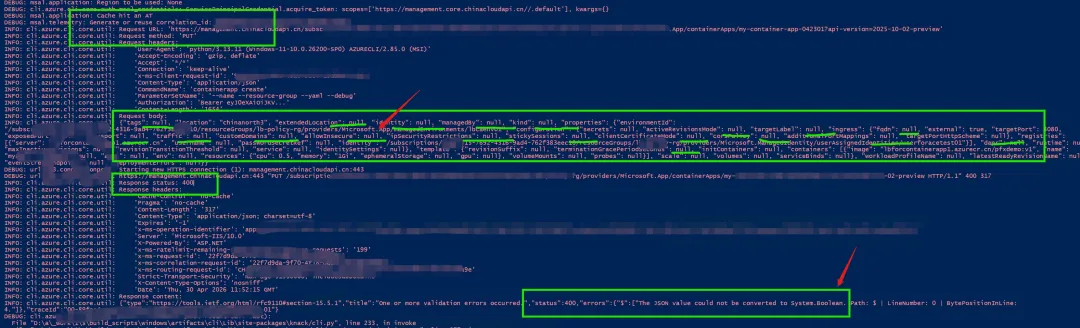
az containerapp create –name <xxxxx> –resource-group <xxxxx> –yaml “containerapp.yaml” –debug
( 为 az containerapp create 添加 –debug , 打印出完整的请求日志,就可以发现HTTP请求body中,很多字段默认添加了 null 值 )
补充说明:
-
az containerapp update –yaml 命令可以正常执行,因为它使用的是 HTTP PATCH,仅提交变更字段(不包含 null 字段)。 -
az deployment group create(Bicep/ARM 模板)也不存在该问题,因为其序列化过程不会注入 null 字段。
解决方案
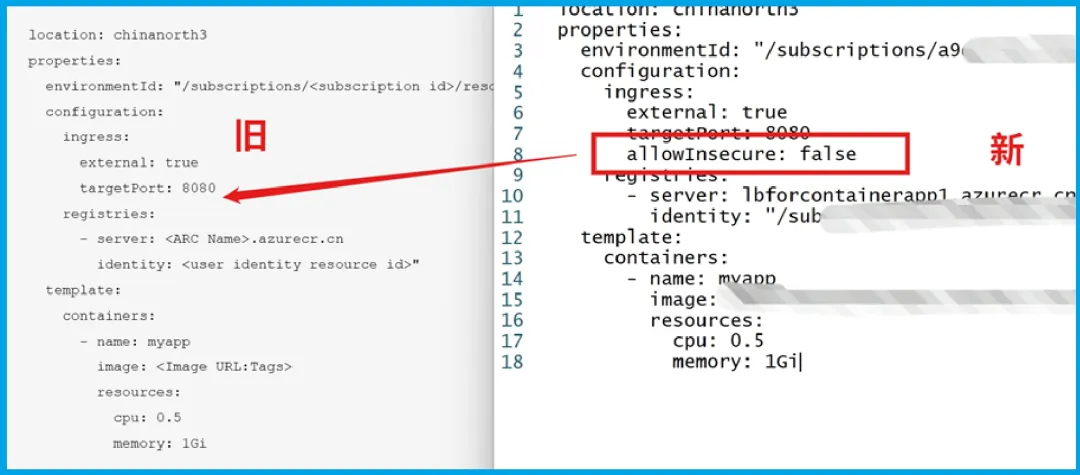
在ACA的yaml文件中,指定 allowInsecure 的值为false就可以了。
参考资料
[containerapp] az containerapp create –yaml injects null fields into PUT request body, causing HTTP 400 (System.Boolean conversion error) #9729 : https://github.com/Azure/azure-cli-extensions/issues/9729
Configure ingress for your app in Azure Container Apps : https://learn.microsoft.com/en-us/azure/container-apps/ingress-how-to?pivots=azure-cli
Azure Container Apps ARM and YAML template specifications : https://learn.microsoft.com/en-us/azure/container-apps/azure-resource-manager-api-spec?tabs=yaml
当在复杂的环境中面临问题,格物之道需:
浊而静之徐清,安以动之徐生。
云中,恰是如此!