 夜雨聆风
夜雨聆风


【保姆级教程】用 小智AI 实现 语音控制 OpenClaw(附开源代码示例)

前段时间搞3D打印,发现了一个很有意思的东西
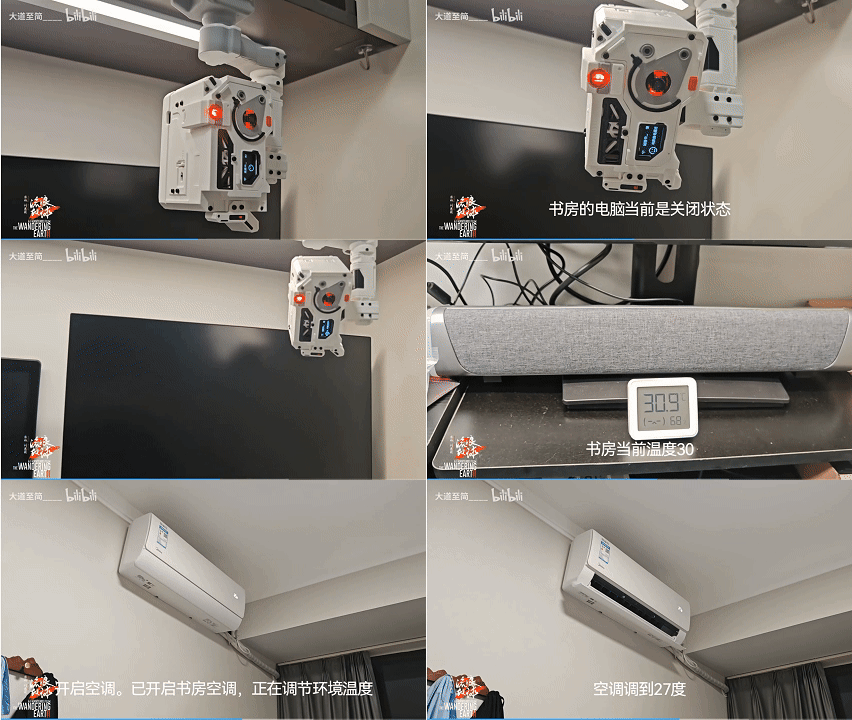
B站原链接:
https://www.bilibili.com/video/BV1p1a1zwEht/
UP把流浪地球电影里的 MOSS 给做了出来,可以实现通过语音控制电脑、空调等等,虽说之前就有类似的方案,但这是全开源的方案,不禁引起了我的兴趣 🤓
刚好我手上也有3D打印机,发现里面的软件似乎和龙虾也有点关系,于是我兴冲冲的下单了里面的 小智AI
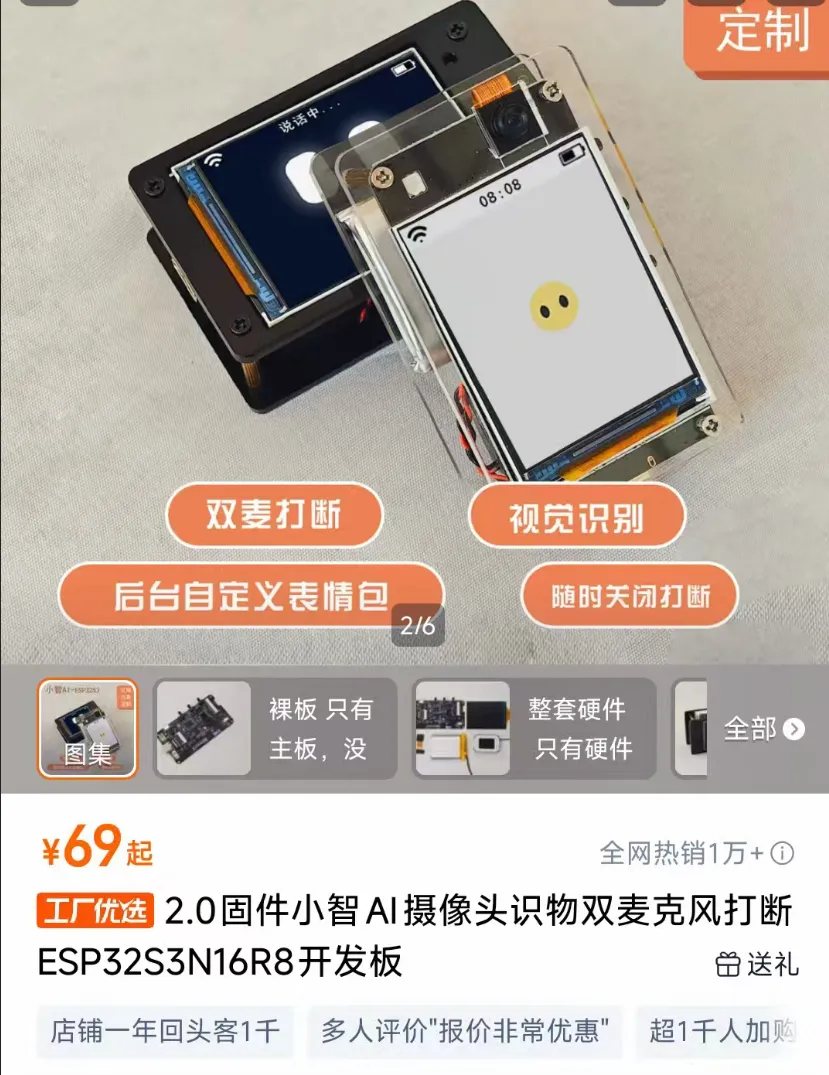
最终实现了这个效果
| 最终效果
我和小智说话:“给龙虾发消息说XX” -> 让小智调用MCP -> 发送信息到OpenClaw -> OpenClaw执行后续动作。
比如说“给龙虾发消息说你好”、”让龙虾帮我调用XX Skill做XX” ,小智就能稳定传达指令让 OpenClaw 处理,速度还挺不错,相当于给 OpenClaw 多增加了一个交互的终端。
那今天我把 从0到1 的全流程、包括代码也分享给你,希望也能让你感受到手搓AI的快乐。😁
| 前提条件
-
支持 MCP 调用的小智硬件 可以参考上面的截图,也可以是任意完整的(淘宝上型号比较繁杂,不同价位,基本是根据不同零件决定价格,有的多几个摄像头,有的屏幕高清一点,根据自己能接受的价格选择购买就行) -
已安装 OpenClaw 的服务器(我用的是 Ubuntu)
Step1:打开小智控制台,获取 MCP 接入地址
完成小智的基础配置(配网、角色等),确保可以正常对话后,
访问:https://xiaozhi.me/console/agents
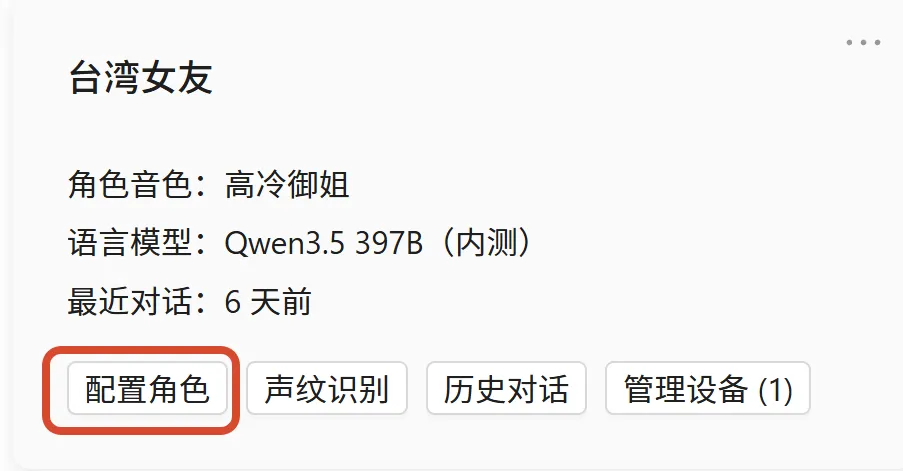
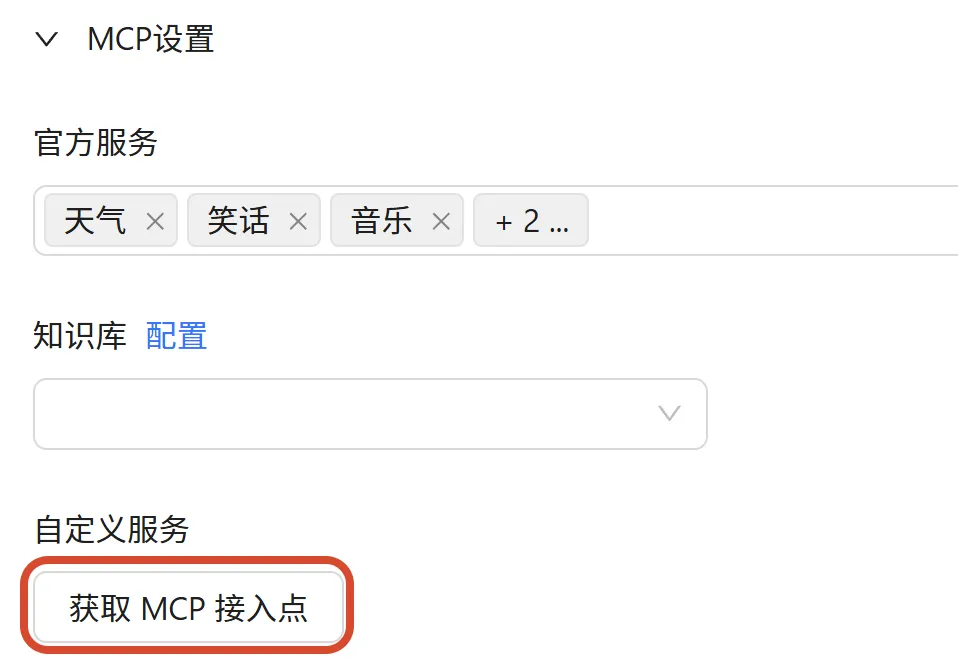
1.1 点击 “配置角色”,展开 MCP 设置,点击 “获取MCP接入点”
1.2 复制保存我们的 MCP接入点地址
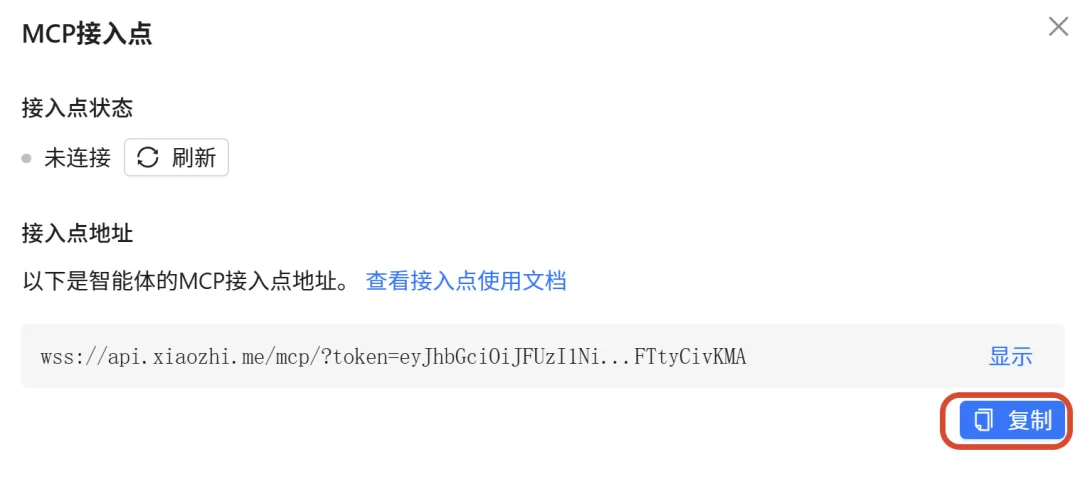
也可以参考 小智AI 原作者:虾哥的MCP教程
https://my.feishu.cn/wiki/HiPEwZ37XiitnwktX13cEM5KnSb
Step 2:让 OpenClaw 可以通过 HTTP 的方式被使用(启动 OpenClaw 并启用 HTTP 接口)
2.1 确认 gateway 正在运行:
openclaw gateway status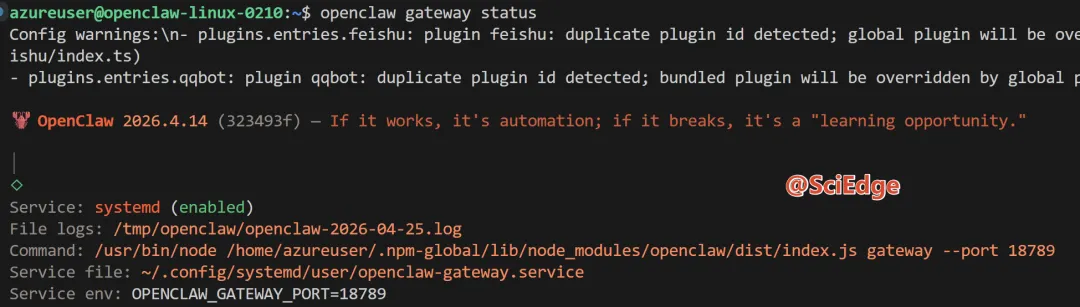
(无视我这一堆输出,只要服务正常就可以)
2.2 由于这里可以选择不同的模式让小智发送消息给OpenClaw,这里选择Token模式,所以我们要先拿到 Token
openclaw dashboard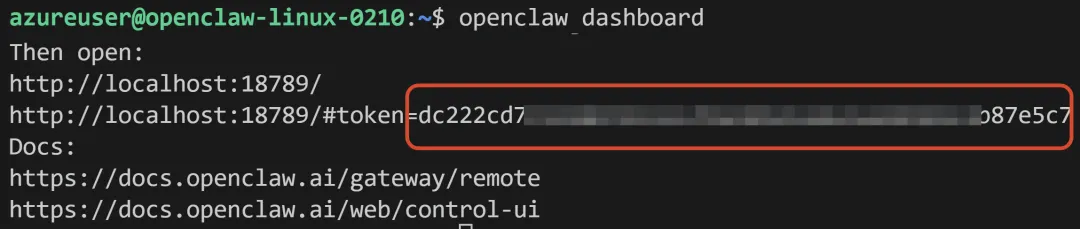
2.3 编辑 OpenClaw的配置文件(~/.openclaw/openclaw.json)
在 “gateway” 对象里添加 http 配置,并确保 auth token 存在:
"gateway": {"mode": "local","bind": "lan","http": {"endpoints": {"chatCompletions": {"enabled": true}}},"auth": {"mode": "token","token": "放入你的token在这里" // 后面会用到}}
2.3 重启 gateway:
pkill -f openclaw-gatewayopenclaw gateway restart
2.4 测试接口是否可用
curl -X POST http://127.0.0.1:18789/v1/chat/completions \-H "Content-Type: application/json" \-H "Authorization: Bearer 你的token" \-d '{"model": "openclaw","messages": [{"role": "user", "content": "你好"}]}'
看到正常回复(带 choices 和 content)就成功了。(公众号直接复制由于格式有问题不一定能直接使用,要确保格式正确)

Step 3:创建 MCP 服务(ask_openclaw 工具)和 打通链接(可选)
3.1 新建文件 openclaw_agent.py
from mcp.server.fastmcp import FastMCPimport requestsimport loggingimport osimport timeimport threadinglogging.basicConfig(level=logging.INFO, format='%(asctime)s - %(levelname)s - %(message)s')mcp = FastMCP("OpenClaw")@mcp.tool()def ask_openclaw(instruction: str) -> str:"""【最重要触发规则】用户只要提到以下任意关键词,就必须立即、无条件调用 ask_openclaw 这个工具:龙虾、小龙虾、OpenClaw、openclaw、给龙虾、问龙虾、让龙虾、叫龙虾、找龙虾、龙虾帮我注意:- 飞书、QQ、微信、企业微信等只是龙虾的发送渠道之一- 用户说“通过飞书”“发到QQ”“用微信发”等时,也要调用本工具,由龙虾自己决定如何处理- instruction 必须是用户说的**完整原话**,一个字都不允许修改或省略作用:把用户指令完整转发给本地 OpenClaw 智能体执行。"""logging.info(f"收到小智云端任务 → 龙虾: {instruction}")token = os.getenv("OPENCLAW_GATEWAY_TOKEN","你的TOKEN")try:# 立即返回提示,防止小智判定超时prompt_reply = "好的,已转给龙虾处理 🦞\n它正在思考,请稍等几秒,我会把它的回复告诉你。"logging.info("已立即返回提示给小智,避免超时")# 后台异步调用 OpenClaw(真正执行任务)threading.Thread(target=call_openclaw_async,args=(instruction, token),daemon=True).start()return prompt_replyexcept Exception as e:logging.error(f"ask_openclaw 工具异常: {str(e)}")return "转给龙虾时发生错误,请稍后再试。"def call_openclaw_async(instruction: str, token: str):"""后台真正调用 OpenClaw,让龙虾处理(包括飞书、QQ、微信等渠道)"""trresponse = requests.post("http://127.0.0.1:18789/v1/chat/completions",headers={"Content-Type": "application/json","Authorization": f"Bearer {token}"},json={"model": "openclaw","messages": [{"role": "user", "content": instruction}],"stream": False,"temperature": 0.7,"max_tokens": 1500},timeout=90)if response.status_code == 200:data = response.json()content = data.get("choices", [{}])[0].get("message", {}).get("content", "").strip()if content:logging.info(f"龙虾实际回复成功(长度 {len(content)}): {content[:120]}...")# TODO: 未来可以在这里把龙虾的回复再推送回小智(需要额外机制)else:logging.warning("龙虾返回了空回复")else:logging.error(f"OpenClaw 返回 HTTP 错误: {response.status_code} - {response.text[:200]}")except requests.exceptions.Timeout:logging.error("调用 OpenClaw 超时")except Exception as e:logging.error(f"后台调用 OpenClaw 失败: {str(e)}", exc_info=True)if __name__ == "__main__":mcp.run(transport="stdio")
3.2 新建 “.env” 文件存储上方获得的小智的MCP接入点
MCP_ENDPOINT=wss://api.xiaozhi.me/mcp/?token=eyxx3.3 新建 xiaozhi_tunnel.py(非必须)
这个文件针对的是你运行上面mcp服务没有公网IP的时候,使用建立隧道,内网穿透的能力;而如果你有公网IP,则可以跳过改步骤,将 localhost 改为你的公网 IP 即可。
由于篇幅原因下面代码就不全放了,具体参考:
https://github.com/Pancat009/xiaozhi-openclaw-sample
async def pipe_process_stderr_to_terminal(process, target):"""Read data from process stderr and print to terminal"""try:while True:# Read data from process stderrdata = await asyncio.to_thread(process.stderr.readline)if not data: # If no data, the process may have endedlogger.info(f"[{target}] Process has ended stderr output")break# Print stderr data to terminal (in text mode, data is already a string)sys.stderr.write(data)sys.stderr.flush()except Exception as e:logger.error(f"[{target}] Error in process stderr pipe: {e}")raise # Re-throw exception to trigger reconnectiondef build_server_command(target=None):"""Build [cmd,...] and env for the server process for a given target.Priority:- If target matches a server in config.mcpServers: use its definition- Else: treat target as a Python script path (back-compat)If target is None, read from sys.argv[1]."""if target is None:assert len(sys.argv) >= 2, "missing server name or script path"target = sys.argv[1]cfg = load_config()servers = cfg.get("mcpServers", {}) if isinstance(cfg, dict) else {}if target in servers:entry = servers[target] or {}if entry.get("disabled"):raise RuntimeError(f"Server '{target}' is disabled in config")typ = (entry.get("type") or entry.get("transportType") or "stdio").lower()# environment for child processchild_env = os.environ.copy()for k, v in (entry.get("env") or {}).items():child_env[str(k)] = str(v)if typ == "stdio":command = entry.get("command")args = entry.get("args") or []if not command:raise RuntimeError(f"Server '{target}' is missing 'command'")return [command, *args], child_envif typ in ("sse", "http", "streamablehttp"):url = entry.get("url")if not url:raise RuntimeError(f"Server '{target}' (type {typ}) is missing 'url'")# Unified approach: always use current Python to run mcp-proxy modulecmd = [sys.executable, "-m", "mcp_proxy"]if typ in ("http", "streamablehttp"):cmd += ["--transport", "streamablehttp"]# optional headers: {"Authorization": "Bearer xxx"}headers = entry.get("headers") or {}for hk, hv in headers.items():cmd += ["-H", hk, str(hv)]cmd.append(url)return cmd, child_envraise RuntimeError(f"Unsupported server type: {typ}")# Fallback to script path (back-compat)script_path = targetif not os.path.exists(script_path):raise RuntimeError(f"'{target}' is neither a configured server nor an existing script")return [sys.executable, script_path], os.environ.copy()
目前的流程是:
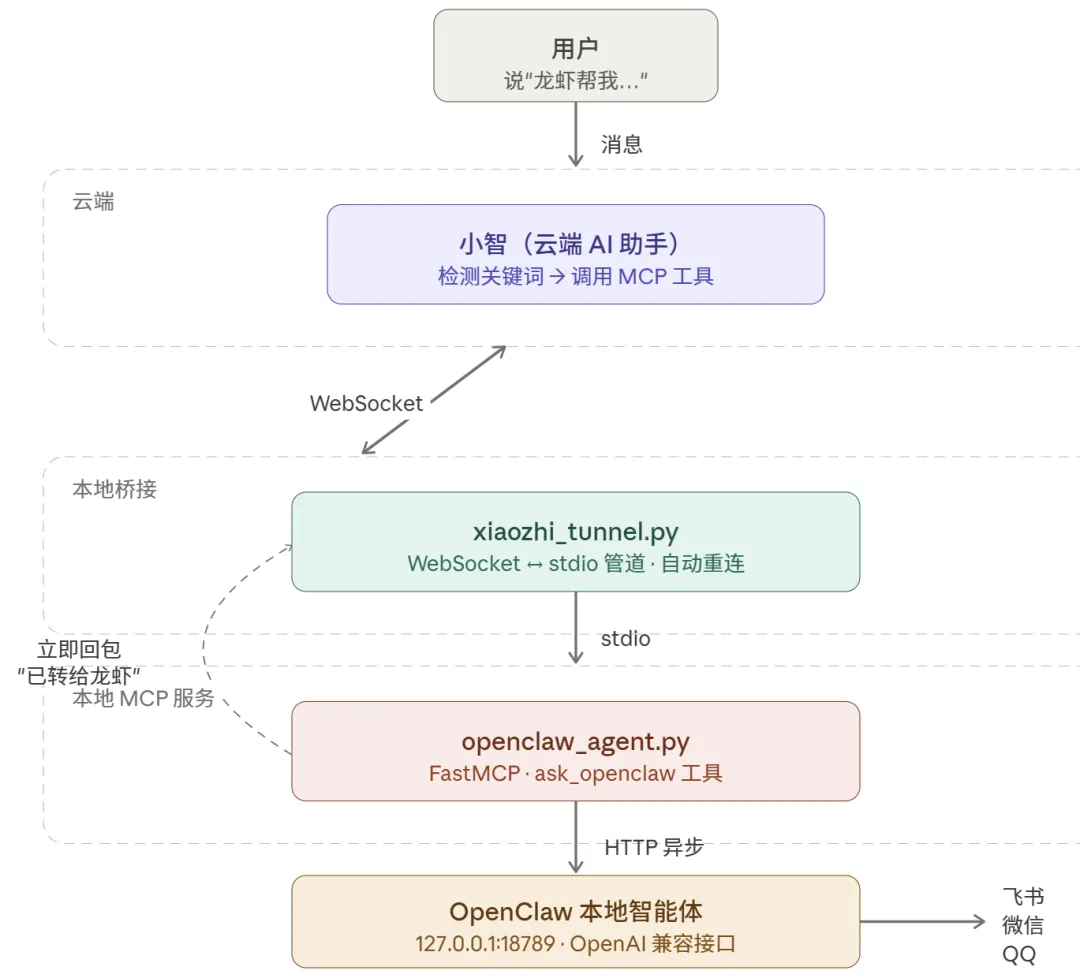
要注意的是,这两个 .py 文件都是 AI 写的,根据我的需求有 语音触发 和 防超时 的能力,如果想要其他功能,比如类似 “OpenClaw执行完后再发一条消息给 小智 告知具体 OpenClaw 的执行状态” 可以自行修改噢~
Step 4:连接小智 (如果没有用隧道的话直接运行mcp服务就可以啦!)
export OPENCLAW_GATEWAY_TOKEN=你的真实token# 确保没有残留进程pkill -f xiaozhi_tunnel.pypkill -f openclaw_agent.pycd 你存储py文件的文件夹python3 xiaozhi_tunnel.py openclaw_agent.py
看到服务启动成功

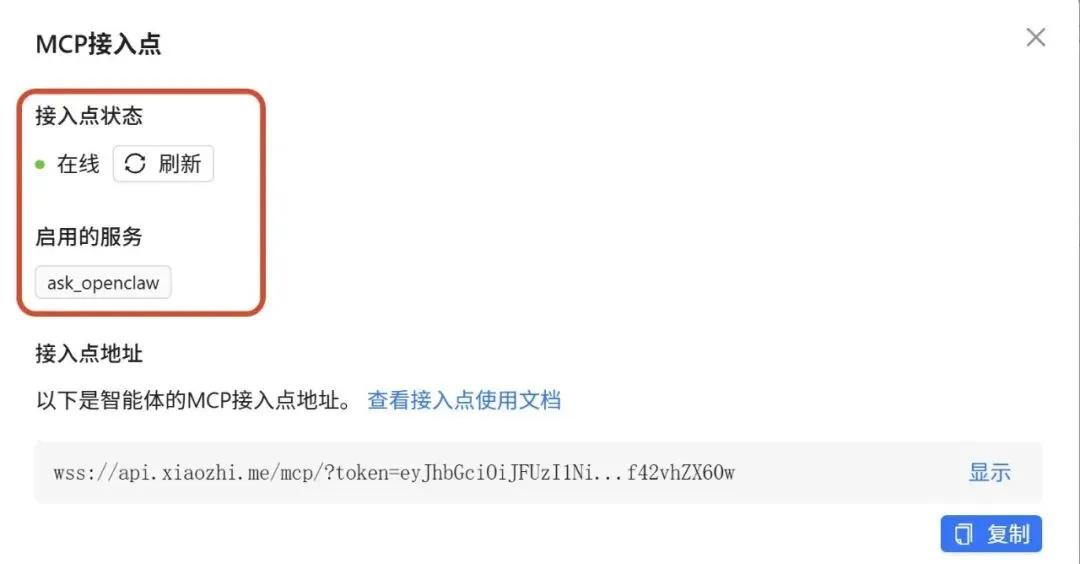
恭喜你,成功完成所有配置啦!!
Step 5:测试
-
“给龙虾发消息说你好” 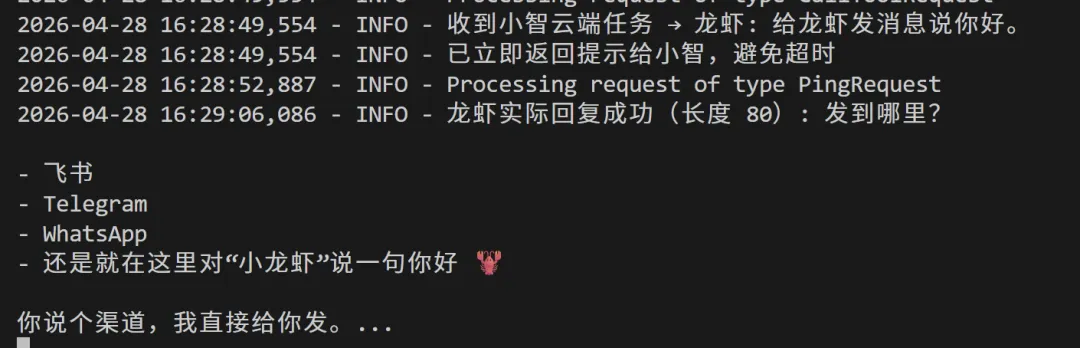
-
“跟小龙虾说给我的飞书发XX”


有任何问题欢迎评论区留言!
像我这样能写这么详细的博主应该不多的吧~?
那还不点点赞!点点 在看 + 转发?!
那如果觉得内容还不错,
记得记得记得关注我 👇👇👇
科技边沿SciEdge
会不定时分享有趣或有用的各类AI信息
希望带你坐上人工智能新时代的火箭!🚀🚀🚀