 夜雨聆风
夜雨聆风OpenClaw小龙虾🦞3-13日版本部署
hello啊,兄弟们好久不见,菜鸡小韩上线了。先跟大家寒暄寒暄,最近身体怎么样。有没有好好吃饭,有没有好好睡觉?身体最重要呦呦呦!好了煽情的话不说了。接下来进入正题:各位看官您往下瞧:
一、场景:
最近小龙虾(openclaw)特别火。有人花钱部署。
os:又富了一批人,羡慕嫉妒恨啊!!!!!
我呢秉着好学,持之以恒的态度搞出来的保姆级安装教程,适合企业的生产环境。且接入钉钉实现智能问答。坑以踩完,一路绿灯
【做大做强,再创辉煌】
二、机器配置:
两台Win11虚拟机(A/B)
一台Ubunut22.04的虚拟机(openclaw部署的位置)最小支持2c2g
即安全,又方便。出问题直接删除虚拟机。
三、下载地址:
| 名称 | 下载地址 | 作用 |
|---|---|---|
| openclaw程序 | https://github.com/openclaw/openclaw | 小龙虾程序 |
| 钉钉对接接口 | https://github.com/soimy/openclaw-channel-dingtalk | 钉钉智能机器人 |
| skill技能下载地址 | https://clawhub.ai/ | 技能下载 |
| openclaw文档 | https://docs.openclaw.ai/ | 官方文档 |
四、准备步骤:
4.1:Ubuntu系统安装
hei@heiL:~/.openclaw$ lsb_release-a
No LSB modules are available.
Distributor ID:Ubuntu
Description:Ubuntu 22.04.5 LTS
Release:22.04
Codename:jammy
#系统的简单我就不做赘述了,网上都有,我写的是网上没有的内容
4.2:工具安装
#安装node.js24+,小龙虾要求node.js22+的版本
#下载命令curl
hei@heiL:~$ sudo apt install curl-y

# 下载并安装 nvm:
hei@heiL:~$ curl-o- https://raw.githubusercontent.com/nvm-sh/nvm/v0.40.3/install.sh | bash
  % Total    % Received % Xferd  Average Speed   Time    Time     Time  Current
                                 Dload  Upload   Total   Spent    Left  Speed
100166311001663100251150--:--:-- --:--:-- --:--:-- 25122
=> Downloading nvm as script to '/home/hei/.nvm'
Failed to download 'https://raw.githubusercontent.com/nvm-sh/nvm/v0.40.3/bash_completion'
Failed to download 'https://raw.githubusercontent.com/nvm-sh/nvm/v0.40.3/nvm-exec'
=> Appending nvm source string to /home/hei/.bashrc
=> Appending bash_completion source string to /home/hei/.bashrc
=> Close and reopen your terminal to start using nvm or run the following to use it now:
exportNVM_DIR="$HOME/.nvm"
[ -s"$NVM_DIR/nvm.sh" ] && \. "$NVM_DIR/nvm.sh"# This loads nvm
[ -s"$NVM_DIR/bash_completion" ] && \. "$NVM_DIR/bash_completion"# This loads nvm bash_completion

hei@heiL:~$ \. "$HOME/.nvm/nvm.sh"

#下载node.js24版本
hei@heiL:~$ nvm install 24
Downloading and installing node v24.14.0...
Downloading https://nodejs.org/dist/v24.14.0/node-v24.14.0-linux-x64.tar.xz...
######################################################################################### 100.0%
Computing checksum with sha256sum
Checksums matched!
Now using node v24.14.0 (npm v11.9.0)
Creating default alias: default -> 24 (-> v24.14.0)

#查看安装版本
hei@heiL:~/.openclaw$ node-v
v24.14.0

#查看npm版本
hei@heiL:~$ npm-v
11.9.0

#安装编译工具
hei@heiL:~$ sudo apt install -ygit cmake g++make
五、安装OpenClaw:
5.1:安装步骤
使用官方推荐的两种安装方式:
1.一种是通过脚本安装
2.一种是通过npm全量安装。
3.我们采用npm全量安装
#1.通过官方提供的脚本安装
curl-fsSL https://openclaw.ai/install.sh | bash
#2.通过npm全量安装
hei@heiL:~$ npm install -g openclaw@latest
npm warn deprecated node-domexception@1.0.0: Use your platform's native DOMException instead
npm warn deprecated glob@10.5.0: Old versions of glob are not supported, and contain widely publicized security vulnerabilities, which have been fixed in the current version. Please update. Support for old versions may be purchased (at exorbitant rates) by contacting i@izs.me

added 564 packages in 53s

99 packages are looking for funding
  run `npm fund`for details

#3.安装完成
hei@heiL:~$ openclaw--version
OpenClaw 2026.3.13 (61d171a)
5.2:openclaw初始化
#初始化
hei@heiL:~$ openclaw onboard
🦞 OpenClaw 2026.3.13 (61d171a) — Shell yeah—I'm here to pinch the toil and leave you the glory.

▄▄▄▄▄▄▄▄▄▄▄▄▄▄▄▄▄▄▄▄▄▄▄▄▄▄▄▄▄▄▄▄▄▄▄▄▄▄▄▄▄▄▄▄▄▄▄▄▄▄▄▄
██░▄▄▄░██░▄▄░██░▄▄▄██░▀██░██░▄▄▀██░████░▄▄▀██░███░██
██░███░██░▀▀░██░▄▄▄██░█░█░██░█████░████░▀▀░██░█░█░██
██░▀▀▀░██░█████░▀▀▀██░██▄░██░▀▀▄██░▀▀░█░██░██▄▀▄▀▄██
▀▀▀▀▀▀▀▀▀▀▀▀▀▀▀▀▀▀▀▀▀▀▀▀▀▀▀▀▀▀▀▀▀▀▀▀▀▀▀▀▀▀▀▀▀▀▀▀▀▀▀▀
                  🦞 OPENCLAW 🦞

┌  OpenClaw onboarding
│
◇  Security ─────────────────────────────────────────────────────────────────────────────────╮
│                                                                                            │
│  Security warning — please read.                                                           │
│                                                                                            │
│  OpenClaw is a hobby project and still in beta. Expect sharp edges.                        │
│  By default, OpenClaw is a personal agent: one trusted operator boundary.                  │
│  This bot can read files and run actions if tools are enabled.                             │
│  A bad prompt can trick it into doing unsafe things.                                       │
│                                                                                            │
│  OpenClaw is not a hostile multi-tenant boundary by default.                               │
│  If multiple users can message one tool-enabled agent, they share that delegated tool      │
│  authority.                                                                                │
│                                                                                            │
│  If you’re not comfortable with security hardening and access control, don’t run           │
│  OpenClaw.                                                                                 │
│  Ask someone experienced to help before enabling tools or exposing it to the internet.     │
│                                                                                            │
│  Recommended baseline:                                                                     │
│  - Pairing/allowlists + mention gating.                                                    │
│  - Multi-user/shared inbox: split trust boundaries (separate gateway/credentials, ideally  │
│    separate OS users/hosts).                                                               │
│  - Sandbox + least-privilege tools.                                                        │
│  - Shared inboxes: isolate DM sessions (`session.dmScope: per-channel-peer`) and keep      │
│    tool access minimal.                                                                    │
│  - Keep secrets out of the agent’s reachable filesystem.                                   │
│  - Use the strongest available model for any bot with tools or untrusted inboxes.          │
│                                                                                            │
│  Run regularly:                                                                            │
│  openclaw security audit --deep                                                            │
│  openclaw security audit --fix                                                             │
│                                                                                            │
│  Must read: https://docs.openclaw.ai/gateway/security
5.3:openclaw配置
#左右方向键进行选择
#1.使用它可能会有分险
◆ I understand this is personal-by-default and shared/multi-user use requires lock-down. Continue?
│ ● Yes / ○ No
#2.选择快速入门模式
◆ Onboarding mode
│ ● QuickStart (Configure details later via openclaw configure.)
│ ○ Manual
#3.接入大模型------本文章接入阿里魔塔社区的模型----因为有免费的羊毛可以薅
◆ Model/auth provider
│ ○ OpenAI
│ ○ Anthropic
│ ○ Chutes
│ ○ MiniMax
│ ○ Moonshot AI (Kimi K2.5) (Kimi K2.5 + Kimi Coding)
│ ○ xAI (Grok)
│ ○ Mistral AI
│ ○ Volcano Engine
│ ○ BytePlus
│ ○ OpenRouter
│ ○ Kilo Gateway
│ ○ Qwen
│ ○ Z.AI
│ ○ Qianfan
│ ○ Alibaba Cloud Model Studio
│ ○ Copilot
│ ○ Vercel AI Gateway
│ ○ OpenCode
│ ○ Xiaomi
│ ○ Synthetic
│ ○ Together AI
│ ○ Hugging Face
│ ○ Venice AI
│ ○ LiteLLM
│ ○ Cloudflare AI Gateway
│ ● Custom Provider
│ ○ Ollama
│ ○ SGLang
│ ○ vLLM
│ ○ Skip for now
#4.配置API Base URL
◇ API Base URL
│ https://api-inference.modelscope.cn/v1
#5.配置APIkey,选择立即粘贴
◆ How do you want to provide this API key?
│ ● Paste API key now (Stores the key directly in OpenClaw config)
│ ○ Use external secret provider
#6.粘贴APIkey
◆ API Key (leave blank if not required)
│ ms-a2c94a71231231212321321321312312321f45447
#7.选着兼容回车
◆ Endpoint compatibility
│ ● OpenAI-compatible (Uses /chat/completions)
│ ○ Anthropic-compatible
│ ○ Unknown (detect automatically)
#8.录入model ID
Qwen/Qwen3.5-397B-A17B
#9.默认回车
◆ Endpoint ID
│ custom-api-inference-modelscope-cn
#10.默认回车
◆ Model alias (optional)
│ e.g. local, ollama
#11.接入聊天工具
◆ Select channel (QuickStart)
│ ○ Telegram (Bot API)
│ ○ WhatsApp (QR link)
│ ○ Discord (Bot API)
│ ○ IRC (Server + Nick)
│ ○ Google Chat (Chat API)
│ ○ Slack (Socket Mode)
│ ○ Signal (signal-cli)
│ ○ iMessage (imsg)
│ ○ LINE (Messaging API)
│ ○ Feishu/Lark (飞书)
│ ○ Nostr (NIP-04 DMs)
│ ○ Microsoft Teams (Bot Framework)
│ ○ Mattermost (plugin)
│ ○ Nextcloud Talk (self-hosted)
│ ○ Matrix (plugin)
│ ○ BlueBubbles (macOS app)
│ ○ Zalo (Bot API)
│ ○ Zalo (Personal Account)
│ ○ Synology Chat (Webhook)
│ ○ Tlon (Urbit)
│ ● Skip for now (You can add channels later via `openclaw channels add`) #我们接入钉钉,因此选着稍后添加
#12.选着稍后添加
◆ Search provider
│ ○ Brave Search
│ ○ Gemini (Google Search)
│ ○ Grok (xAI)
│ ○ Kimi (Moonshot)
│ ○ Perplexity Search
│ ● Skip for now (Configure later with openclaw configure --section web)
#13.配置skill,选择稍后添加
◆ Configure skills now? (recommended)
│ ● Yes / ○ No
#14.配置技能,如果有需要的,现在配置,没有请选择稍后安装
◆ Install missing skill dependencies
│ ◻ Skip for now (Continue without installing dependencies)
│ ◻ 🔐 1password
│ ◻ 📰 blogwatcher
│ ◻ 🫐 blucli
│ ◻ 📸 camsnap
│ ◻ 🧩 clawhub
│ ◻ 🛌 eightctl
│ ◻ ✨ gemini
│ ◻ 🧲 gifgrep
│ ◻ 🐙 github
│ ◻ 🎮 gog
│ ◻ 📍 goplaces
│ ◻ 📧 himalaya
│ ◻ 📦 mcporter
│ ◻ 🍌 nano-banana-pro
│ ◻ 📄 nano-pdf
│ ◻ 💎 obsidian
│ ◻ 🎤 openai-whisper
│ ◻ 💡 openhue
│ ◻ 🧿 oracle
│ ◻ 🛵 ordercli
│ ◻ 🔊 sag
│ ◻ 🌊 songsee
│ ◻ 🔊 sonoscli
│ ◻ 🧾 summarize
│ ◻ 🎬 video-frames
│ ◻ 📱 wacli
│ ◻ 🐦 xurl
#15.配置剩余的模型API秘钥,有就配,没有就选着NO
◇ Configure skills now? (recommended)
│ Yes
│
◇ Install missing skill dependencies
│ Skip for now
│
◇ Set GOOGLE_PLACES_API_KEY for goplaces?
│ No
│
◇ Set GEMINI_API_KEY for nano-banana-pro?
│ No
│
◇ Set NOTION_API_KEY for notion?
│ No
│
◇ Set OPENAI_API_KEY for openai-image-gen?
│ No
│
◇ Set OPENAI_API_KEY for openai-whisper-api?
│ No
│
◆ Set ELEVENLABS_API_KEY for sag?
│ ○ Yes / ● No
◇ Hooks ──────────────────────────────────────────────────────────────────╮
│ │
│ Hooks let you automate actions when agent commands are issued. │
│ Example: Save session context to memory when you issue /new or /reset. │
│ │
│ Learn more: https://docs.openclaw.ai/automation/hooks
#16.配置hooks,某一个事情发生时执行特定任务。先跳过,到时候json配置
#17.选择什么方式进入小龙虾,选着web ui
◆ How do you want to hatch your bot?
│ ● Hatch in TUI (recommended)
│ ○ Open the Web UI
│ ○ Do this later
#18.结束配置
◇ How do you want to hatch your bot?
│ Open the Web UI
│
◇ Dashboard ready ────────────────────────────────────────────────────────────────╮
│ │
│ Dashboard link (with token): │
│ http://127.0.0.1:18789/#token=d498d65bbc7ba37137ca0b93b6cfe784ec53aff8af0108a2 │
│ Opened in your browser. Keep that tab to control OpenClaw. │
│ │
├──────────────────────────────────────────────────────────────────────────────────╯
│
◇ Workspace backup ────────────────────────────────────────╮
│ │
│ Back up your agent workspace. │
│ Docs: https://docs.openclaw.ai/concepts/agent-workspace │
│ │
├───────────────────────────────────────────────────────────╯
│
◇ Security ──────────────────────────────────────────────────────╮
│ │
│ Running agents on your computer is risky — harden your setup: │
│ https://docs.openclaw.ai/security │
│ │
├─────────────────────────────────────────────────────────────────╯
│
◇ Shell completion ────────────────────────────────────────────────────────╮
│ │
│ Shell completion installed. Restart your shell or run: source ~/.bashrc │
│ │
├───────────────────────────────────────────────────────────────────────────╯
│
◇ Web search ───────────────────────────────────────╮
│ │
│ Web search was skipped. You can enable it later: │
│ openclaw configure --section web │
│ │
│ Docs: https://docs.openclaw.ai/tools/web │
│ │
├────────────────────────────────────────────────────╯
│
◇ What now ─────────────────────────────────────────────────────────────╮
│ │
│ What now: https://openclaw.ai/showcase ("What People Are Building"). │
│ │
├────────────────────────────────────────────────────────────────────────╯
│
└ Onboarding complete. Dashboard opened; keep that tab to control OpenClaw.
5.4:验证是否启动
hei@heiL:~$ openclaw gateway status

🦞 OpenClaw 2026.3.13 (61d171a) — Half butler, half debugger, full crustacean.

│
◇
Service: systemd (enabled)
File logs: /tmp/openclaw/openclaw-2026-03-14.log
Command: /home/hei/.nvm/versions/node/v24.14.0/bin/node /home/hei/.nvm/versions/node/v24.14.0/lib/node_modules/openclaw/dist/index.js gateway --port18789
Service file: ~/.config/systemd/user/openclaw-gateway.service
Service env: OPENCLAW_GATEWAY_PORT=18789

Service config looks out of date or non-standard.
Service config issue: Gateway service uses Node from a version manager; it can break after upgrades. (/home/hei/.nvm/versions/node/v24.14.0/bin/node)
Service config issue: System Node 22 LTS (22.16+) or Node 24 not found; install it before migrating away from version managers.
Recommendation: run "openclaw doctor" (or "openclaw doctor --repair").
Config (cli): ~/.openclaw/openclaw.json
Config (service): ~/.openclaw/openclaw.json

Gateway: bind=loopback (127.0.0.1), port=18789 (service args)
Probe target: ws://127.0.0.1:18789
Dashboard: http://127.0.0.1:18789/
Probe note: Loopback-only gateway; only local clients can connect.

Runtime: running (pid 104495, state active, sub running, last exit0, reason 0)
RPC probe: ok

Listening: 127.0.0.1:18789
Troubles: run openclaw status
Troubleshooting: https://docs.openclaw.ai/troubleshooting
5.5:web页面配置查看
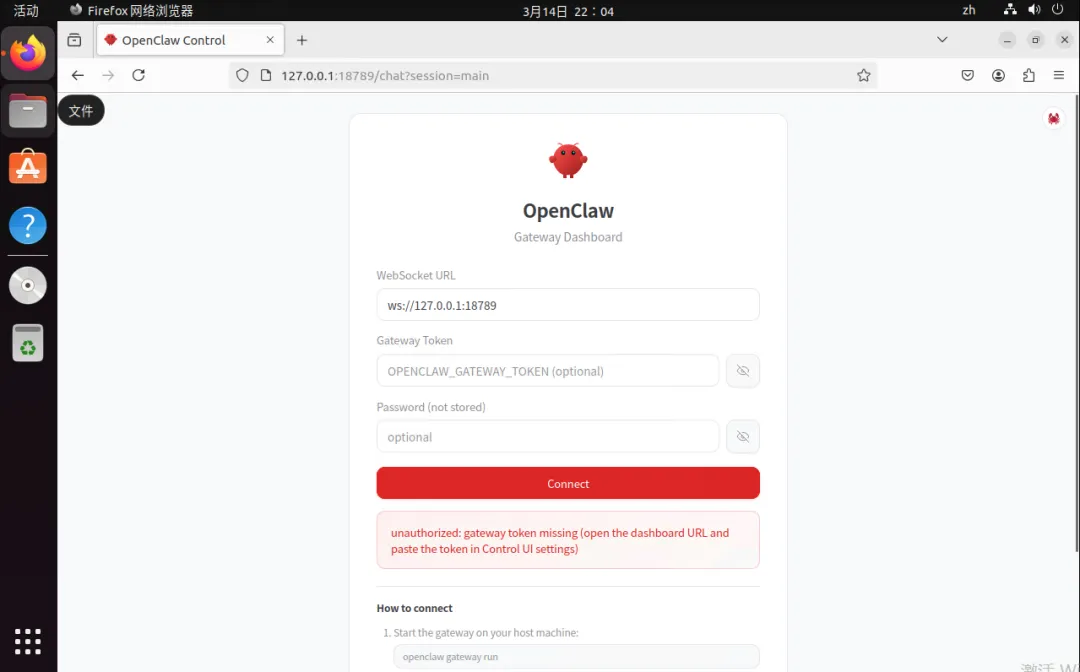
在ubuntu系统上打开火狐进行查看,新版本需要token,
5.6:token获取
hei@heiL:~/.openclaw$ openclaw dashboard

?? OpenClaw 2026.3.13 (61d171a) ? Claws out, commit in?let's ship something mildly responsible.

Dashboard URL: http://127.0.0.1:18789/#token=d498d65bbc7ba37137ca0b93b6cfe784ec53aff8af0108a2
Copy to clipboard unavailable.
Opened in your browser. Keep that tab to control OpenClaw.

####要在ubuntu系统中执行openclaw dashboard会显示token将token复制到页面中的gateway token
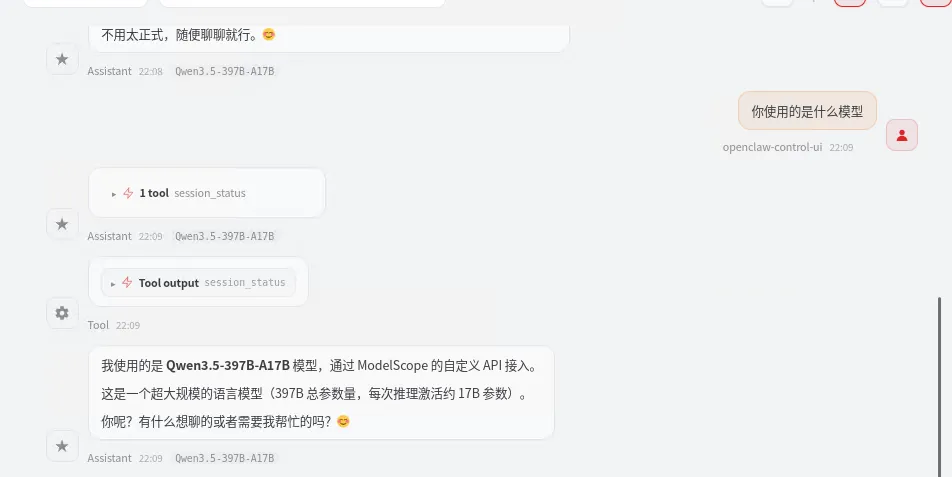
5.7:完成配置
六、配置钉钉接入:
6.1:配置钉钉机器人
登录创建机器人
https://open.dingtalk.com/
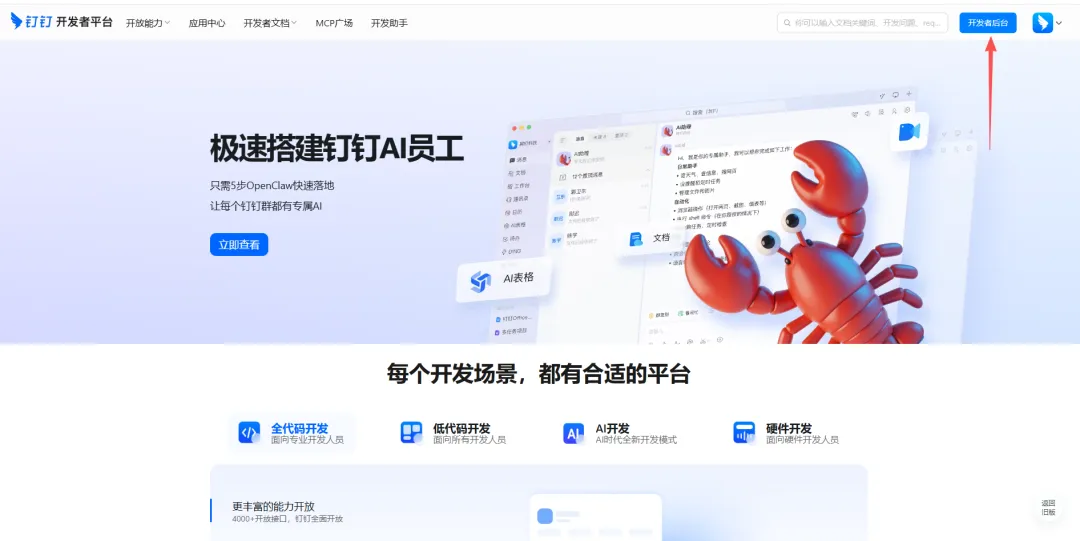
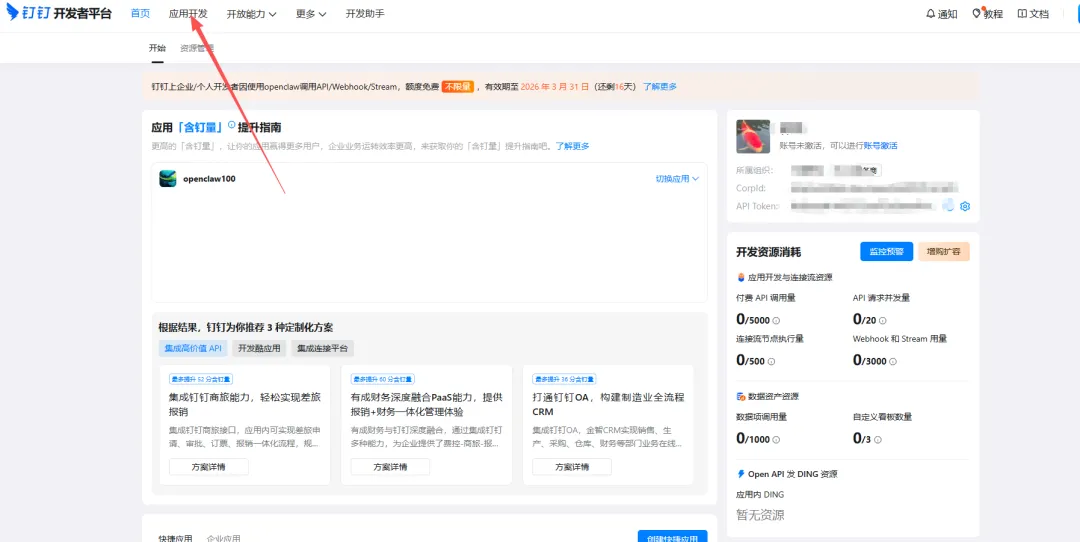
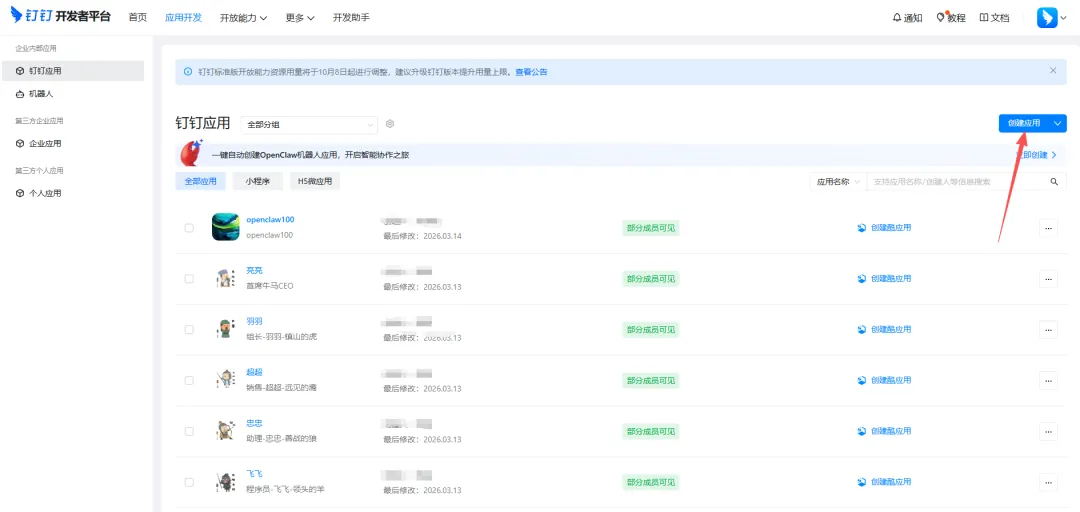
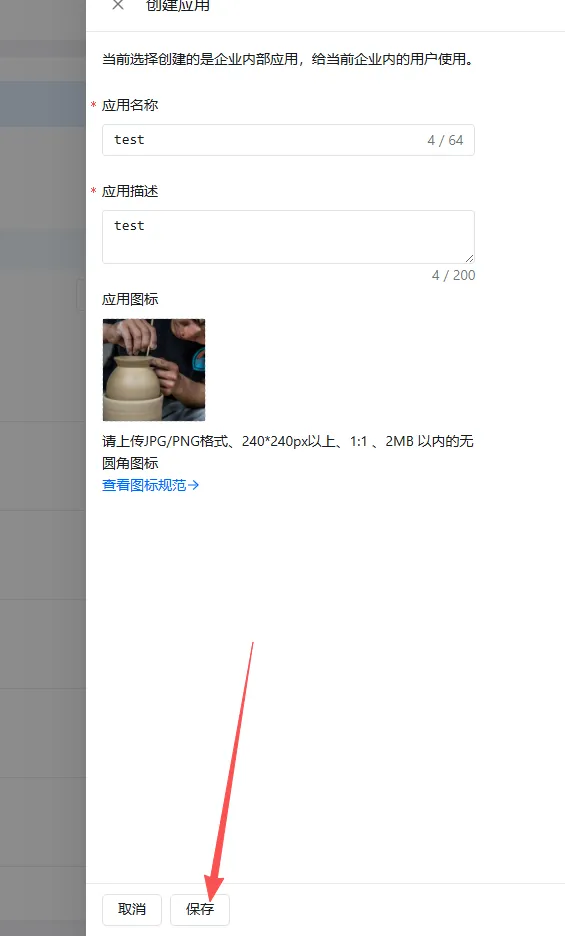
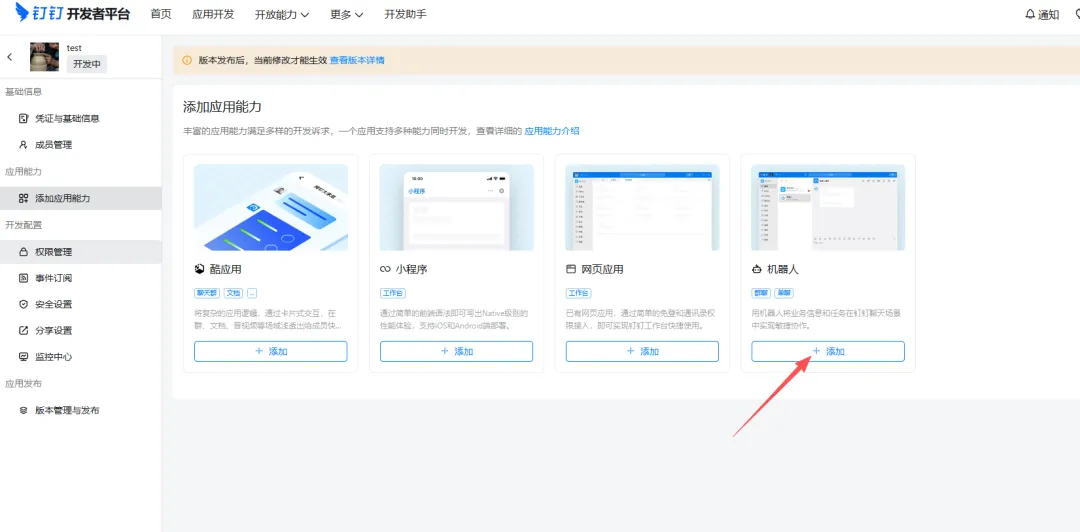
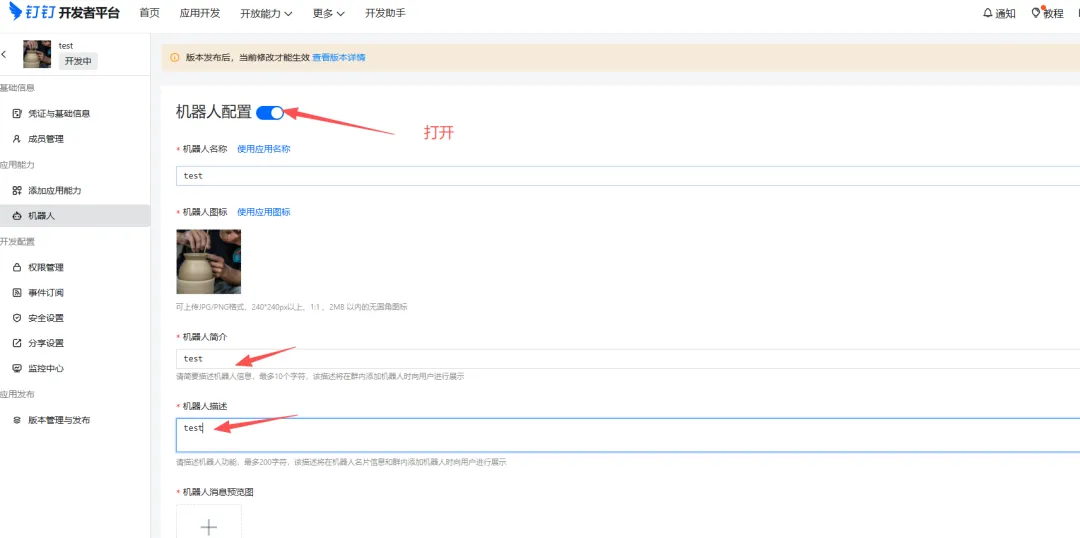
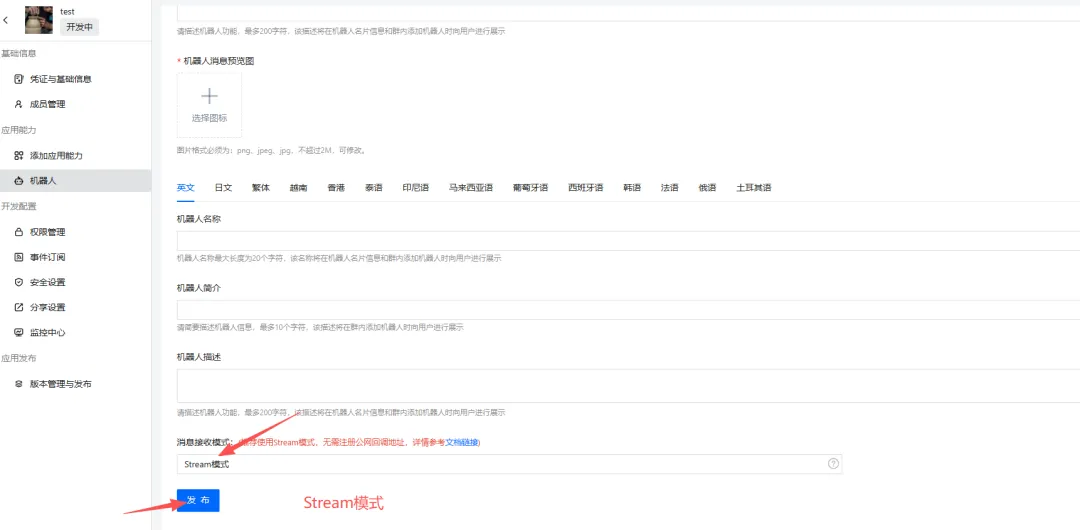
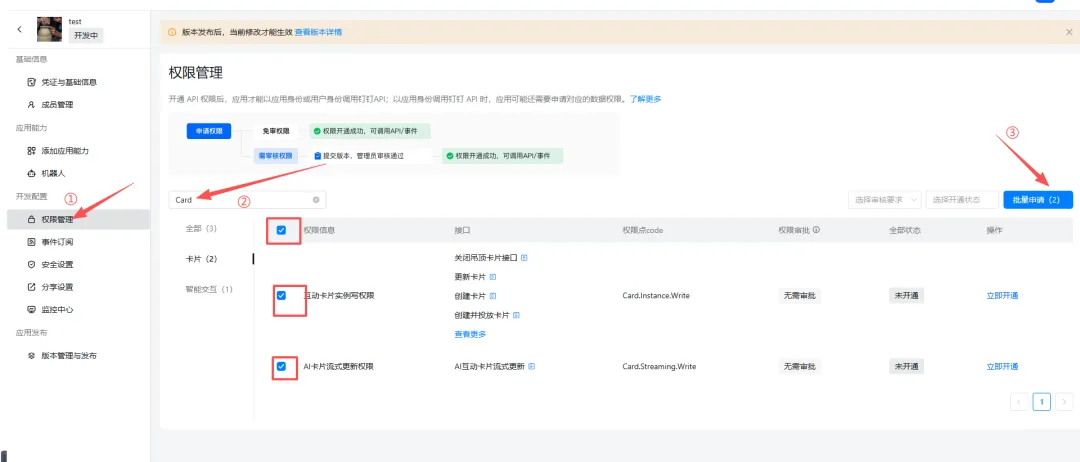
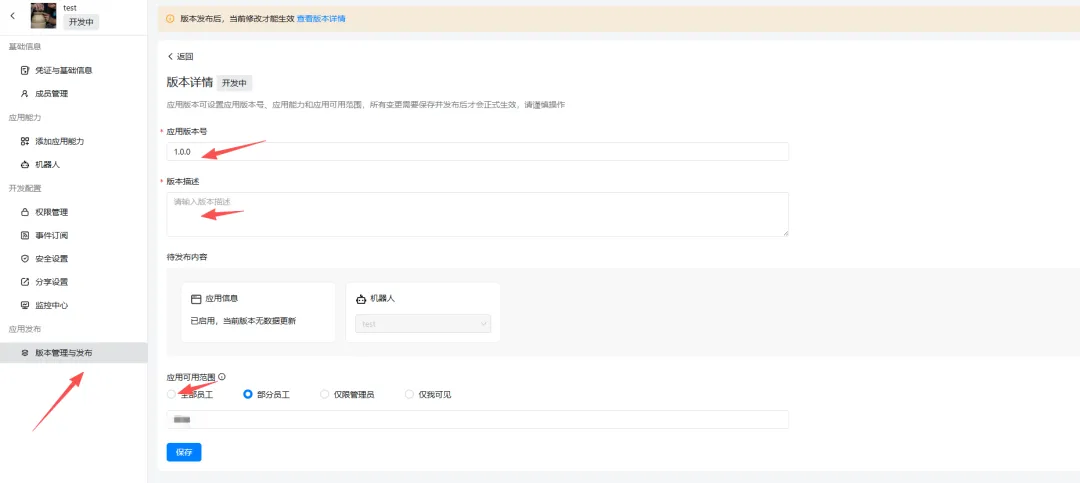

到此我们的钉钉机器人就创建完了
6.2:安装钉钉插件
hei@heiL:~/.openclaw$ openclaw plugins install @soimy/dingtalk

🦞 OpenClaw 2026.3.13 (61d171a) — Give me a workspace and I'll give you fewer tabs, fewer toggles, and more oxygen.

Downloading @soimy/dingtalk…
Extracting /tmp/openclaw-npm-pack-V8oj3c/soimy-dingtalk-3.2.0.tgz…
Plugin "dingtalk" has 1 suspicious code pattern(s). Run "openclaw security audit --deep" for details.
Installing to /home/hei/.openclaw/extensions/dingtalk…
Installing plugin dependencies…
22:35:20 [plugins] plugins.allow is empty; discovered non-bundled plugins may auto-load: dingtalk (/home/hei/.openclaw/extensions/dingtalk/index.ts). Set plugins.allow to explicit trusted ids.
Config overwrite: /home/hei/.openclaw/openclaw.json (sha256 f0da0a49f7d48f623160a713e652c4eee220eb2bfbfa357699085a5d6c5f259c -> 08cf5c61705587172525ff545d5726ba41751734d8f7c2e4866faefda59db670, backup=/home/hei/.openclaw/openclaw.json.bak)
Installed plugin: dingtalk
Restart the gateway to load plugins.
6.3:重启openclaw
hei@heiL:~/.openclaw$ openclaw gateway restart

🦞 OpenClaw 2026.3.13 (61d171a) — Somewhere between 'hello world' and 'oh god what have I built.'

22:36:29 [plugins] plugins.allow is empty; discovered non-bundled plugins may auto-load: dingtalk (/home/hei/.openclaw/extensions/dingtalk/index.ts). Set plugins.allow to explicit trusted ids.
Restarted systemd service: openclaw-gateway.service
6.4:配置openclaw
配置 OpenClaw
从开发者后台应用中获取:
- Agent ID (应用 ID)
- Client ID (AppKey)
- Client Secret (AppSecret)
- Robot Code (与 Client ID 相同)
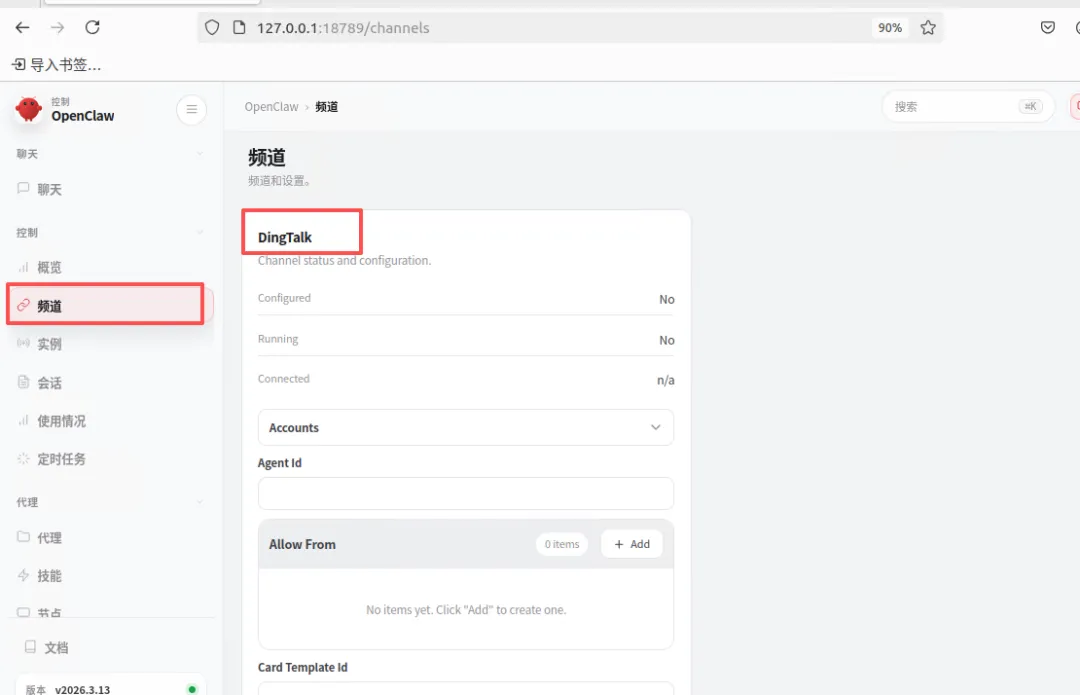
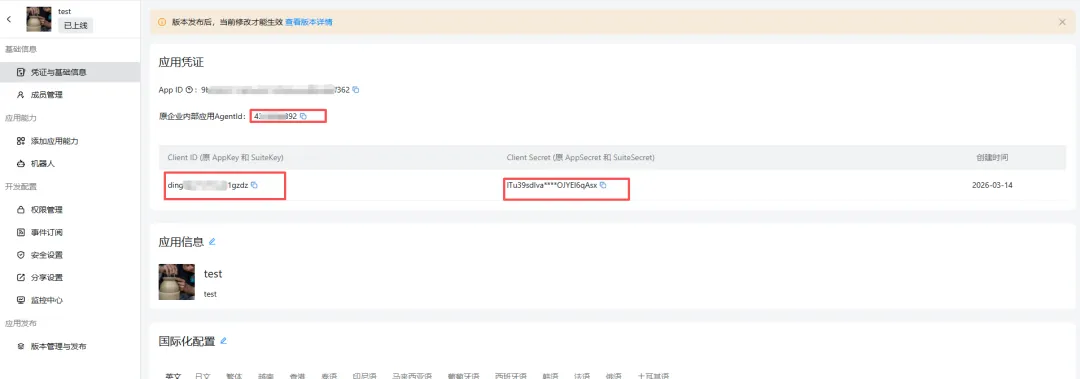
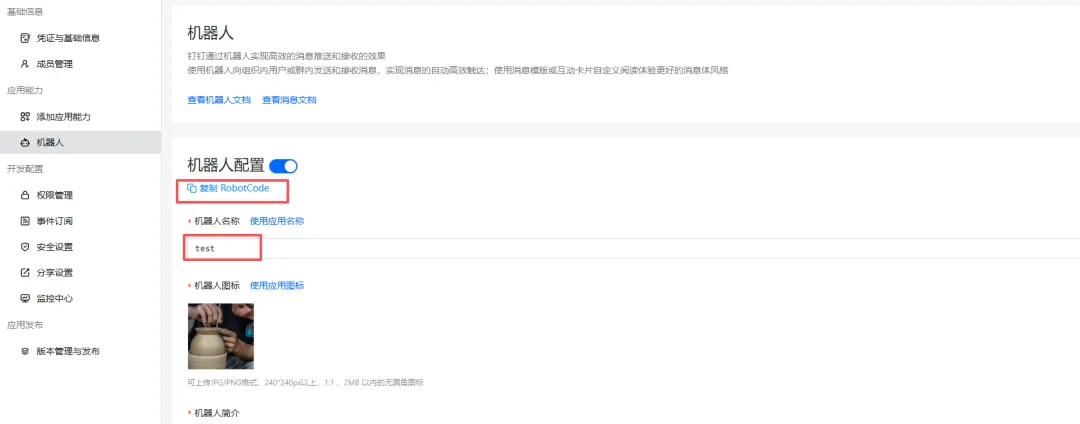
#这几个id复制下来到文本中
#打开openclaw的webui进行配置
#对应钉钉后台进行自己配置。
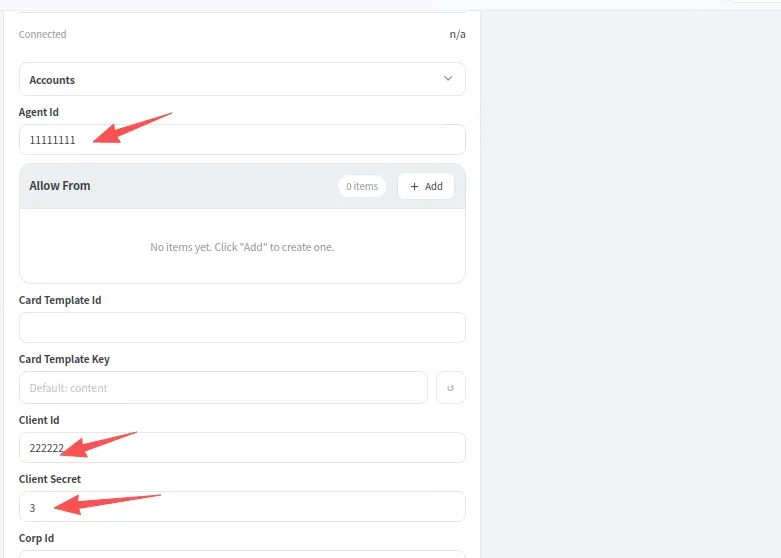
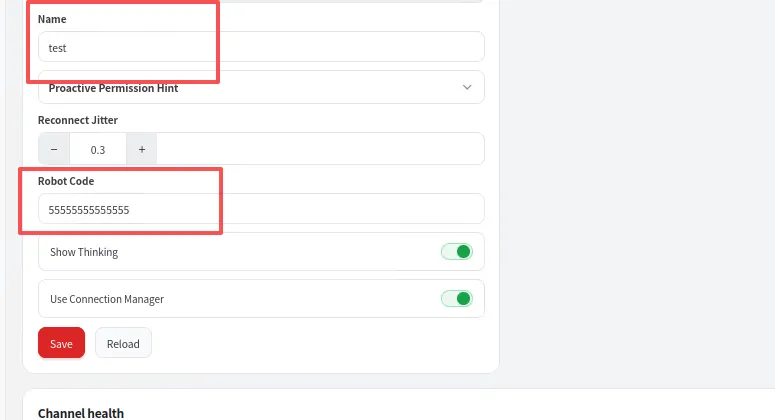
点击Save保存即可。
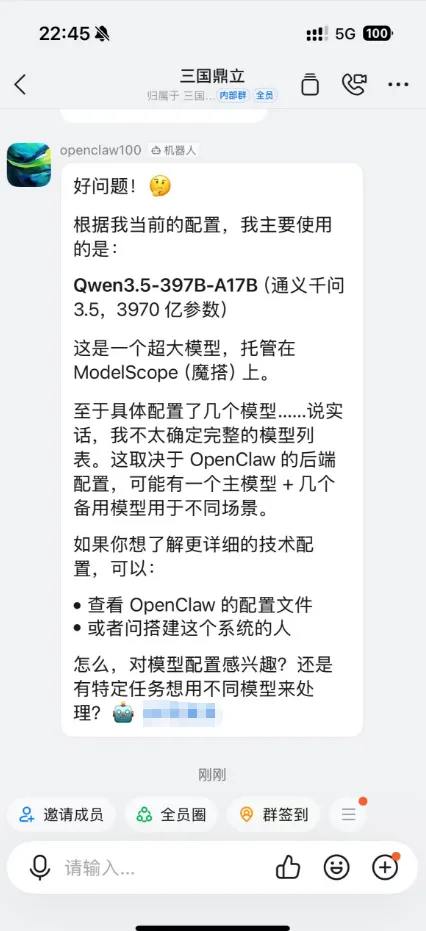
七、手机钉钉进行测试问答:
打开钉钉的公司群,添加机器人
将创建的机器人拉倒群里。
开始智能问答
八、小韩赋能:
hei@heiL:~/.openclaw$ openclaw gateway restart	#重启

hei@heiL:~/.openclaw$ openclaw gateway status	#查看状态

hei@heiL:~/.openclaw$ openclaw gateway start	#启动

hei@heiL:~/.openclaw$ poenclaw gateway stop		#停止

hei@heiL:~/.openclaw$ openclaw dashboard		#查看webui内容

hei@heiL:~/.openclaw$ openclaw agents list		#查看智能体列表

hei@heiL:~/.openclaw$ openclaw gateway --port 9412	#指定端口启动

hei@heiL:~/.openclaw$ openclaw agents add yuyu \	#创建智能体
  --model kimi-k2.5 \
  --workspace ~/.openclaw/workspace-yuyu
openclaw agents set-identity --agent yuyu --name "组长-羽羽-镇山的虎"

hei@heiL:~/.openclaw$ openclaw agents delete yuyu	#删除智能体

#远端访问:cmd输入
1.ssh -N -L 9412:127.0.0.1:9412 hei@10.123.123.123(你的openclawIP地址)
2.输入密码后窗口不要关闭
3.打开ssh工具远程到你的openclaw后台
hei@heiL:~/.openclaw$ openclaw dashboard

🦞 OpenClaw 2026.3.13 (61d171a) — Claws out, commit in—let's ship something mildly responsible.

Dashboard URL: http://127.0.0.1:18789/#token=d498d65bbc7ba37137ca0b93b6cfe784ec53aff8af0108a2
Copy to clipboard unavailable.
Opened in your browser. Keep that tab to control OpenClaw.
4.将http://地址复制到浏览器就可以实现远端访问。
九、总结
虽然不难,但是做完之后的成就感满满,也是踩了一周的坑,才给大家做出的保姆级企业教程。即安全,又智能。
还有好多部署方式没来的及写,docker部署,windows部署。mac部署。其实会linux部署,其余的也就照猫画虎即可。