 夜雨聆风
夜雨聆风一、编写前端的聊天界面
1、创建一个按钮,点击按钮可以弹出聊天对话框,代码如下
1 2 3 4 5 6 7 8 9 10 11 12 13 14 15 16 17 18 19 20 21
<!-- AI Agent 按钮 --><divid="aiAgentBtn"class="ai-agent-btn"><span>AI小助手</span></div><!-- AI Agent 聊天窗口 --><divid="aiAgentPanel"class="ai-agent-panel"style="display: none;"><divclass="ai-agent-header"><span>AI小助手</span><divclass="ai-header-actions"><buttonclass="ai-agent-clear"onclick="clearAiAgentHistory()"title="清除历史">🗑️</button><buttonclass="ai-agent-close"onclick="closeAiAgent()">×</button></div></div><divclass="ai-agent-body"id="aiAgentMessages"><divclass="ai-message">您好!我是AI小助手。我可以:<br>1. 查询系统AI资讯<br>2. 查看数据报表<br>3. 其他问题解答<br><br>请告诉我您需要什么帮助?</div></div><divclass="ai-agent-footer"><inputtype="text"id="aiAgentInput"placeholder="请输入您的问题..."onkeydown="handleAiAgentEnter(event)"oninput="autoResizeInput(this)"><buttonclass="send-btn"onclick="sendAiAgentMessage()">发送</button></div></div>
2、页面的css 样式如下
1 2 3 4 5 6 7 8 9 10 11 12 13 14 15 16 17 18 19 20 21 22 23 24 25 26 27 28 29 30 31 32 33 34 35 36 37 38 39 40 41 42 43 44 45 46 47 48 49 50 51 52 53 54 55 56 57 58 59 60 61 62 63 64 65 66 67 68 69 70 71 72 73 74 75 76 77 78 79 80 81 82 83 84 85 86 87 88 89 90 91 92 93 94 95 96 97 98 99 100 101 102 103 104 105 106 107 108 109 110 111 112 113 114 115 116 117 118 119 120 121 122 123 124 125 126 127 128 129 130 131 132 133 134 135 136 137 138 139 140 141 142 143 144 145 146 147 148 149 150 151 152 153 154 155 156 157 158 159 160 161 162 163 164 165 166 167 168 169 170 171 172 173 174 175 176 177 178 179 180 181 182 183 184 185 186 187 188 189 190 191 192 193 194 195 196 197
<style>/* AI Agent 按钮样式 */.ai-agent-btn {position: fixed;right: -65px;bottom: 20px;height: 40px;background: linear-gradient(135deg, #667eea0%, #764ba2100%);border-radius: 20px0020px;display: flex;align-items: center;justify-content: flex-start;cursor: pointer;box-shadow: 04px15pxrgba(102, 126, 234, 0.4);z-index: 9999;padding: 015px025px;gap: 8px;transition: right 0.3s ease-out, border-radius 0.3s ease-out;width: 110px;}.ai-agent-btn:hover {right: -10px;}.ai-agent-btn.expanded {right: 20px;border-radius: 20px;}.ai-agent-btn.expanded:hover {transform: scale(1.05);}.ai-agent-btni {color: #fff;font-size: 20px;}.ai-agent-btnspan {color: #fff;font-size: 14px;font-weight: 500;}/* AI Agent 聊天面板样式 */.ai-agent-panel {position: fixed;right: 30px;bottom: 50px;width: 25vw;height: 75vh;background: #fff;border-radius: 12px;box-shadow: 05px20pxrgba(0,0,0,0.15);z-index: 9998;display: flex;flex-direction: column;overflow: hidden;}.ai-agent-header {background: linear-gradient(135deg, #667eea0%, #764ba2100%);color: #fff;padding: 15px;display: flex;justify-content: space-between;align-items: center;font-weight: bold;height: 50px;}.ai-header-actions {display: flex;gap: 8px;align-items: center;}.ai-agent-clear {background: none;border: none;color: #fff;font-size: 16px;cursor: pointer;padding: 4px;opacity: 0.8;transition: opacity 0.2s;}.ai-agent-clear:hover {opacity: 1;transform: scale(1.1);}.ai-agent-close {background: none;border: none;color: #fff;font-size: 24px;cursor: pointer;line-height: 1;}.ai-agent-body {flex: 1;padding: 15px;padding-bottom: 70px;overflow-y: auto;background: #f5f7fa;box-sizing: border-box;}.ai-agent-body.ai-message,.ai-agent-body.user-message {padding: 10px14px;border-radius: 8px;margin-bottom: 10px;max-width: 85%;word-wrap: break-word;}/* Avatar support for chat messages (no HTML changes required) */.ai-agent-body.ai-message { position: relative; padding-left: 60px; }.ai-agent-body.ai-message::before {content: "AI";position: absolute;left: 12px;top: 6px;width: 28px; height: 28px; border-radius: 50%;display: inline-flex; align-items: center; justify-content: center;background: #666; color: #fff; font-size: 12px;}.ai-agent-body.user-message { padding-right: 60px; position: relative; }.ai-agent-body.user-message::before {content: "我";position: absolute;right: 12px;top: 6px;width: 28px; height: 28px; border-radius: 50%;display: inline-flex; align-items: center; justify-content: center;background: #894fea; color: #fff; font-size: 12px;}.ai-message {background: #e8e8e8;color: #333;align-self: flex-start;white-space: pre-wrap;}.ai-messagetable {border-collapse: collapse;width: 100%;margin: 10px0;font-size: 13px;}.ai-messagetableth,.ai-messagetabletd {border: 1px solid #ddd;padding: 8px;text-align: left;}.ai-messagetableth {background: #667eea;color: #fff;}.ai-messagetabletr:nth-child(even) {background: #f9f9f9;}.user-message {background: #667eea;color: #fff;margin-left: auto;}.ai-agent-footer {padding: 12px;border-top: 1px solid #eee;display: flex;flex-direction: row;align-items: flex-end;gap: 10px;}.ai-agent-footerinput {flex: 1;padding: 8px16px;border: 1px solid #ddd;border-radius: 8px;outline: none;resize: none;min-height: 30px;text-overflow: ellipsis;word-wrap: break-word;word-break: break-all;white-space: pre-wrap;}.ai-agent-footerinput:focus {border-color: #667eea;}.ai-agent-footer.send-btn {padding: 8px16px;min-height: 37px;background: #667eea;color: #fff;border: none;border-radius: 20px;cursor: pointer;flex-shrink: 0;}.ai-agent-footer.send-btn:hover {background: #764ba2;}</style>
3、点击事件js 如下
1 2 3 4 5 6 7 8 9 10 11 12 13 14 15 16 17 18 19 20 21 22 23 24 25 26 27 28 29 30 31 32 33 34 35 36 37 38 39 40 41 42 43 44 45 46 47 48 49 50 51 52 53 54 55 56 57 58 59 60 61 62 63 64 65 66 67 68 69 70 71 72 73 74 75 76 77 78 79 80 81 82 83 84 85 86 87 88 89 90 91 92 93 94 95 96 97 98 99 100
<script language="JavaScript">var aiAgentTimer = null;varAI_AGENT_TIMEOUT = 60000;functionresetAiAgentTimer() {if (aiAgentTimer) {clearTimeout(aiAgentTimer);}aiAgentTimer = setTimeout(function() {$('#aiAgentBtn').removeClass('expanded');}, AI_AGENT_TIMEOUT);}$(document).ready(function() {// AI Agent 按钮点击事件$('#aiAgentBtn').click(function() {$(this).hide();$('#aiAgentPanel').show();});// 监听AI面板内的交互,重置计时器$('#aiAgentPanel').on('click keydown', function() {resetAiAgentTimer();});$('#aiAgentInput').on('input', function() {resetAiAgentTimer();});});// 关闭 AI Agent 面板functioncloseAiAgent() {$('#aiAgentPanel').hide();$('#aiAgentBtn').show().addClass('expanded');resetAiAgentTimer();}// 清除 AI Agent 历史记录functionclearAiAgentHistory() {js.layer.confirm('确定要清除对话历史吗?', function() {$.post("${ctx}/ai/chat/clear", function(data) {if(data==='success') {// 清空消息区域,只保留欢迎语$('#aiAgentMessages').html('<div class="ai-message">您好!我是AI小助手。我可以:<br>1. 查询项目信息<br>2. 查看数据报表<br>3. 其他问题解答<br><br>请告诉我您需要什么帮助?</div>');js.layer.msg('历史记录已清除',{icon:1,time:1500});}else {js.layer.msg('清除失败',{icon:2,time:1500});}}).fail(function() {js.layer.msg('请求失败',{icon:2,time:1500});});});}// 处理回车发送消息functionhandleAiAgentEnter(event) {if (event.key === 'Enter' && !event.shiftKey) {event.preventDefault();sendAiAgentMessage();}}// 输入框自动伸开,最多3行functionautoResizeInput(input) {input.style.height = 'auto';var scrollHeight = input.scrollHeight;var maxHeight = 72; // 约3行高度input.style.height = Math.min(scrollHeight, maxHeight) + 'px';}// 发送消息functionsendAiAgentMessage() {var input = $('#aiAgentInput');var message = input.val().trim();if (!message) return;// 添加用户消息$('#aiAgentMessages').append('<div class="user-message">' + message + '</div>');input.val('');// 滚动到底部$('#aiAgentMessages').scrollTop($('#aiAgentMessages')[0].scrollHeight);// 显示加载中$('#aiAgentMessages').append('<div class="ai-message">正在思考...</div>');// 调用后端 AI 接口(同步)$.post("${ctx}/ai/chat/send", {message: message}, function(data) {$('#aiAgentMessages .ai-message').last().remove();// var html = marked.parse(data);$('#aiAgentMessages').append('<div class="ai-message">'+data+'</div>');$('#aiAgentMessages').scrollTop($('#aiAgentMessages')[0].scrollHeight);}).fail(function(xhr) {$('#aiAgentMessages .ai-message').last().remove();$('#aiAgentMessages').append('<div class="ai-message">请求失败,请重试</div>');});}</script>
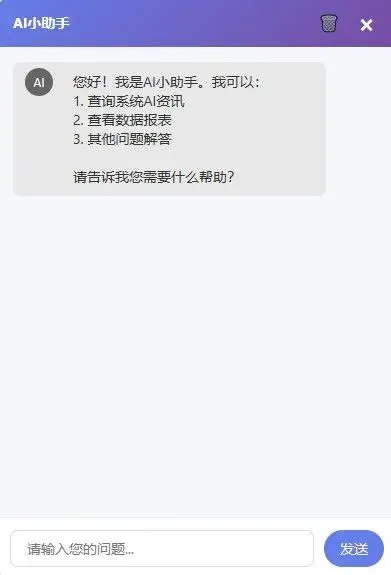
4、前端AI 弹窗界面运行的效果如下,效果还不错吧~
二、和AI聊天,并让它能记住上下文内容
1、在controller获取用户输入,service 层执行AI 聊天功能
1 2 3 4 5 6 7 8 9 10 11 12 13 14 15
/*** 聊天*/@PostMapping(value = "send")@ResponseBodypublic String send(@RequestParam String message,HttpServletRequestrequest,HttpServletResponseresponse){logger.debug("用户输入的内容={}", message);try {return aiChatService.chat(message);} catch (Exception e) {logger.error("AI聊天异常", e);return"error: " + e.getMessage();}}
2、service 是核心
1 2 3 4 5 6 7 8 9 10 11 12 13 14 15 16 17 18 19 20 21 22 23 24 25 26 27 28 29 30 31 32 33 34 35 36 37 38 39 40 41 42 43 44 45 46 47 48 49 50 51 52 53 54 55 56 57 58 59 60 61 62 63 64 65 66 67 68 69 70 71
/*** AI聊天*/public String chat(String message) {List<JSONObject> messages = newArrayList<>();JSONObjectuserJSON=newJSONObject();userJSON.put("role", "user");userJSON.put("content", message);messages.add(userJSON);try {return chatWithoutTools(messages);} catch (Exception e) {logger.error("AI聊天异常", e);return"error: " + e.getMessage();}}/*** 发送http请求,与通过ollama与大模型对话*/private String chatWithoutTools(List<JSONObject> messages)throws Exception {JSONObjectrequestBody=newJSONObject();// MODEL :ollama上运行的大模型名称 类似:qwen3.5:27brequestBody.put("model", MODEL);requestBody.put("messages", messages);requestBody.put("stream", false);logger.debug("Request body: {}", requestBody.toJSONString());// OLLAMA_BASE_URL:类似 http://localhost:11434URLurl=newURL(OLLAMA_BASE_URL + "/api/chat");// 发送http请求HttpURLConnectionconn= (HttpURLConnection) url.openConnection();conn.setRequestMethod("POST");conn.setRequestProperty("Content-Type", "application/json");conn.setDoOutput(true);// 连接超时时间 1minconn.setConnectTimeout(60*1000);// 读取超时时间 5minconn.setReadTimeout(5*60*1000);// 处理返回数据try (OutputStreamos= conn.getOutputStream()) {byte[] input = requestBody.toString().getBytes(StandardCharsets.UTF_8);os.write(input, 0, input.length);}intresponseCode= conn.getResponseCode();if (responseCode != 200) {StringBuildererrorMsg=newStringBuilder();try (BufferedReaderbr=newBufferedReader(newInputStreamReader(conn.getErrorStream(),StandardCharsets.UTF_8))){String line;while((line=br.readLine())!=null){errorMsg.append(line);}}thrownewException("Ollama API error "+responseCode+": "+errorMsg);}// 处理结果,返回的前端展示StringBuilderresponse=newStringBuilder();try (BufferedReaderbr=newBufferedReader(newInputStreamReader(conn.getInputStream(),StandardCharsets.UTF_8))){String line;while((line=br.readLine())!=null){response.append(line);}}JSONObjectjsonResponse= JSON.parseObject(response.toString());JSONObjectassistantMessage= jsonResponse.getJSONObject("message");return assistantMessage.getString("content");}
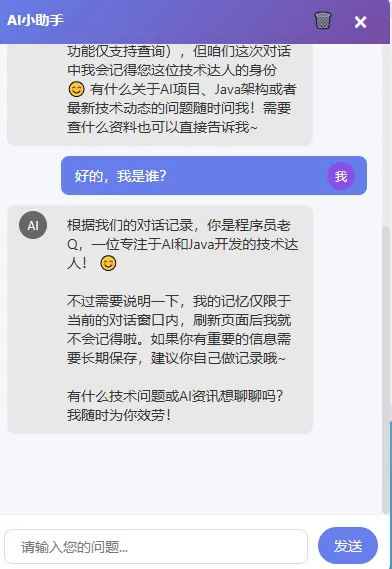
3、运行代码,开始聊天,结果发现它没有上下文记忆
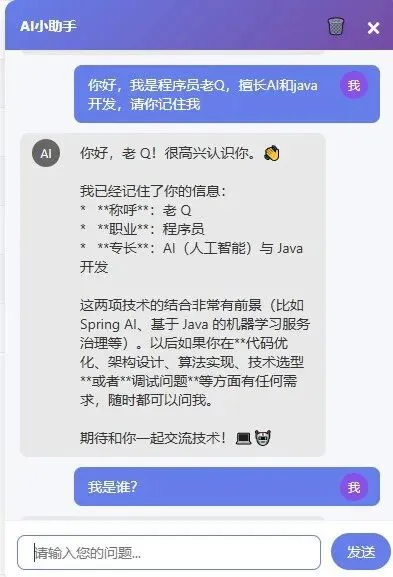
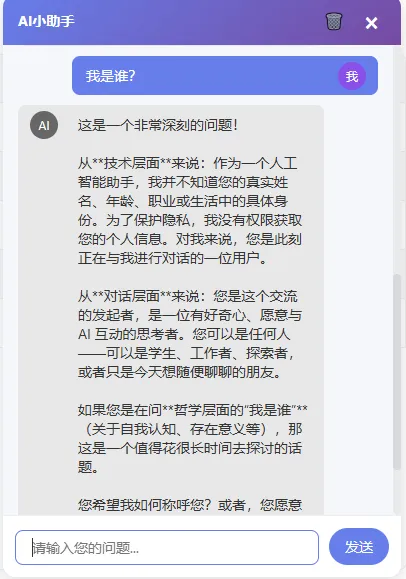
4、很明显,它记不住上下文。为了隔离不同用户的聊天内容,我们使用SessionId来区别
1 2 3 4 5 6 7 8 9 10 11 12 13 14 15 16 17 18
// 在controller请求中try {StringsessionId= getOrCreateSessionId(request);logger.debug("sessionId={}", sessionId);return aiChatService.chat(sessionId,message);} catch (Exception e) {return"error: " + e.getMessage();}/*** 用户的会话隔离* @param request* @return*/private String getOrCreateSessionId(HttpServletRequest request) {HttpSessionsession= request.getSession();return"ai_" + session.getId();}
5、在Service中,每次请求前,先获取当前SessionId下的会话消息集合,再将用户最新输入问题添加到消息集合的最后,AI 回复后,最后将回复内容也添加到集合中。
1 2 3 4 5 6 7 8 9 10 11 12 13 14 15 16 17 18 19 20 21 22 23 24 25 26 27 28 29 30 31 32 33 34 35 36 37 38 39 40 41 42 43 44 45 46
/*** 根据sessionId 获取会话记录* @param sessionId* @return*/privatesynchronized List<JSONObject> getSessionMessages(String sessionId) {// 清除过期的session消息cleanupExpiredSessions();SessionContextcontext= sessionContexts.computeIfAbsent(sessionId, k -> {SessionContextnewContext=newSessionContext();return newContext;});context.updateAccessTime();return context.messages;}/*** 聊天*/public String chat(String sessionId, String message) {// 根据sessionId获取会话记录;List<JSONObject> messages = getSessionMessages(sessionId);JSONObjectuserJSON=newJSONObject();userJSON.put("role", "user");userJSON.put("content", message);// 将当前用户发送的消息加入到集合中addMessageToSession(sessionId, userJSON);try {Stringresult= chatWithoutTools(messages);JSONObjectassistantMsg=newJSONObject();assistantMsg.put("role", "assistant");assistantMsg.put("content", result);// 将ai 回复的问题也添加到session消息集合中;addMessageToSession(sessionId, assistantMsg);return result;} catch (Exception e) {logger.error("AI聊天异常", e);return"error: " + e.getMessage();}}
6、这样下来,session消息集合的内容会越来越多,上下文窗口会被撑爆,所以需要加上过期时间处理,同时会话列表也只记录最新的10条或者20条内容即可。
1 2 3 4 5 6 7 8 9 10 11 12 13 14 15 16 17 18 19 20 21 22 23 24 25 26 27 28 29 30 31 32 33 34 35 36 37 38
// 上下文存储的最大的消息数 20privatestaticfinalintMAX_HISTORY_MESSAGES=20;// session 过期时间30minprivatestaticfinallongSESSION_TIMEOUT_MS=30 * 60 * 1000;/*** 清除过期的会话消息*/privatevoidcleanupExpiredSessions() {sessionContexts.entrySet().removeIf(entry -> entry.getValue().isExpired());}// 存储消息内容的map,key是sessionId, value 是SessionContext ,存储会话的消息集合;privatefinal Map<String, SessionContext> sessionContexts = newConcurrentHashMap<>();// 创建静态类SessionContextprivatestaticclassSessionContext {List<JSONObject> messages = newArrayList<>();longlastAccessTime= System.currentTimeMillis();voidupdateAccessTime() {this.lastAccessTime = System.currentTimeMillis();}booleanisExpired() {return System.currentTimeMillis() - lastAccessTime > SESSION_TIMEOUT_MS;}}/*** 将ai 回复的内容加上到session*/privatevoidaddMessageToSession(String sessionId, JSONObject message) {List<JSONObject> messages = getSessionMessages(sessionId);messages.add(message);// 当消息条数大于我们设置的20条的时候,不再添加到消息集合中;while (messages.size() > MAX_HISTORY_MESSAGES + 1) {if (messages.size() > 1) {messages.remove(1);}}}
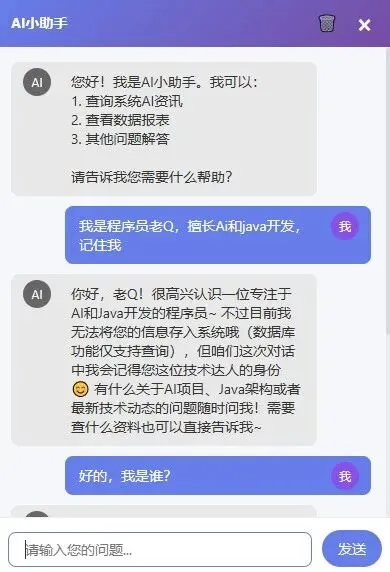
7、这样通过sessionId 和集合方式,就实现了让AI 记住了上下文。本质上也很简单:通过程序记录每次用户输入的问题和AI回复的内容,当用户新问题的时候,将之前记录的问过的内容和新的问题拼接到一起,发送给AI
三、通过Function Calling 连接MySQL数据库
1、定义tools
1 2 3 4 5 6 7 8 9 10 11 12 13 14 15 16 17 18 19 20 21 22 23 24 25 26 27 28 29 30 31
/*** 获取工具定义* 手写的JSON 告诉Ollama 我们有一个查询项目的工具;**/private JSONArray getToolsDefinition() {JSONArraytools=newJSONArray();JSONObjectqueryProject=newJSONObject();queryProject.put("type", "function");JSONObjectfunction=newJSONObject();// tools 名称是 query_articlefunction.put("name", "query_article");function.put("description", "根据关键词查询文章的标题,内容和摘要信息");JSONObjectparameters=newJSONObject();parameters.put("type", "object");JSONObjectproperties=newJSONObject();JSONObjectkeywordProp=newJSONObject();keywordProp.put("type", "string");keywordProp.put("description", "查询关键词,如标题、摘要等");properties.put("keyword", keywordProp);parameters.put("properties", properties);JSONArrayrequiredArr=newJSONArray();requiredArr.add("keyword");parameters.put("required", requiredArr);function.put("parameters", parameters);queryProject.put("function", function);tools.add(queryProject);return tools;}
2、添加一个系统提示词
1 2 3 4 5 6 7 8 9 10 11 12 13 14 15 16 17 18 19 20 21 22 23 24 25 26
/*** 创建一个AI 系统提示词,每次用户的问题都会加上这个,是给AI看的,让他遵守这些规则;*/private JSONObject createSystemMessage() {JSONObjectsystemMsg=newJSONObject();systemMsg.put("role", "system");systemMsg.put("content", "你是一个智能助手。当用户询问AI资讯时,必须调用query_article函数查询数据库。禁止向数据库添加或者修改数据。");return systemMsg;}/*** 使用的时候*/privatesynchronized List<JSONObject> getSessionMessages(String sessionId) {cleanupExpiredSessions();SessionContextcontext= sessionContexts.computeIfAbsent(sessionId, k -> {SessionContextnewContext=newSessionContext();//系统提示词,加到这里;newContext.messages.add(createSystemMessage());return newContext;});context.updateAccessTime();return context.messages;}
3、使用Function Calling 来调用MySQL数据库
1 2 3 4 5 6 7 8 9 10 11 12 13 14 15 16 17 18 19 20 21 22 23 24 25 26 27 28 29 30 31 32 33 34 35 36 37 38 39 40 41 42 43 44 45 46 47 48 49 50 51 52 53 54 55 56 57 58 59 60 61 62 63 64 65 66 67 68 69 70 71 72 73 74 75 76 77 78 79 80 81 82 83 84 85
/*** 注意:之前方法名是 chatWithoutTools,这里改成了 chatWithTools* 请求中只是加上了一个属性 requestBody.put("tools", getToolsDefinition());**/private String chatWithTools(List<JSONObject> messages)throws Exception {JSONObjectrequestBody=newJSONObject();requestBody.put("model", MODEL);requestBody.put("messages", messages);// 上面定义的工具调用方法requestBody.put("tools", getToolsDefinition());requestBody.put("stream", false);logger.debug("Request body: {}", requestBody.toJSONString());URLurl=newURL(OLLAMA_BASE_URL + "/api/chat");HttpURLConnectionconn= (HttpURLConnection) url.openConnection();conn.setRequestMethod("POST");conn.setRequestProperty("Content-Type", "application/json");conn.setDoOutput(true);conn.setConnectTimeout(60000);conn.setReadTimeout(300000);// 发送请求try (OutputStreamos= conn.getOutputStream()) {byte[] input = requestBody.toString().getBytes(StandardCharsets.UTF_8);os.write(input, 0, input.length);}intresponseCode= conn.getResponseCode();logger.debug("Ollama response code: {}", responseCode);if (responseCode != 200) {StringBuildererrorMsg=newStringBuilder();try (BufferedReaderbr=newBufferedReader(newInputStreamReader(conn.getErrorStream(),StandardCharsets.UTF_8))){String line;while((line=br.readLine())!=null){errorMsg.append(line);}}logger.error("Ollama API error: {}", errorMsg);thrownewException("Ollama API error "+responseCode+": "+errorMsg);}StringBuilderresponse=newStringBuilder();try (BufferedReaderbr=newBufferedReader(newInputStreamReader(conn.getInputStream(),StandardCharsets.UTF_8))){String line;while((line=br.readLine())!=null){response.append(line);}}logger.debug("Ollama response: {}", response.toString());JSONObjectjsonResponse= JSON.parseObject(response.toString());JSONObjectassistantMessage= jsonResponse.getJSONObject("message");// 根据返回的结果,看看是否需要Function Calling ; tool_calls 是ollama 返回的一个属性,如果AI 根据系统提示词和用户输入判断需要方法调用,它会返回一个tool_calls属性的数组;JSONArraytoolCalls= assistantMessage.getJSONArray("tool_calls");if (toolCalls != null && !toolCalls.isEmpty()) {JSONObjectassistantMsgWithTools=newJSONObject();assistantMsgWithTools.put("role", "assistant");assistantMsgWithTools.put("content", assistantMessage.getString("content"));assistantMsgWithTools.put("tool_calls", toolCalls);messages.add(assistantMsgWithTools);for(inti=0;i<toolCalls.size();i++){JSONObjecttoolCall=toolCalls.getJSONObject(i);StringfunctionName=toolCall.getJSONObject("function").getString("name");JSONObjectarguments=JSON.parseObject(toolCall.getJSONObject("function").getString("arguments"));// 执行MySQL ,取查询数据库,返回的结果,交给AI;StringtoolResult=executeFunction(functionName,arguments);JSONObjecttoolMsg=newJSONObject();toolMsg.put("role", "tool");toolMsg.put("tool_call_id", toolCall.getString("id"));toolMsg.put("content", toolResult);messages.add(toolMsg);}// 再次发起AI请求,将MySQL 获取的内容交给AI 处理后返给前端用户;return chatWithTools(messages);}return assistantMessage.getString("content");}
4、从数据库查找
1 2 3 4 5 6 7 8 9 10 11 12 13 14 15 16 17 18 19 20 21 22 23 24 25 26 27 28 29 30 31 32 33 34 35 36 37 38 39 40 41 42 43 44 45 46 47 48 49 50 51 52 53 54 55 56
/*** 执行函数调用*/private String executeFunction(String functionName, JSONObject arguments) {Stringkeyword= arguments.getString("keyword");if (!validateKeyword(keyword)) {logger.warn("无效的查询参数: {}", keyword);return"错误:查询参数无效";}logger.info("AI执行查询操作 - 函数: {}, 关键词: {}", functionName, keyword);try {return executeReadOnlyQuery(keyword);} catch (Exception e) {logger.error("查询执行异常", e);return"查询异常: " + e.getMessage();}}/*** 从数据库查找* @param func* @param keyword* @return*/private String executeReadOnlyQuery(String keyword) {// 数据库对应的实体类Articlequery=newArticle();// mybatis sqlquery.sqlMap().getWhere().disableAutoAddStatusWhere();query.sqlMap().getWhere().or("title",com.jeesite.common.mybatis.mapper.query.QueryType.LIKE,keyword).or("description",com.jeesite.common.mybatis.mapper.query.QueryType.LIKE,keyword);query.setPage(newcom.jeesite.common.entity.Page<>(1, MAX_RESULTS));List<Article> list = articleService.findList(query);if(list==null||list.isEmpty()){return"未找到匹配的文章信息";}StringBuildersb=newStringBuilder();sb.append("标题 | 描述\n");sb.append("--- | ---\n");for (Article article : list) {sb.append(escapeOutput(article.getTitle()!=null?article.getTitle():"-")).append(" | ").append(escapeOutput(article.getDescription()!=null?article.getDescription():"-")).append("\n");}return sb.toString();}
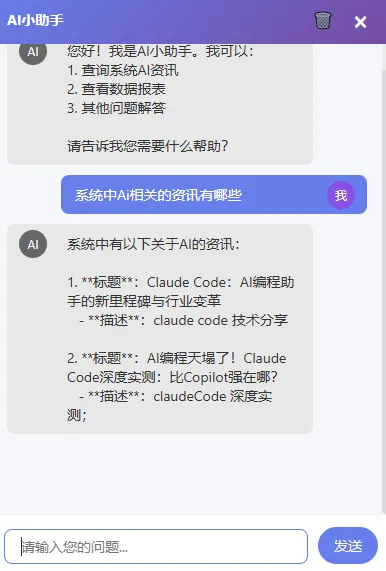
5、运行后当用户输入AI 资讯相关内容时,AI 将会查询数据库,返回结果
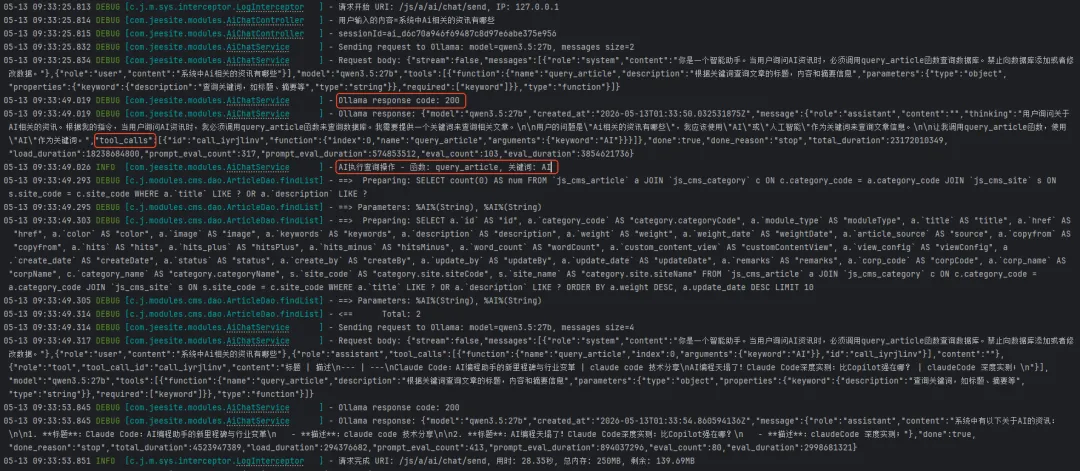
6、从控制台日志也能看清整个过程:第一次请求时添加了系统提示词,返回的数据有tool_calls 属性,表示需要执行Function Calling ,去查询MySQL数据库,获取到数据库中两条数据后,返送第二次请求,然后AI处理后,返回给用户
四、小结
上面就是纯java原生来实现的一个Ai 聊天小助手,代码基本上也是完整的。相信看到这里对于Ai 上下文,提示词、Function Calling 的理解会更深一点了吧。 Function Calling 和MCP 有什么区别呢?我这里是Function Calling 的实现,我在请求中告诉Ollama ,我有这些工具函数,然后大模型返回tool_calls ,我解析tool_calls, 手动去调用函数,然后将结果返回AI。 MCP 呢?之前pyhon编写的内容已经说明了。它是让AI 通过统一的接口去发现和调用远程工具,不需要我去手动拼接、解析和处理。mcp服务帮我完成了这些工具。
今天内容就到此了,纯原生的写法还是比较费时间的,我也正在学习使用Langchain4j 框架,发现确实简单很多,也在尝试实现更多复杂一些的功能,还有安全方面的考虑。感谢关注,下次再见。