 夜雨聆风
夜雨聆风服务化渲染的文章,之前第一篇介绍了 Surface 怎么跨进程上屏;第二篇讲过 URAS 怎么启用、接入和交付。然而,如果你还在用国际版的 Unity或者其他3D引擎,想要自己实现一套服务化渲染,那么从零设计这套架构需要实现什么呢?
本文聚焦 服务化渲染 框架本身的设计,包括客户端怎么持有 Surface、Service 端怎么登记并驱动引擎、3D 引擎厂商提供的 Player/Engine 边界在哪里等等。
引言
如果要自己设计一套 RAS,我们可以先根据对服务化流程的理解,拆解出不同的角色:
| View | ||
| Display | ||
| Monitor | ||
| Player | ||
| Engine |
一、整体拓扑
服务化渲染的进程模型是:一个 Service 进程跑引擎,多个 Client 进程消费画面。
无论 Unity 还是 Unreal,Surface 都是跨进程传递的渲染载体。
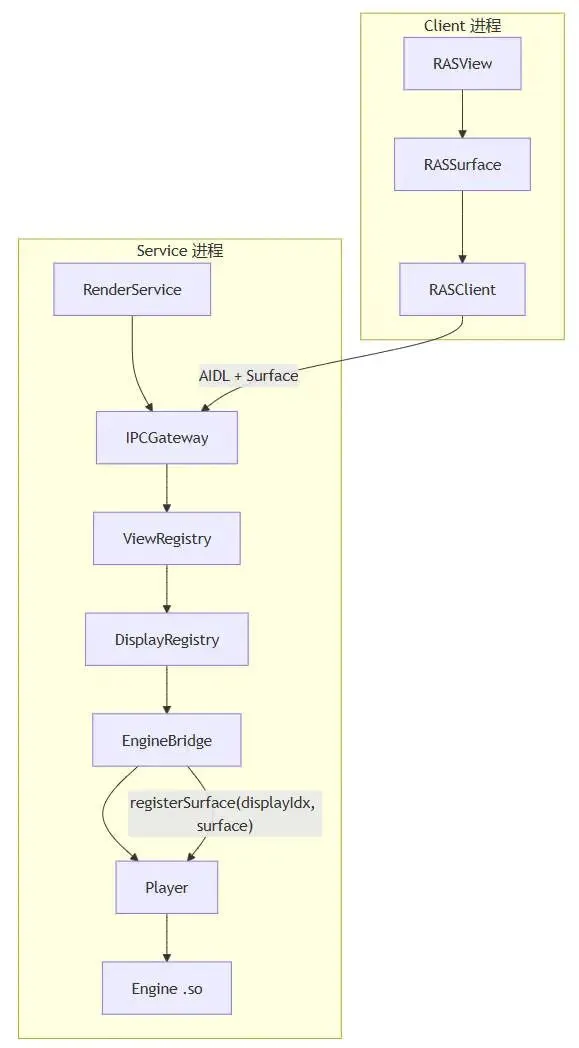
Client 的 RASSurface拿到 Surface经 RASClient跨进程交给 Service 的ViewRegistry登记到某个 DisplayEngineBridge调引擎PlayerEngine往 Surface 里 queueBuffer。
二、客户端
2.1 View 和 Surface
引擎的输入输出是 Surface,Surface 来自 SurfaceView 或 TextureView 的生命周期回调。
| RASView | |
| RASSurface | |
| RASClient |
RASView 只持有 RASSurface 并响应 UI 事件。
RASSurface 只负责 Surface 可用时通知 Service、失效时注销。
2.2 RASView
示例代码:
publicclassRASViewextendsFrameLayout{
publicenum ViewType { SurfaceView, TextureView }

private RASSurface mSurface;
privateint mDisplayIndex = 1;
private ViewType mViewType = ViewType.TextureView;

publicvoidinit(RASClient client, int displayIndex, ViewType type){
        mDisplayIndex = displayIndex;
        mViewType = type;
        mSurface = new RASSurface(client, displayIndex, this);
        recreateInnerView(type);
    }

publicvoidchangeDisplay(int newDisplayIndex){
        mSurface.unregisterFromService();
        mDisplayIndex = newDisplayIndex;
        mSurface.setDisplayIndex(newDisplayIndex);
        mSurface.syncToService();
    }

publicvoidrecreateByType(ViewType type){
        mSurface.unregisterFromService();
        removeAllViews();
        recreateInnerView(type);
        mSurface.reattachToNewHolder();
    }
}
displayIndex在 View 层只是关于我要往引擎哪个逻辑 Display 画的声明,真正登记在 Service 端完成。切换 View 类型必须先 unregister旧 Surface,再挂新 Holder,否则 Service 端会持有已失效的 Surface 引用,表现为黑屏或 EGL bad surface。
2.3 RASSurface
它实现 SurfaceHolder.Callback(SurfaceView)或监听 SurfaceTextureListener(TextureView),在回调里调用 Service:
publicclassRASSurfaceimplementsSurfaceHolder.Callback{
privatefinal RASClient mClient;
privateint mDisplayIndex;
privateint mViewToken;  // View 实例标识,对应 URAS 的 viewHashCode

voidsyncToService(){
        Surface surface = obtainValidSurface();
if (surface == null || !surface.isValid()) return;
        mClient.registerView(mViewToken, mDisplayIndex, surface, mFrameInterval);
    }

@Override
publicvoidsurfaceDestroyed(SurfaceHolder holder){
        mClient.unregisterView(mViewToken, mDisplayIndex);
// 可选:触发末帧保留(PersistentSurface)
    }

@Override
publicvoidsurfaceChanged(SurfaceHolder holder, int format, int w, int h){
        mClient.updateResolution(mViewToken, mDisplayIndex, w, h);
    }
}
viewToken:同一 App 里可能有多个 RASView(例如桌面一块、设置页一块)。Service 端用 (pkgName, viewToken, displayIndex) 的组合来区分。
2.4 RASClient
Client 侧不需要知道 Player 和 Engine,职责是:
ensureStarted()— 启动并 bind 前台 ServiceregisterS2CCallback()— 注册 Service→Client 回调把 RASSurface的 register/unregister/update 转发为 AIDL 调用断线缓存与重连
/**
 * Client 侧总线:bind Service、持有 C2S 代理、注册 S2C、转发 Surface 操作。
 * 对应 URAS:TuanjieRenderService
 */
public final class RASClient implements ServiceConnection {
//....
      @Override
    public void onServiceConnected(ComponentName name, IBinder binder) {
        mC2S = IC2SMessenger.Stub.asInterface(binder);
        mC2S.c2sRegisterS2CMessenger(mClientPkg, mS2CStub);  // ① 注册 S2C
        flushPendingCalls();                                // ② 刷缓存
        notifyCallbacksConnected();                         // ③ 通知 RASView 可 sync
    }
    public void registerView(int viewToken, int displayIndex, Surface surface, int interval) {
if (mC2S == null) { enqueue(/* c2sRegisterViewToDisplay */); return; }
        mC2S.c2sRegisterViewToDisplay(mClientPkg, viewToken, displayIndex, surface, interval);
    }
}
三、服务端
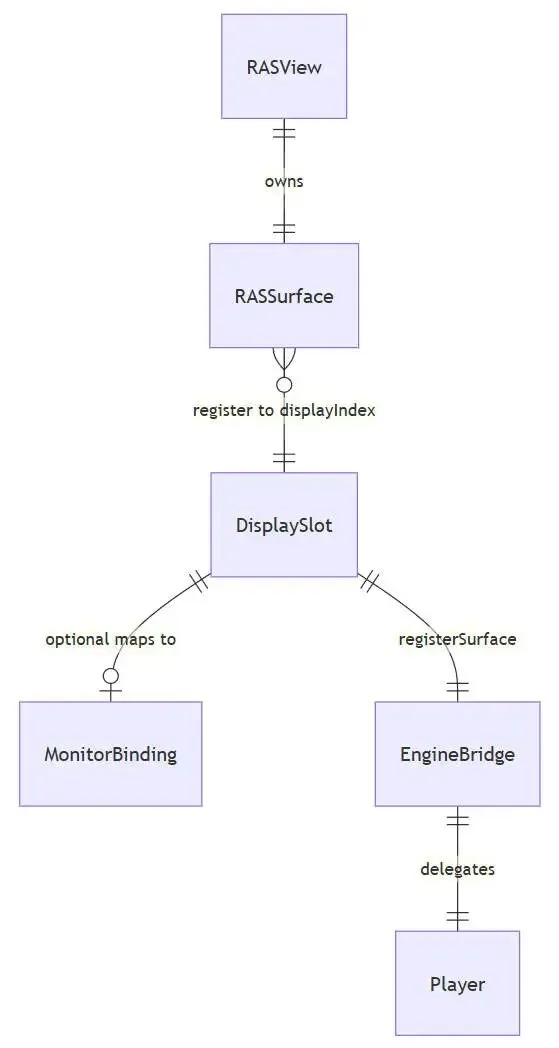
3.1 Display
| 引擎 Display | displayIndex 索引 | |
| Android Display | DisplayManager | |
| RAS DisplaySlot | DisplayRegistry |
我们创建的这个逻辑Display的 DisplaySlot 示意代码:
/** 引擎内一个逻辑 Display 的 Service 端状态 */
publicclassDisplaySlot{
publicfinalint displayIndex;
public String ownerPkg;
publicint ownerViewToken;
public Surface boundSurface;      // 可能为 null(无人消费)
publicint frameInterval = 1;
public IS2CCallback ownerCallback;
}
View 与 Display 的关系:
一个 RASView(客户端)声明 我要 displayIndex = 2的画面。 服务端的 ViewRegistry 收到 register 后,在 DisplayRegistry 里找到 DisplaySlot(2),写入ownerPkg / ownerViewToken / boundSurface。同一 displayIndex同一时刻只有一个 owner,规则为后注册覆盖先注册,并且需要通知前者。
3.2 ViewRegistry
ViewRegistry 是 服务端最核心的业务类,职责是:
(pkg, viewToken, displayIndex) → Surface | |
DeathRecipient | |
IPCGateway 派发到 Service 单线程执行 | |
EngineBridge.registerSurface(...) |
publicclassViewRegistry{
privatefinal DisplayRegistry mDisplays;
privatefinal EngineBridge mEngine;

voidregisterView(String pkg, int viewToken, int displayIndex,
                      Surface surface, int frameInterval, IS2CCallback s2c){
        DisplaySlot slot = mDisplays.slotFor(displayIndex);

if (slot.hasOwner() && !slot.isOwner(pkg, viewToken)) {
            notifyDisplayTakenOver(slot, pkg, viewToken);
        }

        slot.bind(pkg, viewToken, surface, frameInterval, s2c);
        mEngine.registerSurface(displayIndex, surface, /* w, h from slot */);

        s2c.onStartRenderView(viewToken, displayIndex);
    }

voidunregisterView(String pkg, int viewToken, int displayIndex){
        DisplaySlot slot = mDisplays.slotFor(displayIndex);
if (!slot.isOwner(pkg, viewToken)) return;

        slot.unbind();
        mEngine.unregisterSurface(displayIndex);
// 关键:Detach 不 Pause 引擎(见 §3.5)
    }
}
3.3 Monitor
Monitor 不是必须的,需要 Monitor 的场景:一个引擎 Display 要投到 副驾屏、后排屏 或 其他屏体。此时 Monitor 负责维护这个物理屏链路的信息。
/** 物理输出端抽象——不是引擎概念,是 HMI 部署概念 */
publicenum MonitorId {
    MAIN,           // 中控屏 Activity 内嵌
    COPILOT,        // 副驾 android.view.Display
    REAR,           // 后排
    CLUSTER_BRIDGE  // 经 VirtualDisplay / LVDS 到仪表(系列第一篇 §四)
}

publicclassMonitorRegistry{
/** displayIndex → 默认 Monitor;可被 AppView / Presentation 覆盖 */
voidbindDisplayToMonitor(int displayIndex, MonitorId monitor, int androidDisplayId){ ... }
}
3.4 IPCGateway
IPCGateway只做路由,不做渲染业务:
publicclassIPCGatewayextendsIC2S.Stub{
privatefinal Handler mServiceThread;
privatefinal ViewRegistry mViews;

@Override
publicvoidc2sRegisterViewToDisplay(...){
        runOrdered(() -> mViews.registerView(...));
    }

privatevoidrunOrdered(Runnable task){
if (Looper.myLooper() == mServiceThread.getLooper()) {
            task.run();
        } else {
            mServiceThread.post(task);
        }
    }
}
串行调用:register/unregister、binderDied、pause/resume 引擎,否则可能闪黑。
3.5 生命周期
Surface 的 attach/detach 是窗口换绑,不是应用进后台。
Engine.pause() | unregisterSurface(displayIndex) | |
autoPause=true | ||
| 不映射 |
ViewRegistry.unregisterView 里 不要 因为某个 Client 切走就 pause 整个引擎——否则其他 Client 的 Display 会一起停画。
四、Player 与 Engine

4.1 类名理解
| 是什么 | libunity.so / libUnreal.so 等) | |
| 维护 | unity-classes.jar、UE GameActivity) |
Player 是引擎的 Android 前台接待;Engine 是真正干活的渲染车间。
4.2 EngineBridge
EngineBridge 是引擎适配层, RAS 框架与具体引擎之间的接缝。
publicinterfaceEngineBridge{
/** Service 启动时:引擎 init 必须有 Surface,可用 1×1 占位 Surface */
voidensureEngineStarted(Surface placeholderSurface);

/** Client Surface 注册到指定 displayIndex */
voidregisterSurface(int displayIndex, Surface surface, int width, int height);

/** Client Surface 注销 */
voidunregisterSurface(int displayIndex);

/** 分辨率 / 帧间隔变更 */
voidupdateSurfaceSize(int displayIndex, int width, int height);
voidsetFrameInterval(int displayIndex, int interval);

/** 业务消息转发(可选) */
voidsendMessage(String objectName, String methodName, String payload);

/** 全局 pause/resume(无 Client 或显式调用时) */
voidpauseEngine();
voidresumeEngine();

booleanisEngineReady();
}
4.3 RenderService
RenderService 就是服务端的Service本身,管理 IPCGateway、ViewRegistry 和 EngineBridge:
publicclassRenderServiceextendsService{
private IPCGateway mGateway;
private ViewRegistry mViewRegistry;
private EngineBridge mEngine;

@Override
publicvoidonCreate(){
        startForeground(/* 车机杀进程策略 */);
        mEngine = EngineBridgeFactory.create(this);
        mViewRegistry = new ViewRegistry(new DisplayRegistry(), mEngine);
        mGateway = new IPCGateway(mViewRegistry, mEngine);

        Surface placeholder = createPlaceholderSurface(); // 1×1 SurfaceTexture
        mEngine.ensureEngineStarted(placeholder);
    }

@Override
public IBinder onBind(Intent intent){
return mGateway;
    }
}
五、脚本部署
落地到具体工程文件,推荐部署方案是:
your-ras/
├── render-service/          → 打成 engine-service.aar(或整包 Service APK)
│   ├── RenderService / IPCGateway / ViewRegistry / EngineBridge
│   ├── Player + lib*.so(引擎产物)
│   └── AndroidManifest: 前台 Service 声明
│
├── render-client-sdk/       → 打成 render-client.aar
│   ├── RASClient / RASView / RASSurface
│   └── AIDL 接口(与 Service 共享同一份 .aidl)
│
└── launcher/                → 可选 Demo APK
    └── 验证 bind + 单屏渲染
部署模式:
| 跨进程(量产) | com.oem.render3d),系统 UID 或 priv-app | render-client.aar,init(ctx, servicePkg) |
| 同进程(调试) | render-clientrender-service 同模块; |
结语
这里并没有描述引擎端对接 Surface 的部分,因为不同引擎目前在安卓代码上已有的能力不同,比如 Unity 自带注册 Surface 和 displayIndex 的native方法,而 Unreal 却没有这个接口。至于 Godot我也还没有去找。后续计划专门针对自研服务化渲染的引擎部分写一篇。

