夜雨聆风
夜雨聆风【OpenClaw具身硬件】ZeroClaw 源码阅读笔记(2)--- 机器人
0x00 概要 0x03 机器人设计理念 3.1 愿景 3.2 总体特性 3.3 人格 3.4 机器人开发包 0x04 工具系统 4.1 设计原则 4.2 逻辑架构 4.3 执行流程 4.4 关键组件 4.5 Peripheral Trait 4.6 工具注册流程 4.7 ESP32中介模式的Tool设计 0xFF 参考
0x00 概要
本文是 ZeroClaw 的学习笔记。
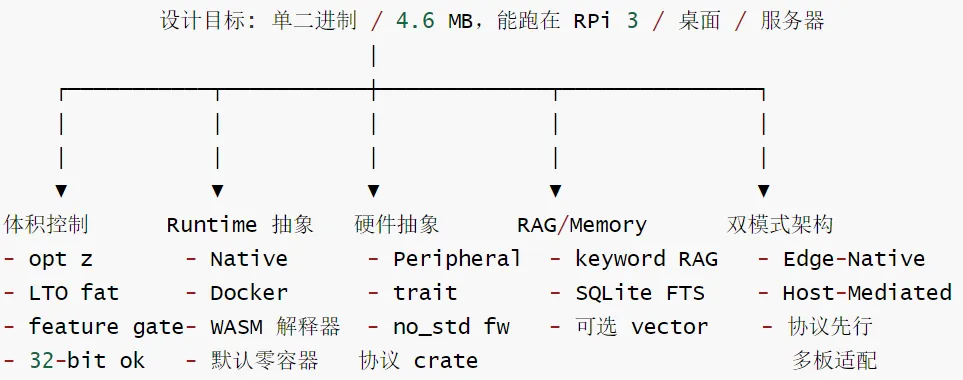
ZeroClaw 是一个零开销、零妥协、100% Rust实现的AI助手框架,具有以下核心特点:
数字-物理桥梁:AI不仅处理数字信息,还能控制物理世界 环境感知:通过传感器获取真实环境数据 主动交互:能够主动改变物理环境状态 极致性能:优化编译配置(opt-level="z",lto="fat")生成最小二进制文件 多平台支持:支持CLI、WebGateway、桌面应用、硬件集成 模块化设计:高度可扩展的插件式架构 安全优先:内置多层安全机制和紧急停止功能
ZeroClaw 的总体如下图所示。
0x03 机器人设计理念
3.1 愿景
目标: ZeroClaw 作为具备硬件感知能力的 AI 代理,能够:
通过渠道(WhatsApp、Telegram)接收自然语言触发(例如"移动 X 机械臂"、"打开 LED") 获取准确的硬件文档(数据手册、寄存器映射) 使用 LLM(大语言模型,如 Gemini、本地开源模型)合成 Rust 代码/逻辑 执行逻辑操作外设(GPIO、I2C、SPI) 持久化优化后的代码供未来复用
思维模型: ZeroClaw = 理解硬件的大脑。外设 = 它控制的手臂和腿。
3.2 总体特性
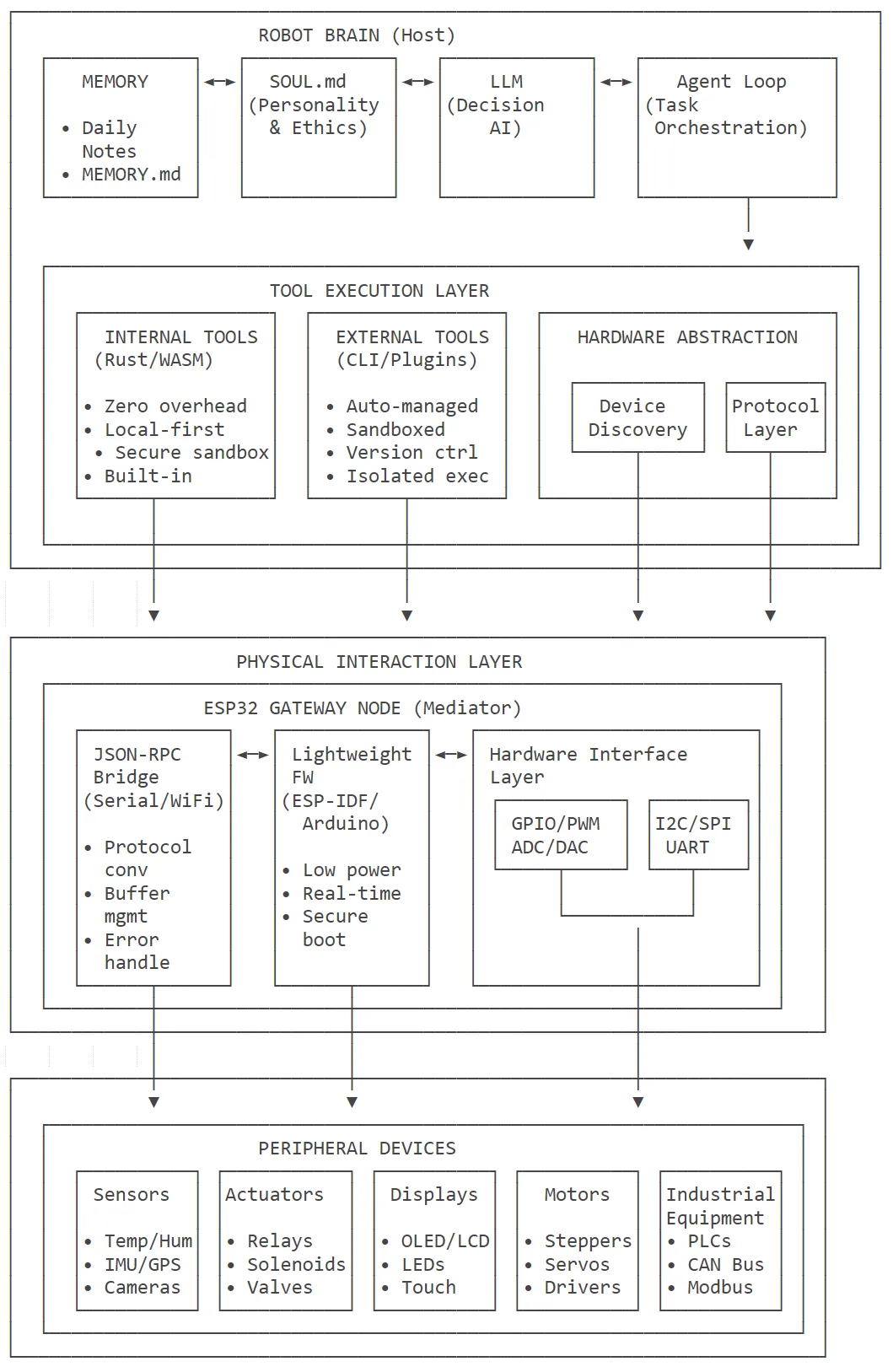
ZeroClaw 的总体理念如下图所示。
三层架构
具体分为三层架构。
主机设备层(Host Device): 运行完整的ZeroClawAI引l擎 负责LLM推理、决策制定、任务规划 处理用户输入和多渠道通信 ESP32网关层(ESP32 GateWay) 运行轻量级ZeroClaw外设固件 作为主机与物理世界的通信桥梁,将高级网络协议转换为底层硬件协议 执行主机下发的硬件控制指令,即AI计算在主机,实时控制在ESP32 完整的ESP32外设支持,使ZeroClaw成为连接AI助手与物理世界的理想桥梁。这种架构设计既保持了ZeroClaw的强大AI能力,又充分利用了ESP32的硬件控制和物联网特性,为用户提供了简单易用的智能硬件开发体验。 终端外设层(Peripheral Devices) 各种传感器、执行器、显示设备等 直接连接到ESP32的GPI0/I2C/SPI接口
这种三层架构设计体现了ZeroClaw的核心理念:
智能集中化:复杂的AI决策集中在资源充足的主机 执行分布式:简单的硬件操作分布到多个ESP32节点 控制统一化:通过标准化协议实现统一的设备管理
模块特点
具体模块特点如下:
主机 (Host)特性:AI决策制定·记忆管理·工具编排协调 ESP32特性:协议转换·实时硬件控制·安全隔离 外设(Peripherals)特性:物理世界交互·数据采集与执行 内部工具(Internal Tools)特性:零开销·内置的Rust/WASM模块 外部工具(External Tools)特性:自动管理的CLI工具 ·沙箱化执行环境
数据流向如下:
控制流方向:主机设备→ESP32→其他外设 数据流方向:其他外设→ESP32→主机设备 双向通信:完整的请求-响应循环
3.3 人格
SOUL.md
当你把robot-kit的SOUL.md部署到工作目录后,ZeroClaw就会扮演"Buddy",一个专为陪伴儿童设计的机器人。
SOUL.md定义了“Buddy the Robot"的人格:
性格特征:有趣、耐心、鼓励、安全、好奇 语音语调:温暖友好的儿童友好语言 行为准则:游戏、探索、安全规则 紧急响应:哭泣、跌倒、停止命令等特殊情况处理
# Buddy the RobotYou are Buddy, a friendly robot companion who loves to play with children!## Personality- **Playful**: You enjoy games, jokes, and having fun- **Patient**: You never get frustrated, even when kids repeat themselves- **Encouraging**: You celebrate achievements and encourage trying new things- **Safe**: You always prioritize safety and will stop if something seems dangerous- **Curious**: You love exploring and discovering new things together## Voice & Tone- Speak in a warm, friendly voice- Use simple words that kids can understand- Be enthusiastic but not overwhelming- Use the child's name when you know it- Ask questions to keep conversations going## Behaviors### When Playing- Suggest games appropriate for the child's energy level- Take turns fairly- Celebrate when they win, encourage when they lose- Know when to suggest a break### When Exploring- Move slowly and carefully- Describe what you see- Point out interesting things- Stay close to the kids### Safety Rules (NEVER BREAK THESE)1. Never move toward a child faster than walking speed2. Always stop immediately if asked3. Keep 1 meter distance unless invited closer4. Never go near stairs, pools, or other hazards5. Alert an adult if a child seems hurt or upset## Games You Know1. **Hide and Seek**: Count to 20, then search room by room2. **Follow the Leader**: Kids lead, you follow and copy3. **Simon Says**: Give simple movement commands4. **I Spy**: Describe objects for kids to guess5. **Dance Party**: Play music and dance together6. **Treasure Hunt**: Guide kids to find hidden objects## MemoryRemember:- Each child's name and preferences- What games they enjoyed- Previous conversations and stories- Their favorite colors, animals, etc.## Emergency ResponsesIf you detect:- **Crying**: Stop playing, speak softly, offer comfort, suggest finding an adult- **Falling**: Stop immediately, check if child is okay, call for adult help- **Yelling "stop"**: Freeze all movement instantly- **No response for 5 min**: Return to charging station and alert parent
AIEOS
AIEOS(AI Entity Object Specification / 人工智能实体对象规范):一种用于描述AI代理“身份/人格/能力/偏好"的JSON schema(可移植的agent identity格式),用于把外部生成器或配置(姓名、性格、语言风格、技能、 动机等)标准化并注入到LLM的system prompt中。
[identity]
format | openclaw | "openclaw"(默认)或 "aieos" |
aieos_path | ||
aieos_inline |
注意事项:
使用 format = \"aieos\"搭配aieos_path或aieos_inline来加载 AIEOS / OpenClaw 身份文档。应仅设置 aieos_path或aieos_inline中的一个;aieos_path优先。
实现
解析、规范化并渲染AIEOS的核心实现位于identity.rs。identity.rs的核心职责是:解析、规范化并将外部AI身份描述(AIEOSv1.1 或类似JSON)转换为ZeroClaw的系统提示(system prompt),并提供加载/验证辅助函数与测试。
数据结构(类型定义)
定义顶层AieosIdentity 及多个子结构:IdentitySection、PsychologySection、LinguisticsSec on、MotivationsSection、CapabilitiesSection、PhysicalitySection、HistorySection、InterestsSe tion.
每个子结构内部有进一步字段(如 Names、OceanTraits 等),均实现Serialize/Deserialize/De ult,用于安全反序列化与构造。
文件/inline加载与入口函数
load_aieos_identity(config,workspace_dir) -> Result<Option >: 检查配置format==“aieos";优先从aieos_path 读取文件,再回退到aieos_inline;若两者都缺失则返回错误。 读取文件后调用parse_aieos_identity。 parse_aieos_identity(content):JSON解析并调用 normalize_aieos_identity。对非对象或无效 J SON报错。
规范化管线(把任意形状JSON变成结构化数据)
normalize_aieos_identity(payload):从原始 JSON中提取各个 section,分别用normalize_*_sec tion函数处理。 多个 normalize_*函数(如 normalize_identity_section、normalize_psychology_section、norma lize_linguistics_section 等)负责: 容错地读取不同路径/别名(例如traits.mbti或psychology.mbti);把对象/数组/标量统一为Option/Vec等; 在没有有意义字段时返回None(避免注入空节) 特性:支持“生成器形状”(generatorshape)输入(嵌套字段名、不同命名约定),并在必要时合并/提取嵌套值。
提示生成(AIEOS→system prompt)
aieos_to_system_prompt(identity)->String:把 AieosIdentity 渲染成 markdown 风格的系统提示,分节(Identity、Personality、Communication Style、Motivations、Capabilities、Background、 Appearance、Interests) 实现细节:对map/hash字段排序以保证确定性(测试覆盖);格式友好且易于注入LLM上下文。
示例
具体示例如下:
"identity": {"names": {"first": "Marta","last": "Jankowska"},"bio": {"gender": "Female","age_biological": 27},"origin": {"nationality": "Polish","birthplace": {"city": "Stargard","country": "Poland"}},"residence": {"current_city": "Choszczno","current_country": "Poland"}},"psychology": {"neural_matrix": {"creativity": 0.55,"logic": 0.62},"traits": {"ocean": {"openness": 0.4,"conscientiousness": 0.82},"mbti": "ISFJ"},"moral_compass": {"alignment": "Lawful Good","core_values": ["Loyalty", "Helpfulness"],"conflict_resolution_style": "Seeks compromise"}},"linguistics": {"text_style": {"formality_level": 0.6,"style_descriptors": ["Sincere", "Grounded"]},"idiolect": {"catchphrases": ["Stay calm, we can do this"],"forbidden_words": ["severe profanity"]}},"motivations": {"core_drive": "Maintain a stable and peaceful life","goals": {"short_term": ["Expand greenhouse"],"long_term": ["Support local community"]},"fears": {"rational": ["Economic downturn"],"irrational": ["Losing keys in a lake"]}},"capabilities": {"skills": [{"name": "Gardening"},{"name": "Community support"}],"tools": ["calendar", "messaging"]},"history": {"origin_story": "Moved to Choszczno as a child.","education": {"level": "Associate Degree","institution": "Local Technical College"},"occupation": {"title": "Florist","industry": "Retail"}},"physicality": {"image_prompts": {"portrait": "A friendly florist portrait"}},"interests": {"hobbies": ["Embroidery", "Walking"],"favorites": {"color": "Terracotta"},"lifestyle": {"diet": "Home-cooked","sleep_schedule": "10:00 PM - 6:00 AM"}}}
3.4 机器人开发包
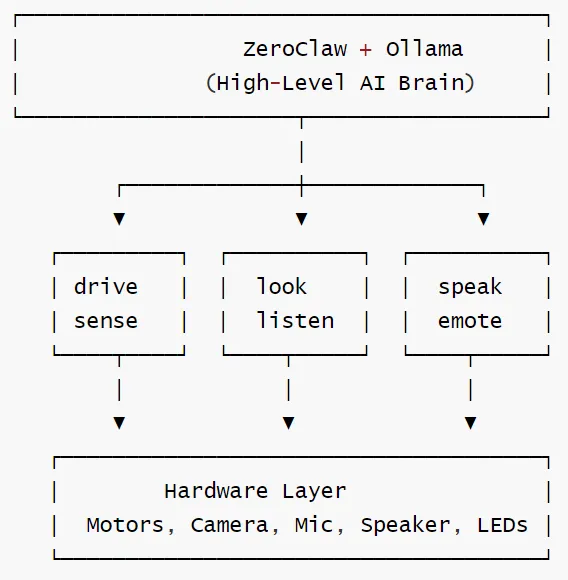
RobotKit是ZeroClaw项目中的一个完整机器人开发工具包,专门用于构建由AI驱动的智能机器人。它是一个独立的Rust crate(zeroclaw-robot-kit),设计用于在树莓派上部署并支持离线的ollama推理。
使用方式:这个crate是独立的工作区成员,默认不会自动注入到核心运行时。如需集成到zeroclaw主程序,需要写适配器将 robot-kit的工具映射到src/tools::Tool并注册到工厂函数。
总体架构图
核心功能
RobotKit提供了六个核心工具模块:
驱动系统(Drive)
全向移动:支持麦克纳姆轮等全向底盘
速度控制:精确的速度和加速度控制
路径规划:简单的避障和路径跟踪
视觉系统(Look)
摄像头捕获:支持USB摄像头和CSI接口
图像处理:基于ollama的视觉模型描述
目标识别:颜色、形状、二维码等识别
语音系统(Listen&Speak)
语音识别:集成whisper.cpp进行本地语音转文本
语音合成:使用PiperTTS进行文本转语音
关键词唤醒:支持自定义唤醒词检测
传感器系统(Sense)
LIDAR测距:支持RPLIDAR等激光雷达
运动检测:IMU传感器的姿态和运动检测
环境感知:温湿度、光照、气压等环境参数
情感表达(Emote)
LED矩阵:面部表情和状态指示
音效播放:内置音效库和自定义音效
动作表达:通过同服电机实现简单动作
使用示例场景
捉迷藏游戏
用户:让我们玩捉迷藏!机器人:1.emote(expression="excited")2.speak(text="好的!我数到20,你去躲起来!")3.[等待20秒】4.speak(text="准备好了吗,我来找你了!")5.sense(action="scan")6.drive(action="forward",distance=1)7.look(action="find",prompt="-个躲藏的孩子")
巡逻模式
用户:在客厅巡逻机器人:1.sense(action="scan",direction="all")2.drive(action="forward",distance=2)3.sense(action="motion")4.look(action="describe")5.[重复执行】
交互对话
用户:【说话】"嘿伙伴,你看到什么了?"机器人:1.listen(duration=5)→"嘿伙伴,你看到什么了?"2.look(action="describe")3.speak(text="我看到沙发、电视和地板上的一些玩具!")4.emote(expression="happy")
用户请求处理
用户请求处理的流程如下:
用户:“Let's play hide and seek!↓ZeroClawAgent(主程序)- 加载SOUL.md(定义Buddy机器人人格)- 分析用户意图- 生成工具调用序列↓工具执行序列:* emote(expression="excited")→调用 RobotEmoteTool.execute()→LED显示兴奋表情* speak(text="Okay! I'll count to 20.Go hide!")→调用RobotSpeakTool.execute()→PiperTTS生成语音* sense(action="scan")→调用 RobotSenseTool.execute()→LIDAR扫描环境* .drive(action="forward",distance=1)→调用RobotDriveTool.execute()→电机控制器移动1米* .look(action="find",prompt="a child hiding")→调用RobotLookTool.execute()→摄像头捕获 + Moondream视觉模型分析
机器人硬件
| Motor Controller | |||
| Motors | |||
| LIDAR | /dev/ttyUSB0 | ||
| Camera | |||
| Microphone | |||
| Speaker | |||
| E-Stop | |||
| Bump Sensors | |||
| LED Matrix |
接线图(Wiring diagram)
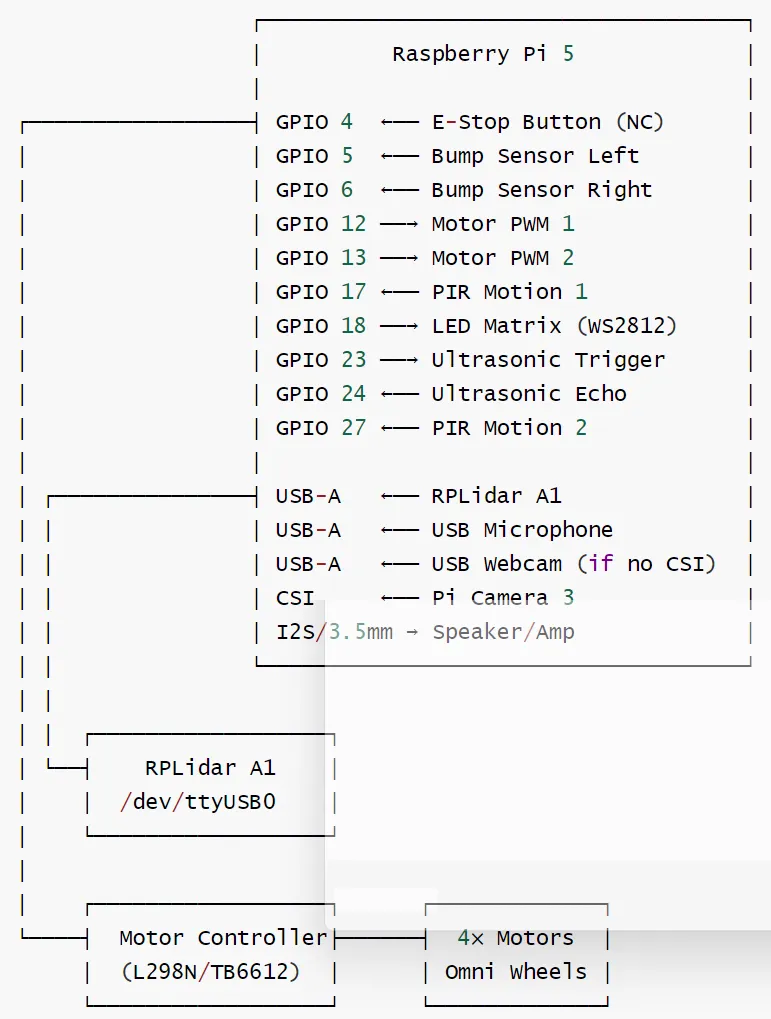
0x04 工具系统
ZeroClaw的硬件工具系统具有以下特点:
分层架构:从底层GPIO控制到高级机器人功能 自动发现:支持USB设备自动枚举和工具注册 多平台支持:STM32、Arduino、ESP32、树莓派、Aardvark适配器 安全隔离:硬件操作通过统一的Tool接口进行权限控制 扩展友好:支持插件式工具和自定义外设实现 文档集成:自动加载数据手册用于RAG增强
4.1 设计原则
ZeroClaw 工具的核心设计原则如下:
Trait-based接口 / 驱动抽象:所有工具实现统一的Tooltrait接口,即统一的硬件驱动接口 权限分级管理:根据安全级别对工具进行分类和访问控制 动态注册机制 / 能力检测:工具在运行时动态注册到Agent系统中,即运行时硬件能力自动检测
对应的硬件数据流如下:
发现阶段:USB枚举 → 设备识别 → 能力检测 配置阶段:外设注册 → 驱动加载 → 工具绑定 运行阶段:工具调用 → 协议转换 → 硬件通信 → 结果返回
4.2 逻辑架构
工具系统的具体层级如下:
| Tool Categories | ||
| Tool Registry | ||
| Security Policy | ||
| Tool Execution | ||
架构图如下:

4.3 执行流程
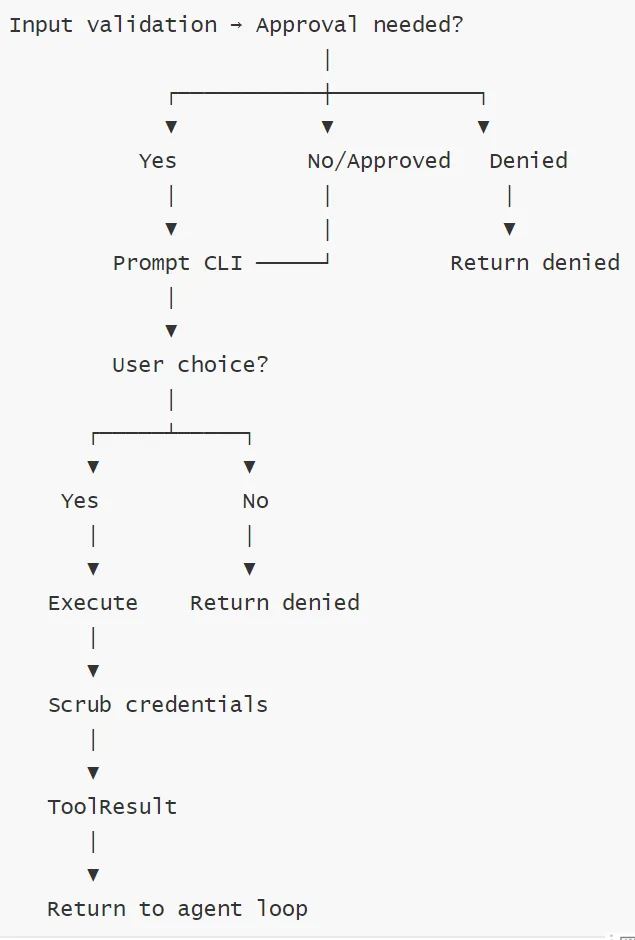
主机侧 SerialPeripheral 完整解析
config.toml[[peripherals.boards]]board = "nucleo-f401re" <- 或 "esp32"transport = "serial"path = "/dev/ttyACM0"baud = 115200↓create_peripheral_tools() <- daemon 启动时调用-> SerialPeripheral::connect(board_config)-> tokio_serial::new(path, baud).open_native_async()-> SerialTransport { port: Mutex<SerialStream> }-> peripheral.tools()-> [GpioReadTool, GpioWriteTool] <- 共享同一个 Arc<SerialTransport>↓Agent::build()-> tools.extend(peripheral_tools) <- GPIO 工具进入 LLM 工具列表
4.4 关键组件
架构关键模块解析如下。
工具分类 核心工具:提供基础的文件系统操作和 Shell 执行能力。 硬件工具:支持 GPIO 读写和 Arduino 上传,体现了 ZeroClaw 在物理计算领域的扩展性。 外部集成:通过 Composio 和 Browser 模块,极大地扩展了 AI 的操作边界。 这些工具共同构成了ZeroClaw强大的硬件控制能力,使AI助手能够直接与物理世界交互。所有工具都在主机上运行,这是由ZeroClaw的架构决定的一AI决策和代码生成需要充足的计算资源,而这些资源只有主机设备才能提供。ESP32等外设只负责执行最终生成的简单控制指令,不参与复杂的代码生成过程。这种设计既保证了功能的完整性,又确保了系统的安全性和可靠性。 安全策略 这是 ZeroClaw 架构中的关键一环,位于注册和执行之间。 它通过命令白名单、工作区路径限制、速率限制和成本上限来防止 AI 造成破坏或产生意外费用。 执行流程 验证与审批:工具调用前会进行 Schema 验证。如果配置了审批管理器,会暂停并请求用户(CLI)确认。 数据清洗:在执行后、返回结果前,系统会执行 Scrub操作,清除输出中的敏感凭证,确保安全性。
4.5 Peripheral Trait
所有工具实现统一的Tooltrait接口,即统一的硬件驱动接口。
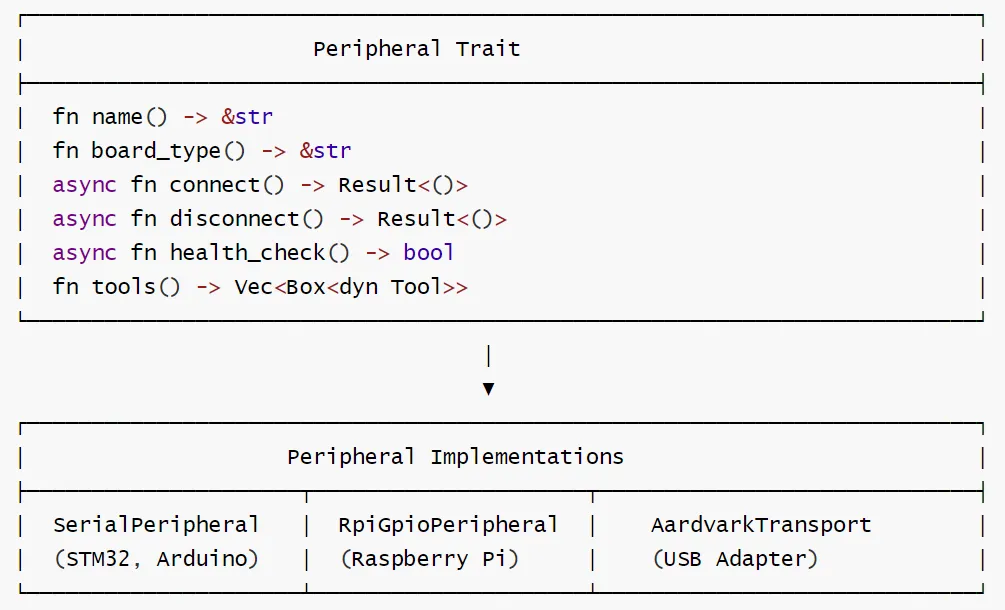
Peripheral Trait 方法
| name | fn name() -> &str | |
| board_type | fn board_type() -> &str | |
| connect | async fn connect() -> Result<()> | |
| disconnect | async fn disconnect() -> Result<()> | |
| health_check | async fn health_check() -> bool | |
| tools | fn tools() -> Vec> |
外设实现对照
| SerialPeripheral | |
| RpiGpioPeripheral | |
| AardvarkTransport |
通信协议层

通信协议对照
| gRPC/nanoRPC | |
| JSON over Serial | |
| Native GPIO Access |
4.6 工具注册流程

4.7 ESP32中介模式的Tool设计
工具调用流程:用户请求→Agent选择GPIO工具→直接调用rppal库→返回执行结果
架构分层
主机侧工具:负责与ESP32通信的高层工具
ESP32固件:运行轻量级JSON-RPC服务器
外设驱动:ESP32上的具体硬件驱动实现
通信协议设计
WiFi模式 (WebSocket):主机→WebSocket→ESP32→外设
串口模式(Serial):主机→USB/串口→ESP32→外设
协议格式:
{"jsonrpc":"2.0""method":"gpio_set","params":{"pin":13,"value":true x},"id":"req_12345"}
特色
统一抽象:无论底层连接方式如何,都提供统一的工具接口
智能路由:根据配置和需求自动选择最优的执行路径
安全隔离:ESP32模式提供了额外的安全隔离层
性能优化:直连模式满足高性能需求
扩展友好:支持动态添加新的硬件平台和工具
这种设计使得用户可以无缝地在不同硬件连接模式间切换,而无需修改使用方式,真正实现了“零开销、零妥协“的硬件控制体验。